
Compare firmware version strings in C : In embedded systems development, firmware updates are crucial for fixing bugs, improving performance, or adding new features. A common challenge developers face is comparing two firmware version strings in C to decide whether an upgrade or downgrade is required.
For example, you might want to check if version “1.2.10” is newer than “1.2.9”. At first glance, this looks like a simple string comparison—but in practice, you need to handle version numbers numerically, not lexicographically.
Compare firmware version strings in C this article, we will:
- Understand the basics of firmware version strings
- Learn why direct string comparison fails
- Write a C program to compare version strings properly
- Explore practical use cases in embedded software development
What is a Firmware Version String?
A firmware version string is a sequence that represents the version of your software. Common formats include:
"1.0.0"→ (major.minor.patch)"2.5"→ (major.minor)"3.10.7-beta"→ (with suffix)
Each number (major, minor, patch) carries meaning:
- Major version: Big changes, possibly breaking compatibility.
- Minor version: New features, still backward compatible.
- Patch version: Small fixes or improvements.
Why Simple String Comparison Fails
Let’s say we compare “1.10” and “1.2” as strings.
strcmp("1.10", "1.2"); Here, "1.10" would be considered smaller than "1.2" because strcmp compares character by character ('1' == '1', then '0' < '2').
But in reality:
- 1.10 (ten) is greater than 1.2 (two).
So, we need numeric comparison.
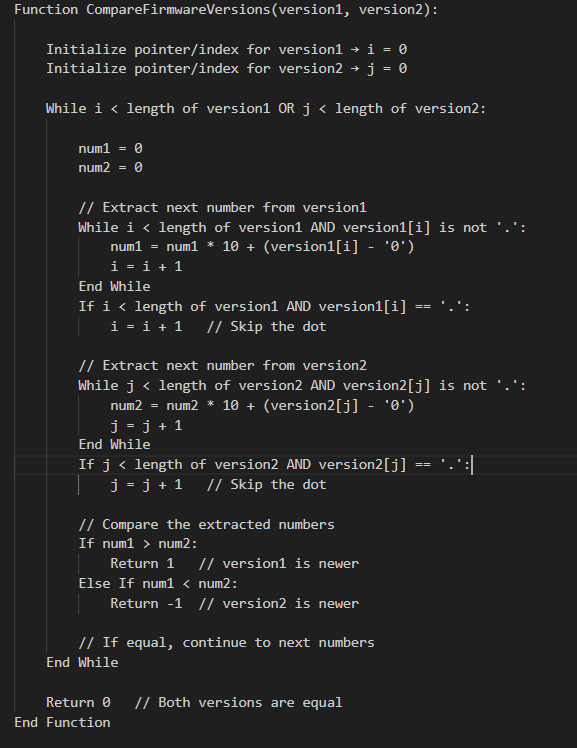
Pseudocode: Compare Two Firmware Version Strings
How the Pseudocode Works
- Iterate through both version strings simultaneously.
- Extract numbers between dots (
.) and convert them to integers. - Compare numbers one by one:
- If a number in
version1is greater → version1 is newer. - If a number in
version2is greater → version2 is newer. - If equal → continue.
- If a number in
- Handle versions of different lengths by treating missing numbers as
0. - Return
0if all numbers are equal.
This pseudocode is optimized for embedded systems logic and avoids string splitting with extra memory allocation.
C Program to Compare Firmware Version Strings
Here’s a beginner-friendly C program that compares two version strings correctly:
#include <stdio.h>
#include <string.h>
#include <stdlib.h>

// Function to compare two firmware version strings
int compareVersions(const char *v1, const char *v2) {
    // Create copies since strtok modifies strings
    char *ver1 = strdup(v1);
    char *ver2 = strdup(v2);

    char *token1 = strtok(ver1, ".");
    char *token2 = strtok(ver2, ".");

    while (token1 != NULL || token2 != NULL) {
        int num1 = (token1 != NULL) ? atoi(token1) : 0;
        int num2 = (token2 != NULL) ? atoi(token2) : 0;

        if (num1 > num2) {
            free(ver1); free(ver2);
            return 1;  // v1 is greater
        } else if (num1 < num2) {
            free(ver1); free(ver2);
            return -1; // v2 is greater
        }

        token1 = (token1 != NULL) ? strtok(NULL, ".") : NULL;
        token2 = (token2 != NULL) ? strtok(NULL, ".") : NULL;
    }

    free(ver1);
    free(ver2);
    return 0; // Both versions are equal
}

int main() {
    const char *v1 = "1.2.10";
    const char *v2 = "1.2.9";

    int result = compareVersions(v1, v2);

    if (result == 0) {
        printf("Both versions are equal.\n");
    } else if (result > 0) {
        printf("Version %s is newer than %s.\n", v1, v2);
    } else {
        printf("Version %s is newer than %s.\n", v2, v1);
    }

    return 0;
}
Explanation of the Code: Compare version numbers in embedded systems
- Splitting the version string:
- We use
strtokwith"."as a delimiter to separate numbers like"1","2","10".
- We use
- Converting to integers:
- Each token is converted using
atoi(). "10"becomes10(so"1.10">"1.2").
- Each token is converted using
- Comparison logic:
- If one number is greater, we immediately return the result.
- If equal, we move to the next part.
- If lengths differ (e.g.,
"1.2"vs"1.2.0.0"), missing parts are treated as0.
Example Output of C code for firmware version management
For input:
v1 = "1.2.10"
v2 = "1.2.9"
Output:
Version 1.2.10 is newer than 1.2.9.
Optimized Firmware Version Comparison in C (No strtok / No strdup)
When writing firmware for resource-constrained embedded devices, we must minimize memory usage and avoid dynamic allocations like malloc, strdup, or even temporary token buffers.
Instead of splitting the version string, we can parse it character by character, extracting numbers on the fly.
Optimized C Code of Numeric comparison of version strings in C
#include <stdio.h>
#include <ctype.h>

// Function to extract the next integer from version string
int getNextNumber(const char **str) {
    int num = 0;

    // Parse until '.' or end of string
    while (**str && **str != '.') {
        if (isdigit(**str)) {
            num = num * 10 + (**str - '0');
        }
        (*str)++;
    }

    // Skip the '.' character
    if (**str == '.') {
        (*str)++;
    }

    return num;
}

// Compare two firmware version strings
int compareVersions(const char *v1, const char *v2) {
    while (*v1 || *v2) {
        int num1 = getNextNumber(&v1);
        int num2 = getNextNumber(&v2);

        if (num1 > num2) return 1;   // v1 is greater
        if (num1 < num2) return -1;  // v2 is greater
    }
    return 0; // Versions are equal
}

int main() {
    const char *v1 = "2.10.3";
    const char *v2 = "2.9.15";

    int result = compareVersions(v1, v2);

    if (result == 0) {
        printf("Both versions are equal.\n");
    } else if (result > 0) {
        printf("Version %s is newer than %s.\n", v1, v2);
    } else {
        printf("Version %s is newer than %s.\n", v2, v1);
    }

    return 0;
}
How Compare software version strings in C Works
getNextNumberfunction- Reads characters until a
.or\0(end of string). - Converts digits into an integer (
"15"→15). - Skips the dot (
.) and prepares for the next segment.
- Reads characters until a
compareVersionsfunction- Loops until both strings are fully read.
- Extracts one integer from each version string.
- Compares them immediately.
- If equal, continues to the next part.
- If different, returns the comparison result.
- No extra memory
- Works directly on the input strings.
- No heap allocation, no
strdup, nostrtok.
C program to compare version numbers Example Run
Input:
v1 = "2.10.3"
v2 = "2.9.15"
Output:
Version 2.10.3 is newer than 2.9.15.
Advantages for Embedded Systems Compare version numbers in embedded systems
- No dynamic memory allocation (safe for microcontrollers).
- Faster execution since it parses directly.
- Smaller memory footprint.
- Works even if versions have different lengths (
"1.2"vs"1.2.0.0").
Real-World Use Cases of Compare version numbers in embedded systems
- Over-the-Air (OTA) Updates: Check if the device needs a firmware upgrade.
- Bootloaders: Ensure only newer firmware is flashed.
- Diagnostics Tools: Display correct version hierarchy.
- Version Management: Maintain compatibility in embedded systems.
Final Thoughts of C code for firmware version management
Comparing firmware version strings in C is more than a simple string check—it requires numeric comparison to handle multi-digit versions correctly. By splitting the string, converting to integers, and comparing each part step by step, you can build a robust firmware version checker for your embedded systems projects.
Frequently Asked Questions (FAQ) | Firmware version comparison in C language
1. Why can’t I compare firmware version strings using strcmp in C?
strcmp performs a lexicographic (alphabetical) comparison, not numeric. For example, "1.10" would appear smaller than "1.2" because "1" and "10" are compared as text, not numbers. That’s why a numeric comparison is required.2. What is the correct way to compare firmware versions in C?
.), convert each part into an integer, and compare them one by one. This ensures "1.10" is correctly recognized as greater than "1.2".3. Which method is better: using strtok or parsing manually?
strtok method: Easier for beginners, but uses extra memory and may not be ideal for embedded systems.Manual parsing: Reads characters directly, avoids dynamic memory, and is more efficient for resource-constrained devices.
4. How do I handle firmware versions with different lengths, like "1.2" vs "1.2.0.0"?
"1.2" is considered equal to "1.2.0.0".5. Can this logic be used in embedded bootloaders?
malloc or strtok) is ideal for this purpose.6. How do I compare versions with suffixes like "1.2.3-beta"?
"alpha", "beta", or "rc", you’ll need to extend the logic with string handling rules for these labels.7. What are the real-world applications of firmware version comparison?
Over-the-Air (OTA) updates
Bootloader validation before flashing
Diagnostics tools to report correct firmware version
Embedded systems compatibility checks
8. Does the optimized code work on all C compilers?
isdigit, printf, basic loops), so it works across most C compilers and embedded toolchains.You can also Visit other tutorials of Embedded Prep
- Multithreading in C++
- Multithreading Interview Questions
- Multithreading in Operating System
- Multithreading in Java
- POSIX Threads pthread Beginner’s Guide in C/C++
- Speed Up Code using Multithreading
- Limitations of Multithreading
- Common Issues in Multithreading
- Multithreading Program with One Thread for Addition and One for Multiplication
- Advantage of Multithreading
- Disadvantages of Multithreading
- Applications of Multithreading: How Multithreading Makes Modern Software Faster and Smarter”
- Master CAN Bus Interview Questions 2025
- What Does CAN Stand For in CAN Bus?
- CAN Bus Message Filtering Explained
- CAN Bus Communication Between Nodes With Different Bit Rates
- How Does CAN Bus Handle Message Collisions
- Message Priority Using Identifiers in CAN Protocol
Leave a Reply