Category: C programming

  • What is Polymorphism?

    Learn polymorphism in object-oriented programming (OOP) with clear examples and easy explanations. Understand method overloading, method overriding, runtime and compile-time polymorphism, and how they improve code flexibility, reusability, and scalability.

    Polymorphism is a fundamental concept in object-oriented programming (OOP) that allows a single function, method, or interface to perform different behaviors depending on the object or input.

    In simple terms, polymorphism means “one name, many forms,” where the same operation behaves differently in different situations.

    Polymorphism = “Many Forms”

    In programming, it means:

    One name (function/method) can do different things depending on the object or input.

    Simple Real-Life Example

    Think of the word “run”:

    • You run in a race
    • A machine runs
    • A program runs

    Same word → different meanings → polymorphism

    Programming Example

    • For a circle → it draws a circle
    • For a square → it draws a square

    Same function name → different behavior

    Code Example

    class Shape {
    public:
        void draw() {
            cout << "Drawing shape";
        }
    };
    
    class Circle : public Shape {
    public:
        void draw() {
            cout << "Drawing circle";
        }
    };
    
    class Square : public Shape {
    public:
        void draw() {
            cout << "Drawing square";
        }
    };
    

    What happens?

    Shape* s;
    
    Circle c;
    Square sq;
    
    s = &c;
    s->draw();   // Drawing circle
    
    s = &sq;
    s->draw();   // Drawing square
    

    Same draw() → different outputs
    This is polymorphism

    Why Do We Need Polymorphism?

    • Code Reusability
      Write one function and use it for multiple types of objects, reducing duplicate code.
    • Flexibility in Code
      The same interface can handle different data types or objects, making code adaptable.
    • Cleaner & Maintainable Code
      Reduces complexity and keeps code organized, especially in large projects.
    • Extensibility (Easy to Add Features)
      You can add new classes or behaviors without changing existing code.
    • Supports Dynamic Behavior
      Objects can behave differently at runtime, making programs more realistic.
    • Improves Readability
      Using a common method name makes code easier to understand.
    • Reduces Conditional Statements
      Avoids multiple if-else or switch cases by using a common interface.
    • Better Abstraction
      Focus on what to do, not how it is done, improving design quality.
    • Real-World Modeling
      Helps represent real-world scenarios where the same action behaves differently.

    Types of Polymorphism

    There are two main types:
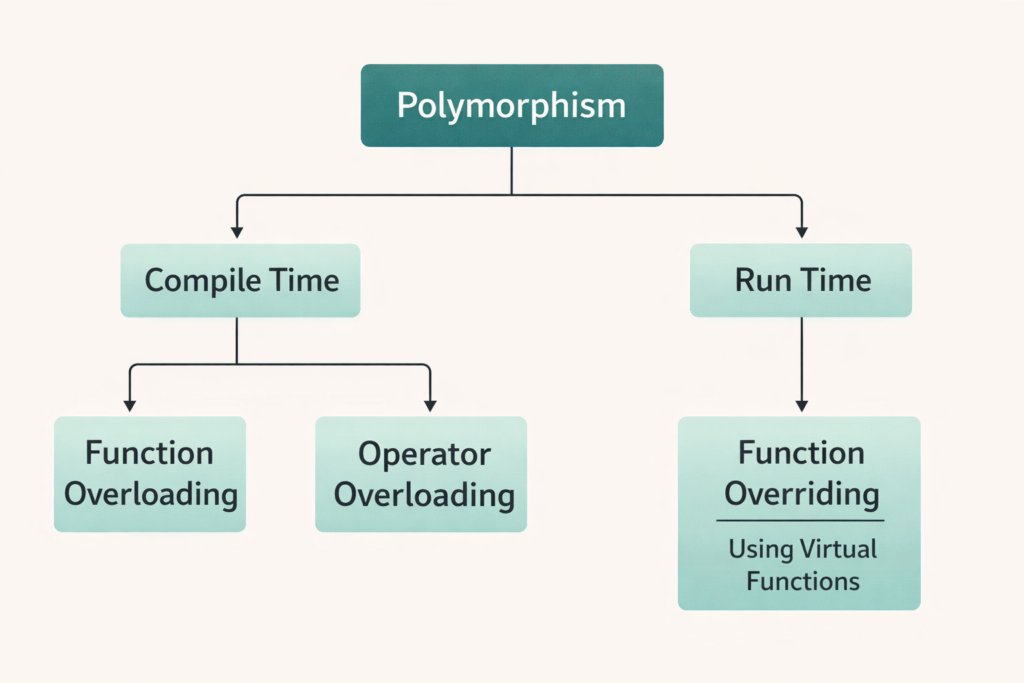
    Types of Polymorphism

    1.Compile-Time Polymorphism (Static Polymorphism)

    Decided at compile time (before program runs)

    How it works?

    The compiler decides which function to call based on:

    • Number of parameters
    • Type of parameters

    A ) Method Overloading

    Same function name, but:

    • Different number of arguments OR
    • Different data types

    Example (C++)

    class Math {
    public:
        int add(int a, int b) {
            return a + b;
        }
    
        int add(int a, int b, int c) {
            return a + b + c;
        }
    
        float add(float a, float b) {
            return a + b;
        }
    };
    

    What’s happening?

    Math m;
    
    m.add(2, 3);        // calls int version
    m.add(2, 3, 4);     // calls 3-arg version
    m.add(2.5, 3.5);    // calls float version
    

    Compiler chooses function before execution

    B) Operator Overloading

    Operators behave differently based on operands.

    int a = 5 + 3;        // addition
    string s = "Hi " + "Bro"; // concatenation
    

    Same + → different behavior

    Key Features

    • Fast (no runtime decision)
    • No inheritance required
    • Less flexible than runtime polymorphism

    2.Run-Time Polymorphism (Dynamic Polymorphism)

    Decided at runtime (during execution)

    How it works?

    • Uses inheritance
    • Uses function overriding
    • Uses pointers/references
    • Uses virtual functions (C++)

    Method Overriding

    Child class provides its own version of parent function.

    Example (C++)

    class Animal {
    public:
        virtual void sound() {
            cout << "Animal sound";
        }
    };
    
    class Dog : public Animal {
    public:
        void sound() {
            cout << "Dog barks";
        }
    };
    
    class Cat : public Animal {
    public:
        void sound() {
            cout << "Cat meows";
        }
    };
    

    Runtime Behavior

    Animal* a;
    
    Dog d;
    Cat c;
    
    a = &d;
    a->sound();   // Dog barks
    
    a = &c;
    a->sound();   // Cat meows
    

    Decision happens at runtime, not compile time

    What is virtual in C++?

    The virtual keyword is used in a base class to ensure that a function can be overridden in a derived (child) class and that the correct function is called at runtime, not compile time.

    Definition

    virtual enables runtime polymorphism by allowing function calls to be resolved dynamically (during execution).

    Why Do We Need virtual?

    Without virtual, C++ uses early binding (compile-time)
    With virtual, C++ uses late binding (runtime)

    This ensures the program calls the correct function based on the actual object, not the pointer type.

    Without virtual (Problem ❌)

    class Animal {
    public:
        void sound() {
            cout << "Animal sound";
        }
    };
    
    class Dog : public Animal {
    public:
        void sound() {
            cout << "Dog barks";
        }
    };
    
    Animal* a;
    Dog d;
    
    a = &d;
    a->sound();   // ❌ Output: Animal sound
    

    Even though object is Dog, it calls Animal function
    Because binding happens at compile time

    With virtual (Solution ✔️)

    class Animal {
    public:
        virtual void sound() {
            cout << "Animal sound";
        }
    };
    
    class Dog : public Animal {
    public:
        void sound() {
            cout << "Dog barks";
        }
    };
    
    Animal* a;
    Dog d;
    
    a = &d;
    a->sound();   // ✔️ Output: Dog barks
    

    Now correct function is called at runtime

    How virtual Works Internally

    When you use virtual:

    Compiler creates:

    • vtable (Virtual Table) → stores function pointers
    • vptr (Virtual Pointer) → inside each object

    At runtime:

    • Object’s vptr points to correct function in vtable
    • Function call is resolved dynamically

    Key Concepts Related to virtual

    1.Function Overriding

    Child class replaces parent function

    2.Base Class Pointer

    Animal* a;
    

    Needed for runtime polymorphism

    3.Dynamic Binding

    Function call decided at runtime

    Virtual Destructor

    class Base {
    public:
        virtual ~Base() {
            cout << "Base destructor";
        }
    };
    

    Ensures:

    • Proper cleanup of derived class objects
    • Prevents memory leaks

    Pure Virtual Function (Advanced)

    class Shape {
    public:
        virtual void draw() = 0;  // pure virtual
    };
    

    Makes class abstract
    Child class must implement this function

    When to Use virtual?

    • When using inheritance
    • When behavior should change in child classes
    • When using base class pointers/references
    • When implementing polymorphism

    Why virtual is important?

    Without virtual:
    Base class function will always be called ❌

    With virtual:
    Correct child function is called ✔️

    Behind the scenes

    • Uses vtable (virtual table)
    • Each object keeps pointer to correct function
    • Enables dynamic dispatch

    Key Features

    • Flexible
    • Supports real-world modeling
    • Slightly slower (runtime decision)
    • Requires inheritance

    Difference Between Both

    FeatureCompile-TimeRun-Time
    Decision TimeBefore executionDuring execution
    SpeedFasterSlightly slower
    ConceptOverloadingOverriding
    InheritanceNot requiredRequired
    FlexibilityLessMore

    Simple Analogy

    • Compile-time → Teacher assigns roles before play
    • Run-time → Actor changes role on stage dynamically

    Compile-Time Polymorphism

    Other Names:

    • Static Polymorphism
    • Early Binding
    • Static Binding

    All mean the same thing:

    Decision is made before program runs

    Run-Time Polymorphism

    Other Names:

    • Dynamic Polymorphism
    • Late Binding
    • Dynamic Binding

    All mean:

    Decision is made during program execution

    Example WITHOUT virtual ❌ (Compile-Time Binding)

    Code

    #include <iostream>
    using namespace std;
    
    class Animal {
    public:
        void speak() {
            cout << "Animal speaks" << endl;
        }
    };
    
    class Dog : public Animal {
    public:
        void speak() {
            cout << "Dog barks" << endl;
        }
    };
    
    int main() {
        Animal* a;
        Dog d;
    
        a = &d;
        a->speak();   // What will this print?
    
        return 0;
    }
    

    Output

    Animal speaks
    

    Why this happens (Important)

    • Pointer type = Animal*
    • Object type = Dog

    But C++ ignores object type here
    It only looks at pointer type at compile time

    So:

    • Compiler decides → call Animal::speak()
    • This is called Static Binding / Early Binding

    Key Point

    Without virtual, function call depends on pointer type, not actual object.

    Example WITH virtual ✔️ (Run-Time Binding)

    Code

    #include <iostream>
    using namespace std;
    
    class Animal {
    public:
        virtual void speak() {
            cout << "Animal speaks" << endl;
        }
    };
    
    class Dog : public Animal {
    public:
        void speak() {
            cout << "Dog barks" << endl;
        }
    };
    
    int main() {
        Animal* a;
        Dog d;
    
        a = &d;
        a->speak();   // Now what?
    
        return 0;
    }
    

    Output

    Dog barks
    

    Why this happens

    Because of virtual:

    Compiler delays decision until runtime
    It checks actual object type (Dog)
    Calls Dog::speak()

    This is called:

    What Changes Internally?

    Without virtual:

    • Direct function call
    • No extra mechanism
    • Faster
    • No polymorphism

    With virtual:

    C++ creates:

    vtable (Virtual Table)

    • A table storing addresses of virtual functions

    vptr (Virtual Pointer)

    • Hidden pointer inside each object

    Flow at Runtime:

    1. a = &d;
    2. Object d has its own vptr
    3. vptr points to Dog’s vtable
    4. a->speak():
      • Looks into vtable
      • Finds Dog::speak()
      • Calls it ✔️

    Side-by-Side Comparison

    FeatureWithout virtualWith virtual
    BindingCompile-timeRun-time
    Function CalledBased on pointerBased on object
    Polymorphism❌ No✔️ Yes
    SpeedFasterSlightly slower
    FlexibilityLowHigh

    Real-Life Analogy

    Without virtual:
    You call a person by their job title only
    (“Hey Employee”) → always same response

    With virtual:
    You call based on actual person
    (“Hey Developer / Manager”) → different response

    Basic Interview Questions

    • What is polymorphism?
    • What are the types of polymorphism?
    • Difference between compile-time and runtime polymorphism?
    • What is method overloading vs method overriding?
    • What is the virtual keyword in C++?
    • Why do we use virtual functions?

    Core Concept Questions

    • What happens if we don’t use virtual in function overriding?
    • Why do we need a base class pointer for runtime polymorphism?
    • Explain early binding vs late binding.
    • How does C++ decide which function to call?
    • Can we achieve polymorphism without inheritance? (Yes → overloading)

    Code-Based Questions

    Interviewer may give code like this:

    class A {
    public:
        void show() { cout << "A"; }
    };
    
    class B : public A {
    public:
        void show() { cout << "B"; }
    };
    
    int main() {
        A* obj = new B();
        obj->show();
    }
    

    Question:

    What will be the output and why?

    Expected Answer:

    • Output = A (because no virtual)
    • Uses compile-time binding

    Same with virtual

    virtual void show()
    

    Output = B
    Because of runtime polymorphism

    Advanced Questions

    • What is a virtual table (vtable)?
    • What is a virtual pointer (vptr)?
    • How does dynamic dispatch work internally?
    • What is the cost of using virtual functions?
    • Can constructors be virtual? (No ❌)
    • Can destructors be virtual? (Yes ✔️, very important)

    Tricky Questions

    • What happens if base class destructor is not virtual?
      👉 Can cause memory issues / incomplete cleanup
    • Can we override a non-virtual function?
      👉 Yes, but no runtime polymorphism
    • Difference between virtual and pure virtual?
      👉 Pure virtual makes class abstract
    • What is an abstract class?
      👉 Class with at least one pure virtual function

    Scenario-Based Questions

    • When should you use polymorphism in real projects?
    • Give a real-world example of polymorphism.
    • Where have you used virtual functions?
    • How would you design a system using polymorphism?

    Top 5 Must-Prepare Questions

    If you prepare only these, you’re safe 👇

    1. What is polymorphism with example?
    2. Compile-time vs runtime polymorphism
    3. What is virtual and why needed?
    4. Output-based question (with/without virtual)
    5. What is vtable and how it works?

    For detailed understanding of Platform Devices and Drivers on Linux, refer to the Linux documentation on Platform Devices and Drivers .
  • How Stack Grows and Shrinks | Master Beginner-Friendly Guide with Examples (2026)

    How stack grows and shrinks explained with real-life examples and C code. Learn stack memory growth and shrinkage in an easy beginner-friendly way.

    A Real-Life Story to Understand the Stack

    Imagine you are in a restaurant kitchen. The chef keeps plates stacked one over another:

    • When a new customer order comes, the chef adds a new plate on top of the pile.
    • When an order is served, the chef removes the top plate first.

    The chef never touches the plates at the bottom until the top ones are removed. This is exactly how the stack in memory works when your program runs.

    • Every new function call is like placing a new plate on the stack (the stack grows).
    • When the function finishes, it’s like removing that plate (the stack shrinks).

    When learning memory management in programming, one of the most important concepts is the stack. Many beginners hear terms like stack grows and stack shrinks but find them confusing. This article explains the concept in a clear, step-by-step, beginner-friendly way, so you understand how the stack works in real programs.

    What is the Stack?

    The stack is a special area of memory used by programs to keep track of function calls, local variables, and return addresses. Think of it as a pile of plates:

    • You add a new plate on top (push).
    • You remove the top plate when it’s no longer needed (pop).

    This “last-in, first-out” (LIFO) behavior makes the stack very efficient.

    How the Stack Grows

    The stack grows when:

    1. A new function is called.
    2. Local variables are created inside that function.
    3. Temporary data (like function arguments or return addresses) are stored.

    Example in C:

    #include <stdio.h>
    
    void displayNumber(int x) {
        int y = x + 5;  // local variable stored on the stack
        printf("Value: %d\n", y);
    }
    
    int main() {
        displayNumber(10);  // stack grows here
        return 0;
    }
    
    • When main() calls displayNumber(10), memory for x and y is added to the stack.
    • This is called stack frame allocation.

    So, each function call creates a new stack frame, and the stack grows downward in memory (on most systems).

    How the Stack Shrinks

    The stack shrinks when:

    1. A function finishes execution.
    2. Its local variables and temporary data are no longer needed.
    3. The system pops the function’s stack frame, releasing memory automatically.

    Continuing with the example above:

    • After displayNumber(10) finishes, the memory used by x and y is removed from the stack.
    • The stack pointer moves back, and the program returns to main().

    This process is automatic — the programmer doesn’t need to free stack memory manually.

    Why Understanding Stack Grows and Shrinks is Important

    1. Avoiding Stack Overflow – If too many functions are called without finishing, the stack memory can run out, causing a stack overflow error.
    2. Debugging Programs – Many runtime errors can be understood by analyzing the stack.
    3. Efficient Programming – Understanding how the stack works helps in writing better functions and managing recursion.

    Key Differences Between Stack Stack Grows and Shrinks

    AspectStack GrowthStack Shrinkage
    When it happensOn function call or variable allocationOn function return or variable release
    Memory effectIncreases stack sizeDecreases stack size
    Programmer controlAutomatic, managed by systemAutomatic, managed by system

    Example Code: How the Stack Stack Grows and Shrinks

    //code for Stack Grows and Shrinks
    #include <stdio.h>
    
    void thirdFunction() {
        int c = 30;  // local variable stored on stack
        printf("➡ Entering thirdFunction (stack grows, variable c = %d)\n", c);
        printf("⬅ Leaving thirdFunction (stack shrinks)\n");
    }
    
    void secondFunction() {
        int b = 20;  // local variable stored on stack
        printf("➡ Entering secondFunction (stack grows, variable b = %d)\n", b);
    
        thirdFunction();  // stack grows again
    
        printf("⬅ Leaving secondFunction (stack shrinks)\n");
    }
    
    void firstFunction() {
        int a = 10;  // local variable stored on stack
        printf("➡ Entering firstFunction (stack grows, variable a = %d)\n", a);
    
        secondFunction();  // stack grows again
    
        printf("⬅ Leaving firstFunction (stack shrinks)\n");
    }
    
    int main() {
        printf("➡ Program started (main function stack frame created)\n");
    
        firstFunction();  // stack grows again
    
        printf("⬅ Back to main (stack shrinks after all calls)\n");
        return 0;
    }
    

    Expected Output for Stack Grows and Shrinks

    When you run the program, the output shows clearly how the stack grows when a function is entered and shrinks when the function finishes:

    ➡ Program started (main function stack frame created)
    ➡ Entering firstFunction (stack grows, variable a = 10)
    ➡ Entering secondFunction (stack grows, variable b = 20)
    ➡ Entering thirdFunction (stack grows, variable c = 30)
    ⬅ Leaving thirdFunction (stack shrinks)
    ⬅ Leaving secondFunction (stack shrinks)
    ⬅ Leaving firstFunction (stack shrinks)
    ⬅ Back to main (stack shrinks after all calls)
    

    How This Code Matches the Story

    • Just like stacking plates in a kitchen:
      • thirdFunction() is the top plate → it must be removed first.
      • Then secondFunction() → removed after third.
      • Finally firstFunction() → removed last.

    That’s why the stack follows a Last-In, First-Out (LIFO) order.

    Advantages of Stack Grows and Shrinks

    1. Automatic Memory Management – The stack grows and shrinks automatically without programmer effort.
    2. Fast Execution – Stack operations (push/pop) are very efficient compared to heap allocations.
    3. Predictable Behavior – Memory is released as soon as a function returns, making the program more reliable.
    4. Good for Function Calls – Ideal for storing local variables, return addresses, and function arguments.

    Disadvantages of Stack Grows and Shrinks

    1. Limited Size – Stack memory is small compared to heap memory. Too many nested function calls may cause stack overflow.
    2. Temporary Lifetime – Data in the stack is destroyed once the function ends, so it cannot be shared globally.
    3. No Manual Control – Unlike heap memory, you cannot manually manage stack memory size.
    4. Recursive Risks – Deep recursion can quickly exhaust stack space.

    Applications of Stack in Programming

    1. Function Call Management – Each function call creates a new stack frame that stores local variables and return addresses.
    2. Recursion – The stack allows recursive functions to keep track of multiple calls at once.
    3. Expression Evaluation – Compilers and interpreters use stacks for evaluating arithmetic expressions.
    4. Backtracking Algorithms – Stacks are used in solving mazes, puzzles, and depth-first search (DFS).
    5. Interrupt Handling in OS – Operating systems use the stack to save the current state before switching tasks.

    Real-World Example

    • Web Browsers → Use stacks for the Back/Forward navigation system.
    • Programming Languages → C, C++, Java, and Python rely heavily on stack growth/shrinkage during function calls.
    • Embedded Systems → Use stacks for managing tasks, interrupts, and low-level function calls efficiently.

    Frequently Asked Questions (FAQ) of Stack Grows and Shrinks

    1. What does it mean when the stack grows?

    Ans: The stack grows when a new function is called in a program. Each function call creates a stack frame that stores local variables, function arguments, and the return address. This increases the size of the stack.

    2. What does it mean when the stack shrinks?

    Ans: The stack shrinks when a function finishes execution. Its stack frame is removed, freeing up memory automatically. This is why you don’t need to manually release stack memory.

    3. Does the stack always grow downward in memory?

    Ans: On most systems, the stack grows downward (from higher memory addresses to lower ones). However, the actual direction depends on the system architecture and compiler.

    4. What is a stack overflow?

    Ans: A stack overflow happens when the stack grows too large and exceeds the memory limit. This usually occurs with very deep recursion or too many nested function calls.

    5. How is stack growth different from heap growth?

    Ans: Stack growth is automatic and temporary. It happens when functions are called and shrinks when they return.
    Heap growth happens when memory is allocated dynamically (using malloc in C or new in C++). Heap memory must be managed manually by the programmer.

    6. Why is understanding stack growth and shrinkage important?

    Ans: It helps beginners avoid common errors like stack overflow, improves debugging skills, and builds a strong foundation for understanding function calls, recursion, and memory management in C, C++, and embedded systems.
  • Weak Symbols vs Strong Symbols in C | Master Embedded Interview Preparation (2026)

    Weak Symbols vs Strong Symbols : When working with C programming, especially in embedded systems or system-level development, you will often encounter the concepts of weak symbols and strong symbols. These terms come into play during the linking stage of compilation. Understanding them is crucial for writing flexible, modular, and maintainable code.

    In this article, we’ll explore the difference between weak symbols and strong symbols in C, how they work, and where they are used.

    What is a Weak symbol and Strong Symbols in C ?

    In C programming, symbols represent functions or variables that the linker resolves during compilation. Strong symbols are the default definitions of global variables or functions, and only one strong symbol with the same name can exist across a program. If multiple strong symbols are present, the linker throws a multiple-definition error.

    On the other hand, weak symbols are declared using the __attribute__((weak)) attribute. They act as fallback definitions, meaning if a strong symbol with the same name is available, it overrides the weak symbol. If no strong definition exists, the weak symbol is used.

    This mechanism is particularly useful in embedded systems, libraries, and modular applications, where weak symbols provide default implementations (such as interrupt handlers or library functions) that can be optionally overridden by the developer.

    Key difference:

    • Strong symbols = Default and unique definitions.
    • Weak symbols = Flexible fallback definitions, overridden by strong symbols if available.

    What are Symbols in C?

    In simple terms, a symbol is the name that represents a function or variable in your program. For example:

    int myVar = 10;   // 'myVar' is a symbol
    void myFunction() {} // 'myFunction' is a symbol
    

    When you compile your code, the compiler generates object files with these symbols. The linker then resolves them to produce the final executable.

    Strong symbols in C

    A strong symbol is the default type of symbol generated by the compiler when you define a global variable or function.

    👉 Characteristics of strong symbols:

    • Created when you define a function or variable without the weak attribute.
    • Only one definition of a strong symbol can exist across the program.
    • If two strong symbols with the same name are defined in different files, the linker will throw an error (multiple definition error).

    Example of Strong Symbol

    int data = 100;  // Strong symbol by default
    
    void printData() {
        printf("%d\n", data);
    }
    

    Here, data and printData are strong symbols.

    Weak Symbols in C

    A weak symbol is a symbol that tells the linker:
    “Use this symbol if no strong definition is found, otherwise ignore me.”

    👉 Characteristics of weak symbols:

    • Declared using the __attribute__((weak)) keyword.
    • Can be overridden by a strong symbol with the same name.
    • If no strong symbol is provided, the weak symbol is used as a fallback.

    Example of Weak Symbol

    __attribute__((weak)) void myFunction() {
        printf("Default weak function\n");
    }
    

    If another file defines a strong version of myFunction, the weak version will be ignored by the linker.

    Weak vs Strong Symbols in C

    FeatureStrong SymbolWeak Symbol
    Default behaviorYesNo (explicitly defined)
    Multiple definitionsNot allowed (linker error)Allowed, but overridden by strong
    Use caseNormal variables/functionsFallbacks, optional overrides
    Example useint var = 10;__attribute__((weak)) void func()

    Why Use Weak Symbols?

    Weak symbols are very useful in system programming and embedded systems:

    1. Fallback Implementation
      • Provide a default implementation of a function.
      • Example: weak logging functions can be overridden by user-defined strong ones.
    2. Flexibility in Libraries
      • Library authors often define weak symbols so developers can override them with custom implementations.
    3. Bootloaders & Firmware
      • In embedded systems, weak symbols are used for interrupt handlers or startup code, which can later be overridden by user-defined handlers.

    Practical Example – Weak vs Strong

    // weak_function.c
    #include <stdio.h>
    __attribute__((weak)) void hello() {
        printf("Hello from weak function!\n");
    }
    
    // strong_function.c
    #include <stdio.h>
    void hello() {
        printf("Hello from strong function!\n");
    }
    
    // main.c
    int main() {
        hello();
        return 0;
    }
    

    👉 If you compile all three files together:

    • Output will be: “Hello from strong function!”
    • The weak symbol is ignored because a strong definition exists.

    👉 If you compile without strong_function.c:

    • Output will be: “Hello from weak function!”

    This demonstrates the priority of strong symbols over weak symbols.

    Weak Symbols vs Strong Symbols

    In C programming, symbols are names that represent functions or variables during the compilation and linking stages. The linker decides how these symbols are resolved. Based on their definition, they can be classified as strong symbols or weak symbols.

    Strong Symbols in C

    • Definition: Default symbols created when you define a global variable or function normally.
    • Characteristics:
      • Only one strong symbol with the same name can exist.
      • If multiple strong symbols are defined → linker error.
      • Used for actual, unique implementations.
    • Example: int count = 0; // Strong symbol void myFunction() { } // Strong symbol

    Weak Symbols in C

    • Definition: Symbols explicitly marked as weak using __attribute__((weak)).
    • Characteristics:
      • Can be overridden by a strong symbol with the same name.
      • If no strong symbol exists, the weak symbol is used.
      • Provide default/fallback implementations.
    • Example: __attribute__((weak)) void handler() { printf("Default weak handler\n"); }

    Key Differences Between Weak and Strong Symbols

    AspectStrong SymbolWeak Symbol
    DefinitionDefault function/variable definitionDefined using __attribute__((weak))
    MultiplicityOnly one allowedMultiple allowed (overridden if strong exists)
    PriorityAlways preferred by linkerUsed only if strong symbol not found
    Error HandlingMultiple definitions → Linker errorNo error, just overridden
    Use CaseUnique implementation of codeFallbacks, library defaults, embedded handlers

    Example Demonstrating Weak vs Strong

    // weak.c
    #include <stdio.h>
    __attribute__((weak)) void hello() {
        printf("Hello from weak function\n");
    }
    
    // strong.c
    #include <stdio.h>
    void hello() {
        printf("Hello from strong function\n");
    }
    
    // main.c
    int main() {
        hello();
        return 0;
    }
    

    👉 If all files are compiled → “Hello from strong function”
    👉 If strong.c is not compiled → “Hello from weak function

    Advantages of Weak and Strong Symbols

    Advantages of Strong Symbols

    • Ensure uniqueness of functions and variables across the program.
    • Prevent accidental multiple definitions through linker checks.
    • Provide clear ownership of implementation (no ambiguity).

    Advantages of Weak Symbols

    • Allow default implementations that can be overridden.
    • Useful for library development – provides flexibility to end-users.
    • Helpful in embedded systems for fallback code like interrupt handlers.
    • Enable code modularity and easy customization without changing base code.

    Disadvantages of Weak and Strong Symbols

    Disadvantages of Strong Symbols

    • Multiple definitions lead to linker errors.
    • Not flexible – you cannot provide optional overrides.

    Disadvantages of Weak Symbols

    • Can cause unintended overrides if strong symbols are accidentally defined.
    • Harder to debug, since weak definitions may silently get replaced.
    • May lead to inconsistent behavior if not properly documented.

    Real-Time Applications of Weak and Strong Symbols

    1. Embedded Systems (Microcontrollers & Firmware)
      • Startup code often defines weak interrupt handlers.
      • Developers can override them with strong custom handlers.
    2. Operating Systems and Libraries
      • System libraries provide weak functions as placeholders, allowing developers to replace them with optimized implementations.
    3. Bootloaders
      • Weak symbols act as default functions for initialization routines, overridden later by board-specific implementations.
    4. Driver Development
      • Hardware drivers may use weak functions to allow custom extensions without modifying the core code.
    5. Logging and Debugging Systems
      • A weak logging function may be defined in a library, which can be overridden by a strong symbol to implement device-specific logging.

    Key Takeaways of weak and strong symbols in C

    • Strong symbols are the default; they must be unique across your program.
    • Weak symbols act as placeholders or fallback implementations.
    • If both exist, the strong symbol overrides the weak symbol.
    • Useful in embedded systems, libraries, and modular applications where flexibility and default behavior are important.

    FAQ of Weak and Strong symbols in C

    1.What is a weak symbol in C programming?

    Ans: A weak symbol in C is a function or variable marked with __attribute__((weak)). It provides a default implementation that can be overridden by a strong symbol if available.

    2.What is a strong symbol in C programming?

    Ans: A strong symbol is the default definition of a global function or variable in C. Only one strong symbol with the same name can exist; otherwise, the linker reports a multiple-definition error.

    3.How does the linker resolve weak and strong symbols in C?

    Ans: The linker always gives priority to strong symbols. If both weak and strong symbols of the same name exist, the strong one overrides the weak one. If no strong symbol is found, the weak symbol is used.

    4.Why are weak symbols used in embedded systems?

    Ans: Weak symbols are widely used in embedded systems to provide default implementations of functions, such as interrupt handlers or startup code, which can later be overridden with strong custom implementations.

    5.Weak vs strong symbols in embedded C examples

    Ans: For example, in an embedded project, a library might provide a weak function for logging, while the developer can define a strong logging function to customize it. If the strong symbol is defined, it overrides the weak one.

    6.Advantages and disadvantages of weak symbols in C

    Ans:
    Advantages: Provide fallback functions, flexibility in libraries, easy overrides, useful in firmware and drivers.
    Disadvantages: Can be accidentally overridden, harder to debug, and may cause inconsistent behavior if not documented.

    7.Real-time applications of weak symbols in embedded systems

    Ans:
    a) Interrupt handlers in microcontrollers
    b) Default startup code in bootloaders
    c) System libraries providing optional implementations
    d) Logging/debugging placeholders overridden by user code

    8.How to override weak functions in C

    Ans: To override a weak function, simply define a strong function with the same name in your program. The linker will ignore the weak definition and use the strong one.

    9.Weak attribute in GCC explained

    Ans: In GCC, the __attribute__((weak)) keyword is used to declare a symbol as weak. This tells the linker to treat it as a fallback definition, which can be replaced if a strong definition exists.

    1.What is a weak symbol in C?

    A weak symbol in C is a function or variable marked with __attribute__((weak)). It can be overridden by a strong definition if available.

    2.What is a strong symbol in C?

    A strong symbol is the default type of global function or variable in C. Only one strong symbol of the same name can exist; otherwise, the linker throws a multiple definition error.

    3.What happens if both weak and strong symbols exist in C?

    The strong symbol takes precedence, and the weak symbol is ignored by the linker.

    4.Why are weak symbols used in embedded systems?

    Weak symbols allow developers to provide default implementations (e.g., interrupt handlers) which can later be overridden by user-defined strong implementations.

    5.Can two strong symbols exist with the same name?

    No, multiple strong symbols with the same name cause a linker error.

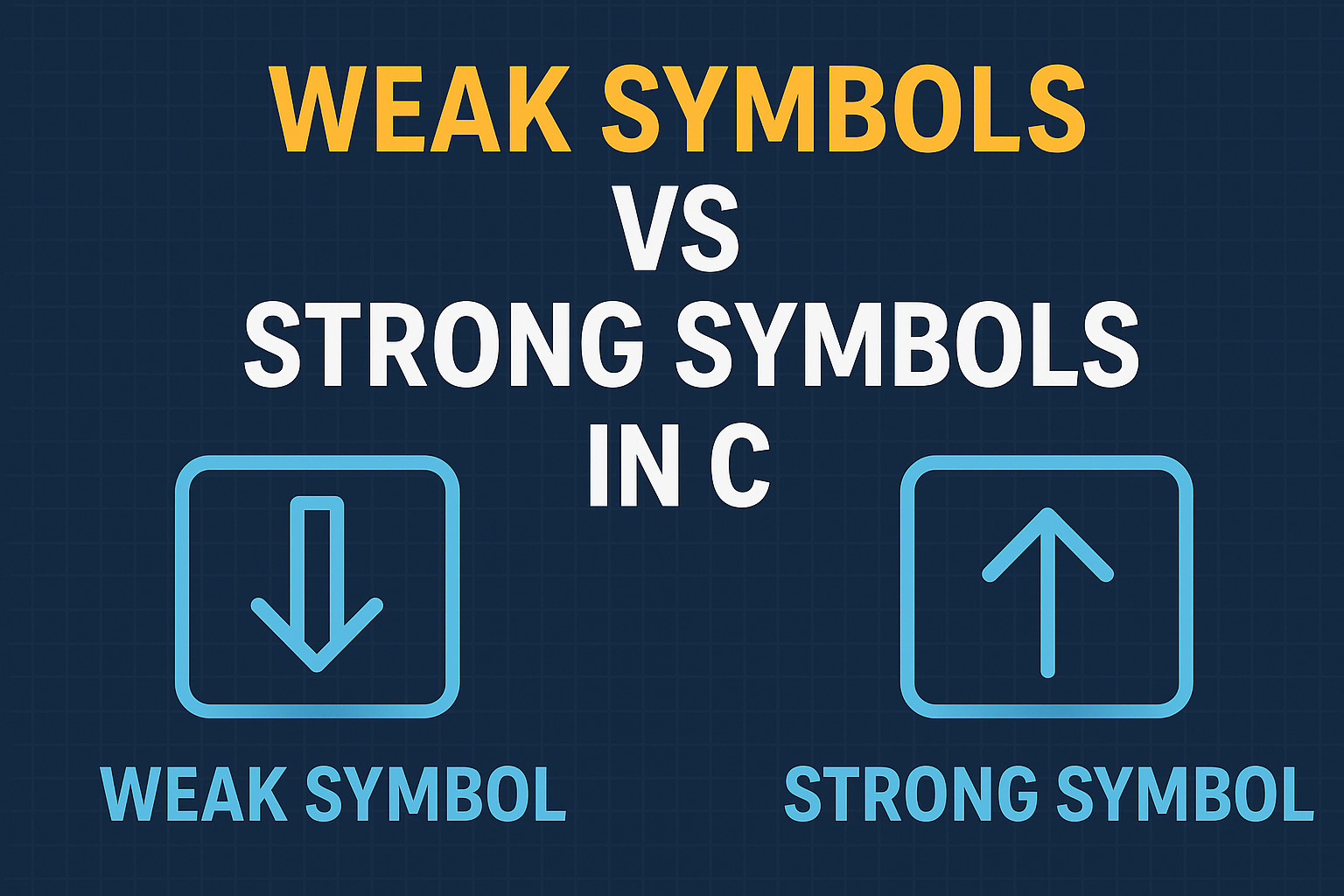
    Weak Symbols vs Strong Symbols
    Weak Symbols vs Strong Symbols
  • Compare firmware version strings in C | Master Embedded Coding (2026)

    Compare firmware version strings in C : In embedded systems development, firmware updates are crucial for fixing bugs, improving performance, or adding new features. A common challenge developers face is comparing two firmware version strings in C to decide whether an upgrade or downgrade is required.

    For example, you might want to check if version “1.2.10” is newer than “1.2.9”. At first glance, this looks like a simple string comparison—but in practice, you need to handle version numbers numerically, not lexicographically.

    Compare firmware version strings in C this article, we will:

    • Understand the basics of firmware version strings
    • Learn why direct string comparison fails
    • Write a C program to compare version strings properly
    • Explore practical use cases in embedded software development

    What is a Firmware Version String?

    A firmware version string is a sequence that represents the version of your software. Common formats include:

    • "1.0.0" → (major.minor.patch)
    • "2.5" → (major.minor)
    • "3.10.7-beta" → (with suffix)

    Each number (major, minor, patch) carries meaning:

    • Major version: Big changes, possibly breaking compatibility.
    • Minor version: New features, still backward compatible.
    • Patch version: Small fixes or improvements.

    Why Simple String Comparison Fails

    Let’s say we compare “1.10” and “1.2” as strings.

    strcmp("1.10", "1.2");  

    Here, "1.10" would be considered smaller than "1.2" because strcmp compares character by character ('1' == '1', then '0' < '2').

    But in reality:

    • 1.10 (ten) is greater than 1.2 (two).

    So, we need numeric comparison.

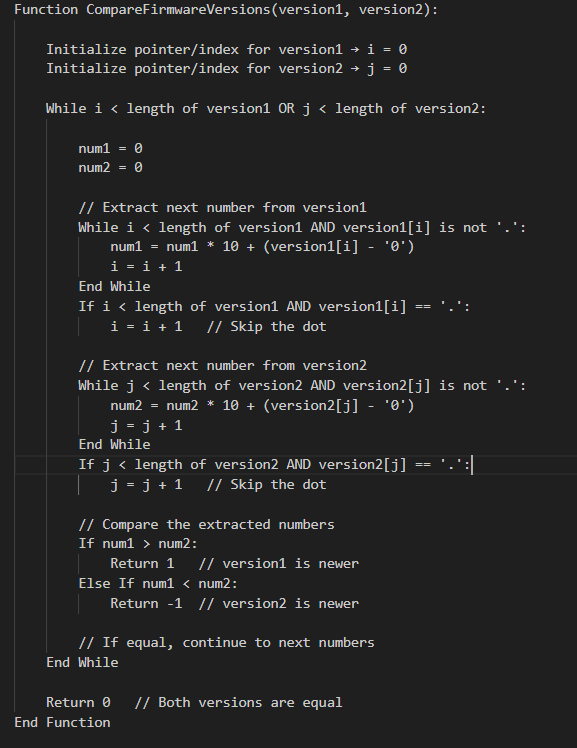
    Pseudocode: Compare Two Firmware Version Strings

    Pseudocode: Compare Two Firmware Version Strings

    How the Pseudocode Works

    1. Iterate through both version strings simultaneously.
    2. Extract numbers between dots (.) and convert them to integers.
    3. Compare numbers one by one:
      • If a number in version1 is greater → version1 is newer.
      • If a number in version2 is greater → version2 is newer.
      • If equal → continue.
    4. Handle versions of different lengths by treating missing numbers as 0.
    5. Return 0 if all numbers are equal.

    This pseudocode is optimized for embedded systems logic and avoids string splitting with extra memory allocation.

    C Program to Compare Firmware Version Strings

    Here’s a beginner-friendly C program that compares two version strings correctly:

    #include <stdio.h>
    #include <string.h>
    #include <stdlib.h>
    
    // Function to compare two firmware version strings
    int compareVersions(const char *v1, const char *v2) {
        // Create copies since strtok modifies strings
        char *ver1 = strdup(v1);
        char *ver2 = strdup(v2);
    
        char *token1 = strtok(ver1, ".");
        char *token2 = strtok(ver2, ".");
    
        while (token1 != NULL || token2 != NULL) {
            int num1 = (token1 != NULL) ? atoi(token1) : 0;
            int num2 = (token2 != NULL) ? atoi(token2) : 0;
    
            if (num1 > num2) {
                free(ver1); free(ver2);
                return 1;  // v1 is greater
            } else if (num1 < num2) {
                free(ver1); free(ver2);
                return -1; // v2 is greater
            }
    
            token1 = (token1 != NULL) ? strtok(NULL, ".") : NULL;
            token2 = (token2 != NULL) ? strtok(NULL, ".") : NULL;
        }
    
        free(ver1);
        free(ver2);
        return 0; // Both versions are equal
    }
    
    int main() {
        const char *v1 = "1.2.10";
        const char *v2 = "1.2.9";
    
        int result = compareVersions(v1, v2);
    
        if (result == 0) {
            printf("Both versions are equal.\n");
        } else if (result > 0) {
            printf("Version %s is newer than %s.\n", v1, v2);
        } else {
            printf("Version %s is newer than %s.\n", v2, v1);
        }
    
        return 0;
    }
    

    Explanation of the Code: Compare version numbers in embedded systems

    1. Splitting the version string:
      • We use strtok with "." as a delimiter to separate numbers like "1", "2", "10".
    2. Converting to integers:
      • Each token is converted using atoi().
      • "10" becomes 10 (so "1.10" > "1.2").
    3. Comparison logic:
      • If one number is greater, we immediately return the result.
      • If equal, we move to the next part.
      • If lengths differ (e.g., "1.2" vs "1.2.0.0"), missing parts are treated as 0.

    Example Output of C code for firmware version management

    For input:

    v1 = "1.2.10"
    v2 = "1.2.9"
    

    Output:

    Version 1.2.10 is newer than 1.2.9.
    

    Optimized Firmware Version Comparison in C (No strtok / No strdup)

    When writing firmware for resource-constrained embedded devices, we must minimize memory usage and avoid dynamic allocations like malloc, strdup, or even temporary token buffers.

    Instead of splitting the version string, we can parse it character by character, extracting numbers on the fly.

    Optimized C Code of Numeric comparison of version strings in C

    #include <stdio.h>
    #include <ctype.h>
    
    // Function to extract the next integer from version string
    int getNextNumber(const char **str) {
        int num = 0;
    
        // Parse until '.' or end of string
        while (**str && **str != '.') {
            if (isdigit(**str)) {
                num = num * 10 + (**str - '0');
            }
            (*str)++;
        }
    
        // Skip the '.' character
        if (**str == '.') {
            (*str)++;
        }
    
        return num;
    }
    
    // Compare two firmware version strings
    int compareVersions(const char *v1, const char *v2) {
        while (*v1 || *v2) {
            int num1 = getNextNumber(&v1);
            int num2 = getNextNumber(&v2);
    
            if (num1 > num2) return 1;   // v1 is greater
            if (num1 < num2) return -1;  // v2 is greater
        }
        return 0; // Versions are equal
    }
    
    int main() {
        const char *v1 = "2.10.3";
        const char *v2 = "2.9.15";
    
        int result = compareVersions(v1, v2);
    
        if (result == 0) {
            printf("Both versions are equal.\n");
        } else if (result > 0) {
            printf("Version %s is newer than %s.\n", v1, v2);
        } else {
            printf("Version %s is newer than %s.\n", v2, v1);
        }
    
        return 0;
    }
    

    How Compare software version strings in C Works

    1. getNextNumber function
      • Reads characters until a . or \0 (end of string).
      • Converts digits into an integer ("15" → 15).
      • Skips the dot (.) and prepares for the next segment.
    2. compareVersions function
      • Loops until both strings are fully read.
      • Extracts one integer from each version string.
      • Compares them immediately.
      • If equal, continues to the next part.
      • If different, returns the comparison result.
    3. No extra memory
      • Works directly on the input strings.
      • No heap allocation, no strdup, no strtok.

    C program to compare version numbers Example Run

    Input:

    v1 = "2.10.3"
    v2 = "2.9.15"

    Output:

    Version 2.10.3 is newer than 2.9.15.
    

    Advantages for Embedded Systems Compare version numbers in embedded systems

    • No dynamic memory allocation (safe for microcontrollers).
    • Faster execution since it parses directly.
    • Smaller memory footprint.
    • Works even if versions have different lengths ("1.2" vs "1.2.0.0").

    Real-World Use Cases of Compare version numbers in embedded systems

    • Over-the-Air (OTA) Updates: Check if the device needs a firmware upgrade.
    • Bootloaders: Ensure only newer firmware is flashed.
    • Diagnostics Tools: Display correct version hierarchy.
    • Version Management: Maintain compatibility in embedded systems.

    Final Thoughts of C code for firmware version management

    Comparing firmware version strings in C is more than a simple string check—it requires numeric comparison to handle multi-digit versions correctly. By splitting the string, converting to integers, and comparing each part step by step, you can build a robust firmware version checker for your embedded systems projects.

    Frequently Asked Questions (FAQ) | Firmware version comparison in C language

    1. Why can’t I compare firmware version strings using strcmp in C?

    Ans: strcmp performs a lexicographic (alphabetical) comparison, not numeric. For example, "1.10" would appear smaller than "1.2" because "1" and "10" are compared as text, not numbers. That’s why a numeric comparison is required.

    2. What is the correct way to compare firmware versions in C?

    Ans: The correct approach is to split the version string by dots (.), convert each part into an integer, and compare them one by one. This ensures "1.10" is correctly recognized as greater than "1.2".

    3. Which method is better: using strtok or parsing manually?

    Ans:
    strtok method
    : Easier for beginners, but uses extra memory and may not be ideal for embedded systems.
    Manual parsing: Reads characters directly, avoids dynamic memory, and is more efficient for resource-constrained devices.

    4. How do I handle firmware versions with different lengths, like "1.2" vs "1.2.0.0"?

    Ans: In proper version comparison, missing parts are treated as zero. So, "1.2" is considered equal to "1.2.0.0".

    5. Can this logic be used in embedded bootloaders?

    Ans: Yes. Bootloaders often need to check if the new firmware is newer than the current one before flashing. The optimized version comparison code (without malloc or strtok) is ideal for this purpose.

    6. How do I compare versions with suffixes like "1.2.3-beta"?

    Ans: The simple numeric comparison handles only numbers. If you need to compare suffixes like "alpha", "beta", or "rc", you’ll need to extend the logic with string handling rules for these labels.

    7. What are the real-world applications of firmware version comparison?

    Ans:
    Over-the-Air (OTA) updates
    Bootloader validation before flashing
    Diagnostics tools to report correct firmware version
    Embedded systems compatibility checks

    8. Does the optimized code work on all C compilers?

    Ans: Yes , The provided code uses standard C functions (isdigit, printf, basic loops), so it works across most C compilers and embedded toolchains.
    Compare firmware version strings in C
    Compare firmware version strings in C Master Embedded Coding (2025)
  • Master Circular Linked List Tutorials with Examples 2026

    Complete guide to mastering Circular Linked Lists in 2025 with this beginner-to-advanced tutorial! Learn how circular linked lists work, their types, operations, and real-life applications through clear explanations, code examples in C, C++, Java, Python, and JavaScript, and step-by-step implementations. This post also covers time and space complexity, interview FAQs, help you crack coding interviews and academic exams. Perfect for students, developers, and data structure enthusiasts!

    What is a Circular Linked List?

    A Circular Linked List is a variation of the linked list in which the last node points back to the first node instead of pointing to NULL. This creates a looped structure where you can traverse endlessly through the list starting from any node.

    🔁 In a circular linked list, you can go from tail to head seamlessly — it’s like a roundabout with no end!

    Why Learn Circular Linked Lists?

    Learning about Circular Linked Lists is crucial for understanding how dynamic data structures work in memory. They are especially useful for:

    • Circular buffers (ring buffers)
    • Multiplayer game round-robin scheduling
    • Task scheduling algorithms
    • Data streaming

    Types of Circular Linked List

    1. Singly Circular Linked List
      Each node has a data and a next pointer, and the next of the last node points to the first node.
    2. Doubly Circular Linked List
      Each node has data, next, and prev pointers. The next of the last node connects to the first node and the prev of the first node connects to the last.

    Circular Linked List Operations

    1. Insertion

    • At the beginning
    • At the end
    • After a specific node

    2. Deletion

    • From the beginning
    • From the end
    • A specific node

    3. Traversal

    • Start from any node and keep moving until you’re back to the same node.
    // Example: Circular Linked List Traversal in C
    void traverse(struct Node* head) {
        struct Node* temp = head;
        if (head != NULL) {
            do {
                printf("%d ", temp->data);
                temp = temp->next;
            } while (temp != head);
        }
    }
    

    C Implementation CLL

    #include <stdio.h>
    #include <stdlib.h>
    
    struct Node {
        int data;
        struct Node* next;
    };
    
    void traverse(struct Node* head) {
        if (head == NULL) return;
        struct Node* temp = head;
        do {
            printf("%d ", temp->data);
            temp = temp->next;
        } while (temp != head);
    }
    
    struct Node* insertEnd(struct Node* head, int data) {
        struct Node* newNode = (struct Node*)malloc(sizeof(struct Node));
        newNode->data = data;
        if (!head) {
            newNode->next = newNode;
            return newNode;
        }
        struct Node* temp = head;
        while (temp->next != head) temp = temp->next;
        temp->next = newNode;
        newNode->next = head;
        return head;
    }
    

    ✅ C++ Implementation CLL

    #include <iostream>
    using namespace std;
    
    class Node {
    public:
        int data;
        Node* next;
        Node(int val) {
            data = val;
            next = nullptr;
        }
    };
    
    void traverse(Node* head) {
        if (!head) return;
        Node* temp = head;
        do {
            cout << temp->data << " ";
            temp = temp->next;
        } while (temp != head);
    }
    
    Node* insertEnd(Node* head, int val) {
        Node* newNode = new Node(val);
        if (!head) {
            newNode->next = newNode;
            return newNode;
        }
        Node* temp = head;
        while (temp->next != head) temp = temp->next;
        temp->next = newNode;
        newNode->next = head;
        return head;
    }
    

    ✅ Java Implementation CLL

    class Node {
        int data;
        Node next;
        Node(int data) {
            this.data = data;
            this.next = null;
        }
    }
    
    public class CircularLinkedList {
        Node head;
    
        void traverse() {
            if (head == null) return;
            Node temp = head;
            do {
                System.out.print(temp.data + " ");
                temp = temp.next;
            } while (temp != head);
        }
    
        void insertEnd(int data) {
            Node newNode = new Node(data);
            if (head == null) {
                newNode.next = newNode;
                head = newNode;
                return;
            }
            Node temp = head;
            while (temp.next != head) temp = temp.next;
            temp.next = newNode;
            newNode.next = head;
        }
    }
    

    ✅ Python Implementation CLL

    class Node:
        def __init__(self, data):
            self.data = data
            self.next = None
    
    class CircularLinkedList:
        def __init__(self):
            self.head = None
    
        def traverse(self):
            if not self.head:
                return
            temp = self.head
            while True:
                print(temp.data, end=' ')
                temp = temp.next
                if temp == self.head:
                    break
    
        def insert_end(self, data):
            new_node = Node(data)
            if not self.head:
                new_node.next = new_node
                self.head = new_node
                return
            temp = self.head
            while temp.next != self.head:
                temp = temp.next
            temp.next = new_node
            new_node.next = self.head
    

    ✅ JavaScript Implementation CLL

    class Node {
        constructor(data) {
            this.data = data;
            this.next = null;
        }
    }
    
    class CircularLinkedList {
        constructor() {
            this.head = null;
        }
    
        traverse() {
            if (!this.head) return;
            let temp = this.head;
            do {
                console.log(temp.data);
                temp = temp.next;
            } while (temp !== this.head);
        }
    
        insertEnd(data) {
            const newNode = new Node(data);
            if (!this.head) {
                newNode.next = newNode;
                this.head = newNode;
                return;
            }
            let temp = this.head;
            while (temp.next !== this.head) {
                temp = temp.next;
            }
            temp.next = newNode;
            newNode.next = this.head;
        }
    }
    

    Time & Space Complexity of Circular Linked List

    OperationTime ComplexitySpace Complexity
    Insert at EndO(n)O(1)
    TraverseO(n)O(1)
    Delete NodeO(n)O(1)
    SearchO(n)O(1)

    ⚠️ Note: You can make insertion O(1) by maintaining a tail pointer.

    Advantages of Circular Linked List

    • No NULL value at the end
    • Ideal for implementing circular queues
    • Efficient for round-robin scheduling
    • Can traverse from any node

    Disadvantages of Circular Linked List

    • Slightly more complex insertion/deletion logic
    • Risk of infinite loops if not handled properly

    Circular Linked List vs Singly Linked List

    FeatureSingly Linked ListCircular Linked List
    End PointerPoints to NULLPoints to head node
    TraversalEnds at NULLLoops back to start
    Use CaseLinear dataCircular scheduling

    Real-world Use Cases of Circular Linked List

    • Music playlist apps (loop through songs)
    • Task scheduling in OS
    • Live data streams
    • Circular queues

    1.What is the use of circular linked list?

    It is mainly used in applications that require a continuous traversal like CPU scheduling, music players, or multiplayer games.

    2.What is the time complexity of circular linked list operations?

    Insertion: O(1) (beginning), O(n) (end/after a node)
    Deletion: O(1) (beginning), O(n) (specific node)
    Traversal: O(n)

    3.Can we implement a stack or queue using a circular linked list?

    Yes! Circular linked lists are great for queues, especially when a circular buffer is needed.

    4.How to detect a circular linked list?

    Use Floyd’s Cycle Detection Algorithm (Tortoise and Hare method).

    5.What is a Circular Linked List in Data Structures?

    A Circular Linked List is a type of linked list where the last node is connected back to the first node, forming a closed loop. Unlike a singly linked list where the last node points to NULL, a circular linked list enables continuous traversal from any point in the list. This structure is highly useful in circular queues, CPU scheduling, and real-time applications.

    6.What are the types of Circular Linked Lists?

    There are two main types of Circular Linked Lists:
    Singly Circular Linked List: Each node has one pointer pointing to the next node, and the last node points to the head.
    Doubly Circular Linked List: Each node has two pointers (prev and next), and both the first and last nodes are connected circularly in both directions.
    Both types are used based on the complexity of operations needed and memory constraints.

    7.What are the real-life applications of Circular Linked List?

    Circular Linked Lists are widely used in:
    Round-robin CPU scheduling
    Music or video playlists that auto-repeat
    Circular buffers in embedded systems
    Real-time data stream processing
    Traffic light simulation systems
    Multiplayer games for turn rotation
    These applications benefit from the list’s looping behavior, which avoids end-condition checks.

    8.What is the time complexity of Circular Linked List operations?

    Insertion at end/head: O(n) / O(1) (if tail maintained)
    Deletion at head: O(n)
    Search: O(n)
    Traversal: O(n)
    Maintaining a tail pointer can reduce insertion time at the end to O(1).

    9.How do you detect a circular linked list in a program?

    To detect a circular linked list, you can use Floyd’s Cycle Detection Algorithm (Tortoise and Hare Algorithm):
    Use two pointers moving at different speeds.
    If they ever meet, a cycle exists.
    If the fast pointer reaches NULL, it’s not circular.
    This is the most efficient method with O(n) time and O(1) space.

    10.Can a Circular Linked List be used to implement a queue?

    Yes, Circular Linked Lists are perfect for circular queues, especially when:
    Memory usage is fixed (as in embedded systems).
    You need constant-time insertion and deletion.
    It avoids shifting elements (like in arrays) and supports continuous enqueuing and dequeuing.

    A Circular Linked List offers flexibility, especially when your use case involves continuous looping or round-based tasks. While it can be a bit more complex than a regular linked list, it brings efficiency and circular logic into dynamic data structures.

    If you’re preparing for coding interviews, learning circular linked lists will give you an edge!

    Circular Linked List
    Master Circular Linked List Tutorials with Examples 2025