Basic signals used in SPI communication MOSI, MISO, SCLK, and CS. Beginner-friendly guide with real-life examples for easy understanding
Imagine you are in a busy kitchen. The head chef gives instructions, helpers listen, and everyone works in perfect sync to prepare a dish. In electronics, something very similar happens when devices “talk” to each other using SPI communication.
SPI (Serial Peripheral Interface) is like that kitchen team — it allows a master device (chef) to communicate with one or more slave devices (helpers) in a fast and organized way. But how do they understand each other? The answer lies in the basic signals of SPI communication.
Let’s break them down one by one with a real-world example.
1. MOSI (Master Out Slave In)
Think of MOSI as the chef giving a recipe instruction to the helper. The master sends data out through MOSI, and the slave listens.
👉 Example: When your smartwatch (master) sends data to a heart rate sensor (slave), the information like “start measuring” is sent via MOSI.
2. MISO (Master In Slave Out)
Now it’s the helper’s turn to reply. MISO is the signal line where the slave sends information back to the master.
Example: The heart rate sensor replies with “your pulse is 78 BPM” using the MISO line, so the smartwatch can display it.
3. SCLK (Serial Clock)
Just like a ticking wall clock keeps a kitchen team in sync, the serial clock keeps both master and slave synchronized. The master generates the clock signal, ensuring everyone talks at the right time.
Example: Without this signal, your smartwatch and sensor would talk over each other like two chefs shouting at the same time — chaos!
4. SS / CS (Slave Select or Chip Select)
Imagine the head chef calling one helper by name — “You, start chopping onions!” That’s exactly what the Slave Select (SS) or Chip Select (CS) line does. It tells which slave device should pay attention.
Example: If your smartwatch has both a heart rate sensor and an accelerometer, the master uses CS to say, “Heart rate sensor, I’m talking to you now.”
Why These Signals Matter in Real Life?
Everyday devices around us — fitness bands, smartphones, digital cameras, or even car infotainment systems — rely onSPI signals for smooth communication. Without these signals:
Your camera’s sensor couldn’t quickly send high-resolution data to the processor.
Your car’s ECU couldn’t communicate with sensors in milliseconds.
Your smartwatch wouldn’t instantly show your heartbeat.
Quick Recap
The four basic SPI signals are:
MOSI → Master sends data to slave.
MISO → Slave sends data back to master.
SCLK → Master clock keeps them in sync.
SS/CS → Selects which slave to talk to.
In short, SPI communication works like a well-organized kitchen team where clear signals ensure perfect results.
Frequently Asked Questions (FAQ) on SPI Communication Signals
1. What are the 4 basic signals used in SPI communication?
Ans: The four basic SPI signals are: MOSI (Master Out Slave In) – Master sends data to slave MISO (Master In Slave Out) – Slave sends data back to master SCLK (Serial Clock) – Synchronizes data transfer SS/CS (Slave Select or Chip Select) – Selects which slave device to communicate with
2. Why is the clock (SCLK) important in SPI?
Ans: SCLK ensures that both master and slave send and receive data in sync. Without the clock, devices would not know when to read or write data, causing communication errors.
3. What is the difference between MOSI and MISO?
Ans: MOSI → Data flows from master to slave. MISO → Data flows from slave to master. They work like a two-way street, but each has its dedicated lane.
4. Where is SPI communication used in real life?
Ans: SPI is widely used in smartwatches, smartphones, sensors, EEPROMs, SD cards, displays, and automotive ECUs where fast and reliable data transfer is required.
5. How is SPI different from I2C communication?
Ans: Yes! Multiple slaves can be connected, but each requires a separate CS (Chip Select) line from the master to activate it individually.SPI uses 4 lines (MOSI, MISO, SCLK, CS) and is faster. I2C uses only 2 lines (SDA, SCL) and supports multiple devices more easily. Use SPI when you need speed, and I2C when you need simplicity.
6. Can multiple devices be connected using SPI?
Ans: Yes! Multiple slaves can be connected, but each requires a separate CS (Chip Select) line from the master to activate it individually.
You can also Visit other tutorials of Embedded Prep
Learn everything about the Memory Protection Unit (MPU), its key features, working, advantages, and applications in embedded systems. Discover how a memory protection unit improves security, stability, fault isolation, and safety in microcontrollers and RTOS-based designs.
Introduction
In modern embedded systems and microcontrollers, ensuring safe and reliable execution of code is a critical requirement. This is where the Memory Protection Unit (MPU) plays a vital role. The MPU is a hardware feature that provides memory access control, enhances system security, and prevents unintended memory corruption. For developers working with real-time operating systems (RTOS) or safety-critical applications, understanding the memory protection unit is essential.
What is a Memory Protection Unit (MPU)?
A Memory Protection Unit is a hardware component integrated into many microcontrollers and processors. Its primary job is to control how different parts of memory (RAM, Flash, peripherals, etc.) can be accessed by applications or processes. Unlike a full Memory Management Unit (MMU) used in complex processors, the MPU is lightweight and designed for resource-constrained embedded devices.
With an MPU, developers can define memory regions, assign access permissions, and protect critical data or code from being accidentally modified.
Key Features of a Memory Protection Unit
Region-Based Protection
The MPU allows memory to be divided into regions. Each region can have specific permissions such as read-only, write-only, or read/write access.
Privilege Levels
It supports different privilege levels (e.g., user mode and privileged mode), preventing untrusted code from modifying system resources.
Fault Handling
If a program tries to access restricted memory, the MPU triggers a fault, ensuring safe execution.
Lightweight Design
The memory protection unit does not perform address translation like an MMU, which makes it suitable for microcontrollers with limited resources.
Support for Real-Time Systems
The MPU enables better isolation in RTOS-based applications, helping achieve safety certifications like ISO 26262 (automotive) and IEC 61508 (industrial).
Why Do We Need a Memory Protection Unit?
System Stability: Prevents one faulty task from corrupting another task’s memory.
Security: Protects sensitive data and system-level code from unauthorized access.
Safety Compliance: Essential for industries like automotive, aerospace, and medical devices.
Difference Between MPU and MMU
Feature
MPU (Memory Protection Unit)
MMU (Memory Management Unit)
Function
Provides access control and protection
Provides virtual memory and paging
Complexity
Lightweight, simple
More complex
Target
Microcontrollers, embedded systems
High-end processors, desktops, servers
Address Translation
Not supported
Fully supported
Address Translation in an Operating System (OS) is the process of converting a logical (virtual) address generated by a program into a physical address in main memory (RAM).
Think of it like this : a) Program speaks virtual addresses b) Hardware (RAM) understands physical addresses c) OS + hardware act as the translator
Why Address Translation is needed
Programs don’t know actual RAM locations
Multiple programs run at the same time
Memory protection & isolation
Efficient memory usage (virtual memory)
So every process thinks:
“I start at address 0”
…but in reality, they are placed at different physical locations.
If logical address ≥ limit → ❌ invalid (memory protection)
Paging
Memory is divided into:
Pages (virtual memory)
Frames (physical memory)
Translation steps:
Logical address → (Page Number + Offset)
Page Number → Frame Number (via Page Table)
Physical address → (Frame Number + Offset)
Logical Address
   ├── Page No
   └── Offset

Page Table
   Page No ──► Frame No

Physical Address
   ├── Frame No
   └── Offset
✔ No external fragmentation ✔ Efficient memory usage
Segmentation
Memory is divided into segments:
Code
Data
Stack
Each segment has:
Base
Limit
Physical Address = Segment Base + Offset
✔ Matches program structure ❌ External fragmentation
Paging + Segmentation (Advanced OS)
Used in modern systems for:
Better protection
Better flexibility
Role of MMU
Performs address translation
Checks access permissions
Uses TLB (Translation Lookaside Buffer) for fast lookup
Real-Life Analogy
Logical address → House number
Physical address → GPS coordinates
OS/MMU → Google Maps translating it
Applications of a Memory Protection Unit
Automotive ECUs (Engine Control Units)
Medical devices with safety requirements
Industrial automation systems
Consumer electronics (IoT devices, wearables)
Defense and aerospace systems
Conclusion
The Memory Protection Unit (MPU) is a powerful hardware feature for embedded systems, ensuring secure, stable, and reliable program execution. By restricting unauthorized access, isolating memory regions, and enhancing system safety, the MPU has become a standard component in microcontroller design.
For developers aiming to build secure and safety-critical embedded applications, mastering the memory protection unit is not optional—it’s a necessity.
Advantages of Memory Protection Unit (MPU)
System Stability
The memory protection unit prevents faulty tasks from corrupting other tasks’ memory, ensuring stable system performance.
Improved Security
It restricts unauthorized access to sensitive data and code, making embedded devices more secure.
Fault Isolation
MPU detects invalid memory accesses quickly and generates a fault, helping developers identify and fix issues.
Low Resource Overhead
Unlike a memory management unit (MMU), the memory protection unit is lightweight, making it ideal for resource-constrained microcontrollers.
Safety Compliance
Essential for achieving industry safety certifications such as ISO 26262 (automotive) and IEC 61508 (industrial).
Support for RTOS
Provides task isolation in real-time operating systems, improving reliability of multitasking environments.
Disadvantages of Memory Protection Unit (MPU)
Limited Flexibility
The memory protection unit cannot perform address translation or virtual memory, unlike MMUs.
Region Restrictions
MPUs usually support only a fixed number of memory regions, which may not be enough for complex applications.
Manual Configuration
Developers must carefully configure regions and permissions; incorrect setup can cause frequent memory faults.
Not Suitable for High-End Systems
While MPU is great for microcontrollers, it cannot match the advanced features of MMUs in high-end processors.
Debugging Overhead
Frequent memory faults due to strict protection may slow down development if not handled properly.
Interview Questions on Memory Protection Unit (MPU)
Basic Level Questions
What is a Memory Protection Unit (MPU)?
How does a memory protection unit differ from a memory management unit (MMU)?
Why do microcontrollers use an MPU instead of an MMU?
What are the main features of a memory protection unit?
Can you explain how MPU helps in debugging embedded systems?
What happens when a task tries to access a restricted memory region in MPU?
Intermediate Level Questions
How does the MPU handle privilege levels in embedded systems?
How many memory regions can typically be defined in an ARM Cortex-M MPU?
Explain how an MPU improves system stability in RTOS-based applications.
What is the role of MPU in achieving safety certifications like ISO 26262?
How does the MPU support read, write, and execute permissions for memory?
What kind of fault is generated if unauthorized memory access occurs?
Advanced Level Questions
Compare MPU-based protection with software-based memory protection.
How would you configure an MPU in ARM Cortex-M architecture?
What are the challenges of using MPU in complex embedded systems?
How does MPU improve security in IoT devices?
In what scenarios would you choose MPU over MMU for system design?
How does the MPU interact with exception handling in microcontrollers?
Can MPU be used to protect peripheral registers as well as RAM/Flash memory?
Give a real-world example where MPU played a critical role in system reliability.
You can also Visit other tutorials of Embedded Prep
Compare firmware version strings in C : In embedded systems development, firmware updates are crucial for fixing bugs, improving performance, or adding new features. A common challenge developers face is comparing two firmware version strings in C to decide whether an upgrade or downgrade is required.
For example, you might want to check if version “1.2.10” is newer than “1.2.9”. At first glance, this looks like a simple string comparison—but in practice, you need to handle version numbers numerically, not lexicographically.
Compare firmware version strings in C this article, we will:
Understand the basics of firmware version strings
Learn why direct string comparison fails
Write a C program to compare version strings properly
Explore practical use cases in embedded software development
What is a Firmware Version String?
A firmware version string is a sequence that represents the version of your software. Common formats include:
"1.0.0" → (major.minor.patch)
"2.5" → (major.minor)
"3.10.7-beta" → (with suffix)
Each number (major, minor, patch) carries meaning:
Major version: Big changes, possibly breaking compatibility.
Minor version: New features, still backward compatible.
Patch version: Small fixes or improvements.
Why Simple String Comparison Fails
Let’s say we compare “1.10” and “1.2” as strings.
strcmp("1.10", "1.2");
Here, "1.10" would be considered smaller than "1.2" because strcmp compares character by character ('1' == '1', then '0' < '2').
But in reality:
1.10 (ten) is greater than 1.2 (two).
So, we need numeric comparison.
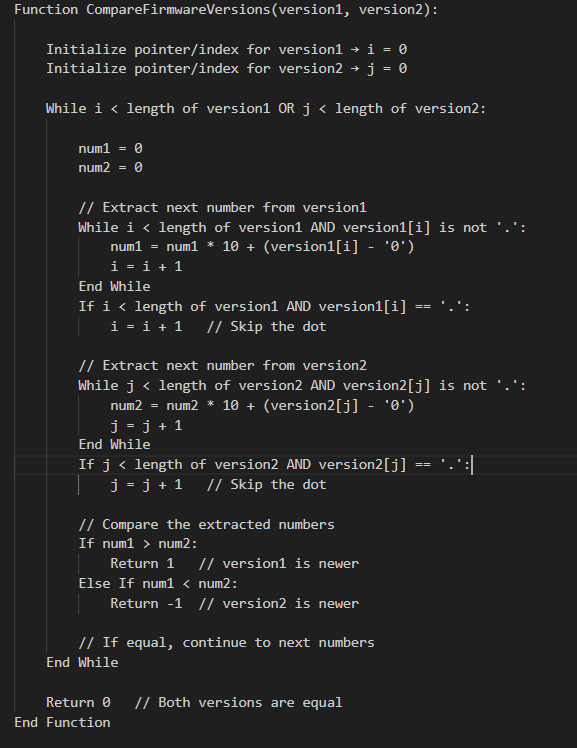
Pseudocode: Compare Two Firmware Version Strings
How the Pseudocode Works
Iterate through both version strings simultaneously.
Extract numbers between dots (.) and convert them to integers.
Compare numbers one by one:
If a number in version1 is greater → version1 is newer.
If a number in version2 is greater → version2 is newer.
If equal → continue.
Handle versions of different lengths by treating missing numbers as 0.
Return 0 if all numbers are equal.
This pseudocode is optimized for embedded systems logic and avoids string splitting with extra memory allocation.
C Program to Compare Firmware Version Strings
Here’s a beginner-friendly C program that compares two version strings correctly:
#include <stdio.h>
#include <string.h>
#include <stdlib.h>

// Function to compare two firmware version strings
int compareVersions(const char *v1, const char *v2) {
    // Create copies since strtok modifies strings
    char *ver1 = strdup(v1);
    char *ver2 = strdup(v2);

    char *token1 = strtok(ver1, ".");
    char *token2 = strtok(ver2, ".");

    while (token1 != NULL || token2 != NULL) {
        int num1 = (token1 != NULL) ? atoi(token1) : 0;
        int num2 = (token2 != NULL) ? atoi(token2) : 0;

        if (num1 > num2) {
            free(ver1); free(ver2);
            return 1;  // v1 is greater
        } else if (num1 < num2) {
            free(ver1); free(ver2);
            return -1; // v2 is greater
        }

        token1 = (token1 != NULL) ? strtok(NULL, ".") : NULL;
        token2 = (token2 != NULL) ? strtok(NULL, ".") : NULL;
    }

    free(ver1);
    free(ver2);
    return 0; // Both versions are equal
}

int main() {
    const char *v1 = "1.2.10";
    const char *v2 = "1.2.9";

    int result = compareVersions(v1, v2);

    if (result == 0) {
        printf("Both versions are equal.\n");
    } else if (result > 0) {
        printf("Version %s is newer than %s.\n", v1, v2);
    } else {
        printf("Version %s is newer than %s.\n", v2, v1);
    }

    return 0;
}
Explanation of the Code: Compare version numbers in embedded systems
Splitting the version string:
We use strtok with "." as a delimiter to separate numbers like "1", "2", "10".
Converting to integers:
Each token is converted using atoi().
"10" becomes 10 (so "1.10" > "1.2").
Comparison logic:
If one number is greater, we immediately return the result.
If equal, we move to the next part.
If lengths differ (e.g., "1.2" vs "1.2.0.0"), missing parts are treated as 0.
Example Output of C code for firmware version management
For input:
v1 = "1.2.10"
v2 = "1.2.9"
Output:
Version 1.2.10 is newer than 1.2.9.
Optimized Firmware Version Comparison in C (No strtok / No strdup)
When writing firmware for resource-constrained embedded devices, we must minimize memory usage and avoid dynamic allocations like malloc, strdup, or even temporary token buffers.
Instead of splitting the version string, we can parse it character by character, extracting numbers on the fly.
Optimized C Code of Numeric comparison of version strings in C
#include <stdio.h>
#include <ctype.h>

// Function to extract the next integer from version string
int getNextNumber(const char **str) {
    int num = 0;

    // Parse until '.' or end of string
    while (**str && **str != '.') {
        if (isdigit(**str)) {
            num = num * 10 + (**str - '0');
        }
        (*str)++;
    }

    // Skip the '.' character
    if (**str == '.') {
        (*str)++;
    }

    return num;
}

// Compare two firmware version strings
int compareVersions(const char *v1, const char *v2) {
    while (*v1 || *v2) {
        int num1 = getNextNumber(&v1);
        int num2 = getNextNumber(&v2);

        if (num1 > num2) return 1;   // v1 is greater
        if (num1 < num2) return -1;  // v2 is greater
    }
    return 0; // Versions are equal
}

int main() {
    const char *v1 = "2.10.3";
    const char *v2 = "2.9.15";

    int result = compareVersions(v1, v2);

    if (result == 0) {
        printf("Both versions are equal.\n");
    } else if (result > 0) {
        printf("Version %s is newer than %s.\n", v1, v2);
    } else {
        printf("Version %s is newer than %s.\n", v2, v1);
    }

    return 0;
}
How Compare software version strings in C Works
getNextNumber function
Reads characters until a . or \0 (end of string).
Converts digits into an integer ("15" → 15).
Skips the dot (.) and prepares for the next segment.
compareVersions function
Loops until both strings are fully read.
Extracts one integer from each version string.
Compares them immediately.
If equal, continues to the next part.
If different, returns the comparison result.
No extra memory
Works directly on the input strings.
No heap allocation, no strdup, no strtok.
C program to compare version numbers Example Run
Input:
v1 = "2.10.3"
v2 = "2.9.15"
Output:
Version 2.10.3 is newer than 2.9.15.
Advantages for Embedded Systems Compare version numbers in embedded systems
No dynamic memory allocation (safe for microcontrollers).
Faster execution since it parses directly.
Smaller memory footprint.
Works even if versions have different lengths ("1.2" vs "1.2.0.0").
Real-World Use Cases of Compare version numbers in embedded systems
Over-the-Air (OTA) Updates: Check if the device needs a firmware upgrade.
Bootloaders: Ensure only newer firmware is flashed.
Diagnostics Tools: Display correct version hierarchy.
Version Management: Maintain compatibility in embedded systems.
Final Thoughts of C code for firmware version management
Comparing firmware version strings in C is more than a simple string check—it requires numeric comparison to handle multi-digit versions correctly. By splitting the string, converting to integers, and comparing each part step by step, you can build a robust firmware version checker for your embedded systems projects.
Frequently Asked Questions (FAQ) | Firmware version comparison in C language
1. Why can’t I compare firmware version strings using strcmp in C?
Ans:strcmp performs a lexicographic (alphabetical) comparison, not numeric. For example, "1.10" would appear smaller than "1.2" because "1" and "10" are compared as text, not numbers. That’s why a numeric comparison is required.
2. What is the correct way to compare firmware versions in C?
Ans: The correct approach is to split the version string by dots (.), convert each part into an integer, and compare them one by one. This ensures "1.10" is correctly recognized as greater than "1.2".
3. Which method is better: using strtok or parsing manually?
Ans: strtok method: Easier for beginners, but uses extra memory and may not be ideal for embedded systems. Manual parsing: Reads characters directly, avoids dynamic memory, and is more efficient for resource-constrained devices.
4. How do I handle firmware versions with different lengths, like "1.2" vs "1.2.0.0"?
Ans: In proper version comparison, missing parts are treated as zero. So, "1.2" is considered equal to "1.2.0.0".
5. Can this logic be used in embedded bootloaders?
Ans: Yes. Bootloaders often need to check if the new firmware is newer than the current one before flashing. The optimized version comparison code (without malloc or strtok) is ideal for this purpose.
6. How do I compare versions with suffixes like "1.2.3-beta"?
Ans: The simple numeric comparison handles only numbers. If you need to compare suffixes like "alpha", "beta", or "rc", you’ll need to extend the logic with string handling rules for these labels.
7. What are the real-world applications of firmware version comparison?
Ans: Over-the-Air (OTA) updates Bootloader validation before flashing Diagnostics tools to report correct firmware version Embedded systems compatibility checks
8. Does the optimized code work on all C compilers?
Ans: Yes , The provided code uses standard C functions (isdigit, printf, basic loops), so it works across most C compilers and embedded toolchains.
You can also Visit other tutorials of Embedded Prep