Author: admin

  • Differences between RISC and CISC | Master Embedded Interview Guide (2026)

    Differences between RISC and CISC : Discover the differences between RISC and CISC processors, their advantages, disadvantages, and applications in computers and embedded systems. Learn which processor architecture suits your needs

    Differences between RISC and CISC

    In the world of computer architecture, RISC and CISC are two foundational processor designs that have shaped how modern computers work. Understanding these architectures is essential for students, engineers, and tech enthusiasts who want to deepen their knowledge of computer processors and embedded systems. In this article, we will explain what RISC and CISC are, their differences, advantages, disadvantages, and real-world applications.

    What is RISC (Reduced Instruction Set Computer)?

    RISC stands for Reduced Instruction Set Computer. It is a type of microprocessor architecture that uses a small set of simple instructions, allowing the processor to execute instructions faster. The main idea behind RISC is simplicity and efficiency. Each instruction is designed to perform a very basic operation, which typically completes in one clock cycle.

    Key Features of RISC

    • Simplified Instructions: Executes basic instructions only.
    • Uniform Instruction Length: All instructions usually have the same size.
    • Load/Store Architecture: Memory access is done only through specific instructions.
    • Faster Execution: Due to simplicity, pipelines can be implemented efficiently.
    • Low Power Consumption: Less complex hardware reduces energy usage.

    Advantages of RISC

    • High performance for simple instructions.
    • Easier to design and optimize pipelines.
    • Efficient for embedded systems and mobile devices.

    Disadvantages of RISC

    • Requires more instructions to perform complex tasks.
    • Larger program size due to the higher number of instructions.

    Examples of RISC Processors

    • ARM (Advanced RISC Machine)
    • MIPS (Microprocessor without Interlocked Pipeline Stages)
    • SPARC (Scalable Processor Architecture)

    What is CISC (Complex Instruction Set Computer)?

    CISC stands for Complex Instruction Set Computer. Unlike RISC, CISC processors use a large set of instructions, including complex operations that can perform multiple tasks in a single instruction. The main goal of CISC is to reduce the number of instructions per program, even if it increases the complexity of each instruction.

    Key Features of CISC

    • Complex Instructions: Each instruction can perform multiple low-level operations.
    • Variable Instruction Length: Instructions can have different sizes.
    • Memory-to-Memory Operations: Allows operations directly on memory without using registers.
    • Fewer Instructions per Program: Reduces the need for repetitive coding.

    Advantages of CISC

    • Reduced program size.
    • Easier for programmers to implement complex algorithms.
    • More powerful instructions can simplify software development.

    Disadvantages of CISC

    • Slower execution due to instruction complexity.
    • More power consumption and heat generation.
    • Complex design and harder to optimize pipelines.

    Examples of CISC Processors

    • Intel x86 Series
    • VAX (Virtual Address eXtension)
    • IBM System/360

    Differences between RISC and CISC

    FeatureRISCCISC
    Full FormReduced Instruction Set ComputerComplex Instruction Set Computer
    Instruction SetSimple and smallLarge and complex
    ExecutionSingle clock cycle per instructionMultiple clock cycles per instruction
    Memory AccessLoad/Store instructions onlyMemory-to-memory instructions allowed
    Program SizeLargerSmaller
    Hardware ComplexitySimpleComplex
    ExamplesARM, MIPS, SPARCIntel x86, VAX

    Applications of RISC and CISC

    • RISC Processors are commonly used in smartphones, tablets, embedded systems, and IoT devices because of their efficiency and low power consumption.
    • CISC Processors dominate personal computers, servers, and workstations, where performance and complex computations are required.

    Why Understanding RISC and CISC is Important

    Knowing the difference between RISC and CISC helps in:

    • Selecting the right processor architecture for specific applications.
    • Optimizing software for performance and energy efficiency.
    • Understanding the evolution of modern CPUs and embedded systems.

    Conclusion of topic Differences between RISC and CISC

    Both RISC and CISC architectures have their own advantages and use cases. While RISC focuses on simplicity and speed, making it ideal for mobile and embedded devices, CISC emphasizes powerful instructions and ease of programming, making it suitable for desktops and servers. Understanding these architectures is crucial for anyone working in computer engineering, embedded systems, or software development.

    Frequently Asked Questions (FAQ) | Differences between RISC and CISC

    1. What is the difference between RISC and CISC?
    RISC (Reduced Instruction Set Computer) uses a small set of simple instructions executed quickly, while CISC (Complex Instruction Set Computer) uses a large set of complex instructions, often requiring multiple clock cycles.

    2. Which is better, RISC or CISC?
    It depends on the application. RISC is ideal for embedded systems and mobile devices due to efficiency and low power consumption, whereas CISC is suited for desktops and servers requiring complex computations.

    3. What are some examples of RISC processors?
    Popular RISC processors include ARM, MIPS, and SPARC.

    4. What are some examples of CISC processors?
    Common CISC processors include Intel x86 series, VAX, and IBM System/360.

    5. Why do RISC processors use simpler instructions?
    RISC processors focus on simplicity to allow faster execution, efficient pipelining, and lower power consumption.

    6. Does CISC reduce program size?
    Yes, CISC’s complex instructions allow multiple operations in a single instruction, reducing the overall program size.

    7. What is the main application of RISC and CISC architectures?
    RISC is widely used in smartphones, tablets, and IoT devices, while CISC dominates personal computers, servers, and workstations.

    8. Can a processor be both RISC and CISC?
    Modern processors often incorporate hybrid designs, combining RISC efficiency with some complex CISC instructions for compatibility.

    Differences between RISC and CISC
    Differences between RISC and CISC Master Embedded Interview Guide (2025)
  • Embedded System Engineer Job in Canada | Latest Hiring News 2026

    Embedded System Engineer Job in Canada : Canada continues to emerge as a hub for innovation in embedded systems, nanotechnology, and photometric instrumentation. Companies are investing heavily in research and product development to meet global demands in food safety, public health, environmental monitoring, process control, and medical diagnostics. One of the most exciting opportunities in this space comes from Optokey Inc., a fast-growing startup that is expanding its team and actively recruiting skilled professionals.

    About the Company – Optokey Inc.

    Optokey Inc., headquartered in the Hayward-San Francisco Bay Area, is rapidly growing with a strong focus on Surface Enhanced Raman Spectroscopy (SERS) and Raman analytical techniques. The company designs, tests, and integrates optoelectronic and microfluidic components to create breakthrough products for multi-billion-dollar global industries. With its commitment to advancing photometric instruments and proprietary nanostructure reagents, Optokey is making a strong impact in food safety, biochemical analysis, petrochemical industries, and medical diagnostics.

    As part of its expansion, Optokey is opening new doors for professionals in Canada to join its innovation-driven environment.

    Job Opportunity: Embedded System Engineer – Canada

    Position Title: Embedded System Engineer
    Location: Canada (with opportunities for global collaboration)

    Key Requirements:

    • Education: Master’s degree or higher in Electronics Engineering, Automation, or Computer Science (Ph.D. preferred).
    • Experience: Minimum 4+ years in embedded or mobile system R&D including hardware, firmware development, and system verification.
    • Technical Skills:
      • Proficiency in C/C++, Python, Visual Basic, and Shell scripting.
      • Strong background in hardware design, PCB layout, and BOM optimization.
      • Hands-on experience with oscilloscopes, CAD tools, bus analyzers, and signal generators.
    • Knowledge Base: Familiarity with embedded product development processes, industrialization workflows, and yield improvement techniques.
    • Extra Edge: Basic knowledge of optics, mechanics, fluidics, or chemistry/biology will be an advantage.
    • Language: Strong English communication skills. Mandarin Chinese is considered a plus.

    Job Responsibilities:

    • Designing hardware and software architectures for embedded systems using microcontrollers and mobile CPUs.
    • Reviewing and modifying schematics and PCB layouts for optimized designs.
    • Conducting system verification, debugging, and interface testing.
    • Evaluating development kits and sensor modules for integration.
    • Managing technical documentation and version control for design files.
    • Collaborating with cross-functional teams of engineers, chemists, and bio-experts.
    • Supporting continuous improvement initiatives for system quality, performance, and cost-effectiveness.

    Why Join Optokey in Canada?

    • Be part of a cutting-edge startup with rapid growth potential.
    • Work on innovative projects in life sciences, public health, and chemical detection.
    • Opportunity to collaborate with global experts in chemistry, biology, and engineering.
    • Competitive salary and equity based on qualifications.

    How to Apply

    If you are passionate about embedded systems and eager to contribute to next-generation analytical instruments, Optokey Inc. wants to hear from you.

    📩 Apply now by sending your resume to: jobs@optokey.com

    Direct Apply : Company Website

    Final Thoughts

    For professionals seeking an Embedded System Engineer job in Canada, Optokey provides an excellent platform to grow in the fields of embedded technology, photometric instruments, and nanostructure reagent applications. With opportunities to lead product development and collaborate across disciplines, this role is perfect for engineers who want to shape the future of embedded systems in healthcare, food safety, and environmental monitoring.

  • Weak Symbols vs Strong Symbols in C | Master Embedded Interview Preparation (2026)

    Weak Symbols vs Strong Symbols : When working with C programming, especially in embedded systems or system-level development, you will often encounter the concepts of weak symbols and strong symbols. These terms come into play during the linking stage of compilation. Understanding them is crucial for writing flexible, modular, and maintainable code.

    In this article, we’ll explore the difference between weak symbols and strong symbols in C, how they work, and where they are used.

    What is a Weak symbol and Strong Symbols in C ?

    In C programming, symbols represent functions or variables that the linker resolves during compilation. Strong symbols are the default definitions of global variables or functions, and only one strong symbol with the same name can exist across a program. If multiple strong symbols are present, the linker throws a multiple-definition error.

    On the other hand, weak symbols are declared using the __attribute__((weak)) attribute. They act as fallback definitions, meaning if a strong symbol with the same name is available, it overrides the weak symbol. If no strong definition exists, the weak symbol is used.

    This mechanism is particularly useful in embedded systems, libraries, and modular applications, where weak symbols provide default implementations (such as interrupt handlers or library functions) that can be optionally overridden by the developer.

    Key difference:

    • Strong symbols = Default and unique definitions.
    • Weak symbols = Flexible fallback definitions, overridden by strong symbols if available.

    What are Symbols in C?

    In simple terms, a symbol is the name that represents a function or variable in your program. For example:

    int myVar = 10;   // 'myVar' is a symbol
    void myFunction() {} // 'myFunction' is a symbol
    

    When you compile your code, the compiler generates object files with these symbols. The linker then resolves them to produce the final executable.

    Strong symbols in C

    A strong symbol is the default type of symbol generated by the compiler when you define a global variable or function.

    👉 Characteristics of strong symbols:

    • Created when you define a function or variable without the weak attribute.
    • Only one definition of a strong symbol can exist across the program.
    • If two strong symbols with the same name are defined in different files, the linker will throw an error (multiple definition error).

    Example of Strong Symbol

    int data = 100;  // Strong symbol by default
    
    void printData() {
        printf("%d\n", data);
    }
    

    Here, data and printData are strong symbols.

    Weak Symbols in C

    A weak symbol is a symbol that tells the linker:
    “Use this symbol if no strong definition is found, otherwise ignore me.”

    👉 Characteristics of weak symbols:

    • Declared using the __attribute__((weak)) keyword.
    • Can be overridden by a strong symbol with the same name.
    • If no strong symbol is provided, the weak symbol is used as a fallback.

    Example of Weak Symbol

    __attribute__((weak)) void myFunction() {
        printf("Default weak function\n");
    }
    

    If another file defines a strong version of myFunction, the weak version will be ignored by the linker.

    Weak vs Strong Symbols in C

    FeatureStrong SymbolWeak Symbol
    Default behaviorYesNo (explicitly defined)
    Multiple definitionsNot allowed (linker error)Allowed, but overridden by strong
    Use caseNormal variables/functionsFallbacks, optional overrides
    Example useint var = 10;__attribute__((weak)) void func()

    Why Use Weak Symbols?

    Weak symbols are very useful in system programming and embedded systems:

    1. Fallback Implementation
      • Provide a default implementation of a function.
      • Example: weak logging functions can be overridden by user-defined strong ones.
    2. Flexibility in Libraries
      • Library authors often define weak symbols so developers can override them with custom implementations.
    3. Bootloaders & Firmware
      • In embedded systems, weak symbols are used for interrupt handlers or startup code, which can later be overridden by user-defined handlers.

    Practical Example – Weak vs Strong

    // weak_function.c
    #include <stdio.h>
    __attribute__((weak)) void hello() {
        printf("Hello from weak function!\n");
    }
    
    // strong_function.c
    #include <stdio.h>
    void hello() {
        printf("Hello from strong function!\n");
    }
    
    // main.c
    int main() {
        hello();
        return 0;
    }
    

    👉 If you compile all three files together:

    • Output will be: “Hello from strong function!”
    • The weak symbol is ignored because a strong definition exists.

    👉 If you compile without strong_function.c:

    • Output will be: “Hello from weak function!”

    This demonstrates the priority of strong symbols over weak symbols.

    Weak Symbols vs Strong Symbols

    In C programming, symbols are names that represent functions or variables during the compilation and linking stages. The linker decides how these symbols are resolved. Based on their definition, they can be classified as strong symbols or weak symbols.

    Strong Symbols in C

    • Definition: Default symbols created when you define a global variable or function normally.
    • Characteristics:
      • Only one strong symbol with the same name can exist.
      • If multiple strong symbols are defined → linker error.
      • Used for actual, unique implementations.
    • Example: int count = 0; // Strong symbol void myFunction() { } // Strong symbol

    Weak Symbols in C

    • Definition: Symbols explicitly marked as weak using __attribute__((weak)).
    • Characteristics:
      • Can be overridden by a strong symbol with the same name.
      • If no strong symbol exists, the weak symbol is used.
      • Provide default/fallback implementations.
    • Example: __attribute__((weak)) void handler() { printf("Default weak handler\n"); }

    Key Differences Between Weak and Strong Symbols

    AspectStrong SymbolWeak Symbol
    DefinitionDefault function/variable definitionDefined using __attribute__((weak))
    MultiplicityOnly one allowedMultiple allowed (overridden if strong exists)
    PriorityAlways preferred by linkerUsed only if strong symbol not found
    Error HandlingMultiple definitions → Linker errorNo error, just overridden
    Use CaseUnique implementation of codeFallbacks, library defaults, embedded handlers

    Example Demonstrating Weak vs Strong

    // weak.c
    #include <stdio.h>
    __attribute__((weak)) void hello() {
        printf("Hello from weak function\n");
    }
    
    // strong.c
    #include <stdio.h>
    void hello() {
        printf("Hello from strong function\n");
    }
    
    // main.c
    int main() {
        hello();
        return 0;
    }
    

    👉 If all files are compiled → “Hello from strong function”
    👉 If strong.c is not compiled → “Hello from weak function

    Advantages of Weak and Strong Symbols

    Advantages of Strong Symbols

    • Ensure uniqueness of functions and variables across the program.
    • Prevent accidental multiple definitions through linker checks.
    • Provide clear ownership of implementation (no ambiguity).

    Advantages of Weak Symbols

    • Allow default implementations that can be overridden.
    • Useful for library development – provides flexibility to end-users.
    • Helpful in embedded systems for fallback code like interrupt handlers.
    • Enable code modularity and easy customization without changing base code.

    Disadvantages of Weak and Strong Symbols

    Disadvantages of Strong Symbols

    • Multiple definitions lead to linker errors.
    • Not flexible – you cannot provide optional overrides.

    Disadvantages of Weak Symbols

    • Can cause unintended overrides if strong symbols are accidentally defined.
    • Harder to debug, since weak definitions may silently get replaced.
    • May lead to inconsistent behavior if not properly documented.

    Real-Time Applications of Weak and Strong Symbols

    1. Embedded Systems (Microcontrollers & Firmware)
      • Startup code often defines weak interrupt handlers.
      • Developers can override them with strong custom handlers.
    2. Operating Systems and Libraries
      • System libraries provide weak functions as placeholders, allowing developers to replace them with optimized implementations.
    3. Bootloaders
      • Weak symbols act as default functions for initialization routines, overridden later by board-specific implementations.
    4. Driver Development
      • Hardware drivers may use weak functions to allow custom extensions without modifying the core code.
    5. Logging and Debugging Systems
      • A weak logging function may be defined in a library, which can be overridden by a strong symbol to implement device-specific logging.

    Key Takeaways of weak and strong symbols in C

    • Strong symbols are the default; they must be unique across your program.
    • Weak symbols act as placeholders or fallback implementations.
    • If both exist, the strong symbol overrides the weak symbol.
    • Useful in embedded systems, libraries, and modular applications where flexibility and default behavior are important.

    FAQ of Weak and Strong symbols in C

    1.What is a weak symbol in C programming?

    Ans: A weak symbol in C is a function or variable marked with __attribute__((weak)). It provides a default implementation that can be overridden by a strong symbol if available.

    2.What is a strong symbol in C programming?

    Ans: A strong symbol is the default definition of a global function or variable in C. Only one strong symbol with the same name can exist; otherwise, the linker reports a multiple-definition error.

    3.How does the linker resolve weak and strong symbols in C?

    Ans: The linker always gives priority to strong symbols. If both weak and strong symbols of the same name exist, the strong one overrides the weak one. If no strong symbol is found, the weak symbol is used.

    4.Why are weak symbols used in embedded systems?

    Ans: Weak symbols are widely used in embedded systems to provide default implementations of functions, such as interrupt handlers or startup code, which can later be overridden with strong custom implementations.

    5.Weak vs strong symbols in embedded C examples

    Ans: For example, in an embedded project, a library might provide a weak function for logging, while the developer can define a strong logging function to customize it. If the strong symbol is defined, it overrides the weak one.

    6.Advantages and disadvantages of weak symbols in C

    Ans:
    Advantages: Provide fallback functions, flexibility in libraries, easy overrides, useful in firmware and drivers.
    Disadvantages: Can be accidentally overridden, harder to debug, and may cause inconsistent behavior if not documented.

    7.Real-time applications of weak symbols in embedded systems

    Ans:
    a) Interrupt handlers in microcontrollers
    b) Default startup code in bootloaders
    c) System libraries providing optional implementations
    d) Logging/debugging placeholders overridden by user code

    8.How to override weak functions in C

    Ans: To override a weak function, simply define a strong function with the same name in your program. The linker will ignore the weak definition and use the strong one.

    9.Weak attribute in GCC explained

    Ans: In GCC, the __attribute__((weak)) keyword is used to declare a symbol as weak. This tells the linker to treat it as a fallback definition, which can be replaced if a strong definition exists.

    1.What is a weak symbol in C?

    A weak symbol in C is a function or variable marked with __attribute__((weak)). It can be overridden by a strong definition if available.

    2.What is a strong symbol in C?

    A strong symbol is the default type of global function or variable in C. Only one strong symbol of the same name can exist; otherwise, the linker throws a multiple definition error.

    3.What happens if both weak and strong symbols exist in C?

    The strong symbol takes precedence, and the weak symbol is ignored by the linker.

    4.Why are weak symbols used in embedded systems?

    Weak symbols allow developers to provide default implementations (e.g., interrupt handlers) which can later be overridden by user-defined strong implementations.

    5.Can two strong symbols exist with the same name?

    No, multiple strong symbols with the same name cause a linker error.

    Weak Symbols vs Strong Symbols
    Weak Symbols vs Strong Symbols
  • Best RTOS for microcontrollers | Embedded Systems Interview Guide (2026)

    Best RTOS for microcontrollers : When working with embedded systems, choosing the right Real-Time Operating System (RTOS) is essential. An RTOS provides predictable task scheduling, resource management, and timing accuracy—critical for applications like automotive systems, IoT devices, robotics, and medical equipment.

    In this article, we’ll explore 6 popular RTOS software for embedded systems, highlighting their key features and use cases in a simple, beginner-friendly way.

    6 Best RTOS for microcontrollers

    1. FreeRTOS

    FreeRTOS is one of the most widely used open-source RTOS. It is lightweight, portable, and designed for microcontrollers and small embedded devices.

    Key Features:

    • Open-source and free to use
    • Supports over 40+ architectures
    • Small memory footprint
    • Large community support

    Best For: IoT devices, low-power microcontrollers, and academic projects.

    2. VxWorks

    VxWorks is a commercial RTOS developed by Wind River. It is known for high performance and reliability in mission-critical applications.

    Key Features:

    • Real-time scheduling and deterministic behavior
    • Strong security features
    • POSIX-compliant APIs
    • Extensive debugging and development tools

    Best For: Aerospace, defense, automotive, and industrial automation.

    3. QNX Neutrino RTOS

    QNX is a microkernel-based RTOS trusted for its stability and fault tolerance. It is commonly used in safety-critical applications.

    Key Features:

    • Microkernel architecture for high reliability
    • Scalability from small devices to large systems
    • Strong focus on safety standards (ISO 26262, IEC 61508)
    • Excellent inter-process communication

    Best For: Automotive infotainment, medical devices, and industrial systems.

    4. ThreadX (Azure RTOS)

    ThreadX, now part of Microsoft Azure RTOS, is optimized for simplicity and performance.

    Key Features:

    • Fast real-time performance with low latency
    • Integrated with Azure IoT services
    • Small footprint (as low as 2 KB RAM)
    • Pre-certified for safety standards

    Best For: IoT products, wearables, and consumer electronics.

    5. Micrium µC/OS-II & µC/OS-III

    Micrium’s RTOS family is well-documented and widely used in commercial and educational fields.

    Key Features:

    • Preemptive multitasking
    • Safety-certified kernels
    • Rich documentation and examples
    • Compatible with various microcontrollers

    Best For: Medical devices, industrial controls, and educational use.

    6. Zephyr RTOS

    Zephyr is an open-source RTOS backed by the Linux Foundation. It is gaining popularity due to its scalability and community support.

    Key Features:

    • Open-source and royalty-free
    • Supports multiple architectures (ARM, RISC-V, x86)
    • Strong IoT integration
    • Active developer community

    Best For: IoT, smart home devices, and wearable technology.

    Conclusion of Best RTOS for microcontrollers

    Choosing the right RTOS software for embedded systems depends on your project needs. For beginners, FreeRTOS and Zephyr are great starting points due to their open-source nature and community support. For advanced, safety-critical applications, VxWorks and QNX are widely trusted in industries.

    Frequently Asked Questions (FAQ) | Best RTOS for microcontrollers

    1. What is the best RTOS for microcontrollers in 2025?

    In 2025, the best RTOS for microcontrollers is still FreeRTOS due to its lightweight design, wide hardware support, and active community. However, Zephyr RTOS is quickly becoming a strong alternative for IoT-based microcontroller projects.

    2. Why should I use an RTOS instead of bare-metal programming?

    An RTOS provides task scheduling, multitasking, and resource management, making it easier to handle complex embedded applications. In bare-metal programming, the developer manages everything manually, which is harder to scale.

    3. Which RTOS is most used in the industry?

    • FreeRTOS is the most widely adopted in microcontrollers.
    • QNX and VxWorks dominate safety-critical industries like automotive, aerospace, and medical.
    • Zephyr is rapidly growing in IoT ecosystems.

    4. What is the lightest RTOS for microcontrollers?

    FreeRTOS and ThreadX (Azure RTOS) are considered the lightest RTOS options. They require very little RAM and ROM, making them ideal for small 8-bit and 32-bit microcontrollers.

    5. Can I run Linux instead of RTOS on microcontrollers?

    No. Linux requires more memory and processing power than most microcontrollers can provide. For resource-constrained devices, an RTOS is the best choice.

    6. Which RTOS is free to use?

    • FreeRTOS (MIT license)
    • Zephyr RTOS (Apache 2.0 license)
      Both are completely open-source and free to use in commercial or personal projects.

    7. What is the difference between an RTOS and a general OS?

    • RTOS: Provides deterministic timing and real-time scheduling for critical applications.
    • General OS (like Linux/Windows): Focuses on throughput, user interaction, and multitasking without strict timing guarantees.

    8. Is FreeRTOS the best RTOS for microcontrollers used in IoT?

    Yes. FreeRTOS is the most popular choice for IoT devices because it is lightweight, works with cloud platforms like AWS, and supports a huge range of microcontrollers

    Best RTOS for microcontrollers Embedded Systems
    Best RTOS for microcontrollers Embedded Systems Interview Guide (2025)
  • Embedded Firmware Software Engineer – Enfabrica | Hyderabad | Embedded Job 2026

    Company: Enfabrica
    Experience Required: 3 – 6 years
    Location: Hyderabad
    Employment Type: Full Time, Permanent
    Industry: FinTech / Payments
    Openings: 1
    Posted: 3+ weeks ago

    Job Overview Enfabrica | Embedded Job 2025

    Enfabrica is seeking a highly skilled Embedded Firmware Software Engineer with expertise in low-level firmware development, Linux systems, and board support packages (BSPs). This role is ideal for professionals who enjoy working at the intersection of hardware and software, ensuring seamless integration and performance of in-house developed PCBs.

    You will play a key role in developing and optimizing firmware using Rust, C, and C++, while collaborating closely with hardware engineers to deliver robust solutions for networking and high-performance computing applications.

    🛠 Key Responsibilities

    • Design, implement, and maintain low-level firmware for custom PCBs using Rust.
    • Develop and optimize drivers for CPLDs, Ethernet OSFPs, PCIe CEM via I2C and SPI interfaces.
    • Collaborate with hardware teams to understand board specifications and requirements.
    • Work with Linux systems and kernel drivers for firmware integration and board-level support.
    • Debug and troubleshoot hardware/software issues using industry-standard tools.
    • Write and maintain comprehensive technical documentation for firmware and BSPs.
    • Participate in code reviews and contribute to best practices in embedded development.

    🎓 Qualifications

    • Bachelor’s degree in Computer Science, Electrical Engineering, or related field (or equivalent experience).
    • Proven experience in low-level system programming or embedded development (C, C++, or Rust).
    • Strong knowledge of Linux internals and their interaction with firmware.
    • Hands-on experience developing drivers for CPLDs, PCIe, Ethernet OSFPs, and related hardware.
    • Proficiency in debugging techniques for both hardware and software issues.
    • Excellent problem-solving, documentation, and communication skills.

    🌟 Preferred Qualifications

    • Prior experience with the Rust programming language (desired but not mandatory).
    • Familiarity with embedded systems and microcontroller architectures.
    • Experience with embedded RTOS (Hubris knowledge is a plus).
    • Proficiency with version control systems (Git); familiarity with Bazel build tooling is a plus.

    📌 Role Details

    • Role Category: Software Development
    • Department: Engineering – Software & QA
    • Role: Embedded Firmware Software Engineer
    • Type: Full Time, Permanent

    🔑 Key Skills

    • Embedded Firmware
    • System Programming (C, C++, Rust)
    • Linux Kernel & Device Drivers
    • RTOS
    • Networking & Ethernet
    • PCIe / CPLD / I2C / SPI
    • Debugging & Troubleshooting
    • Automotive & Embedded Software

    📍 How to Apply

    Interested candidates can apply directly through the Enfabrica careers portal.

    Why Join Enfabrica?

    At Enfabrica, you’ll be working on cutting-edge embedded systems and networking solutions that power next-generation FinTech and payment platforms. This is an excellent opportunity for engineers who want to push the boundaries of low-level programming and firmware design while working in a collaborative, innovation-driven environment.

  • Compare firmware version strings in C | Master Embedded Coding (2026)

    Compare firmware version strings in C : In embedded systems development, firmware updates are crucial for fixing bugs, improving performance, or adding new features. A common challenge developers face is comparing two firmware version strings in C to decide whether an upgrade or downgrade is required.

    For example, you might want to check if version “1.2.10” is newer than “1.2.9”. At first glance, this looks like a simple string comparison—but in practice, you need to handle version numbers numerically, not lexicographically.

    Compare firmware version strings in C this article, we will:

    • Understand the basics of firmware version strings
    • Learn why direct string comparison fails
    • Write a C program to compare version strings properly
    • Explore practical use cases in embedded software development

    What is a Firmware Version String?

    A firmware version string is a sequence that represents the version of your software. Common formats include:

    • "1.0.0" → (major.minor.patch)
    • "2.5" → (major.minor)
    • "3.10.7-beta" → (with suffix)

    Each number (major, minor, patch) carries meaning:

    • Major version: Big changes, possibly breaking compatibility.
    • Minor version: New features, still backward compatible.
    • Patch version: Small fixes or improvements.

    Why Simple String Comparison Fails

    Let’s say we compare “1.10” and “1.2” as strings.

    strcmp("1.10", "1.2");  

    Here, "1.10" would be considered smaller than "1.2" because strcmp compares character by character ('1' == '1', then '0' < '2').

    But in reality:

    • 1.10 (ten) is greater than 1.2 (two).

    So, we need numeric comparison.

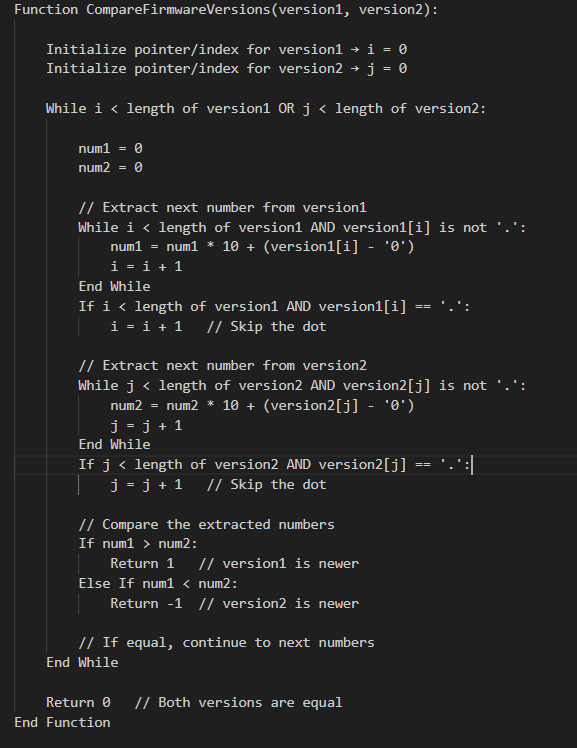
    Pseudocode: Compare Two Firmware Version Strings

    Pseudocode: Compare Two Firmware Version Strings

    How the Pseudocode Works

    1. Iterate through both version strings simultaneously.
    2. Extract numbers between dots (.) and convert them to integers.
    3. Compare numbers one by one:
      • If a number in version1 is greater → version1 is newer.
      • If a number in version2 is greater → version2 is newer.
      • If equal → continue.
    4. Handle versions of different lengths by treating missing numbers as 0.
    5. Return 0 if all numbers are equal.

    This pseudocode is optimized for embedded systems logic and avoids string splitting with extra memory allocation.

    C Program to Compare Firmware Version Strings

    Here’s a beginner-friendly C program that compares two version strings correctly:

    #include <stdio.h>
    #include <string.h>
    #include <stdlib.h>
    
    // Function to compare two firmware version strings
    int compareVersions(const char *v1, const char *v2) {
        // Create copies since strtok modifies strings
        char *ver1 = strdup(v1);
        char *ver2 = strdup(v2);
    
        char *token1 = strtok(ver1, ".");
        char *token2 = strtok(ver2, ".");
    
        while (token1 != NULL || token2 != NULL) {
            int num1 = (token1 != NULL) ? atoi(token1) : 0;
            int num2 = (token2 != NULL) ? atoi(token2) : 0;
    
            if (num1 > num2) {
                free(ver1); free(ver2);
                return 1;  // v1 is greater
            } else if (num1 < num2) {
                free(ver1); free(ver2);
                return -1; // v2 is greater
            }
    
            token1 = (token1 != NULL) ? strtok(NULL, ".") : NULL;
            token2 = (token2 != NULL) ? strtok(NULL, ".") : NULL;
        }
    
        free(ver1);
        free(ver2);
        return 0; // Both versions are equal
    }
    
    int main() {
        const char *v1 = "1.2.10";
        const char *v2 = "1.2.9";
    
        int result = compareVersions(v1, v2);
    
        if (result == 0) {
            printf("Both versions are equal.\n");
        } else if (result > 0) {
            printf("Version %s is newer than %s.\n", v1, v2);
        } else {
            printf("Version %s is newer than %s.\n", v2, v1);
        }
    
        return 0;
    }
    

    Explanation of the Code: Compare version numbers in embedded systems

    1. Splitting the version string:
      • We use strtok with "." as a delimiter to separate numbers like "1", "2", "10".
    2. Converting to integers:
      • Each token is converted using atoi().
      • "10" becomes 10 (so "1.10" > "1.2").
    3. Comparison logic:
      • If one number is greater, we immediately return the result.
      • If equal, we move to the next part.
      • If lengths differ (e.g., "1.2" vs "1.2.0.0"), missing parts are treated as 0.

    Example Output of C code for firmware version management

    For input:

    v1 = "1.2.10"
    v2 = "1.2.9"
    

    Output:

    Version 1.2.10 is newer than 1.2.9.
    

    Optimized Firmware Version Comparison in C (No strtok / No strdup)

    When writing firmware for resource-constrained embedded devices, we must minimize memory usage and avoid dynamic allocations like malloc, strdup, or even temporary token buffers.

    Instead of splitting the version string, we can parse it character by character, extracting numbers on the fly.

    Optimized C Code of Numeric comparison of version strings in C

    #include <stdio.h>
    #include <ctype.h>
    
    // Function to extract the next integer from version string
    int getNextNumber(const char **str) {
        int num = 0;
    
        // Parse until '.' or end of string
        while (**str && **str != '.') {
            if (isdigit(**str)) {
                num = num * 10 + (**str - '0');
            }
            (*str)++;
        }
    
        // Skip the '.' character
        if (**str == '.') {
            (*str)++;
        }
    
        return num;
    }
    
    // Compare two firmware version strings
    int compareVersions(const char *v1, const char *v2) {
        while (*v1 || *v2) {
            int num1 = getNextNumber(&v1);
            int num2 = getNextNumber(&v2);
    
            if (num1 > num2) return 1;   // v1 is greater
            if (num1 < num2) return -1;  // v2 is greater
        }
        return 0; // Versions are equal
    }
    
    int main() {
        const char *v1 = "2.10.3";
        const char *v2 = "2.9.15";
    
        int result = compareVersions(v1, v2);
    
        if (result == 0) {
            printf("Both versions are equal.\n");
        } else if (result > 0) {
            printf("Version %s is newer than %s.\n", v1, v2);
        } else {
            printf("Version %s is newer than %s.\n", v2, v1);
        }
    
        return 0;
    }
    

    How Compare software version strings in C Works

    1. getNextNumber function
      • Reads characters until a . or \0 (end of string).
      • Converts digits into an integer ("15" → 15).
      • Skips the dot (.) and prepares for the next segment.
    2. compareVersions function
      • Loops until both strings are fully read.
      • Extracts one integer from each version string.
      • Compares them immediately.
      • If equal, continues to the next part.
      • If different, returns the comparison result.
    3. No extra memory
      • Works directly on the input strings.
      • No heap allocation, no strdup, no strtok.

    C program to compare version numbers Example Run

    Input:

    v1 = "2.10.3"
    v2 = "2.9.15"

    Output:

    Version 2.10.3 is newer than 2.9.15.
    

    Advantages for Embedded Systems Compare version numbers in embedded systems

    • No dynamic memory allocation (safe for microcontrollers).
    • Faster execution since it parses directly.
    • Smaller memory footprint.
    • Works even if versions have different lengths ("1.2" vs "1.2.0.0").

    Real-World Use Cases of Compare version numbers in embedded systems

    • Over-the-Air (OTA) Updates: Check if the device needs a firmware upgrade.
    • Bootloaders: Ensure only newer firmware is flashed.
    • Diagnostics Tools: Display correct version hierarchy.
    • Version Management: Maintain compatibility in embedded systems.

    Final Thoughts of C code for firmware version management

    Comparing firmware version strings in C is more than a simple string check—it requires numeric comparison to handle multi-digit versions correctly. By splitting the string, converting to integers, and comparing each part step by step, you can build a robust firmware version checker for your embedded systems projects.

    Frequently Asked Questions (FAQ) | Firmware version comparison in C language

    1. Why can’t I compare firmware version strings using strcmp in C?

    Ans: strcmp performs a lexicographic (alphabetical) comparison, not numeric. For example, "1.10" would appear smaller than "1.2" because "1" and "10" are compared as text, not numbers. That’s why a numeric comparison is required.

    2. What is the correct way to compare firmware versions in C?

    Ans: The correct approach is to split the version string by dots (.), convert each part into an integer, and compare them one by one. This ensures "1.10" is correctly recognized as greater than "1.2".

    3. Which method is better: using strtok or parsing manually?

    Ans:
    strtok method
    : Easier for beginners, but uses extra memory and may not be ideal for embedded systems.
    Manual parsing: Reads characters directly, avoids dynamic memory, and is more efficient for resource-constrained devices.

    4. How do I handle firmware versions with different lengths, like "1.2" vs "1.2.0.0"?

    Ans: In proper version comparison, missing parts are treated as zero. So, "1.2" is considered equal to "1.2.0.0".

    5. Can this logic be used in embedded bootloaders?

    Ans: Yes. Bootloaders often need to check if the new firmware is newer than the current one before flashing. The optimized version comparison code (without malloc or strtok) is ideal for this purpose.

    6. How do I compare versions with suffixes like "1.2.3-beta"?

    Ans: The simple numeric comparison handles only numbers. If you need to compare suffixes like "alpha", "beta", or "rc", you’ll need to extend the logic with string handling rules for these labels.

    7. What are the real-world applications of firmware version comparison?

    Ans:
    Over-the-Air (OTA) updates
    Bootloader validation before flashing
    Diagnostics tools to report correct firmware version
    Embedded systems compatibility checks

    8. Does the optimized code work on all C compilers?

    Ans: Yes , The provided code uses standard C functions (isdigit, printf, basic loops), so it works across most C compilers and embedded toolchains.
    Compare firmware version strings in C
    Compare firmware version strings in C Master Embedded Coding (2025)
  • Firmware Test & Integration Engineer Latest Jobs in USA: Apply Now

    Are you looking to advance your career as a Firmware Test & Integration Engineer in the USA? Companies like EMO.energy are hiring talented engineers to test, validate, and integrate firmware for Battery Management Systems (BMS) and Electric Vehicle (EV) control units.

    About EMO.energy

    EMO.energy is a dynamic deep-tech startup revolutionizing electric mobility. From high-performance batteries to advanced EV control electronics, they are building next-generation electric vehicle systems. With rapid growth, EMO.energy is seeking passionate engineers to contribute to sustainable transportation solutions.

    Location: Bengaluru, Karnataka, India (On-site)
    Experience Required: 2–5 years
    Employment Type: Full-time

    Apply Here for Firmware Test & Integration Engineer at EMO.energy

    Job Role & Responsibilities

    As a Firmware Test & Integration Engineer, you will:

    • Design unit, integration, and system-level test cases for embedded firmware.
    • Conduct functional, regression, and stress testing on microcontroller-based systems.
    • Use lab tools like oscilloscopes, logic analyzers, and JTAG debuggers for debugging.
    • Develop automated test scripts using Python or C.
    • Validate CAN, I2C, SPI communication protocols for real-time performance.
    • Support hardware-firmware integration, board bring-up, and system-level validation.
    • Maintain detailed documentation for test execution and issues.

    Required Skills & Qualifications

    • Bachelor’s in Electronics, Electrical Engineering, Embedded Systems, or related fields.
    • 2–5 years of experience in embedded firmware testing and system integration.
    • Knowledge of ARM Cortex-M microcontrollers, RTOS, Autosar, or embedded Linux.
    • Hands-on experience with Python/C scripting, CI/CD for firmware testing.
    • Familiarity with communication protocols: CAN, I2C, SPI.
    • Experience with Battery Management Systems (BMS) or EV platforms is a plus.

    Why Apply?

    • Work with cutting-edge embedded systems and EV technology.
    • Gain hands-on experience in firmware testing, integration, and automated validation.
    • Opportunity for career growth in a high-demand sector.
    • Contribute to sustainable transportation solutions.

    How to Apply

    Click here to apply directly for the position:
    Firmware Test & Integration Engineer at EMO.energy – Apply Now

    Pro Tip: Update your resume with keywords like: “embedded firmware testing,” “microcontroller debugging,” “system integration,” “hardware-firmware validation,” and “CI/CD automation” to stand out to recruiters.

  • Reverse a Hex Number in C | Master Embedded Coding (2026)

    Reverse a Hex Number in C : If you are learning C programming, working with hexadecimal numbers is an important skill. One common task is to reverse a hex number – that means flipping its digits from last to first.Master the art of reversing a hexadecimal number with this beginner-friendly guide covering C++, Python, and Java. Learn what hex numbers are, how reversal works, and explore simple, step-by-step programs for each language. Perfect for students and programmers looking to practice string manipulation, number system basics, and improve problem-solving skills with real coding examples.
    In this tutorial, we will explain what a hex number is, how reversing works, and how to write C code to reverse a hexadecimal number step-by-step.

    What is a Hex Number?

    A hexadecimal number (or hex number) is a number system with base 16.
    It uses digits 0-9 and letters A-F:

    Hex: 0, 1, 2, ..., 9, A, B, C, D, E, F
    Decimal: 0, 1, 2, ..., 9, 10, 11, 12, 13, 14, 15
    

    Example:

    • Hex 1A3F in decimal is 6719.

    What Does “Reverse a Hex Number” Mean?

    Reversing a hex number means reading its hexadecimal digits from right to left.

    Example:

    Original: 1A3F  
    Reversed: F3A1
    

    Steps to Reverse a Hex Number in C

    We can reverse a hex number by:

    1. Reading the number as a string (so letters and numbers are preserved).
    2. Reversing the string by swapping characters.
    3. Printing the reversed hex number.

    1.C Program to Reverse a Hex Number

    #include <stdio.h>
    #include <string.h>
    
    int main() {
        char hex[100]; // To store hex number as string
        int length, i;
        char temp;
    
        // Step 1: Input hex number
        printf("Enter a hexadecimal number: ");
        scanf("%s", hex);
    
        // Step 2: Find length
        length = strlen(hex);
    
        // Step 3: Reverse the string
        for (i = 0; i < length / 2; i++) {
            temp = hex[i];
            hex[i] = hex[length - i - 1];
            hex[length - i - 1] = temp;
        }
    
        // Step 4: Output the reversed hex number
        printf("Reversed hexadecimal number: %s\n", hex);
    
        return 0;
    }
    

    Example Output

    Enter a hexadecimal number: 1A3F
    Reversed hexadecimal number: F3A1
    

    How Reverse a Hex Number Code Works

    • We store the hex number as a string to preserve both numbers and letters.
    • strlen() helps us find how many characters are in the input.
    • A loop swaps characters from start and end until the middle is reached.
    • Finally, we print the reversed result.

    Key Points of Reverse a Hex Number

    • Use char[] to store hex numbers with letters.
    • Always handle input as a string, not as an integer, when reversing.
    • Works for both uppercase (A-F) and lowercase (a-f) hex letters.

    2. Reverse a Hex Number in C++

    #include <iostream>
    #include <string>
    #include <algorithm>
    using namespace std;
    
    int main() {
        string hexNum;
    
        // Step 1: Input hex number
        cout << "Enter a hexadecimal number: ";
        cin >> hexNum;
    
        // Step 2: Reverse the string
        reverse(hexNum.begin(), hexNum.end());
    
        // Step 3: Output reversed hex
        cout << "Reversed hexadecimal number: " << hexNum << endl;
    
        return 0;
    }
    

    Explanation:

    • We use string to store the hex value.
    • The reverse() function from <algorithm> quickly reverses the characters.
    • Works for both uppercase and lowercase letters.

    3. Reverse a Hex Number in Python

    # Step 1: Input hex number
    hex_num = input("Enter a hexadecimal number: ")
    
    # Step 2: Reverse the string using slicing
    reversed_hex = hex_num[::-1]
    
    # Step 3: Output result
    print("Reversed hexadecimal number:", reversed_hex)
    

    Explanation:

    • Python treats strings as sequences, so slicing [::-1] reverses the string easily.
    • This method is the shortest and beginner-friendly.

    4. Reverse a Hex Number in Java

    import java.util.Scanner;
    
    public class ReverseHex {
        public static void main(String[] args) {
            Scanner sc = new Scanner(System.in);
    
            // Step 1: Input hex number
            System.out.print("Enter a hexadecimal number: ");
            String hexNum = sc.next();
    
            // Step 2: Reverse using StringBuilder
            String reversedHex = new StringBuilder(hexNum).reverse().toString();
    
            // Step 3: Output result
            System.out.println("Reversed hexadecimal number: " + reversedHex);
    
            sc.close();
        }
    }
    

    Explanation:

    • Java’s StringBuilder class has a built-in reverse() method.
    • Using toString() converts the reversed object back into a string.

    Example Run for Reverse a Hex Number in all Languages

    Enter a hexadecimal number: 1A3F
    Reversed hexadecimal number: F3A1
    

    Key Takeaways

    • Always store hex numbers as strings when reversing.
    • C++ uses reverse() from <algorithm>.
    • Python uses slicing [::-1].
    • Java uses StringBuilder.reverse().

    FAQ : Reverse a Hex Number in C

    Q1: What does it mean to reverse a hex number in C?

    Ans: Reversing a hex number means rearranging its hexadecimal digits in reverse order. For example, reversing 0x1A3F gives 0xF3A1. This is often used in embedded systems and low-level programming.

    Q2: How can I reverse a hex number in C?

    Ans: You can reverse a hex number by extracting each digit using bitwise operations or string manipulation, and then reconstructing the number in reverse order.

    Q3: Can I reverse a hex number using arrays or strings?

    Ans: Yes! You can convert the hex number to a string, reverse the string, and convert it back to a number. This method is simple and beginner-friendly.

    Q4: Is reversing a hex number different in C++ or Python?

    Ans: The concept is the same across languages, but the implementation differs. In C++, you can use std::string for easy manipulation. In Python, you can use slicing to reverse the string representation of a hex number.

    Q5: Why is reversing a hex number important in embedded systems?

    Ans: Reversing hex numbers is useful in memory management, communication protocols, endianness handling, and debugging, where the byte order matters.

    Q6: Are there any common mistakes to avoid when reversing hex numbers in C?

    Ans: Common mistakes include ignoring leading zeros, not handling negative numbers correctly, and mixing up bitwise operations with string manipulation methods.
  • QNX Operating System vs Linux | Master QNX RTOS A Beginner’s Guide (2026)

    QNX Operating System vs Linux : Discover the difference between the QNX Operating System and Linux in this beginner-friendly guide. Learn how BlackBerry QNX delivers real-time performance, safety, and reliability for automotive, medical, and industrial applications compared to Linux’s flexibility and open-source power.

    When it comes to choosing an operating system for embedded systems and mission-critical applications, two popular options are the QNX Operating System and Linux. Both have their strengths, but they are designed for different purposes.
    This article will help beginners understand what the QNX Operating System vs Linux is, how it compares to Linux, and where each one is best used.

    What is the QNX Operating System?

    The QNX Operating System is a real-time operating system (RTOS) developed by BlackBerry Limited. It is known for its high reliability, safety, and deterministic performance, making it ideal for environments where failure is not an option.

    Main features of the QNX Operating System:

    • Microkernel architecture — only essential services (like scheduling and interprocess communication) run in the kernel for improved stability.
    • Real-time capabilities — guarantees predictable responses within strict deadlines.
    • POSIX compliance — allows easier porting of software from other Unix-like systems.
    • Fault resilience — if one component fails, the rest of the system remains unaffected.

    Where the QNX Operating System is used:

    • Automotive infotainment and safety systems
    • Aerospace and defense equipment
    • Medical devices
    • Industrial automation systems

    What is Linux?

    Linux is a general-purpose, open-source operating system used on everything from smartphones to servers and IoT devices. Unlike the QNX Operating System, Linux uses a monolithic kernel and is maintained by a global open-source community.

    Main features of Linux:

    • Monolithic kernel — all core OS services run in kernel space.
    • Highly customizable — hundreds of distributions to suit different needs.
    • Large developer community — constant updates and support.
    • Wide hardware compatibility — runs on small IoT boards to large data centers.

    QNX Operating System vs Linux : Key Differences

    FeatureQNX Operating SystemLinux Operating System
    TypeReal-Time Operating System (RTOS)General-Purpose Operating System
    Kernel ArchitectureMicrokernelMonolithic kernel
    Real-Time CapabilityHard real-time, deterministicNot hard real-time (PREEMPT_RT patch adds soft real-time)
    LicensingCommercial (BlackBerry QNX)Open-source (GPL and others)
    ReliabilityExtremely high, fault-tolerantStable but less fault isolation
    CustomizationSafety-critical focusBroad customization options
    Typical Use CasesAutomotive, aerospace, medical, industrialServers, desktops, IoT, embedded devices
    Community SupportVendor-providedLarge open-source community

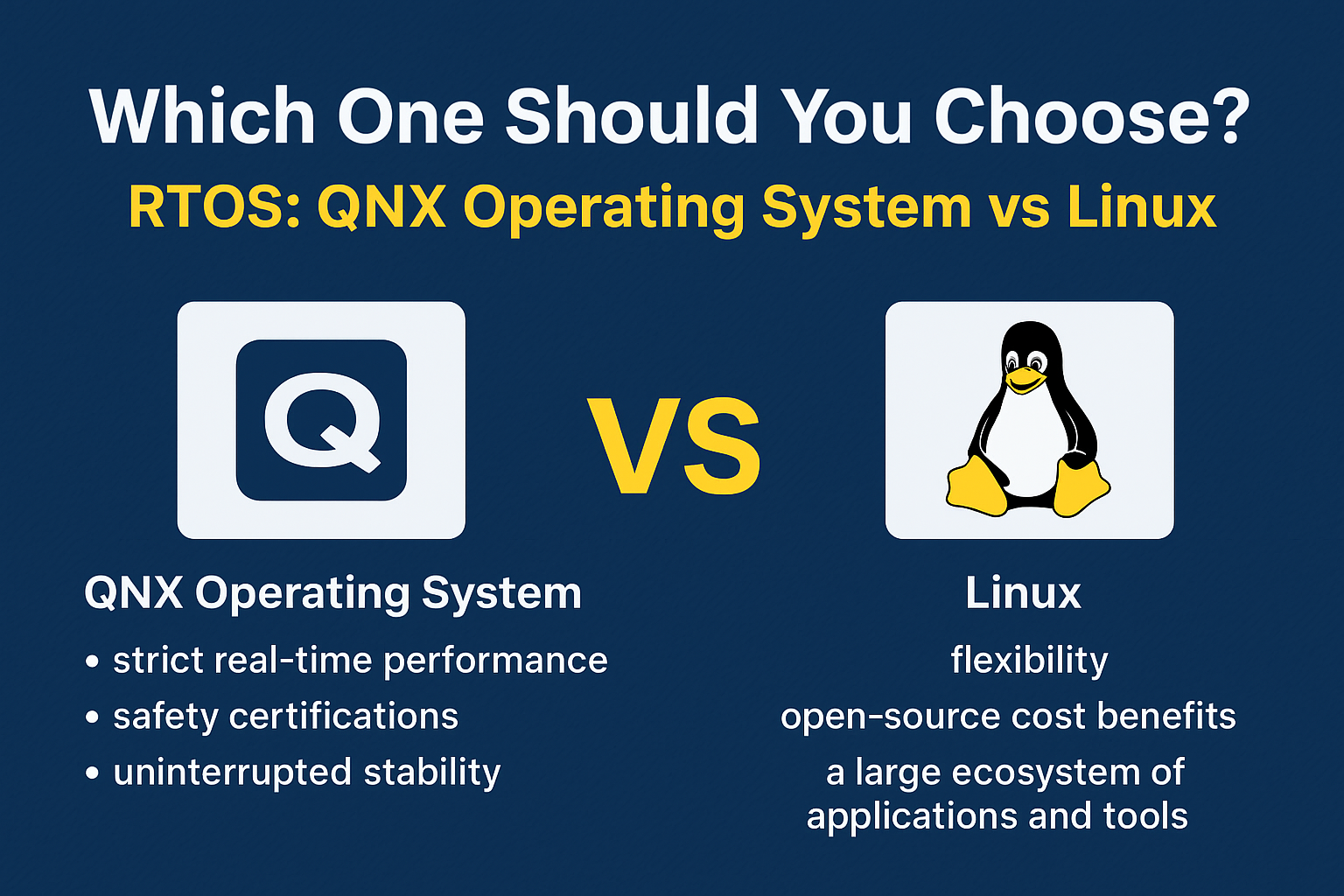
    Which One Should You Choose QNX & LINUX ?

    Choosing between the QNX Operating System and Linux depends on your project’s requirements, performance goals, and safety needs. Both are powerful, but they shine in different areas.

    When to Choose the QNX Operating System

    The QNX Operating System, developed by BlackBerry QNX, is the right choice when:

    • Your project demands strict real-time performance with predictable response times.
    • You are working on safety-critical systems that require certifications such as ISO 26262 (automotive), IEC 62304 (medical devices), or DO-178C (aerospace).
    • You need uninterrupted stability — if one software component crashes, the rest of the system should remain unaffected thanks to QNX’s microkernel architecture.
    • You’re developing for industries like automotive infotainment, industrial automation, aerospace, or defense, where downtime is unacceptable.

    In short, BlackBerry QNX is designed for environments where failure is not an option and real-time precision is critical.

    When to Choose Linux

    Linux is the right choice when:

    • You need flexibility and the freedom to customize the OS for different purposes.
    • You want the cost benefits of open-source software without paying licensing fees.
    • Your application benefits from a large ecosystem of tools, libraries, and developer support.
    • Real-time precision is not your top priority, or you can manage with soft real-time capabilities by using the PREEMPT_RT patch.
    • Your focus is on building servers, IoT devices, development platforms, or consumer electronics.

    Linux is ideal when you need versatility, fast development, and broad hardware compatibility rather than strict safety certifications.

    Bottom line:

    • Choose the QNX Operating System if you’re building mission-critical, real-time, and safety-certified applications.
    • Choose Linux if you want open-source flexibility, community support, and broad use cases.

    Conclusion QNX Operating System vs Linux

    The QNX Operating System and Linux both serve important roles in the world of technology.

    • QNX shines in real-time, safety-critical applications.
    • Linux excels in general-purpose and flexible environments.

    Your choice will depend on whether you prioritize deterministic performance or flexibility and cost-efficiency.

    1. What is the QNX Operating System used for?

    The QNX Operating System is mainly used in safety-critical and real-time applications such as automotive systems, aerospace equipment, medical devices, and industrial control systems. It is chosen for its high reliability, fault tolerance, and deterministic performance.

    2. Is the QNX Operating System open source?

    No, the QNX Operating System is a commercial product owned by BlackBerry Limited. It requires licensing for use, unlike Linux, which is open source and free to download.

    3. How is the QNX Operating System different from Linux?

    The QNX Operating System is a real-time microkernel-based OS, while Linux is a general-purpose monolithic kernel OS. QNX focuses on predictable execution and fault isolation, whereas Linux emphasizes flexibility, customization, and community support.

    4. Can Linux replace the QNX Operating System?

    In most real-time, safety-critical environments, Linux cannot fully replace the QNX Operating System because Linux does not provide the same level of hard real-time guarantees. However, with the PREEMPT_RT patch, Linux can handle some real-time workloads.

    5. Why do automotive companies prefer the QNX Operating System?

    Automotive companies use the QNX Operating System because it meets strict safety and reliability standards such as ISO 26262. It ensures that vehicle systems like infotainment, navigation, and driver assistance run without unexpected delays or failures.

    6. Is the QNX Operating System better than Linux?

    Neither is universally “better” — the QNX Operating System is better for time-sensitive, safety-critical applications, while Linux is better for general-purpose and cost-effective solutions.
    QNX Operating System vs Linux | Master QNX RTOS
    QNX Operating System vs Linux Master QNX RTOS A Beginner’s Guide (2025)
  • What Are the Typical Synchronization Mechanisms Used in an RTOS? | RTOS Interview Question (2026)

    Typical synchronization mechanisms used in an RTOS (Real-Time Operating System) are techniques that manage the coordination and safe sharing of resources among multiple tasks running concurrently. These mechanisms—such as semaphores, mutexes, event flags, message queues, mailboxes, and barriers—help prevent race conditions, ensure mutual exclusion, and maintain deterministic behavior in time-critical applications. By enabling controlled access to shared memory, devices, and data structures, they keep real-time systems stable, predictable, and efficient. Whether it’s signaling between tasks, protecting resources, or coordinating task execution, these synchronization tools are essential for reliable RTOS performance.

    Typical Synchronization Mechanisms Used in an RTOS

    In a Real-Time Operating System (RTOS), multiple tasks often run concurrently and may need to share resources such as memory, hardware devices, or data structures. Without proper control, two tasks could try to access the same resource at the same time, leading to race conditions or data corruption.

    This is where synchronization mechanisms come into play. They ensure safe, predictable, and coordinated access to shared resources, maintaining system stability in real-time environments.

    Why Synchronization is Important in RTOS

    In real-time systems, timing and reliability are critical. Synchronization helps to:

    • Prevent race conditions and data corruption
    • Ensure mutual exclusion (only one task can access a resource at a time)
    • Maintain task coordination and predictable behavior
    • Improve system stability and deterministic performance

    Typical Synchronization Mechanisms Used in RTOS

    1. Semaphores

    A semaphore is a signaling mechanism that controls access to resources.

    • Binary Semaphore: Works like an on/off flag. Useful for task signaling and simple mutual exclusion.
    • Counting Semaphore: Allows a fixed number of tasks to access a resource simultaneously.

    Example: In an RTOS-based printer control system, a counting semaphore can allow up to 3 print jobs to be queued at the same time.

    2. Mutex (Mutual Exclusion)

    A mutex ensures that only one task can access a shared resource at any given moment.

    • Often supports priority inheritance, which helps prevent priority inversion problems in real-time systems.

    Example: Protecting a shared log file from being written by multiple tasks at the same time.

    3. Event Flags

    Event flags (or event groups) allow tasks to wait for specific conditions to occur.

    • Multiple bits in a flag group can represent different events.
    • Tasks can wait for any or all events to be set before proceeding.

    Example: A task waits for both “data received” and “data processed” flags before sending the next packet.

    4. Message Queues

    Message queues allow safe communication between tasks by sending and receiving messages in FIFO (First In, First Out) order.

    • Helps decouple tasks — the sender and receiver do not need to run at the same time.
    • Supports data passing with built-in synchronization.

    Example: A sensor task sends temperature readings to a processing task via a message queue.

    5. Mailboxes

    A mailbox is like a message queue but usually designed for fixed-size messages and single message storage.

    • Suitable when tasks need to exchange small messages quickly.

    Example: A control task sends a command to a motor driver task using a mailbox.

    6. Barriers

    A barrier is a synchronization point where multiple tasks must wait until all have reached the barrier before continuing.

    • Useful for coordinating stages in multi-task processing.

    Example: In a multi-core RTOS system, all tasks wait at a barrier until data loading is complete.

    Choosing the Right Mechanism

    The right synchronization mechanism depends on:

    • Type of resource (shared memory, hardware device, data buffer)
    • Number of tasks accessing the resource
    • Real-time constraints and timing requirements
    • Data size and communication frequency

    Quick Guide:

    • Use mutex for exclusive access to a resource.
    • Use semaphore for signaling between tasks or controlling resource count.
    • Use event flags for multi-condition synchronization.
    • Use message queues/mailboxes for safe inter-task communication.
    • Use barriers for group synchronization.

    Final Thoughts

    In an RTOS, synchronization mechanisms are essential for building stable, predictable, and safe embedded applications. Whether you are working with FreeRTOS, QNX, VxWorks, or any other RTOS, mastering semaphores, mutexes, event flags, and message queues will significantly improve your ability to design efficient real-time systems.

    FAQ – Typical Synchronization Mechanisms in an RTOS

    1. What is synchronization in an RTOS?

    Synchronization in an RTOS ensures that multiple tasks can safely share resources without conflicts or data corruption. It helps coordinate task execution and maintain predictable system behavior.

    2. Why is synchronization important in real-time systems?

    In real-time systems, timing is critical. Synchronization prevents race conditions, ensures mutual exclusion, and keeps system performance consistent and deterministic.

    3. What are the most common synchronization mechanisms in RTOS?

    The most common synchronization mechanisms include:

    • Semaphores (binary and counting)
    • Mutexes
    • Event flags
    • Message queues
    • Mailboxes
    • Barriers

    4. What is the difference between a semaphore and a mutex in RTOS?

    A semaphore is a signaling mechanism that can be used by multiple tasks, while a mutex provides exclusive access to a resource and usually supports priority inheritance to avoid priority inversion.

    5. When should I use event flags in RTOS?

    Event flags are best when a task must wait for one or more conditions to occur before continuing execution—such as waiting for multiple sensors to signal readiness.

    6. What is a message queue used for in RTOS?

    A message queue allows tasks to send and receive data safely, even if they run at different times. It supports FIFO ordering and prevents data loss during task communication.

    7. Do all RTOS platforms support the same synchronization mechanisms?

    No. While most RTOS platforms support semaphores, mutexes, and message queues, advanced features like barriers or event flags may vary depending on the RTOS (e.g., FreeRTOS, QNX, VxWorks).