Tag: real-time operating system

  • Master QNX OS Interview Questions and Answer 2026

    QNX OS interview questions and answers for 2026, explained in simple language. Covers microkernel architecture, IPC, scheduling, resource managers, and real-time concepts for embedded and automotive engineers.

    This collection of QNX OS interview questions and answers is designed for engineers who want to truly understand QNX, not just memorize definitions. The questions are written in a practical way, similar to what is actually asked in real technical interviews, especially for automotive, embedded, and RTOS roles.

    The content starts from basic concepts, such as what QNX is, why it is called a microkernel OS, and how it differs from Linux. As the questions progress, they move into core internal topics like kernel space vs user space, message passing, processes and threads, scheduling, IPC, and resource managers. Advanced sections cover fault tolerance, adaptive partitioning, real-time behavior, priority scheduling, and system reliability, which are commonly discussed in senior-level interviews.

    Each answer is written in simple language, focusing on clarity and understanding, not textbook definitions. Wherever possible, explanations reflect real-world behavior, how QNX works internally, and how engineers actually use it in production systems like automotive ECUs, medical devices, and industrial controllers.

    This material is especially useful for:

    • Embedded Software Engineers
    • Automotive/QNX Developers
    • RTOS and System Programming Interviews
    • Engineers working with QNX Neutrino

    The goal is not to impress with complex wording, but to help you explain QNX confidently and naturally during interviews just like an experienced engineer would.

    QNX is a POSIX-compliant, microkernel-based real-time operating system used in embedded and safety-critical systems. It provides deterministic real-time performance, high reliability, and fault isolation, making it ideal for automotive, medical, industrial, and aerospace applications.

    Key Points to Mention in Interviews

    • RTOS (Real-Time OS) → Guarantees predictable response times
    • Microkernel architecture → Only essential services (scheduler, IPC, interrupts) run in kernel
    • Fault tolerant → A crashing driver doesn’t crash the whole system
    • POSIX compliant → Familiar Linux/UNIX APIs
    • High reliability & safety → Used in ADAS, infotainment, medical devices
    • Message-passing IPC → Core communication mechanism
    • Certified OS → ISO 26262, IEC 61508, etc.

    Where QNX is Used

    • Automotive (Infotainment, ADAS, Digital Cockpits)
    • Medical Devices
    • Industrial Automation
    • Aerospace & Defense
    • Robotics

    QNX is a real-time operating system (RTOS).

    Interview-Ready Answer

    QNX is a hard real-time operating system that provides deterministic and predictable response times, which makes it suitable for safety-critical embedded systems.

    Why QNX is Real-Time

    • Deterministic scheduling → Guaranteed response within deadlines
    • Microkernel architecture → Minimal kernel, faster interrupt handling
    • Priority-based preemptive scheduling
    • Message-passing IPC → Core real-time communication mechanism
    • Low interrupt latency & jitter

    Hard vs Soft Real-Time

    • QNX = Hard real-time OS
      Missing a deadline is considered a system failure (important for automotive, medical systems).

    Interview One-Liner (Strong)

    QNX is a POSIX-compliant, microkernel-based hard real-time operating system designed for deterministic and safety-critical applications.

    In QNX, a microkernel means that only the most essential operating system services run in the kernel, such as the scheduler, interrupt handling, and inter-process communication (IPC). All other services like device drivers, file systems, networking, and protocol stacks run as user-space processes.

    Key Points to Mention

    1. Minimal Kernel → Only critical functions run in kernel space.
    2. User-space Services → Most OS services run as separate processes, improving stability and fault isolation.
    3. Fault Isolation → If a driver or service crashes, it won’t crash the whole system.
    4. Message-Passing IPC → Kernel facilitates communication between processes efficiently.
    5. Real-Time Friendly → Microkernel keeps latency low, making it suitable for hard real-time applications.

    Example Explanation

    • Suppose the audio driver crashes in QNX → Only that driver stops; the OS and other applications continue running.
    • Contrast this with monolithic kernels (like Linux), where a driver crash can crash the whole system.

    One-Liner for Interviews

    QNX’s microkernel architecture runs only essential services in the kernel, while other services run in user space, providing fault tolerance and real-time performance.

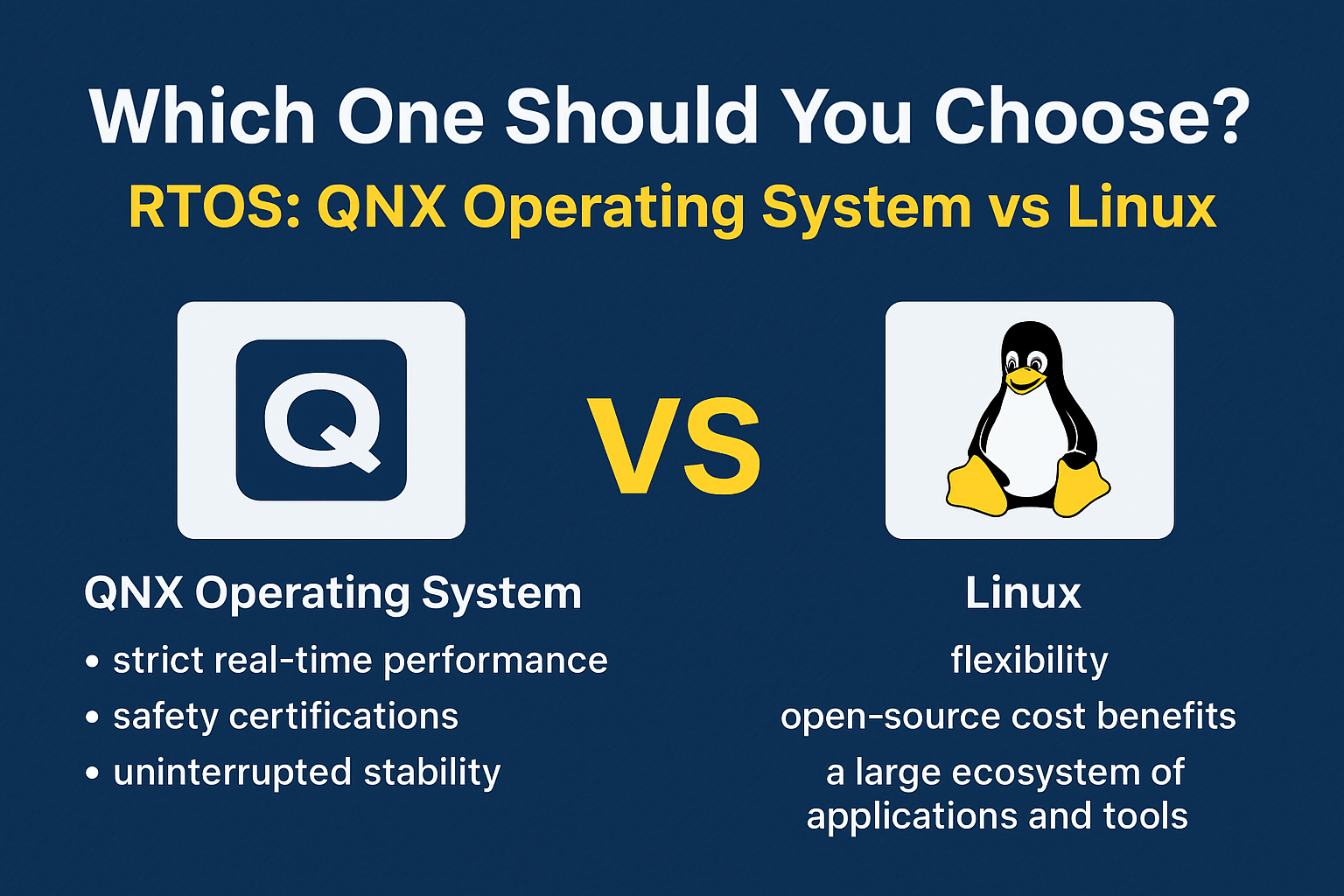
    QNX is a microkernel-based real-time operating system designed for deterministic, safety-critical embedded systems, while Linux is a monolithic, general-purpose OS that is not inherently real-time (unless using PREEMPT_RT patches).

    Key Differences to Mention

    FeatureQNXLinux
    Kernel TypeMicrokernelMonolithic
    Real-Time SupportHard real-time (deterministic)General-purpose; soft real-time with PREEMPT_RT
    Fault IsolationHigh – services run in user space; crashes don’t crash OSLow – kernel modules can crash entire system
    Inter-Process Communication (IPC)Message-passing via microkernelShared memory, signals, pipes (less deterministic)
    Typical Use CaseAutomotive, medical, industrial, aerospaceDesktop, servers, embedded systems (non-critical)
    Memory FootprintSmall, lightweightLarger, heavier
    Boot TimeFast, optimized for embedded systemsSlower, general-purpose boot
    CertificationISO 26262, IEC 61508, DO-178Not generally certified for safety-critical applications

    Example for Interview

    • Automotive Infotainment: QNX → Digital dashboard (hard real-time, fault-tolerant).
    • Desktop Application: Linux → Ubuntu OS on a laptop.

    One-Liner for Interviews

    QNX is a real-time, microkernel OS optimized for safety-critical embedded systems, whereas Linux is a general-purpose monolithic OS with limited real-time support.

    QNX is widely used in embedded and safety-critical systems where reliability, fault tolerance, and real-time performance are essential.

    Key Areas / Industries

    1. Automotive
      • Infotainment systems (digital dashboards, touchscreens)
      • Advanced Driver Assistance Systems (ADAS)
      • Digital cockpits and instrument clusters
    2. Medical Devices
      • Life-support equipment, patient monitors
      • Imaging systems
    3. Industrial Automation
      • Robotics, PLCs, factory automation controllers
      • Process control systems
    4. Aerospace & Defense
      • Avionics and flight control systems
      • Mission-critical embedded electronics
    5. Telecommunications
      • Network switches, base stations
    6. IoT and Embedded Devices
      • Smart appliances, robotics, edge devices

    Example for Interview

    “For example, in automotive, QNX is used in digital dashboards where a crash in the media player or Bluetooth module won’t take down the whole system, thanks to its microkernel architecture.”

    One-Liner

    QNX is commonly used in automotive, medical, industrial, aerospace, and telecommunications systems where reliability and real-time performance are critical.

    QNX is a microkernel-based real-time operating system with features designed for embedded and safety-critical systems, providing high reliability, determinism, and fault tolerance.

    Key Features

    1. Microkernel Architecture
      • Only essential services run in the kernel (scheduler, IPC, interrupts)
      • Other services (drivers, file systems, networking) run in user space
      • Ensures fault isolation and system stability
    2. Real-Time Performance
      • Hard real-time deterministic scheduling
      • Low interrupt latency and predictable response times
      • Priority-based preemptive multitasking
    3. POSIX Compliance
      • Supports standard UNIX/Linux APIs
      • Eases application porting from other systems
    4. Inter-Process Communication (IPC)
      • Efficient message-passing mechanism
      • Supports synchronous and asynchronous communication between processes
    5. Fault Tolerance & High Reliability
      • Crashing of a driver or service does not crash the OS
      • Critical for safety-certified applications
    6. Scalability
      • Runs on small microcontrollers to complex multi-core systems
      • Suitable for both resource-constrained devices and high-end embedded platforms
    7. File System Support
      • Journaling and networked file systems for reliability
      • Can integrate custom embedded file systems
    8. Networking & Communication
      • Supports TCP/IP, CAN, USB, and other industrial protocols
      • Suitable for connected embedded systems
    9. Security & Safety Certification
      • ISO 26262 (Automotive), IEC 61508 (Industrial), DO-178B/C (Aerospace)
      • Enables use in safety-critical applications
    10. Modularity
      • Easy to add/remove components without affecting the kernel
      • Lightweight and customizable for specific embedded use cases

    Example for Interview

    “For instance, in an automotive digital dashboard, QNX ensures that even if the media or Bluetooth service crashes, the display of speed, fuel, and engine status continues to work reliably, thanks to its microkernel architecture and fault isolation.”

    One-Liner for Interviews

    QNX features a microkernel architecture, hard real-time performance, fault tolerance, POSIX compliance, scalable modular design, and is certified for safety-critical systems.

    POSIX compliance in QNX means that the operating system supports standard UNIX/Linux APIs and interfaces, allowing developers to write portable applications that can run on QNX with minimal changes.

    Key Points to Mention

    1. Standardized API
      • QNX provides POSIX-compliant system calls for file I/O, process management, threading, signals, and IPC.
      • Makes it familiar to developers coming from Linux or UNIX environments.
    2. Portability
      • Applications written using POSIX APIs can be easily ported between QNX and other POSIX-compliant systems.
    3. Real-Time Extensions
      • QNX extends POSIX with real-time features, such as real-time scheduling (SCHED_FIFO, SCHED_RR) and priority inheritance mutexes.
    4. Example APIs in QNX
      • File operations: open(), read(), write(), close()
      • Threads: pthread_create(), pthread_join()
      • IPC: mq_open(), mq_send(), mq_receive() (message queues)
    5. Why It Matters
      • Reduces development time and learning curve
      • Enables cross-platform development for embedded systems
      • Ensures consistency and standard compliance in embedded applications

    Example for Interview

    “If you have an application written for Linux using standard POSIX threads and message queues, you can port it to QNX almost directly because QNX supports the same POSIX APIs, while also providing real-time guarantees.”

    One-Liner for Interviews

    POSIX compliance in QNX ensures standard UNIX/Linux API support, enabling application portability and consistent development while adding real-time capabilities.

    QNX is a proprietary operating system developed by BlackBerry. It is not open source, and its source code is licensed under commercial terms.

    Key Points to Mention

    1. Proprietary License
      • QNX requires a commercial license for development and deployment.
      • Source code is not freely available to the public.
    2. Commercial Support
      • BlackBerry provides official support, updates, and safety certifications.
      • Essential for automotive, medical, and industrial applications.
    3. Contrast with Open Source OS
      • Linux, FreeRTOS → Open source, source code freely available.
      • QNX → Closed-source, with guaranteed reliability and certification.
    4. Why Proprietary Matters
      • Ensures controlled development, rigorous testing, and compliance with safety standards like ISO 26262 or IEC 61508.

    One-Liner for Interviews

    QNX is a proprietary, commercially licensed real-time operating system with source code controlled by BlackBerry.

    Neutrino is the microkernel-based real-time operating system (RTOS) at the core of QNX. It provides the fundamental services like scheduling, inter-process communication (IPC), and interrupt handling, enabling QNX to deliver deterministic, reliable, and fault-tolerant performance in embedded systems.

    Key Points to Mention

    1. Core of QNX
      • Neutrino is the actual OS kernel.
      • All QNX services (file system, networking, drivers) run on top of Neutrino.
    2. Microkernel Architecture
      • Only essential functions (scheduler, IPC, interrupt handling) are in the Neutrino kernel.
      • Other services run in user space → better fault isolation.
    3. Real-Time Capabilities
      • Supports hard real-time scheduling.
      • Ensures predictable response times for critical applications.
    4. POSIX Compliance
      • Neutrino implements POSIX APIs, allowing applications to be portable from UNIX/Linux.
    5. Fault-Tolerant
      • If a driver or service crashes, Neutrino keeps the system running.

    Example for Interview

    “In an automotive dashboard, Neutrino ensures that the speedometer and fuel gauge continue updating even if a non-critical service like media playback crashes, thanks to its microkernel design.”

    One-Liner for Interviews

    Neutrino is the microkernel RTOS at the heart of QNX, providing deterministic real-time performance, POSIX compliance, and fault tolerance for embedded systems.

    Deterministic behavior in an RTOS means that the system responds to events or interrupts within a guaranteed, predictable amount of time, regardless of system load. This is essential for real-time applications where timing is critical.

    Key Points to Mention

    1. Predictable Response
      • A deterministic RTOS ensures that tasks meet their deadlines consistently.
      • Example: If a sensor triggers an interrupt, the OS handles it within a fixed maximum latency.
    2. Critical for Real-Time Systems
      • Timing guarantees are required in automotive, medical, aerospace, and industrial systems.
      • Missing deadlines can lead to system failures or safety hazards.
    3. Determinism vs Speed
      • Determinism focuses on predictability, not just fast execution.
      • Even if execution is slightly slower, as long as timing is predictable, it’s considered deterministic.
    4. Example
      • In a car’s ABS system, the RTOS must read wheel speed sensors and control brakes within exact deadlines. QNX ensures this deterministic behavior.

    One-Liner for Interviews

    Deterministic behavior in an RTOS means predictable, guaranteed response times to events or interrupts, ensuring real-time deadlines are always met.

    The latest major version of QNX is QNX Software Development Platform (SDP) 8.0. It includes:

    • QNX OS 8.0 – The core microkernel-based real-time operating system.
    • QNX OS for Safety 8.0 – Safety-certified edition for critical systems (ISO 26262, IEC 61508).
    • QNX Hypervisor 8.0 – Embedded virtualization platform.
    • QNX Momentics IDE 8.0.x – Development environment supporting SDP 8.0.

    Key Points:

    • Designed for embedded and safety-critical systems.
    • Provides deterministic real-time performance.
    • Supports fault isolation and microkernel architecture.

    One-Liner for Interviews:

    “QNX SDP 8.0 is the latest version, with QNX OS 8.0 at its core, optimized for embedded and safety-critical applications.”

    QNX Architecture

    QNX Architecture Overview

    QNX is a microkernel-based real-time operating system (RTOS). Its architecture is designed for high reliability, modularity, and real-time performance.

    The main layers are:

    1. Microkernel

    • Core of QNX.
    • Very small and minimal: only contains the most essential OS functions.
    • Responsibilities:
      • Task scheduling (prioritized, real-time scheduling)
      • Interprocess communication (IPC)
      • Interrupt handling
      • Timers
      • Low-level memory management
    • All other OS services run as user-space processes, not inside the kernel.

    Key point: This design improves stability because a crash in a service doesn’t crash the entire system.

    2. Process Managers (User-space Services)

    These are system services that run outside the kernel, providing higher-level OS functionalities:

    ServiceFunction
    File SystemManages files, directories, and storage devices.
    Network StackHandles TCP/IP, UDP, and network protocols.
    Device DriversHardware control (keyboard, serial, audio, display) as user-space tasks.
    Resource ManagersUnified interface for devices & files, exposing them as files (/dev).
    Timers / ClocksUser-space timers and scheduling assistance.
    • These services communicate with each other and with the microkernel via IPC.
    • Because they are separate from the kernel, if one fails, the system can continue running.

    3. Application Layer

    • Your user applications run here.
    • They request services via standard APIs or POSIX calls, which get translated into IPC messages to the microkernel or system services.
    • Applications are fully isolated, which enhances reliability.

    4. Communication Model

    • QNX uses message-passing IPC instead of traditional system calls.
    • Every process can send and receive messages synchronously or asynchronously.
    • This ensures determinism, essential for real-time systems.

    5. Memory Architecture

    • Microkernel handles basic memory protection.
    • Applications and services are isolated in their own address space, preventing accidental overwrites.
    • Memory faults in one service usually do not affect the kernel or other services.

    6. Highlights of QNX Architecture

    • Modular & Scalable: Add/remove services without touching the kernel.
    • Fault-Tolerant: Crashes in user-space services don’t crash the kernel.
    • Deterministic: Real-time scheduling ensures predictable behavior.
    • POSIX-Compliant: Supports standard APIs for portability.

    Architecture Diagram (Text Representation)

    +----------------------------------+
    |         User Applications        |
    +----------------------------------+
    |        POSIX APIs / Libraries    |
    +----------------------------------+
    |       User-Space Services        |
    |  (File System, Network, Drivers)|
    +----------------------------------+
    |           Microkernel            |
    |  (Scheduler, IPC, Interrupts)   |
    +----------------------------------+
    |           Hardware Layer         |
    +----------------------------------+
    

    Interview-Friendly Answer:

    “QNX has a microkernel-based architecture, where the kernel is minimal and handles only essential functions like task scheduling, interprocess communication (IPC), interrupt handling, and memory management. All other services, such as file systems, network stacks, and device drivers, run as user-space processes, communicating with the kernel and each other via IPC. Applications run on top of these services using POSIX APIs. This modular design ensures high reliability, fault tolerance, and deterministic real-time performance, making QNX ideal for embedded and safety-critical systems.”
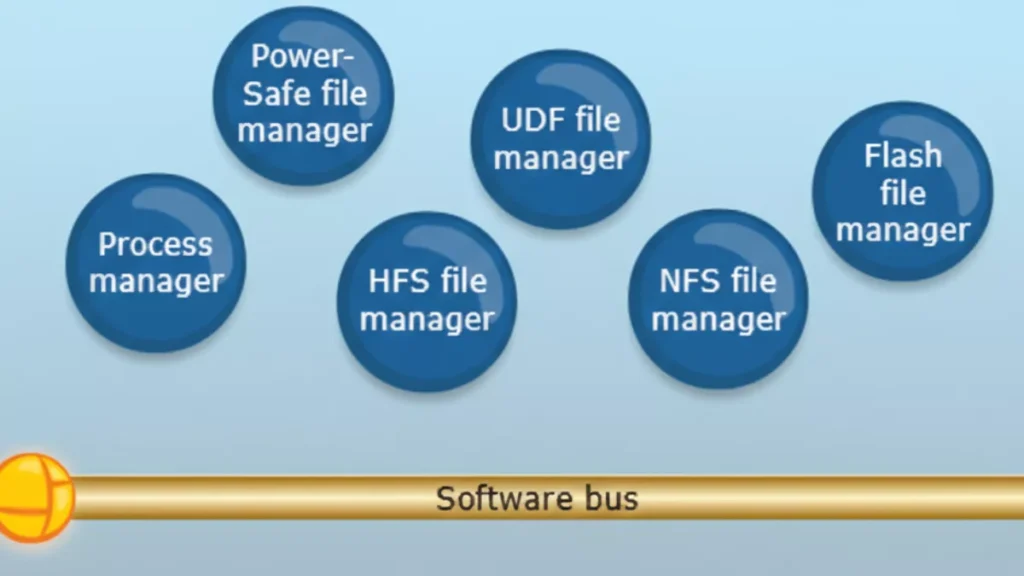
    Explanation of the Diagram

    1. Software Bus (Middle Layer)
      • Acts as a communication backbone for all user-space managers and applications.
      • All managers (file, network, GUI, character, etc.) and applications communicate with each other through this message-passing mechanism.
      • Essentially, this is how QNX implements microkernel principles: minimal kernel + IPC.
    1. Upper Layer: File and Process Managers
      These are system-level services running in user space:
      • Process Manager: Handles process creation, deletion, and scheduling requests.
      • File Managers: Manage different types of file systems:
        • Power-Safe file manager
        • UDF file manager
        • HFS file manager
        • NFS file manager
        • Flash file manager
      • These managers communicate via the software bus, instead of being inside the kernel.
    1. Lower Layer: Applications and Resource Managers
      • GUI Manager: Handles graphical interface.
      • Character Manager: Handles character devices (e.g., keyboard, serial port).
      • Network Manager: Handles network services.
      • Mqueue Manager: Manages message queues (IPC feature).
      • CIFS File Manager: For network file sharing (SMB/CIFS).
      • Applications: End-user or embedded applications running on top of these managers.

    Key Takeaways

    • This diagram shows QNX’s modular microkernel architecture in action:
      • Microkernel: Handles only essential kernel tasks (not shown explicitly in this diagram; it’s below the software bus, managing IPC, scheduling, and interrupts).
      • Software bus: Allows all user-space managers and applications to communicate.
      • Managers: Implement higher-level OS services in user space.
      • Applications: Sit at the top and use these services via message passing.
    • If one manager crashes, it doesn’t crash the kernel or other managers, highlighting QNX’s fault-tolerant design.

    Interview Tip:
    You can say:

    “This diagram shows QNX Neutrino’s user-space architecture. System managers like file managers, network manager, GUI manager, and process manager run as independent processes in user space. Applications communicate with these managers via the software bus, which implements the microkernel’s message-passing IPC. This design makes QNX highly modular, fault-tolerant, and suitable for real-time embedded systems.”

    QNX uses a microkernel architecture, meaning the operating system kernel is kept very small and only contains the most critical functions.
    All other OS services run as separate user-space processes, not inside the kernel.

    What Runs Inside the QNX Microkernel?

    The QNX Neutrino microkernel includes only four core responsibilities:

    1. Thread scheduling
      • Priority-based, fully preemptive
      • Ensures deterministic real-time behavior
    2. Inter-Process Communication (IPC)
      • Message passing (MsgSend, MsgReceive, MsgReply)
      • This is the heart of QNX
    3. Interrupt handling
      • Fast and predictable interrupt response
    4. Low-level thread and process management

    Nothing else runs in kernel space

    What Runs Outside the Kernel (User Space)?

    All higher-level OS services are implemented as user-space servers:

    • File systems (e.g., /fs-qnx6.so)
    • Device drivers (UART, I2C, SPI, Audio, Network)
    • Networking stack (TCP/IP)
    • Process manager (procnto)
    • Memory manager
    • Resource managers

    These components communicate using message passing.

    QNX Architecture Overview (Logical Flow)

    +-----------------------+
    |   Applications          |
    +-----------------------+
              |
              |  Message Passing (IPC)
              |
    +-----------------------+
    | OS Services / Servers |
    | (Drivers, FS, Net)         |
    +-----------------------+
              |
              | IPC
              |
    +-----------------------+
    |   Microkernel         |
    | (Scheduler, IPC, IRQ)|
    +-----------------------+
              |
    +-----------------------+
    |      Hardware         |
    +-----------------------+
    

    Message Passing – The Core Concept

    Unlike Linux (which uses system calls heavily), QNX uses:

    • Synchronous message passing
    • Client sends request → server processes → replies

    Example:

    • App wants to write to a UART
    • App sends message to UART driver
    • UART driver responds after operation
    • No shared memory required
    • Strong isolation
    • Predictable timing

    Why Microkernel? (Advantages)

    1. High Reliability

    • If a driver crashes, only that process restarts
    • Kernel remains unaffected

    2. Fault Tolerance

    • Ideal for safety-critical systems (ASIL-D)

    3. Deterministic Real-Time Behavior

    • Guaranteed response times
    • Used in automotive and medical systems

    4. Security

    • Smaller kernel → smaller attack surface

    QNX vs Linux (Interview Comparison)

    FeatureQNXLinux
    Kernel typeMicrokernelMonolithic
    DriversUser spaceKernel space
    IPCMessage passingSyscalls + shared memory
    Real-timeNativeNeeds RT patches
    Fault isolationStrongWeak
    Safety certificationYes (ASIL-D)Limited

    Real-World Example (Automotive)

    In a car infotainment system:

    • Audio driver crashes
    • Only audio service restarts
    • Navigation and UI keep running

    This is why QNX is used in automotive ECUs

    One-Line Interview Answer

    QNX uses a microkernel architecture where only scheduling, IPC, interrupts, and thread management run in the kernel, while all other services like drivers and file systems run in user space as separate processes, ensuring high reliability, fault isolation, and deterministic real-time behavior.

    In QNX (Neutrino), the kernel space contains only the most critical real-time components. Everything else runs in user space.

    The following run in kernel space:

    1. Thread Scheduling

    • Priority-based, fully preemptive scheduler
    • Ensures deterministic real-time behavior
    • Handles context switching

    2. Inter-Process Communication (IPC)

    • Core message passing mechanism
    • MsgSend(), MsgReceive(), MsgReply()
    • Fast, synchronous IPC

    IPC is the heart of QNX

    3. Interrupt Handling

    • Low-latency interrupt dispatching
    • Interrupt Service Routines (ISRs)
    • Interrupt events delivery to threads

    4. Low-Level Thread & Process Management

    • Thread creation and destruction
    • Basic process control
    • Kernel-level synchronization primitives

    What Does NOT Run in Kernel Space?

    These run in user space, not kernel space:

    • Device drivers (UART, I2C, SPI, Audio, Network)
    • File systems
    • Memory manager
    • Network stack (TCP/IP)
    • Process manager (procnto)
    • Resource managers

    One-Line Interview Answer

    In QNX, kernel space contains only the microkernel responsible for scheduling, message-passing IPC, interrupt handling, and low-level thread management; all other OS services and drivers run in user space.

    Memory Tip for Interviews

    Think S-I-I-T:

    • Scheduling
    • IPC
    • Interrupts
    • Threads

    In QNX Neutrino, almost everything except the microkernel runs in user space as separate processes (servers).

    Major Components Running in User Space

    1. Process Manager (procnto)

    • Handles:
      • Process creation (fork, spawn)
      • Signal delivery
      • POSIX compliance
    • Acts as the root server of the system

    2. Memory Manager

    • Virtual memory management
    • Address space creation
    • Memory protection
    • Page faults handling (with kernel support)

    3. Device Drivers

    • UART, I2C, SPI, CAN
    • Audio, Display, Camera
    • GPIO, ADC, PWM
    • Network drivers
    • Run as normal user processes
    • Can be restarted if they crash

    4. File Systems

    • QNX6 filesystem
    • Flash file systems
    • Network file systems
    • Mounted under /

    5. Network Stack

    • TCP/IP stack
    • Ethernet, Wi-Fi drivers
    • Socket services

    6. Resource Managers

    • Implement POSIX-style resources
    • Expose services as files (e.g. /dev/ser1)
    • Handle open/read/write/ioctl

    7. System Services & Daemons

    • Audio services
    • Power management
    • Clock services
    • Logging services

    8. User Applications

    • HMI / UI apps
    • Control logic
    • Diagnostic tools
    • Middleware

    QNX User Space Layout (Conceptual)

    +----------------------+
    |   User Applications  |
    +----------------------+
    | System Services      |
    | File Systems         |
    | Network Stack        |
    | Device Drivers       |
    | Resource Managers    |
    | procnto              |
    +----------------------+
            |
            | IPC (message passing)
            |
    +----------------------+
    |   Microkernel        |
    +----------------------+
    

    Why This Design Matters

    Fault Isolation

    • Driver crash ≠ system crash

    Easy Recovery

    • Restart a single service

    Safety Certification

    • Ideal for ASIL-D systems

    Secure Architecture

    • Minimal kernel attack surface

    One-Line Interview Answer

    In QNX, user space contains the process manager, memory manager, device drivers, file systems, network stack, resource managers, system services, and all applications—each running as separate processes that communicate via message passing.

    QNX uses message passing as its core communication mechanism to achieve deterministic real-time behavior, fault isolation, reliability, and scalability in a microkernel architecture.

    1. Fits the Microkernel Design

    QNX keeps the kernel very small.
    Since drivers, file systems, and services run in user space, they must communicate safely.

    ➡ Message passing replaces shared kernel data structures

    • No direct function calls across protection boundaries
    • Clean client–server model

    2. Deterministic Real-Time Behavior (Key Reason)

    Message passing in QNX is:

    • Synchronous
    • Priority-aware

    What this means:

    • Client blocks until server replies
    • Server temporarily inherits the client’s priority (priority inheritance)

    ✔ Prevents priority inversion
    ✔ Guarantees bounded latency
    ✔ Ideal for hard real-time systems

    3. Strong Fault Isolation & Reliability

    • Each driver/service runs as a separate process
    • If a driver crashes:
      • Kernel stays alive
      • Other services keep running
      • Only the failed service is restarted

    ➡ Message passing enforces strict process isolation

    4. Security by Design

    • No shared memory by default
    • No arbitrary kernel access
    • Services only expose controlled interfaces

    ➡ Smaller attack surface than monolithic kernels

    5. Unified Communication Model

    QNX uses one mechanism everywhere:

    OperationImplemented via
    File I/O (read/write)Messages
    Device accessMessages
    Network stackMessages
    Signals & eventsMessages

    ➡ Simpler OS design
    ➡ Easier to reason about timing

    6. Zero-Copy Efficiency

    Despite being message-based:

    • QNX supports zero-copy transfers
    • Uses shared memory only when explicitly needed

    ➡ High performance with real-time guarantees

    7. Easier Debugging & Maintenance

    • Services can be:
      • Stopped
      • Replaced
      • Restarted
    • No kernel rebuild required

    ➡ Faster development and safer updates

    Real Example (Automotive)

    • Audio application → sends message to audio driver
    • Audio driver crashes
    • Audio service restarts
    • Navigation & safety systems continue running

    ➡ System does not reboot

    One-Line Interview Answer

    QNX uses message passing to enable safe and deterministic communication between user-space services in its microkernel architecture, providing real-time predictability, fault isolation, priority inheritance, and high system reliability.

    Memory Trick for Interviews

    Think D-R-F-S-U:

    • Determinism
    • Reliability
    • Fault isolation
    • Security
    • Unified IPC

    Resource managers in QNX are user-space server processes that implement POSIX-style resources (files, devices, pseudo-devices) and expose them through the filesystem namespace using message passing.

    In simple words:

    A resource manager lets a user-space service behave like a file or device (e.g. /dev/ser1).

    Why Resource Managers Exist

    QNX follows the principle:

    “Everything is a file”

    Instead of placing drivers in kernel space (like Linux), QNX uses resource managers in user space to handle:

    • open()
    • read()
    • write()
    • ioctl()
    • close()

    All these calls are translated into messages.

    Where Do Resource Managers Run?

    • User space
    • As normal processes
    • Communicate with clients via QNX IPC (message passing)
    • Crash-safe
    • Restartable
    • Isolated

    Common Examples of Resource Managers

    ResourceExample
    Serial driver/dev/ser1
    GPIO/dev/gpioX
    Audio/dev/snd/*
    Custom device/dev/mydevice
    Pseudo file/proc, /dev/random

    How a Resource Manager Works (Flow)

    1. Application calls:fd = open("/dev/ser1", O_RDWR);
    2. Kernel converts this into a message
    3. Message is sent to the resource manager
    4. Resource manager processes the request
    5. Sends a reply back to the application

    Key Components of a Resource Manager

    1. Dispatch Layer

    • Receives messages
    • Routes them to appropriate handlers

    2. Connect Functions

    • Handle:
      • open()
      • close()

    3. I/O Functions

    • Handle:
      • read()
      • write()
      • ioctl()

    Types of Resource Managers

    Device Resource Managers

    • Hardware drivers (UART, I2C, CAN)

    Filesystem Resource Managers

    • QNX6, Flash FS

    Pseudo Resource Managers

    • Virtual or logical devices

    Benefits of Resource Managers

    Fault Isolation

    • Driver crash ≠ system crash

    POSIX Compliance

    • Standard file APIs

    Real-Time Friendly

    • Priority inheritance during IPC

    Easy Debugging

    • Run, stop, restart like any process

    QNX vs Linux (Quick Comparison)

    FeatureQNXLinux
    Driver locationUser spaceKernel space
    InterfaceFile-basedSyscalls
    Crash impactLocalOften system-wide
    IPCMessage passingFunction calls

    One-Line Interview Answer

    Resource managers in QNX are user-space processes that expose devices and services as POSIX-compliant files, handling open/read/write/ioctl requests via message passing, enabling fault isolation and real-time reliability.

    The microkernel’s role in QNX is to provide the core real-time foundation by handling thread scheduling, message-passing IPC, interrupt handling, and basic process/thread management, while all other OS services run in user space.

    QNX achieves fault tolerance by running drivers and OS services in user space, using message passing for isolation, and allowing failed components to be restarted without affecting the microkernel or the rest of the system.

    How QNX Achieves Fault Tolerance (Key Points)

    1. Microkernel Architecture
      • Kernel contains only scheduling, IPC, and interrupts
      • Minimal kernel → fewer failure points
    2. User-Space Drivers & Services
      • Device drivers, file systems, network stack run as separate processes
      • A crash affects only that component, not the whole OS
    3. Message Passing (Strong Isolation)
      • No shared kernel data by default
      • Faults are contained within a single process
    4. Service Restart & Recovery
      • Failed services/drivers can be restarted dynamically
      • System continues running
    5. Priority Inheritance in IPC
      • Prevents priority inversion during communication
      • Maintains real-time stability even under faults
    6. Health Monitoring (Optional)
      • Watchdogs and supervisors can detect failures and relaunch services

    Adaptive Partitioning in QNX is a CPU resource management mechanism that guarantees each group of threads a minimum percentage of CPU time, while dynamically redistributing unused CPU to other partitions.

    Key Points (Simple)

    • CPU time is divided into partitions
    • Each partition has a guaranteed minimum CPU budget
    • Unused CPU is adaptively shared with others
    • Ensures real-time tasks are never starved

    Why QNX Uses Adaptive Partitioning

    • Prevents CPU starvation
    • Improves system predictability
    • Supports mixed-criticality systems (safety + infotainment)

    Example

    PartitionCPU Guarantee
    Safety tasks40%
    Audio30%
    UI20%
    Background10%
    • If UI uses only 10%, the extra 10% is temporarily used by others
    • When UI needs CPU again, it gets its guaranteed share back

    Where It’s Used

    • Automotive ECUs
    • Medical devices
    • Industrial control systems

    One-Line Interview Answer

    Adaptive partitioning ensures guaranteed CPU bandwidth for critical tasks while efficiently sharing unused CPU among other processes.

    A thread in QNX is the smallest schedulable unit of execution that runs within a process and is scheduled by the microkernel based on priority.

    Key points:

    • Executes code
    • Has its own:
      • Program counter
      • Stack
      • Priority
    • Shares process resources (memory, file descriptors)
    • Scheduled directly by the QNX microkernel

    A process in QNX is a protected container that provides an address space and resources for one or more threads.

    Key points:

    • Owns:
      • Virtual address space
      • File descriptors
      • Signals
      • Permissions
    • Contains one or more threads
    • Provides isolation from other processes

    Relationship (Easy to Remember)

    • Process = container
    • Thread = worker
    Process
     ├── Thread 1 (main thread)
     ├── Thread 2
     └── Thread 3
    

    QNX-Specific Interview Highlight

    • Threads are the real-time scheduling entities, not processes
    • Priority, IPC, and interrupts are all thread-centric

    One-Line Comparison (Interview Gold)

    In QNX, a process provides isolation and resources, while threads are the actual execution units scheduled by the microkernel.

    Thread States in QNX

    In QNX Neutrino, a thread can exist in the following main states:

    1. READY

    • Thread is ready to run
    • Waiting for CPU
    • Placed in a priority-based ready queue

    2. RUNNING

    • Thread is currently executing on the CPU

    3. BLOCKED

    • Thread is waiting for an event or resource

    Common reasons:

    • Waiting for a message (MsgReceive)
    • Waiting for a reply (MsgSend)
    • Waiting for I/O
    • Waiting for a mutex or semaphore
    • Sleeping (nanosleep)

    4. STOPPED

    • Thread execution is suspended

    Causes:

    • Debugger attached
    • Job control signals (e.g. SIGSTOP)
    • Explicit suspension

    5. WAITING (ZOMBIE – process level)

    • Thread has exited
    • Waiting for parent process to collect status

    Note: Zombie is mainly a process concept, but threads can be in a terminated state internally.

    Simple State Diagram (Interview Friendly)

    READY → RUNNING → BLOCKED
      ↑        ↓         |
      └────────┴─────────┘
            STOPPED
    

    Important QNX Interview Points

    • Threads (not processes) are scheduled
    • Scheduling is priority-based and preemptive
    • IPC operations heavily influence BLOCKED states
    • Message passing directly affects thread transitions

    One-Line Interview Answer

    In QNX, threads transition between READY, RUNNING, BLOCKED, and STOPPED states, with scheduling handled at the thread level using priority-based preemption.

    Memory Trick

    Think R-R-B-S:

    • Ready
    • Running
    • Blocked
    • Stopped

    Thread Scheduling Algorithm in QNX

    QNX uses a priority-based, fully preemptive, deterministic thread scheduling algorithm, designed for hard real-time systems.

    Core Characteristics

    1. Priority-Based Scheduling

    • Each thread has a fixed priority
    • Priority range: 0 (lowest) to 255 (highest)
    • Highest-priority READY thread always runs

    2. Fully Preemptive

    • If a higher-priority thread becomes READY:
      • It immediately preempts the currently running thread
    • Ensures fast response for real-time tasks

    3. Round-Robin Within Same Priority

    • Threads with the same priority share CPU time
    • Each gets a time slice
    • Prevents starvation among equal-priority threads

    4. Thread-Centric Scheduling

    • QNX schedules threads, not processes
    • Each thread is an independent scheduling entity

    5. Deterministic Behavior

    • Scheduling decisions are predictable
    • No dynamic priority changes by default
    • Ideal for safety-critical systems

    Scheduling Flow (Simple)

    1. Scheduler checks READY queues (highest → lowest priority)
    2. Picks the highest-priority READY thread
    3. Thread runs until:
      • It blocks
      • Its time slice expires (same-priority case)
      • A higher-priority thread becomes READY

    Priority Inheritance (Very Important)

    • Used during message passing and mutex locking
    • If a high-priority thread is blocked by a lower-priority one:
      • Lower-priority thread temporarily inherits the higher priority
    • Prevents priority inversion

    Comparison with Linux (Interview Highlight)

    FeatureQNXLinux
    SchedulingFixed priorityCFS (dynamic)
    PreemptionAlwaysConfig-dependent
    DeterminismGuaranteedBest-effort
    Priority inheritanceBuilt-inPartial

    One-Line Interview Answer

    QNX uses a priority-based, fully preemptive scheduling algorithm where the highest-priority ready thread always runs, with round-robin scheduling among threads of equal priority and priority inheritance to prevent inversion.

    Conclusion

    QNX is not just another operating system—it is built for environments where reliability, predictability, and safety truly matter. Understanding QNX means understanding how real-time systems behave under pressure, how failures are isolated, and how software can continue running even when individual components crash.

    These interview questions and answers are meant to help you think like a QNX engineer, not just repeat definitions. By focusing on microkernel design, message passing, scheduling, fault tolerance, and system design choices, this content prepares you to explain why QNX works the way it does, not just what it is.

    If you can clearly explain these concepts in your own words during an interview, it shows strong fundamentals, real project exposure, and confidence in system-level thinking—qualities that interviewers look for in embedded and automotive roles.

    Master the concepts, relate them to real use cases, and you won’t just clear a QNX interview—you’ll stand out as someone who truly understands the system.

    FAQ : QNX OS Interview Questions

    1. What is QNX OS?

    QNX is a real-time operating system (RTOS) designed for systems that require high reliability, deterministic performance, and fault tolerance. It is widely used in automotive, medical, industrial, and safety-critical embedded systems.

    2. Why is QNX called a microkernel operating system?

    QNX uses a microkernel architecture, meaning only the most essential services (scheduling, IPC, interrupt handling) run in kernel space. All other services run in user space, improving system stability and fault isolation.

    3. How is QNX different from Linux?

    Linux uses a monolithic kernel, while QNX uses a microkernel. In QNX, drivers and services run in user space and can be restarted if they fail, whereas in Linux, a faulty driver can crash the entire system.

    4. What runs in kernel space in QNX?

    Only critical components run in kernel space:

    • Thread scheduling
    • Inter-process communication (IPC)
    • Interrupt handling
    • Low-level synchronization

    This keeps the kernel small and reliable.

    5. What runs in user space in QNX?

    Most system services run in user space, including:

    • Device drivers
    • File systems
    • Network stacks
    • Resource managers
    • System services

    This design improves fault tolerance.

    6. Why does QNX use message passing?

    QNX uses message passing for IPC to ensure:

    • Deterministic communication
    • Strong process isolation
    • Safer interaction between services
    • Easier debugging and recovery

    It is a core reason for QNX’s reliability.

    7. What is a resource manager in QNX?

    A resource manager is a user-space server that manages system resources like files, devices, or custom interfaces. Applications interact with resource managers using standard POSIX calls such as open(), read(), and write().

    8. What is the role of the microkernel in QNX?

    The microkernel acts as a traffic controller, handling communication, scheduling, and interrupts while letting user-space services do the rest. This separation makes the system robust and scalable.

    9. How does QNX achieve fault tolerance?

    QNX achieves fault tolerance through:

    • Process isolation
    • User-space drivers
    • Automatic service restart
    • Priority-based scheduling

    A failure in one component does not crash the entire system.

    10. What is adaptive partitioning in QNX?

    Adaptive partitioning ensures CPU time is reserved for critical processes. Even if one process misbehaves, real-time and safety-critical tasks continue to run without disruption.

    11. What is a process in QNX?

    A process is an independent program with its own memory space. It may contain one or more threads and communicates with other processes using message passing.

    12. What is a thread in QNX?

    A thread is the smallest unit of execution in QNX. Threads share the same address space within a process but are scheduled independently.

    13. What are the thread states in QNX?

    Common thread states include:

    • Running
    • Ready
    • Blocked (waiting for IPC or resources)
    • Stopped

    These states help manage real-time execution efficiently.

    14. What scheduling algorithm does QNX use?

    QNX uses priority-based preemptive scheduling. Higher-priority threads always run first, ensuring deterministic real-time behavior.

    Read More about Process : What is is Process
    Read More about System Call in Linux : What is System call
    Read More about IPC : What is IPC
  • How to Port FreeRTOS to MCU Step by Step : Master 7 Steps

    The Chill of December and the Warmth of a Working Kernel

    It was a frigid December evening. The kind where your breath plumes like smoke and your fingers go numb even inside gloves. I was hunched over my bench, the glow of the desk lamp the only warmth in the room, staring at a blank terminal screen. My latest custom Internet of Things (IoT) project, a smart sensor node built on an unfamiliar Microcontroller Unit (MCU), was waiting for its operating system. I needed real-time performance, task scheduling, and robustness— I needed FreeRTOS.

    But the vendor hadn’t provided a port. The silicon was new, the ecosystem sparse. It was up to me to bridge the gap, to take a proven, powerful Real-Time Operating System (RTOS) and make it sing on my custom hardware. It felt like staring up at a mountain.

    If you’ve ever been there—faced with a new MCU and the daunting task of porting an RTOS—you know that feeling. It’s a blend of challenge and excitement. But the truth is, porting FreeRTOS is not black magic. It’s a structured, logical process that, when broken down, becomes entirely manageable.

    This comprehensive, step-by-step tutorial is your map for that journey. We’ll demystify the process, ensuring your project—whether it’s an embedded system, a wearable device, or industrial control system—gets the multitasking capabilities it deserves.

    Why Port FreeRTOS?

    Before diving into the “how,” let’s quickly solidify the “why.” In the world of embedded programming, time is often measured in microseconds. A bare-metal loop can work for simple tasks, but for any complex application requiring multiple concurrent activities (like reading a sensor, processing data, and communicating over Wi-Fi), you need an RTOS.

    Key BenefitTechnical AdvantageSEO Keyword Target
    MultitaskingEfficiently manages multiple threads (tasks) using a scheduler.FreeRTOS multitasking, embedded scheduler, real-time system
    Resource ManagementProvides semaphores, mutexes, and queues for safe inter-task communication.FreeRTOS synchronization, embedded software development
    Power EfficiencyThe Idle Task and tickless mode allow the MCU to sleep when idle.FreeRTOS tickless, low-power embedded, MCU power saving
    ScalabilityA large, well-documented codebase makes it easier to expand features.scalable embedded software, open-source RTOS

    If you’re building a professional, robust, and scalable embedded product, FreeRTOS is often the gold standard.

    Advantages and Disadvantages of FreeRTOS

    While the successful porting of FreeRTOS unlocks immense power, it’s not without its costs and trade-offs. Choosing an RTOS over a bare-metal loop is a significant architectural decision that impacts resource usage, complexity, and development time.

    Advantages of Using FreeRTOS

    The benefits of successfully integrating and porting FreeRTOS far outweigh the initial effort for complex, time-critical embedded applications.

    1. True Multitasking and Real-Time Performance:
      • Benefit: Provides preemptive scheduling, allowing the system to run numerous independent tasks (threads) concurrently based on priority. This is essential for applications requiring deterministic timing, such as industrial control systems or high-frequency data acquisition.
      • SEO Focus: FreeRTOS real-time performance, embedded multitasking, deterministic scheduling.
    2. Robust Inter-Task Communication (ITC):
      • Benefit: Offers proven, thread-safe mechanisms (semaphores, mutexes, queues, and event groups) to manage shared resources and data flow between tasks. This eliminates dangerous race conditions and simplifies the implementation of complex protocols.
      • SEO Focus: FreeRTOS synchronization primitives, inter-task communication, thread safety in RTOS.
    3. Scalability and Modularity:
      • Benefit: Moving from bare metal to FreeRTOS forces a modular design where features are compartmentalized into tasks. This makes the codebase easier to test, maintain, scale, and reuse across different MCU platforms.
      • SEO Focus: scalable embedded software, modular RTOS design, FreeRTOS porting flexibility.
    4. Extensive Ecosystem and Community Support:
      • Benefit: As the de facto standard open-source RTOS, it boasts vast online documentation, tutorials, and a massive community. Furthermore, it’s often supported by silicon vendors (like Microchip, NXP, and STMicroelectronics) and includes middleware for IoT protocols (e.g., TCP/IP stacks, MQTT, TLS).
      • SEO Focus: FreeRTOS community support, open-source embedded system, IoT protocol stack.
    5. Optimized Resource Usage:
      • Benefit: FreeRTOS has a tiny memory footprint. The core kernel is minimal (often under 10 KB of flash) and is highly configurable, allowing you to strip out unused features to save valuable RAM and Flash space on resource-constrained microcontrollers.
      • SEO Focus: minimal memory footprint RTOS, resource-constrained embedded devices, FreeRTOS optimization.

    Disadvantages of Using FreeRTOS

    While powerful, introducing an RTOS adds a layer of complexity that can introduce new types of bugs and increase the overhead compared to a simple bare-metal loop.

    1. Increased Complexity and Steep Learning Curve:
      • Drawback: Developers must master concepts like task state management, priority inversion, deadlocks, and the proper use of synchronization objects. Incorrect use of these primitives is a major source of hard-to-debug system crashes.
      • SEO Focus: FreeRTOS learning curve, RTOS debugging complexity, priority inversion pitfalls.
    2. Higher RAM and Flash Overhead:
      • Drawback: Even with its minimal core, every task requires its own dedicated stack. For systems with many tasks or deep function calls, the total RAM requirement increases significantly compared to a single-stack bare-metal design. The kernel code itself also consumes Flash memory.
      • SEO Focus: FreeRTOS RAM usage, task stack allocation, embedded memory overhead.
    3. Timing Nondeterminism and Context Switching Overhead:
      • Drawback: The process of saving and restoring the CPU’s context (context switch) takes a finite amount of time (latency), typically a few microseconds, during which the CPU is doing non-application work. While small, this overhead can be critical in extremely high-frequency control loops. Furthermore, preemption introduces a slight element of nondeterminism compared to a strictly sequential bare-metal program.
      • SEO Focus: context switch latency, RTOS timing overhead, embedded non-determinism.
    4. Need for Toolchain and Hardware Expertise:
      • Drawback: A successful port, as detailed in this guide, demands intimate knowledge of the target MCU’s interrupt controller (NVIC), linker script, and often requires proficiency in Assembly language for the context switch. This level of low-level expertise is not required for simpler embedded projects.
      • SEO Focus: MCU NVIC configuration, FreeRTOS porting requirements, assembly language embedded programming.
    5. Licensing and Certification (AWS Integration):
      • Drawback: While the core FreeRTOS kernel is truly free and MIT-licensed, its sibling, Amazon FreeRTOS (a part of AWS IoT), adds features and complexity tied to the AWS cloud. While useful for IoT, adopting these extensions might involve cloud vendor lock-in or additional legal/compliance considerations if moving to a certified version (like SafeRTOS for functional safety).

    Prerequisites: What You Need to Get Started

    Before you open your Integrated Development Environment (IDE) or start modifying source files, ensure you have the following in place:

    1. Your Target MCU: The specific microcontroller you are porting to (e.g., STM32, ESP32, PIC, or a custom ASIC).
    2. Datasheet and Reference Manual: These are your sacred texts. You must be intimately familiar with the MCU’s interrupt controller and system timer registers.
    3. Toolchain: A working C/C++ compiler (like GCC), linker script, and debugger that targets your MCU architecture.
    4. A Working Bare-Metal Project: A minimal project that successfully initializes the clock, blinks an LED, and uses the standard startup code on your MCU. This confirms your toolchain and hardware interface are correct.

    How to Port FreeRTOS to MCU Step by Step : Master 7 Steps

    Step 1: Understanding the Core FreeRTOS Porting Requirement

    Porting FreeRTOS essentially boils down to adapting two core components to your specific MCU architecture:

    1. The Scheduler/Context Switch: The mechanism that saves the state of the current task and loads the state of the next task. This is highly architecture-dependent and often involves Assembly language.
    2. The Tick Interrupt: The regular, precise interrupt that drives the RTOS’s time-keeping and tells the scheduler when it’s time to check for a new task to run.

    Step 2: Choosing Your Base Port (Leveraging Existing Work)

    Never start from scratch! FreeRTOS is designed to be highly portable. It provides separate port layers for popular architectures like ARM Cortex-M, RISC-V, AVR, etc.

    1. Identify Your CPU Architecture: Is your MCU a Cortex-M4, a proprietary MIPS core, or a simple 8-bit AVR?
    2. Find the Closest Existing Port: Go to the FreeRTOS source code (FreeRTOS/Source/portable/) and find the folder matching your architecture and toolchain (e.g., GCC/ARM_CM4F). This folder contains the bulk of the work you need.
    3. Copy the Files: Copy the relevant architecture-specific files (e.g., port.c and portasm.s or equivalent Assembly file) into your project’s porting layer folder.

    Step 3: Configuring the System Clock and Tick Interrupt

    This is where you bridge the generic RTOS with your specific hardware. The RTOS tick is the heartbeat of FreeRTOS.

    3.1 Clock Initialization

    Ensure your MCU’s main clock is initialized before starting the RTOS. The tick frequency (defined by configTICK_RATE_HZ in FreeRTOSConfig.h) relies on a stable System Clock frequency (e.g., 80 MHz).

    3.2 Implementing the vPortSetupTimerInterrupt

    You need to write a function (often named vPortSetupTimerInterrupt or similar) that:

    1. Selects a Timer: Choose a reliable hardware timer on your MCU (like a SysTick timer on Cortex-M devices or a General-Purpose Timer).
    2. Calculates the Reload Value: Use the MCU’s clock frequency and the desired tick rate (configTICK_RATE_HZ) to calculate the value to load into the timer’s register. The formula is generally:Reload Value=(System Clock Frequency/configTICK_RATE_HZ)−1
    3. Enables the Interrupt: Configure the timer to generate an interrupt when the counter reaches zero and enable that interrupt in the Nested Vectored Interrupt Controller (NVIC).

    3.3 Defining the Tick Handler

    You must map the hardware timer interrupt service routine (ISR) to the FreeRTOS function that increments the tick count: xPortSysTickHandler() (or vPortEndScheduler() in older ports). This is critical for time-slicing and task delays.

    Step 4: Customizing the Context Switch (Assembly/C Code)

    The context switch is the most delicate part, as it’s often written in Assembly language for maximum efficiency and direct register manipulation.

    4.1 Understanding Stack Structure

    When a task is switched out, its execution context (all its CPU registers) must be saved onto its private stack. When it’s switched back in, these registers are restored. The structure of this saved context must exactly match what the architecture expects when exiting an interrupt or a function call.

    4.2 The Role of portSAVE_CONTEXT() and portRESTORE_CONTEXT()

    These two macros, usually found in the Assembly file, handle the heavy lifting:

    • portSAVE_CONTEXT(): Saves the CPU’s general-purpose registers and other critical state information (like the Stack Pointer and Program Counter) onto the task’s stack.1
    • portRESTORE_CONTEXT(): Pops the saved context from the task’s stack back into the CPU registers, effectively resuming the task exactly where it left off.2

    If you are using a standard architecture like Cortex-M, the provided portasm.s file is usually correct, relying on specific Programmable Interrupt Controller (PIC) features like PendSV for the context switch trigger.3

    Step 5: The FreeRTOSConfig.h File (Configuration and Optimization)

    The FreeRTOSConfig.h file is your project’s command center for configuring the RTOS. It’s the primary way to define constraints, enable features, and optimize memory.

    Key Configuration ParameterDescriptionImportance
    configCPU_CLOCK_HZMust be set to the exact frequency of your MCU’s clock.Critical for time calculations.
    configTICK_RATE_HZThe frequency of the RTOS tick (e.g., 1000 Hz for 1ms resolution).High. Impacts timing precision.
    configMINIMAL_STACK_SIZEThe smallest stack size (in words) that any task can be created with.High. Prevents Stack Overflow.
    configTOTAL_HEAP_SIZEThe total memory allocated for the FreeRTOS heap (for dynamic allocation).High. Determines memory availability.
    configUSE_PREEMPTIONSet to 1 to enable preemptive scheduling.Mandatory for most RTOS use cases.

    Step 6: Initialization and Starting the Scheduler

    With the porting layer complete, the final steps are integrating it into your main application code.

    1. Define Tasks: Use xTaskCreate() to create one or more initial tasks. Each task needs a function, a stack size, a priority, and a handle.Cvoid vApplicationCode( void *pvParameters ) { // Your application logic here (e.g., sensor reading loop) for( ;; ) { // ... } } // In main(): xTaskCreate( vApplicationCode, "AppTask", configMINIMAL_STACK_SIZE, NULL, 1, NULL );
    2. Start the Scheduler: Once all tasks are created, call the core function that never returns: vTaskStartScheduler().Cint main( void ) { // 1. Hardware Initialization (Clock, Peripherals) // 2. Task Creation (as above) vTaskStartScheduler(); // The program should never reach here! for( ;; ); }

    Step 7: Deep Dive into FreeRTOS Configuration Parameters

    The heart of an optimized and stable FreeRTOS port lies in a meticulously configured FreeRTOSConfig.h file. While we touched upon a few critical parameters earlier, a professional port requires attention to numerous subtle settings that dictate performance, memory usage, and debugging capabilities. This is where you tailor the generic RTOS to your specific MCU constraints.

    7.1 The Critical Settings for Reliability

    Beyond the clock speed and heap size, these configuration macros ensure robustness and efficiency:

    Configuration MacroFunction and ImportanceSEO Keywords
    configUSE_IDLE_HOOKIf set to 1, enables a user-defined function (vApplicationIdleHook) that executes when the Idle Task is running. Essential for implementing low-power modes like tickless idle.FreeRTOS idle hook, low-power embedded systems, tickless mode configuration
    configUSE_TICK_HOOKEnables a function (vApplicationTickHook) that runs with every RTOS tick. Useful for performing simple, time-critical, and short operations that must occur periodically.RTOS tick hook, periodic task execution, real-time clock synchronization
    configMAX_PRIORITIESDefines the maximum number of task priority levels available. Setting this too high wastes RAM; set it only as high as necessary for your application’s complexity.FreeRTOS task priorities, scheduler configuration, RTOS optimization
    configCHECK_FOR_STACK_OVERFLOWSetting this to 1 or 2 enables runtime checking for stack overflow. Mode 2 is more thorough but adds overhead; it’s invaluable during the development and porting phases.FreeRTOS stack overflow detection, embedded debugging, RTOS memory safety
    configUSE_DAEMON_TASK_STARTUP_HOOKEnsures that initialization code that must run after the scheduler starts (but before application tasks) is executed safely within the context of the Timer Service/Daemon Task.FreeRTOS daemon task, RTOS startup initialization, timer service task

    7.2 Memory Allocation Strategy: Heap Selection

    FreeRTOS provides several heap management schemes (Heap_1, Heap_2, Heap_3, Heap_4, Heap_5). Choosing the right one is crucial for your embedded system’s stability and memory footprint.

    • Heap_1: Simplest. Can only allocate but never free memory. Suitable for systems where all memory is allocated statically at startup.
    • Heap_2: Allows memory to be freed but does not consolidate adjacent free blocks (fragmentation risk).
    • Heap_3: Uses the standard C library’s malloc() and free(). Easy, but the C library functions might not be thread-safe or deterministic (real-time friendly).
    • Heap_4: Provides coalescing (joining adjacent free blocks) for better fragmentation mitigation but is less deterministic than Heap_5.
    • Heap_5: The most sophisticated. Uses a single block of memory and implements coalescing and a best-fit algorithm. It is highly recommended for production systems requiring dynamic allocation and deallocation of memory throughout the application lifecycle.

    For a new port, start with Heap_4 or Heap_5 and ensure you define configTOTAL_HEAP_SIZE within your linker script’s available RAM space.

    Step 8: Handling the Interrupt Vector Table (IVT)

    The Interrupt Vector Table (IVT) is the bridge between your MCU’s hardware events (like the RTOS tick) and the specific functions (ISRs) that handle them. A misconfigured IVT is a common reason for hard faults during the initial scheduler startup.

    8.1 The SysTick and PendSV Handlers

    In ARM Cortex-M ports (which cover the vast majority of modern MCUs), the RTOS porting layer relies on two specific system interrupts:

    1. SysTick Handler: This is typically used to implement the RTOS tick. You must ensure the IVT maps the SysTick interrupt vector to the FreeRTOS function that handles the tick, often called xPortSysTickHandler or similar. This function increments the RTOS tick count and, if necessary, triggers a context switch.
    2. PendSV Handler: This is the low-priority, software-triggerable exception used by FreeRTOS to perform the actual task context switch. The scheduler uses PendSV to force a context switch when a higher-priority task is ready, outside of the standard tick interrupt. The IVT must correctly map the PendSV vector to the FreeRTOS assembly function that contains the portSAVE_CONTEXT() and portRESTORE_CONTEXT() macros.

    Crucial Check: When configuring the NVIC for these two interrupts, ensure the priority of the PendSV and SysTick interrupts is set correctly. FreeRTOS mandates specific priority levels for these interrupts to ensure thread-safe operation and prevent priority inversions:

    • PendSV and SysTick: Must be configured to the lowest possible priority (or at least lower than the application’s peripheral interrupts) to allow higher-priority ISRs to run uninterrupted. The priority grouping defined by configKERNEL_INTERRUPT_PRIORITY and configMAX_SYSCALL_INTERRUPT_PRIORITY in FreeRTOSConfig.h must align with your compiler’s startup files and your MCU’s NVIC requirements.

    8.2 Ensuring Interrupt Safety

    Any custom ISR you write for your application (e.g., for a UART or I2C peripheral) that uses FreeRTOS API functions (ending in ...FromISR()) must adhere to strict rules:

    1. Do Not Call Blocking Functions: An ISR must never call a function that might cause the task to block (like vTaskDelay()).
    2. Check Return Values: Functions like xQueueSendFromISR() return a value (xHigherPriorityTaskWoken) indicating if a context switch is required upon exiting the ISR. If this is true, you must trigger the context switch, typically done by setting a flag that triggers the PendSV.

    Step 9: Debugging the Port with Visibility

    A working port is good, but a debuggable and transparent port is essential for long-term embedded software development. Once the basic LED blink is working, the next critical step is gaining visibility into the scheduler’s operation.

    9.1 Implementing the Trace Macros

    FreeRTOS provides hooks—macros located in FreeRTOSConfig.h—that allow you to capture every event the scheduler performs (task switch, queue send, semaphore take, etc.). These are the Trace Macros.

    • #define configGENERATE_RUN_TIME_STATS 1: Enables high-resolution measurement of the CPU time each task uses. This requires an extra hardware timer set up to run independently of the RTOS tick and an implementation of vConfigureTimerForRunTimeStats() and ulGetRunTimeCounterValue().
    • #define traceTASK_SWITCHED_IN() and traceTASK_CREATE(): These can be defined to log or print the name and ID of the task currently running or being created.

    By integrating these macros with an external tool like Tracealyzer or by simply logging to a UART, you can visualize the task execution flow and pinpoint scheduling issues, priority inversions, or excessive interrupt latency.

    9.2 The Debugging View

    For modern Cortex-M MCUs, ensure your IDE (e.g., Keil, IAR, VSCode with extensions) is configured to use the FreeRTOS-aware debugging features. These features allow you to:

    • View All Tasks: See the name, status (Running, Ready, Blocked, Suspended), priority, and stack high water mark for every task.
    • Inspect RTOS Objects: View the contents and waiting lists of queues, semaphores, and mutexes.

    If your debugger cannot correctly inspect the task stacks, it often points to a problem with how the Stack Pointer is being managed in your Assembly context switch code.

    Step 10: Finalizing the Port and Optimizing for Production

    Once your port is stable, verified, and debugged, the final stage involves optimization and production hardening.

    10.1 Implementing Tickless Idle (Power Optimization)

    The RTOS tick consumes power because it wakes the MCU up frequently. Tickless Idle mode allows the MCU to sleep for extended periods.

    1. Enable: Set #define configUSE_TICKLESS_IDLE 1 in FreeRTOSConfig.h.
    2. Implement: You must provide the function vPortSuppressTicksAndSleep(). This function:
      • Calculates the time the MCU can safely sleep based on the next scheduled RTOS event.
      • Stops the SysTick (or whichever timer is the RTOS tick).
      • Programs a different low-power timer to wake the MCU after the calculated sleep duration.
      • Puts the MCU into a low-power sleep mode.
      • Upon waking, calculates the number of RTOS ticks that elapsed and manually advances the FreeRTOS tick count using vTaskStepTick().

    This step is arguably the most challenging but delivers massive gains in battery life for IoT and wearable devices.

    10.2 Hardening the Port: Assertions and Hooks

    For a production-ready system, always enable runtime error checks.

    • configASSERT( x ): Define this macro. It acts like the standard C assert() but is crucial for catching invalid states within the kernel itself. A good implementation prints the file and line number and deliberately causes a crash (e.g., an infinite loop or a breakpoint) so the failure is caught instantly.
    • vApplicationMallocFailedHook: This must be implemented. It is called if a call to pvPortMalloc() fails due to insufficient heap memory. Crucial for handling out-of-memory errors gracefully.
    • vApplicationStackOverflowHook: Reiterate the importance of this hook. If called, it’s a critical fault indicating a task has corrupted memory outside its allocated stack.

    By integrating these safety nets, your embedded software becomes far more resilient and reliable in the field

    Troubleshooting and Verification (The Debugging Phase)

    A successful port often requires iteration. Here’s what to check:

    • Hard Faults: If your MCU hits a Hard Fault right after vTaskStartScheduler(), it almost certainly means your context switch Assembly is incorrect or your linker script isn’t allocating enough RAM. Review your stack alignment and register saving logic.
    • LED Blink: Create a simple task that delays for 500ms and toggles an LED. If the LED blinks at the correct rate, your tick interrupt and time-keeping are likely correct.
    • vApplicationStackOverflowHook: Implement this hook.4 If it’s called, one of your tasks has a stack that’s too small. Increase the usStackDepth in your xTaskCreate call.

    Conclusion: From Blank Screen to Real-Time Power

    That cold December night is a distant memory now. The effort of poring over datasheets, tweaking assembly, and debugging stack alignment paid off. The sensor node came alive, running multiple tasks concurrently and managing its power perfectly—all thanks to a successful FreeRTOS port.

    By following these structured steps—understanding the requirements, choosing a base port, configuring the clock, and customizing the context switch—you can turn the daunting task of porting an RTOS into a manageable and rewarding experience. You’ve now unlocked the full potential of your embedded hardware with a robust, professional Real-Time Operating System. Happy coding!

  • Mater How is QNX different from Linux or other RTOS 7 Key Ways.

    How is QNX different from Linux or other RTOS . Learn about kernel design, real-time performance, safety certifications, and use cases.

    When you first hear about QNX, you might think, “Isn’t it just another operating system like Linux or other RTOS (Real-Time Operating Systems)?” The truth is, QNX stands out in some very unique ways. If you are working in automotive, medical devices, or mission-critical embedded systems, understanding how QNX differs from Linux or other RTOS is super important. Let’s break it down in a simple, human way.

    1. QNX is a Microkernel, Linux is a Monolithic Kernel

    One of the biggest differences is in the kernel design.

    • QNX uses a microkernel architecture, meaning only the most essential services (like scheduling, IPC, and interrupt handling) run in the kernel space. Everything else, such as device drivers, file systems, and networking, runs in user space.
    • Linux, on the other hand, is monolithic. Almost everything runs in kernel space, which makes it powerful but harder to isolate faults.

    Result? QNX offers better reliability and fault isolation. If a driver crashes in QNX, it won’t take down the entire system.

    2. Real-Time Capabilities

    • QNX is designed from the ground up as a true RTOS. It guarantees hard real-time performance, meaning tasks are executed within strict deadlines.
    • Linux wasn’t originally designed for real-time, though there are Real-Time Linux patches (PREEMPT-RT) to improve it. Still, it doesn’t match QNX when ultra-low latency and predictability are required.
    • Other RTOS like FreeRTOS or VxWorks also provide real-time features, but QNX’s microkernel plus POSIX compliance make it more robust for industrial use.

    If you’re building a system where safety and timing are non-negotiable, QNX is the go-to choice.

    3. Safety Certifications

    • QNX shines in industries like automotive (ISO 26262), medical devices (IEC 62304), and aerospace (DO-178C) because it already comes with safety-certified versions.
    • Linux and many other RTOS options are not safety-certified by default. Achieving certifications with Linux usually requires heavy customization and additional effort.

    This makes QNX a favorite for companies that build autonomous vehicles, ventilators, or train control systems.

    4. Resource Usage

    • QNX is lightweight. The microkernel can run with minimal resources, making it ideal for embedded devices with limited memory and CPU power.
    • Linux generally needs more resources, especially if you’re running a full Linux distribution.
    • Other RTOS like FreeRTOS are even smaller than QNX, but they lack the rich features QNX provides (like a full POSIX environment).

    With QNX, you get the best of both worlds: small footprint and powerful features.

    5. Use Cases

    • QNX is popular in cars (digital clusters, ADAS), medical devices, industrial automation, and aerospace.
    • Linux powers servers, desktops, IoT devices, and smartphones (Android is based on Linux).
    • Other RTOS like FreeRTOS or VxWorks are more common in small embedded devices without the complexity of QNX.

    Quick Comparison Table

    FeatureQNX (Microkernel RTOS)Linux (Monolithic OS)Other RTOS (e.g., FreeRTOS, VxWorks)
    Kernel TypeMicrokernelMonolithicVaries
    Real-Time SupportTrue hard real-timeSoft real-time (with patches)Hard real-time
    Safety CertificationsBuilt-in (ISO, IEC, DO)Limited/Custom effortSome available (e.g., VxWorks)
    Resource UsageLightweightHeavyVery lightweight
    Main Use CasesAutomotive, medical, aerospaceServers, IoT, smartphonesSmall embedded devices

    Final Thoughts

    So, how is QNX different from Linux or other RTOS? In simple words:

    • QNX is like the safety-first, highly reliable pilot designed for real-time missions.
    • Linux is the all-rounder athlete, powerful and flexible but not always punctual.
    • Other RTOS are the minimalist specialists, great for simple, resource-limited systems.

    FAQ: How is QNX Different from Linux or Other RTOS?

    Q1. What makes QNX different from Linux?

    QNX uses a microkernel architecture, offering better fault isolation and real-time guarantees, while Linux is a monolithic kernel designed for general-purpose computing.

    Q2. Is QNX faster than Linux for real-time tasks?

    Yes. QNX provides hard real-time performance, ensuring tasks run within strict deadlines. Linux, even with real-time patches, is usually better for soft real-time applications.

    Q3. Why is QNX popular in automotive systems?

    QNX is ISO 26262 safety-certified and reliable for digital clusters, ADAS, and infotainment systems, making it a trusted OS in the automotive industry.

    Q4. How does QNX compare to FreeRTOS or VxWorks?

    QNX offers a full POSIX environment, strong fault tolerance, and safety certifications. FreeRTOS is lightweight but limited, while VxWorks is powerful but less modular than QNX’s microkernel design.

    Q5. Can Linux replace QNX in safety-critical projects?

    Not easily. Linux requires significant customization to achieve safety certifications, while QNX comes pre-certified for industries like automotive, medical, and aerospace.

    Q6. Is QNX open source like Linux?

    No. QNX is a commercial RTOS from BlackBerry, while Linux is open-source. QNX provides evaluation versions and strong commercial support for critical systems.

    Q7. Which is better: QNX or Linux?

    It depends on your project.


  • Master QNX OS and Hypervisor Most Asked Interview Questions (2026)

    QNX OS Most Asked Interview Questions explained in a simple and beginner-friendly way. Learn about microkernel, message passing, scheduling, memory management, and debugging in QNX OS to prepare for your next embedded systems interview.

    If you are preparing for an interview where QNX OS is involved, you are in the right place. QNX (Quick UNIX) is a real-time operating system (RTOS) widely used in automotive, medical devices, industrial systems, and embedded applications. Many companies test candidates on their understanding of QNX fundamentals, process management, memory handling, and inter-process communication.

    This article will walk you through the most asked QNX interview questions with simple explanations so you can build confidence for your next interview.

    Master QNX OS Most Asked Interview Questions

    1. What is QNX OS?

    QNX is a microkernel-based real-time operating system designed for reliability and deterministic performance. Unlike monolithic kernels, QNX uses a microkernel that handles only essential functions like scheduling, message passing, and interrupt handling, while other services run as user-space processes.

    Why it matters in interviews?
    Interviewers want to know if you understand the core concept of microkernel vs monolithic kernel, because this is the foundation of QNX.

    2. What makes QNX different from other RTOS?

    • Microkernel design (high reliability, modularity).
    • Message passing architecture (efficient inter-process communication).
    • Deterministic response time (critical in automotive and medical systems).
    • POSIX compliance (developers can use familiar APIs).

    Tip: Be ready to compare QNX with Linux or VxWorks in your interview.

    3. Explain QNX Microkernel Architecture

    QNX runs only the microkernel in privileged mode, while everything else (drivers, file systems, services) runs in user mode.

    • This makes the system fault-tolerant – if one driver crashes, it doesn’t bring down the whole system.
    • Communication happens through message passing between processes.

    Beginner way to answer:
    Think of QNX like a city: the microkernel is the traffic controller, while drivers, applications, and services are like cars following rules.

    4. What is Message Passing in QNX?

    Message passing is the heart of QNX IPC (Inter-Process Communication).

    • Processes communicate using Send, Receive, and Reply (SRR) calls.
    • It ensures synchronous, safe communication without shared memory conflicts.

    Example Interview Point:
    If asked about performance, mention that message passing avoids race conditions and makes QNX highly predictable.

    5. How does Scheduling work in QNX?

    QNX uses priority-based preemptive scheduling.

    • The highest-priority ready thread always runs.
    • Supports round-robin among equal-priority threads.
    • Ideal for real-time systems where deadlines matter.

    Tip for Interviews: Always highlight deterministic response time.

    6. How is Memory Managed in QNX?

    • QNX supports protected virtual memory.
    • Each process has its own address space.
    • Memory faults in one process don’t affect others.

    This is a key difference from smaller RTOS that often lack memory protection.

    7. What are some common use cases of QNX?

    • Automotive infotainment and ADAS systems.
    • Industrial automation.
    • Medical devices.
    • Aerospace and defense applications.

    Why this question matters?
    Interviewers want to check if you know where QNX is actually used in the real world.

    8. How do you debug in QNX?

    • Using QNX Momentics IDE (based on Eclipse).
    • With tools like pidin, sloginfo, and tracelogger.
    • Remote debugging over target hardware.

    Beginner-friendly answer:
    Say you use pidin to check running processes, sloginfo to read system logs, and the IDE for step-by-step debugging.

    9. QNX vs Linux – Which is better for real-time?

    • QNX → More predictable, deterministic, lightweight.
    • Linux RT patches → Can achieve real-time, but not as reliable in critical systems.

    10. Why do Automotive Companies prefer QNX?

    • ISO 26262 safety certification.
    • High reliability in infotainment, ADAS, and digital clusters.
    • Fault isolation (one failing component doesn’t crash the system).

    All Possible QNX OS Interview Questions

    QNX Fundamentals (Beginner)

    1. What is QNX?
    2. Is QNX a real-time operating system?
    3. What type of kernel does QNX use?
    4. What does “microkernel” mean?
    5. Why is QNX considered a microkernel OS?
    6. What are the main features of QNX?
    7. Where is QNX commonly used?
    8. What is the difference between QNX and Linux?
    9. Is QNX POSIX compliant?
    10. What does POSIX compliance mean?
    11. Who develops QNX?
    12. What is Neutrino in QNX?
    13. Is QNX open source?
    14. What languages are supported in QNX?
    15. What hardware architectures does QNX support?
    16. What is real-time behavior?
    17. What is hard real-time vs soft real-time?
    18. Why is determinism important in QNX?
    19. What is latency?
    20. What is jitter?

    QNX Architecture & Microkernel

    1. What components run inside the QNX microkernel?
    2. What runs outside the microkernel in QNX?
    3. Why are drivers outside the kernel in QNX?
    4. How does microkernel improve reliability?
    5. How does QNX achieve fault isolation?
    6. What is a user-space driver?
    7. What happens if a driver crashes in QNX?
    8. How is IPC handled in QNX?
    9. What is the role of the QNX microkernel scheduler?
    10. What kernel services are provided by QNX?
    11. Compare monolithic kernel vs microkernel
    12. What are the advantages of QNX microkernel?
    13. What are the disadvantages of microkernel?
    14. How does QNX reduce IPC overhead?
    15. What is message passing?

    QNX Boot Process

    1. Explain the QNX boot sequence
    2. What is IPL (Initial Program Loader)?
    3. What is startup code in QNX?
    4. What is procnto?
    5. What does procnto do?
    6. What is the role of the bootstrap loader?
    7. What is the system page (syspage)?
    8. What information is stored in syspage?
    9. What is the difference between startup and procnto?
    10. What happens after procnto starts?
    11. What is the first user process in QNX?
    12. How are drivers started during boot?
    13. What is buildfile?
    14. What is a QNX image?
    15. How do you customize QNX boot image?

    QNX Processes & Threads

    1. What is a process in QNX?
    2. What is a thread?
    3. Difference between process and thread in QNX
    4. Does QNX support multi-threading?
    5. What is a thread ID (TID)?
    6. What is a process ID (PID)?
    7. How many threads can a process have?
    8. What is thread scheduling?
    9. What is preemptive scheduling?
    10. How does QNX handle context switching?
    11. What is thread state?
    12. What is thread priority?
    13. What is priority inversion?
    14. How does QNX handle priority inversion?
    15. What is priority inheritance?
    16. What is priority ceiling?

    QNX Scheduling

    1. What scheduling policies does QNX support?
    2. What is SCHED_FIFO?
    3. What is SCHED_RR?
    4. What is SCHED_OTHER?
    5. Difference between FIFO and Round Robin
    6. What is time slicing?
    7. What is quantum?
    8. What happens when two threads have same priority?
    9. Can a lower priority thread preempt a higher one?
    10. How do interrupts affect scheduling?
    11. What is CPU affinity?
    12. Does QNX support SMP?
    13. How does QNX schedule threads on multi-core systems?
    14. What is adaptive partition scheduling (APS)?

    QNX Inter-Process Communication (IPC)

    1. What IPC mechanisms does QNX use?
    2. What is message passing in QNX?
    3. What is MsgSend?
    4. What is MsgReceive?
    5. What is MsgReply?
    6. Why is message passing synchronous?
    7. What is a channel?
    8. What is a connection?
    9. Difference between channel and connection
    10. What happens if MsgSend blocks?
    11. What is pulse in QNX?
    12. What is a pulse used for?
    13. Difference between pulse and message
    14. What is sigevent?
    15. How are signals used in QNX?
    16. Difference between signals and pulses
    17. What is shared memory?
    18. When to use shared memory vs message passing?
    19. What synchronization mechanisms are used?
    20. What are mutexes and semaphores in QNX?

    QNX Resource Manager (Very Important)

    1. What is a resource manager?
    2. Why does QNX use resource managers?
    3. What is the pathname space in QNX?
    4. How does QNX handle files and devices uniformly?
    5. What is io_open?
    6. What is io_read?
    7. What is io_write?
    8. What is io_devctl?
    9. What is dispatch layer?
    10. What is resmgr_attach?
    11. What is iofunc?
    12. What is ocb (Open Control Block)?
    13. What is attr structure?
    14. How do permissions work in resource managers?
    15. How does QNX handle /dev entries?
    16. Difference between character and block devices
    17. How to create a custom device driver?
    18. How does read/write flow work internally?
    19. What happens when a process opens a device?
    20. How does QNX handle blocking I/O?

    QNX File System

    1. What file systems does QNX support?
    2. What is QNX6 file system?
    3. What is ETFS?
    4. What is flash file system?
    5. Difference between QNX6 and ext4
    6. What is mount?
    7. What is umount?
    8. What is inode?
    9. What is a file descriptor?
    10. How does QNX handle file permissions?
    11. What is virtual file system (VFS)?
    12. How are file systems implemented in QNX?
    13. How does QNX handle wear leveling?
    14. What is fs-qnx6?
    15. What happens if file system crashes?

    QNX Drivers & BSP

    1. What is a BSP in QNX?
    2. What does a BSP contain?
    3. What is startup code in BSP?
    4. What is board bring-up?
    5. How do you write a QNX driver?
    6. Difference between Linux driver and QNX driver
    7. What is devb?
    8. What is devc?
    9. What is devn?
    10. What is io-pkt?
    11. What is devctl?
    12. How are interrupts handled in QNX drivers?
    13. What is ISR in QNX?
    14. What is InterruptAttach?
    15. What is InterruptWait?

    Memory Management

    1. How does QNX manage memory?
    2. What is virtual memory?
    3. What is physical memory?
    4. What is MMU?
    5. Does QNX support demand paging?
    6. What is memory partitioning?
    7. What is stack memory?
    8. What is heap memory?
    9. What is shared memory object?
    10. What is shm_open?
    11. How does QNX prevent memory corruption?
    12. What happens on memory fault?
    13. What is page fault?
    14. How does QNX handle memory protection?
    15. What is mprotect?

    Networking in QNX

    1. What networking stack does QNX use?
    2. What is io-pkt?
    3. Does QNX support TCP/IP?
    4. What is socket API?
    5. Difference between TCP and UDP
    6. What is CAN stack in QNX?
    7. What is Ethernet driver architecture?
    8. How does QNX handle network interrupts?
    9. What is loopback interface?
    10. How do you debug network issues in QNX?

    Debugging & Tools

    1. What debugging tools are available in QNX?
    2. What is Momentics?
    3. What is gdb in QNX?
    4. How do you debug a crashed process?
    5. What is slogger?
    6. What is sloginfo?
    7. What is tracelogger?
    8. What is system profiler?
    9. What is latency measurement tool?
    10. How do you analyze CPU usage?
    11. How do you analyze memory leaks?
    12. What is dump file?
    13. What is core dump?
    14. How to debug IPC issues?
    15. How to debug deadlocks?

    Safety, Security & ISO 26262

    1. What is functional safety?
    2. Why is QNX used in safety-critical systems?
    3. What is ISO 26262?
    4. What is ASIL?
    5. What ASIL levels does QNX support?
    6. What is QNX Safe Kernel?
    7. Difference between QNX Neutrino and QNX Safe
    8. What is safety certification?
    9. How does microkernel help safety?
    10. What is freedom from interference?
    11. How is memory isolated?
    12. How is time partitioning achieved?
    13. What is secure boot?
    14. What is trusted execution?
    15. How does QNX handle cybersecurity?

    Advanced & Expert Level

    1. How does QNX guarantee deterministic latency?
    2. How do you design a real-time system in QNX?
    3. How do you handle overload conditions?
    4. How do you design fault-tolerant systems?
    5. How do you restart failed components?
    6. How does QNX support high availability?
    7. How does QNX compare with AUTOSAR OS?
    8. How does QNX compare with VxWorks?
    9. How does QNX handle mixed-criticality systems?
    10. How do you optimize IPC performance?
    11. How do you tune scheduler parameters?
    12. How do you reduce interrupt latency?
    13. How do you design a custom resource manager?
    14. How do you debug real-time violations?
    15. How do you port QNX to new hardware?

    Scenario / Practical Interview Questions

    1. How would you design a device driver in QNX?
    2. How would you implement inter-process communication?
    3. How would you recover from a crashed driver?
    4. How would you measure worst-case latency?
    5. How would you implement a watchdog?
    6. How would you handle priority inversion?
    7. How would you isolate a faulty application?
    8. How would you meet ASIL-D requirements?
    9. How would you debug boot failure?
    10. How would you optimize system startup time?

    QNX Security Architecture (Including TrustZone)

    Why Security Matters in QNX

    QNX is used in:

    • Automotive ECUs (IVI, ADAS, Digital Cockpit)
    • Industrial controllers
    • Medical devices

    So it must provide:

    • Strong isolation
    • Deterministic real-time behavior
    • Safety + security together

    Core Security Principles in QNX

    QNX security is based on:

    1. Microkernel isolation
    2. Least-privilege design
    3. Hardware-assisted security
    4. Defense-in-depth
    5. Separation of safety-critical and non-critical software

    Microkernel = First Security Layer

    How QNX Microkernel Improves Security

    • Only minimal code runs in kernel mode:
      • Scheduling
      • IPC
      • Interrupt handling
      • Low-level memory management
    • Drivers, filesystems, network stacks run in user space

    Security Benefits

    • Driver crash ≠ system crash
    • Compromised service can be restarted
    • Smaller attack surface
    • Easier security certification

    This is a huge advantage over monolithic kernels.

    Process & Memory Isolation

    🔹 Memory Protection

    • Each process has its own virtual address space
    • Enforced by MMU
    • No direct memory access between processes

    🔹 What Happens on Violation?

    • Memory fault
    • Process terminated
    • Kernel remains unaffected

    IPC Security (Message Passing)

    QNX uses synchronous message passing instead of shared memory by default.

    🔹 Security Advantages

    • No accidental memory sharing
    • Kernel validates message transfer
    • Controlled access through channels

    🔹 Credentials Propagation

    • QNX can pass:
      • PID
      • UID
      • GID
    • Enables authentication & authorization

    Capabilities & Permissions

    🔹 POSIX Permissions

    • File/device permissions
    • User & group based access

    🔹 Fine-Grained Control

    • Access to /dev nodes
    • Access to IPC channels
    • Access to system services

    Secure Boot in QNX

    🔹 What is Secure Boot?

    Ensures only trusted software runs on the system.

    🔹 Boot Chain

    1. ROM bootloader
    2. First-stage bootloader
    3. QNX IPL
    4. QNX startup
    5. QNX kernel (procnto)
    6. User processes

    🔹 Verification

    • Digital signatures
    • Cryptographic hash validation
    • Root of Trust (RoT)

    ❗ If verification fails → system does not boot.

    Trusted Execution Environment (TEE)

    QNX integrates with hardware TEE, such as:

    • ARM TrustZone
    • Secure enclaves

    ARM TrustZone + QNX (Very Important)

    What is TrustZone?

    ARM TrustZone splits the system into:

    • Secure World
    • Normal World

    How QNX Uses TrustZone

    Secure WorldNormal World
    Key storageApplications
    Crypto opsQNX Neutrino
    Secure bootIVI / ADAS
    HSM accessNetworking

    Use Cases

    • Secure key management
    • Certificate handling
    • DRM
    • Secure firmware update
    • Vehicle identity protection

    QNX typically runs in:

    • Normal World
    • Communicates with Secure World via SMC calls

    Hardware Security Module (HSM)

    What is HSM?

    • Dedicated hardware for cryptography

    QNX + HSM

    • Secure key storage
    • Hardware-accelerated crypto
    • Used for:
      • Secure boot
      • TLS
      • OTA updates
      • CAN authentication

    Secure Communication

    Network Security

    • TLS/SSL support
    • Secure sockets
    • Firewall & filtering

    Automotive

    • Secure CAN
    • Ethernet TSN security
    • DoIP protection

    QNX Hypervisor Security

    QNX Hypervisor

    • Runs multiple OSs (Linux, Android, QNX)
    • Strong partitioning

    Security Benefits

    • No shared kernel
    • Memory & CPU isolation
    • One OS compromise does not affect others

    Very important for digital cockpit systems.

    Safety + Security (ISO 26262 + Cybersecurity)

    QNX supports:

    • ISO 26262
    • ISO 21434 (Automotive Cybersecurity)

    Freedom From Interference

    • Time partitioning
    • Memory partitioning
    • Resource partitioning

    Secure + Safe Together

    • Secure boot protects safety software
    • Isolation prevents cascading failures

    Intrusion Detection & Monitoring

    • Secure logging
    • Process monitoring
    • Integrity checks
    • Watchdogs

    QNX Security Interview Questions

    1. How does QNX microkernel improve security?
    2. How does QNX ensure process isolation?
    3. What is secure boot in QNX?
    4. How does QNX integrate with TrustZone?
    5. Difference between TrustZone and Hypervisor?
    6. How does QNX protect cryptographic keys?
    7. How does QNX support ISO 21434?
    8. How does QNX prevent privilege escalation?
    9. How does QNX handle a compromised driver?
    10. Why is QNX preferred for automotive security?

    One-Line Interview

    QNX security is built on a microkernel architecture, strong process isolation, secure boot, hardware-assisted security like ARM TrustZone and HSMs, and certified safety/security standards, making it ideal for automotive and safety-critical systems.

    What is QNX Hypervisor?

    Short definition (for interviews)

    QNX Hypervisor is a Type-1 (bare-metal) hypervisor that allows multiple operating systems—such as QNX, Linux, and Android to run simultaneously on the same hardware with strong isolation, real-time performance, and safety certification support.

    Why Do We Need a Hypervisor in QNX Systems?

    Modern embedded systems (especially automotive) must run:

    • Safety-critical software (ADAS, instrument cluster)
    • Non-critical software (Android IVI, apps)
    • Real-time control tasks
    • High-performance graphics & networking

    Running everything in one OS is risky.

    Hypervisor solves this by isolating systems.

    What Type of Hypervisor is QNX Hypervisor?

    TypeDescription
    Type-1 (Bare-metal)Runs directly on hardware
    Type-2Runs on top of another OS

    QNX Hypervisor is Type-1, meaning:

    • No host OS
    • Lower latency
    • Stronger isolation
    • Better real-time behavior

    High-Level Architecture

    +-----------------------------+
    |   Guest OS (Android)        |
    +-----------------------------+
    |   Guest OS (Linux)          |
    +-----------------------------+
    |   Guest OS (QNX Neutrino)   |
    +-----------------------------+
    |        QNX Hypervisor       |
    +-----------------------------+
    |           Hardware          |
    +-----------------------------+
    

    Each Guest OS:

    • Thinks it owns the hardware
    • Is fully isolated from others

    Key Responsibilities of QNX Hypervisor

    🔹 CPU Virtualization

    • Assigns CPU cores to guests
    • Supports core pinning
    • Guarantees real-time behavior

    🔹 Memory Isolation

    • Each guest has a fixed memory region
    • Enforced using MMU & IOMMU
    • No memory overlap

    🔹 Device Virtualization

    • Shared devices (GPU, network)
    • Dedicated devices (CAN, SPI, UART)
    • Controlled access

    🔹 Interrupt Virtualization

    • Interrupt routing per guest
    • Priority-aware handling

    Real-Time Advantages

    Unlike general hypervisors:

    • Deterministic scheduling
    • Low interrupt latency
    • Predictable execution

    This is why QNX Hypervisor is used in ADAS and safety ECUs.

    Safety & Certification

    🔹 Functional Safety

    • Supports ISO 26262
    • Freedom from interference

    🔹 Why Hypervisor Helps Safety

    • Fault in Android ≠ fault in QNX safety app
    • Crash containment
    • Independent restart

    QNX Hypervisor vs TrustZone

    FeatureTrustZoneQNX Hypervisor
    PurposeSecure vs normal worldMulti-OS virtualization
    Worlds2Multiple guests
    IsolationSecurity-focusedSafety + security
    OS CountLimitedMany OSs
    Use caseKey storage, cryptoDigital cockpit

    They are complementary, not competitors.

    QNX Hypervisor vs Linux Hypervisor (KVM)

    FeatureQNX HypervisorKVM
    Real-timeExcellentLimited
    Safety certYesNo
    DeterminismHighMedium
    AutomotivePreferredRare

    Typical Automotive Use Case

    Digital Cockpit ECU

    Guest OSRole
    QNXInstrument cluster (ASIL-B/D)
    AndroidInfotainment
    LinuxMiddleware / services

    All running on one SoC.

    Device Sharing Example

    • GPU shared between Android & QNX
    • CAN dedicated to QNX safety OS
    • Ethernet shared via virtual NIC

    Boot Flow with Hypervisor

    1. Secure Boot ROM
    2. Bootloader
    3. QNX Hypervisor starts
    4. Guest OS images loaded
    5. Guests run independently

    Key Interview Questions

    1. What is QNX Hypervisor?
    2. Why is QNX Hypervisor Type-1?
    3. How does QNX Hypervisor ensure isolation?
    4. Difference between Hypervisor and microkernel?
    5. Hypervisor vs TrustZone?
    6. Why is QNX Hypervisor used in automotive?
    7. How does QNX Hypervisor support ISO 26262?
    8. How are devices shared between guests?

    One-Line Interview Answer

    QNX Hypervisor is a real-time, safety-certified, Type-1 hypervisor that allows multiple operating systems to run securely and independently on the same hardware, making it ideal for automotive and safety-critical systems.

    1. What is QNX Hypervisor?

    QNX Hypervisor is a Type-1 (bare-metal) hypervisor built on top of the QNX Neutrino RTOS microkernel.
    It allows multiple operating systems (guests) such as QNX, Linux, Android, or AUTOSAR Adaptive to run simultaneously on the same hardware, while remaining strictly isolated from each other.

    In simple words:

    QNX Hypervisor lets you safely run infotainment, ADAS, and safety-critical software on one SoC without interference.

    2. Why is QNX Hypervisor Type-1?

    A Type-1 hypervisor runs directly on hardware, not on top of another OS.

    Why QNX Hypervisor is Type-1:

    • Runs directly on the SoC
    • No host OS like Linux or Windows underneath
    • Has direct control over:
      • CPU cores
      • Memory (MMU)
      • Interrupts
      • Devices

    Why this matters:

    • Lower latency
    • Deterministic real-time behavior
    • Higher safety and security
    • Smaller attack surface

    This is mandatory for automotive safety systems.

    3. How does QNX Hypervisor ensure isolation?

    Isolation is the core strength of QNX Hypervisor.

    Isolation is achieved at multiple levels:

    CPU Isolation

    • Each guest OS is assigned:
      • Dedicated CPU cores or
      • Controlled time slices (scheduler enforced)
    • One guest cannot block or starve another

    Memory Isolation

    • Uses hardware MMU
    • Each guest has:
      • Its own virtual address space
    • No guest can:
      • Read
      • Write
      • Execute memory of another guest

    Device Isolation

    • Devices are either:
      • Exclusively assigned (pass-through)
      • Virtualized via QNX resource managers
    • A faulty guest cannot crash shared drivers

    Fault Containment

    • If one guest:
      • Crashes
      • Hangs
    • Other guests continue running normally

    This is critical for ASIL-D systems.

    4. Difference between Hypervisor and Microkernel?

    This is a very common interview trap question.

    AspectMicrokernel (QNX Neutrino)Hypervisor (QNX Hypervisor)
    PurposeOS architectureOS virtualization
    RunsCore OS servicesMultiple OS instances
    ControlsThreads, IPC, schedulingCPU, memory, devices
    Fault isolationBetween servicesBetween OSs
    ExampleQNX NeutrinoQNX Hypervisor

    Key relationship:

    QNX Hypervisor is built on top of the QNX microkernel

    The microkernel provides:

    • Message passing
    • Scheduling
    • Fault isolation

    The hypervisor adds:

    • Guest OS control
    • Hardware partitioning

    5. Hypervisor vs TrustZone?

    These are not competitors they work together.

    TrustZone (ARM):

    • Hardware security technology
    • Splits system into:
      • Secure world
      • Non-secure world
    • Used for:
      • Secure boot
      • Key storage
      • Crypto
      • DRM

    QNX Hypervisor:

    • Software virtualization layer
    • Runs multiple OSs
    • Provides:
      • Isolation
      • Scheduling
      • Resource control

    Key difference:

    FeatureTrustZoneQNX Hypervisor
    LevelHardware securitySoftware virtualization
    IsolationSecure vs non-secureOS-to-OS
    Use caseKeys, cryptoFull OS workloads
    FlexibilityLimitedVery high

    In automotive:

    • TrustZone protects secrets
    • QNX Hypervisor isolates systems

    6. Why is QNX Hypervisor used in automotive?

    Automotive systems demand safety + performance + consolidation.

    Reasons QNX Hypervisor is chosen:

    Mixed-Criticality Support

    • Run together:
      • ASIL-D safety apps
      • Infotainment (Linux/Android)
      • ADAS workloads

    ECU Consolidation

    • Multiple ECUs → Single powerful SoC
    • Reduces:
      • Cost
      • Wiring
      • Power consumption
      • Weight

    Real-Time Determinism

    • Guaranteed timing behavior
    • Mandatory for:
      • Braking
      • Steering
      • ADAS

    Proven Safety

    • Used by:
      • BMW
      • Mercedes
      • Volkswagen
      • Tesla (selected domains)

    7. How does QNX Hypervisor support ISO 26262?

    ISO 26262 is about functional safety.

    QNX Hypervisor supports ISO 26262 through:

    Safety-Certified Components

    • QNX Neutrino microkernel:
      • Certified up to ASIL-D
    • Safety manuals and documentation provided

    Freedom from Interference

    • Strong isolation ensures:
      • One guest cannot affect another
    • Required by ISO 26262 Part 6

    Deterministic Scheduling

    • Predictable execution
    • No priority inversion across guests

    Fault Detection and Recovery

    • Guest crashes are contained
    • Safety guest continues operating

    Auditable Design

    • Minimal trusted computing base
    • Easier certification

    This is why QNX is trusted for safety-critical ECUs.

    8. How are devices shared between guests?

    There are three main methods.

    Device Pass-Through

    • One device → one guest
    • Direct hardware access
    • Lowest latency
    • Example:
      • CAN controller → safety guest

    Virtual Devices

    • Hypervisor emulates a device
    • Guest sees a virtual hardware device
    • Actual hardware managed by QNX

    Example:

    • Virtual network card

    Shared Services via Resource Managers

    • QNX resource manager owns the device
    • Guests communicate using:
      • IPC
      • Shared memory
    • Controlled and safe sharing

    Example:

    • Display
    • Audio
    • Storage

    FAQ: QNX OS Interview Questions

    Q1. Is QNX a real-time operating system?
    Yes, QNX is an RTOS with deterministic scheduling and predictable response times.

    Q2. What is the core feature of QNX?
    The microkernel architecture with message passing.

    Q3. How do processes communicate in QNX?
    Using Send, Receive, and Reply (SRR) message passing calls.

    Q4. Which companies use QNX?
    Automotive (BlackBerry QNX, BMW, Audi), medical devices, aerospace, and industrial automation.

    Q5. How do you check running processes in QNX?
    By using the pidin command.

    Q6. What is the difference between QNX and Linux?
    QNX offers true real-time performance and fault tolerance, while Linux is more flexible but less predictable.

    Q7. What tools are used for debugging in QNX?
    Momentics IDE, pidin, sloginfo, tracelogger.

    Q8. Why is QNX preferred in automotive software?
    Because of safety certification, fault isolation, and reliability.

    Final Tips for Cracking QNX OS Interview

    Understand basic architecture (microkernel, message passing).
    Learn system utilities (pidin, sloginfo, ls, etc.).
    Be clear about real-time scheduling and priorities.
    Compare QNX vs Linux when asked.

  • What is the Role of a Tick Interrupt in an RTOS? | Time Management and Task Scheduling Explained | Master RTOS Interview Questions (2026)

    Role of a Tick Interrupt in an RTOS : Learn the role of a tick interrupt in RTOS and how it manages time and task scheduling in real-time systems. Beginner-friendly guide with examples from IoT, robotics, automotive, and medical applications.

    Real-Time Operating Systems (RTOS) are widely used in embedded systems to handle tasks that must run within strict timing constraints. One of the most important concepts in an RTOS is the tick interrupt, which plays a key role in time management and task scheduling.

    In this article, we will explain what a tick interrupt is, why it is important, and provide examples of real-world applications where it is used.

    What is a Tick Interrupt in RTOS?

    A tick interrupt is a periodic signal generated by a hardware timer in a microcontroller or processor.

    • It occurs at a fixed interval (for example, every 1 millisecond).
    • Each tick updates the system clock inside the RTOS.
    • The RTOS uses these ticks to manage delays, timeouts, and scheduling decisions.

    Think of it like the heartbeat of the RTOS—without it, the system would not know how to measure time or decide when to switch tasks.

    Role of Tick Interrupt in RTOS

    1. Time Management

    The tick interrupt allows the RTOS to measure time in small intervals.

    • Functions like delay(1000 ms) or timeouts in message queues rely on ticks.
    • The RTOS keeps a counter that increases on every tick, helping tasks know how much time has passed.

    Example Applications:

    • Digital Watches: Updating the time every second using periodic ticks.
    • IoT Sensors: Collecting temperature data every 500 ms.
    • Industrial Automation: Sending sensor status updates at fixed intervals.

    2. Task Scheduling

    In an RTOS, tasks have priorities and sometimes need to run periodically. The tick interrupt helps the scheduler decide:

    • When to switch tasks (context switching).
    • When to wake up tasks that were waiting for a timer or delay.
    • How to ensure fair CPU usage among multiple tasks.

    Example Applications:

    • Automotive Systems: Airbag control tasks must run immediately when triggered, while background monitoring tasks run periodically.
    • Robotics: Motor control tasks execute every 10 ms, while navigation tasks run every 100 ms.
    • Medical Devices: A pacemaker uses tick interrupts to generate precise timing for electrical pulses.

    How Tick Interrupt Works (Step-by-Step)

    1. Hardware Timer Setup – A hardware timer in the microcontroller is configured to generate interrupts at fixed intervals.
    2. Tick ISR (Interrupt Service Routine) – When the timer fires, the RTOS runs the tick handler function.
    3. Update System Time – The tick count (system clock) is updated.
    4. Check Delayed Tasks – The RTOS checks if any tasks’ wait/delay time has expired.
    5. Task Switching – If a higher-priority task is ready, the scheduler performs a context switch.

    Key Benefits of Tick Interrupt in RTOS

    • Precise time tracking in milliseconds or microseconds.
    • Efficient multitasking with minimal CPU overhead.
    • Support for real-time deadlines and predictable task execution.
    • Flexibility to handle periodic and aperiodic tasks.

    Conclusion of Role of a Tick Interrupt in an RTOS

    The tick interrupt in an RTOS is the foundation of time management and task scheduling. It acts like the system’s heartbeat, ensuring that delays, timeouts, and periodic tasks are handled accurately.

    Without the tick interrupt, an RTOS would lose its ability to manage time-critical tasks, making it unsuitable for real-time applications such as automotive safety systems, robotics, and medical devices.

    Understanding the tick interrupt is essential for anyone learning RTOS concepts or working on embedded systems.

    FAQ Role of a Tick Interrupt in an RTOS

    Q1. What is a tick in RTOS?
    A tick is a fixed time interval generated by a hardware timer that helps the RTOS manage time and schedule tasks.

    Q2. What happens if an RTOS has no tick interrupt?
    Without ticks, the RTOS cannot track time or schedule periodic tasks, making real-time operation impossible.

    Q3. Can tick interrupts be customized?
    Yes, developers can configure the tick frequency (e.g., 1 ms or 10 ms) based on the application’s needs.

    Q4. What is the difference between tick-based and tickless RTOS?

    • Tick-based RTOS uses periodic ticks for scheduling.
    • Tickless RTOS saves power by waking up only when needed, common in low-power IoT systems.
    What is the Role of a Tick Interrupt in an RTOS
    What is the Role of a Tick Interrupt in an RTOS? | Time Management and Task Scheduling Explained
  • What are the Differences Between a Hard Real-Time System and a Soft Real-Time System? | Master RTOS Interview Questions (2026)

    Differences Between a Hard Real-Time System and a Soft Real-Time System : Learn the key differences between hard real-time and soft real-time systems with beginner-friendly examples. Explore real-time system types, applications, and FAQs for embedded systems, operating systems, and computer science students.

    When learning real-time systems in embedded systems or computer science, one of the most common questions is: What is the difference between a hard real-time system and a soft real-time system?

    Both types of systems deal with time-critical tasks, but they handle deadlines differently. Let’s break it down in simple terms.

    Differences Between a Hard Real-Time System and a Soft Real-Time System

    What is a Real-Time System?

    A real-time system is a computer system where the correctness of operations depends not only on producing the right result but also on delivering it at the right time. In other words, timing is as important as accuracy.

    Real-time systems are widely used in embedded systems, robotics, automotive, aerospace, medical devices, and telecommunications.

    Hard Real-Time System

    A hard real-time system is one where missing a deadline is unacceptable. Even a single delay can cause system failure or dangerous situations.

    • Key Characteristics:
      • Deadlines must always be met.
      • Deterministic response (predictable behavior).
      • Usually used in safety-critical applications.
    • Examples of Hard Real-Time Systems:
      • Airbag control system in cars 🚗
      • Pacemakers and medical life-support systems ❤️‍🩹
      • Flight control systems in airplanes ✈️
      • Industrial automation robots 🤖

    In all these cases, even a millisecond delay can lead to severe consequences.

    Soft Real-Time System

    A soft real-time system is more flexible. Missing a deadline occasionally does not cause system failure, but it may degrade performance or user experience.

    • Key Characteristics:
      • Deadlines are important but not strict.
      • Occasional delays are tolerable.
      • Focuses on performance efficiency rather than strict timing.
    • Examples of Soft Real-Time Systems:
      • Video streaming platforms 🎥 (buffering may occur, but playback continues)
      • Online gaming 🎮 (minor network delays are acceptable)
      • Multimedia systems 🎵 (slight delay in audio is tolerable)
      • E-commerce websites 🛒 (slight page load delay doesn’t break the system)

    Hard Real-Time vs Soft Real-Time: A Quick Comparison

    FeatureHard Real-Time SystemSoft Real-Time System
    Deadline HandlingMust always meet deadlinesMissing deadlines is tolerable
    Tolerance to DelayZero toleranceSome tolerance allowed
    Application DomainSafety-criticalPerformance-focused
    ExamplesAirbag, pacemaker, flight controlVideo streaming, gaming, multimedia

    Conclusion

    The main difference between hard and soft real-time systems lies in how strictly they treat deadlines.

    • Hard real-time systems cannot afford delays because they deal with life-critical or safety-critical operations.
    • Soft real-time systems allow flexibility, as a missed deadline only affects performance or user experience.

    Understanding this difference is crucial for students, developers, and engineers working in embedded systems, operating systems, and time-sensitive applications

    Frequently Asked Questions (FAQ)

    1. What is the main difference between a hard real-time system and a soft real-time system?

    The main difference is how they handle deadlines.

    • Hard real-time system → Missing a deadline is unacceptable and can cause system failure.
    • Soft real-time system → Missing a deadline is tolerable, but it may affect performance.

    2. Is an operating system like Windows or Linux a real-time system?

    • Standard Windows and Linux are not real-time systems because they do not guarantee strict deadline handling.
    • However, specialized versions like RTLinux or QNX can be used for real-time applications.

    3. Which is faster: a hard real-time system or a soft real-time system?

    It’s not about being “faster” but about predictability.

    • Hard real-time systems are deterministic (responses are guaranteed within a fixed time).
    • Soft real-time systems may respond quickly but without strict guarantees.

    4. Can a system be both hard and soft real-time?

    Yes, a single system can have mixed-criticality tasks. For example:

    • In a modern car 🚗, the airbag system is hard real-time, while the infotainment system is soft real-time.

    5. What are real-life examples of hard and soft real-time systems?

    • Hard Real-Time → Pacemaker, flight control, anti-lock braking system (ABS).
    • Soft Real-Time → Online gaming, video conferencing, multimedia streaming.

    6. Why are hard real-time systems used in critical applications?

    Because in safety-critical environments, even a 1-millisecond delay can cause accidents, loss of life, or major system failure .

    Differences Between a Hard Real-Time System and a Soft Real-Time System
    Differences Between a Hard Real-Time System and a Soft Real-Time System
  • Trade-offs Between Cooperative and Preemptive Multitasking in RTOS | Master RTOS Interview Questions (2026)

    Learn the trade-offs between cooperative and preemptive multitasking in RTOS. Discover their advantages, disadvantages, use cases, and FAQs to choose the right model for your embedded system.

    In the world of embedded systems and real-time applications, performance and timing are everything. Unlike general-purpose operating systems such as Windows or Linux, where slight delays are acceptable, a Real-Time Operating System (RTOS) must ensure that tasks are executed on time and within strict deadlines.

    Introduction of Trade-offs Between Cooperative and Preemptive Multitasking

    Real-Time Operating Systems (RTOS) are widely used in embedded systems such as automotive ECUs, medical devices, and industrial controllers. One of the core features of an RTOS is multitasking, which allows multiple tasks to run seemingly at the same time.

    There are two common multitasking models in RTOS:

    • Cooperative Multitasking
    • Preemptive Multitasking

    Each model has its advantages, disadvantages, and specific use cases. To design efficient real-time systems, it is important to understand the trade-offs between cooperative multitasking and preemptive multitasking.

    What is Cooperative Multitasking?

    In a cooperative multitasking model, tasks voluntarily give up control of the CPU. This means the RTOS scheduler only switches tasks when a running task explicitly calls a yield function or completes execution.

    Key Characteristics of Trade-offs Between Cooperative and Preemptive Multitasking:

    • The CPU remains with a task until it decides to release control.
    • Context switching happens only at well-defined points.
    • The system depends on good behavior from tasks.

    Advantages of Cooperative Multitasking:

    • Simplicity: Easy to implement and understand.
    • Low Overhead: Fewer context switches mean more CPU time for tasks.
    • Predictability: Task switching occurs at known points, making debugging easier.

    Disadvantages of Cooperative Multitasking:

    • Risk of CPU Monopolization: A task that fails to yield can block the entire system.
    • Poor Real-Time Response: High-priority tasks may be delayed by long-running tasks.
    • Limited Scalability: Not suitable for complex applications with multiple time-critical tasks.

    Example Use Case: Small embedded systems such as calculators, digital watches, or basic IoT devices where tasks are lightweight and predictable.

    What is Preemptive Multitasking?

    In a preemptive multitasking model, the RTOS scheduler can interrupt tasks automatically based on priorities or timer ticks. This ensures that the CPU is allocated fairly and that high-priority tasks run without being blocked.

    Key Characteristics of Trade-offs Between Cooperative and Preemptive Multitasking:

    • The scheduler decides when to switch tasks.
    • High-priority tasks can preempt lower-priority ones immediately.
    • Requires proper handling of shared resources.

    Advantages of Preemptive Multitasking:

    • Fairness: No single task can monopolize the CPU.
    • High Responsiveness: Real-time deadlines can be met.
    • Better for Complex Systems: Can manage many tasks efficiently.

    Disadvantages of Preemptive Multitasking:

    • Higher Overhead: Frequent context switching consumes CPU time.
    • Increased Complexity: Requires synchronization mechanisms like mutexes and semaphores.
    • Harder to Debug: Bugs related to race conditions are more common.

    Example Use Case: Automotive systems, industrial automation, and medical devices where safety and real-time responsiveness are critical.

    Trade-offs Between Cooperative and Preemptive Multitasking Difference

    FactorCooperative MultitaskingPreemptive Multitasking
    CPU ControlTask decides when to yieldScheduler enforces switching
    OverheadLow (fewer context switches)Higher (frequent context switches)
    SimplicityEasy to implement and debugComplex, requires careful design
    FairnessDepends on task cooperationGuaranteed by scheduler
    ResponsivenessLimited, can cause delaysHigh, suitable for real-time systems
    Use CasesSimple devices, lightweight applicationsSafety-critical, time-sensitive systems

    Trade-offs Explained

    1. Performance vs Reliability:
      Cooperative multitasking has low overhead but risks reliability if a task fails to yield. Preemptive multitasking is more reliable but consumes more resources.
    2. Simplicity vs Complexity:
      Cooperative multitasking is beginner-friendly and easier to debug. Preemptive multitasking requires advanced concepts like mutexes, semaphores, and priority inversion handling.
    3. Responsiveness vs Determinism:
      Preemptive multitasking ensures timely responses, while cooperative multitasking offers deterministic but less responsive scheduling.

    When to Use Which?

    • Choose Cooperative Multitasking if:
      • The system is simple and predictable.
      • Tasks are lightweight and guaranteed to yield.
      • Power efficiency and low overhead are critical.
    • Choose Preemptive Multitasking if:
      • The system is complex with multiple critical tasks.
      • Real-time responsiveness is required.
      • Safety and fairness must be guaranteed.

    Conclusion of Trade-offs Between Cooperative and Preemptive Multitasking

    The choice between cooperative multitasking and preemptive multitasking in RTOS depends on the application’s needs.

    • Cooperative multitasking is simple, efficient, and suitable for small systems but risks delays if tasks do not yield.
    • Preemptive multitasking ensures fairness and responsiveness, making it ideal for safety-critical and real-time applications, but it comes with higher complexity and overhead.

    For most modern embedded systems, preemptive multitasking is preferred due to its reliability and ability to meet real-time constraints. However, cooperative multitasking still has its place in lightweight, power-constrained devices.

    FAQ: Trade-offs Between Cooperative and Preemptive Multitasking

    1. What is cooperative multitasking in RTOS?

    Cooperative multitasking is a model where tasks run until they voluntarily yield control to the scheduler. The RTOS depends on tasks being “well-behaved” and sharing CPU time responsibly.

    2. What is preemptive multitasking in RTOS?

    Preemptive multitasking allows the RTOS scheduler to forcibly interrupt tasks and allocate CPU time to higher-priority tasks. This ensures fairness and responsiveness but adds more complexity.

    3. Which model is easier to implement in an RTOS?

    Cooperative multitasking is easier to implement because it has lower overhead and requires minimal context switching. However, it relies heavily on proper task design.

    4. Why can cooperative multitasking cause delays?

    If a task does not yield control, it can block other tasks from executing, leading to delays, poor responsiveness, or even system freeze.

    5. Why is preemptive multitasking more reliable for real-time systems?

    Preemptive multitasking ensures that critical tasks always get CPU time when needed. This makes it more reliable for systems requiring strict real-time responses, such as automotive and medical devices.

    6. Which multitasking model has lower overhead?

    Cooperative multitasking has lower overhead because it avoids frequent context switches and reduces interrupt handling.

    7. Which multitasking model is more power-efficient?

    Cooperative multitasking can be more power-efficient in simple systems since fewer context switches reduce CPU load. However, preemptive multitasking can save power in real-time systems by ensuring tasks finish quickly and the CPU returns to idle mode.

    8. Can cooperative multitasking be used in critical systems?

    It can, but it is not recommended for safety-critical applications. Since one faulty or greedy task can block others, cooperative multitasking is risky for systems that require guaranteed timing.

    9. Is preemptive multitasking always better than cooperative multitasking?

    Not always. While preemptive multitasking ensures fairness and responsiveness, it also increases complexity, requires careful synchronization, and may waste CPU cycles due to frequent context switching.

    10. What is task starvation in cooperative multitasking?

    Task starvation occurs when a long-running task never yields control, preventing other tasks from executing. This problem is more common in cooperative systems.

    11. Do preemptive multitasking systems require synchronization mechanisms?

    Yes. Since tasks can be interrupted at any time, synchronization tools like semaphores, mutexes, and message queues are required to prevent data corruption and race conditions.

    12. Which multitasking model is best for beginners learning RTOS concepts?

    Beginners often start with cooperative multitasking because it is easier to understand and debug. Once comfortable, they move to preemptive multitasking for real-world, time-critical applications.

    Trade-offs Between Cooperative and Preemptive Multitasking
    Trade-offs Between Cooperative and Preemptive Multitasking in RTOS Master RTOS Interview Questions (2025)
  • What is Priority Inversion, and How Can it be Mitigated in an RTOS? | Master RTOS Interview Questions (2026)

    Learn what Priority Inversion is in an RTOS, why it causes problems in real-time systems, and how techniques like priority inheritance and priority ceiling protocols can fix it.

    Priority Inversion : When working with Real-Time Operating Systems (RTOS), one important concept that often confuses beginners is priority inversion. If you are learning about task scheduling, semaphores, or resource sharing, understanding this issue is crucial. In this article, we’ll break down what priority inversion is, why it happens, and how it can be solved in RTOS systems.

    What is Priority Inversion?

    Priority inversion is a problem that occurs in multitasking systems when a high-priority task is forced to wait because a lower-priority task is holding a resource (like a mutex or semaphore) that the high-priority task needs.

    Instead of the high-priority task running immediately (as expected in an RTOS), it gets “inverted” and ends up waiting, sometimes even longer than medium-priority tasks. This can lead to performance issues, missed deadlines, and unexpected system behavior.

    Example of Priority Inversion

    Imagine you have three tasks in an RTOS:

    • Task H (High priority) → Needs a shared resource.
    • Task L (Low priority) → Currently holding the resource.
    • Task M (Medium priority) → Independent task that doesn’t need the resource.

    Here’s what happens:

    1. Task L locks the resource.
    2. Task H tries to access the same resource, but it is locked by Task L, so Task H must wait.
    3. Before Task L can finish, Task M starts running (since it has higher priority than Task L).
    4. Now, Task H (which is the most critical task) is waiting indirectly because Task M keeps running, delaying Task L from releasing the resource.

    This situation is called priority inversion.

    Why is Priority Inversion a Problem?

    • Missed deadlines: In real-time systems, tasks often have strict timing requirements.
    • Unpredictable behavior: The system no longer behaves as expected based on priority rules.
    • Reduced reliability: Critical applications (like automotive, aerospace, or medical devices) may fail due to delays.

    How Can Priority Inversion Be Mitigated?

    RTOS designers use specific techniques to solve priority inversion. The most common solutions are:

    1. Priority Inheritance Protocol

    When a low-priority task holds a resource needed by a high-priority task, the RTOS temporarily boosts the priority of the low-priority task to match the high-priority task.

    • This ensures the low-priority task quickly finishes and releases the resource.
    • After releasing, its priority is restored.

    2. Priority Ceiling Protocol

    In this method, each resource is assigned a priority ceiling (the highest priority of any task that may use it).

    • When a task locks the resource, it temporarily inherits the ceiling priority.
    • This prevents medium-priority tasks from preempting and causing delays.

    3. Careful Task Design

    • Keep critical sections (where resources are locked) as short as possible.
    • Avoid unnecessary resource sharing between high and low-priority tasks.
    • Use appropriate scheduling policies in the RTOS.

    Real-World Example of Priority Inversion

    NASA’s Mars Pathfinder mission famously experienced a system reset issue due to priority inversion. The problem was solved by enabling priority inheritance, which prevented further system failures.

    C++ Example using std::thread and std::mutex

    #include <iostream>
    #include <thread>
    #include <mutex>
    #include <chrono>
    
    std::mutex resource;
    
    void lowPriorityTask() {
        std::cout << "Low-priority task started and locking resource\n";
        resource.lock();  // Lock resource
        std::this_thread::sleep_for(std::chrono::seconds(5)); // Simulate long work
        resource.unlock();
        std::cout << "Low-priority task finished\n";
    }
    
    void mediumPriorityTask() {
        std::this_thread::sleep_for(std::chrono::milliseconds(500)); // Let low task start first
        std::cout << "Medium-priority task running\n";
        std::this_thread::sleep_for(std::chrono::seconds(2)); // Simulate work
        std::cout << "Medium-priority task finished\n";
    }
    
    void highPriorityTask() {
        std::this_thread::sleep_for(std::chrono::milliseconds(1000)); // Start after low task
        std::cout << "High-priority task trying to lock resource\n";
        resource.lock(); // Blocked here because low-priority holds it
        std::cout << "High-priority task got resource!\n";
        resource.unlock();
    }
    
    int main() {
        std::thread t1(lowPriorityTask);
        std::thread t2(mediumPriorityTask);
        std::thread t3(highPriorityTask);
    
        t1.join();
        t2.join();
        t3.join();
    
        return 0;
    }

    Output explanation:

    1. Low-priority task locks the resource.
    2. High-priority task wants it but is blocked.
    3. Medium-priority task runs and delays Low-priority task from finishing → High-priority task is indirectly delayed.

    This demonstrates priority inversion.

    C++ Simulation with Priority Inheritance (Conceptual)

    #include "FreeRTOS.h"
    #include "task.h"
    #include "semphr.h"
    
    SemaphoreHandle_t xMutex;
    
    void vLowPriorityTask(void *pvParameters) {
        xSemaphoreTake(xMutex, portMAX_DELAY);
        // Simulate work
        vTaskDelay(pdMS_TO_TICKS(5000));
        xSemaphoreGive(xMutex);
        vTaskDelete(NULL);
    }
    
    void vMediumPriorityTask(void *pvParameters) {
        vTaskDelay(pdMS_TO_TICKS(500));
        // Work that can preempt low priority
        vTaskDelay(pdMS_TO_TICKS(2000));
        vTaskDelete(NULL);
    }
    
    void vHighPriorityTask(void *pvParameters) {
        vTaskDelay(pdMS_TO_TICKS(1000));
        xSemaphoreTake(xMutex, portMAX_DELAY); // Will inherit low-priority task priority
        xSemaphoreGive(xMutex);
        vTaskDelete(NULL);
    }
    
    int main() {
        xMutex = xSemaphoreCreateMutex(); // FreeRTOS mutex with priority inheritance
    
        xTaskCreate(vLowPriorityTask, "Low", 1000, NULL, 1, NULL);
        xTaskCreate(vMediumPriorityTask, "Medium", 1000, NULL, 2, NULL);
        xTaskCreate(vHighPriorityTask, "High", 1000, NULL, 3, NULL);
    
        vTaskStartScheduler();
        return 0;
    }

    Here, FreeRTOS automatically boosts the low-priority task holding the mutex to the priority of the high-priority task if it tries to acquire it. This avoids priority inversion.

    Conclusion

    Priority inversion is an important concept every embedded systems or RTOS developer should understand. It happens when a high-priority task is blocked by a lower-priority task holding a resource. The good news is that RTOS kernels offer mechanisms like priority inheritance and priority ceiling protocols to solve this issue.

    By keeping critical sections short and designing tasks carefully, developers can prevent priority inversion and ensure their RTOS applications run smoothly and reliably.

    FAQ of Priority Inversion

    1.What is priority inversion in RTOS?

    Ans: Priority inversion occurs when a high-priority task is blocked because a low-priority task is holding a resource, while medium-priority tasks keep running.

    2.Why is priority inversion dangerous?

    Ans: It can cause missed deadlines, unpredictable system behavior, and failures in critical real-time systems like automotive, aerospace, and medical devices.

    3.How can priority inversion be prevented?

    Ans: Common solutions include priority inheritance protocol, priority ceiling protocol, and designing tasks so that resource locking is minimal.

    4.What is the difference between priority inheritance and priority ceiling?

    Ans:
    Priority inheritance temporarily raises the priority of the low-priority task holding a resource.
    Priority ceiling assigns the resource the highest priority of any task that might use it, preventing medium-priority interference.

    5.Can you give a real-world example of priority inversion?

    Ans: Yes, NASA’s Mars Pathfinder mission faced a system reset issue due to priority inversion, which was fixed using the priority inheritance mechanism.

    Priority Inversion Interview Questions

    Basic Level

    1. What is priority inversion in an RTOS?
    2. Explain with an example how a high-priority task can get blocked by a low-priority task.
    3. Why is priority inversion a problem in real-time systems?
    4. What is the difference between a high-priority and low-priority task in an RTOS context?

    Intermediate Level

    1. How does the priority inheritance protocol help in mitigating priority inversion?
    2. What is the priority ceiling protocol and how is it different from priority inheritance?
    3. Can priority inversion occur if there are no shared resources between tasks? Why or why not?
    4. How can careful task design help prevent priority inversion?

    Advanced Level

    1. Explain a real-world example where priority inversion caused a system failure.
    2. If a high-priority task is blocked due to priority inversion, how can you identify it using RTOS debugging tools?
    3. What are the trade-offs of implementing priority inheritance in an RTOS?
    4. How would you handle multiple resources being used by tasks of different priorities to avoid priority inversion?
    What is Priority Inversion
    What is Priority Inversion, and How Can it be Mitigated in an RTOS? | Master RTOS Interview Questions (2025)
  • Best RTOS for microcontrollers | Embedded Systems Interview Guide (2026)

    Best RTOS for microcontrollers : When working with embedded systems, choosing the right Real-Time Operating System (RTOS) is essential. An RTOS provides predictable task scheduling, resource management, and timing accuracy—critical for applications like automotive systems, IoT devices, robotics, and medical equipment.

    In this article, we’ll explore 6 popular RTOS software for embedded systems, highlighting their key features and use cases in a simple, beginner-friendly way.

    6 Best RTOS for microcontrollers

    1. FreeRTOS

    FreeRTOS is one of the most widely used open-source RTOS. It is lightweight, portable, and designed for microcontrollers and small embedded devices.

    Key Features:

    • Open-source and free to use
    • Supports over 40+ architectures
    • Small memory footprint
    • Large community support

    Best For: IoT devices, low-power microcontrollers, and academic projects.

    2. VxWorks

    VxWorks is a commercial RTOS developed by Wind River. It is known for high performance and reliability in mission-critical applications.

    Key Features:

    • Real-time scheduling and deterministic behavior
    • Strong security features
    • POSIX-compliant APIs
    • Extensive debugging and development tools

    Best For: Aerospace, defense, automotive, and industrial automation.

    3. QNX Neutrino RTOS

    QNX is a microkernel-based RTOS trusted for its stability and fault tolerance. It is commonly used in safety-critical applications.

    Key Features:

    • Microkernel architecture for high reliability
    • Scalability from small devices to large systems
    • Strong focus on safety standards (ISO 26262, IEC 61508)
    • Excellent inter-process communication

    Best For: Automotive infotainment, medical devices, and industrial systems.

    4. ThreadX (Azure RTOS)

    ThreadX, now part of Microsoft Azure RTOS, is optimized for simplicity and performance.

    Key Features:

    • Fast real-time performance with low latency
    • Integrated with Azure IoT services
    • Small footprint (as low as 2 KB RAM)
    • Pre-certified for safety standards

    Best For: IoT products, wearables, and consumer electronics.

    5. Micrium µC/OS-II & µC/OS-III

    Micrium’s RTOS family is well-documented and widely used in commercial and educational fields.

    Key Features:

    • Preemptive multitasking
    • Safety-certified kernels
    • Rich documentation and examples
    • Compatible with various microcontrollers

    Best For: Medical devices, industrial controls, and educational use.

    6. Zephyr RTOS

    Zephyr is an open-source RTOS backed by the Linux Foundation. It is gaining popularity due to its scalability and community support.

    Key Features:

    • Open-source and royalty-free
    • Supports multiple architectures (ARM, RISC-V, x86)
    • Strong IoT integration
    • Active developer community

    Best For: IoT, smart home devices, and wearable technology.

    Conclusion of Best RTOS for microcontrollers

    Choosing the right RTOS software for embedded systems depends on your project needs. For beginners, FreeRTOS and Zephyr are great starting points due to their open-source nature and community support. For advanced, safety-critical applications, VxWorks and QNX are widely trusted in industries.

    Frequently Asked Questions (FAQ) | Best RTOS for microcontrollers

    1. What is the best RTOS for microcontrollers in 2025?

    In 2025, the best RTOS for microcontrollers is still FreeRTOS due to its lightweight design, wide hardware support, and active community. However, Zephyr RTOS is quickly becoming a strong alternative for IoT-based microcontroller projects.

    2. Why should I use an RTOS instead of bare-metal programming?

    An RTOS provides task scheduling, multitasking, and resource management, making it easier to handle complex embedded applications. In bare-metal programming, the developer manages everything manually, which is harder to scale.

    3. Which RTOS is most used in the industry?

    • FreeRTOS is the most widely adopted in microcontrollers.
    • QNX and VxWorks dominate safety-critical industries like automotive, aerospace, and medical.
    • Zephyr is rapidly growing in IoT ecosystems.

    4. What is the lightest RTOS for microcontrollers?

    FreeRTOS and ThreadX (Azure RTOS) are considered the lightest RTOS options. They require very little RAM and ROM, making them ideal for small 8-bit and 32-bit microcontrollers.

    5. Can I run Linux instead of RTOS on microcontrollers?

    No. Linux requires more memory and processing power than most microcontrollers can provide. For resource-constrained devices, an RTOS is the best choice.

    6. Which RTOS is free to use?

    • FreeRTOS (MIT license)
    • Zephyr RTOS (Apache 2.0 license)
      Both are completely open-source and free to use in commercial or personal projects.

    7. What is the difference between an RTOS and a general OS?

    • RTOS: Provides deterministic timing and real-time scheduling for critical applications.
    • General OS (like Linux/Windows): Focuses on throughput, user interaction, and multitasking without strict timing guarantees.

    8. Is FreeRTOS the best RTOS for microcontrollers used in IoT?

    Yes. FreeRTOS is the most popular choice for IoT devices because it is lightweight, works with cloud platforms like AWS, and supports a huge range of microcontrollers

    Best RTOS for microcontrollers Embedded Systems
    Best RTOS for microcontrollers Embedded Systems Interview Guide (2025)
  • QNX Operating System vs Linux | Master QNX RTOS A Beginner’s Guide (2026)

    QNX Operating System vs Linux : Discover the difference between the QNX Operating System and Linux in this beginner-friendly guide. Learn how BlackBerry QNX delivers real-time performance, safety, and reliability for automotive, medical, and industrial applications compared to Linux’s flexibility and open-source power.

    When it comes to choosing an operating system for embedded systems and mission-critical applications, two popular options are the QNX Operating System and Linux. Both have their strengths, but they are designed for different purposes.
    This article will help beginners understand what the QNX Operating System vs Linux is, how it compares to Linux, and where each one is best used.

    What is the QNX Operating System?

    The QNX Operating System is a real-time operating system (RTOS) developed by BlackBerry Limited. It is known for its high reliability, safety, and deterministic performance, making it ideal for environments where failure is not an option.

    Main features of the QNX Operating System:

    • Microkernel architecture — only essential services (like scheduling and interprocess communication) run in the kernel for improved stability.
    • Real-time capabilities — guarantees predictable responses within strict deadlines.
    • POSIX compliance — allows easier porting of software from other Unix-like systems.
    • Fault resilience — if one component fails, the rest of the system remains unaffected.

    Where the QNX Operating System is used:

    • Automotive infotainment and safety systems
    • Aerospace and defense equipment
    • Medical devices
    • Industrial automation systems

    What is Linux?

    Linux is a general-purpose, open-source operating system used on everything from smartphones to servers and IoT devices. Unlike the QNX Operating System, Linux uses a monolithic kernel and is maintained by a global open-source community.

    Main features of Linux:

    • Monolithic kernel — all core OS services run in kernel space.
    • Highly customizable — hundreds of distributions to suit different needs.
    • Large developer community — constant updates and support.
    • Wide hardware compatibility — runs on small IoT boards to large data centers.

    QNX Operating System vs Linux : Key Differences

    FeatureQNX Operating SystemLinux Operating System
    TypeReal-Time Operating System (RTOS)General-Purpose Operating System
    Kernel ArchitectureMicrokernelMonolithic kernel
    Real-Time CapabilityHard real-time, deterministicNot hard real-time (PREEMPT_RT patch adds soft real-time)
    LicensingCommercial (BlackBerry QNX)Open-source (GPL and others)
    ReliabilityExtremely high, fault-tolerantStable but less fault isolation
    CustomizationSafety-critical focusBroad customization options
    Typical Use CasesAutomotive, aerospace, medical, industrialServers, desktops, IoT, embedded devices
    Community SupportVendor-providedLarge open-source community

    Which One Should You Choose QNX & LINUX ?

    Choosing between the QNX Operating System and Linux depends on your project’s requirements, performance goals, and safety needs. Both are powerful, but they shine in different areas.

    When to Choose the QNX Operating System

    The QNX Operating System, developed by BlackBerry QNX, is the right choice when:

    • Your project demands strict real-time performance with predictable response times.
    • You are working on safety-critical systems that require certifications such as ISO 26262 (automotive), IEC 62304 (medical devices), or DO-178C (aerospace).
    • You need uninterrupted stability — if one software component crashes, the rest of the system should remain unaffected thanks to QNX’s microkernel architecture.
    • You’re developing for industries like automotive infotainment, industrial automation, aerospace, or defense, where downtime is unacceptable.

    In short, BlackBerry QNX is designed for environments where failure is not an option and real-time precision is critical.

    When to Choose Linux

    Linux is the right choice when:

    • You need flexibility and the freedom to customize the OS for different purposes.
    • You want the cost benefits of open-source software without paying licensing fees.
    • Your application benefits from a large ecosystem of tools, libraries, and developer support.
    • Real-time precision is not your top priority, or you can manage with soft real-time capabilities by using the PREEMPT_RT patch.
    • Your focus is on building servers, IoT devices, development platforms, or consumer electronics.

    Linux is ideal when you need versatility, fast development, and broad hardware compatibility rather than strict safety certifications.

    Bottom line:

    • Choose the QNX Operating System if you’re building mission-critical, real-time, and safety-certified applications.
    • Choose Linux if you want open-source flexibility, community support, and broad use cases.

    Conclusion QNX Operating System vs Linux

    The QNX Operating System and Linux both serve important roles in the world of technology.

    • QNX shines in real-time, safety-critical applications.
    • Linux excels in general-purpose and flexible environments.

    Your choice will depend on whether you prioritize deterministic performance or flexibility and cost-efficiency.

    1. What is the QNX Operating System used for?

    The QNX Operating System is mainly used in safety-critical and real-time applications such as automotive systems, aerospace equipment, medical devices, and industrial control systems. It is chosen for its high reliability, fault tolerance, and deterministic performance.

    2. Is the QNX Operating System open source?

    No, the QNX Operating System is a commercial product owned by BlackBerry Limited. It requires licensing for use, unlike Linux, which is open source and free to download.

    3. How is the QNX Operating System different from Linux?

    The QNX Operating System is a real-time microkernel-based OS, while Linux is a general-purpose monolithic kernel OS. QNX focuses on predictable execution and fault isolation, whereas Linux emphasizes flexibility, customization, and community support.

    4. Can Linux replace the QNX Operating System?

    In most real-time, safety-critical environments, Linux cannot fully replace the QNX Operating System because Linux does not provide the same level of hard real-time guarantees. However, with the PREEMPT_RT patch, Linux can handle some real-time workloads.

    5. Why do automotive companies prefer the QNX Operating System?

    Automotive companies use the QNX Operating System because it meets strict safety and reliability standards such as ISO 26262. It ensures that vehicle systems like infotainment, navigation, and driver assistance run without unexpected delays or failures.

    6. Is the QNX Operating System better than Linux?

    Neither is universally “better” — the QNX Operating System is better for time-sensitive, safety-critical applications, while Linux is better for general-purpose and cost-effective solutions.
    QNX Operating System vs Linux | Master QNX RTOS
    QNX Operating System vs Linux Master QNX RTOS A Beginner’s Guide (2025)