Category: microcontrollers

  • Top 10 Powerful Facts About MCUs Every Beginner Should Know (2026 Guide)

    Discover 10 powerful facts about MCUs (microcontrollers) that power today’s smart devices. A beginner-friendly 2025 guide to understanding MCUs .

    Ever wondered what’s inside your washing machine, your TV remote, or even your smartwatch? The answer is simple — a microcontroller, often called an MCU. These tiny chips are the hidden brains behind most modern electronic devices.

    In this article, we’ll chat about what MCUs are, how they work, why they matter, and how you can start learning about them — all in simple, human language.

    So, What Exactly Are MCUs?

    Think of an MCU as a tiny computer built into a single chip. Unlike your laptop or phone, which can run multiple programs and connect to the internet, MCUs are built to do one job — but do it really well.

    An MCU contains three key parts:

    • CPU (Central Processing Unit): The brain that processes instructions.
    • Memory: Stores data and the program.
    • Input/Output (I/O) Pins: Connects to sensors, buttons, and other devices.

    In short, MCUs take inputs (like temperature, motion, or button presses), process them, and control outputs (like LEDs, motors, or displays).

    How Do MCUs Work?

    Imagine you press a button to turn on a light. The MCU senses that input, decides what to do (based on its program), and sends a signal to the light to turn it on.

    That’s it — simple but powerful.

    Here’s a step-by-step look at how MCUs operate:

    1. Sense – Get data from sensors or user input.
    2. Process – Use logic or math to make decisions.
    3. Act – Send output signals to devices like LEDs, buzzers, or motors.

    Every electronic gadget around you follows this “sense-process-act” pattern thanks to MCUs.

    Why Are MCUs So Popular?

    MCUs are everywhere because they’re small, cheap, and efficient. They can run for months on a small battery, making them perfect for portable and IoT devices.

    Here’s why MCUs are the go-to choice for engineers:

    • 🧩 Compact: Everything you need on one chip.
    • ⚡ Low Power: Designed for efficiency.
    • 💰 Affordable: Costs just a few dollars.
    • 🛠️ Versatile: Can be used in almost any project.

    Whether you’re automating your home or designing a robot, MCUs are at the heart of it.

    Common Examples of MCUs

    Let’s make it real — here are some of the most popular MCUs beginners and pros use today:

    • Arduino Uno (ATmega328P): Perfect for learning and small projects.
    • ESP32: Ideal for IoT applications with built-in Wi-Fi and Bluetooth.
    • STM32: Used in professional embedded systems and robotics.
    • PIC Microcontrollers: Great for industrial and automotive projects.
    • Raspberry Pi Pico (RP2040): A low-cost yet powerful MCU for DIY projects.

    Each of these MCUs has its own personality — and if you’re looking to deepen your embedded systems knowledge (especially around memory handling), check out this beginner-friendly guide on memory management in QNX OS: Master Memory Management in QNX OS

    Where Are MCUs Used?

    Here’s the fun part — MCUs are literally everywhere. You might not see them, but you use them every single day.

    • 🏠 Home Appliances: Washing machines, microwaves, smart thermostats.
    • 🚗 Automotive Systems: Airbags, ABS, engine control units.
    • 💡 Smart Devices: Smart bulbs, wearables, security cameras.
    • ⚙️ Industrial Machines: Robotics, automation controllers.
    • 🌐 IoT Devices: Sensors, actuators, and remote monitoring gadgets.

    If it’s smart and electronic, there’s a good chance MCUs are running the show inside.

    How Are MCUs Different from Microprocessors?

    People often mix these two up — and it’s easy to see why.

    • A microprocessor is like a brain without a body — it needs RAM, ROM, and other components to work.
    • An MCU is a complete mini-computer on a single chip.

    So, while your laptop uses a microprocessor, your washing machine uses an MCU.

    How Do You Program MCUs?

    Programming MCUs is actually easier than it sounds. Most beginners start with Arduino, which uses a simplified version of C/C++.

    Here’s what you usually do:

    1. Write code on your computer.
    2. Upload it to the MCU using a USB cable.
    3. The MCU runs your program instantly.

    Example (Arduino code to blink an LED):

    void setup() {
      pinMode(13, OUTPUT);
    }
    
    void loop() {
      digitalWrite(13, HIGH);
      delay(1000);
      digitalWrite(13, LOW);
      delay(1000);
    }
    

    This simple code makes an LED blink every second — a classic “Hello World” for MCUs.

    Choosing the Right MCU for Your Project

    When picking MCUs, consider:

    • 🔋 Power: Does your project need long battery life?
    • 💾 Memory: How big is your program?
    • 🔌 I/O Pins: How many devices will it connect to?
    • 📶 Connectivity: Do you need Wi-Fi, Bluetooth, or CAN?

    Each project is different, so always choose MCUs that match your requirements.

    The Future of MCUs

    With the rise of AI, IoT, and edge computing, MCUs are evolving fast. Modern chips are smarter, smaller, and more connected than ever.

    You’ll soon see MCUs handling machine learning models, speech recognition, and advanced automation — right from your home to industrial systems.

    The beauty of MCUs is that they’re the perfect blend of simplicity and power.

    FAQs About MCUs

    Q1: What language is best for programming MCUs?
    A: Most MCUs are programmed in C or C++, but platforms like Arduino make it beginner-friendly.

    Q2: Can I use MCUs without electronics knowledge?
    A: Absolutely! Start with Arduino — you’ll learn electronics step by step.

    Q3: Are MCUs and IoT devices the same thing?
    A: Not exactly. IoT devices use MCUs to process data and connect to networks.

    Q4: What’s the difference between MCU and SoC?
    A: An SoC (System on Chip) may include an MCU plus extras like GPU, DSP, or wireless modules.

    Q5: Can MCUs run Linux?
    A: Most MCUs are too small to run Linux, but powerful ones like ESP32 or STM32 can run lightweight OSes like FreeRTOS.

    Final Thoughts

    Learning about MCUs opens up a world of creativity. From blinking LEDs to building full-fledged robots, MCUs give you the power to bring ideas to life.

    The best way to master them? Start small, experiment, and keep learning.

    Remember — every smart gadget around you began with someone experimenting with MCUs. That someone could be you.

  • Top Interview Questions on Interrupt Service Routine (ISR) | Master Embedded Interview Guide (2026)

    Interview Questions on Interrupt Service Routine : When preparing for embedded systems interviews, one of the most important topics is the Interrupt Service Routine (ISR). Recruiters often ask questions on ISR because it is a core concept in microcontrollers, operating systems, and real-time systems. In this guide, we’ll go through commonly asked ISR interview questions, explained in a simple way for beginners.

    What is an Interrupt Service Routine (ISR)?

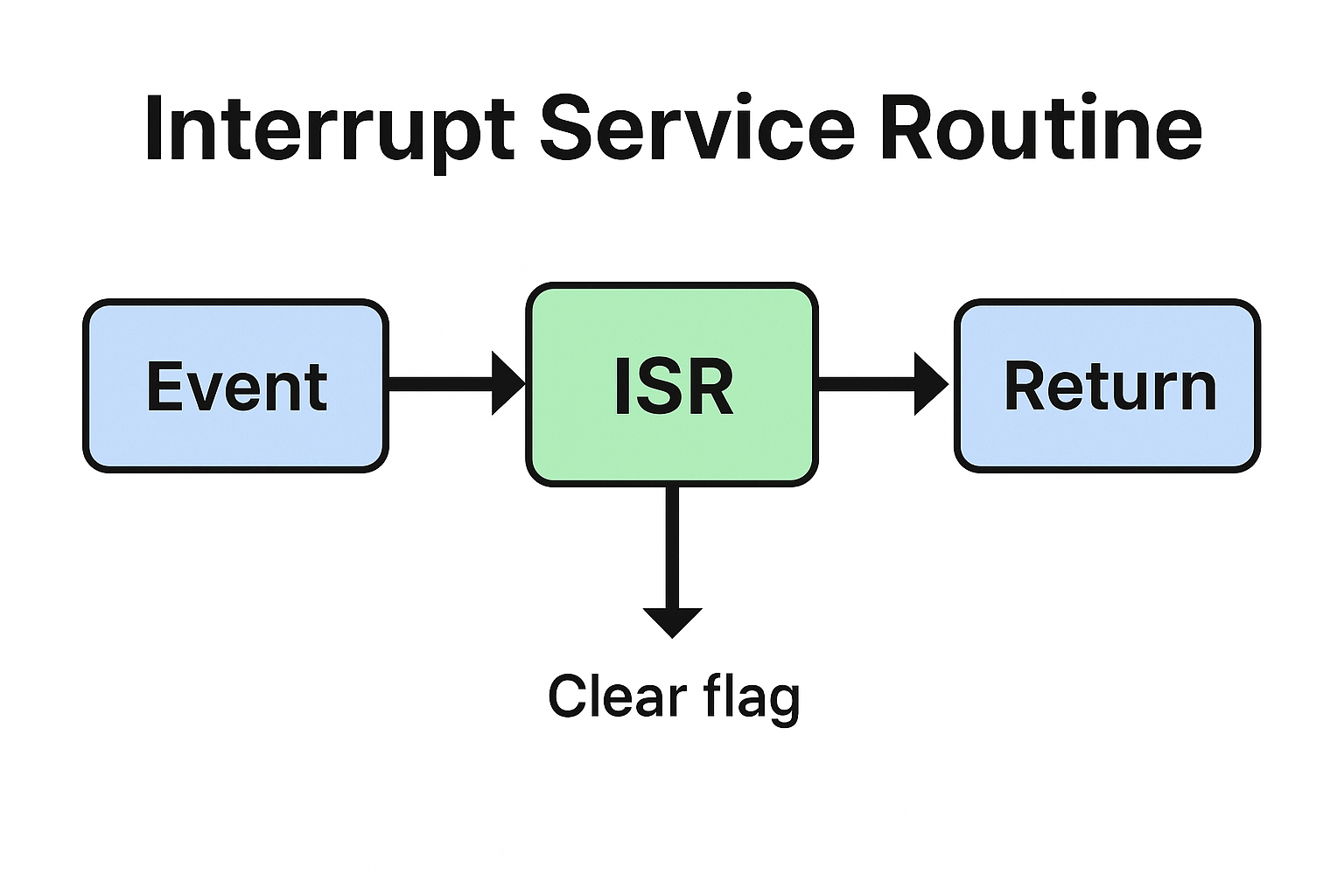
    An Interrupt Service Routine (ISR) is a special block of code that executes when a hardware or software interrupt occurs. Instead of continuously checking a condition (polling), the system pauses its normal execution and jumps to the ISR to handle the event immediately.

    Example: When you press a button on a microcontroller, an interrupt occurs, and the ISR handles the button press.

    Interview Questions on Interrupt Service Routine
    Top Interview Questions on Interrupt Service Routine (ISR) Master Embedded Interview Guide (2025)

    Common Interview Questions on Interrupt Service Routine (ISR)

    1. What is an ISR in embedded systems?

    Answer: An ISR is a function that handles interrupts. It is triggered automatically when an interrupt occurs, allowing the CPU to respond quickly to external or internal events.

    2. What are the characteristics of an ISR?

    Answer:

    • Fast execution : Should be short and efficient.
    • No return values : ISR does not return values.
    • No blocking calls : Avoid using functions like delay() inside ISR.
    • Context saving : CPU saves the current state before jumping to ISR.

    3. Can an ISR call another function?

    Answer: Yes, but it should only call lightweight functions. Heavy operations inside ISR may slow down the system and block other interrupts.

    4. What are nested interrupts?

    Answer: Nested interrupts occur when a higher-priority interrupt occurs while another ISR is still running. In such cases, the CPU pauses the current ISR and executes the higher-priority one.

    5. Why should we keep ISRs short?

    Answer: Long ISRs delay the processing of other interrupts. In real-time systems, this can cause missed events and system instability.

    6. What is the difference between ISR and a normal function?

    Answer:

    • ISR executes automatically when an interrupt occurs, while a normal function is called manually.
    • ISR does not return values, while functions can.
    • ISR runs in a special CPU context and must be as short as possible.

    7. Can we use global variables inside ISR?

    Answer: Yes, but they must be declared as volatile so that the compiler does not optimize them. This ensures real-time updates between the ISR and the main program.

    8. What is interrupt latency?

    Answer: Interrupt latency is the time delay between an interrupt request and the start of ISR execution. Low latency is important for real-time systems.

    9. How do you handle multiple interrupts?

    Answer:

    • Assign priority levels to interrupts.
    • Use interrupt vectors to map different ISRs.
    • Ensure critical ISRs are shorter and higher priority.

    10. What are some best practices for writing ISRs?

    Answer:

    • Keep ISRs short and simple.
    • Use global variables carefully (mark them as volatile).
    • Avoid using printf, malloc, or delay inside ISR.
    • Handle only critical tasks inside ISR and defer others to the main loop or task scheduler.

    List of Interview Questions on Interrupt Service Routine (ISR)

    Basic Questions of Interrupt Service Routine interview questions

    1. What is an Interrupt Service Routine (ISR)?
    2. Why do we need ISR in embedded systems?
    3. What are the main features of an ISR?
    4. What is the difference between polling and ISR?
    5. What happens when an interrupt occurs?

    Intermediate Questions of ISR in embedded systems

    1. What are the rules for writing an ISR?
    2. Why should an ISR be short and fast?
    3. Can we use global variables inside ISR?
    4. What is the role of the volatile keyword in ISR?
    5. What is interrupt latency?
    6. Can an ISR return a value? Why or why not?
    7. What is the difference between ISR and a normal function?
    8. Can ISRs be nested? What are nested interrupts?
    9. How does the CPU know which ISR to execute?
    10. What is an interrupt vector table?

    Advanced Questions of common ISR interview questions

    1. How are multiple interrupts handled in a system?
    2. What are interrupt priorities?
    3. What is the difference between maskable and non-maskable interrupts?
    4. What are reentrant and non-reentrant ISRs?
    5. Can we use dynamic memory allocation (malloc/free) inside ISR?
    6. Why is it not recommended to use printf() inside ISR?
    7. What are some common mistakes while writing ISRs?
    8. How do you handle critical tasks inside ISR?
    9. What happens if an ISR takes too long to execute?
    10. How do modern microcontrollers reduce interrupt latency?

    Practical/Implementation Questions of interrupt handling in embedded systems

    1. How do you declare an ISR in C/C++?
    2. How do you enable and disable interrupts in a microcontroller?
    3. What is the difference between hardware and software interrupts?
    4. Can an ISR call another ISR?
    5. How do you share data between ISR and the main program?
    6. What are best practices for writing ISRs?
    7. What tools or debuggers can be used to test ISR execution?
    8. Can an ISR cause a system crash? How?
    9. How does an operating system handle interrupts differently from bare-metal programming?
    10. What is the difference between vectored and non-vectored interrupts?

    1.What is an Interrupt Service Routine (ISR)?

    Ans: An ISR is a special function that executes automatically when an interrupt occurs, allowing the CPU to handle events quickly without polling.

    2.Why do we use ISR in embedded systems?

    Ans: ISR reduces CPU load, improves response time, and makes systems more efficient by handling events only when they occur.

    3. Can an ISR return a value?

    Ans: No, ISRs cannot return values because they are executed by hardware/OS, not called like regular functions.

    4. Why should ISR be short and fast?

    Ans: Long ISRs block other interrupts and can cause system delays or missed events.

    5. Can we use global variables in ISR?

    Ans: Yes, but they should be declared as volatile to ensure real-time updates between ISR and the main program.

    6. What is interrupt latency?

    Ans: Interrupt latency is the time delay between an interrupt request and the start of ISR execution.

    7. Can we use printf or delay inside ISR?

    Ans: No, functions like printf, malloc, or delay should be avoided inside ISR as they are slow and may cause system instability.

    8. What is the difference between ISR and normal function?

    Ans:
    a) ISR executes automatically when an interrupt occurs, while a normal function is called explicitly.
    b) ISR does not return values, while functions can.
    c) ISR runs in a special CPU context.

    9. What are nested interrupts?

    Ans: Nested interrupts occur when a higher-priority interrupt interrupts the execution of a lower-priority ISR.

    10. What are best practices for writing ISRs?

    Ans:
    a) Keep ISRs short and efficient.
    b) Use volatile for shared variables.
    c) Avoid blocking functions.
    d) Handle only critical tasks inside ISR, defer the rest to main loop or task scheduler.
    Interrupt Service Routine
    Interrupt Service Routine (ISR) Definition, Examples, Best Practices Embedded Interview Guide (2025)
  • Memory Protection Unit (MPU): Features, Importance & Applications | Master Embedded Interview 2026

    Learn everything about the Memory Protection Unit (MPU), its key features, working, advantages, and applications in embedded systems. Discover how a memory protection unit improves security, stability, fault isolation, and safety in microcontrollers and RTOS-based designs.

    Introduction

    In modern embedded systems and microcontrollers, ensuring safe and reliable execution of code is a critical requirement. This is where the Memory Protection Unit (MPU) plays a vital role. The MPU is a hardware feature that provides memory access control, enhances system security, and prevents unintended memory corruption. For developers working with real-time operating systems (RTOS) or safety-critical applications, understanding the memory protection unit is essential.

    What is a Memory Protection Unit (MPU)?

    A Memory Protection Unit is a hardware component integrated into many microcontrollers and processors. Its primary job is to control how different parts of memory (RAM, Flash, peripherals, etc.) can be accessed by applications or processes. Unlike a full Memory Management Unit (MMU) used in complex processors, the MPU is lightweight and designed for resource-constrained embedded devices.

    With an MPU, developers can define memory regions, assign access permissions, and protect critical data or code from being accidentally modified.

    Key Features of a Memory Protection Unit

    1. Region-Based Protection
      • The MPU allows memory to be divided into regions. Each region can have specific permissions such as read-only, write-only, or read/write access.
    2. Privilege Levels
      • It supports different privilege levels (e.g., user mode and privileged mode), preventing untrusted code from modifying system resources.
    3. Fault Handling
      • If a program tries to access restricted memory, the MPU triggers a fault, ensuring safe execution.
    4. Lightweight Design
      • The memory protection unit does not perform address translation like an MMU, which makes it suitable for microcontrollers with limited resources.
    5. Support for Real-Time Systems
      • The MPU enables better isolation in RTOS-based applications, helping achieve safety certifications like ISO 26262 (automotive) and IEC 61508 (industrial).

    Why Do We Need a Memory Protection Unit?

    • System Stability: Prevents one faulty task from corrupting another task’s memory.
    • Security: Protects sensitive data and system-level code from unauthorized access.
    • Debugging Support: Helps developers detect invalid memory accesses quickly.
    • Safety Compliance: Essential for industries like automotive, aerospace, and medical devices.

    Difference Between MPU and MMU

    FeatureMPU (Memory Protection Unit)MMU (Memory Management Unit)
    FunctionProvides access control and protectionProvides virtual memory and paging
    ComplexityLightweight, simpleMore complex
    TargetMicrocontrollers, embedded systemsHigh-end processors, desktops, servers
    Address TranslationNot supportedFully supported

    Address Translation in an Operating System (OS) is the process of converting a logical (virtual) address generated by a program into a physical address in main memory (RAM).

    Think of it like this :
    a) Program speaks virtual addresses
    b) Hardware (RAM) understands physical addresses
    c) OS + hardware act as the translator

    Why Address Translation is needed

    1. Programs don’t know actual RAM locations
    2. Multiple programs run at the same time
    3. Memory protection & isolation
    4. Efficient memory usage (virtual memory)

    So every process thinks:

    “I start at address 0”

    …but in reality, they are placed at different physical locations.

    Types of Addresses

    1. Logical (Virtual) Address

    • Generated by the CPU
    • Used by programs
    • Example: 0x0040

    2. Physical Address

    • Actual location in RAM
    • Used by memory hardware
    • Example: 0xA040

    How Address Translation Works

    Simple View

    Logical Address  ──► Address Translation ──► Physical Address
    

    This translation is mainly done by MMU (Memory Management Unit).

    Common Address Translation Techniques

    Base and Limit Register (Simple OS)

    • Base Register → starting physical address of process
    • Limit Register → size of process memory

    Formula:

    Physical Address = Base + Logical Address
    

    Example:

    Base = 1000
    Logical Address = 200
    Physical Address = 1200
    

    If logical address ≥ limit → ❌ invalid (memory protection)

    Paging

    Memory is divided into:

    • Pages (virtual memory)
    • Frames (physical memory)

    Translation steps:

    1. Logical address → (Page Number + Offset)
    2. Page Number → Frame Number (via Page Table)
    3. Physical address → (Frame Number + Offset)
    Logical Address
       ├── Page No
       └── Offset
    
    Page Table
       Page No ──► Frame No
    
    Physical Address
       ├── Frame No
       └── Offset
    

    ✔ No external fragmentation
    ✔ Efficient memory usage

    Segmentation

    Memory is divided into segments:

    • Code
    • Data
    • Stack

    Each segment has:

    • Base
    • Limit

    Physical Address = Segment Base + Offset

    ✔ Matches program structure
    ❌ External fragmentation

    Paging + Segmentation (Advanced OS)

    Used in modern systems for:

    • Better protection
    • Better flexibility

    Role of MMU

    • Performs address translation
    • Checks access permissions
    • Uses TLB (Translation Lookaside Buffer) for fast lookup

    Real-Life Analogy

    • Logical address → House number
    • Physical address → GPS coordinates
    • OS/MMU → Google Maps translating it

    Applications of a Memory Protection Unit

    • Automotive ECUs (Engine Control Units)
    • Medical devices with safety requirements
    • Industrial automation systems
    • Consumer electronics (IoT devices, wearables)
    • Defense and aerospace systems

    Conclusion

    The Memory Protection Unit (MPU) is a powerful hardware feature for embedded systems, ensuring secure, stable, and reliable program execution. By restricting unauthorized access, isolating memory regions, and enhancing system safety, the MPU has become a standard component in microcontroller design.

    For developers aiming to build secure and safety-critical embedded applications, mastering the memory protection unit is not optional—it’s a necessity.

    Advantages of Memory Protection Unit (MPU)

    1. System Stability
      • The memory protection unit prevents faulty tasks from corrupting other tasks’ memory, ensuring stable system performance.
    2. Improved Security
      • It restricts unauthorized access to sensitive data and code, making embedded devices more secure.
    3. Fault Isolation
      • MPU detects invalid memory accesses quickly and generates a fault, helping developers identify and fix issues.
    4. Low Resource Overhead
      • Unlike a memory management unit (MMU), the memory protection unit is lightweight, making it ideal for resource-constrained microcontrollers.
    5. Safety Compliance
      • Essential for achieving industry safety certifications such as ISO 26262 (automotive) and IEC 61508 (industrial).
    6. Support for RTOS
      • Provides task isolation in real-time operating systems, improving reliability of multitasking environments.

    Disadvantages of Memory Protection Unit (MPU)

    1. Limited Flexibility
      • The memory protection unit cannot perform address translation or virtual memory, unlike MMUs.
    2. Region Restrictions
      • MPUs usually support only a fixed number of memory regions, which may not be enough for complex applications.
    3. Manual Configuration
      • Developers must carefully configure regions and permissions; incorrect setup can cause frequent memory faults.
    4. Not Suitable for High-End Systems
      • While MPU is great for microcontrollers, it cannot match the advanced features of MMUs in high-end processors.
    5. Debugging Overhead
      • Frequent memory faults due to strict protection may slow down development if not handled properly.

    Interview Questions on Memory Protection Unit (MPU)

    Basic Level Questions

    1. What is a Memory Protection Unit (MPU)?
    2. How does a memory protection unit differ from a memory management unit (MMU)?
    3. Why do microcontrollers use an MPU instead of an MMU?
    4. What are the main features of a memory protection unit?
    5. Can you explain how MPU helps in debugging embedded systems?
    6. What happens when a task tries to access a restricted memory region in MPU?

    Intermediate Level Questions

    1. How does the MPU handle privilege levels in embedded systems?
    2. How many memory regions can typically be defined in an ARM Cortex-M MPU?
    3. Explain how an MPU improves system stability in RTOS-based applications.
    4. What is the role of MPU in achieving safety certifications like ISO 26262?
    5. How does the MPU support read, write, and execute permissions for memory?
    6. What kind of fault is generated if unauthorized memory access occurs?

    Advanced Level Questions

    1. Compare MPU-based protection with software-based memory protection.
    2. How would you configure an MPU in ARM Cortex-M architecture?
    3. What are the challenges of using MPU in complex embedded systems?
    4. How does MPU improve security in IoT devices?
    5. In what scenarios would you choose MPU over MMU for system design?
    6. How does the MPU interact with exception handling in microcontrollers?
    7. Can MPU be used to protect peripheral registers as well as RAM/Flash memory?
    8. Give a real-world example where MPU played a critical role in system reliability.
    Memory Protection Unit (MPU)
    Memory Protection Unit (MPU) Features, Importance & Applications Master Embedded Interview 2025
  • Best RTOS for microcontrollers | Embedded Systems Interview Guide (2026)

    Best RTOS for microcontrollers : When working with embedded systems, choosing the right Real-Time Operating System (RTOS) is essential. An RTOS provides predictable task scheduling, resource management, and timing accuracy—critical for applications like automotive systems, IoT devices, robotics, and medical equipment.

    In this article, we’ll explore 6 popular RTOS software for embedded systems, highlighting their key features and use cases in a simple, beginner-friendly way.

    6 Best RTOS for microcontrollers

    1. FreeRTOS

    FreeRTOS is one of the most widely used open-source RTOS. It is lightweight, portable, and designed for microcontrollers and small embedded devices.

    Key Features:

    • Open-source and free to use
    • Supports over 40+ architectures
    • Small memory footprint
    • Large community support

    Best For: IoT devices, low-power microcontrollers, and academic projects.

    2. VxWorks

    VxWorks is a commercial RTOS developed by Wind River. It is known for high performance and reliability in mission-critical applications.

    Key Features:

    • Real-time scheduling and deterministic behavior
    • Strong security features
    • POSIX-compliant APIs
    • Extensive debugging and development tools

    Best For: Aerospace, defense, automotive, and industrial automation.

    3. QNX Neutrino RTOS

    QNX is a microkernel-based RTOS trusted for its stability and fault tolerance. It is commonly used in safety-critical applications.

    Key Features:

    • Microkernel architecture for high reliability
    • Scalability from small devices to large systems
    • Strong focus on safety standards (ISO 26262, IEC 61508)
    • Excellent inter-process communication

    Best For: Automotive infotainment, medical devices, and industrial systems.

    4. ThreadX (Azure RTOS)

    ThreadX, now part of Microsoft Azure RTOS, is optimized for simplicity and performance.

    Key Features:

    • Fast real-time performance with low latency
    • Integrated with Azure IoT services
    • Small footprint (as low as 2 KB RAM)
    • Pre-certified for safety standards

    Best For: IoT products, wearables, and consumer electronics.

    5. Micrium µC/OS-II & µC/OS-III

    Micrium’s RTOS family is well-documented and widely used in commercial and educational fields.

    Key Features:

    • Preemptive multitasking
    • Safety-certified kernels
    • Rich documentation and examples
    • Compatible with various microcontrollers

    Best For: Medical devices, industrial controls, and educational use.

    6. Zephyr RTOS

    Zephyr is an open-source RTOS backed by the Linux Foundation. It is gaining popularity due to its scalability and community support.

    Key Features:

    • Open-source and royalty-free
    • Supports multiple architectures (ARM, RISC-V, x86)
    • Strong IoT integration
    • Active developer community

    Best For: IoT, smart home devices, and wearable technology.

    Conclusion of Best RTOS for microcontrollers

    Choosing the right RTOS software for embedded systems depends on your project needs. For beginners, FreeRTOS and Zephyr are great starting points due to their open-source nature and community support. For advanced, safety-critical applications, VxWorks and QNX are widely trusted in industries.

    Frequently Asked Questions (FAQ) | Best RTOS for microcontrollers

    1. What is the best RTOS for microcontrollers in 2025?

    In 2025, the best RTOS for microcontrollers is still FreeRTOS due to its lightweight design, wide hardware support, and active community. However, Zephyr RTOS is quickly becoming a strong alternative for IoT-based microcontroller projects.

    2. Why should I use an RTOS instead of bare-metal programming?

    An RTOS provides task scheduling, multitasking, and resource management, making it easier to handle complex embedded applications. In bare-metal programming, the developer manages everything manually, which is harder to scale.

    3. Which RTOS is most used in the industry?

    • FreeRTOS is the most widely adopted in microcontrollers.
    • QNX and VxWorks dominate safety-critical industries like automotive, aerospace, and medical.
    • Zephyr is rapidly growing in IoT ecosystems.

    4. What is the lightest RTOS for microcontrollers?

    FreeRTOS and ThreadX (Azure RTOS) are considered the lightest RTOS options. They require very little RAM and ROM, making them ideal for small 8-bit and 32-bit microcontrollers.

    5. Can I run Linux instead of RTOS on microcontrollers?

    No. Linux requires more memory and processing power than most microcontrollers can provide. For resource-constrained devices, an RTOS is the best choice.

    6. Which RTOS is free to use?

    • FreeRTOS (MIT license)
    • Zephyr RTOS (Apache 2.0 license)
      Both are completely open-source and free to use in commercial or personal projects.

    7. What is the difference between an RTOS and a general OS?

    • RTOS: Provides deterministic timing and real-time scheduling for critical applications.
    • General OS (like Linux/Windows): Focuses on throughput, user interaction, and multitasking without strict timing guarantees.

    8. Is FreeRTOS the best RTOS for microcontrollers used in IoT?

    Yes. FreeRTOS is the most popular choice for IoT devices because it is lightweight, works with cloud platforms like AWS, and supports a huge range of microcontrollers

    Best RTOS for microcontrollers Embedded Systems
    Best RTOS for microcontrollers Embedded Systems Interview Guide (2025)