
Tag: Kernel Programming

  • Complete Linux Block Device Driver Project: Kernel Driver + Userspace Access Program

    Complete Linux Block Device Driver Project tutorial covering kernel module development and userspace access program. Learn how to build, register, and test a block device driver in Linux with step-by-step code examples, real-world concepts, and performance insights for beginners and advanced developers.

    This is a complete, working project. By the end of this guide you will have a Linux block device driver running as a kernel module, a userspace C program that opens the device and performs raw read/write operations on it, a working Makefile that builds both, and a clear understanding of every line of code.

    No hand-waving. No “left as an exercise.” Every file is here, complete and ready to compile.

    This is the kind of project that actually belongs in a portfolio if you are looking for embedded Linux or Linux kernel driver roles. It touches kernel module development, block layer internals, device node access from userspace, raw sector I/O, and ioctl communication all in one project.

    Before diving into implementation, it’s important to understand the fundamentals of how block device drivers work in Linux. If you’re new to this topic, check out this Linux Block Device Drivers: The Complete Beginner’s Guide, which explains core concepts like request queues, buffering, and kernel interactions in a simple and beginner-friendly way.

    Linux Block Device Driver Project

    1. Project Overview and Architecture

    Here is what we are building and how the pieces connect:

    
    +---------------------------+
    |     Userspace Program     |  userapp.c
    |  open() / read() / write()|
    |  ioctl() / lseek()        |
    +------------+--------------+
                 |
                 | /dev/myblkdev  (block device node)
                 |
    +------------+--------------+
    |      Linux Block Layer    |  Kernel block layer
    |  bio, request queue,      |
    |  blk-mq, scheduler        |
    +------------+--------------+
                 |
    +------------+--------------+
    |   myblkdev.ko             |  Our kernel module
    |   RAM-backed block driver |
    |   16MB virtual disk       |
    |   ioctl for device info   |
    +---------------------------+
                 |
         vmalloc'd RAM buffer
         (simulates disk storage)
    

    The kernel module registers a block device backed by a 16MB chunk of kernel RAM. It handles read and write requests through the blk-mq interface. It also exposes an ioctl command so userspace can query device information like size and sector count.

    The userspace program opens the device node directly using open(), writes a pattern to specific sectors using write(), reads it back and verifies it, and calls ioctl() to print device info.

    This is exactly how tools like dd, hdparm, and storage benchmark tools work at the lowest level.

    2. Prerequisites and Environment Setup

    Before you start, make sure your system has everything needed:

    # Install kernel headers for your running kernel
    sudo apt-get update
    sudo apt-get install linux-headers-$(uname -r) build-essential
    
    # Verify kernel headers are present
    ls /lib/modules/$(uname -r)/build
    # Should show a directory, not an error
    
    # Check your kernel version
    uname -r
    # This project is tested on 5.15+ and 6.x kernels

    You also need to run the load and test steps as root or with sudo. Block devices require root access for raw sector I/O from userspace.

    If you are on a VM (recommended for kernel development), make sure you can do sudo insmod and that your VM has at least 256MB of RAM free for the driver’s buffer plus kernel overhead.

    3. Project Directory Structure

    Create this layout on your machine:

    myblkdev/
    ├── myblkdev.c       # Kernel block device driver
    ├── myblkdev.h      # Shared header (kernel + userspace)
    ├── userapp.c         # Userspace test and access program
    └── Makefile           # Builds both kernel module and userapp
    mkdir myblkdev
    cd myblkdev

    All four files go in this single directory. The Makefile handles building the kernel module (which goes through the kernel build system) and the userspace binary (which is just a normal gcc compile) in one make command.

    4. Shared Header File : myblkdev.h

    This header is included by both the kernel driver and the userspace program. It defines the ioctl command numbers and the data structure used to exchange device information. Sharing this header between kernel and userspace is the standard kernel pattern — it ensures both sides agree on the exact binary layout of ioctl structures.

    /* myblkdev.h
     * Shared header between kernel driver and userspace program.
     * Defines ioctl interface for myblkdev block device driver.
     */
    
    #ifndef MYBLKDEV_H
    #define MYBLKDEV_H
    
    #include <linux/ioctl.h>
    
    /* Magic number for our driver's ioctl commands.
     * Pick something unlikely to conflict. Check Documentation/userspace-api/ioctl/ioctl-number.rst
     */
    #define MYBLKDEV_MAGIC  0xBD
    
    /* Device info structure returned by MYBLKDEV_GET_INFO ioctl */
    struct myblkdev_info {
        unsigned long total_bytes;    /* total device size in bytes */
        unsigned long sector_count;   /* total number of 512-byte sectors */
        unsigned int  sector_size;    /* sector size in bytes (always 512 here) */
        unsigned int  major;          /* device major number */
        unsigned int  minor;          /* device minor number */
    };
    
    /* ioctl command: get device info
     * Direction: kernel -> userspace (IOR = read from kernel's perspective)
     * Type: MYBLKDEV_MAGIC
     * Number: 1
     * Size: sizeof(struct myblkdev_info)
     */
    #define MYBLKDEV_GET_INFO  _IOR(MYBLKDEV_MAGIC, 1, struct myblkdev_info)
    
    /* ioctl command: reset device (zero all storage)
     * Direction: no data transfer
     * Type: MYBLKDEV_MAGIC
     * Number: 2
     */
    #define MYBLKDEV_RESET     _IO(MYBLKDEV_MAGIC, 2)
    
    #endif /* MYBLKDEV_H */

    The _IOR and _IO macros encode the direction, magic number, command number, and data size into a single 32-bit integer. This encoding prevents different drivers from accidentally sharing the same ioctl number, which would cause the wrong driver to handle the command.

    5. The Kernel Block Device Driver : myblkdev.c

    This is the full kernel driver. Read through it section by section — every part is commented to explain what it does and why.

    /* myblkdev.c
     * A RAM-backed Linux block device driver with ioctl support.
     * Registers /dev/myblkdev as a 16MB block device.
     *
     * Tested on Linux 5.15 - 6.x
     * License: GPL v2
     */
    
    #include <linux/module.h>
    #include <linux/kernel.h>
    #include <linux/init.h>
    #include <linux/fs.h>
    #include <linux/blkdev.h>
    #include <linux/blk-mq.h>
    #include <linux/genhd.h>
    #include <linux/hdreg.h>
    #include <linux/vmalloc.h>
    #include <linux/uaccess.h>
    #include "myblkdev.h"
    
    MODULE_LICENSE("GPL");
    MODULE_AUTHOR("myblkdev project");
    MODULE_DESCRIPTION("RAM-backed block device driver with ioctl");
    MODULE_VERSION("1.0");
    
    /* ===== Configuration ===== */
    #define MYBLKDEV_MAJOR       240        /* static major; 240-254 are for local use */
    #define MYBLKDEV_NAME        "myblkdev"
    #define MYBLKDEV_MINORS      1          /* 1 = no partitions; use 16 to allow partitions */
    #define DISK_SIZE_MB         16
    #define KERNEL_SECTOR_SIZE   512
    
    /* ===== Device State ===== */
    struct myblkdev_state {
        unsigned long    size;          /* device size in bytes */
        u8              *data;          /* vmalloc'd storage buffer */
        spinlock_t       lock;          /* protects data access */
        struct blk_mq_tag_set  tag_set;
        struct request_queue  *queue;
        struct gendisk        *gd;
        int              major;
        int              minor;
    };
    
    /* Single global device instance for this example */
    static struct myblkdev_state *mydev;
    
    /* ===== Request Handler ===== */
    /*
     * This is the core of the driver. The block layer calls this function
     * for every I/O request. We iterate over each segment of the request,
     * copy data to/from our RAM buffer, and signal completion.
     */
    static blk_status_t myblkdev_queue_rq(struct blk_mq_hw_ctx *hctx,
                                           const struct blk_mq_queue_data *bd)
    {
        struct request        *req  = bd->rq;
        struct myblkdev_state *dev  = req->q->queuedata;
        struct bio_vec         bvec;
        struct req_iterator    iter;
        loff_t                 pos;
        unsigned long          flags;
    
        /* Mark request as started — required by blk-mq before any processing */
        blk_mq_start_request(req);
    
        /* Reject non-filesystem requests (SCSI passthrough, etc.) */
        if (blk_rq_is_passthrough(req)) {
            pr_notice(MYBLKDEV_NAME ": skip passthrough request\n");
            blk_mq_end_request(req, BLK_STS_IOERR);
            return BLK_STS_OK;
        }
    
        /* Convert starting sector to byte offset.
         * blk_rq_pos() returns offset in 512-byte units always. */
        pos = (loff_t)blk_rq_pos(req) * KERNEL_SECTOR_SIZE;
    
        spin_lock_irqsave(&dev->lock, flags);
    
        /* Iterate over each scatter-gather segment in the request */
        rq_for_each_segment(bvec, req, iter) {
            void   *buf = page_address(bvec.bv_page) + bvec.bv_offset;
            size_t  len = bvec.bv_len;
    
            /* Bounds check — never go past our buffer */
            if (pos + len > dev->size) {
                pr_err(MYBLKDEV_NAME ": I/O beyond device size "
                       "(pos=%lld len=%zu size=%lu)\n",
                       pos, len, dev->size);
                spin_unlock_irqrestore(&dev->lock, flags);
                blk_mq_end_request(req, BLK_STS_IOERR);
                return BLK_STS_OK;
            }
    
            if (rq_data_dir(req) == WRITE) {
                /* WRITE: copy from bio page into our RAM buffer */
                memcpy(dev->data + pos, buf, len);
            } else {
                /* READ: copy from our RAM buffer into bio page */
                memcpy(buf, dev->data + pos, len);
            }
    
            pos += len;
        }
    
        spin_unlock_irqrestore(&dev->lock, flags);
    
        /* Signal successful completion to the block layer */
        blk_mq_end_request(req, BLK_STS_OK);
        return BLK_STS_OK;
    }
    
    /* blk-mq operations table — only queue_rq is mandatory */
    static const struct blk_mq_ops myblkdev_mq_ops = {
        .queue_rq = myblkdev_queue_rq,
    };
    
    /* ===== ioctl Handler ===== */
    /*
     * Userspace programs can call ioctl() on the block device fd to
     * get device info or trigger a reset. We handle our custom commands
     * here and return -ENOTTY for anything we don't recognize.
     */
    static int myblkdev_ioctl(struct block_device *bdev, fmode_t mode,
                               unsigned int cmd, unsigned long arg)
    {
        struct myblkdev_state *dev = bdev->bd_disk->private_data;
        struct myblkdev_info   info;
        unsigned long          flags;
    
        switch (cmd) {
    
        case MYBLKDEV_GET_INFO:
            /* Fill info structure and copy to userspace */
            info.total_bytes  = dev->size;
            info.sector_count = dev->size / KERNEL_SECTOR_SIZE;
            info.sector_size  = KERNEL_SECTOR_SIZE;
            info.major        = dev->major;
            info.minor        = dev->minor;
    
            if (copy_to_user((void __user *)arg, &info, sizeof(info)))
                return -EFAULT;
            return 0;
    
        case MYBLKDEV_RESET:
            /* Zero the entire storage buffer */
            spin_lock_irqsave(&dev->lock, flags);
            memset(dev->data, 0, dev->size);
            spin_unlock_irqrestore(&dev->lock, flags);
            pr_info(MYBLKDEV_NAME ": device reset (zeroed)\n");
            return 0;
    
        default:
            /* Unknown command — return standard "not a typewriter" error */
            return -ENOTTY;
        }
    }
    
    /* ===== Block Device Operations Table ===== */
    static const struct block_device_operations myblkdev_fops = {
        .owner          = THIS_MODULE,
        .ioctl          = myblkdev_ioctl,
    };
    
    /* ===== Module Init ===== */
    static int __init myblkdev_init(void)
    {
        int ret;
    
        pr_info(MYBLKDEV_NAME ": initializing %d MB RAM block device\n",
                DISK_SIZE_MB);
    
        /* Allocate our device state structure */
        mydev = kzalloc(sizeof(*mydev), GFP_KERNEL);
        if (!mydev) {
            pr_err(MYBLKDEV_NAME ": failed to allocate device state\n");
            return -ENOMEM;
        }
    
        mydev->size  = DISK_SIZE_MB * 1024 * 1024;
        mydev->major = MYBLKDEV_MAJOR;
        mydev->minor = 0;
        spin_lock_init(&mydev->lock);
    
        /* Allocate the RAM storage buffer using vmalloc.
         * We use vmalloc (not kmalloc) because we need a large contiguous
         * virtual mapping but don't need physically contiguous memory. */
        mydev->data = vmalloc(mydev->size);
        if (!mydev->data) {
            pr_err(MYBLKDEV_NAME ": failed to allocate %d MB storage\n",
                   DISK_SIZE_MB);
            ret = -ENOMEM;
            goto err_free_dev;
        }
        memset(mydev->data, 0, mydev->size);
    
        /* Register the block device major number */
        ret = register_blkdev(MYBLKDEV_MAJOR, MYBLKDEV_NAME);
        if (ret < 0) {
            pr_err(MYBLKDEV_NAME ": register_blkdev failed (%d)\n", ret);
            goto err_free_data;
        }
    
        /* Configure blk-mq tag set.
         * nr_hw_queues=1: single hardware queue (fine for RAM, no real HW)
         * queue_depth=128: up to 128 in-flight requests at once */
        mydev->tag_set.ops          = &myblkdev_mq_ops;
        mydev->tag_set.nr_hw_queues = 1;
        mydev->tag_set.queue_depth  = 128;
        mydev->tag_set.numa_node    = NUMA_NO_NODE;
        mydev->tag_set.cmd_size     = 0;
        mydev->tag_set.flags        = BLK_MQ_F_SHOULD_MERGE;
    
        ret = blk_mq_alloc_tag_set(&mydev->tag_set);
        if (ret) {
            pr_err(MYBLKDEV_NAME ": blk_mq_alloc_tag_set failed (%d)\n", ret);
            goto err_unreg_blkdev;
        }
    
        /* Create the request queue linked to our tag set */
        mydev->queue = blk_mq_init_queue(&mydev->tag_set);
        if (IS_ERR(mydev->queue)) {
            ret = PTR_ERR(mydev->queue);
            pr_err(MYBLKDEV_NAME ": blk_mq_init_queue failed (%d)\n", ret);
            goto err_free_tag_set;
        }
    
        /* Store device pointer in queue for access from request handler */
        mydev->queue->queuedata = mydev;
    
        /* Set queue limits — tell the block layer what our "hardware" supports */
        blk_queue_logical_block_size(mydev->queue, KERNEL_SECTOR_SIZE);
        blk_queue_max_hw_sectors(mydev->queue, 256); /* max 128KB per request */
    
        /* Allocate the gendisk structure.
         * MYBLKDEV_MINORS=1 means no partition support.
         * Use 16 if you want to allow up to 15 partitions. */
        mydev->gd = alloc_disk(MYBLKDEV_MINORS);
        if (!mydev->gd) {
            pr_err(MYBLKDEV_NAME ": alloc_disk failed\n");
            ret = -ENOMEM;
            goto err_free_queue;
        }
    
        /* Fill in gendisk fields */
        mydev->gd->major        = MYBLKDEV_MAJOR;
        mydev->gd->first_minor  = 0;
        mydev->gd->fops         = &myblkdev_fops;
        mydev->gd->queue        = mydev->queue;
        mydev->gd->private_data = mydev;
        snprintf(mydev->gd->disk_name, sizeof(mydev->gd->disk_name),
                 MYBLKDEV_NAME);
    
        /* Set disk capacity in 512-byte sectors */
        set_capacity(mydev->gd, mydev->size / KERNEL_SECTOR_SIZE);
    
        /* add_disk() makes the device visible — /dev/myblkdev appears after this */
        add_disk(mydev->gd);
    
        pr_info(MYBLKDEV_NAME ": ready — /dev/%s, major=%d, size=%lu MB\n",
                mydev->gd->disk_name, MYBLKDEV_MAJOR,
                mydev->size / (1024 * 1024));
        return 0;
    
    /* Error cleanup — reverse order of initialization */
    err_free_queue:
        blk_cleanup_queue(mydev->queue);
    err_free_tag_set:
        blk_mq_free_tag_set(&mydev->tag_set);
    err_unreg_blkdev:
        unregister_blkdev(MYBLKDEV_MAJOR, MYBLKDEV_NAME);
    err_free_data:
        vfree(mydev->data);
    err_free_dev:
        kfree(mydev);
        return ret;
    }
    
    /* ===== Module Exit ===== */
    static void __exit myblkdev_exit(void)
    {
        /* Cleanup in strict reverse order of init */
        del_gendisk(mydev->gd);          /* remove from block layer */
        put_disk(mydev->gd);             /* release gendisk reference */
        blk_cleanup_queue(mydev->queue); /* destroy request queue */
        blk_mq_free_tag_set(&mydev->tag_set);
        unregister_blkdev(MYBLKDEV_MAJOR, MYBLKDEV_NAME);
        vfree(mydev->data);              /* free RAM storage */
        kfree(mydev);                    /* free device state */
    
        pr_info(MYBLKDEV_NAME ": unloaded\n");
    }
    
    module_init(myblkdev_init);
    module_exit(myblkdev_exit);
    

    6. The Makefile

    This single Makefile builds both the kernel module and the userspace program. Run make once and you get both.

    # Makefile for myblkdev project
    # Builds kernel module (myblkdev.ko) and userspace program (userapp)
    
    # Kernel build directory — uses headers for currently running kernel
    KDIR ?= /lib/modules/$(shell uname -r)/build
    
    # Kernel module object
    obj-m += myblkdev.o
    
    # Default target: build kernel module then userspace app
    all: module userapp
    
    module:
    	$(MAKE) -C $(KDIR) M=$(PWD) modules
    
    # Userspace app: plain gcc, no kernel headers needed
    # _GNU_SOURCE for pread/pwrite, O_DIRECT etc.
    userapp: userapp.c myblkdev.h
    	gcc -Wall -Wextra -O2 -D_GNU_SOURCE -o userapp userapp.c
    
    clean:
    	$(MAKE) -C $(KDIR) M=$(PWD) clean
    	rm -f userapp
    
    .PHONY: all module userapp clean

    The kernel module build goes through the kernel’s own build system (make -C $(KDIR)). The userspace binary is just a normal gcc compile. The shared myblkdev.h header is included by both — that dependency is declared on the userapp line so it rebuilds if the header changes.

    7. The Userspace Access Program : userapp.c

    This program demonstrates every way a userspace application can interact with a raw block device. It opens the device node directly, queries info via ioctl, writes test patterns to specific sectors, reads them back, and verifies the data.

    /* userapp.c
     * Userspace program to test and demonstrate myblkdev block driver access.
     * Performs: ioctl info query, raw sector write, raw sector read, verify.
     *
     * Run as root: sudo ./userapp /dev/myblkdev
     */
    
    #include <stdio.h>
    #include <stdlib.h>
    #include <string.h>
    #include <unistd.h>
    #include <fcntl.h>
    #include <errno.h>
    #include <sys/ioctl.h>
    #include <sys/types.h>
    
    /* Include our shared header.
     * For userspace, linux/ioctl.h is included via sys/ioctl.h already.
     * We redefine to use userspace-safe types. */
    #include "myblkdev.h"
    
    #define SECTOR_SIZE     512
    #define TEST_SECTORS    8       /* write/read 8 sectors = 4KB at a time */
    #define TEST_PATTERN    0xAB    /* byte pattern to write for verification */
    
    /* ===== Helper: print device info from ioctl ===== */
    static void print_device_info(int fd)
    {
        struct myblkdev_info info;
    
        printf("\n--- Device Info (via ioctl) ---\n");
    
        if (ioctl(fd, MYBLKDEV_GET_INFO, &info) < 0) {
            perror("ioctl MYBLKDEV_GET_INFO failed");
            return;
        }
    
        printf("  Total Size   : %lu bytes (%lu MB)\n",
               info.total_bytes, info.total_bytes / (1024 * 1024));
        printf("  Sector Count : %lu sectors\n", info.sector_count);
        printf("  Sector Size  : %u bytes\n", info.sector_size);
        printf("  Major Number : %u\n", info.major);
        printf("  Minor Number : %u\n", info.minor);
        printf("-------------------------------\n\n");
    }
    
    /* ===== Helper: write pattern to a sector range ===== */
    static int write_sectors(int fd, off_t start_sector,
                              int num_sectors, unsigned char pattern)
    {
        size_t   buf_size = num_sectors * SECTOR_SIZE;
        unsigned char *buf;
        ssize_t  written;
        off_t    offset = start_sector * SECTOR_SIZE;
    
        buf = malloc(buf_size);
        if (!buf) {
            fprintf(stderr, "malloc failed\n");
            return -1;
        }
    
        /* Fill buffer with test pattern */
        memset(buf, pattern, buf_size);
    
        /* Seek to the correct byte offset on the block device */
        if (lseek(fd, offset, SEEK_SET) < 0) {
            perror("lseek failed");
            free(buf);
            return -1;
        }
    
        /* Write the buffer — this goes through VFS -> block layer -> our driver */
        written = write(fd, buf, buf_size);
        if (written != (ssize_t)buf_size) {
            fprintf(stderr, "write: expected %zu bytes, got %zd (%s)\n",
                    buf_size, written, strerror(errno));
            free(buf);
            return -1;
        }
    
        printf("[WRITE] Sector %ld - %ld: wrote %zu bytes, pattern=0x%02X\n",
               (long)start_sector, (long)(start_sector + num_sectors - 1),
               buf_size, pattern);
    
        free(buf);
        return 0;
    }
    
    /* ===== Helper: read from sector range and verify pattern ===== */
    static int read_and_verify(int fd, off_t start_sector,
                                int num_sectors, unsigned char expected_pattern)
    {
        size_t    buf_size = num_sectors * SECTOR_SIZE;
        unsigned char *buf;
        ssize_t   bytes_read;
        off_t     offset = start_sector * SECTOR_SIZE;
        int       errors = 0;
        size_t    i;
    
        buf = malloc(buf_size);
        if (!buf) {
            fprintf(stderr, "malloc failed\n");
            return -1;
        }
    
        /* Seek to sector offset */
        if (lseek(fd, offset, SEEK_SET) < 0) {
            perror("lseek failed");
            free(buf);
            return -1;
        }
    
        /* Read back the data */
        bytes_read = read(fd, buf, buf_size);
        if (bytes_read != (ssize_t)buf_size) {
            fprintf(stderr, "read: expected %zu bytes, got %zd (%s)\n",
                    buf_size, bytes_read, strerror(errno));
            free(buf);
            return -1;
        }
    
        /* Verify every byte matches the expected pattern */
        for (i = 0; i < buf_size; i++) {
            if (buf[i] != expected_pattern) {
                fprintf(stderr, "[VERIFY] Mismatch at byte %zu: "
                        "got 0x%02X, expected 0x%02X\n",
                        i, buf[i], expected_pattern);
                errors++;
                if (errors > 5) {
                    fprintf(stderr, "[VERIFY] Too many errors, stopping\n");
                    break;
                }
            }
        }
    
        if (errors == 0) {
            printf("[READ]  Sector %ld - %ld: read %zu bytes — VERIFIED OK "
                   "(pattern=0x%02X)\n",
                   (long)start_sector,
                   (long)(start_sector + num_sectors - 1),
                   buf_size, expected_pattern);
        } else {
            printf("[READ]  Sector %ld - %ld: VERIFICATION FAILED "
                   "(%d errors)\n",
                   (long)start_sector,
                   (long)(start_sector + num_sectors - 1),
                   errors);
        }
    
        free(buf);
        return errors ? -1 : 0;
    }
    
    /* ===== Helper: dump first 64 bytes of a sector as hex ===== */
    static void hexdump_sector(int fd, off_t sector)
    {
        unsigned char buf[64];
        ssize_t       n;
        size_t        i;
    
        lseek(fd, sector * SECTOR_SIZE, SEEK_SET);
        n = read(fd, buf, sizeof(buf));
        if (n <= 0) {
            perror("hexdump read failed");
            return;
        }
    
        printf("\n[HEXDUMP] First 64 bytes of sector %ld:\n", (long)sector);
        for (i = 0; i < (size_t)n; i++) {
            if (i % 16 == 0) printf("  %04zx: ", i);
            printf("%02x ", buf[i]);
            if (i % 16 == 15) printf("\n");
        }
        printf("\n");
    }
    
    /* ===== Helper: reset device via ioctl ===== */
    static void reset_device(int fd)
    {
        printf("[RESET] Sending MYBLKDEV_RESET ioctl...\n");
        if (ioctl(fd, MYBLKDEV_RESET) < 0) {
            perror("ioctl MYBLKDEV_RESET failed");
            return;
        }
        printf("[RESET] Device zeroed successfully\n");
    }
    
    /* ===== Main ===== */
    int main(int argc, char *argv[])
    {
        const char *devpath;
        int         fd;
        int         ret = 0;
    
        if (argc < 2) {
            fprintf(stderr, "Usage: %s \n", argv[0]);
            fprintf(stderr, "Example: sudo %s /dev/myblkdev\n", argv[0]);
            return EXIT_FAILURE;
        }
    
        devpath = argv[1];
    
        printf("===========================================\n");
        printf("  myblkdev Userspace Test Program\n");
        printf("  Device: %s\n", devpath);
        printf("===========================================\n");
    
        /* Open the block device.
         * O_RDWR: we need both read and write access.
         * O_SYNC: write() calls wait for I/O completion before returning.
         *         Important for testing — without this, writes may be
         *         cached by the page cache and not reach the driver immediately. */
        fd = open(devpath, O_RDWR | O_SYNC);
        if (fd < 0) {
            fprintf(stderr, "open(%s) failed: %s\n", devpath, strerror(errno));
            fprintf(stderr, "Did you load the module? Are you running as root?\n");
            return EXIT_FAILURE;
        }
    
        printf("[OPEN]  Opened %s successfully (fd=%d)\n\n", devpath, fd);
    
        /* Step 1: Query device info via ioctl */
        print_device_info(fd);
    
        /* Step 2: Write pattern 0xAB to sectors 0-7 (first 4KB) */
        printf("--- Test 1: Write and Read First 4KB ---\n");
        if (write_sectors(fd, 0, TEST_SECTORS, TEST_PATTERN) < 0) {
            ret = 1;
            goto out;
        }
    
        /* Step 3: Read back and verify */
        if (read_and_verify(fd, 0, TEST_SECTORS, TEST_PATTERN) < 0) {
            ret = 1;
            goto out;
        }
    
        /* Step 4: Hexdump sector 0 to visually confirm */
        hexdump_sector(fd, 0);
    
        /* Step 5: Write different pattern to a sector in the middle of the disk */
        printf("\n--- Test 2: Write and Read Middle of Disk ---\n");
        {
            off_t mid_sector = (DISK_SIZE_MB * 1024 * 1024 / SECTOR_SIZE) / 2;
            printf("[INFO]  Mid-disk sector: %ld\n", (long)mid_sector);
    
            if (write_sectors(fd, mid_sector, TEST_SECTORS, 0xCD) < 0) {
                ret = 1;
                goto out;
            }
            if (read_and_verify(fd, mid_sector, TEST_SECTORS, 0xCD) < 0) {
                ret = 1;
                goto out;
            }
            hexdump_sector(fd, mid_sector);
        }
    
        /* Step 6: Verify sector 0 still has original pattern
         * (mid-disk write must not have corrupted sector 0) */
        printf("\n--- Test 3: Re-verify Sector 0 (Isolation Check) ---\n");
        if (read_and_verify(fd, 0, TEST_SECTORS, TEST_PATTERN) < 0) {
            ret = 1;
            goto out;
        }
    
        /* Step 7: Reset device and verify sector 0 is now zeroed */
        printf("\n--- Test 4: Reset Device and Verify Zeroed ---\n");
        reset_device(fd);
        if (read_and_verify(fd, 0, TEST_SECTORS, 0x00) < 0) {
            ret = 1;
            goto out;
        }
    
        printf("\n===========================================\n");
        if (ret == 0)
            printf("  ALL TESTS PASSED\n");
        else
            printf("  SOME TESTS FAILED — check output above\n");
        printf("===========================================\n");
    
    out:
        close(fd);
        return ret ? EXIT_FAILURE : EXIT_SUCCESS;
    }
    

    8. How the ioctl Interface Works

    The ioctl path is worth understanding clearly because it is the standard way userspace programs communicate non-I/O control information to block and character drivers.

    When userspace calls:

    ioctl(fd, MYBLKDEV_GET_INFO, &info);

    The kernel routes this through VFS to blkdev_ioctl() in the block layer, which checks if it is a standard block ioctl (like BLKGETSIZE, BLKRRPART). If not recognized, it calls your driver’s .ioctl function pointer — which is myblkdev_ioctl() in our driver.

    Inside the driver, copy_to_user() safely copies data from kernel space to the userspace buffer pointer that was passed in as the third argument. You must always use copy_to_user and copy_from_user for this — never dereference a userspace pointer directly in kernel code. It will either fault or silently access wrong memory.

    The _IOR, _IOW, _IOWR, and _IO macros encode direction and size into the command number so the kernel’s ioctl dispatch can do basic sanity checking on the argument size before even calling your handler.

    9. Build, Load, and Run : Step by Step

    # Step 1: Build everything
    cd myblkdev
    make
    
    # You should see:
    # CC [M] /path/to/myblkdev/myblkdev.o
    # LD [M] /path/to/myblkdev/myblkdev.ko
    # gcc -Wall -Wextra -O2 -D_GNU_SOURCE -o userapp userapp.c
    
    # Step 2: Load the kernel module
    sudo insmod myblkdev.ko
    
    # Step 3: Verify it loaded and device node exists
    dmesg | tail -5
    # Expected: myblkdev: ready — /dev/myblkdev, major=240, size=16 MB
    
    ls -la /dev/myblkdev
    # Expected: brw-rw---- 1 root disk 240, 0 ... /dev/myblkdev
    
    cat /proc/devices | grep myblkdev
    # Expected: 240 myblkdev
    
    # Step 4: Run the userspace test program
    sudo ./userapp /dev/myblkdev
    
    # Step 5: When done, unload the module
    sudo rmmod myblkdev
    dmesg | tail -3
    # Expected: myblkdev: unloaded

    10. Expected Output

    When you run sudo ./userapp /dev/myblkdev you should see exactly this:

    ===========================================
      myblkdev Userspace Test Program
      Device: /dev/myblkdev
    ===========================================
    [OPEN]  Opened /dev/myblkdev successfully (fd=3)
    
    --- Device Info (via ioctl) ---
      Total Size   : 16777216 bytes (16 MB)
      Sector Count : 32768 sectors
      Sector Size  : 512 bytes
      Major Number : 240
      Minor Number : 0
    -------------------------------
    
    --- Test 1: Write and Read First 4KB ---
    [WRITE] Sector 0 - 7: wrote 4096 bytes, pattern=0xAB
    [READ]  Sector 0 - 7: read 4096 bytes — VERIFIED OK (pattern=0xAB)
    
    [HEXDUMP] First 64 bytes of sector 0:
      0000: ab ab ab ab ab ab ab ab ab ab ab ab ab ab ab ab
      0010: ab ab ab ab ab ab ab ab ab ab ab ab ab ab ab ab
      0020: ab ab ab ab ab ab ab ab ab ab ab ab ab ab ab ab
      0030: ab ab ab ab ab ab ab ab ab ab ab ab ab ab ab ab
    
    --- Test 2: Write and Read Middle of Disk ---
    [INFO]  Mid-disk sector: 16384
    [WRITE] Sector 16384 - 16391: wrote 4096 bytes, pattern=0xCD
    [READ]  Sector 16384 - 16391: read 4096 bytes — VERIFIED OK (pattern=0xCD)
    
    [HEXDUMP] First 64 bytes of sector 16384:
      0000: cd cd cd cd cd cd cd cd cd cd cd cd cd cd cd cd
      ...
    
    --- Test 3: Re-verify Sector 0 (Isolation Check) ---
    [READ]  Sector 0 - 7: read 4096 bytes — VERIFIED OK (pattern=0xAB)
    
    --- Test 4: Reset Device and Verify Zeroed ---
    [RESET] Sending MYBLKDEV_RESET ioctl...
    [RESET] Device zeroed successfully
    [READ]  Sector 0 - 7: read 4096 bytes — VERIFIED OK (pattern=0x00)
    
    ===========================================
      ALL TESTS PASSED
    ===========================================

    11. How Userspace Actually Talks to the Block Driver

    This is worth tracing through the full kernel call path for both the write and ioctl cases, because understanding this path is what separates someone who just ran the code from someone who actually understands it.

    write() Call Path

    userapp: write(fd, buf, 4096)
      |
      v
    syscall: sys_write()
      |
      v
    VFS: vfs_write() -> block_write_iter()
      |
      v
    Page Cache: data written to page cache first
      |
      v (O_SYNC forces immediate flush)
    Block Layer: submit_bio()
      -> bio created with our data pages
      -> bio submitted to request queue
      -> blk-mq merges/dispatches
      |
      v
    myblkdev_queue_rq()  <-- OUR DRIVER
      -> rq_for_each_segment loops over bio_vec segments
      -> memcpy(dev->data + pos, buf, len)  for WRITE
      -> blk_mq_end_request(req, BLK_STS_OK)
      |
      v
    Block layer signals completion
      -> page cache marks page clean (O_SYNC path)
      |
      v
    write() returns 4096 to userspace

    ioctl() Call Path

    userapp: ioctl(fd, MYBLKDEV_GET_INFO, &info)
      |
      v
    syscall: sys_ioctl()
      |
      v
    VFS: vfs_ioctl() -> blkdev_ioctl()
      |
      v (not a standard block ioctl)
    myblkdev_ioctl()  <-- OUR DRIVER
      -> copy_to_user(&info, kernel_info, sizeof(info))
      -> return 0
      |
      v
    ioctl() returns 0 to userspace
    userspace info struct now has device data

    The key thing to notice: userspace never directly accesses the driver’s memory. Everything goes through the kernel’s VFS and block layer. The copy_to_user() in the driver is the only point where kernel-owned data crosses into user-owned memory, and it does so safely through kernel-controlled copy routines that check permissions.

    12. Extending the Project

    Here are four concrete things you can add to this project to take it further:

    Add Partition Support

    Change MYBLKDEV_MINORS from 1 to 16. Then after loading, run fdisk /dev/myblkdev to create partitions. The kernel will automatically create /dev/myblkdev1, /dev/myblkdev2, etc. Your driver handles them with zero additional code because the block layer translates offsets for you.

    Add a Module Parameter for Disk Size

    static int disk_size_mb = DISK_SIZE_MB;
    module_param(disk_size_mb, int, 0444);
    MODULE_PARM_DESC(disk_size_mb, "Disk size in MB (default 16)");

    Then load with: sudo insmod myblkdev.ko disk_size_mb=64

    Add Multiple Device Instances

    Change the single global device to an array and support creating multiple devices at load time, like the real brd driver does with /dev/ram0, /dev/ram1, etc.

    Format and Mount It

    sudo mkfs.ext4 /dev/myblkdev
    sudo mkdir /mnt/myblkdev
    sudo mount /dev/myblkdev /mnt/myblkdev
    echo "data survives in RAM until rmmod" | sudo tee /mnt/myblkdev/note.txt
    cat /mnt/myblkdev/note.txt
    sudo umount /mnt/myblkdev

    13. Troubleshooting Common Errors

    insmod: ERROR: could not insert module myblkdev.ko: Invalid module format

    Your kernel headers do not match your running kernel. Run uname -r and verify that /lib/modules/$(uname -r)/build exists and matches. On Ubuntu after a kernel update, run sudo apt-get install linux-headers-$(uname -r) again.

    open(/dev/myblkdev) failed: No such file or directory

    The module is not loaded or load failed. Run dmesg | tail -20 to see the error. Also check lsmod | grep myblkdev.

    open(/dev/myblkdev) failed: Permission denied

    Run with sudo. Block devices require root for raw access. Alternatively: sudo chmod 666 /dev/myblkdev for testing only.

    ioctl MYBLKDEV_GET_INFO failed: Inappropriate ioctl for device

    This means the ioctl command number does not match between userapp and the loaded driver. Make sure you rebuilt both after any header change. Run make clean && make, then sudo rmmod myblkdev && sudo insmod myblkdev.ko.

    Kernel panic on rmmod

    Almost always caused by a cleanup order bug. The most common one: calling put_disk() before del_gendisk(), or calling unregister_blkdev() while requests are still in flight. Make sure your exit function matches the exact order in the code above.

    VERIFICATION FAILED in userapp output

    Check dmesg for any error messages from the driver. The most common causes are wrong sector arithmetic (off-by-one in byte offset calculation) or a missing spinlock that lets two requests race on the same buffer region.

    Project File Summary

    FilePurposeLines
    myblkdev.hShared ioctl definitions, magic numbers, info struct~50
    myblkdev.cKernel block device driver — full blk-mq + ioctl~220
    userapp.cUserspace test program — open, write, read, ioctl, verify~230
    MakefileBuilds kernel module and userspace binary together~15

    Final Thoughts

    This project gives you a working end-to-end example of how the Linux block I/O stack operates from the userspace open() call all the way down to your driver’s request handler. Every layer in between VFS, page cache, block layer, blk-mq scheduler, bio structure, scatter-gather segments is exercised by running this code.

    The most important habit to build from here: whenever something does not work, start with dmesg. The kernel logs everything your driver prints and every oops or warning. It is your primary debugging window and it will tell you exactly where something went wrong almost every time.

    From this foundation, the next logical project is adding DMA support to talk to real hardware, or building a stacked driver using the Device Mapper framework that encrypts data before passing it to this RAM disk. Both use exactly the same block layer interfaces you just learned.

    For detailed understanding of Platform Devices and Drivers on Linux, refer to the Linux documentation on Platform Devices and Drivers .
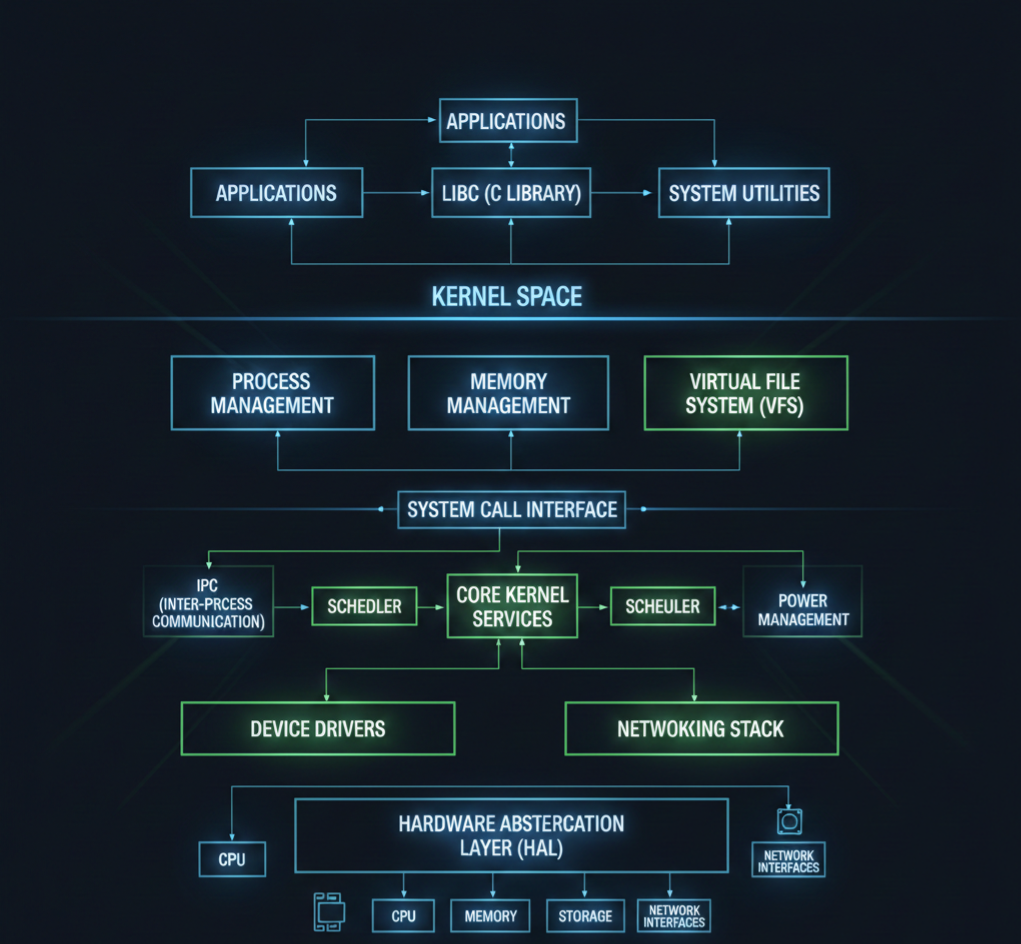
  • How to Master Essentials of Linux Kernel Architecture : Complete Guide with All Interview Questions (2026)

    Learn the Essentials of Linux Kernel Architecture with our comprehensive guide. Master core concepts, understand kernel components, and prepare for all Linux kernel interview questions. Perfect for beginners and professionals aiming to excel in Linux system programming.

    If you have ever used Linux, whether on a server, embedded device, Android phone, or development board, you have already relied on the Linux kernel. It works quietly in the background, managing hardware, memory, processes, and communication between software and devices. Yet for many beginners, the kernel feels mysterious and complex.

    This article breaks down the Essentials of Linux kernel architecture in a clear, human, and beginner-friendly way. Just real explanations that help you understand how the Linux kernel is designed, how its major components work together, and why this architecture has made Linux so powerful and popular.

    By the end of this guide, you will have a solid mental model of how the Linux kernel works internally and why its architecture matters in real-world systems.

    What Is the Linux Kernel?

    At its core, the Linux kernel is the heart of the operating system. It sits between user applications and the hardware.

    When you open a file, start a program, connect to the internet, or plug in a USB device, your application does not talk directly to the hardware. Instead, it makes a request to the kernel. The kernel decides what is allowed, manages resources, and communicates with the hardware safely.

    In simple terms:

    • Applications ask for services
    • Kernel manages and controls everything
    • Hardware does the actual physical work

    This layered design is the foundation of Linux kernel architecture.

    Why Linux Kernel Architecture Matter

    Understanding the Essentials of Linux kernel architecture is important for several reasons:

    • It helps you debug system-level problems
    • It improves performance tuning skills
    • It is essential for kernel development, device drivers, and embedded systems
    • It is a common interview topic for Linux and embedded roles

    Linux is used everywhere because its kernel architecture is modular, efficient, and scalable. The same kernel design runs on tiny microcontrollers and massive cloud servers.

    Monolithic Kernel Design in Linux

    Linux uses a monolithic kernel architecture, but with a modern twist.

    In a traditional monolithic kernel:

    • All core services run in kernel space
    • Memory management, process scheduling, file systems, and device drivers are part of the kernel

    Linux follows this approach, but it also supports loadable kernel modules, which makes it flexible.

    Why Linux Chose a Monolithic Kernel

    A monolithic kernel offers:

    • Faster performance due to fewer context switches
    • Direct communication between kernel components
    • Lower overhead compared to microkernels

    The downside is complexity, but Linux solves this with modular design.

    Kernel Space vs User Space

    One of the most important concepts in Linux kernel architecture is the separation between kernel space and user space.

    User Space

    User space is where applications run. Examples include:

    • Web browsers
    • Shells like bash
    • Media players
    • Your own C or Python programs

    Applications in user space have limited privileges. They cannot directly access hardware or critical memory.

    Kernel Space

    Kernel space is where the Linux kernel runs. Code here has:

    • Full access to hardware
    • Control over memory and CPU
    • Responsibility for system stability

    This separation improves security and stability. If an application crashes, it usually does not crash the whole system.

    System Calls: The Bridge Between User and Kernel

    Applications interact with the kernel using system calls.

    A system call is a controlled entry point into the kernel. Common examples include:

    • open() for files
    • read() and write() for I/O
    • fork() and exec() for process creation

    From a Linux kernel architecture point of view, system calls are critical because they define how user space safely requests kernel services.

    Process Management in Linux Kernel

    Process management is a core part of the Essentials of Linux kernel architecture.

    What Is a Process?

    A process is a running instance of a program. The kernel keeps track of each process using a structure called task_struct.

    This structure stores:

    • Process ID (PID)
    • State (running, sleeping, stopped)
    • Priority
    • Memory information
    • Open files

    Process Scheduling

    The Linux kernel uses a scheduler to decide which process runs on the CPU.

    Key features include:

    • Preemptive multitasking
    • Fair scheduling for interactive tasks
    • Support for real-time scheduling

    The Completely Fair Scheduler (CFS) is commonly used and aims to give each process a fair share of CPU time.

    Memory Management in Linux Kernel

    Memory management is another essential building block of Linux kernel architecture.

    Virtual Memory

    Linux uses virtual memory to give each process the illusion that it has its own private memory.

    Benefits include:

    • Process isolation
    • Efficient memory usage
    • Support for swapping

    Paging and Address Translation

    The kernel uses paging to map virtual addresses to physical memory. Hardware support from the MMU (Memory Management Unit) helps with fast translation.

    Kernel Memory vs User Memory

    The kernel carefully separates:

    • User process memory
    • Kernel memory

    This prevents applications from corrupting kernel data.

    File System Architecture

    Linux treats almost everything as a file. This philosophy is deeply embedded in Linux kernel architecture.

    Virtual File System (VFS)

    The Virtual File System is an abstraction layer that allows Linux to support multiple file systems.

    Examples include:

    • ext4
    • XFS
    • Btrfs
    • FAT

    VFS provides a common interface so applications do not need to know which file system is in use.

    Device Drivers and Hardware Interaction

    Device drivers are the glue between hardware and the kernel.

    In Linux kernel architecture:

    • Drivers run in kernel space
    • They expose standard interfaces to user space
    • They are often loadable as kernel modules

    This modular approach allows:

    • Dynamic loading and unloading of drivers
    • Smaller kernel images
    • Easier development and debugging

    Loadable Kernel Modules

    One of the most powerful features in the Essentials of Linux kernel architecture is support for Loadable Kernel Modules (LKMs).

    Modules allow you to:

    • Add functionality without rebooting
    • Develop drivers independently
    • Reduce kernel size

    Common examples include:

    • USB drivers
    • Network drivers
    • File system modules

    Interrupt Handling in Linux Kernel

    Hardware devices need a way to notify the CPU. This is done using interrupts.

    The Linux kernel:

    • Registers interrupt handlers
    • Responds quickly to hardware events
    • Uses deferred work mechanisms like softirqs and tasklets

    Efficient interrupt handling is critical for performance and responsiveness.

    Inter-Process Communication (IPC)

    Processes often need to communicate. Linux kernel architecture supports multiple IPC mechanisms:

    • Pipes
    • Signals
    • Message queues
    • Shared memory
    • Sockets

    Each method serves a different use case, from simple parent-child communication to high-performance data sharing.

    Networking Stack in the Linux Kernel

    The Linux kernel includes a full networking stack.

    Key layers include:

    • Network device drivers
    • IP layer
    • Transport protocols like TCP and UDP
    • Socket interface for applications

    This integrated design allows Linux to power everything from routers to cloud servers.

    Security Model in Linux Kernel Architecture

    Security is built into the kernel design.

    Important elements include:

    • User and group permissions
    • Capability-based security
    • Mandatory Access Control frameworks like SELinux and AppArmor

    The kernel enforces these rules consistently across the system.

    Kernel Preemption and Real-Time Support

    Linux supports different levels of kernel preemption.

    This is especially important for:

    • Embedded systems
    • Audio processing
    • Automotive and industrial applications

    Real-time patches further enhance deterministic behavior.

    Boot Process and Kernel Initialization

    Understanding kernel architecture also means understanding how Linux boots.

    High-level steps include:

    1. Bootloader loads the kernel
    2. Kernel initializes hardware
    3. Kernel mounts the root file system
    4. First user process (init or systemd) starts

    Each step relies on tightly coordinated kernel components.

    Why Linux Kernel Architecture Scales So Well

    One reason Linux dominates servers, cloud, and embedded systems is its scalable architecture.

    It supports:

    • Multiple CPU architectures
    • SMP and NUMA systems
    • Tiny embedded boards and massive servers

    This flexibility comes from clean internal abstractions and modular design.

    Common Misconceptions About Linux Kernel Architecture

    Let’s clear a few myths:

    • Linux is not a microkernel
    • Drivers do not always crash the system if written properly
    • Kernel development is hard but not impossible

    With the right understanding, the kernel becomes approachable.

    How Beginners Should Learn Linux Kernel Architecture

    If you are new, focus on:

    • Understanding kernel vs user space
    • Learning system calls
    • Exploring process and memory management
    • Writing simple kernel modules

    Reading code becomes much easier once the architecture makes sense.

    Linux Kernel Architecture Diagram

    Think of Linux kernel architecture like a well-organized city. Applications live on the surface, hardware lives underground, and the kernel is the intelligent system running everything in between.

    Linux Kernel Architecture

    Let’s start with a simple logical diagram.

    Linux Kernel Architecture Diagram (Conceptual View)

    +--------------------------------------------------+
    |                  User Space                      |
    |                                                  |
    |  Applications (Browser, Editor, Media Player)    |
    |  Shell (bash, zsh)                               |
    |  System Utilities                                |
    |                                                  |
    +--------------------|-----------------------------+
                         | System Calls
    +--------------------v-----------------------------+
    |                  Kernel Space                    |
    |                                                  |
    |  +--------------------------------------------+  |
    |  |           System Call Interface             |  |
    |  +--------------------------------------------+  |
    |                                                  |
    |  Process Management   Memory Management          |
    |  (Scheduler, Tasks)   (Paging, Virtual Memory)   |
    |                                                  |
    |  File System (VFS)    Inter-Process Communication|
    |  (ext4, XFS)         (Pipes, Signals, Sockets)  |
    |                                                  |
    |  Networking Stack     Device Drivers             |
    |  (TCP/IP)             (USB, Audio, Display)     |
    |                                                  |
    |  Interrupt Handling   Power Management           |
    |                                                  |
    +--------------------|-----------------------------+
                         |
    +--------------------v-----------------------------+
    |                    Hardware                      |
    |  CPU | RAM | Disk | Network | USB | Display     |
    +--------------------------------------------------+
    

    Now let’s break this down layer by layer.

    1. User Space (Where Applications Live)

    This is the top layer of the Linux kernel architecture.

    What runs here?

    • Browsers
    • Media players
    • Text editors
    • Shells like bash
    • Your own C, C++, Python programs

    Important point:

    User space cannot directly access hardware.
    Everything must go through the kernel.

    This separation keeps the system safe and stable. If an app crashes, the kernel stays alive.

    2. System Call Interface (The Gateway)

    The system call interface is the bridge between user space and kernel space.

    When an application wants to:

    • Read a file
    • Allocate memory
    • Create a process
    • Send data over the network

    It makes a system call.

    Common system calls:

    • open()
    • read()
    • write()
    • fork()
    • exec()

    Think of system calls as a formal request form that applications submit to the kernel.

    3. Kernel Space (The Brain of the System)

    This is where the real work happens. The kernel runs with full privileges and controls all system resources.

    Let’s go component by component.

    4. Process Management

    Process management is a core pillar of Linux kernel architecture.

    What it handles:

    • Creating processes
    • Killing processes
    • Scheduling CPU time
    • Context switching

    The kernel uses internal structures to track each process and a scheduler to decide who runs and when.

    This is why Linux can run hundreds of processes smoothly.

    5. Memory Management

    Memory management ensures every process gets memory safely and efficiently.

    Key responsibilities:

    • Virtual memory
    • Paging
    • Memory protection
    • Kernel vs user memory separation

    Each process thinks it owns all the memory, but the kernel quietly manages the illusion.

    This design prevents one process from corrupting another.

    6. File System Layer (VFS)

    Linux supports many file systems, but applications don’t care which one you use.

    That’s because of the Virtual File System (VFS).

    What VFS does:

    • Provides a common interface for file operations
    • Allows ext4, XFS, FAT, and others to work together
    • Keeps applications portable

    This is a classic example of smart kernel architecture design.

    7. Device Drivers

    Device drivers are how the kernel talks to hardware.

    Examples:

    • Keyboard drivers
    • USB drivers
    • Audio drivers
    • Network card drivers

    Drivers run in kernel space and expose standard interfaces to user space.

    Linux supports loadable kernel modules, so drivers can be added or removed without rebooting.

    8. Networking Stack

    The Linux kernel includes a full networking implementation.

    Includes:

    • Network device drivers
    • IP layer
    • TCP and UDP
    • Socket interface

    This allows Linux to function as:

    • A desktop OS
    • A server OS
    • A router
    • A cloud platform

    All using the same kernel architecture.

    9. Inter-Process Communication (IPC)

    Processes often need to talk to each other.

    Linux kernel architecture supports multiple IPC mechanisms:

    • Pipes
    • Signals
    • Message queues
    • Shared memory
    • Sockets

    Each one exists because different problems need different communication styles.

    10. Interrupt Handling

    Hardware devices need attention from the CPU.

    They use interrupts to signal the kernel.

    The kernel:

    • Handles interrupts quickly
    • Defers heavy work
    • Keeps the system responsive

    Efficient interrupt handling is critical for performance.

    11. Hardware Layer

    This is the physical world:

    • CPU
    • RAM
    • Disk
    • Network card
    • Sensors
    • Displays

    The kernel is the only layer allowed to touch hardware directly.

    This design keeps hardware access controlled and secure.

    How All Layers Work Together

    Here’s a simple flow example:

    1. You click “Save” in a text editor
    2. The app makes a system call
    3. The kernel checks permissions
    4. VFS routes the request
    5. File system writes data
    6. Device driver talks to disk
    7. Hardware stores the data

    All of this happens in milliseconds.

    Why This Architecture Is So Powerful

    The Linux kernel architecture is:

    • Modular
    • Secure
    • High-performance
    • Scalable

    That’s why the same kernel runs on:

    • Android phones
    • Embedded boards
    • Servers
    • Supercomputers

    Basic Linux Kernel Programming Questions

    1. What is the Linux kernel and its primary responsibilities?
    2. What are the differences between user space and kernel space?
    3. Explain the process context vs interrupt context in Linux kernel.
    4. What are system calls? Give examples.
    5. How does the Linux kernel manage memory?
    6. What are kernel modules? How do you load and unload a module?
    7. Explain the proc filesystem and its usage.
    8. What are character devices and block devices?
    9. What is a major number and a minor number in Linux device drivers?
    10. What is init_module and cleanup_module in kernel modules?
    11. Explain the difference between static and dynamic kernel modules.
    12. What are kernel threads, and how do you create them?
    13. What is spinlock, and how is it different from a mutex?
    14. Explain preemption in Linux kernel.
    15. What is a wait queue? How is it used in kernel programming?

    Intermediate Linux Kernel Programming Questions

    1. What is the difference between copy_to_user() and copy_from_user()?
    2. Explain the kernel memory allocation methods (kmalloc, vmalloc, etc.).
    3. What is a task_struct, and why is it important?
    4. Explain the Linux process scheduling mechanism.
    5. What is the difference between hardirq and softirq?
    6. What are bottom halves, and what is their role?
    7. Explain workqueues and tasklets.
    8. What is interrupt handling in Linux kernel?
    9. What is a device driver, and what are the types of device drivers?
    10. How do you register a character device driver in Linux?
    11. What is the difference between blocking and non-blocking I/O in kernel space?
    12. Explain the Linux kernel logging mechanism (printk, KERN_INFO, etc.).
    13. What is a module parameter, and how do you pass parameters to a kernel module?
    14. What is kthread_stop, and how is it used?
    15. How do you handle race conditions in the kernel?

    Advanced Linux Kernel Programming Questions

    1. Explain Linux kernel memory management: page cache, slab allocator, buddy system.
    2. What are kernel namespaces, and how are they used?
    3. Explain Virtual File System (VFS) and its role.
    4. How does the Linux kernel handle file operations?
    5. Explain the kernel networking stack.
    6. What is a kobject, and how does it relate to sysfs?
    7. Explain reference counting in the Linux kernel.
    8. How does dynamic kernel tracing work (ftrace, perf)?
    9. What is a PCI device driver, and how do you write one?
    10. How do you implement I2C or SPI device drivers in Linux?
    11. Explain interrupt-driven vs polling mechanisms in kernel device drivers.
    12. How do you implement DMA in Linux kernel drivers?
    13. What is a kernel timer, and how do you implement it?
    14. Explain Linux kernel modules dependencies and symbol exports.
    15. How does user-space memory mapping (mmap) work in kernel drivers?
    16. How do you debug kernel modules using kgdb or printk?
    17. Explain the Linux kernel boot process.
    18. How does the scheduler handle real-time processes?
    19. What is NUMA, and how does the kernel handle memory in NUMA systems?
    20. How do you handle deadlocks in the kernel?

    Practical / Scenario-Based Questions

    1. How would you modify an existing Linux kernel driver?
    2. How do you implement read and write operations in a character driver?
    3. How would you trace a kernel panic?
    4. How do you profile a kernel module for performance?
    5. How do you implement interrupt handling for a GPIO device?
    6. How do you use procfs or sysfs to expose driver data to user space?
    7. How do you implement ioctl commands for a custom device?
    8. How would you handle concurrency in a multi-threaded kernel module?
    9. How do you simulate and test a driver in QEMU before using real hardware?
    10. How do you write a kernel module compatible with multiple kernel versions?

    Expert / Advanced Scenario Questions

    1. How would you implement zero-copy communication between kernel and user space?
    2. How do you optimize memory usage in kernel modules?
    3. How do you write a kernel driver for DMA buffer sharing between devices?
    4. Explain how kernel hot-plugging works.
    5. How do you handle interrupt storms in Linux?
    6. How do you implement suspend/resume operations for a device driver?
    7. How do you use kernel timers to schedule periodic tasks?
    8. How do you implement custom kernel syscalls?
    9. How do you handle kernel module security and permissions?
    10. How do you debug race conditions in kernel driver code?

    Final Thoughts

    The Essentials of Linux kernel architecture are not about memorizing code or data structures. They are about understanding how Linux thinks, how it manages resources, and how its components work together as one system.

    Once you grasp the architecture, Linux stops feeling like magic and starts feeling logical.

    Whether you are preparing for interviews, working on embedded systems, or simply curious about how operating systems work, learning Linux kernel architecture is one of the best investments you can make in your technical journey.

    FAQ : Linux Kernel Architecture

    1. What is Linux Kernel Architecture?
    Linux Kernel Architecture is the internal structure of the Linux operating system. It manages hardware, processes, memory, and system calls, acting as a bridge between software and hardware.

    2. Why is Linux Kernel important for developers?
    Understanding the Linux Kernel helps developers write efficient code, manage hardware resources, and develop device drivers or system-level applications.

    3. What are the main components of the Linux Kernel?
    The Linux Kernel consists of process management, memory management, file system, device drivers, network stack, and system calls.

    4. What is the difference between monolithic and microkernel in Linux?
    Linux uses a monolithic kernel, where all core services run in kernel space for performance. Microkernels run minimal services in kernel space and others in user space for modularity.

    5. How does process management work in the Linux Kernel?
    The kernel handles process creation, scheduling, and termination. It uses scheduling algorithms to manage CPU time efficiently among processes.

    6. What is a Linux Kernel module?
    A kernel module is a piece of code that can be loaded or unloaded into the kernel at runtime, like device drivers or system extensions.

    7. How is memory managed in Linux Kernel?
    Linux uses virtual memory, paging, and caching to efficiently allocate memory for processes and the system while isolating processes from each other.

    8. How can I prepare for Linux Kernel interview questions?
    Focus on kernel architecture, process and memory management, device drivers, file systems, and hands-on practice with kernel modules.

    9. Can I modify the Linux Kernel safely?
    Yes, by using a separate test environment or virtual machine. Kernel modifications require caution and understanding of dependencies.

    10. Where can I learn Linux Kernel Architecture from scratch?
    You can start with official Linux Kernel documentation, beginner-friendly tutorials, YouTube guides, and practical exercises like writing simple kernel modules.

    Read More about Process : What is is Process

    Read More about System Call in Linux : What is System call

    Read More about IPC : What is IPC

  • Exporting Module Symbols in Linux: 5 Powerful Steps to Master It Easily

    Ever wondered how one Linux kernel module can use a function or variable from another module? . Imagine this — you’re working as an embedded Linux engineer, and your team is developing a new audio driver for a smart car infotainment system.

    Your colleague has already written a sound codec driver module that handles the core audio processing. Meanwhile, you’re building a speaker control module that needs to use one of their functions — let’s say set_audio_volume().

    Now, here’s the challenge:
    Your module needs that function, but it’s defined inside another kernel module. You can’t just include a header file like in user-space programs. So, how do you make one kernel module talk to another safely?

    That’s when you discover the magic of Exporting Module Symbols in Linux.

    By simply using EXPORT_SYMBOL(set_audio_volume);, your teammate’s module can “share” that function with your module — just like opening a door between two kernel spaces. Suddenly, your speaker driver can call the function, and your audio stack works perfectly in sync in real time! 🔊🚗

    This simple yet powerful mechanism — exporting module symbols — keeps the Linux kernel modular, flexible, and efficient.That’s where exporting module symbols in Linux comes into play!

    In this guide, we’ll explore what exporting module symbols means, why it’s used, and how you can easily do it — step by step. By the end, you’ll confidently understand how Linux modules share information using exported symbols.

    What Does “Exporting Module Symbols in Linux” Mean?

    In simple terms, exporting module symbols in Linux allows one kernel module to make its functions or variables accessible to other modules.

    Think of it like this:

    • You write a helper function inside one module.
    • Another module needs that function.
    • Instead of rewriting it, you just export it!

    This helps reusability and modularity — key principles of Linux kernel development.

    Why Do We Export Symbols?

    Let’s say you have:

    • A driver module for a hardware component, and
    • A utility module that performs logging or shared operations.

    If both need to share code, exporting symbols is the perfect solution. It’s a common scenario when working with kernel modules in the Linux operating system, where different modules often depend on one another.

    Instead of duplicating the same logic, you can export the symbol once and use it anywhere inside the kernel environment.

    So in short:
    Promotes code reuse
    Makes debugging easier
    Keeps the kernel modular and clean

    How to Export Module Symbols in Linux

    The Linux kernel provides two macros to export symbols:

    • EXPORT_SYMBOL(symbol_name);
    • EXPORT_SYMBOL_GPL(symbol_name);

    The difference?

    • EXPORT_SYMBOL — can be used by any module.
    • EXPORT_SYMBOL_GPL — can be used only by modules with a GPL-compatible license.

    Example: Exporting and Using Symbols

    Let’s understand this with a simple example

    Module 1: my_math.c

    This module defines a function and exports it.

    #include <linux/module.h>
    #include <linux/kernel.h>
    
    int add_numbers(int a, int b) {
        return a + b;
    }
    EXPORT_SYMBOL(add_numbers);  // Exporting the symbol
    
    static int __init my_math_init(void) {
        printk(KERN_INFO "my_math module loaded\n");
        return 0;
    }
    
    static void __exit my_math_exit(void) {
        printk(KERN_INFO "my_math module unloaded\n");
    }
    
    module_init(my_math_init);
    module_exit(my_math_exit);
    
    MODULE_LICENSE("GPL");
    MODULE_AUTHOR("Nish");
    MODULE_DESCRIPTION("Example of Exporting Module Symbols in Linux");
    

    Module 2: use_math.c

    This module imports and uses the exported function.

    #include <linux/module.h>
    #include <linux/kernel.h>
    
    extern int add_numbers(int a, int b);  // Declare the external symbol
    
    static int __init use_math_init(void) {
        int result = add_numbers(4, 5);
        printk(KERN_INFO "Result from exported symbol: %d\n", result);
        return 0;
    }
    
    static void __exit use_math_exit(void) {
        printk(KERN_INFO "use_math module unloaded\n");
    }
    
    module_init(use_math_init);
    module_exit(use_math_exit);
    
    MODULE_LICENSE("GPL");
    MODULE_AUTHOR("Nish");
    MODULE_DESCRIPTION("Using Exported Module Symbols in Linux");
    

    Steps to Try It Out

    1. Compile both modules: make
    2. Load the first module (exports the symbol): sudo insmod my_math.ko
    3. Load the second module (uses the symbol): sudo insmod use_math.ko
    4. Check dmesg for output: dmesg | tail
    5. Unload both: sudo rmmod use_math sudo rmmod my_math

    You’ll see the result of the shared function printed in your kernel log.

    Common Errors While Exporting Module Symbols in Linux

    If you face an error like:

    Unknown symbol in module
    

    It usually means:

    • The module that exports the symbol isn’t loaded yet.
    • The exported name doesn’t match exactly.
    • You forgot to declare it as extern in the using module.

    Always check dmesg for kernel logs — it gives clear hints about what went wrong.

    Real-World Example

    This mechanism is widely used in Linux device drivers.
    For instance:

    • The sound subsystem exports symbols for codecs and controllers.
    • The network stack exports helper functions that other modules reuse.

    It’s a clean way for the kernel to stay modular while still sharing functionality between components.

    Pro Tip

    If your module exports many symbols, you can list them in a Module.symvers file.
    This helps the kernel link everything correctly during module compilation.

    Wrapping Up

    Exporting module symbols in Linux isn’t scary at all — it’s just about sharing functions safely between kernel modules.
    It helps keep the Linux kernel modular, reusable, and easier to maintain.

    So next time you want one module to use a function from another, just remember:

    A simple EXPORT_SYMBOL() can do the magic!

    Key Takeaways

    ConceptDescription
    Exporting Module Symbols in LinuxAllows sharing of functions or variables between kernel modules.
    EXPORT_SYMBOL()Makes the symbol available to any module.
    EXPORT_SYMBOL_GPL()Restricts usage to GPL-compatible modules.
    Common Error“Unknown symbol” – means the exporting module isn’t loaded yet.

    ❓ Frequently Asked Questions (FAQ) — Exporting Module Symbols in Linux

    🧠 1. What is meant by exporting module symbols in Linux?

    Exporting module symbols in Linux means making a function or variable defined in one kernel module available for use in another module. This helps different parts of the kernel communicate and share functionality efficiently.

    ⚙️ 2. Why do we need to export symbols in kernel modules?

    We export symbols to promote code reuse and modularity. Instead of rewriting the same code across multiple modules, developers can export a function once and use it wherever needed — saving time and keeping the kernel codebase clean.

    🧩 3. What is the difference between EXPORT_SYMBOL and EXPORT_SYMBOL_GPL?

    EXPORT_SYMBOL() makes the symbol available to any module, while EXPORT_SYMBOL_GPL() restricts usage to GPL-licensed modules only. It ensures that only open-source compatible modules can use the exported symbol.

    🧾 4. How do you declare and use exported symbols in Linux?

    To export a symbol, use:

    EXPORT_SYMBOL(symbol_name);

    To use it in another module, declare it with:

    extern data_type symbol_name;

    Then load the exporting module before loading the module that uses the symbol.

    🧰 5. What causes the “Unknown symbol in module” error?

    This error occurs when:

    • The exporting module isn’t loaded yet.
    • The symbol name is misspelled or mismatched.
    • The module version doesn’t match the kernel build.

    Always check logs using dmesg to find the root cause.

    🔗 6. How does exporting module symbols relate to kernel modules in Linux?

    Exporting module symbols is a fundamental concept when working with kernel modules in the Linux operating system. It ensures that multiple kernel modules can work together without being hardcoded into a single file.

    🧑‍💻 7. Can I export variables as well as functions?

    Yes, both functions and global variables can be exported using EXPORT_SYMBOL() or EXPORT_SYMBOL_GPL(). Just make sure the variable has proper scope and type definition accessible to the other module.

    🚀 8. What are real-world applications of exporting module symbols in Linux?

    Exporting symbols is widely used in device driver development, especially when multiple drivers or kernel components need to share utility functions — like audio, network, or power management drivers.

    🔒 9. Can I use exported symbols from a proprietary module?

    Only if the symbol is exported using EXPORT_SYMBOL(). If it’s exported with EXPORT_SYMBOL_GPL(), proprietary or non-GPL modules cannot legally or technically use it.

    🧩 10. Where can I learn more about Linux kernel modules?

    You can explore a complete beginner-friendly guide on kernel modules in the Linux operating system to strengthen your understanding before diving deeper into symbol exporting.

  • Why Need for Kernel Programming is Essential for Beginners 10 Powerful Reasons

    Learn why Need for Kernel Programming is essential for embedded systems, device drivers, and OS optimization. A beginner-friendly guide with examples.

    When we talk about kernel programming, it might sound like something very advanced and complicated. But in reality, it’s a crucial part of how modern computers, operating systems, and devices work. Whether you’re a beginner in embedded systems or a curious software developer, understanding why kernel programming matters will give you a strong foundation.

    Let’s break it down in simple terms.

    What is the Kernel?

    Think of the kernel as the heart of an operating system. It acts as a bridge between software and hardware. Whenever your program needs to use a hardware component — like memory, CPU, disk storage, or communication interfaces — the kernel steps in to manage these requests safely and efficiently.

    In short, the kernel is responsible for:

    • Resource management (CPU scheduling, memory allocation)
    • Device control (drivers, hardware interaction)
    • System security (managing permissions and access)
    • Process management (creating, scheduling, and terminating processes)

    Why Kernel Programming is Important

    1. Better Control Over Hardware

    For embedded systems, operating systems like Linux run close to the hardware level. If you want to optimize performance, control peripherals directly, or implement custom device drivers, you need kernel programming skills.

    2. Custom Functionality

    Sometimes, the existing operating system cannot meet the exact requirements of a project. Kernel programming lets developers add custom features to the OS, enabling specific functionalities. For example, real-time systems often require kernel modifications for better timing control.

    3. Performance Optimization

    Kernel-level code runs faster because it works directly with hardware and system resources. For applications requiring high speed and low latency, kernel programming can make a huge difference.

    4. Building Device Drivers

    Device drivers are a key part of kernel programming. Without drivers, hardware devices won’t work with the OS. Writing custom drivers allows integration of new hardware with the system.

    5. Understanding System Internals

    Learning kernel programming gives you deep insight into how operating systems work internally — knowledge that is valuable for any systems programmer or embedded engineer.

    Real-Life Example

    Imagine you are developing an IoT device like a smart thermostat. The device needs to read sensor data in real time and control heating/cooling without delay. To achieve this, you might need to write a kernel module that directly interacts with hardware sensors, bypassing unnecessary overhead.

    How to Get Started with Kernel Programming

    If you’re new, here’s a simple roadmap:

    1. Learn C programming — most kernels (like Linux) are written in C.
    2. Understand operating system concepts — processes, memory management, interrupts.
    3. Explore Linux kernel source code — a treasure trove for learning.
    4. Write simple kernel modules — start with “Hello World” kernel module examples.
    5. Experiment with device drivers — build a basic driver for a peripheral.

    Linux Kernel Module Example

    Example: Simple Kernel Module (“Hello World”)

    A kernel module is a piece of code that can be loaded into the kernel at runtime. It’s often used to add features without rebuilding the kernel.

    Hello World Kernel Module Code

    // hello_module.c
    #include <linux/init.h>    // Required for init and exit macros
    #include <linux/module.h>  // Core header for loading modules
    #include <linux/kernel.h>  // Kernel log functions
    
    MODULE_LICENSE("GPL");
    MODULE_AUTHOR("Nish");
    MODULE_DESCRIPTION("A Simple Hello World Kernel Module");
    MODULE_VERSION("1.0");
    
    // Initialization function
    static int __init hello_init(void) {
        printk(KERN_INFO "Hello, Kernel World!\n");
        return 0; // Return 0 means success
    }
    
    // Cleanup function
    static void __exit hello_exit(void) {
        printk(KERN_INFO "Goodbye, Kernel World!\n");
    }
    
    // Macros for registering functions
    module_init(hello_init);
    module_exit(hello_exit);
    

    How to Compile the Kernel Module

    1. Create a Makefile:
    obj-m += hello_module.o
    
    all:
    	make -C /lib/modules/$(shell uname -r)/build M=$(PWD) modules
    
    clean:
    	make -C /lib/modules/$(shell uname -r)/build M=$(PWD) clean
    
    1. Compile the module:
    make
    
    1. Insert the module into the kernel:
    sudo insmod hello_module.ko
    
    1. Check kernel messages:
    dmesg | tail
    

    You should see:

    Hello, Kernel World!
    
    1. Remove the module:
    sudo rmmod hello_module
    

    And in dmesg:

    Goodbye, Kernel World!

    How This Code Helps Understand Kernel Programming

    • printk: Similar to printf in C, but used for kernel logs.
    • Module initialization and cleanup functions: Show how kernel modules are loaded and unloaded.
    • Macros (module_init and module_exit): Connect functions to kernel events.
    • Makefile: Demonstrates how to compile a kernel module outside the kernel tree.

    FAQs – Understanding the Need for Kernel Programming

    Q1: Do I need kernel programming for every software project?
    No. Kernel programming is mainly needed for system-level development, embedded systems, and drivers. Regular application development doesn’t require it.

    Q2: Which programming language is used for kernel programming?
    C is the most common language for kernel development. Knowledge of assembly language can also be beneficial.

    Q3: Is kernel programming difficult?
    It can be challenging, but with the right learning path, even beginners can start with simple kernel modules and gradually build expertise.

    Q4: Why is kernel programming important in embedded systems?
    Embedded systems interact closely with hardware. Kernel programming allows customization, optimization, and driver development for these systems.