Explore key firmware design challenges in EV Battery Management Systems, including safety, efficiency, and compliance for automotive embedded systems.
“It was a hot summer afternoon when Rahul, an embedded engineer, got a call from his manager. Their EV prototype, which had been performing well in lab tests, suddenly showed unexpected battery drain on a real road test. The culprit? Not the hardware, but the firmware running inside the Battery Management System (BMS). That was the moment Rahul realized—firmware design in EV Battery Management Systems is not just about coding; it’s about ensuring safety, efficiency, and reliability on wheels.”
This simple story highlights a real-world truth: EV Battery Management System (BMS) firmware design is full of challenges that go far beyond just managing battery charging and discharging. In the electric vehicle industry, firmware is the hidden brain of the BMS that decides how safe, efficient, and long-lasting an EV battery can be.
In this article, we’ll explore the major challenges in EV BMS firmware design, their impact, and why engineers need to carefully plan every line of code to meet automotive safety and performance standards.
Designing firmware for an EV Battery Management System (BMS) requires compliance with
ISO 26262 standards
to ensure safety and reliability. According to the
U.S. Department of Energy,
battery efficiency is also a critical factor for EV adoption.
What is EV Battery Management System Firmware?
The Battery Management System (BMS) firmware is the embedded software that monitors and controls the battery pack in electric vehicles. It ensures:
Safe charging and discharging
Cell balancing
Thermal management
Fault detection and protection
Communication with the vehicle control unit
Without robust firmware, even the best EV battery hardware can fail to deliver reliability, efficiency, and safety.
Key Challenges in EV Battery Management System Firmware Design
1. Real-Time Monitoring and Safety
EV batteries can fail catastrophically if voltage, current, or temperature exceed safe limits. Firmware must continuously monitor battery parameters in real time and trigger safety actions instantly. The challenge? Writing highly optimized code that works under tight deadlines without missing critical events.
2. Complex Cell Balancing Algorithms
A battery pack may have hundreds of cells. Ensuring that all cells are balanced in terms of voltage is crucial for battery life. Firmware engineers face the challenge of designing efficient balancing algorithms (active or passive) that don’t slow down system performance.
3. Thermal Management
Temperature variations across cells can reduce battery efficiency. Firmware must handle smart cooling and heating control, but integrating these thermal management strategies with hardware sensors and actuators is complex.
4. Power Efficiency vs. Processing Power
Firmware must run continuously with low power consumption. But at the same time, it must process huge amounts of data from sensors. Balancing efficiency with performance is one of the toughest design challenges.
5. Functional Safety (ISO 26262 Compliance)
EVs are safety-critical systems. Firmware must comply with ISO 26262 functional safety standards. This requires error handling, redundancy, and fail-safe states, making firmware design more complex.
6. Communication Protocols Integration
Firmware must handle CAN, LIN, or Ethernet protocols to communicate with other ECUs in the vehicle. Ensuring reliable and real-time communication without data loss is a significant challenge.
7. Scalability and Upgradability
As EV battery technology evolves, firmware must support over-the-air (OTA) updates. Designing firmware that is modular, scalable, and secure against cyber threats is another big hurdle.
Why These Challenges Matter
If firmware fails, it can lead to:
Reduced battery life
Vehicle breakdowns
Safety hazards like thermal runaway
Lower consumer trust in EV technology
That’s why BMS firmware is the backbone of EV performance, safety, and reliability.
Impact on Key US Industries
1. Automotive and Electric Vehicles (EVs)
The US is leading the global shift toward electric and self-driving cars. Embedded systems manage everything from battery monitoring to driver assistance features. Tesla, GM, and Ford all rely heavily on embedded technology. This sector alone has created thousands of jobs and opened billions of dollars in new opportunities.
2. Healthcare and Medical Devices
The US healthcare market is huge, and embedded systems are at its core. Devices like pacemakers, insulin pumps, and wearable health monitors depend on reliable embedded software. With telemedicine and AI-driven diagnostics growing, the role of embedded systems is only getting bigger.
3. Aerospace and Defense
From Boeing aircraft to military drones, the US defense sector depends on embedded systems for navigation, communication, and safety. It’s a multi-billion-dollar industry where embedded engineers are in high demand.
4. Consumer Electronics and IoT
Smartphones, smart TVs, fitness trackers, and voice assistants (like Alexa) all run on embedded systems. The US market for IoT devices is expected to cross hundreds of billions in revenue in the next few years, and embedded tech is the backbone of it.
5. Industrial Automation
Factories in the US are adopting Industry 4.0, where embedded systems in robots and controllers improve efficiency, safety, and cost savings. This makes US manufacturing more competitive on the global stage.
Economic Impact
Job Creation: Demand for embedded engineers, software developers, and hardware specialists continues to rise.
Innovation Powerhouse: Startups and big tech companies alike are building products around embedded systems, boosting the innovation ecosystem.
Market Growth: By integrating embedded systems, industries save costs, improve safety, and scale faster — making the US a global leader in tech adoption.
Advantages for the US Market
Enhances competitiveness in automotive, healthcare, and aerospace.
Fuels the IoT revolution and smart city projects.
Opens new revenue streams through digital services.
Challenges
Cybersecurity risks for connected devices.
High R&D costs for advanced embedded solutions.
Need for skilled workforce, which sometimes lags behind demand.
FAQs on EV Battery Management System Firmware Challenges
Q1. What are the biggest challenges in EV BMS firmware design?
The biggest challenges include real-time monitoring, thermal management, cell balancing, ISO 26262 safety compliance, and reliable communication protocols.
Q2. Why is functional safety important in BMS firmware?
Functional safety ensures that even if the firmware fails, the EV battery stays in a safe state to avoid accidents or damage.
Q3. How does firmware affect EV battery life?
Efficient firmware extends battery life by balancing cells, optimizing charging cycles, and managing heat distribution. Poor firmware shortens lifespan.
Q4. Can EV BMS firmware be updated?
Yes. Modern EVs support Over-the-Air (OTA) updates, allowing manufacturers to fix bugs, improve safety, and add new features without physical recalls.
Q5. Which standards must EV BMS firmware follow?
The most important standard is ISO 26262 (functional safety). Some designs also follow AUTOSAR for modularity and communication consistency.
Conclusion
Designing firmware for an EV Battery Management System is not just about coding—it’s about solving real engineering challenges that directly impact safety and performance. From real-time monitoring to functional safety compliance, every challenge makes firmware development a critical part of the EV ecosystem.
As the EV market continues to grow, engineers who can tackle these challenges will play a key role in shaping the future of sustainable transportation.
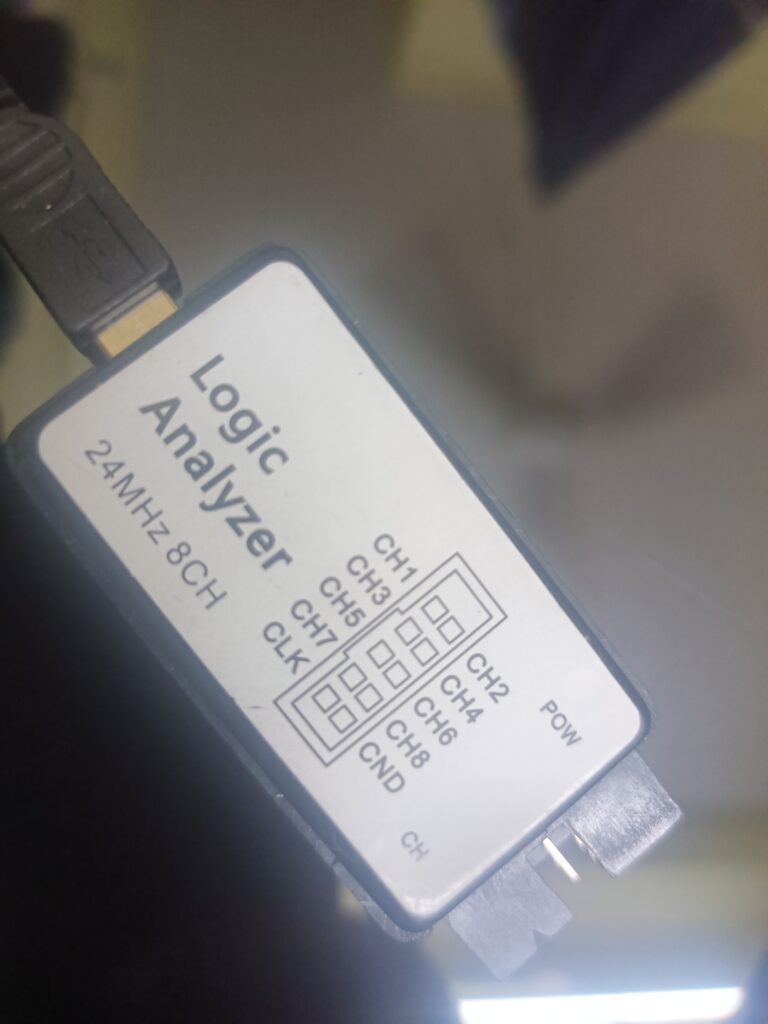
How to Use a Saleae Logic Analyzer : If you’re new to Arduino and curious about how digital signals really work under the hood, a Saleae Logic Analyzer is the perfect tool to start exploring. In this beginner-friendly guide, I’ll walk you through my learning journey of using the Saleae Logic Analyzer with a simple Arduino Uno sketch.
You’ll learn how to capture, visualize, and interpret digital signals in real time—making it easier to debug issues, understand timing, and get deeper insight into your embedded projects. Whether you’re monitoring a blinking LED or analyzing serial communication, this tutorial will help you unlock the full power of digital signal analysis.
Perfect for makers, students, and embedded enthusiasts looking to build a strong foundation in hardware debugging and signal analysis.
What is a Saleae Logic Analyzer?
A Saleae Logic Analyzer is a tool that lets you capture and visualize digital signals from your circuits. It’s like an oscilloscope but specialized for digital data. It helps you see when signals go HIGH (on) or LOW (off) over time.
The Arduino Sketch
For my experiment, I wrote a very simple program to blink the built-in LED on pin 13 of the Arduino Uno:
void setup() {
  pinMode(13, OUTPUT);  // Set pin 13 as an output
}

void loop() {
  digitalWrite(13, HIGH);  // Turn LED ON
  delay(1000);             // Wait for 1 second
  digitalWrite(13, LOW);   // Turn LED OFF
  delay(500);              // Wait for 0.5 seconds
}
This program turns the LED on for 1 second, then off for half a second, repeatedly.
Connecting the Logic Analyzer
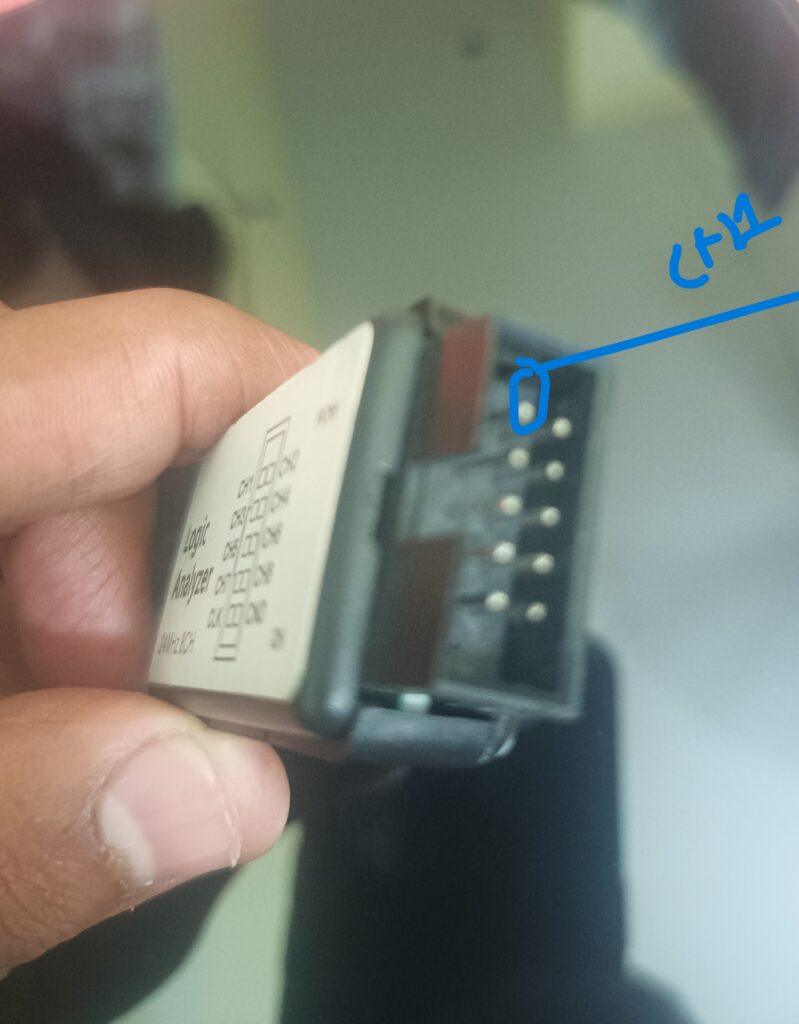
Pin of Logic Analyzer
To see what’s happening on pin 13, I connected the Saleae Logic Analyzer probe to Arduino pin 13 and ground. This allows the Logic Analyzer to measure the voltage changes as the LED turns on and off.
What I Learned from the Logic Analyzer
When I opened the Saleae software and started capturing data, I saw a clean square wave pattern on channel 0 corresponding to pin 13. The signal was HIGH for about 1 second and LOW for about 0.5 seconds, exactly as my code intended.
This visual confirmation helped me understand:
How digital signals appear as voltage changes (HIGH = ~5V, LOW = 0V).
Timing between signal changes, like the 1-second ON and 0.5-second OFF.
The importance of accurate timing in embedded programming.
Why Use a Logic Analyzer?
Debugging: It helps find errors in signal timing or logic.
Learning: Visualizing signals makes digital electronics easier to understand.
Complex Projects: When dealing with communication protocols like I2C or SPI, it’s invaluable.
Final Tips for Beginners
Always connect the ground of the Logic Analyzer to the Arduino ground.
Start with simple code like blinking an LED before moving to complex signals.
Use the Saleae software features like zoom and cursors to measure signal duration.
Don’t be afraid to experiment and observe how changes in code affect the signal.
Using a Saleae Logic Analyzer with an Arduino Uno is a fantastic way to bring digital signals to life and deepen your understanding of embedded electronics. Happy learning
You can also Visit other tutorials of Embedded Prep
Memory management in QNX is a crucial part of any operating system. It refers to the way an OS handles computer memory (RAM), ensuring every program gets the memory it needs, without interfering with others. Whether you’re building apps or embedded systems, understanding memory management helps you write efficient and safe code.
What is Memory Management QNX?
Memory Management QNX is the process of:
Allocating memory to programs when they need it
Keeping track of who owns which piece of memory
Reclaiming memory when it’s no longer needed
The Operating System (OS) handles this using both hardware features and internal data structures like memory maps and tables.
Types of Memory Management QNX
There are generally two types of memory to understand:
Type
Description
Physical Memory
The actual RAM chips installed in your device
Virtual Memory
A software-based illusion that makes programs believe they have more memory
Let’s look into both.
Physical vs Virtual Memory Management in QNX
Feature
Physical Memory
Virtual Memory
Actual hardware?
Yes (RAM chips)
No, it’s an abstraction
Size limitations?
Limited to installed RAM
Can be larger (uses disk as backup)
Access speed
Very fast
Slower when using swap (disk)
Visibility to app
Not directly accessed
Apps see virtual memory addresses
The OS maps virtual addresses to physical addresses. This allows for process isolation, better security, and memory efficiency.
Memory Management Techniques
Paging: Breaks memory into fixed-size pages and maps them virtually.
Segmentation: Divides memory into variable-size segments (used in older systems).
Memory Allocation:
Static: At compile-time (e.g., global variables)
Dynamic: At runtime (e.g., malloc() in C)
Garbage Collection: Some languages (e.g., Java) automatically clean unused memory.
Swapping: Moves data between RAM and disk to free space.
Memory Protection in QNX OS
Memory protection prevents one process from accessing another’s memory. This ensures:
Security (no data leaks)
Stability (bad code doesn’t crash the whole system)
Isolation (multiple users/processes run safely)
How Is Memory Managed in QNX?
QNX is a real-time operating system (RTOS) widely used in embedded systems (like cars, medical devices). It takes memory management very seriously due to real-time and safety-critical needs.
1. Microkernel Architecture
QNX uses a microkernel design: only essential services run in the kernel.
Most drivers and services run as separate user-space processes.
This reduces the risk of memory corruption across the system.
2. Virtual Memory Support
QNX provides per-process virtual memory:
Each process has its own virtual address space
Memory is managed by the Memory Manager (procnto)
QNX supports:
Demand paging
Copy-on-write
Shared memory
3. Physical vs Virtual Memory Management QNXin QNX
Aspect
Physical Memory in QNX
Virtual Memory in QNX
What it is
Real RAM used by the system
Virtual address space seen by processes
How it’s managed
Allocated by kernel/memory manager
Managed through page tables and mappings
Process access
Indirect access through mapping
Direct use (via APIs like mmap, malloc, etc.)
Isolation
Not isolated unless mapped properly
Isolated by default
How QNX Handles Memory Protection Between Processes
QNX uses hardware memory protection (MMU – Memory Management Unit) and virtual memory mapping to enforce safety.
Here’s how it protects memory:
Each process runs in its own address space
The MMU ensures no process can access another’s memory unless explicitly shared
Shared memory can be created using QNX IPC (Inter-Process Communication) methods
shm_open() and mmap() – for shared memory between processes
malloc() / calloc() – dynamic memory allocation
sbrk() – old style heap management (rarely used in modern apps)
💛 Support Embedded Prep
If you find our tutorials helpful and want to support our mission of sharing high-quality embedded system knowledge, you can contribute by buying us a coffee.
Every small contribution helps us keep creating valuable content for learners like you. ☕
Thank you for your support — it truly keeps Embedded Prep growing. 💻✨
Summary
Concept
Explanation
Memory Management
The OS allocates, tracks, and protects memory for applications
Physical vs Virtual Memory
Physical is real RAM; virtual is software-managed illusion for each process
Memory Protection
Prevents apps from interfering with each other’s memory
QNX Memory Management
Uses virtual memory, MMU, and microkernel for high security and reliability
Memory Protection in QNX
Enforced using hardware + kernel policies; each process is isolated
QNX’s memory management system is designed to be efficient, safe, and flexible, especially for real-time and embedded environments.
Here’s what you should remember as a beginner:
Every process in QNX has its own virtual address space, which protects it from other processes.
The Memory Manager (procnto) handles requests for memory, such as allocating and freeing memory, and managing shared memory.
QNX supports both physical and virtual memory, and uses techniques like demand paging and copy-on-write to make memory use more efficient.
Shared memory and memory-mapped files let processes exchange data quickly and safely.
If a process tries to access memory it doesn’t own, QNX will catch the error and send a signal like SIGSEGV (Segmentation Fault) to prevent system crashes.
You can control memory directly using functions like malloc(), mmap(), shm_open(), and more.
The Persistence of Memory Management in QNX
“Memory in QNX is a bit like Salvador Dalí’s melting clocks — flexible, layered, and sometimes strange — but with a solid purpose.” — You, becoming an embedded developer
1. What is “Memory” Anyway?
In QNX, memory means anything you can access using a physical address — and that includes more than just RAM.
2. The Main Memory Types (with Examples)
RAM vs. Non-RAM
RAM: This is your regular, read-write memory. Think of it like a desk you can work on.
Example: Variables, stack, heap.
Non-RAM: Memory that looks like RAM but actually talks to hardware.
Example: Device registers (like talking to your graphics card or USB controller via memory).
🔍 Tip: You can read/write non-RAM like RAM, but it may do things like control hardware instead of just storing data.
SYSRAM vs. Non-SYSRAM
This is QNX-specific.
SYSRAM: RAM that is available for general use after the OS boots.
Used by malloc() and mmap().
Non-SYSRAM: RAM reserved for special purposes (like USB, camera, GPU).
You can’t use it casually — it’s set aside by the system startup.
Pageable vs. Wired Memory
Pageable: Memory is reserved for you, but it’s not tied to physical RAM yet.
Like having a hotel room key, but the room isn’t ready yet.
Used for regular malloc() or file-backed memory.
Wired: Memory is immediately tied to a real RAM location.
Like buying a house instead of just booking a room.
3. How Specific Can You Be?
You can ask for memory with different levels of specificity:
Level
Example
Very general
malloc() → OS picks the best place
File-backed
mmap(file) → memory reflects file
Specific range
Memory below 4 GB for 32-bit systems
Exact physical address
Memory-mapped I/O → must match exactly
4. Contiguity: Does Memory Need to Be Together?
Non-contiguous
Memory is scattered in chunks.
Default for most allocations like malloc().
Contiguous
Memory is in one solid block.
Needed for DMA or certain hardware devices.
Mostly contiguous
Try to get a big block, but don’t waste time if it’s hard to find.
A balance between performance and speed.
5. Shared vs. Private Memory
Shared: Changes are visible to everyone mapping that memory.
Like a Google Doc — live edits!
Private: Your own copy; changes are not visible to others.
Like saving a PDF — now it’s yours.
6. Memory Attributes
Memory can be further customized using:
Caching policies: Should memory be cached or not?
Ordering: When working with hardware, should memory accesses be reordered?
These attributes matter a lot in embedded and real-time systems.
7. Object-Backed vs. Direct Mapping
Object-backed: Memory is tied to a file or object (e.g., a file on disk).
Direct-mapped: You map a specific physical memory region directly — common for device registers.
Final Thoughts: Like Dalí’s Clocks
Just like in The Persistence of Memory, QNX’s memory isn’t rigid — it melts and shapes itself based on how you ask for it.
✅ Want general-purpose memory? Use malloc() — the OS will find something for you. 🔧 Need control? Use mmap() with precise addresses or flags. ⚠️ Working with hardware? Be very specific, use direct mappings, and think about caching and access order.
TL;DR: QNX Memory Management Simplified
Concept
Simple Meaning
RAM
Usable memory (read/write)
Non-RAM
Looks like memory, talks to hardware
SYSRAM
General-purpose memory available post-boot
Pageable
Reserved but not backed yet
Wired
Immediately tied to physical memory
Contiguous
One solid block of memory
Shared
Visible to all processes
Private
Only for you
Understanding QNX Memory Management Regions
In QNX, the memory system is organized into named regions to help you clearly understand how memory is used in your system. These regions give developers insight into what parts of memory are used for what purposes—whether it’s RAM, ROM, or memory-mapped devices.
Top-Level Memory Regions
Region
Description
/io
Memory-mapped I/O — not RAM. Used to communicate with hardware devices.
/memory
Describes all the physical memory the processor can access.
What’s Inside /memory
This is where things get more detailed. QNX breaks /memory into smaller, more meaningful areas:
Path
Description
/memory/acpi_rsdp
Stores ACPI info — used by the system to understand hardware layout.
/memory/below4G
Memory addresses below 4 GB (important for 32-bit addressing).
/memory/bootram
RAM reserved for apps in the image filesystem (preloaded at boot).
/memory/device
Memory dedicated to devices.
/memory/imagefs
Memory used for the image filesystem, where boot files are stored.
/memory/isa
Memory mapped for ISA devices (older hardware standard).
/memory/lapic
Local APIC (Advanced Programmable Interrupt Controller) info.
/memory/rom
Read-Only Memory region.
/memory/startup
Memory used during the boot/startup phase of the system.
RAM Regions
These are the actual RAM portions within other memory areas:
RAM Path
Description
/memory/below4G/ram
RAM under 4 GB
/memory/device/ram
RAM used by devices
/memory/isa/ram
RAM related to ISA device space
SYSRAM Regions
SYSRAM is a special kind of RAM used by the OS and system services. It’s found under multiple areas:
SYSRAM Path
Purpose
/memory/below4G/ram/sysram
SYSRAM under 4 GB
/memory/device/ram/sysram
Device memory reserved for system use
/memory/isa/ram/sysram
ISA-related system memory
Not Currently Used
/virtual and /virtual/vboot: These are reserved regions but not currently used by QNX.
Understanding Memory Objects in QNX
In QNX, a memory object is like a container that holds physical memory behind the scenes. It acts as the source or backing for any memory you access via mapping, sharing, or file-based memory.
Think of a memory object like a box in which memory pages (pieces of RAM or storage-backed memory) are stored — and you can open that box through different APIs.
What Makes Up a Memory Object?
1. Layout
This means how physical memory pages are arranged inside the object.
If you mapped a file, some of its pages might already be loaded into memory, and some might not — but they’re still part of the “layout.”
If you asked for contiguous memory using shm_ctl(), then all pages are already in place.
A memory object can include more than one range of memory.
Analogy: Imagine a photo album — some pages have photos (memory pages loaded), and some are blank (not loaded yet), but the layout includes all of them.
2. Content
This is the actual data held inside the memory object.
For example, if you mapped a file, the file’s contents are the content of the memory object.
Lifecycle of a Memory Object
A memory object is like a shared document with a reference count that keeps track of how many users (processes) are using it.
When a process creates, duplicates, or maps the object → reference count increases.
When processes unmap or disconnect from it → reference count decreases.
When no one is using it anymore (reference count = 0) → QNX destroys the object automatically.
Examples of Memory Objects
Type
What it does
Memory-mapped files
Back memory with file content
shm_open() + ftruncate()
Create shared memory you can resize
`mmap(MAP_ANON
MAP_PHYS)`
Anonymous memory
Per-process memory from malloc() or stack
Important Note: Directly mapping physical addresses does not create a memory object.
Key APIs for Working with Memory Objects
API
Use Case
shm_open()
Create or open a shared memory object under /dev/shmem
posix_typed_mem_open()
Open a named memory pool to allocate memory from it
shm_ctl()
Control the layout of a memory object created with shm_open()
mmap()
Map the object into virtual memory so you can access it
ftruncate()
Resize the object (usually used with shared memory)
In Simple Words…
A memory object in QNX is:
A way to organize and manage physical memory behind the scenes.
Used in shared memory, file mappings, and special memory regions.
Created and managed using functions like shm_open(), mmap(), and ftruncate().
Automatically cleaned up when nobody is using it anymore.
1. Memory Protection in QNX
Microkernel-based architecture: Each process (even device drivers) is isolated. If one crashes, others stay safe.
Fault containment: Errors stay confined to the process that caused them.
2. Virtual vs Physical Memory
Virtual memory: What your program sees.
Physical memory: What exists in hardware.
Mapped via page tables: Virtual memory is mapped to non-contiguous physical pages, typically 4 KB in size.
3. Memory Object
A container for physical memory pages.
May back shared memory, files, or anonymous memory.
Lifecycle tracked via reference count: created, mapped, unmapped, etc.
Examples:
shm_open() + ftruncate() → shared memory object
mmap() → creates or maps memory (can use MAP_ANON, MAP_PHYS)
shm_ctl() → fine-grained control in QNX
4. Types of Memory in a Process
Memory Type
Description
Program
Code and global/static data (read-only and read-write)
Stack
Per-thread memory for local variables, grows/shrinks per function calls
Heap
Dynamically allocated memory via malloc(), free() etc.
Shared Library
Loaded .so files: code shared, data is private per process
Reserved in virtual memory, but allocated physically on demand.
Guard page at end → detects overflow, triggers SIGSEGV.
Stack appears contiguous, but may not be physically so.
6. Heap Memory: How malloc() Works
Library requests memory via mmap().
Breaks large pages into chunks.
Maintains metadata (small overhead per block).
Coalesces freed blocks and may return them to OS.
7. ASLR (Address Space Layout Randomization)
Randomizes memory layout to improve security.
Enabled by default (procnto -mr), but configurable:
Use posix_spawnattr_setaslr() to control it.
Inspect with devctl() and _NTO_PF_ASLR flag.
What is Memory Initialization?
When your program needs memory (e.g., to store data), the system gives it virtual memory pages. These virtual pages must point to actual physical memory pages. This link is often created using a system call like mmap().
But here’s a critical question: 👉 Is that memory filled with something, or is it just random garbage? That’s where memory initialization comes in.
Why Memory Initialization Is Important
Imagine you’re working with passwords or other sensitive information. If you free memory but don’t clear it first, the next program that uses it might see your data!
So, it’s good practice to initialize (clear) memory before use or overwrite it before release.
When Is Memory Automatically Initialized to Zero?
These are the cases where the OS gives you clean memory filled with zeroes:
Anonymous memory allocation (MAP_ANON)
You ask for memory not backed by any file or device.
OS gives you a fresh, zeroed-out memory block.
First time mapping a shared memory object (unless from non-SYSRAM typed memory)
Shared memory that hasn’t been written to yet is initialized to zero.
Typed memory from SYSRAM
SYSRAM is safe and zeroed by default.
Tail of file-backed mappings if the file is not page-aligned
Example: If you map a file that’s 3000 bytes, but a memory page is 4096 bytes, the leftover 1096 bytes are filled with zeroes.
When Is Memory Not Initialized?
These are risky cases where memory might contain old data:
Re-mapping existing shared memory
If someone already wrote data to it, you’ll see that old data.
Typed memory not from SYSRAM
Some memory regions don’t auto-clear.
Physical memory mappings using MAP_PHYS (without MAP_ANON)
You get a direct view of some physical memory — it may have anything in it.
What About File-Backed Mappings?
When you map a file (e.g., with mmap(file)), the memory is filled with the contents of the file, not zeroes. The only exception is the tail, as we discussed, if the file size is not a multiple of the page size.
Summary Table
Scenario
Memory Initialized?
MAP_ANON (anonymous mapping)
✅ Yes (zeroed)
First-time shared memory (SYSRAM)
✅ Yes
Typed memory from SYSRAM
✅ Yes
File mapping (tail only if not page-sized)
✅ Yes
Existing shared memory
❌ No
Typed memory not from SYSRAM
❌ No
Physical mapping with MAP_PHYS
❌ No
File-backed mapping
⚠️ Initialized to file contents
mmap() in C to understand memory initialization.
Goal:
We’ll create two examples:
Anonymous mapping – memory will be initialized to zero.
File-backed mapping – memory will be filled with the file’s content.
Anonymous Mapping (MAP_ANON) Example
#include <stdio.h>
#include <stdlib.h>
#include <sys/mman.h>
#include <unistd.h>
#include <string.h>

int main() {
    size_t size = 4096;  // One memory page

    // Anonymous mmap
    void *addr = mmap(NULL, size, PROT_READ | PROT_WRITE,
                      MAP_PRIVATE | MAP_ANONYMOUS, -1, 0);

    if (addr == MAP_FAILED) {
        perror("mmap");
        exit(EXIT_FAILURE);
    }

    // Check contents (should be all zeroes)
    unsigned char *data = (unsigned char *)addr;
    printf("First 10 bytes of anonymous mmap:\n");
    for (int i = 0; i < 10; i++) {
        printf("%02x ", data[i]);  // should all be 00
    }
    printf("\n");

    munmap(addr, size);
    return 0;
}
What this does:
Allocates 4KB of memory.
Because it’s anonymous (MAP_ANONYMOUS), memory is initialized to zero.
Prints the first 10 bytes, which should all be 00.
File-Backed Mapping Example
Create a file named testfile.txt with some content:
These bytes will reflect exactly what’s in the file, not zeroes.
What is the Heap?
Think of the heap as a big storage room in your computer’s memory. When your program runs and it needs some extra space to store data (like creating a list that changes size), it goes to this storage room and says:
“Hey, I need a box of size X.”
That’s where dynamic memory allocation comes in.
How Do You Request Memory?
In C or C++, you use special tools (functions) to request memory from the heap:
malloc(size) – Ask for a box of memory of a certain size.
calloc(num, size) – Ask for a box of memory for multiple items and initialize them to zero.
realloc(ptr, new_size) – Resize a previously requested memory box.
free(ptr) – Return the box when you’re done using it.
In C++, we usually use:
new (instead of malloc)
delete (instead of free)
How Does the Memory Allocator Work?
Imagine a memory allocator as a manager of the storage room. This manager:
Tracks which boxes are in use.
Keeps info about each box, like its size (usually in a little label in front of the box).
Keeps a list of available boxes (called the free list), so it doesn’t waste memory.
When you ask for memory, the allocator checks its list:
If it finds a free box of the right size, it gives it to you.
If there’s not enough space, it makes the room bigger (asks the OS for more memory).
What Happens When You Free Memory?
When you call free(ptr):
The memory is not immediately deleted.
It goes back to the free list, so the allocator can reuse it later.
Sometimes, if enough memory is freed, the runtime might return some memory back to the operating system.
Master eMMC memory in 2026 with this complete embedded storage guide. Learn eMMC architecture, features, performance, reliability, and real-world use cases.
What is eMMC ?
eMMC stand for Embedded Multi Media Card) memory , eMMC is a type of non-volatile flash storage which used in embedded systems. eMMC is combination of NAND flash memory and a flash memory controller in a single package, so both NAND and flash memory in single bundle eMMC provide simple and very cost-effective storage solution in embedded domain . so no you able to understand from above description is what is emmc memory .
Non-volatile flash storage is a type of memory that retains data even when the power is turned off, making it ideal for long-term storage in various electronic devices. It is widely used in embedded systems, IoT devices, smartphones, SSDs, USB drives, and memory cards.
eMMC (embedded MultiMediaCard) is a type of non-volatile storage commonly used in embedded systems, smartphones, tablets, automotive applications, and IoT devices. It combines two key components into a single package
What is emmc storage
NAND Flash Memory:
This is the actual storage medium where data is written and read.
It offers high-density storage with fast read/write speeds.
NAND flash is used due to its low cost per bit and high capacity, making it ideal for large data storage.
Flash Memory Controller:
This is an integrated controller that manages the NAND flash memory.
It handles functions like:
Wear leveling: Distributes writes evenly across the memory to prolong lifespan.
Error correction (ECC): Detects and corrects bit errors during read/write operations.
Bad block management: Skips defective blocks to ensure data integrity.
Garbage collection: Frees up space by erasing invalid data blocks.
Translation layer (FTL): Maps logical block addresses (LBA) to physical NAND addresses, abstracting the low-level NAND details from the host.
What is eMMC Storage Capacity?
Sure, here’s a human-readable and unique explanation of eMMC storage capacity:
What is eMMC Storage Capacity?
eMMC stands for embedded MultiMediaCard, which is a type of flash storage commonly used in smartphones, tablets, budget laptops, and embedded devices. It’s a small chip that combines both the flash memory and the controller into a single package, making it compact, cost-effective, and easy to integrate into electronics.
When we talk about eMMC storage capacity, we’re referring to how much data that chip can store — similar to how a USB drive or SD card has a specific size.
Typical eMMC Storage Sizes:
You’ll often find eMMC storage in these capacities:
4GB / 8GB / 16GB – Found in basic IoT devices or entry-level gadgets.
32GB / 64GB / 128GB – Common in mid-range smartphones and budget laptops.
256GB and above – Less common, but used in higher-end embedded systems.
Real-World Meaning:
If you have a device with 64GB of eMMC storage, it means you can store around:
12,000+ songs
30+ full HD movies
Tens of thousands of documents and images (of course, this varies depending on file size and format)
However, not all of that space is usable — part of it is taken up by the operating system and system files.
So, in simple terms, eMMC storage capacity is the total amount of space available on a built-in chip for storing your files, apps, and system data — kind of like the internal memory of your phone or tablet.
Why is eMMC a combination of both?
Without a controller, raw NAND flash would be difficult to manage, as the host CPU would have to handle all the NAND management tasks. By integrating the flash controller with the NAND flash, eMMC offers a simplified interface (typically using the MMC protocol) and offloads the complex NAND management tasks from the host CPU.
List of 6 Key Features of eMMC Memory in embedded domain:
Power Efficiency: eMMC memory consumes less power, that\’s makes it ideal for battery-powered devices.
Embedded Storage: eMMC memory is on board solution its not like removable SD cards form device, eMMC is soldered directly onto the PCB, that\’s makes part of PCB itself
Managed Flash Memory: It includes an integrated controller that manages wear leveling, bad block management, and error correction, reducing the complexity for the host system.
Standardized Interface: eMMC follows JEDEC (Joint Electron Device Engineering Council) standards such as eMMC 5.1, eMMC ensure compatibility across devices.
Capacity: eMMC come under typically ranges from 4GB to 128GB, but in some higher-end models it reaching 256GB or more then that.
Performance: Basically its slower than SSD but comparatively more faster than traditional SD cards, with speeds goes up to 400 MB/s in eMMC 5.1 version
How eMMC Flash Storage Works
eMMC stands for embedded MultiMediaCard and is a type of non-volatile flash storage used in embedded systems, smartphones, tablets, IoT devices, and low-cost laptops. It combines NAND flash memory with a built-in controller, making it a self-contained storage solution.
eMMC Architecture
An eMMC module consists of:
NAND Flash Memory: Stores the actual data.
Controller: Manages read/write operations, wear leveling, and error correction.
Ball Grid Array (BGA) Package: The eMMC module is soldered directly onto the PCB of the device.
Applications of eMMC in Embedded Systems:
Used in Smartphones and tablets
Used in Industrial and automotive embedded systems
Used in IoT devices
Used in Medical equipment
Used in Consumer electronics such as smart TVs
eMMC Working Mechanism
Data Storage (NAND Flash):
eMMC uses NAND flash to store data in binary form (0s and 1s).
Cells are arranged in pages and blocks:
Page: Smallest unit for read/write (usually 4 KB).
Block: Group of pages (typically 128 pages/block).
Data is written, read, and erased at the page and block level.
Wear Leveling:
eMMC uses wear leveling algorithms to distribute writes evenly across the memory.
This prevents certain blocks from wearing out prematurely, increasing the lifespan of the device.
Error Correction Code (ECC):
The ECC engine in the eMMC controller detects and corrects errors that occur during read/write operations.
This ensures data integrity.
Bad Block Management:
Over time, some blocks may fail.
The eMMC controller detects and marks bad blocks to avoid using them for data storage.
eMMC Versions and Speed
eMMC storage follows JESD84 standards by JEDEC. Key versions include:
eMMC 4.5: Up to 200 MB/s read speed.
eMMC 5.0: Up to 400 MB/s read speed.
eMMC 5.1: Up to 600 MB/s read speed and improved reliability.
Comparison with Other Storage Technologies:
Feature
eMMC
SSD
SD Card
Speed
Moderate
High
Low
Interface
Parallel
PCIe and SATA
Serial
Removability
No
No for most of the Case
Yes
Cost
Low
Higher
Low
Power Usage
Low
Moderate
Low
Limitations of eMMC:
eMMC is bit Slower than SSD
eMMC is not designed for high-end performance applications.
eMMC having limited lifespan as compared to enterprise level different storage solutions.
Practically Example
Let Do Practically Example by Interfacing eMMC with STM32F407VG for understanding in depth : Interfacing eMMC with STM32F407VG requires understanding way to communicate with the memory using the SDIO also called Secure Digital Input Output interface or SPI also called Serial Peripheral Interface
Steps to Interface eMMC with STM32F407VG
1. Hardware Connections
The STM32F407VG has an SDIO (Secure Digital Input Output) peripheral, which can be used to communicate with eMMC.
eMMC uses an 8-bit parallel interface, but STM32 SDIO supports only a 4-bit mode.
Use level shifters if needed, as eMMC typically operates at 1.8V or 3.3V, while STM32F407VG GPIOs are 3.3V.
SDIO Pin Mapping for STM32F407VG
eMMC Pin
SDIO Pin on STM32F407VG
Alternate Function
CMD
SDIO_CMD (PA6)
AF12
CLK
SDIO_CK (PC12)
AF12
DAT0
SDIO_D0 (PC8)
AF12
DAT1
SDIO_D1 (PC9)
AF12
DAT2
SDIO_D2 (PC10)
AF12
DAT3
SDIO_D3 (PC11)
AF12
VCC
3.3V or 1.8V
Power
VSS (GND)
GND
Power
2. Software Development
To communicate with eMMC, you need to configure SDIO and use a file system like FATFS (if using a file system) or send raw commands.
Ensure proper pull-up resistors on CMD and DAT lines.
Alternative Approach: Using SPI (Slower)
If SDIO is unavailable, you can use SPI (Single-bit mode). This is not recommended due to slow speed.
Pin of eMMC
Pin of STM32 SPI
CLK
SPI_SCK (PA5)
CMD (MOSI)
SPI_MOSI (PA7)
DAT0 (MISO)
SPI_MISO (PA6)
DAT3 (CS)
GPIO (e.g., PB6)
Can eMMC Memory Be Upgraded?
No — eMMC memory cannot be upgraded, because it is soldered directly onto the motherboard of your device. Unlike SSDs or HDDs that you can plug in or remove, eMMC is permanently attached, meaning you cannot replace or expand it like normal storage.
Why eMMC Cannot Be Upgraded?
There are 3 main reasons why eMMC memory is not upgradeable:
1. eMMC Is Soldered to the PCB
eMMC chips are surface-mounted on the motherboard using BGA (Ball Grid Array). So they are not removable, not replaceable, and not designed for DIY upgrades.
2. Device Firmware Is Mapped to the eMMC
Operating system bootloaders, partitions, and hardware mappings are linked to the exact eMMC chip. Replacing it would break the boot process unless re-flashed with factory tools.
3. Limited Device Architecture
Most smartphones, tablets, single-board computers, and low-cost laptops do not include:
Extra storage connectors
Upgrade slots
Spare PCB pads for a bigger eMMC chip
This makes upgrading nearly impossible.
Interview Questions on eMMC (Embedded MultiMediaCard)
Basic-Level Questions on eMMC :
What is eMMC? How does it differ from traditional storage solutions?
What are the main components of an eMMC module?
Explain the difference between NAND flash and NOR flash memory. Why is NAND preferred for eMMC?
What is wear leveling in eMMC, and why is it important?
How does error correction code (ECC) work in eMMC?
What are the typical capacities and speeds of eMMC versions?
How does eMMC compare to SD cards in terms of performance and durability?
What are the voltage levels supported by eMMC?
Explain the difference between eMMC 4.5, eMMC 5.0, and eMMC 5.1.
What is the role of the Flash Translation Layer (FTL) in eMMC?
Intermediate-Level Questions on eMMC :
How does eMMC handle bad block management?
Explain the architecture of an eMMC module (NAND + Controller + BGA package).
What are the common communication interfaces used by eMMC in embedded systems?
(SDIO, SPI)
How does garbage collection work in eMMC?
What is the significance of the JEDEC standards in eMMC?
How does power management work in eMMC to reduce energy consumption?
What are the advantages and disadvantages of using eMMC in embedded systems?
Explain the difference between parallel and serial data transfer modes in eMMC.
How does eMMC handle data integrity during unexpected power loss?
What is the significance of TRIM and Secure Erase commands in eMMC?
💛 Support Embedded Prep
If you find our tutorials helpful and want to support our mission of sharing high-quality embedded system knowledge, you can contribute by buying us a coffee.
Every small contribution helps us keep creating valuable content for learners like you. ☕
Thank you for your support — it truly keeps Embedded Prep growing. 💻✨
Advanced-Level Questions on eMMC:
How would you optimize eMMC read/write operations for better performance?
Explain the process of interfacing eMMC with an STM32 microcontroller over SDIO.
How does DMA improve eMMC data transfer efficiency?
What challenges arise while using eMMC in automotive embedded systems?
How do you detect and handle eMMC errors during runtime in an embedded system?
What are the key considerations for booting from eMMC in embedded Linux?
How do you implement file systems (FATFS or EXT4) on eMMC in embedded systems?
What are the limitations of eMMC compared to UFS (Universal Flash Storage)?
Explain the role of boot partitions in eMMC.
How do you debug eMMC communication issues using an oscilloscope or logic analyzer?
Hands-On and Practical Questions on eMMC :
Write a C/C++ program to initialize and read/write data from eMMC over SPI or SDIO.
Explain the steps to mount an eMMC filesystem in an embedded Linux environment.
How would you measure eMMC read/write speeds in a Linux-based embedded system?
Demonstrate how to format and partition eMMC storage.
How would you identify and isolate bad blocks in eMMC using Linux commands?
(e.g., dmesg, badblocks, fsck)
Show how to access eMMC registers and interpret their status using the SDIO interface.
Demonstrate the process of updating firmware on an embedded device using eMMC storage.
Scenario-Based Questions on eMMC:
You notice data corruption issues while using eMMC in an embedded system. How would you troubleshoot the issue?
In an automotive application, you need to ensure reliable data logging using eMMC. What techniques would you implement to enhance data reliability?
You are designing an embedded system with limited power resources. How would you optimize eMMC power consumption?
You encounter slow read/write speeds in eMMC. What are the possible causes, and how would you diagnose the problem?
Your eMMC-based device is rebooting unexpectedly. How would you investigate if eMMC is the cause?
Ans: eMMC stands for Embedded MultiMediaCard, a non-volatile memory system that combines NAND flash memory and a flash memory controller. It is commonly used for mass storage in embedded devices such as smartphones, tablets, digital cameras, IoT devices, and automotive systems.
2. How does eMMC differ from SSD?
Ans: Form Factor: eMMC is soldered directly onto the board, while SSDs are removable and use SATA, PCIe, or NVMe interfaces. Performance: SSDs offer higher read/write speeds and better durability. eMMC is slower but more power-efficient. Use Case: eMMC is used in low-cost, embedded devices, whereas SSDs are common in high-performance systems.
3. What are the typical eMMC capacities available?
Ans: eMMC storage typically ranges from: 4 GB to 512 GB for consumer devices Higher capacities (up to 1 TB) are used in industrial and automotive applications
4. What is the eMMC interface and how does it work?
Ans: eMMC uses the JEDEC eMMC standard and connects to the host system through: 8-bit parallel data bus Clock and command lines It supports protocols like HS200 and HS400 for high-speed data transfer.
5. What are the eMMC speed modes?
Ans: HS (High Speed): Up to 52 MB/s HS200: Up to 200 MB/s HS400: Up to 400 MB/s HS400 Enhanced Strobe: Improved stability at 400 MB/s
6. How is eMMC different from UFS (Universal Flash Storage)?
Ans: Speed: UFS offers full-duplex communication (read/write simultaneously), while eMMC uses half-duplex. Performance: UFS provides faster data transfer and lower latency. Power Efficiency: UFS is more power-efficient, making it suitable for high-end devices.
7. What are the advantages of eMMC?
Ans: Cost-effective storage solution Low power consumption Compact, integrated design Simple interface for easier integration
8. What are the limitations of eMMC?
Ans: Limited performance compared to SSDs and UFS Limited lifespan due to NAND flash wear No support for simultaneous read/write operations
9. How to check the health of eMMC?
Ans: Linux:mmc extcsd read /dev/mmcblk0 → Shows eMMC attributes QNX:devctl or lsmmc → Displays eMMC details Windows: Use CrystalDiskInfo or other disk diagnostic tools
10. How to format eMMC?
Ans: Linux: Use mkfs.ext4 /dev/mmcblk0 to format with EXT4 filesystem Windows: Use Disk Management to format the eMMC partition QNX: Use mkefs or fs-umass utilities
11. What is eMMC boot partition?
Ans: eMMC contains two boot partitions: boot0 and boot1 → Reserved for bootloader or firmware These partitions are protected and accessed using the mmcblk0boot0 and mmcblk0boot1 devices
12. What is eMMC TRIM and why is it important?
Ans: TRIM is a command used to optimize flash memory by clearing unused data blocks, improving performance and longevity. Linux:fstrim command Windows:Optimize Drive utility
13. What is eMMC Wear Leveling?
Ans : Wear leveling is a flash management technique that evenly distributes writes across the eMMC to extend its lifespan. Dynamic and static wear leveling algorithms prevent specific blocks from wearing out faster.
14. What is the eMMC life cycle and how is it measured?
Ans: eMMC has a limited number of program/erase (P/E) cycles, typically around: 3,000 – 10,000 P/E cycles The eMMC life cycle is monitored through: Health status registers (EXT_CSD fields) Wear-leveling indicators
15. How to optimize eMMC performance in embedded systems?
Ans: Use direct memory access (DMA) for faster transfers Enable caching and pre-fetching Align partitions to erase block boundaries Use HS400 mode for maximum throughput
16. What is the difference between eMMC 5.1 and eMMC 5.0?
Ans:eMMC 5.1 introduced features like command queuing and enhanced strobe Improved random read/write performance Lower latency and better power efficiency
17. Can eMMC be replaced or upgraded?
Ans: No, eMMC is soldered onto the board and cannot be replaced or upgraded like removable storage.
18. What is the lifespan of eMMC?
Ans: The lifespan depends on the number of write cycles and workload. Consumer-grade eMMC lasts around 5-10 years under normal use Industrial eMMC offers enhanced durability
19. What is eMMC Secure Erase?
Ans: Secure Erase is a built-in eMMC feature that performs a full wipe of all NAND blocks, ensuring no residual data is left behind.
20. What are the alternatives to eMMC in embedded systems?
Ans: UFS (Universal Flash Storage) → Faster and more efficient eUFS (Embedded UFS) → Better performance for mobile devices NAND Flash with controller → Custom storage solutions NVMe SSDs → High-speed storage for advanced systems Thank you for exploring this tutorial ! Stay ahead in embedded systems with expert insights, hands-on projects, and in-depth guides. Follow Embedded Prep for the latest trends, best practices, and step-by-step tutorials to enhance your expertise. Keep learning, keep innovating!
You can also Visit other tutorials of Embedded Prep
Master I2C Interview Questions and Answers from basic to advanced. Learn I2C protocol, addressing, ACK/NACK, clock stretching, arbitration, pull-up resistors, and real-world debugging tips. Perfect guide for embedded engineers and interview preparation
I2C Interview Questions & Answers (Basic to Advanced): I2C (Inter-Integrated Circuit) is a widely used serial communication protocol that enables data exchange between microcontrollers and peripherals using just two wires: SDA (Serial Data Line) and SCL (Serial Clock Line).
I2C Interview Questions : In this guide, we will explore I2C interview questions step by step, covering basic, medium, and advanced levels, with detailed answers to help you master this essential protocol.
Basic I2C Interview Questions
1. What is I2C and how does it work?
I2C is a serial communication protocol that enables multiple devices to communicate over a shared two-wire interface. It follows a master-slave architecture, where the master initiates communication, and slaves respond based on their unique addresses.
2. What are the roles of SDA and SCL in I2C communication?
SDA (Serial Data Line): Transfers data between devices.
SCL (Serial Clock Line): Provides synchronization for data transmission.
Both lines are open-drain and require pull-up resistors for proper operation.
3. What are the standard speeds of I2C communication?
I2C supports different speed modes:
Standard Mode (SM): 100 kbps
Fast Mode (FM): 400 kbps
Fast Mode Plus (FM+): 1 Mbps
High-Speed Mode (HS): 3.4 Mbps
Ultra-Fast Mode (UF): 5 Mbps
4. How many devices can be connected to a single I2C bus?
I2C supports up to 127 devices (7-bit addressing) or 1024 devices (10-bit addressing). The actual number depends on bus capacitance and pull-up resistor values.
5. What is the difference between I2C and SPI?
Feature
I2C
SPI
Wires Needed
2 (SDA, SCL)
4 (MISO, MOSI, SCLK, SS)
Speed
Up to 3.4 Mbps
Up to 100 Mbps
Multi-Master Support
Yes
No
Complexity
Low
Higher
6. Why are pull-up resistors needed in I2C?
Since I2C uses open-drain logic, pull-up resistors are required to keep the SDA and SCL lines HIGH when no device is actively pulling them LOW.
Think of the I²C bus like two wires:
SDA (data wire)
SCL (clock wire)
Many devices (master and slaves) are connected to these same two wires.
I²C devices can only pull the wire LOW
In I²C:
Devices can make the wire LOW (0)
Devices cannot make the wire HIGH (1)
So when a device wants to send 0, it pulls the wire down. But when it wants to send 1, it does nothing.
This means the wire is left hanging unless something pulls it up.
Pull-up resistor makes the wire HIGH
A pull-up resistor is connected:
Between the wire and power (VCC)
What it does:
When no device pulls the wire LOW
The resistor gently pulls the wire HIGH
So:
LOW → device pulls the wire down
HIGH → pull-up resistor pulls the wire up
Without pull-up resistor, I²C will not work
If there is no pull-up resistor:
The wire will float
The voltage will be unclear
Master and slave cannot understand 0 or 1
Result: No communication
Why not let devices drive HIGH directly?
Because many devices share the same wire.
If:
One device drives HIGH
Another device drives LOW
Short circuit and damage
So I²C uses:
Open-drain outputs
Pull-up resistors
This makes I²C safe and reliable.
Simple real-life example
Imagine:
A rope hanging down (LOW)
A spring pulling it up (pull-up resistor)
Anyone can pull the rope down, but when nobody pulls it, the spring pulls it back up.
That’s exactly how I²C works.
Common pull-up resistor values
For beginners, remember this:
4.7 kΩ is the most common value
Used in:
Arduino
STM32
ESP32
Sensors
7. What are the possible states of SDA and SCL lines?
HIGH (Idle state)
LOW (Active state)
Transitioning (During data transmission)
8. What is an I2C address, and how is it assigned?
Each slave device has a unique 7-bit or 10-bit address, assigned by the manufacturer. Some devices allow hardware pin configurations to change the address.
9. What are the start and stop conditions in I2C communication?
Start Condition: Master pulls SDA LOW while SCL is HIGH.
Stop Condition: Master releases SDA HIGH while SCL is HIGH.
10. What are ACK and NACK in I2C?
ACK (Acknowledge): Slave pulls SDA LOW to confirm data reception.
NACK (Not Acknowledge): Slave releases SDA HIGH, indicating an issue.
Medium-Level I2C Interview Questions
11. What is clock stretching in I2C?
Clock stretching allows a slave device to hold SCL LOW to delay communication when it is not ready to process data.
12. What happens if two devices on the I2C bus share the same address?
This can cause bus conflicts. Solutions include:
Using address-selectable devices
Implementing an I2C multiplexer (e.g., PCA9548A)
13. Explain standard, fast, and high-speed modes in I2C.
Mode
Speed
Features
Standard Mode
100 kbps
Default speed
Fast Mode
400 kbps
Faster data transfer
High-Speed Mode
3.4 Mbps
Requires special handshake
14. How can address conflicts be resolved in I2C communication?
Use configurable slave addresses
Implement I2C multiplexers
Assign software-defined addresses
15. What is a repeated start condition in I2C?
It allows the master to continue communication without releasing the bus, preventing another master from interrupting.
16. How is bus arbitration handled in I2C?
When multiple masters transmit at the same time, the master detecting a LOW while expecting HIGH loses arbitration and stops transmitting.
17. What is the difference between 7-bit and 10-bit I2C addressing?
7-bit Addressing: Supports up to 127 devices, commonly used.
10-bit Addressing: Supports more devices but requires special handling.
18. What happens if a slave does not acknowledge a transmission?
The master can either retry transmission or issue a STOP condition.
19. How do you handle common I2C errors?
Bus Busy: Check if another master is using the bus.
NACK Received: Verify device address and connection.
Arbitration Lost: Implement proper recovery.
💛 Support Embedded Prep
If you find our tutorials helpful and want to support our mission of sharing high-quality embedded system knowledge, you can contribute by buying us a coffee.
Every small contribution helps us keep creating valuable content for learners like you. ☕
Thank you for your support — it truly keeps Embedded Prep growing. 💻✨
20. How does a master detect a busy slave?
The slave holds SCL LOW (clock stretching) when it is busy.
Advanced I2C Interview Questions
21. How is multi-master communication handled in I2C?
By using arbitration and clock synchronization mechanisms.
22. What are the advantages and disadvantages of software I2C vs. hardware I2C?
Feature
Software I2C
Hardware I2C
Flexibility
High
Low
Speed
Lower
Faster
CPU Load
High
Low
23. How can you debug I2C issues using an oscilloscope or logic analyzer?
Check Start/Stop conditions
Verify correct ACK/NACK responses
Analyze bit patterns on SDA and SCL
24. How does clock stretching impact I2C performance?
It slows down communication as the slave holds SCL LOW until it is ready.
25. How can power consumption be optimized in an I2C-based system?
Use higher pull-up resistor values
Implement low-power sleep modes
26. How can I2C speed be increased while maintaining data integrity?
Reduce bus capacitance
Use lower pull-up resistor values
27. What are common challenges in I2C implementation?
Address conflicts
Clock stretching issues
Debugging complexity
28. How is priority handled in multi-master I2C mode?
The arbitration mechanism ensures the master with the lowest address wins.
29. What is PEC (Packet Error Checking) in SMBus?
PEC adds error detection by using a CRC-8 checksum.
30. How can low-power I2C communication be implemented in battery-operated devices?
Use interrupt-driven I2C communication
Disable I2C when not in use
If you’re preparing for I2C interview questions, understanding the fundamentals of I2C communication is crucial. I2C (Inter-Integrated Circuit) is a widely used serial communication protocol in embedded systems. This guide will cover the most common I2C interview questions, from basic concepts to advanced troubleshooting techniques.
What are the differences between SMBus and I2C?
Feature
I2C
SMBus
Speed
Up to 3.4 Mbps
Up to 1 Mbps
Voltage
2.5V, 3.3V, 5V
3.0V to 5V
Timeout
No timeout feature
35 ms timeout
Protocol
Open standard
Strict protocol specification
What Is I2C ACK?
In the I2C protocol, an ACK (Acknowledge) is a signal sent by the receiver to the transmitter to confirm that it has successfully received a byte of data.
Whenever the master or slave sends a byte, the receiving device pulls the SDA line LOW during the 9th clock pulse on SCL to indicate: “Yes, I received the data.”
This LOW signal is called I2C ACK.
Why ACK Is Important in I2C Communication?
I2C ACK is one of the most important parts of I2C communication because it ensures reliable data transfer.
Without ACK, the master will not know:
Whether the slave is available
Whether data was received correctly
Whether to continue sending more bytes
ACK basically works like a confirmation message in the I2C protocol.
How I2C ACK Works? (9th Clock Pulse Rule)
Each I2C data transfer happens in 8-bit (1 byte) chunks. After every byte:
Transmitter releases the SDA line Receiver pulls SDA LOW This happens during 9th clock pulse on SCL
This is the ACK cycle.
When Does I2C Device Send ACK?
A device (usually a slave) sends ACK when:
Its address matches the address sent by the master
It receives a byte of data correctly
It is ready for the next byte of communication
What Is I2C NACK?
NACK (Not Acknowledge) happens when the receiver keeps SDA HIGH instead of pulling it LOW.
A slave sends NACK when:
It didn’t understand the data
It is not ready to receive more bytes
Memory/register is full
Communication must end
Master sends NACK at the end to stop reading data.
Real-World Example of ACK in I2C
If the master sends an address 0x68 (for RTC module), the slave responds:
If the device exists → SDA goes LOW → ACK
If the device doesn’t exist → SDA stays HIGH → NACK
This helps the microcontroller detect whether the device is connected properly.
What is open-drain logic ?
Open-drain logic is a type of digital output where a pin can do only one thing actively:
Pull the line LOW (0)
It cannot drive the line HIGH (1) by itself
To get a HIGH level, the line needs an external pull-up resistor.
Normal Output vs Open-Drain Output
1. Normal (Push-Pull) Output
A normal output pin can:
Drive LOW (0)
Drive HIGH (1)
It has two internal transistors:
One pulls the line to GND
One pulls the line to VCC
2. Open-Drain Output
An open-drain pin has only one transistor:
ON → pulls line to GND (LOW)
OFF → pin becomes floating (High-Impedance / Z state)
There is no internal transistor to pull HIGH
That’s why we use a pull-up resistor.
Simple Real-Life Analogy
Think of a rope tied to a balloon
You can pull the rope down → LOW
If you release the rope, the balloon pulls it up → HIGH
You cannot push it up, you can only release it.
That’s open-drain logic.
How Open-Drain Works
Pin State
Transistor
Line Voltage
Output = 0
ON
LOW (0V)
Output = 1
OFF
HIGH (via pull-up resistor)
Why Pull-Up Resistor Is Required?
Without a pull-up resistor:
When transistor is OFF, the line is floating
Voltage is undefined
Leads to noise and wrong readings
Pull-up resistor gives a default HIGH.
Where Is Open-Drain Used?
1. I2C Communication
SDA and SCL lines are open-drain
Multiple devices share the same bus
Any device can pull the line LOW safely
2. Interrupt Lines
Multiple devices can trigger one interrupt
3. Level Shifting
Safe communication between 3.3V and 5V devices
Why Not Use Push-Pull Here?
If two push-pull outputs connect:
One drives HIGH
One drives LOW Short circuit!
Open-drain avoids this because:
Devices only pull LOW
HIGH is passive
Simple Example (Microcontroller)
// Open-drain output pin
if (output == 0)
{
    pin = 0;   // pull LOW
}
else
{
    pin = Z;   // release line (pull-up makes it HIGH)
}
What is a Pull-Up Resistor?
A pull-up resistor is a simple resistor used in digital electronics to make sure a signal line stays at a known HIGH (1) level when nothing else is driving it.
In short: It “pulls” the signal up to HIGH voltage when no device is pulling it LOW.
Why Do We Need a Pull-Up Resistor?
Digital inputs must be either 0 or 1. But sometimes a wire is not connected to anything (floating).
A floating wire can:
Randomly read HIGH or LOW
Pick up noise
Cause bugs and unstable behavior
A pull-up resistor prevents floating.
Simple Explanation
A pull-up resistor:
Connects the signal line to VCC (3.3V or 5V)
Has a high resistance so it doesn’t waste power
When nothing else controls the line → it becomes HIGH.
Real-Life Analogy
Think of a light spring pulling a door open
If nobody pushes the door → spring keeps it open (HIGH)
If someone pushes hard → door closes (LOW)
The spring is the pull-up resistor.
How Pull-Up Works
Case 1 Switch Open (Nothing Connected)
VCC
 |
[R]  ← Pull-up resistor
 |
Signal → HIGH (1)
✔ Signal reads HIGH
Case 2 Switch Closed (Connected to GND)
VCC
 |
[R]
 |
Signal ---- GND
✔ Signal becomes LOW (0) ✔ Current safely flows through the resistor
Why Use a Resistor? Why Not Direct VCC?
If we connect directly to VCC:
When pulled to GND → short circuit Damage!
Resistor limits current, keeping everything safe.
Where Are Pull-Up Resistors Used?
1. Push Buttons
Button not pressed → HIGH
Button pressed → LOW
2. I2C Communication
SDA & SCL lines use pull-ups
3. Open-Drain Outputs
To generate HIGH level
4. Reset Pins
Keep microcontroller running normally
Example (Microcontroller Button)
// Button with pull-up resistor
if (button == 1)
{
    // Button not pressed
}
else
{
    // Button pressed
}
Common Pull-Up Resistor Values
Application
Typical Value
Buttons
10kΩ
I2C
2.2kΩ – 10kΩ
Reset pin
10kΩ
Pull-Up vs Pull-Down
Pull-Up
Pull-Down
Default HIGH
Default LOW
Connected to VCC
Connected to GND
Conclusion on I2C Interview Questions
Mastering I2C Interview Questions is essential for embedded software engineers. By understanding I2C fundamentals, error handling, and debugging techniques, you can confidently answer any I2C-related questions in an interview.
Best Resources to Learn I2C Interview Questions
For more details on I2C Interview Questions, check out:
Ans: I2C (Inter-Integrated Circuit) is a synchronous, multi-master, multi-slave, serial communication protocol used for connecting low-speed devices like sensors, EEPROMs, ADCs, and microcontrollers. It uses only two wires: SDA (Serial Data Line) – for data transfer. SCL (Serial Clock Line) – for clock synchronization.
2. What are the advantages of I2C over SPI?
Ans: Fewer wires: I2C uses only two lines, while SPI requires at least four. Multi-master support: I2C allows multiple masters on the same bus. Addressing: I2C uses unique addresses for each device, while SPI uses separate chip select lines. Cost-effective: I2C reduces pin usage, making it more efficient for embedded systems.
3. What are the limitations of I2C?
Ans: Slower speed: I2C is slower compared to SPI, with maximum speeds of 3.4 Mbps. Short distance: It is suited for short-range communication only (~1 meter). Complex protocol: More complex addressing scheme and overhead compared to SPI.
4. What are the standard I2C speeds?
Ans: Standard Mode: 100 kbps Fast Mode: 400 kbps Fast Mode Plus: 1 Mbps High-Speed Mode: 3.4 Mbps Ultra-Fast Mode: 5 Mbps (rarely used)
5. Explain how data is transmitted over I2C.
Ans: Start Condition: The master generates a START condition by pulling SDA low while SCL is high. Addressing: The master sends the 7-bit or 10-bit address of the slave, followed by the R/W bit. Acknowledgment (ACK): The slave responds with an ACK by pulling SDA low. Data Transfer: Data is transferred 1 byte at a time (MSB first), with an ACK after each byte. Stop Condition: The master generates a STOP condition by releasing SDA while SCL is high.
6. What is the difference between 7-bit and 10-bit addressing in I2C?
Ans: 7-bit addressing: Supports 128 unique addresses (0x00 to 0x7F). 10-bit addressing: Allows 1024 unique addresses by using two bytes for addressing. Usage: 7-bit addressing is common in embedded systems, while 10-bit is used for larger address space needs.
7. What is clock stretching in I2C?
Ans: Clock stretching is a mechanism where the slave holds the SCL line low to force the master into a wait state. It allows the slave to: Catch up with processing data. Synchronize with the master. Prevent data loss due to speed mismatch.
8. What is the role of pull-up resistors in I2C?
Ans: Pull-up resistors are necessary to: Keep the lines in a known state when idle (HIGH). Ensure proper voltage levels during data transfer. Typical values range from 2.2kΩ to 10kΩ, depending on the bus speed and capacitance.
9. How does I2C handle multiple masters?
Ans: I2C supports multi-master mode using arbitration: If two masters start communication simultaneously, they compare the bits being transmitted. The master that sends a low bit while detecting a high bit loses arbitration and stops transmission. The master with the lower address value wins arbitration.
10. What is repeated start in I2C?
Ans: A repeated start condition allows the master to: Continue communication without releasing the bus. Avoid generating a stop condition between consecutive transfers. Useful for reading data after writing without losing bus control.
11. What is clock stretching and why is it needed?
Ans: Clock stretching occurs when a slave holds the SCL line low to delay further communication, allowing it time to process data. It prevents the master from overrunning the slave. Ensures data integrity. Commonly used in slow peripherals.
12. How do you avoid data collision in I2C?
Ans: Arbitration: Masters monitor the bus and back off if they lose arbitration. ACK/NACK checking: Slaves respond with ACK or NACK to confirm data reception. Bus recovery: Masters can reset the bus if it gets stuck.
13. What is the difference between ACK and NACK?
Ans: ACK (Acknowledge): The receiver pulls the SDA line low during the 9th clock cycle, confirming successful data reception. NACK (Not Acknowledge): The receiver leaves SDA high during the 9th clock cycle, indicating no data received or end of communication.
14. How do you troubleshoot I2C communication issues?
Check pull-up resistors: Ensure proper resistance values. Verify address conflicts: Check for duplicate addresses. Use logic analyzers or oscilloscopes: Inspect the waveforms. Check clock stretching issues: Identify if slaves are holding SCL low. Look for bus contention: Resolve multiple masters fighting for bus control.
15. What is the impact of capacitance on I2C communication?
Excessive capacitance slows down the signal rise time. Maximum capacitance for I2C is typically 400 pF. To mitigate this: Reduce bus length. Use lower-value pull-up resistors.
16. How do you calculate I2C bus speed?
Bus speed is determined by: Bus Speed=1(THIGH+TLOW)\\text{Bus Speed} = \\frac{1}{(T_{HIGH} + T_{LOW})} Where: THIGHT_{HIGH} = High clock period. TLOWT_{LOW} = Low clock period. For example, in 100 kbps mode: THIGH=4.7μsT_{HIGH} = 4.7 \\mu s TLOW=4.7μsT_{LOW} = 4.7 \\mu s Bus speed = 100 kbps
17. What is I2C bus arbitration?
Arbitration is the process where multiple masters compete for bus control. It prevents data corruption by ensuring only one master controls the bus at a time. Arbitration uses bitwise comparison of data bits.
18. How do you implement I2C in embedded systems?
Initialize the I2C module with the desired clock speed. Set the device address. Start communication with a START condition. Send/receive data in bytes. Wait for ACK/NACK signals. End communication with a STOP condition.
19. What are common issues with I2C communication?
No ACK: Slave not responding. Bus hang: SCL line stuck low due to clock stretching. Address conflict: Two slaves with the same address. Data corruption: Incorrect pull-up resistor values or noise.
Above FAQ covers the I2C Interview Questions and provides detailed answers to frequently asked interview questions, ranging from basic to advanced topics. Let me know if you want in-depth explanations or code examples wrt I2C Interview Questions!
Thank you for exploring I2c Interview Question tutorials ! Stay ahead in embedded systems with expert insights, hands-on projects, and in-depth guides. Follow Embedded Prep for the latest trends, best practices, and step-by-step tutorials to enhance your expertise. Keep learning, keep innovating!
You can also Visit other tutorials of Embedded Prep