Explore ALSA Audio on Linux: advanced sound architecture for seamless audio playback, recording, and MIDI management in embedded and desktop systems.
If you have ever played sound on a Linux system, recorded audio from a microphone, or written an embedded audio driver, you have already touched ALSA Audio: Advanced Linux Sound Architecture for Audio and MIDI on Linux, whether you knew it or not.
ALSA sits quietly underneath almost every Linux audio experience. Desktop music players, embedded infotainment systems, Raspberry Pi projects, Bluetooth speakers, and professional audio setups all rely on it. Even modern sound servers like PulseAudio and PipeWire stand on ALSA’s shoulders.
1. Introduction
What ALSA is and why it matters
ALSA: Advanced Linux Sound Architecture for Audio and MIDI on Linux is the core audio and MIDI framework built directly into the Linux kernel. It is responsible for talking to actual sound hardware.
When an application plays audio, ALSA is the final stop before the sound reaches your speakers. When you record audio, ALSA is the first layer that receives data from the microphone or ADC.
Without ALSA, Linux would have no standardized way to handle sound cards, codecs, mixers, or MIDI devices.
Real-world use cases
You will encounter ALSA in many places:
Desktop Linux audio playback and recording
Embedded Linux systems like automotive head units
Raspberry Pi audio projects
Linux audio applications and analyzers
Android ALSA audio layers at the kernel level
WSL ALSA audio setups using WSL2
Audio frameworks vs ALSA
ALSA is not a media player and not a sound server. It is a low-level Linux audio API and driver framework.
Think of it like this:
ALSA talks directly to hardware
PulseAudio and PipeWire manage policies and mixing
Applications usually talk to higher layers, which talk to ALSA
2. What is ALSA?
Full form and purpose
ALSA stands for Advanced Linux Sound Architecture.
Its purpose is to:
Provide a unified audio and MIDI framework for Linux
Support a wide range of sound hardware
Offer both kernel drivers and user-space APIs
Why Linux needs ALSA
Linux runs on everything from servers to smart speakers. ALSA provides:
Hardware abstraction
Standard APIs for audio and MIDI
Efficient, low-latency audio paths
Without ALSA, every application would need to know hardware details. That would be chaos.
ALSA vs OSS
Before ALSA, Linux used OSS (Open Sound System).
OSS had major limitations:
Poor mixer support
Weak MIDI handling
Limited scalability
ALSA replaced OSS and became the default Linux audio architecture years ago.
3. ALSA Architecture Explained Simply
Kernel space vs user space
ALSA is split into two main parts:
Kernel space
Audio drivers
Hardware control
User space
Libraries
Tools and utilities
ALSA drivers
ALSA kernel drivers handle:
Sound cards
Codecs
DMA transfers
Interrupts
These drivers expose standard interfaces to user space.
ALSA core
The ALSA core lives in the kernel and provides:
PCM framework
Control interface
MIDI support
Timer services
User-space libraries
The most important one is alsa-lib.
Applications use alsa-lib to:
Play and record audio
Control mixers
Access MIDI devices
Interfaces ALSA provides
PCM for audio data
Control for mixers and switches
MIDI for musical instruments
Timer for synchronization
4. ALSA Components in Detail
PCM devices
PCM means Pulse Code Modulation. This is raw digital audio.
Two main types:
Playback PCM
Capture PCM
Every ALSA audio application uses PCM devices.
Mixer and controls
Mixers control:
Volume
Mute
Input selection
Gain
You interact with them using amixer or alsamixer.
Sound cards and devices
ALSA organizes hardware as:
Card: physical sound device
Device: playback or capture stream
You can list them using:
aplay -l
arecord -l
This helps you list ALSA audio devices correctly.
ALSA device naming
Common names include:
hw:0,0 raw hardware access
plughw:0,0 with format conversion
default user-friendly device
Understanding these names solves many ALSA problems.
5. Audio Flow in ALSA
From application to hardware
The audio path looks like this:
Application writes audio samples
alsa-lib processes the stream
ALSA kernel PCM driver receives data
DMA transfers audio to hardware
DAC converts digital data to analog
Buffering and latency
ALSA uses buffers and periods.
Buffer size controls latency
Period size controls wake-up frequency
Smaller buffers mean lower latency but higher CPU usage.
6. ALSA and MIDI Support
MIDI in ALSA
ALSA handles MIDI separately from audio.
MIDI is event-based, not audio data.
Sequencer interface
The ALSA sequencer:
Routes MIDI events
Connects devices and applications
MIDI vs audio paths
Audio uses PCM streams. MIDI uses message queues.
They are independent but share ALSA infrastructure.
7. ALSA Configuration Files
asound.conf
System-wide configuration file:
/etc/asound.conf
Used for global audio behavior.
.asoundrc
User-specific configuration:
~/.asoundrc
Overrides system defaults.
Common use cases
Set default sound card
Disable HDMI audio
Route audio to Bluetooth
Example to set default device:
pcm.!default {
  type hw
  card 1
}
This helps when you need to set default ALSA audio device.
8. ALSA Utilities and Tools
aplay and arecord
Used for playback and recording.
aplay test.wav
arecord test.wav
amixer and alsamixer
Control mixer settings.
amixer scontrols
alsamixer
aconnect
Used for MIDI connections.
These tools are essential for debugging failed to initialize audio driver ALSA errors.
9. ALSA in Embedded Linux
Why ALSA matters in embedded systems
Embedded devices need:
Deterministic audio behavior
Low latency
Minimal overhead
ALSA delivers all three.
ALSA in Yocto and Buildroot
In Yocto:
Enable alsa-lib
Add alsa-utils
Include kernel sound drivers
This is critical for embedded Linux audio use cases.
Common embedded audio scenarios
Audio amplifiers
I2S codecs
Bluetooth audio
Linux audio amplifier control
10. ALSA vs PulseAudio vs PipeWire
Comparison table
Feature
ALSA
PulseAudio
PipeWire
Kernel-level
Yes
No
No
Low latency
Excellent
Moderate
Excellent
Mixing
Basic
Yes
Yes
Embedded use
Ideal
Rare
Growing
When ALSA is used directly
Embedded systems
Real-time audio
Driver testing
How sound servers rely on ALSA
PulseAudio and PipeWire use ALSA as their backend.
ALSA never goes away.
11. Common ALSA Problems and Debugging
No sound issues
Check:
Mixer mute
Correct default device
Permissions
Device not found
Use:
aplay -l
Permission errors
Add user to audio group:
sudo usermod -aG audio username
Debugging tips
Run alsamixer
Test with hw: devices
Check kernel logs
12. ALSA for Driver Developers
ALSA kernel drivers
Drivers implement:
PCM operations
Control callbacks
Power management
ALSA SoC overview
ASoC is for embedded audio systems.
It splits drivers into:
Codec drivers
Platform drivers
Machine drivers
This separation keeps code clean and reusable.
13. Performance, Latency, and Real-Time Audio
Buffer tuning
Key parameters:
Buffer size
Period size
Lower values reduce latency.
Real-time tips
Use PREEMPT_RT kernel
Lock memory
Avoid resampling
This is crucial for Linux audio analyzer and professional audio apps.
14. Beginner Interview Questions and Answers
Q: What is ALSA? A: ALSA is the Linux kernel audio and MIDI framework.
Q: What is PCM? A: PCM is raw digital audio data.
Q: How do you list ALSA devices? A: Using aplay -l and arecord -l.
15. Advanced Interview Questions
Q: What is ASoC? A: ALSA System on Chip framework for embedded audio.
Q: Difference between hw and plughw? A: plughw performs format conversion.
Q: How is latency controlled in ALSA? A: By buffer and period sizes.
16. Best Practices and Learning Path
For beginners
Learn aplay and alsamixer
Understand device names
Practice with USB sound cards
Tools to practice
Raspberry Pi ALSA audio
VLC ALSA-audio-device testing
Python ALSA audio bindings
Moving to advanced topics
Write simple ALSA drivers
Learn ASoC
Study kernel audio paths
17. Conclusion
ALSA: Advanced Linux Sound Architecture for Audio and MIDI on Linux is the foundation of everything audio-related on Linux. From desktop playback to embedded automotive systems, ALSA quietly does the hard work.
Understanding ALSA means you understand Linux audio itself. Whether you are fixing a failed to initialize audio driver ALSA error, building an embedded Linux product, or preparing for interviews, ALSA knowledge always pays off.
Once you truly grasp ALSA, every higher-level audio framework starts to make sense.
To strengthen your ALSA skills, practicing real-world questions is essential. The EmbeddedPrep ALSA interview guide offers a curated set of questions for beginners and embedded Linux developers. This guide complements what you learn from ALSA hands-on projects and Linux audio experiments.
An audio interface is a hardware component that allows a computer, microcontroller, or embedded system to send and receive digital audio data. It acts as a bridge between digital systems and audio hardware, such as microphones, speakers, amplifiers, and audio codecs.
In simple terms, an audio interface defines how audio samples are transferred, synchronized, and formatted between a processor (SoC, MCU, CPU) and an audio codec or peripheral.
What is Embedded Audio Hardware?
Embedded audio hardware is the physical circuitry and components that:
Capture sound (from microphones)
Process sound (digitally or analog)
Store / transfer audio data
Play sound (through speakers or headphones)
It works together with embedded software + audio drivers + audio frameworks (ALSA, I2S, etc.).
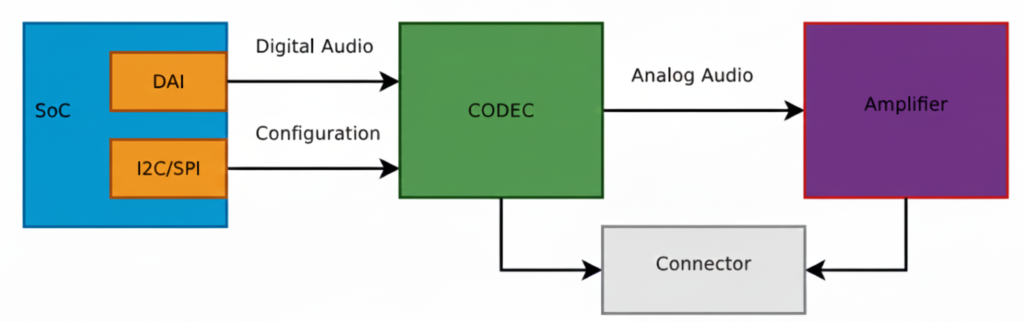
This diagram shows a typical embedded Linux / SoC audio playback architecture exactly the kind of pipeline you deal with in ALSA, QNX audio, codec drivers, and board bring-up. Let’s break it block by block, signal by signal, and then connect it to real software components you use.
SoC (System on Chip)
The SoC is the brain of the system (Qualcomm, TI, NXP, STM32MP, etc.).
Inside the SoC, two important blocks are shown:
DAI (Digital Audio Interface)
This block is responsible for sending and receiving digital audio samples.
Typical interfaces:
I2S
TDM
PCM
DSP_A / DSP_B
What flows here?
Raw PCM samples
Example: 16-bit / 24-bit / 32-bit audio
Sample rates: 44.1 kHz, 48 kHz, 96 kHz
Signals on the wire:
BCLK (Bit clock)
LRCLK / FS (Frame sync)
DATA
This is high-speed, real-time audio data
I2C / SPI (Control Interface)
This is NOT audio data.
Used only for:
Configuring the codec
Setting volume
Power control
Selecting input/output paths
Muting, unmuting
Clocking modes
Example operations:
Set DAC sample rate
Enable headphone output
Set gain = +6 dB
Power up analog blocks
This is low-speed control, not streaming audio.
Digital Audio Path (SoC → CODEC)
The arrow labeled “Digital Audio” represents:
SoC DAI ──(I2S/TDM/PCM)──> CODEC
✔ Audio is still digital ✔ No voltage amplification ✔ No sound yet
This is where:
ALSA PCM writes happen
DMA transfers audio buffers
Timing is critical
In ALSA terms:
CPU DAI ↔ Codec DAI
Defined in ASoC machine driver
Linked using snd_soc_dai_link
CODEC (Most Important Block)
The CODEC (Coder–Decoder) is the heart of audio hardware.
What the CODEC does:
DAC: Digital → Analog (playback)
ADC: Analog → Digital (capture)
Filtering
Mixing
Volume control
Clock management
Inputs:
Digital audio (I2S/TDM)
Control commands (I2C/SPI)
Outputs:
Analog audio signals (line-level)
Important:
The codec output is NOT strong enough to drive speakers
That’s why the next block exists.
Analog Audio Path (CODEC → Amplifier)
The arrow labeled “Analog Audio” means:
Audio is now continuous voltage
Typical level: ~1 Vrms (line level)
Sensitive to noise, grounding, layout
Signals here:
Left / Right analog outputs
Differential or single-ended
Amplifier
The Amplifier increases signal power so it can:
Drive speakers
Drive headphones
Overcome impedance
Amplifier types:
Class D (most common in embedded)
Class AB
Headphone amps
What it does:
Voltage amplification
Current amplification
Power delivery
Example:
Codec output: 1V
Amplifier output: 5–12V swing (speaker)
Connector (Speaker / Headphone Jack)
The Connector is the physical output:
Speaker connector
3.5mm headphone jack
Line-out
Automotive speaker terminals
Why shown separately? Because:
Board routing matters
ESD protection is added
Jack detection may exist
Multiple outputs can be routed
Full Signal Flow (End-to-End)
Playback path:
Application (aplay / media app)
        ↓
ALSA PCM
        ↓
CPU DAI (SoC)
        ↓  [Digital Audio: I2S/TDM]
CODEC (DAC)
        ↓  [Analog Audio]
Amplifier
        ↓
Speaker / Headphones
Software Mapping (Very Important)
In Linux ALSA ASoC:
Hardware Block
Software Component
SoC DAI
CPU DAI driver
CODEC
Codec driver
I2C/SPI
Regmap
Connections
Machine driver
User app
aplay, arecord
Why WAV is Used for Testing
WAV = raw PCM
No decoding needed
Direct match to DAI data
Perfect for testing this pipeline
MP3/AAC would require:
Decoder
Extra CPU
More variables
Big Picture Audio Hardware Block Diagram
Microphone
   ↓
[ Analog Front End ]
   ↓
ADC  →  SoC / MCU  →  DAC
   ↑        ↓        ↓
 Codec   DSP / CPU  Amplifier
                         ↓
                      Speaker
Let’s explain each block in detail.
Audio Input Hardware (Sound Capture)
Microphone
Converts sound waves → electrical signals
Types:
Electret Condenser Mic (analog output)
MEMS Mic
Analog MEMS
Digital MEMS (PDM / I2S output)
Key parameters:
Sensitivity (dBV/Pa)
Signal-to-noise ratio (SNR)
Directionality (Omni / Uni-directional)
Analog Front End (AFE)
Before audio reaches the ADC, it must be conditioned.
AFE includes:
Pre-amplifier (boosts weak mic signals)
Biasing circuit (for electret mics)
Low-pass filter (anti-aliasing)
Noise filtering
Without AFE, captured audio will be noisy or distorted.
Audio Codec (Heart of Audio Hardware)
What is an Audio Codec?
A codec = Coder + Decoder
It usually integrates:
ADC (Analog → Digital)
DAC (Digital → Analog)
Mixers, volume control, mute
Power management
Examples:
TLV320 series (TI)
PCM5102, PCM1808
WM8960
Realtek codecs
Why Codec Is Important
MCU/SoC cannot directly handle analog audio
Codec ensures:
Correct sampling
Bit depth
Clean audio conversion
Digital Audio Interfaces (SoC ↔ Codec)
Audio data moves digitally between SoC and codec.
I2S (Most Common)
Used for PCM audio.
Signals:
BCLK (Bit Clock)
LRCLK / WS (Left-Right clock)
DATA
MCLK (optional)
SoC  ←→  Codec
 I2S     I2S
Other Audio Interfaces
PCM/TDM – multi-channel audio (automotive, pro audio)
PDM – digital microphone interface
SPDIF – consumer audio
AC97 / HDA – PC-class audio
Audio Processing Hardware
MCU / SoC
Processes audio samples.
Responsibilities:
Buffer management
DMA handling
Audio routing
Running DSP algorithms
Examples:
BeagleBone (AM335x)
STM32F4/F7/H7
ESP32
Qualcomm SoCs
DSP (Optional but Powerful)
Dedicated processor for:
Noise cancellation
Echo cancellation
Equalizer
Compression
In many SoCs, DSP is integrated.
Audio Output Hardware (Sound Playback)
DAC
Converts digital PCM samples → analog waveform
Parameters:
Resolution (16-bit / 24-bit)
Sampling rate
Dynamic range
Often integrated inside codec.
Audio Power Amplifier
Boosts low-level analog signal to drive speakers.
Examples:
LM386 (you’ve used this)
TPA3116
Class-D amplifiers
Why needed?
Codec output ≈ millivolts
Speaker needs watts
Speaker / Headphones
Final sound-producing component.
Considerations:
Impedance (4Ω, 8Ω)
Power rating
Mono vs stereo
Clocking Hardware (Very Important)
Audio hardware needs precise clocks.
Sources:
External crystal
SoC PLL
Codec internal PLL
Clock affects:
Sampling accuracy
Audio quality
Jitter
Power Management in Audio Hardware
Audio is sensitive to power noise.
Hardware includes:
Separate analog & digital power rails
LDOs
Ground separation (AGND / DGND)
Bad power = hiss, pop, distortion.
Real Embedded Example (BeagleBone + Codec)
Mic → AFE → Codec ADC
               ↓
           I2S Bus
               ↓
        AM335x (ALSA)
               ↓
           I2S Bus
               ↓
           Codec DAC
               ↓
          LM386 Amp
               ↓
            Speaker
Software controls:
ALSA drivers
Device Tree
Mixer settings
Common Embedded Audio Hardware Issues
No sound → clock misconfiguration
Distorted audio → wrong gain
Noise → poor grounding
Channel swap → LRCLK mismatch
Crackling → buffer underrun
Summary
Block
Purpose
Microphone
Capture sound
AFE
Condition analog signal
ADC
Convert to digital
Codec
Audio conversion + control
I2S/PCM
Transfer digital audio
SoC/DSP
Process audio
DAC
Convert to analog
Amplifier
Boost signal
Speaker
Play sound
What is an Audio CODEC?
Codec = ADC + DAC + mixers + clocks + controls
CODEC = COder + DECoder
An audio codec is a single chip that can:
Record sound → convert analog sound into digital data
Play sound → convert digital data back into analog sound
It acts as a bridge between the real (analog) world and the digital world.
Controlled via:
I2C / SPI → registers
I2S / TDM → audio data
Why do we need a CODEC?
Microcontrollers / SoCs cannot understand analog voltages directly.
Microphone → gives analog voltage
Processor → understands digital numbers
Speaker → needs analog voltage
So we need a translator → that’s the CODEC.
Inside a CODEC: ADC + DAC
A codec internally contains:
ADC (Analog to Digital Converter)
Takes analog voltage (from mic/line-in)
Converts it into digital samples
Used during audio capture / recording
DAC (Digital to Analog Converter)
Takes digital samples
Converts them into analog voltage
Used during audio playback
Both ADC and DAC are inside one chip → called an Audio CODEC
What exactly does a CODEC do?
Recording path
Microphone → Analog voltage → ADC → Digital samples → SoC
Playback path
SoC → Digital samples → DAC → Analog voltage → Speaker / Amplifier
How does a CODEC talk to the SoC? (DAI)
CODECs don’t send data randomly. They use a Digital Audio Interface (DAI).
DAI is a synchronous serial interface (everything happens on clock edges).
Common DAI standards:
I²S
PCM
TDM
PCM / I²S Interface Basics
The 2 Main Clocks
Bit Clock (BCLK / BCK)
Ticks once per bit
Controls bit-by-bit transfer
Frame Clock (LRCLK / FSCLK / WCLK)
Ticks once per audio sample
Indicates Left / Right channel
Its frequency = Sample Rate (Fs)
Example:
Fs = 48 kHz → 48,000 samples per second
Relationship Between Clocks
Formula:
BCLK = FS × Number_of_Channels × Bit_Depth
Example:
Sample Rate (Fs) = 48 kHz
Channels = 2 (Stereo)
Bit depth = 16 bits
BCLK = 48,000 × 2 × 16 = 1.536 MHz
BCLK must run much faster than LRCLK.
Data Lines (Audio Data)
Along with clocks, we have data lines:
Carry the actual audio bits
Usually called: SDATA, DSDATA, ASDATA
Important points:
One data line can carry two channels (Left + Right)
Some codecs have multiple data lines:
One per channel pair
Useful for multi-channel audio
Multiple DAI Interfaces
Some codecs support:
Separate DAI for input (ADC)
Separate DAI for output (DAC)
This allows:
Different clocks
Different sample rates
Independent routing
Real Example: AD1937 CODEC
Capabilities
8 DAC channels → 4 stereo output pairs
4 ADC channels → 2 stereo input pairs
Playback (DAC side)
Clocks:
ABCLK → Bit clock
ALRCLK → Frame clock
Data lines:
ASDATA[1–2] → 2 output data lines
Capture (ADC side)
Clocks:
DBCLK
DLRCLK
Data lines:
DSDATA[1–4] → 4 input data lines
Perfect for multi-channel professional audio systems
Control Interface (Configuration Bus)
Audio data ≠ configuration.
CODECs use a separate control bus to:
Set volume
Select sample rate
Enable ADC/DAC
Configure routing
Common control buses:
I²C
SPI
Audio flows on DAI, configuration happens on I²C/SPI.
Left-Justified is a digital audio data format used to transfer audio samples between a codec and a SoC/DSP over serial audio interfaces like:
I²S
TDM
PCM interfaces
It defines how audio bits are aligned with the clock signals.
The 3 Important Audio Signals (Recap)
In any digital audio interface, you’ll see:
Signal
Meaning
BCLK
Bit Clock – clocks each bit
LRCLK / WS
Left-Right Clock (Word Select)
DATA
Actual audio sample bits
Left-Justified format describes when DATA starts relative to LRCLK.
Left-Justified Format – Core Idea
The MSB (Most Significant Bit) of the audio sample appears immediately after the LRCLK transition.
Key Rule:
No delay
MSB is aligned with the LRCLK edge
Data is “left-aligned” in the word frame
Timing Diagram (Conceptual)
LRCLK:  |____ LEFT ____|____ RIGHT ____|
            ↑                ↑
           MSB              MSB
BCLK :  |‾|_|‾|_|‾|_|‾|_|‾|_|‾|_|
DATA :  [MSB ........ LSB][MSB .... LSB]
As soon as LRCLK changes:
Data starts immediately
First bit = MSB
Example: 16-bit Audio Sample
Assume:
Sample size = 16 bits
Left channel sample = 0x5A3C
Bit Transmission (Left Channel)
LRCLK = 0  → LEFT channel
DATA   = 0 1 0 1 1 0 1 0 0 0 1 1 1 1 0 0
          ↑
         MSB (no delay!)
Left-Justified vs I²S (Very Important Interview Point)
Feature
Left-Justified
I²S
MSB position
Immediately after LRCLK edge
1 BCLK delay
Alignment
Left aligned
Delayed
Simplicity
Simple
Slightly complex
Codec support
Older & simple codecs
Most modern codecs
This 1-bit delay is the ONLY difference — but it breaks audio if misconfigured.
Why is it Called “Left-Justified”?
Because:
Audio data is pushed to the left side of the word frame
No padding before MSB
Extra unused bits (if any) come after LSB
Example (24-bit sample on 32-bit frame):
[ MSB .... LSB ][ 0 0 0 0 0 0 0 0 ]
Where is Left-Justified Used?
Common in:
Audio codecs (TLV320, PCM series)
Simple DAC/ADC interfaces
Embedded SoCs during codec bring-up
Some QNX / ALSA hardware configs
You’ll often see it as:
LEFT_J
LEFT_JUSTIFIED
LJ
ALSA / Embedded Perspective (Real World)
In ALSA, Left-Justified is configured using:
DAI format flags
Example:
SND_SOC_DAIFMT_LEFT_J
If:
Codec = Left-Justified
SoC = I²S
Audio will be distorted or silent
Simple One-Line Definition (Interview Ready)
Left-Justified audio format is a digital audio data format where the MSB of the sample appears immediately after the LRCLK transition, with no bit delay.
What is Right-Justified (RJ) Audio Digital Format?
Right-Justified is a digital audio data alignment format used to transfer audio samples between:
Codec ↔ SoC / DSP
Over interfaces like I²S, PCM, TDM
It defines how audio bits are aligned with the LRCLK (Word Select) signal.
Core Idea (Very Important)
In Right-Justified format, the LSB (Least Significant Bit) of the audio sample is aligned with the end of the LRCLK period.
Meaning:
Data is right-aligned
MSB position depends on sample width
Signals Involved
Signal
Role
BCLK
Clocks each bit
LRCLK / WS
Selects Left or Right channel
DATA
Audio sample bits
Right-Justified format defines where the LSB appears relative to LRCLK.
Timing Concept (Simple View)
LRCLK:  |____ LEFT ____|____ RIGHT ____|
                     ↑                ↑
                    LSB              LSB

BCLK :  |‾|_|‾|_|‾|_|‾|_|‾|_|‾|_|
DATA :  [MSB .... LSB][MSB .... LSB]
Padding bits come before MSB Sample ends exactly at LRCLK edge
Why “Right-Justified”?
Because:
Audio data is aligned to the right side of the frame
Extra unused bits are placed before MSB
LSB touches the LRCLK boundary
Right-Justified vs Left-Justified vs I²S
Feature
Left-Justified
Right-Justified
I²S
MSB alignment
Immediately after LRCLK
Variable
1 BCLK delay
LSB alignment
Variable
At LRCLK edge
Fixed
Padding bits
After LSB
Before MSB
After LSB
Common usage
Some codecs
Legacy codecs
Most modern systems
Important Embedded Detail
In Right-Justified, the SoC must know sample width:
16-bit
20-bit
24-bit
If sample width mismatches:
Audio distortion
Shifted samples
Noise / silence
This is why RJ is more error-prone than LJ or I²S.
ALSA / Driver Perspective
In ALSA SoC drivers, Right-Justified is selected using:
SND_SOC_DAIFMT_RIGHT_J
Typical usage:
Old DACs / ADCs
Simple PCM audio paths
Some automotive codecs
One-Line Interview Definition
Right-Justified audio format aligns the LSB of each audio sample with the LRCLK edge, while MSB position depends on the sample width.
Quick Memory Trick
Left-Justified → MSB touches LRCLK
Right-Justified → LSB touches LRCLK
I²S → MSB delayed by 1 BCLK
What is I2S (Inter-IC Sound)?
I2S (Inter-IC Sound) is a digital audio communication protocol used to transfer audio data between chips such as a processor, audio codec, DAC, or ADC.
Key Points of I2S
Designed specifically for digital audio
Transfers PCM (Pulse Code Modulation) audio data
Commonly used in embedded systems, SoCs, and audio boards
Simple and easy to implement
I2S Signals
I2S uses three or four lines:
BCLK (Bit Clock): Clocks each audio bit
LRCLK / WS (Word Select): Selects Left or Right audio channel
SD (Serial Data): Carries audio sample data
MCLK (Optional): Master clock for codec timing
I2S Features
Supports stereo audio (Left & Right)
Fixed channel structure
Low latency
Ideal for headphones, speakers, microphones
Where I2S is Used
Audio codecs (PCM, WM, TLV series)
Embedded Linux audio (ALSA)
Microcontrollers and DSPs
Music players and voice applications
What is TDM (Time Division Multiplexing)?
TDM (Time Division Multiplexing) is a digital audio interface that allows multiple audio channels to be transmitted over a single data line by assigning each channel a time slot.
Key Points of TDM
Supports multi-channel audio
Uses time slots instead of separate data lines
Highly scalable and efficient
Common in professional and automotive audio systems
TDM Signals
TDM typically uses:
BCLK (Bit Clock): Drives bit transmission
FS / SYNC (Frame Sync): Marks start of a frame
SD (Serial Data): Carries data for all channels
TDM Features
Supports 4, 8, 16, or more channels
Better bandwidth utilization
Reduces pin count on SoCs
Ideal for surround sound and voice systems
Where TDM is Used
Automotive infotainment systems
Multi-microphone arrays
Professional audio mixers
Advanced SoC audio pipelines
I2S vs TDM – Quick Comparison
Feature
I2S
TDM
Channels
2 (Stereo)
Multiple (4–16+)
Data Lines
One per stream
Single shared
Complexity
Simple
Moderate
Use Case
Basic audio
Multi-channel audio
Scalability
Limited
High
Summary
I2S is best for simple stereo audio communication
TDM is ideal for multi-channel, high-performance audio systems
Both are widely used in embedded audio, Linux ALSA, and SoC designs
Late data = noise Missing data = crack/pop Clock mismatch = drift
Key challenges:
Buffer underrun / overrun
Clock synchronization
Interrupt latency
DMA tuning
Playback vs Capture (Two Directions)
Playback
File → PCM → DAC → Speaker
Capture
Mic → ADC → PCM → File / Stream
Drivers must support both directions.
Compression vs Raw Audio
Type
Example
Used Where
Raw
PCM
Drivers, ALSA
Compressed
MP3, AAC
Apps
Lossless
WAV, FLAC
Storage
Embedded drivers almost never touch MP3/AAC.
Audio = Data + Time (Golden Rule)
Audio correctness depends more on TIMING than data
Even perfect samples are useless if late.
What is Clock in Audio?
In digital audio, a clock is a timing signal that synchronizes the transfer of audio data between components like a CPU, DSP, or audio codec. Without clocks, audio data could be misaligned, causing glitches, noise, or distortion.
Types of Clocks in Audio DAI (Digital Audio Interface)
Bit Clock (BCLK)
Drives the rate at which each audio bit is sent.
Think of it like the tick of a metronome, sending bits one by one.
Bit Clock Producer: One DAI (Digital Audio Interface) must generate this clock, called the BCLK producer (previously called “master”).
Frame Clock (LRCLK / Word Select / FS)
Signals the start of each audio frame (Left and Right channels in stereo).
Ensures the receiving device knows which bits belong to the left or right channel.
Frame Clock Producer: One DAI generates this, called the frame producer.
Master Clock (MCLK)
Optional but important for many CODECs.
Provides a high-frequency reference clock that other clocks (BCLK, LRCLK) can derive from using PLLs and dividers.
Helps CODECs generate precise bit and frame clocks even if the SoC provides multiple MCLK rates.
Who Should Generate the Clock?
Often, it’s better to let the CODEC act as the clock producer because:
CODECs have built-in PLLs and dividers for accurate BCLK from MCLK.
Reduces jitter (timing errors) in audio.
Some SoCs have specialized audio PLLs, so the CPU can generate precise clocks too.
Rule of thumb:
Let the device with the best PLL stability produce the clock.
The other device is called the bit or frame consumer, which simply follows the clock.
What are Auxiliary Devices in Audio?
In audio systems, auxiliary devices are additional hardware components that are not the main audio codec or processor, but help in modifying, routing, or amplifying audio signals. They can exist on the analog path (after digital-to-analog conversion) or sometimes on the digital path.
These devices are essential for fine-tuning audio output, volume control, or channel selection.
Types of Auxiliary Devices
Amplifiers
Boost the audio signal strength before sending it to speakers or headphones.
Examples:
Headphone amplifiers in mobile phones
Line amplifiers in sound cards
They can be controlled digitally in modern systems to adjust gain or mute audio.
Potentiometers (Volume Controls)
Analog knobs or digital controls that adjust signal amplitude.
They act as volume knobs or mixing controls.
Can be exposed in the ALSA sound card interface so software can control them.
Multiplexers (MUXes)
Switch between multiple audio sources or paths.
Example: Choosing between line-in, mic, or Bluetooth input.
Controlled via software registers to route audio correctly.
Other Analog Path Devices
Filters, equalizers, or attenuators
Ensure signal quality, reduce noise, or adjust frequency response
Control of Auxiliary Devices
Many auxiliary devices are software-controllable.
In ALSA (Advanced Linux Sound Architecture):
They appear as controls of the sound card.
Software can adjust volume, enable/disable paths, or switch inputs.
Input Source: Selects which audio path the multiplexer connects
This software abstraction makes it easy to manage analog devices programmatically.
Key Points for Beginners
Auxiliary devices are not the main audio codec, but they enhance or route audio.
They can be analog or digital controlled.
Exposing them as sound card controls allows software to adjust audio dynamically.
Common examples: Amplifiers, volume controls, multiplexers.
I2S (Inter-IC Sound) Interview Questions
Q1. What is I2S? Answer: I2S (Inter-IC Sound) is a digital audio interface used to transfer PCM audio data between chips such as processors, codecs, DACs, and ADCs.
Q2. How many signals does I2S use? Answer: I2S typically uses 3 or 4 signals:
BCLK (Bit Clock) – Clocks each audio bit
LRCLK / WS (Word Select) – Indicates Left or Right channel
SD (Serial Data) – Carries audio samples
MCLK (Master Clock) – Optional, used for codec timing
Q3. What audio formats does I2S support? Answer: I2S supports PCM audio, commonly 16-bit, 24-bit, or 32-bit samples, stereo only.
Q4. Difference between Left-Justified and I2S format? Answer:
I2S format: Data starts one clock after LRCLK changes.
Left-Justified: Data starts exactly at the LRCLK edge.
Q5. Where is I2S used in embedded systems? Answer:
Q1. What is TDM in audio? Answer: TDM allows multiple audio channels to share a single data line by assigning each channel a time slot, used for professional multi-channel audio.
Q2. How many channels can TDM support? Answer: It depends on the implementation; common configurations support 4, 8, 16, or more channels.
Q3. Difference between I2S and TDM? Answer:
Feature
I2S
TDM
Channels
2 (Stereo)
Multiple (4–16+)
Data lines
One per stream
Single shared
Complexity
Simple
Moderate
Use case
Basic stereo audio
Multi-channel audio
Q4. What signals are used in TDM? Answer:
BCLK (Bit Clock) – Synchronizes bits
FS / SYNC (Frame Sync) – Marks frame start
SD (Serial Data) – Carries all channels sequentially
Q5. Where is TDM commonly used? Answer:
Automotive infotainment
Multi-microphone voice capture
Surround sound systems
DSP audio pipelines
Practical/Scenario Questions
How do you connect an I2S codec to STM32?
Use BCLK, WS, SD pins, enable I2S peripheral, configure sample rate & word length.
How do you configure ALSA for TDM multi-channel audio?
Define codec and CPU DAI in ASoC machine driver, set number of slots, slot width, frame sync, and register in ALSA.
Why choose TDM over I2S?
When you need more than 2 channels over limited pins, e.g., 8-channel microphone arrays.
Explain Left-Justified vs Right-Justified format in I2S/TDM.
Left-Justified: Data aligned with LRCLK edge
Right-Justified: Data ends at LRCLK edge
Explore Embedded Audio Basics : From microphones to codecs, understand how audio works in embedded systems: Read more
Analog signal means the values can change smoothly over time (like a smooth wave).
2. Digital samples
Computers and embedded systems cannot understand continuous signals directly.
So, we convert analog sound into digital numbers, which are called samples.
This process is done by an Analog-to-Digital Converter (ADC).
Later, to play sound, the numbers are converted back to analog using a Digital-to-Analog Converter (DAC).
Simple example:
Imagine taking photos of a moving object every second. Each photo is a “sample” of the motion.
More photos = smoother playback; fewer photos = choppy motion.
Same idea with audio: more samples per second = better sound quality.
3. Timing constraints
Audio has to be played or processed at the right speed.
If the system is too slow or samples are missed, sound may become choppy, delayed, or distorted.
Embedded systems often use timers or buffers to ensure accurate timing while playing or recording audio.
Example:
If you play a song on your phone and it stutters or lags, it’s a timing problem.
Putting it all together
So, the formula:
Audio = Analog signal ⇄ Digital samples + timing constraints
means:
Audio starts as a real-world analog sound.
It is converted to digital samples so the system can process it.
It must be handled with proper timing to play correctly.
When needed, the digital samples are converted back to analog so we can hear it.
Understanding the Difference Between Sound and Audio
Sound is something we experience every day, whether it’s birds chirping, music playing, or a person talking. But in the world of electronics and embedded systems, you often hear the term audio. Many people wonder: Are sound and audio the same thing? Let’s break it down step by step.
What is Sound?
Sound is the natural phenomenon that we hear. It is created when an object vibrates, causing the surrounding air, water, or solid material to vibrate as well. These vibrations travel as waves, known as sound waves, which our ears detect.
Some key points about sound:
Sound is a physical wave in a medium (air, water, or solids).
It has frequency, which determines the pitch (high or low sound).
It has amplitude, which determines the loudness (soft or loud sound).
Real-world sounds often consist of many combined waves, giving each sound its unique quality, called timbre.
Examples: Clapping hands, a ringing bell, a dog barking.
What is Audio?
Audio is how we capture, process, store, or reproduce sound electronically. In simple terms, audio is sound converted into an electrical or digital form.
Some key points about audio:
Audio allows sound to be recorded, processed, transmitted, and played on electronic devices.
It can be analog (continuous electrical signal) or digital (numbers representing the sound).
Devices like microphones, speakers, computers, and smartphones use audio to handle sound in a usable form.
Examples: Songs on Spotify, voice recorded on a phone, sound effects in video games.
Sound vs Audio : Key Differences
Feature
Sound
Audio
Nature
Natural vibration in a medium
Electronic or digital form of sound
How we use it
Heard directly by humans
Processed, stored, or played via devices
Medium
Air, water, solids
Electrical signals or digital files
Example
Clapping hands, dog barking
MP3 song, recorded voice, podcast
Easy way to remember:
Sound is the real-world vibration we hear.
Audio is sound in a form that electronics can understand and use.
What is Audio
Audio is a time-varying analog signal representing air pressure variations, converted into electrical signals, then into digital data for processing, storage, and playback.
Audio Signal in the Real World (Physical Layer)
Sound → Air → Pressure Wave
Sound is a mechanical vibration
Travels as pressure waves
Human hearing range: 20 Hz – 20 kHz
Key properties:
Property
Meaning
Frequency
Pitch (Hz)
Amplitude
Loudness
Phase
Timing alignment
Audio in Embedded Systems (High-Level Flow)
Microphone
   ↓
Analog Front End (AFE)
   ↓
ADC (inside codec)
   ↓
Digital Audio (PCM samples)
   ↓
CPU / DSP / OS
   ↓
DAC (inside codec)
   ↓
Amplifier
   ↓
Speaker
Key idea: Your software never “plays sound” — it moves samples on time.
Sound waves are continuous
Sound waves are like smooth, endless curves.
They represent how air pressure changes over time when something makes a sound.
Continuous means the wave has an infinite number of points – it never “jumps” suddenly.
Measuring points on the wave
At any single point on the wave, you can measure how strong the sound is (its amplitude).
This single measurement is called a sample.
Think of it as taking a snapshot of the wave at one exact moment.
32-bit sample → used for special purposes, like precise calculations in audio processing.
6. Why Bit Depth Matters
More bits = more precision = smoother and more accurate sound.
Fewer bits → sound may be distorted or “grainy”.
That’s why 8-bit audio is rare today, while 16-bit and 24-bit are common.
Quick Summary
Concept
Explanation
Example
Sample value
Number representing amplitude at a moment
-1.0 to 1.0
Sample size (bits)
How many different values each sample can have
16-bit = 65,536 levels
Quality
More bits = better sound quality
8-bit = low, 24-bit = high
Analog vs Digital Audio (Critical Concept)
Analog Audio
Continuous voltage
Noise-prone
Example: microphone output
Digital Audio
Discrete samples
Binary data
Example: PCM buffer in RAM
Conversion happens using:
ADC (Analog → Digital)
DAC (Digital → Analog)
These are almost always inside an audio codec IC.
What is PCM? (This is your bread & butter)
PCM (Pulse Code Modulation) is raw, uncompressed audio data.
PCM = Samples taken at fixed intervals
Example:
Sample rate: 48 kHz
Bit depth: 16-bit
Channels: 2 (stereo)
Each sample:
Left sample | Right sample
In memory:
L0 R0 L1 R1 L2 R2 ...
PCM (Pulse Code Modulation) is a method to digitally represent analog audio signals. In simpler terms, it’s a way to take a continuous sound wave (like someone talking or music) and turn it into numbers that a computer or microcontroller can store, process, or transmit.
How PCM Works
Sampling
The analog signal is continuous over time.
PCM measures (samples) the signal at regular intervals, called the sampling rate.
Example: A sampling rate of 44.1 kHz (CD quality) means the audio is measured 44,100 times per second.
Quantization
Each sampled value is assigned a discrete number.
The number of bits used per sample determines the bit depth.
Example: 16-bit audio can represent 65,536 (2¹⁶) different amplitude levels.
Encoding
These discrete numbers are stored as binary data.
This sequence of numbers is your PCM audio stream.
Characteristics of PCM Audio
Linear PCM (LPCM): Most common type; samples are proportional to the original waveform.
Sample Rate: Higher rate → more accurate reproduction. Standard rates: 44.1 kHz, 48 kHz, 96 kHz.
Bit Depth: Higher depth → more dynamic range. Standard: 16-bit, 24-bit, 32-bit float.
Lossless representation of audio (no compression artifacts).
Standard for audio CDs, professional audio recording, and many embedded audio applications.
Easy to manipulate digitally (filtering, effects, mixing, etc.).
Example in Embedded Systems
Suppose you have a BeagleBone or STM32 and you want to play a recorded sound:
You store the audio in PCM format in memory (like an array of integers).
You send these samples to a DAC (Digital-to-Analog Converter) at the correct sample rate.
The DAC reconstructs the analog signal → goes to a speaker.
Key Audio Parameters (You MUST know these)
1. Sample Rate
Definition: The sample rate (or sampling frequency) is how many times per second the analog audio signal is measured (sampled) to convert it into digital form.
Unit: Hertz (Hz) → samples per second.
Example:
44.1 kHz → 44,100 samples per second (standard for audio CDs)
48 kHz → common in professional video and recording
96 kHz → high-resolution audio
Effect:
Higher sample rate → more accurate reproduction of the original waveform.
Lower sample rate → may lose high-frequency details (can cause aliasing if below Nyquist limit).
Embedded Example: If your microcontroller outputs 44,100 PCM samples per second to a DAC, it will reproduce the audio faithfully up to ~22 kHz (Nyquist theorem).
2. Bit Depth
Definition: Bit depth determines how many discrete levels are used to represent each audio sample.
Higher bit depth → more dynamic range (difference between softest and loudest sound)
Lower bit depth → more quantization noise
Embedded Example: If your STM32 DAC uses 12-bit resolution, each PCM sample must be mapped to 0–4095 levels.
3. Channels
Definition: Channels refer to the number of separate audio tracks in the PCM data.
Types:
Mono: 1 channel (same audio for all speakers)
Stereo: 2 channels (Left and Right)
Surround: 5.1, 7.1 channels → for multi-speaker systems
Effect:
More channels → more complex and immersive sound
Each channel has its own sample stream
Embedded Example: For stereo PCM audio on a microcontroller:
Left channel samples: [L1, L2, L3 …]
Right channel samples: [R1, R2, R3 …]
DAC outputs both channels to separate speakers simultaneously.
Summary Table
Feature
Definition
Effect
Example
Sample Rate
How many times per second audio is sampled
Accuracy of waveform
44.1 kHz
Bit Depth
Number of levels per sample
Dynamic range, quantization noise
16-bit
Channels
Number of separate audio tracks
Mono, stereo, surround
Stereo (Left + Right)
Shannon-Nyquist Theorem (Sampling Theorem)
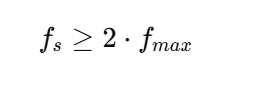
Definition: The Shannon-Nyquist theorem states:
To digitally represent an analog signal without losing information, it must be sampled at a rate at least twice the highest frequency present in the signal.
To turn a real sound into digital data without losing any information, you need to “take enough snapshots” of the sound every second. The rule is: take at least 2 snapshots for every cycle of the fastest sound you want to capture.
Step by Step
Sound is a wave
Sound moves in waves (like ocean waves).
Each wave has a frequency: how fast it goes up and down per second.
Example: A piano note might be 440 Hz → 440 waves per second.
Digital can’t see continuous waves
Computers store numbers, not continuous waves.
So we “sample” the wave: take snapshots of its height at regular intervals.
How often should we take snapshots?
Shannon-Nyquist says: take at least twice as many snapshots as the highest frequency you want to capture.
Example: If the fastest sound is 20,000 Hz (human hearing limit), take at least 40,000 samples per second.
Why 2×?
If you take fewer samples, the wave can look like a completely different wave when you try to play it back.
This mistake is called aliasing.
Taking at least 2× ensures the original wave can be accurately recreated.
Super Simple Example
Imagine a bouncing ball going up and down 5 times per second.
If you take 2 photos per second → you might miss the motion → the ball looks weird.
If you take 10 photos per second → you see the motion clearly.
That’s basically Shannon-Nyquist for sound waves.
Formula:
Where:
(f_s) = sampling rate (samples per second)
(f_{max}) = maximum frequency in the analog signal
Why it matters
If you sample too slowly, higher frequencies in the signal will be misrepresented.
This misrepresentation is called aliasing.
Example:
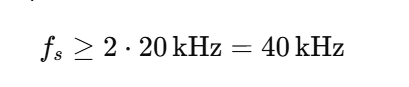
Human hearing range: 20 Hz – 20 kHz
That’s why CDs use 44.1 kHz.
To capture all audible frequencies:
Aliasing Explained
If the sampling rate is below 2 *fmax
High-frequency components “fold back” into lower frequencies
The reconstructed audio sounds distorted
Visual: Imagine trying to sample a fast-moving wave slowly → it appears as a slower wave.
Embedded Systems Example
Suppose you have a microcontroller with a DAC:
You want to play a sound with frequency content up to 8 kHz
Minimum sample rate according to Shannon-Nyquist: (f_s \ge 16\text{kHz})
Using 16 kHz will reconstruct the waveform correctly
Using 10 kHz → aliasing will occur, audio will be distorted
Sound Digitization
Definition: Sound digitization is the process of converting an analog sound wave (continuous) into a digital format (numbers) that a computer can store, process, or play back.
Step 1: Sampling the Sound
The analog sound wave is measured at regular intervals.
Each measurement is called a sample.
Example:
A sound is recorded at 44.1 kHz → 44,100 samples per second.
Each sample captures the amplitude (height) of the wave at that instant.
Step 2: Quantization
Each sample is rounded to the nearest value that can be represented digitally.
This depends on bit depth.
16-bit → 65,536 possible levels
8-bit → 256 levels
Effect: Higher bit depth → more precise representation of the wave.
Step 3: Storing as WAV
WAV (Waveform Audio File Format) is a digital audio file format used to store audio in uncompressed PCM (Pulse Code Modulation) format.
Developed by Microsoft and IBM.
Stores raw audio data plus some metadata (like sample rate, bit depth, and number of channels).
Very common for high-quality audio in Windows and embedded projects.
WAV file is a common container for PCM audio.
Stores raw PCM data, along with metadata like:
Sample rate (e.g., 44,100 Hz)
Bit depth (e.g., 16-bit)
Number of channels (mono/stereo)
Structure of a WAV file (simplified):
[Header]       → info about sample rate, bit depth, channels
[Data Chunk]   → sequence of PCM samples
Understanding WAV Files: Beginner’s Guide to Digital Audio
Digital audio has become an integral part of technology, from music streaming and video production to embedded systems and microcontroller projects. Among various audio formats, WAV (Waveform Audio File Format) stands out for its simplicity, high quality, and ease of use. This article explains WAV files in a beginner-friendly way, covering their structure, usage, and technical details.
What Is a WAV File?
A WAV file is a digital audio file format that stores sound in an uncompressed PCM (Pulse Code Modulation) format. Unlike compressed formats such as MP3 or AAC, WAV preserves every detail of the original audio. This makes it ideal for high-quality audio playback, recording, and professional applications.
WAV files can store:
Mono or stereo audio
Different bit depths (8-bit, 16-bit, 24-bit, 32-bit)
Send them to a DAC at the correct sample rate to play the sound.
Common Audio Sample Rates and Their Uses
Sample Rate
Frequency Captured
Use / Typical Application
8 kHz
Up to 4 kHz
Telephony (phone calls), VoIP
16 kHz
Up to 8 kHz
Wideband voice, some low-quality audio
22.05 kHz
Up to 11 kHz
Low-quality music, older audio formats
32 kHz
Up to 16 kHz
FM radio, some lower-quality recordings
44.1 kHz
Up to 22 kHz
CD audio (standard for music), general-purpose audio
48 kHz
Up to 24 kHz
Video production, DVDs, broadcast audio
88.2 kHz
Up to 44.1 kHz
High-resolution audio, some studio recordings
96 kHz
Up to 48 kHz
Professional audio, film production, high-quality recording
192 kHz
Up to 96 kHz
Audiophile / ultra-high-resolution recordings
Guidelines for Choosing Sample Rate
Voice / telephony:
Use 8 kHz or 16 kHz → only needs human speech range (~300–3400 Hz).
Music / general audio:
Use 44.1 kHz → covers full human hearing (~20 Hz – 20 kHz).
Video / film:
Use 48 kHz → industry standard for audio/video sync.
High-quality / studio recording:
Use 96 kHz or 192 kHz → captures more details for professional mixing/mastering.
Embedded Systems Perspective
Microcontrollers with DACs often use 8 kHz–48 kHz.
Higher sample rates → better quality, but more memory and higher CPU load.
Example:
Playing music on a small MCU → 44.1 kHz, 16-bit stereo PCM
Voice alerts or notifications → 8 kHz, 8-bit mono PCM
Quick rule of thumb:
8–16 kHz: voice only
44.1 kHz: music / general audio
48 kHz: video / multimedia
96 kHz+: high-res studio recordings
Why we often use WAV files for testing audio instead of MP3, MP4, or other formats.
WAV Is Uncompressed (PCM)
WAV stores audio in raw PCM format—the exact waveform is preserved.
MP3, AAC, or MP4 are compressed formats (lossy or container formats), which remove some audio information to save space.
For testing audio in embedded systems or audio applications, you want the original waveform without any distortion from compression.
Example: If you are testing a DAC or audio pipeline, WAV ensures the numbers you send to hardware match the original waveform perfectly.
Simple Structure
WAV files have a simple, predictable header and straightforward data chunk.
You can read the samples directly into memory and send them to a DAC.
MP4 or MP3 files need decoding first (using codecs), which complicates testing.
In embedded systems, simplicity is key—WAV lets you focus on the hardware or playback pipeline without worrying about decoding software.
No Loss of Quality
Compression can introduce artifacts (unwanted noise or distortion).
Using WAV ensures that all audio details are preserved, which is crucial when testing:
DAC linearity
Speaker output quality
Signal processing algorithms
Predictable Timing
WAV files have a fixed sample rate and bit depth, so the timing of samples is predictable.
MP3/MP4 often use variable bit rates, which can make playback timing less precise—not ideal for testing embedded audio systems.
Industry Standard for Testing
Audio engineers and embedded developers almost always use WAV for test tones, audio calibration, and hardware verification.
Common test signals include:
Sine waves (to check frequency response)
Square waves (for DAC linearity)
White/pink noise (for speaker testing)
FAQs: What is Audio
1. What is audio? Audio is the representation of sound, either as a physical wave in air or as a digital signal. It can be captured, processed, stored, and played back in devices like computers, smartphones, and embedded systems.
2. How is audio captured from a microphone? A microphone converts sound waves into an analog electrical signal. This analog signal can then be converted into digital audio using an ADC (Analog-to-Digital Converter) and stored in formats like WAV or PCM.
3. What is PCM audio? PCM (Pulse Code Modulation) is a method of converting analog sound into digital form by sampling the amplitude of the sound wave at regular intervals and storing it as numbers.
4. What is the difference between WAV and MP3? WAV is an uncompressed audio format, preserving the original sound quality, making it ideal for testing and professional applications. MP3 is a compressed format that reduces file size but loses some audio details.
5. What is sample rate in audio? Sample rate is the number of times per second the analog signal is measured during digitization. Common sample rates are 44.1 kHz (CD quality) and 48 kHz (video/audio production).
6. What is bit depth in audio? Bit depth defines how accurately each audio sample is represented. Higher bit depth (like 16-bit or 24-bit) allows for greater dynamic range and more precise sound reproduction.
7. Why is WAV used for audio testing? WAV files store raw PCM audio without compression, ensuring exact waveform reproduction. This makes them perfect for testing audio hardware or embedded systems, where accuracy is crucial.
8. Can all captured audio be saved as WAV? Yes. Audio captured from a microphone or ADC can be saved as a WAV file by adding a header to the raw PCM data. Other formats like MP3 or AAC require compression and encoding.
9. What are the common audio channels? Audio can have one channel (mono), two channels (stereo), or more for surround sound setups (5.1, 7.1). Channels determine how sound is distributed across speakers.
10. How is audio used in embedded systems? Embedded systems use digital audio for alerts, notifications, music playback, and voice recognition. PCM data from WAV files is typically sent to a DAC to produce sound through speakers.
Recommended Resource: Expand Your ESP32 Knowledge
If you’re enjoying this project and want to explore more powerful sensor integrations, make sure to check out my detailed guide on using the ESP32 with the DS18B20 temperature sensor. It’s a beginner-friendly, real-world tutorial that shows how to measure temperature with high accuracy and integrate the data into IoT dashboards, automation systems, or cloud servers. You can read the full step-by-step guide here: ESP with DS18b20
This resource pairs perfectly with your ESP32 with RFID setup—together, you can build advanced smart home systems, environmental monitoring tools, or complete multi-sensor IoT projects.
I²S Protocol Interview Questions : If you’re preparing for an embedded systems interview, especially for roles involving audio data, you’ll likely face I2S-related questions. Let’s break it down in a simple and beginner-friendly way so you can understand and answer confidently.
What is I2S?
I2S (Inter-IC Sound) is a serial bus interface standard used to transmit digital audio data between devices like microcontrollers, DSPs, DACs (Digital to Analog Converters), and ADCs (Analog to Digital Converters).
Think of it as a language used by chips to talk and send sound to each other.
Answer: I2S stands for Inter-IC Sound. It is a digital audio interface standard used to transfer PCM audio data between ICs. It’s commonly used in audio applications such as smartphones, DACs, MP3 players, and digital microphones.
2. What are the main signals/pins in an I2S interface?
Answer: I2S typically has the following signals:
SD (Serial Data): Carries audio data.
SCK (Serial Clock): Also called Bit Clock (BCLK).
WS (Word Select): Also called LRCLK (Left/Right Clock) – indicates left or right channel.
(Optional)MCLK (Master Clock): Used by some devices for internal clocking.
3. Is I2S synchronous or asynchronous?
Answer: I2S is synchronous. It uses a shared clock (SCK/BCLK) between transmitter and receiver.
4. What is the difference between I2S and I2C?
Answer:
Feature
I2S
I2C
Purpose
Digital audio interface
General-purpose serial communication
Signals
SD, SCK, WS, (optional MCLK)
SDA, SCL
Speed
High-speed (MHz range)
Lower speed (100kHz – 1MHz)
Usage
Audio data transfer
EEPROMs, sensors, etc.
5. What is the role of the Word Select (WS) signal?
Answer: WS tells whether the current audio sample is for the left or right channel.
WS = 0: Left channel
WS = 1: Right channel
6. What is the typical word length supported in I2S?
Answer: Common word lengths: 16, 24, or 32 bits. It depends on audio resolution.
7. What happens if the master and slave are not synchronized in I2S?
Answer: Desynchronization leads to data corruption, audio glitches, or noise. Both devices must use the same clock signals to stay in sync.
8. Can I2S transmit multichannel audio?
Answer: Yes, but standard I2S supports only stereo (2-channel). For multichannel audio, protocols like TDM (Time Division Multiplexing) or I2S variants are used.
9. Is I2S full-duplex?
Answer: No, basic I2S is half-duplex, supporting one-way audio at a time. Full-duplex requires using two I2S buses or bidirectional extensions.
10. What are common issues in I2S communication?
Answer:
Incorrect clock rate
Mismatch in master/slave configuration
Word length mismatch
Signal integrity (bad wiring, noise)
Improper synchronization
Bonus: Practical Use Case Question
Q: How would you connect a microcontroller to an I2S DAC?
Answer:
Configure microcontroller as I2S master.
Connect SCK (bit clock), WS (word select), and SD (data out) to DAC.
Ensure the same audio format and sample rate on both sides.
If needed, provide MCLK to DAC.
Tips for I²S Protocol Interview Questions
Know basic audio formats: PCM, bit depth, sampling rate.
Be ready to explain data flow (left/right channel timing).
Understand I2S role in audio pipelines (e.g., microphone → codec → speaker).
If you’ve worked with it (e.g., STM32, ESP32), mention your experience.
Beginner-Level I²S Protocol Interview Questions
What is I2S?
What are the basic signals/pins used in I2S?
What is the function of the Word Select (WS) or LRCLK in I2S?
Is I2S synchronous or asynchronous?
What is the difference between I2S and I2C?
What devices commonly use I2S?
Can I2S transmit both left and right channel data?
What is the typical word length supported by I2S?
Is I2S full-duplex or half-duplex?
What is the sampling frequency in I2S and how is it derived?
50 Proven ALSA Interview Questions for Guaranteed 2026 Success is a complete, beginner-to-advanced guide covering ALSA architecture, PCM, mixer, drivers, debugging, and real Linux audio interview questions to help you crack embedded and Linux audio interviews confidently.
Basic ALSA Questions | ALSA Interview Questions
ALSA interview questions : Are you preparing for an interview involving the Advanced Linux Sound Architecture (ALSA)? This post covers 50 essential ALSA interview questions tailored for 2026, helping you brush up on key concepts, technical details, and real-world applications. Whether you\’re a beginner or an experienced professional, these questions will help you assess your knowledge on ALSA drivers, user-space libraries, audio processing, PCM interfaces, mixer controls, and debugging techniques. Stay ahead of the curve with these up-to-date and practical ALSA interview questions!
1. What is ALSA, and how does it differ from OSS (Open Sound System)?
Advanced Linux Sound Architecture (ALSA) is a framework for handling sound on Linux systems. It provides:
Low-level kernel drivers for audio devices
A user-space library (libasound) to simplify application development
Features like software mixing, MIDI support, and audio processing
Differences between ALSA and OSS:
Feature
ALSA
OSS (Open Sound System)
Architecture
Modular, supports multiple devices
Older, monolithic design
Full Duplex Support
Yes
Limited in OSSv3
Hardware Mixing
Yes
Limited
User-Space API
libasound
OSS /dev/dsp interface
Multiple Applications
Uses software mixing (dmix)
Required hardware mixing
Default in Linux
Default since Linux 2.6
Replaced by ALSA
OSS was the default in early Linux versions but was replaced by ALSA due to flexibility and better hardware support.
2. What are the key components of the ALSA architecture (ALSA Interview Questions)?
The ALSA architecture consists of three major layers:
3. Explain the role of PCM (Pulse Code Modulation) in ALSA.
PCM (Pulse Code Modulation) is a method of digitally representing analog signals. In ALSA, PCM acts as the interface for audio data streams, allowing applications to send/receive raw audio samples.
PCM in ALSA includes:
Hardware PCM (hw:x,y) – Direct access to the sound card\’s PCM interface
List of PLAYBACK Hardware Devices
card 0: PCH [HDA Intel PCH], device 0: ALC892 Analog [ALC892 Analog]
Here, card 0, device 0 refers to the primary audio device.
7. How do you check available PCM devices?
To check playback PCM devices:
aplay -L
To check recording PCM devices:
arecord -L
This lists devices like:
hw:0,0
default
plug:dmix
hw:0,0 → Direct hardware access
default → System-defined default PCM
plug:dmix → Software mixer
8. How do you test audio playback and recording using ALSA utilities?
To test playback:
aplay -D hw:0,0 /usr/share/sounds/alsa/test.wav
To test recording:
arecord -D hw:0,0 -f cd test.wav
This records audio and saves it as test.wav.
To check speaker output:
speaker-test -D hw:0,0 -c 2 -t wav
This plays test tones in stereo.
9. What is the function of the ALSA Mixer?
The ALSA Mixer manages audio controls on a sound card. It allows:
Adjusting playback and recording volume
Muting/unmuting audio channels
Configuring input/output sources
Common utilities:
alsamixer → Graphical terminal-based mixer
amixer → Command-line control
Example commands:
alsamixer      # Opens the mixer UI
amixer set Master 50%    # Sets volume to 50%
💛 Support Embedded Prep
If you find our tutorials helpful and want to support our mission of sharing high-quality embedded system knowledge, you can contribute by buying us a coffee.
Every small contribution helps us keep creating valuable content for learners like you. ☕
Thank you for your support — it truly keeps Embedded Prep growing. 💻✨
10. How does ALSA handle multiple applications trying to access the same audio device?
ALSA provides software mixing (dmix) to allow multiple applications to use the same audio device.
Hardware Mixing – If the sound card supports it, multiple streams can be mixed in hardware.
Software Mixing (dmix) – If hardware mixing isn’t available, ALSA uses a software-based mixer.
In C++, you open an ALSA PCM (Pulse Code Modulation) device using the snd_pcm_open() function, which initializes the PCM device for playback or recording.
Example: Opening a PCM Device
#include <alsa/asoundlib.h>
#include <iostream>
int main() {
    snd_pcm_t *pcm_handle;
    const char *device_name = \"default\";  // Can also be \"hw:0,0\" for direct access
    int err = snd_pcm_open(&pcm_handle, device_name, SND_PCM_STREAM_PLAYBACK, 0);
    if (err < 0) {
        std::cerr << \"Error opening PCM device: \" << snd_strerror(err) << std::endl;
        return -1;
    }
    std::cout << \"PCM device opened successfully.\" << std::endl;
    snd_pcm_close(pcm_handle);  // Always close the device when done
    return 0;
}
2. How do you configure ALSA for a specific sample rate and bit depth?
After opening a PCM device, you configure its parameters using the snd_pcm_hw_params_* functions.
Steps for Configuration
Allocate a snd_pcm_hw_params_t structure.
Set the access type (interleaved or non-interleaved).
Set the sample format (e.g., 16-bit, 32-bit).
Set the sample rate (e.g., 44100 Hz, 48000 Hz).
Set the number of channels (mono/stereo).
Apply the configuration using snd_pcm_hw_params().
8. What is an interleaved vs. non-interleaved audio buffer format?
Formatv(ALSA Interview Questions)
Description (ALSA Interview Questions)
Interleaved
Channels are stored sequentially (L R L R L R)
Non-Interleaved
Separate memory buffers for each channel (L L L and R R R)
9. How do you handle underruns and overruns in ALSA?
Underrun: Occurs when playback buffer runs out of data (ALSA Interview Questions).
Overrun: Occurs when recording buffer is full before being processed.
To recover from underrun/overrun:
if (snd_pcm_prepare(pcm_handle) < 0) {
    std::cerr << \"Failed to recover from buffer error\" << std::endl;
}
10. Explain the difference between direct hardware access and plughw in ALSA.
Mode
Description
hw:
Direct access to hardware (no resampling)
plughw:
Uses ALSA’s software layer for format conversion
Use hw for low-latency, plughw for compatibility.
ALSA Driver Development Questions | ALSA Interview Questions
1. What is ALSA SoC (ASoC), and how does it work?
ALSA System on Chip (ASoC) is a Linux kernel framework designed for embedded audio systems, particularly SoCs with onboard audio hardware. It simplifies the development of ALSA drivers by (ALSA Interview Questions) breaking them into modular components:
Codec Driver → Manages the audio codec (e.g., WM8960, PCM5122).
Platform Driver → Handles SoC-specific audio DMA and I/O.
Machine Driver → Connects the codec and platform drivers, defining board-specific settings.
DAI (Digital Audio Interface) → Facilitates data transfer between SoC and codec (e.g., I2S, TDM).
How ASoC Works
The machine driver registers the codec and platform components.
The codec driver manages audio signal processing.
The platform driver handles the data flow.
The ASoC core coordinates these components, allowing flexibility across different SoCs and codecs.
2. Explain the role of a Codec Driver in ALSA.
A codec driver in ALSA (ALSA Interview Questions) is responsible for configuring and controlling the audio codec, which handles audio signal processing like:
1. How do you write a custom ALSA codec driver from scratch?
Writing a custom ALSA codec driver involves implementing an ASoC (ALSA System-on-Chip) codec driver that interfaces with a hardware codec.(ALSA Interview Questions) The driver should handle audio data transmission, mixer controls, and power management.
Steps to Write a Custom Codec Driver:
Define the codec driver structure:
Implement DAPM (Dynamic Audio Power Management) widgets.
Implement mixer controls, PCM ops, DAPM, and register the codec.
Modifying ALSA for a new codec
Update machine driver, device tree, and register the codec.
Changing I2C/SPI address
Modify reg field in DTS and driver probe function.
Supporting a new sample rate
Modify PCM hardware constraints.
Implementing mixer controls
Use snd_kcontrol_new for volume, mute, and gain.
snd_soc_register_codec()
Registers the codec with the ALSA framework.
Modifying machine driver
Change dai_link settings for new hardware.
Writing a PCM driver
Define PCM ops, hw_params, and trigger functions.
Enabling power management
Use DAPM widgets to manage power dynamically.
Debugging an ALSA codec driver
Check aplay -l, dmesg, and use speaker-test.
ALSA Plugins and Advanced Topics | ALSA Interview Questions
1. What are ALSA plugins, and why are they used?
ALSA plugins provide software-based extensions that enhance audio handling without modifying the underlying hardware drivers. (ALSA Interview Questions) They are used for:
Software mixing (dmix for multiple streams).
Resampling (rate plugin for different sample rates).
Channel remapping (route plugin).
Virtual devices (creating loopbacks or null sinks).
Interfacing with higher-level audio systems like PulseAudio or PipeWire.
Common ALSA Plugins (ALSA Interview Questions)
Plugin
Function
dmix
Software mixing for multiple streams.
dsnoop
Capturing from multiple applications.
rate
Sample rate conversion.
route
Channel remapping and mixing.
equal
Software equalizer (via LADSPA).
softvol
Per-stream software volume control.
2. How do you configure dmix for software mixing in ALSA?
dmix allows multiple applications to play audio simultaneously (ALSA Interview Questions) on hardware that does not support hardware mixing.
Example: Configuring dmix in /etc/asound.conf
pcm.dmixed {
    type dmix
    ipc_key 1024
    slave {
        pcm \"hw:0,0\"
        rate 48000
        format S16_LE
        period_time 0
        period_size 1024
        buffer_size 4096
    }
}
pcm.!default {
    type plug
    slave.pcm \"dmixed\"
}
Usage:
Redirects all application audio to the dmixed device.
Enables multiple applications to play sounds at the same time.
3. What is the purpose of the asound.conf file?
The asound.conf file (global) and ~/.asoundrc (user-level) are used to customize ALSA configurations without modifying kernel drivers.
Use Cases
Set a default audio device.
Configure dmix for software mixing.
Define virtual devices.
Enable loopback for audio routing.
Modify buffering settings for low latency.
4. How do you create a virtual ALSA device?
A virtual ALSA device routes audio through software without needing real hardware.
Example: Virtual Null Device
pcm.null {
    type null
}
This allows applications to \”play\” audio without actual sound output.
Example: Virtual Loopback for Recording
pcm.virtual {
    type plug
    slave.pcm \"hw:Loopback,1,0\"
}
This allows capturing audio from the virtual device.
5. How do you implement an ALSA loopback device?
ALSA loopback devices allow internal audio routing between playback and capture.(ALSA Interview Questions)
Enable the Loopback Device
modprobe snd-aloop
This creates a virtual hw:Loopback device.
Record from the loopback device
arecord -D hw:Loopback,1,0 -f cd output.wav
Captures the playback audio.
Playback through the loopback device
aplay -D hw:Loopback,0,0 input.wav
6. How does ALSA integrate with PulseAudio or PipeWire?
ALSA can redirect audio to PulseAudio or PipeWire, which handle mixing, resampling, and network streaming.
ALSA to PulseAudio | ALSA Interview Questions
PulseAudio provides an ALSA plugin that redirects sound.
pcm.!default {
    type pulse
}
ctl.!default {
    type pulse
}
Applications using ALSA will output sound via PulseAudio.
ALSA to PipeWire
PipeWire replaces PulseAudio while maintaining ALSA compatibility.
Ensures that ALSA applications send audio to PipeWire.
7. What are ALSA UCM (Use Case Manager) Profiles?
ALSA UCM (Use Case Manager) is used to define audio routing for complex hardware setups. It is common in embedded devices (e.g., smartphones, IoT devices).
Example UCM Profile (/usr/share/alsa/ucm/mydevice/HiFi.conf)
ALSA-lib is the user-space API that simplifies ALSA hardware access (ALSA Interview Questions)
5. How does ALSA interact with JACK Audio Connection Kit?
Feature
ALSA
JACK
Main Purpose
General Audio
Low-latency, Pro-Audio
Latency
Low
Ultra-Low
Multiple Streams
Needs dmix
Yes
Use Case
Standard audio playback
Music production, professional audio routing
Connecting ALSA with JACK
Use ALSA as JACK’s backend: jackd -d alsa -d hw:0
Uses ALSA as a low-latency audio engine.
Bridge ALSA to JACK: alsa_out -j alsa_bridge -d hw:0
ALSA is low-level, whereas JACK is optimized for ultra-low-latency professional audio.
Embedded Linux & ALSA Use-Case Questions
1. How do you port ALSA to a new embedded platform (e.g., STM32, BeagleBone, ESP32, etc.)?
Porting ALSA to an embedded platform involves (ALSA Interview Questions) configuring the kernel, writing drivers, and integrating user-space applications. The key steps are:
Step 1: Enable ALSA in the Linux Kernel
In the kernel configuration (make menuconfig), enable ALSA: Device Drivers ---> Sound card support ---> Advanced Linux Sound Architecture ---> <*> ALSA for SoC audio support
Select the SoC-specific driver (e.g., snd-soc-stm32 for STM32).
Step 2: Write/Modify the ALSA Machine Driver
Define the I2S, I2C, or SPI connections for the codec.
Best Practices: 1.Use LADSPA for software echo cancellation. 2.Utilize DSP offloading when available. 3.Configure ALSA UCM for voice processing.
FAQ : ALSA Interview Questions
What is ALSA, and how is it different from OSS?
ALSA (Advanced Linux Sound Architecture) is the default sound system in Linux, replacing OSS (Open Sound System). It supports modern audio features like multiple sound cards, software mixing, and low-latency audio.
What are the main components of ALSA?
ALSA consists of:
ALSA Kernel Drivers (for hardware interaction)
ALSA-lib (User-space API)
PCM Interface (for audio streaming)
Mixer Interface (for volume and controls)
How do you list available sound cards in ALSA?
Use: aplay -l for playback devices, arecord -l for recording devices.
Check: /proc/asound/cards for a list of detected sound cards.
What is an ALSA PCM device, and how do you use it?
PCM (Pulse Code Modulation) devices handle digital audio streams.
Programs can open an ALSA PCM device using snd_pcm_open() in C++.
How do you debug ALSA issues in Linux?
Check logs: dmesg | grep -i alsa
Use alsamixer to adjust volume settings.
Run speaker-test -c 2 -t wav to test audio output.
What is an ALSA codec driver, and why is it needed?
An ALSA codec driver interfaces with audio chips (DAC/ADC).
It is required for configuring I2S, sampling rates, and audio formats.
How do you modify an existing ALSA driver for a custom board?
Update the Device Tree to match hardware settings.
Modify the Machine Driver to support the new audio path.
Recompile and reload the kernel module for ALSA.
How do you write a simple ALSA playback application in C++?
Open a PCM device using snd_pcm_open().
Set parameters like sample rate, format, and buffer size.
Write audio data using snd_pcm_writei().
MCQ questions with the keyword ALSA Interview Questions
Here are MCQ descriptions with the keyword ALSA Interview Questions included in each one:
✅ ALSA Interview Questions – 1:
What does ALSA stand for in Linux audio architecture? A) Advanced Linux Sound Architecture B) Automated Linux Sound Adapter C) Audio Linux System Access D) Advanced Low-Level Sound Application Answer: A) Advanced Linux Sound Architecture
✅ ALSA Interview Questions – 2:
Which command is used to list all ALSA-supported sound cards? A) aplay -l B) alsa-info C) alsactl list D) amixer -l Answer: A) aplay -l
✅ ALSA Interview Questions – 3:
In ALSA, which API is used to handle PCM streams in user space? A) snd_pcm_open() B) snd_card_open() C) alsa_pcm_init() D) pcm_stream_create() Answer: A) snd_pcm_open()
✅ ALSA Interview Questions – 4:
Which ALSA configuration file is commonly used to define the audio device settings? A) /etc/alsa.conf B) /etc/asound.conf C) /usr/bin/alsa_config D) /usr/local/alsa.conf Answer: B) /etc/asound.conf
✅ ALSA Interview Questions – 5:
What is the purpose of alsamixer in ALSA? A) To control audio volume and mixer settings B) To display active audio streams C) To compile ALSA drivers D) To configure PCM buffers ✅ Answer: A) To control audio volume and mixer settings
Thank you for exploring this ALSA Interview Questions ! Stay ahead in embedded systems with expert insights, hands-on projects, and in-depth guides. Follow Embedded Prep for the latest trends, best practices, and step-by-step tutorials to enhance your expertise. Keep learning, keep innovating !
You can also Visit other tutorials of Embedded Prep