
FPU Warning Fix & FPU Errors :Fix FPU warnings and floating-point errors easily. Learn causes, solutions, and how to resolve “FPU is not initialized” in this simple beginner-friendly guide.
Understand, Diagnose, and Fix Floating Point Unit Problems Like a Pro

If you’ve ever written embedded code, worked with a microcontroller, or compiled software for an ARM system, you’ve probably run into strange messages that look like this:
- FPU warning fix required
- FPU errors during execution
- warning “FPU is not initialized”
At first, they feel scary. You see words like “FPU” and instantly think something major is broken. But don’t worry. These warnings are more common than you think, and they’re usually easy to fix once you understand what’s going on.
So let’s grab a coffee and debugging code together.
What Is the FPU and Why It Matters
Before we talk about fpu errors or a proper fpu warning fix, you need a simple picture of what the FPU is.
FPU = Floating Point Unit
It’s a tiny hardware block inside your processor that performs:
- floating-point calculations
- mathematical operations like division or square root
- DSP-style computations
- audio, sensor, and graphics-related math
In short, any time your program uses:
float
double
sin()
exp()
pow()
0.1 + 4.5
…the FPU is involved.
If the FPU isn’t enabled, isn’t initialized, or your build settings don’t match your CPU, you’ll see fpu errors or warnings like:
warning “FPU is not initialized”
This is your system telling you:
“Hey, I’m trying to run floating-point stuff, but I’m not set up for it.”
How to Solve FPU Errors in STM32CubeIDE (Step-by-Step Guide)
If you’re working with STM32 microcontrollers, especially Cortex-M4 or Cortex-M7 devices, you may often see warnings like:
- FPU not enabled
- warning “FPU is not initialized”
- FPU instructions generated but FPU not present
- floating point instructions cause HardFault
These usually appear in STM32CubeIDE when your compiler flags, MCU configuration, or startup code are not aligned.
Here’s the simplest, beginner-friendly guide to fixing all fpu errors in STM32CubeIDE.
1. Enable FPU in STM32CubeMX (Device Configuration Tool)
Step 1: Open Your Project in CubeMX inside STM32CubeIDE
Go to:
Project > Open in CubeMX
Step 2: Enable FPU in “System Core → Cortex-Mx”
Navigate to:
System Core → Cortex-Mx
Under FPU Settings, choose:
- “Hardware Floating Point (single precision)” for Cortex-M4F
- “Hardware Floating Point (single precision)” for Cortex-M7
Make sure FPU = Enabled.
Step 3: Save and Regenerate Code
CubeMX automatically updates:
- startup code
- system initialization
- compiler flags
This alone fixes 80% of FPU warnings.
2. Verify Compiler Settings in STM32CubeIDE
Even if CubeMX enables the FPU, sometimes the IDE still uses incorrect compiler flags.
Check them manually.
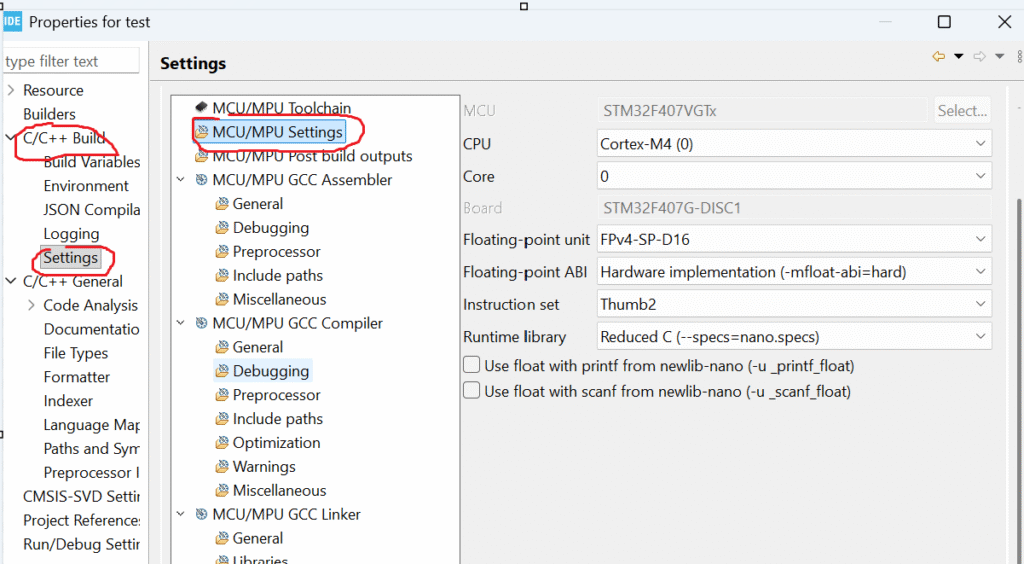
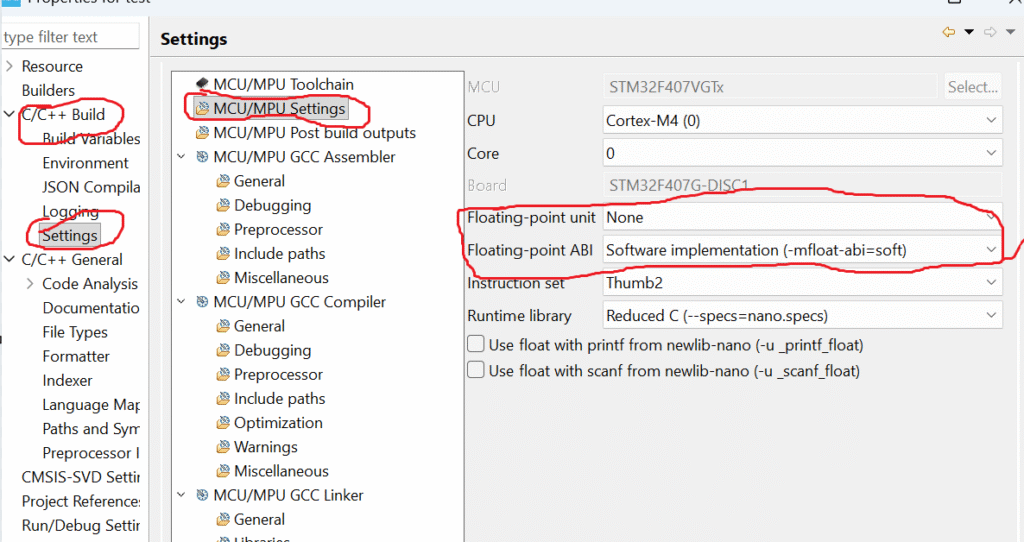
Step 1: Right-click Your Project → Properties
Step 2: Go to
C/C++ Build → Settings → MCU Settings
Make sure these settings are correct:
- Floating Point Unit: FPv4-SP-D16 (for Cortex-M4)
- Floating Point ABI: Hard
Internal flags that must appear automatically:
-mfpu=fpv4-sp-d16
-mfloat-abi=hard
If you’re using Cortex-M7, expect:
-mfpu=fpv5-sp-d16
-mfloat-abi=hard
If these are wrong…
You will get typical fpu errors like:
- unexpected NaN
- wrong floating-value output
- HardFault on floating math
- slow float performance
Fixing the flags eliminates these issues instantly.
3. Ensure FPU Is Enabled in system_stm32xxxx.c
Even if CubeMX should do this automatically, it sometimes doesn’t.
Open:
system_stm32f4xx.c
system_stm32f7xx.c
system_stm32h7xx.c
Look for:
SCB->CPACR |= (0xF << 20); // Enable CP10 + CP11
If it’s missing, add this line inside SystemInit() before calling HAL functions.
This prevents the common error:
warning “FPU is not initialized”
4. Avoid Using Floats Before SystemInit()
Many beginners accidentally use float operations inside:
- constructor of a global object
- static initializers
- early Reset_Handler code
- before HAL_Init()
This leads to runtime fpu errors.
Fix:
Make sure floating-point math happens after:
HAL_Init();
SystemClock_Config();
5. Fix HardFault from Floating Point Use in FreeRTOS
If you’re using FreeRTOS with STM32, you must enable FPU support for tasks.
Add:
configUSE_TASK_FPU_SUPPORT 2
Or create tasks with:
xTaskCreate(taskFunc, "task", stack, NULL, priority, &handle);
FreeRTOS will automatically:
- save/restore FPU registers
- prevent task-switch corruption
- avoid NaN randomness
Without this, multiple tasks fight for the same FPU, causing floating-point bugs.
6. Clean and Rebuild Your Project
After enabling FPU:
- Project → Clean
- Project → Build
STM32CubeIDE sometimes keeps old flags; a full clean ensures the new settings apply.
7. Test Floating Point Output
Add a simple test:
float a = 10.5f;
float b = 3.2f;
float c = a * b;

printf("FPU Test: %f\n", c);
If output is correct and no warning appears, you’ve solved the issue.
Why you see the warning (short):
The compiler is telling you that your project is set to use the processor’s hardware FPU, but your code never enables (initializes) it. If you run floating-point code before the FPU is enabled, the CPU can raise a fault.
Quick step-by-step fix (STM32CubeIDE):
- Right-click your project → Properties.
- Open C/C++ Build → Settings.
- Under Tool Settings, find MCU Settings.
- Set Floating Point Unit to the correct hardware FPU for your MCU.
- Set Floating Point ABI to the matching ABI (usually hard when you use the hardware FPU).
- Click Apply and Close.
- Do Project → Clean (or clean the build).
- Rebuild the project.
After these steps, either the IDE will add proper FPU init code for you or you’ll know to enable the FPU at startup in your SystemInit() (e.g. by setting CPACR on Cortex-M) before any floating-point operations run.
Common Causes of FPU Errors
Let’s break down the real reasons behind fpu warning fix requirements.
1. FPU not enabled in the microcontroller startup code
On Cortex-M4, M7, R5, or A-series processors, the FPU must be manually enabled.
If not, you’ll see:
- weird computation results
- hard faults
- NaN values
- compiler warnings
- runtime messages like warning “FPU is not initialized”
2. Compiler flags mismatch
On embedded systems, these flags matter:
-mfpu=fpv4-sp-d16
-mfloat-abi=hard
If you compile with FPU support but the hardware lacks it, the program crashes.
If the hardware supports FPU but compiler doesn’t use it, you get slow code or warnings.
3. OS not initializing FPU during context switching
In RTOS systems like:
- FreeRTOS
- QNX
- ThreadX
- Zephyr
…each task must save/restore FPU registers.
If not, FPU corruption occurs.
4. Using floating values before startup completes
Some developers accidentally call floating functions inside:
- early boot
- before system init
- inside interrupts
That leads to fpu errors.
5. Incorrect exception or lazy stacking settings
For example, on ARM:
- enabling lazy FPU stacking incorrectly
- disabling automatic FP context saving
…triggers random crashes.
Signs That You’re Facing FPU Problems
Here’s how you know you need an fpu warning fix:
- your program runs but produces incorrect float values
- occasional crashes when using math functions
- system gives warning “FPU is not initialized”
- compiler prints FPU mismatch warnings
- enabling or disabling FPU changes program behavior
- DSP code runs extremely slow
If any of these sound familiar, the next sections will help you fix it.
How to Fix FPU Warnings (Step by Step)
Let’s walk through the most common fpu warning fix steps.
This works for ARM Cortex (M0+, M3, M4, M7, A-series) and most embedded platforms.
1. Enable FPU in Startup Code
For most ARM Cortex-M4/M7 microcontrollers, add this:
SCB->CPACR |= (0xF << 20); // Enable CP10 and CP11 (FPU)
This registers block controls the CPU’s FPU access.
After enabling:
- flush caches
- set CONTROL register if needed
- call SystemInit()
If this isn’t done, you’ll keep seeing warning “FPU is not initialized”.
2. Fix Compiler Flags
For Cortex-M4F or M7F:
-mfpu=fpv4-sp-d16
-mfloat-abi=hard
For Cortex-A processors:
-mfpu=neon-fp-armv8
-mfloat-abi=hard
If you choose the wrong option, GCC throws:
- “FPU not supported on this architecture”
- “FPU instructions generated but target does not support FPU”
Quick rule:
| Hardware | Compiler Flag |
|---|---|
| Cortex-M0/M3 | No FPU; disable FPU |
| Cortex-M4F | fpv4-sp-d16 |
| Cortex-M7F | fpv5-sp-d16 |
| Cortex-A | neon-fp |
3. OS/RTOS Must Manage FPU Context
In systems like FreeRTOS:
You must enable:
configUSE_TASK_FPU_SUPPORT
Otherwise:
- tasks overwrite each other’s float registers
- random NaN values appear
- fpu errors show up under load
4. Do Not Use Float in Early Boot
The FPU is usually disabled before system startup.
Avoid using floating point in:
- Reset handler
- Early init functions
- Bare-metal interrupt handlers
If you must use it, initialize the FPU first.
5. Disable or Adjust Lazy FPU Stacking
Lazy stacking is a power optimization.
But on some MCUs, it triggers weird issues.
To disable:
FPU->FPCCR &= ~(FPU_FPCCR_LSPEN_Msk);
If you experience random hard faults, try toggling lazy stacking.
FPU Errors During Runtime: What They Really Mean
Even after initialization, you may face runtime fpu errors like:
- invalid operation
- divide by zero
- underflow
- overflow
- inexact result
These are normal floating-point exceptions.
Example:
float x = 1.0 / 0.0;   // Inf
float y = 0.0 / 0.0;   // NaN
How to debug:
- print float values
- check stack corruption
- inspect FPU registers (S0–S31)
- check your ABI settings
Practical Example: Eliminating the FPU Initialization Warning
Let’s fix the exact error:
warning “FPU is not initialized”
Cause:
Code uses floats before FPU is enabled.
Fix:
Enable FPU at the very start of SystemInit.
void SystemInit(void)
{
    SCB->CPACR |= (0xF << 20);    // FPU enable
    __DSB();
    __ISB();
}
Now the warning disappears.
And your float math becomes faster, correct, and stable.
FPU Warning Fix in Linux / QNX / Android Systems
Sometimes the warning comes not from bare metal, but from OS logs.
Why it happens:
- kernel doesn’t initialize thread FP state
- user-space app uses floating point before kernel setup
- context switching issues
Fix:
On QNX or Linux, ensure your thread creates an FP context:
pthread_attr_setfp(regs, PTHREAD_FP_ENABLE);
Some OSes call it “VFP context” instead of FPU.
How to Avoid FPU Errors in the Future
Here are practical tips:
Always match your toolchain flags to your CPU
Check the datasheet.
Enable FPU before using floats
Do it in SystemInit.
Avoid floats in interrupts
Use fixed-point instead.
Test with edge cases
Division by zero
Very small numbers
Very large numbers
Keep RTOS FPU context switching enabled
This prevents cross-task corruption.
Beginner vs. Experienced Developer Understanding
Here’s how different developers see the issue.
Beginners
- see the warning
- google it
- try random fixes
- still face errors
Experienced developers
- check CPU architecture
- verify compiler flags
- check startup code
- inspect context switching
But now, after this guide, you’ll think like the second group.
FPU Warning Fix & FPU Errors
Q1. What is the simplest fix for “warning FPU is not initialized”?
Enable the FPU in startup code using CPACR.
Q2. Will enabling FPU break anything?
No. If your CPU has an FPU, enabling it only improves performance.
Q3. Why do I get FPU errors only sometimes?
Usually due to RTOS tasks not saving/restoring FPU registers.
Q4. Why does float computation produce random values?
Because FPU registers were overwritten by another task or interrupt.
Q5. Can an MCU run without FPU enabled?
Yes, but float operations become slow and warnings appear.
Q6. Why does enabling lazy stacking cause random crashes?
Some MCUs have silicon bugs related to it.
Q7. Do Cortex-M0/M3 have FPU?
No. Never compile them with FPU flags.
Q8. What causes floating-point divide-by-zero errors?
Normal IEEE-754 behavior; not a hardware issue.
Q9. My compiler shows FPU mismatch warnings. What now?
Fix your -mfpu and -mfloat-abi flags.
Q10. Can I completely avoid FPU errors?
Yes, by initializing FPU properly and using correct compiler flags.
If you’re learning C programming and want to strengthen your fundamentals before practicing Structures and Unions Interview Questions, you should explore this detailed beginner-friendly guide on structures: Structures in C – Complete Guide
It explains structure syntax, memory layout, padding, nesting, and real-world examples in a very simple way. Reading this will give you a strong foundation before jumping into advanced interview questions.
Conclusion: You Can Now Fix Any FPU Warning
You now understand:
- what the FPU is
- why fpu errors appear
- how to solve fpu warning fix issues
- how to fix warning “FPU is not initialized”
- how to configure compiler flags
- how to avoid problems in RTOS
Whether you’re a beginner or an experienced embedded developer, this guide covers everything you need to solve floating-point issues confidently.
FAQ : PU Warning Fix & FPU Errors
1. What does “FPU Warning Fix” actually mean in STM32 or embedded projects?
2. Why do FPU errors happen in ARM Cortex-M processors?
FPU hardware is enabled in project settings
But FPU is not activated in CPACR register
Or floating-point ABI does not match compiler flags
This mismatch leads to NOCP faults, crashes, or undefined behavior.
3. How do I fix FPU warnings in STM32CubeIDE?
Enabling the correct FPU type (e.g., FPv4-SP-D16).
Selecting the correct floating-point ABI (Hard or SoftFP).
Initializing CP10/CP11 in
SystemInit() before using floats.Cleaning and rebuilding the project.
4. Do I need to enable the FPU manually in code?
You must set CPACR bits for CP10 and CP11. Without this, the processor cannot execute any floating-point instructions, causing exceptions.
5. Why does my project crash when using float or double?
FPU not initialized
Wrong ABI
Wrong compiler flags
RTOS not handling FPU context switching
6. What FPU settings should I select in STM32CubeIDE?
Floating Point Unit: FPv4-SP-D16 / FPv5
Floating Point ABI: Hard (recommended)
SoftFP can be used, but code will be slower.
7. How does improper FPU configuration affect performance?
8. Can RTOS users face FPU errors more often?
If the RTOS does not save/restore FPU registers correctly, tasks using floating-point variables may corrupt the FPU state, causing random crashes or hard faults.
9. What is the best way to avoid FPU errors in new projects?
Choose correct FPU + ABI settings
Initialize CPACR early
Avoid floating-point operations inside ISRs
Verify your RTOS supports FPU context switching
Test float operations under debugger
10. How do I verify my FPU is working correctly?
CPACR register (CP10 & CP11 bits = 0xF)
No NOCP bit set in UsageFault Status Register
Simple float operations execute without exception
If all checks pass, your FPU is fully enabled and stable.
Leave a Reply