Learn how to count duplicates in a linked list in C++ with this beginner-friendly guide. Step-by-step explanation, easy-to-understand code, and tips for detecting duplicate nodes efficiently.
Linked lists are one of the fundamental data structures in programming. While they are simple to understand, performing operations like counting duplicates can be tricky for beginners. In this guide, we will explain how to count duplicates in a linked listin an easy-to-understand, step-by-step way.
What is a Linked List?
A linked list is a collection of nodes where each node contains two things:
Data – The value stored in the node.
Pointer (Next) – A reference to the next node in the list.
For example, a linked list can look like this:
1 → 2 → 2 → 3 → 3 → 3 → 4
What Are Duplicates in a Linked List?
Duplicates are values that appear more than once in the linked list.
In the example above:
2 appears twice → 1 duplicate
3 appears three times → 2 duplicates
Total duplicates = 3
Step-By-Step Approach to Count Duplicates
Here’s a simple way to count duplicates, perfect for beginners:
Start with the first node (curr).
Compare it with all nodes that come after it (temp).
If a node has the same value as curr, it’s a duplicate.
Move to the next node and repeat until the end.
Understanding the Key Line: Node* temp = curr->next;
One line often confuses beginners:
Node* temp = curr->next;
Here’s what it means:
Node* temp → temp is a pointer that can point to a node.
curr->next → the next node after the current node.
Together → temp starts checking from the node after curr, not from the beginning. This avoids counting the same value multiple times.
Count Duplicates in a Linked List : C++ Code
#include <iostream>
using namespace std;

class Node {
public:
    int data;
    Node* next;

    Node(int data) {
        this->data = data;
        this->next = NULL;
    }
};

// Function to count duplicates
int countDuplicates(Node* head) {
    int count = 0;
    Node* curr = head;

    while (curr != NULL) {
        Node* temp = curr->next; // Start checking from next node

        while (temp != NULL) {
            if (curr->data == temp->data) {
                count++;
                break; // Count only once per value
            }
            temp = temp->next;
        }
        curr = curr->next;
    }

    return count;
}

// Main function
int main() {
    Node* head = new Node(1);
    head->next = new Node(2);
    head->next->next = new Node(2);
    head->next->next->next = new Node(3);
    head->next->next->next->next = new Node(3);
    head->next->next->next->next->next = new Node(3);
    head->next->next->next->next->next->next = new Node(4);

    cout << "Total duplicate nodes: " << countDuplicates(head) << endl;
    return 0;
}
How This Works
curr pointer moves node by node.
temp pointer checks all nodes after curr.
If curr->data == temp->data, we found a duplicate.
Count is updated once per duplicate value.
Time and Space Complexity
Time Complexity: O(n²) – two nested loops
Space Complexity: O(1) – no extra memory used
Note: For beginners, this approach is easy to understand. Advanced methods (like using a hash map) can reduce time complexity.
Since there are two nested loops, the time complexity is O(n²).
Space Complexity
Answer:
Space Complexity = O(1)
Why O(1)? (How we calculate it)
Let’s see what extra memory we use:
int count;
Node* curr;
Node* temp;
These are just variables and pointers
They do not grow with input size
No arrays, maps, or extra lists are used
What we are NOT using
No extra linked list
No hash map
No array
So memory usage stays constant, no matter how big the linked list is.
Therefore, Space Complexity = O(1)
Final Summary (Perfect for Notes)
Type
Complexity
Time Complexity
O(n²)
Space Complexity
O(1)
Tips for Beginners
Use two loops to make your logic clear.
Always check from the next node, not from the head again.
Use visual examples to understand how curr and temp work.
Frequently Asked Questions (FAQ)
1. What is a duplicate in a linked list?
A duplicate is a node whose value appears more than once in a linked list. For example, in the list 1 → 2 → 2 → 3, the value 2 is a duplicate because it appears twice.
2. Why do we use Node* temp = curr->next?
This line ensures that we start checking for duplicates from the node after the current one (curr). It avoids re-checking nodes and makes counting accurate.
3. Can we count duplicates in a sorted linked list faster?
Yes! In a sorted linked list, duplicates are always next to each other. So, we can use a single loop to compare each node with the next, which reduces time complexity from O(n²) to O(n).
4. What is the time complexity of this method?
The beginner-friendly method using two nested loops has O(n²) time complexity, where n is the number of nodes in the list.
5. Can we count duplicates without using extra space?
Yes, the method shown in this guide uses O(1) extra space, meaning no additional memory is required apart from the linked list itself.
6. How is this different from using a hash map?
Using a hash map can reduce the time complexity to O(n), but it uses extra memory to store counts. The method in this guide is memory-efficient and easier for beginners to understand.
7. Can this method handle strings or other data types?
Yes, as long as the linked list stores comparable data (like integers, characters, or strings), you can modify the comparison curr->data == temp->data accordingly.
Master the most asked Stack Coding Questionswith this complete list of beginner to advanced problems. Perfect for coding interviews and placements.
Stack interview questions are among the most frequently asked problems in coding interviews, especially for product-based companies and FAANG roles. A stack follows the LIFO (Last In, First Out) principle and is heavily used in real-world applications such as expression evaluation, undo-redo operations, browser history navigation, recursion handling, and memory management. Because of this wide usage, interviewers rely on stack problems to test a candidate’s problem-solving ability, logical thinking, and understanding of data structure fundamentals.
This guide provides a complete and carefully curated list of the most asked stack coding interview questions, covering everything from basic stack operations to advanced real-world problem patterns. You will start with foundational concepts like stack implementation using arrays and linked lists, push and pop operations, and time complexity analysis. As you progress, the article dives deep into popular interview problems such as valid parentheses, infix to postfix conversion, expression evaluation, and stack-based string manipulation.
A major focus of this guide is monotonic stack problems, which are extremely important for technical interviews. Questions like Next Greater Element, Stock Span Problem, Daily Temperatures, Largest Rectangle in Histogram, and Trapping Rain Water are explained as core stack patterns that appear repeatedly across interviews. Mastering these patterns can help you solve multiple variations of problems efficiently and confidently.
The article also includes advanced design-based stack questions such as Min Stack, Max Stack, stack with getMin in O(1), stack using queues, and queue using stacks. These problems are commonly asked to evaluate your understanding of data structure optimization and real-world system design. Additionally, recursion-based stack problems and matrix-based stack applications are covered to ensure you are fully prepared for any level of interview difficulty.
Whether you are a beginner preparing for your first coding interview or an experienced developer targeting FAANG and top product-based companies, this in-depth stack interview question guide will help you build strong fundamentals, recognize common patterns, and approach interviews with confidence. Practice these problems thoroughly, understand the logic behind each solution, and you will significantly increase your chances of cracking coding interviews.
BASIC STACK QUESTIONS (Must-Know)
What is a Stack? Explain LIFO principle
Stack implementation using array
Stack implementation using linked list
Push, Pop, Peek operations
Check if stack is empty or full
Time & space complexity of stack operations
Difference between stack and queue
Applications of stack in real life
EXPRESSION & STRING PROBLEMS
Reverse a string using stack
Check for balanced parentheses
Valid parentheses problem
Check redundant brackets
Infix to postfix conversion
Infix to prefix conversion
Postfix expression evaluation
Prefix expression evaluation
Longest valid parentheses
Minimum add to make parentheses valid
Score of parentheses
STACK WITH ARRAY / LINKED LIST
Implement stack using linked list
Implement two stacks in one array
Implement k stacks in one array
Stack using dynamic array (resize)
STACK USING STACK / QUEUE (FAVORITE)
Implement stack using queue
Implement stack using two queues
Implement stack using one queue
Implement queue using stack
Implement queue using two stacks
MONOTONIC STACK
Next Greater Element (NGE)
Next Smaller Element
Previous Greater Element
Previous Smaller Element
Next Greater Element II (circular array)
Daily Temperatures
Stock Span Problem
Online Stock Span
Asteroid Collision
Remove K Digits
Trapping Rain Water (using stack)
Largest Rectangle in Histogram
MATRIX + STACK QUESTIONS
Maximal Rectangle in Binary Matrix
Largest Rectangle of 1s in Matrix
Sum of subarray minimums
Sum of subarray ranges
RECURSION + STACK
Reverse a stack using recursion
Sort a stack using recursion
Delete middle element of stack
Insert element at bottom of stack
Check stack is palindrome
ADVANCED / DESIGN STACK QUESTIONS
Design Min Stack
Design Max Stack
Design stack with getMin() in O(1)
Design stack with getMiddle() in O(1)
Design browser back-forward system
Design undo-redo functionality
Design stack supporting increment operation
Frequency Stack (LeetCode 895)
HARD INTERVIEW QUESTIONS
Simplify Unix Path
Decode String
Basic Calculator I / II / III
Remove duplicate letters
Validate stack sequences
Exclusive time of functions
Car Fleet
Maximum Width Ramp
Smallest Subsequence of Distinct Characters
TOP COMPANY FAVORITES
Company
Frequently Asked
Amazon
Valid Parentheses, Min Stack, Histogram
Google
Calculator, Decode String
Microsoft
NGE, Stock Span
Facebook
Remove K Digits
Uber
Car Fleet
Adobe
Infix/Postfix
Paytm
Stack using Queue
MUST-DO TOP 15 (If Time Is Less)
Valid Parentheses
Next Greater Element
Stock Span
Largest Rectangle in Histogram
Trapping Rain Water
Min Stack
Infix → Postfix
Reverse Stack
Sort Stack
Stack using Queue
Daily Temperatures
Remove K Digits
Decode String
Basic Calculator
Maximal Rectangle
FAQ : Stack Coding Questions and Tricks
1. What is a stack in data structures? A stack is a linear data structure that follows the Last In, First Out rule. The last element added to the stack is the first one removed.
2. Why are stack questions so common in coding interviews? Stack questions test logical thinking, problem-solving skills, and understanding of core data structure concepts. They are also used in many real-world applications like undo-redo and expression evaluation.
3. What are the basic operations performed on a stack? The basic operations are push (add an element), pop (remove an element), peek or top (view the top element), and checking if the stack is empty or full.
4. What is the difference between a stack and a queue? A stack follows LIFO order, while a queue follows FIFO order. In a queue, the first element added is the first one removed.
5. Which stack problems are most frequently asked in interviews? Common stack interview questions include valid parentheses, next greater element, stock span problem, largest rectangle in histogram, and min stack.
6. What is a monotonic stack and why is it important? A monotonic stack keeps elements in increasing or decreasing order. It is important because it helps solve many interview problems efficiently, such as next greater or smaller element.
7. How is stack used in real-world applications? Stacks are used in browser navigation, undo-redo features, recursion, expression evaluation, syntax checking, and memory management.
8. What is a Min Stack and why is it asked so often? A Min Stack is a special stack that returns the minimum element in constant time. It is asked to test optimization skills and understanding of auxiliary data structures.
9. Can a stack be implemented using a queue? Yes, a stack can be implemented using one or two queues. This question checks understanding of how data structures can be transformed.
10. Is recursion related to stack? Yes, recursion internally uses a call stack to store function calls, local variables, and return addresses.
11. How should beginners prepare for stack interview questions? Beginners should start with basic stack operations, then practice classic problems like valid parentheses, next greater element, and stock span.
12. Are stack problems important for FAANG interviews? Yes, stack problems are very important for FAANG and product-based companies because they appear frequently and are used to test core fundamentals.
Learn Basic Linked List Coding Questions with simple explanations and beginner-friendly code examples. Perfect for students and interview preparation.
Basic Linked List Coding Questions are designed to help beginners master one of the most fundamental data structures in programming. A linked list is a collection of nodes where each node contains data and a reference (or pointer) to the next node in the sequence. Unlike arrays, linked lists allow dynamic memory allocation, making them highly useful for scenarios where the size of the data can change frequently.
These coding questions cover all the essential operations of a linked list, such as:
Creating a linked list: Understanding how to initialize nodes and link them together.
Insertion: Adding new nodes at the beginning, middle, or end of the list.
Deletion: Removing nodes safely without breaking the chain.
Traversal: Accessing each node to perform operations like printing data or finding elements.
Searching: Locating a specific value within the list.
Counting nodes: Determining the size of the list dynamically.
Practicing these questions builds a strong foundation in pointers, memory management, and dynamic data structures, which are crucial for coding interviews, competitive programming, and real-world software development.
This guide focuses on beginner-friendly explanations and clean code examples, making it easy to follow step by step. By solving these questions, you not only learn the mechanics of linked lists but also improve problem-solving skills, logical thinking, and confidence in handling more complex data structures in the future.
Whether you are a student, a beginner programmer, or preparing for interviews, mastering basic linked list coding questions is the first step toward becoming a proficient programmer.
Creation & Traversal
Create a singly linked list
Traverse and print a linked list
Count number of nodes in a linked list
Search an element in a linked list
Find length of linked list (iterative & recursive)
Insertion
Insert at head
Insert at tail
Insert at a given position
Insert after a given value
Insert before a given value
Insert in the middle of linked list
Deletion
Delete head node
Delete tail node
Delete node at a given position
Delete node by value
Delete entire linked list
Basic Pointer Logic
Find middle of linked list
Find Nth node from beginning
Find Nth node from end
Check if linked list is empty
Reversal
Reverse linked list (iterative)
Reverse linked list (recursive)
Reverse first K nodes
Two Pointer / Slow-Fast
Detect loop in linked list
Find starting point of loop
Remove loop from linked list
Comparison & Checking
Check if linked list is palindrome
Compare two linked lists
Check if two linked lists intersect
Sorting & Merging
Merge two sorted linked lists
Sort a linked list
Remove duplicates from sorted list
Remove duplicates from unsorted list
Interview-Famous Basics
Add two numbers represented by linked lists
Rotate linked list
Pairwise swap nodes
Delete alternate nodes
Move last node to front
MUST-DO (Very Important)
If you do only these 10, you’re good for interviews:
1. Insert at head
2. Insert at tail
3. Insert at position
4. Delete at position
5. Reverse linked list
6. Find middle
7. Nth node from end
8. Detect loop
9. Remove duplicates
10. Merge two sorted lists
11.Add Two Numbers in a Linked List
Creation & Traversal based Linked List Coding Questions
1. Create a singly linked list
#include <iostream>
using namespace std;

// Node structure
class Node {
public:
    int data;
    Node* next;

    // Constructor
    Node(int data) {
        this->data = data;
        this->next = NULL;
    }
};

// Insert at Tail
void insertAtTail(Node* &head, int data) {
    Node* newNode = new Node(data);

    // If list is empty
    if (head == NULL) {
        head = newNode;
        return;
    }

    Node* temp = head;
    while (temp->next != NULL) {
        temp = temp->next;
    }
    temp->next = newNode;
}

// Display Linked List
void printList(Node* head) {
    Node* temp = head;
    while (temp != NULL) {
        cout << temp->data << " -> ";
        temp = temp->next;
    }
    cout << "NULL";
}

// Main function
int main() {
    Node* head = NULL;

    insertAtTail(head, 10);
    insertAtTail(head, 20);
    insertAtTail(head, 30);
    insertAtTail(head, 40);

    cout << "Singly Linked List: ";
    printList(head);

    return 0;
}
2.Traverse and Print a Linked List in C++
#include <iostream>
using namespace std;

// Node structure
class Node {
public:
    int data;
    Node* next;

    Node(int data) {
        this->data = data;
        this->next = NULL;
    }
};

// Traverse and print function
void traverseAndPrint(Node* head) {
    Node* temp = head;

    while (temp != NULL) {
        cout << temp->data << " -> ";
        temp = temp->next;
    }
    cout << "NULL";
}

// Main function
int main() {
    // Creating linked list manually
    Node* head = new Node(10);
    head->next = new Node(20);
    head->next->next = new Node(30);

    cout << "Linked List: ";
    traverseAndPrint(head);

    return 0;
}
3.Count Number of Nodes in a Linked List (C++)
#include <iostream>
using namespace std;

// Node structure
class Node {
public:
    int data;
    Node* next;

    Node(int data) {
        this->data = data;
        this->next = NULL;
    }
};

// Function to count nodes
int countNodes(Node* head) {
    int count = 0;
    Node* temp = head;

    while (temp != NULL) {
        count++;
        temp = temp->next;
    }
    return count;
}

// Main function
int main() {
    Node* head = new Node(10);
    head->next = new Node(20);
    head->next->next = new Node(30);
    head->next->next->next = new Node(40);

    cout << "Number of nodes: " << countNodes(head);

    return 0;
}
4.Search an element in a linked list
#include <iostream>
using namespace std;

// Node structure
class Node {
public:
    int data;
    Node* next;

    Node(int data) {
        this->data = data;
        this->next = NULL;
    }
};

// Search function
bool searchElement(Node* head, int key) {
    Node* temp = head;

    while (temp != NULL) {
        if (temp->data == key) {
            return true;   // Element found
        }
        temp = temp->next;
    }
    return false;          // Element not found
}

// Main function
int main() {
    Node* head = new Node(10);
    head->next = new Node(20);
    head->next->next = new Node(30);
    head->next->next->next = new Node(40);

    int key = 30;

    if (searchElement(head, key))
        cout << "Element found in the linked list";
    else
        cout << "Element not found in the linked list";

    return 0;
}
Recursive Search
bool searchRecursive(Node* head, int key) {
    if (head == NULL)
        return false;

    if (head->data == key)
        return true;

    return searchRecursive(head->next, key);
}
5.Find length of linked list (iterative & recursive)
#include <iostream>
using namespace std;

class Node {
public:
    int data;
    Node* next;

    Node(int data) {
        this->data = data;
        this->next = NULL;
    }
};

int lengthIterative(Node* head) {
    int count = 0;
    Node* temp = head;

    while (temp != NULL) {
        count++;
        temp = temp->next;
    }
    return count;
}
Recursive Method
int lengthRecursive(Node* head) {
    if (head == NULL)
        return 0;

    return 1 + lengthRecursive(head->next);
}
Insertion based Linked List Coding Questions
1.Insert at head
#include <iostream>
using namespace std;

// Node structure
class Node {
public:
    int data;
    Node* next;

    Node(int data) {
        this->data = data;
        this->next = NULL;
    }
};

// Insert at head function
void insertAtHead(Node* &head, int data) {
    Node* newNode = new Node(data); // Step 1: create new node
    newNode->next = head;           // Step 2: point to current head
    head = newNode;                 // Step 3: update head
}

// Print linked list
void printList(Node* head) {
    Node* temp = head;
    while (temp != NULL) {
        cout << temp->data << " -> ";
        temp = temp->next;
    }
    cout << "NULL" << endl;
}

// Main function
int main() {
    Node* head = NULL; // empty linked list

    insertAtHead(head, 10);
    insertAtHead(head, 20);
    insertAtHead(head, 30);

    cout << "Linked List after inserting at head: ";
    printList(head);

    return 0;
}
2.Insert at Tail in a Linked List
#include <iostream>
using namespace std;

// Node structure
class Node {
public:
    int data;
    Node* next;

    Node(int data) {
        this->data = data;
        this->next = NULL;
    }
};

// Insert at tail function
void insertAtTail(Node* &head, int data) {
    Node* newNode = new Node(data);

    if (head == NULL) { // If list is empty
        head = newNode;
        return;
    }

    Node* temp = head;
    while (temp->next != NULL) { // Traverse to last node
        temp = temp->next;
    }
    temp->next = newNode; // Link last node to new node
}

// Print linked list
void printList(Node* head) {
    Node* temp = head;
    while (temp != NULL) {
        cout << temp->data << " -> ";
        temp = temp->next;
    }
    cout << "NULL" << endl;
}

// Main function
int main() {
    Node* head = NULL; // empty list

    insertAtTail(head, 10);
    insertAtTail(head, 20);
    insertAtTail(head, 30);

    cout << "Linked List after inserting at tail: ";
    printList(head);

    return 0;
}
3.Insert node at a given position
#include <iostream>
using namespace std;

struct Node {
    int data;
    Node* next;
};

// Delete node at given position (0-based index)
Node* deleteAtPosition(Node* head, int position) {
    if (head == NULL)
        return head;

    // Case 1: Delete head node
    if (position == 0) {
        Node* temp = head;
        head = head->next;
        delete temp;
        return head;
    }

    Node* current = head;

    // Traverse to (position - 1)
    for (int i = 0; i < position - 1 && current->next != NULL; i++) {
        current = current->next;
    }

    // If position is valid
    if (current->next != NULL) {
        Node* temp = current->next;
        current->next = temp->next;
        delete temp;
    }

    return head;
}
4.Delete Node by Value
Node* deleteByValue(Node* head, int value) {
    if (head == NULL)
        return head;

    // Case 1: Value at head
    if (head->data == value) {
        Node* temp = head;
        head = head->next;
        delete temp;
        return head;
    }

    Node* current = head;

    // Search for the value
    while (current->next != NULL && current->next->data != value) {
        current = current->next;
    }

    // If value found
    if (current->next != NULL) {
        Node* temp = current->next;
        current->next = temp->next;
        delete temp;
    }

    return head;
}
5.Delete Entire Linked List
void deleteEntireList(Node*& head) {
    Node* current = head;
    while (current != NULL) {
        Node* temp = current;
        current = current->next;
        delete temp;
    }
    head = NULL;
}
FAQ : Linked List Coding Questions
1. What is a linked list in simple words?
A linked list is a data structure where elements are stored in separate nodes, and each node points to the next one instead of being stored in continuous memory.
2. Why should I learn linked lists?
Linked lists help you understand dynamic memory, pointers, and real-world data structure concepts that are important for coding interviews and advanced programming.
3. What are the basic operations in a linked list?
The basic operations include insertion, deletion, traversal, searching, and counting nodes in the list.
4. Is a linked list better than an array?
It depends on the use case. Linked lists are better for frequent insertions and deletions, while arrays are faster for accessing elements by index.
5. What is a node in a linked list?
A node is a single unit of a linked list that stores data and a pointer (or reference) to the next node.
6. What is the difference between singly and doubly linked lists?
A singly linked list points only to the next node, while a doubly linked list points to both the previous and the next nodes.
7. Are linked list coding questions difficult for beginners?
No, basic linked list questions are easy if you understand pointers and practice step by step with simple examples.
8. Which language is best for learning linked lists?
C and C++ are commonly used because they clearly show pointer concepts, but Java and Python are also good options.
9. What are the most common linked list interview questions?
Common questions include reversing a linked list, finding the middle node, detecting a loop, and deleting a node at a given position.
10. How can I avoid mistakes while coding linked lists?
Always check for null pointers, handle edge cases like empty lists, and test your code with small inputs.
11. How much practice is needed to master linked lists?
With regular practice for a few days and solving basic problems, you can become comfortable with linked list concepts.
12. Are linked lists still used in real projects?
Yes, linked lists are used internally in operating systems, memory management, and many software libraries.
When you’re learning data structures, you’ll often hear about Linked Lists. A Doubly Linked List (DLL) is a powerful and flexible variation of the basic Singly Linked List that allows you to traverse in both directions — forward and backward.
In this beginner-friendly article, we’ll explore:
What is a Doubly Linked List?
How it works (with diagrams)
Real-world uses
Advantages over singly linked list
Basic operations (insertion, deletion, traversal)
Code example in C/C++
🚀 Whether you’re preparing for coding interviews or improving your DSA skills, understanding doubly linked lists is a must!
What is a Doubly Linked List?
A Doubly Linked List is a type of linear data structure made up of nodes, where each node contains:
Data (the actual value)
Pointer to the next node
Pointer to the previous node
⚙️ Node Structure of Doubly Linked List:
+-------+----------+----------+
| prev  |   data   |   next   |
+-------+----------+----------+
Each node is connected to its previous and next node, unlike a singly linked list, which only has a next pointer.
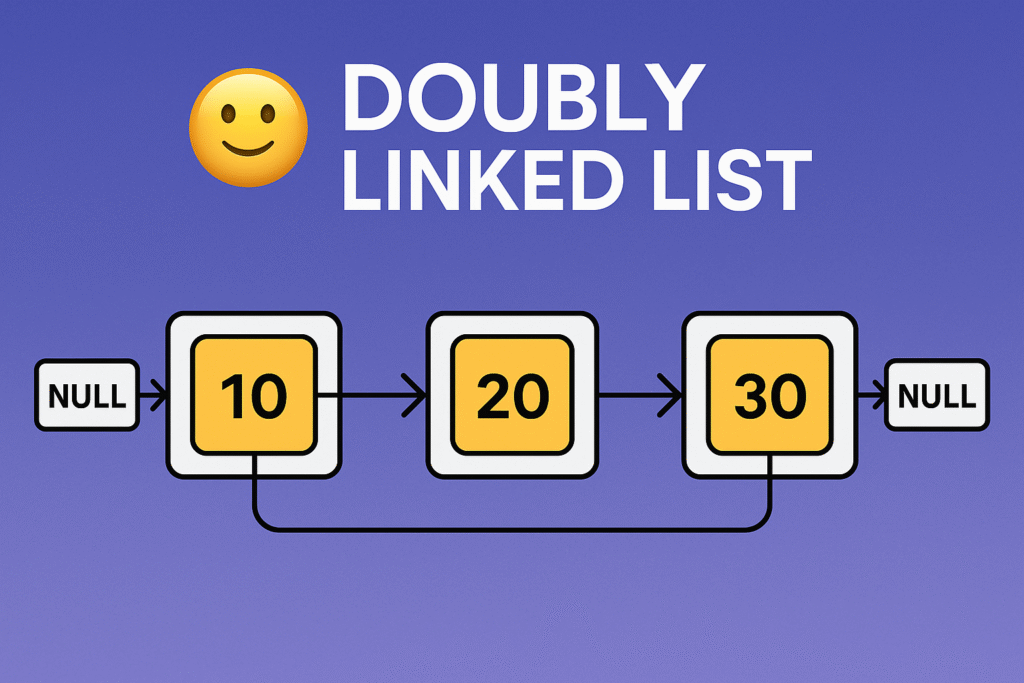
Visual Representation of Doubly Linked List
Let’s say we have 3 nodes with data: 10, 20, and 30.
Two-way traversal: You can navigate forward and backward.
Easier deletion: You can delete a node without needing the previous node pointer.
More flexible: Especially useful in complex data structures like Deques, Undo/Redo systems, Music Playlists, etc.
Disadvantages of Doubly Linked List
More memory: Each node requires extra space for the prev pointer.
More complex: Handling pointers can be error-prone for beginners.
Real-Life Applications of Doubly Linked List
Web browsers (backward and forward navigation)
Music playlist apps
Text editors (undo/redo operations)
Task managers (circular doubly linked lists for round-robin)
Conclusion DLL
Master Doubly Linked List in Data Structures (With Examples) 2025
The Doubly Linked List is an essential topic in Data Structures and Algorithms (DSA). It offers a better way to manage dynamic data, especially when two-way traversal is needed. Though slightly more complex than a singly linked list, the benefits are powerful.
Whether you’re preparing for a coding interview, building a system-level application, or just learning C programming, mastering DLLs will give you a strong foundation in memory management and pointer logic.
FAQs of Doubly Linked List
Q1: Is doubly linked list faster than singly linked list? Ans: DLL allows backward traversal and easier deletion, but it uses more memory. It’s more flexible, not necessarily faster.
Q2: Where is DLL used in real life? Ans: Browser history, playlist navigation, undo/redo features, and memory management systems.
Q3: What is the main drawback of doubly linked list? Ans: It uses extra memory due to the additional prev pointer and increases code complexity.
Q4: How is a doubly linked list different from a circular doubly linked list? Ans: In a doubly linked list, the last node’s next pointer is NULL, whereas in a circular doubly linked list, the last node’s next points back to the head, forming a circle.
Q5: Can a doubly linked list be empty? Ans: Yes, initially a doubly linked list can be empty with head pointing to NULL.
Q6: How do you insert a node at the beginning of a doubly linked list? Ans: Create a new node, point its next to the current head, set the head’s prev to the new node, and then update head to the new node.
Q7: What happens when you delete the last node in a doubly linked list? Ans: The second last node’s next pointer is set to NULL, and the last node is freed from memory.
Q8: Is it possible to implement a stack using a doubly linked list? Ans: Yes, a doubly linked list can be used to implement a stack with push and pop operations.
Q9: How does traversal in a doubly linked list work? Ans: You can traverse forward from head to NULL using next pointers or backward from the last node to head using prev pointers.
Q10: What are the memory requirements for a doubly linked list node? Ans: Each node stores data plus two pointers (prev and next), so it uses more memory compared to a singly linked list node, which stores only one pointer.
Q11: Can doubly linked lists have cycles? How to detect them? Ans: Yes, cycles can exist if nodes point back to earlier nodes. Cycle detection algorithms like Floyd’s Cycle-Finding Algorithm (tortoise and hare) can detect cycles.
Q12: Are doubly linked lists used in databases? Ans: Yes, doubly linked lists are used to implement certain data structures like LRU caches, which are common in databases and operating systems.
Q13: How do you reverse a doubly linked list? Ans: Swap the prev and next pointers for each node and update the head to the last node.
You can also Visit other tutorials of Embedded Prep
If you’re learning Linked List data structures, you’ve probably come across the term Linked List. But what exactly is it? How does it work, and why do we even need it when we already have arrays?
In this blog post, we’ll dive deep into linked list in data structure, understand how it differs from other data structures, explore the types of linked list, and learn about their practical advantages and use cases.
What is a Linked List?
A Linked List is a linear data structure where elements are stored in nodes, and each node points to the next one in the sequence. Unlike arrays, which store elements in contiguous memory locations, linked lists store data non-contiguously and use pointers to connect elements.
Each node in a linked list contains:
Data (the value stored in the node)
Pointer (or reference) to the next node
This unique structure makes linked lists highly flexible and efficient in certain scenarios.
Why Use Linked List Instead of Arrays?
Before diving into the types of linked list, let’s quickly understand why we’d choose a linked list over an array:
✅ Dynamic Size: Unlike arrays, linked lists don’t require specifying size in advance. Nodes can be added or removed without reallocating memory.
✅ Efficient Insertions/Deletions: Adding or removing elements doesn’t involve shifting elements, as in arrays.
✅ Memory Utilization: Useful when memory is fragmented or when the size of the dataset changes frequently.
However, linked lists also have some disadvantages, like higher memory usage due to storing pointers and slower random access.
Types of Linked List
There are several types of linked list, each serving different use cases:
1. Singly Linked List
Each node has a reference to the next node only.
Traversal is possible only in one direction.
Simple and widely used in basic implementations.
Example:
[10] → [20] → [30] → NULL
2. Doubly Linked List
Each node has references to both next and previous nodes.
Allows traversal in both directions (forward and backward).
Slightly higher memory usage due to the extra pointer.
Example:
NULL ← [10] ↔ [20] ↔ [30] → NULL
3. Circular Linked List
Last node points back to the first node, creating a circle.
Can be singly or doubly linked.
Useful in applications like round-robin scheduling.
Example:
[10] → [20] → [30] → [10] …
Common Linked List Operations
Understanding basic linked list operations is crucial. Let’s look at the most common:
Insertion
Insert a new node at the beginning, middle, or end of the list.
Deletion
Remove a node based on value or position.
Traversal
Visit each node and perform an action (like printing values).
Searching
Find whether a particular value exists in the linked list.
Advantages of Linked List
Let’s recap some advantages of linked list:
Dynamic memory allocation
No wasted memory (no predefined size)
Easier insertion/deletion
Useful for implementing stacks, queues, graphs, and more
Applications of Linked List
Here are some practical uses of linked list in data structure:
Implementing stacks and queues
Dynamic memory management
Browser history (back and forward functionality)
Undo/redo features in software
Hash table chaining
Linked List vs Array: Quick Comparison
Feature
Array
Linked List
Size
Fixed
Dynamic
Memory Allocation
Contiguous
Non-contiguous
Insertion/Deletion
Costly (shifting)
Efficient
Random Access
O(1)
O(n)
Conclusion
A Linked List is a powerful and flexible data structure essential for any programmer’s toolkit. While it might seem complex initially, it offers significant advantages, especially when dealing with dynamic data and frequent insertions or deletions.
Whether you’re preparing for coding interviews or simply expanding your programming knowledge, mastering linked list in data structure will give you a strong foundation for solving complex problems efficiently.
Frequently Asked Questions (FAQ)
Q1. What is a linked list in simple words? A linked list is a sequence of nodes where each node points to the next, making it easy to add or remove elements without shifting other data.
Q2. Is linked list better than array? It depends. Linked lists are better for frequent insertions/deletions, but arrays are better for fast random access.
Q3. What are the types of linked list? The main types include singly linked list, doubly linked list, and circular linked list.
Q4. Where is linked list used in real life? Linked lists are used in browser history, memory management, music playlists, and many other applications.
Insert an Element at the Bottom of a Stack : Want to master stacks? This beginner-friendly tutorial walks you through how to insert an element at the bottom of a stack using recursion — without any extra data structures!
You’ll learn:
✅ What the problem means ✅ How recursion helps you simulate going deep into the stack ✅ Step-by-step explanation with dry run ✅ Full working code in C++ and Python ✅ Practice exercises to test your understanding
Perfect for beginners preparing for coding interviews or learning recursion concepts with stacks. Start building your foundation in data structures now!
Problem Statement Insert an Element at the Bottom of a Stack:
“Given a stack and an element, insert that element at the bottom of the stack.”
Step-by-step solution for Insert an Element at the Bottom of a Stack:
If the stack is empty, push the given element. ✅
Otherwise:
Pop the top element temporarily.
Recur to insert the element at the bottom.
Push the popped elements back after inserting. 🔄
This way, you dig down to the bottom using recursion, then insert, and rebuild the stack on your way back up.
C++ Code for Insert an Element at the Bottom of a Stack
#include <iostream>
#include <stack>
using namespace std;

// Function to insert element at the bottom of a stack
void insertAtBottom(stack<int>& st, int element) {
    // Base case: stack is empty
    if (st.empty()) {
        st.push(element);
        return;
    }

    // Step 1: Pop top element
    int top = st.top();
    st.pop();

    // Step 2: Recursive call
    insertAtBottom(st, element);

    // Step 3: Push top back after inserting
    st.push(top);
}

int main() {
    stack<int> st;

    // Push some elements
    st.push(1);
    st.push(2);
    st.push(3);
    st.push(4);
    st.push(5);

    int newElement = 10;
    insertAtBottom(st, newElement);

    // Display stack
    cout << "Stack after inserting at bottom:\n";
    while (!st.empty()) {
        cout << st.top() << " ";
        st.pop();
    }

    return 0;
}
Python Code for Insert an Element at the Bottom of a Stack
def insert_at_bottom(stack, element):
    # Base case: if stack is empty, insert element
    if not stack:
        stack.append(element)
        return

    # Step 1: Remove top
    top = stack.pop()

    # Step 2: Recursive call
    insert_at_bottom(stack, element)

    # Step 3: Put back the top
    stack.append(top)

# Test
stack = [1, 2, 3, 4, 5]
element = 10
insert_at_bottom(stack, element)

print("Stack after inserting at bottom:")
print(stack[::-1])  # Print from top to bottom
Dry Run Example (Simple):
Let’s dry run the C++/Python code for inserting an element at the bottom of a stack, step by step.
Input:
Initial Stack (top -> bottom): [5, 4, 3, 2, 1]
Element to insert at bottom: 10
Function Call:
insertAtBottom(st, 10);
Dry Run – Step by Step (Recursion Unwinding)
Stack Before:
[top] → 5 → 4 → 3 → 2 → 1 → [bottom]
Step 1:
st.top() is 5 Pop 5 → Recur on smaller stack
Call: insertAtBottom([4, 3, 2, 1], 10)
Step 2:
Pop 4 → Recur again Call: insertAtBottom([3, 2, 1], 10)
Step 3:
Pop 3 → Recur again Call: insertAtBottom([2, 1], 10)
Step 4:
Pop 2 → Recur again Call: insertAtBottom([1], 10)
Step 5:
Pop 1 → Recur again Call: insertAtBottom([], 10)
Step 6 (Base Case):
Stack is empty → Push 10
✅ Stack: [10]
Backtracking Begins (Pushing elements back):
Now we return from previous function calls one-by-one:
🎉 Success! We inserted 10 at the bottom of the stack without using extra space
Why Use Recursion?
Stacks follow Last-In-First-Out (LIFO) — meaning you can only directly access or modify the top of the stack. There’s no built-in way to reach the bottom element directly.
But recursion gives us a trick:
It lets us temporarily pop all elements one by one.
Then, after reaching the empty stack (i.e., bottom), we insert the new element.
Finally, recursion rebuilds the original stack by pushing the saved elements back.
So, recursion simulates going deep into the stack, allowing us to insert at the bottom without breaking the stack’s rules!
Practice Exercises (to solidify your learning):
🔁 1. Reverse a stack using the insert_at_bottom() method. 💡 Tip: Use recursion to pop all elements, then reinsert using your insert-at-bottom function.
🔁 2. Insert an element at the bottom without using recursion, by using:
A second temporary stack, or
A queue (FIFO nature)
🔁 3. Implement stack reversal using both iterative and recursive approaches. 🔁 4. Write a function to find the size of a stack recursively. 🔁 5. Use insert_at_bottom() to sort a stack recursively in increasing order.
You can also Visit other tutorials of Embedded Prep
Merge sort algorithm:Sorting is a fundamental concept in computer science, and one of the most efficient and widely used sorting techniques is Merge Sort. Whether you’re preparing for coding interviews or building real-world software, understanding Merge Sort can boost your algorithmic thinking.
What is Merge Sort?
Merge Sort is a divide-and-conquer algorithm that works by breaking down a list into smaller chunks, sorting those pieces individually, and then merging them back together in the correct order. It’s known for its reliable performance, even with large datasets.
Key Characteristics:
Stable Sort: Maintains the relative order of equal elements.
Time Complexity: O(n log n) in all cases (best, average, worst).
Space Complexity: O(n) due to the temporary arrays used for merging.
How Does Merge Sort Work?
Imagine you have a messy pile of cards. Instead of sorting them all at once, you divide them into smaller piles, sort each pile, and then combine the sorted piles into one organized deck. Merge Sort does exactly that, but with numbers (or any sortable data).
Step-by-Step Process:
Divide the array into two halves.
Recursively sort each half.
Merge the sorted halves into a single sorted array.
Sorting plays a crucial role in organizing data efficiently. Among the various algorithms, Merge Sort stands out for its efficiency and reliability. Let’s break it down in the simplest way possible.
Example
Let’s say you have the following array:
[38, 27, 43, 3, 9, 82, 10]
Your goal is to sort this array in ascending order using Merge Sort.
Step-by-step:
Divide: Split the array until each part has a single element: [38] [27] [43] [3] [9] [82] [10]
Sort and Merge:
Merge [38] and [27] → [27, 38]
Merge [27, 38] and [43] → [27, 38, 43]
Merge [3] and [9] → [3, 9], then merge with [82] → [3, 9, 82], and finally merge with [10] → [3, 9, 10, 82]
Final Merge: Merge [27, 38, 43] and [3, 9, 10, 82] → [3, 9, 10, 27, 38, 43, 82]
Intuition
Imagine you are sorting playing cards. It’s easier to sort two small piles and then combine them than to sort a large pile all at once. That’s what Merge Sort does.
It divides the problem into smaller sub-problems.
Solves each smaller problem (sorts each half).
Then combines the solutions (merges sorted halves).
This divide-and-conquer strategy makes Merge Sort powerful and predictable.
Approach
Merge Sort follows a recursive strategy:
Divide the array into two halves.
Recursively apply merge sort to each half.
Merge the two sorted halves into one.
Key Points:
Uses extra space (temporary arrays).
Always has time complexity of O(n log n).
Performs well with large datasets and linked lists.
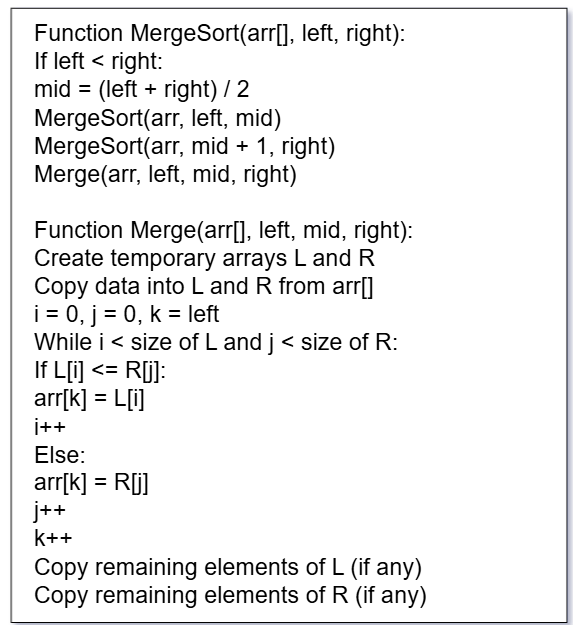
Pseudocode
Here’s the simplified pseudocode for Merge Sort:
Merge Sort Pseudocode
What’s the Goal?
We want to take an unsorted array and sort it in ascending order. Merge Sort does this by splitting the array, sorting the parts, and then merging them.
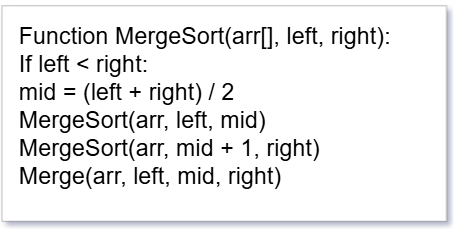
MergeSort(arr, left, right)
Explanation:
arr[] – This is the array we want to sort.
left – The starting index of the array.
right – The ending index of the array.
Step-by-step:
If left is smaller than right, it means we still have more than one element in the array.
Find the middle point (to divide the array into two halves).
Recursively sort the first half.
Recursively sort the second half.
Merge the two sorted halves.
It keeps calling itself (recursion) until each half has only one element. That’s when sorting begins.
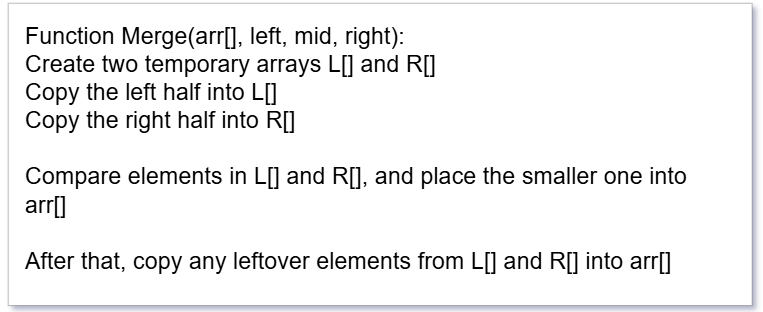
Merge(arr, left, mid, right)
Explanation:
This function merges two already sorted halves of the array into one sorted array.
Step-by-step:
Make two temporary arrays – one for the left part and one for the right part.
Copy elements from the original array into these two parts.
Start comparing the first elements from both halves:
Put the smaller one back into the original array.
Keep comparing and placing until one of the arrays is empty.
If anything is left over in L or R, just copy it into the original array.
💛 Support Embedded Prep
If you find our tutorials helpful and want to support our mission of sharing high-quality embedded system knowledge, you can contribute by buying us a coffee.
Every small contribution helps us keep creating valuable content for learners like you. ☕
Thank you for your support — it truly keeps Embedded Prep growing. 💻✨
Real-Life Analogy
Think of Merge Sort like sorting pages of a book:
You split the book in half.
Ask two people to sort each half separately.
Then you take both sorted stacks and combine them one page at a time in the correct order.
Visual Example
Suppose we want to sort the array: [38, 27, 43, 3, 9, 82, 10]
Split into two halves: [38, 27, 43] and [3, 9, 82, 10]
Keep splitting until you reach single-element arrays:
[38] [27] [43] [3] [9] [82] [10]
Merge step-by-step:
[27, 38], [3, 43], [9, 10], [9, 10, 82]
Final result: [3, 9, 10, 27, 38, 43, 82]
Merge Sort in Java
public class MergeSort {
    public static void mergeSort(int[] arr, int left, int right) {
        if (left < right) {
            int mid = (left + right) / 2;

            mergeSort(arr, left, mid);
            mergeSort(arr, mid + 1, right);

            merge(arr, left, mid, right);
        }
    }

    public static void merge(int[] arr, int left, int mid, int right) {
        int n1 = mid - left + 1;
        int n2 = right - mid;

        int[] L = new int[n1];
        int[] R = new int[n2];

        for (int i = 0; i < n1; i++)
            L[i] = arr[left + i];
        for (int j = 0; j < n2; j++)
            R[j] = arr[mid + 1 + j];

        int i = 0, j = 0, k = left;

        while (i < n1 && j < n2) {
            if (L[i] <= R[j]) {
                arr[k++] = L[i++];
            } else {
                arr[k++] = R[j++];
            }
        }

        while (i < n1)
            arr[k++] = L[i++];

        while (j < n2)
            arr[k++] = R[j++];
    }

    public static void main(String[] args) {
        int[] arr = {38, 27, 43, 3, 9, 82, 10};
        mergeSort(arr, 0, arr.length - 1);

        for (int num : arr)
            System.out.print(num + " ");
    }
}
Merge Sort in C++
#include <iostream>
using namespace std;

void merge(int arr[], int left, int mid, int right) {
    int n1 = mid - left + 1;
    int n2 = right - mid;

    int L[n1], R[n2];

    for (int i = 0; i < n1; i++) L[i] = arr[left + i];
    for (int j = 0; j < n2; j++) R[j] = arr[mid + 1 + j];

    int i = 0, j = 0, k = left;

    while (i < n1 && j < n2) {
        arr[k++] = (L[i] <= R[j]) ? L[i++] : R[j++];
    }

    while (i < n1) arr[k++] = L[i++];
    while (j < n2) arr[k++] = R[j++];
}

void mergeSort(int arr[], int left, int right) {
    if (left < right) {
        int mid = (left + right) / 2;

        mergeSort(arr, left, mid);
        mergeSort(arr, mid + 1, right);

        merge(arr, left, mid, right);
    }
}

int main() {
    int arr[] = {38, 27, 43, 3, 9, 82, 10};
    int n = sizeof(arr) / sizeof(arr[0]);

    mergeSort(arr, 0, n - 1);

    for (int i = 0; i < n; i++)
        cout << arr[i] << " ";
    return 0;
}
Merge Sort in C
#include <stdio.h>

void merge(int arr[], int left, int mid, int right) {
    int i, j, k;
    int n1 = mid - left + 1;
    int n2 = right - mid;

    int L[n1], R[n2];

    for (i = 0; i < n1; i++) L[i] = arr[left + i];
    for (j = 0; j < n2; j++) R[j] = arr[mid + 1 + j];

    i = 0; j = 0; k = left;

    while (i < n1 && j < n2) {
        if (L[i] <= R[j]) arr[k++] = L[i++];
        else arr[k++] = R[j++];
    }

    while (i < n1) arr[k++] = L[i++];
    while (j < n2) arr[k++] = R[j++];
}

void mergeSort(int arr[], int left, int right) {
    if (left < right) {
        int mid = (left + right) / 2;

        mergeSort(arr, left, mid);
        mergeSort(arr, mid + 1, right);

        merge(arr, left, mid, right);
    }
}

int main() {
    int arr[] = {38, 27, 43, 3, 9, 82, 10};
    int n = sizeof(arr) / sizeof(arr[0]);

    mergeSort(arr, 0, n - 1);

    for (int i = 0; i < n; i++)
        printf("%d ", arr[i]);
    return 0;
}
Merge Sort in Python
def merge_sort(arr):
    if len(arr) > 1:
        mid = len(arr) // 2

        left = arr[:mid]
        right = arr[mid:]

        merge_sort(left)
        merge_sort(right)

        i = j = k = 0

        # Merge the two halves
        while i < len(left) and j < len(right):
            if left[i] <= right[j]:
                arr[k] = left[i]
                i += 1
            else:
                arr[k] = right[j]
                j += 1
            k += 1

        # Remaining elements
        while i < len(left):
            arr[k] = left[i]
            i += 1
            k += 1

        while j < len(right):
            arr[k] = right[j]
            j += 1
            k += 1

# Example usage
arr = [38, 27, 43, 3, 9, 82, 10]
merge_sort(arr)
print(arr)
Merge Sort in JavaScript
function mergeSort(arr) {
    if (arr.length <= 1) return arr;

    const mid = Math.floor(arr.length / 2);
    const left = mergeSort(arr.slice(0, mid));
    const right = mergeSort(arr.slice(mid));

    return merge(left, right);
}

function merge(left, right) {
    let result = [], i = 0, j = 0;

    while (i < left.length && j < right.length) {
        if (left[i] <= right[j]) {
            result.push(left[i++]);
        } else {
            result.push(right[j++]);
        }
    }

    return result.concat(left.slice(i)).concat(right.slice(j));
}

// Example usage
const arr = [38, 27, 43, 3, 9, 82, 10];
const sorted = mergeSort(arr);
console.log(sorted);
Merge Sort vs Bubble Sort
Feature
Merge Sort
Bubble Sort
Approach
Divide and Conquer
Repeatedly swapping
Time Complexity
O(n log n)
O(n²)
Best Case
O(n log n)
O(n) (if optimized)
Stable?
Yes
Yes
Recursive?
Yes
No
Use Case
Large datasets
Teaching / simple examples
Extra Space?
Yes (O(n))
No
🔸 Merge Sort is way faster than Bubble Sort for large arrays.
Merge Sort vs Insertion Sort
Feature
Merge Sort
Insertion Sort
Approach
Divide and Conquer
Builds final array one item at a time
Time Complexity
O(n log n)
O(n²)
Best Case
O(n log n)
O(n) (when array is sorted)
Stable?
Yes
Yes
Recursive?
Yes
No
Use Case
Large datasets
Small or nearly sorted arrays
Extra Space?
Yes
No
🔸 Insertion Sort is good for small or nearly sorted arrays. Merge Sort is better for general use.
Merge Sort vs Selection Sort
Feature
Merge Sort
Selection Sort
Approach
Divide and Conquer
Finds minimum each pass
Time Complexity
O(n log n)
O(n²)
Best Case
O(n log n)
O(n²)
Stable?
Yes
No
Recursive?
Yes
No
Use Case
General purpose sorting
Educational purposes
Extra Space?
Yes
No
🔸 Selection Sort is simple but not efficient. Merge Sort wins in speed.
Merge Sort vs Quick Sort
Feature
Merge Sort
Quick Sort
Approach
Divide and Conquer
Divide and Conquer
Time Complexity
O(n log n)
Average: O(n log n), Worst: O(n²)
Best Case
O(n log n)
O(n log n)
Stable?
Yes
No (unless modified)
Recursive?
Yes
Yes
Use Case
Linked lists or when stability is required
Faster on arrays, commonly used
Extra Space?
O(n)
O(log n) (in-place)
🔸 Quick Sort is generally faster in practice but not stable. Merge Sort is more predictable.
Summary Table
Sort
Time (Best)
Time (Worst)
Stable
Space
Suitable For
Merge Sort
O(n log n)
O(n log n)
✅
O(n)
Large, stable sorting
Quick Sort
O(n log n)
O(n²)
❌
O(log n)
Fast general purpose
Bubble Sort
O(n)
O(n²)
✅
O(1)
Educational, small sets
Insertion
O(n)
O(n²)
✅
O(1)
Nearly sorted data
Selection
O(n²)
O(n²)
❌
O(1)
Simple, not efficient
Real-World Use Cases of Merge Sort
External Sorting: Ideal for sorting huge files on disk where memory is limited.
Linked Lists: Performs better than quicksort on linked lists.
Parallel Processing: Merge Sort can be efficiently parallelized due to its divide-and-conquer nature.
Advantages and Disadvantages
Pros:
Predictable time complexity (O(n log n)).
Great for sorting linked lists.
Stable sort.
Cons:
Uses extra memory.
Slower for small datasets compared to quicksort or insertion sort.
Basic-Level Interview Questions
What is Merge Sort?
Can you explain the Merge Sort algorithm in simple terms?
What is the time and space complexity of Merge Sort?
Best, worst, average case complexities?
Is Merge Sort a stable sorting algorithm? Why?
What is the difference between Merge Sort and Quick Sort?
Which one is preferred and when?
Does Merge Sort work in-place?
If not, how much additional memory does it need?
What do you mean by Divide and Conquer approach?
Can you give a real-world analogy for it?
Intermediate-Level Questions
Can you write the Merge Sort algorithm in any language of your choice?
Explain the merge process in Merge Sort.
How does the merging step maintain order?
How is Merge Sort implemented on a linked list?
Why is it more efficient in that case?
How would you modify Merge Sort to count the number of inversions in an array?
Can you implement Merge Sort iteratively (bottom-up approach)?
Advanced/Real-World Questions
How would you handle very large datasets that don’t fit into memory using Merge Sort?
External sorting techniques?
How can you optimize the space complexity of Merge Sort?
What are the cache performance issues in Merge Sort compared to Quick Sort?
Where is Merge Sort used in real-world systems or libraries?
(e.g., Timsort is based on Merge Sort + Insertion Sort)
How would you parallelize Merge Sort in a multi-threaded system?
Bonus Conceptual Questions
Why does Merge Sort have consistent O(n log n) time complexity regardless of input?
Can you identify when Merge Sort is not the best option to use?
Explain Merge Sort using recursion stack trace.
What happens in each call?
Why do some standard libraries prefer Quick Sort or Timsort over Merge Sort?
Thank you for exploring Merge Sort tutorials ! Stay ahead in embedded systems with expert insights, hands-on projects, and in-depth guides. Follow Embedded Prep for the latest trends, best practices, and step-by-step tutorials to enhance your expertise. Keep learning, keep innovating!
You can also Visit other tutorials of Embedded Prep