
Tag: data structure

  • Master Doubly Linked List in Data Structures (With Examples) 2026

    Introduction to Doubly Linked List

    When you’re learning data structures, you’ll often hear about Linked Lists. A Doubly Linked List (DLL) is a powerful and flexible variation of the basic Singly Linked List that allows you to traverse in both directions — forward and backward.

    In this beginner-friendly article, we’ll explore:

    • What is a Doubly Linked List?
    • How it works (with diagrams)
    • Real-world uses
    • Advantages over singly linked list
    • Basic operations (insertion, deletion, traversal)
    • Code example in C/C++

    🚀 Whether you’re preparing for coding interviews or improving your DSA skills, understanding doubly linked lists is a must!

    What is a Doubly Linked List?

    A Doubly Linked List is a type of linear data structure made up of nodes, where each node contains:

    • Data (the actual value)
    • Pointer to the next node
    • Pointer to the previous node

    ⚙️ Node Structure of Doubly Linked List:

    +-------+----------+----------+
    | prev  |   data   |   next   |
    +-------+----------+----------+
    

    Each node is connected to its previous and next node, unlike a singly linked list, which only has a next pointer.

    Visual Representation of Doubly Linked List

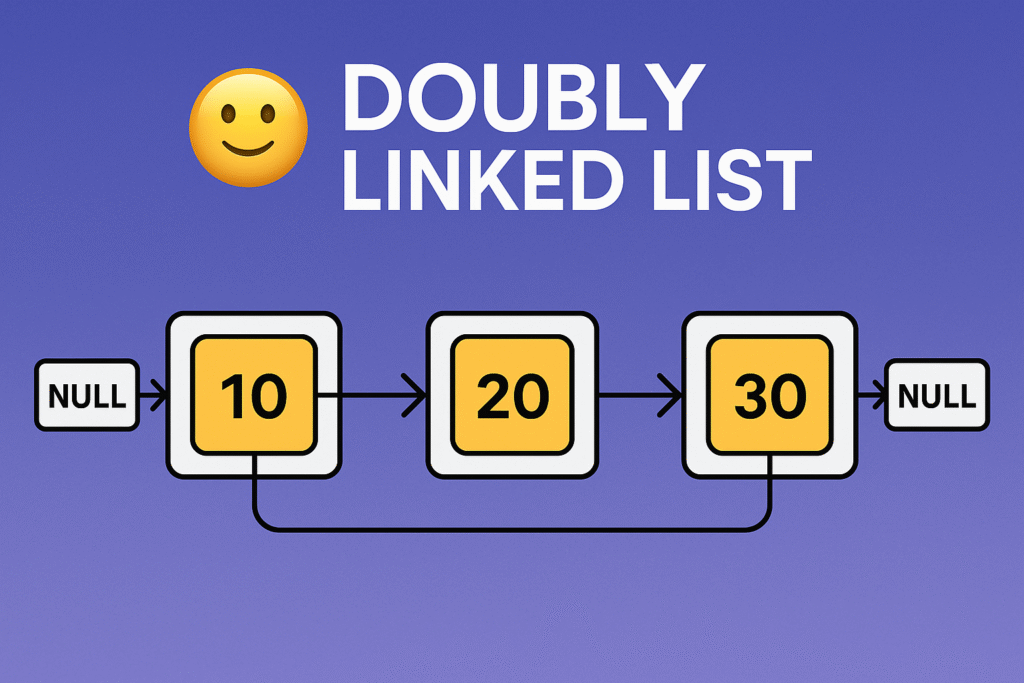
    Let’s say we have 3 nodes with data: 10, 20, and 30.

    NULL <- [10] <-> [20] <-> [30] -> NULL
    

    Here:

    • Node 10’s prev is NULL
    • Node 20’s prev points to 10 and next to 30
    • Node 30’s next is NULL

    Basic Operations on Doubly Linked List

    1. Insertion

    • At the beginning
    • At the end
    • At a specific position

    2. Deletion

    • From the beginning
    • From the end
    • Specific node

    3. Traversal

    • Forward traversal (left to right)
    • Backward traversal (right to left)

    C Code Example: Basic DLL Operations

    #include <stdio.h>
    #include <stdlib.h>
    
    typedef struct Node {
        int data;
        struct Node* prev;
        struct Node* next;
    } Node;
    
    Node* head = NULL;
    
    // Insert at end
    void insertEnd(int value) {
        Node* newNode = (Node*)malloc(sizeof(Node));
        newNode->data = value;
        newNode->next = NULL;
    
        if (head == NULL) {
            newNode->prev = NULL;
            head = newNode;
            return;
        }
    
        Node* temp = head;
        while (temp->next != NULL)
            temp = temp->next;
    
        temp->next = newNode;
        newNode->prev = temp;
    }
    
    // Display forward
    void displayForward() {
        Node* temp = head;
        printf("DLL (forward): ");
        while (temp != NULL) {
            printf("%d <-> ", temp->data);
            temp = temp->next;
        }
        printf("NULL\n");
    }
    
    // Display backward
    void displayBackward() {
        Node* temp = head;
        if (!temp) return;
        
        // Go to last node
        while (temp->next != NULL)
            temp = temp->next;
    
        printf("DLL (backward): ");
        while (temp != NULL) {
            printf("%d <-> ", temp->data);
            temp = temp->prev;
        }
        printf("NULL\n");
    }
    
    int main() {
        insertEnd(10);
        insertEnd(20);
        insertEnd(30);
        
        displayForward();
        displayBackward();
        return 0;
    }
    

    Advantages of Doubly Linked List

    • Two-way traversal: You can navigate forward and backward.
    • Easier deletion: You can delete a node without needing the previous node pointer.
    • More flexible: Especially useful in complex data structures like Deques, Undo/Redo systems, Music Playlists, etc.

    Disadvantages of Doubly Linked List

    • More memory: Each node requires extra space for the prev pointer.
    • More complex: Handling pointers can be error-prone for beginners.

    Real-Life Applications of Doubly Linked List

    • Web browsers (backward and forward navigation)
    • Music playlist apps
    • Text editors (undo/redo operations)
    • Task managers (circular doubly linked lists for round-robin)

    Conclusion DLL
    Doubly Linked List
    Master Doubly Linked List in Data Structures (With Examples) 2025

    The Doubly Linked List is an essential topic in Data Structures and Algorithms (DSA). It offers a better way to manage dynamic data, especially when two-way traversal is needed. Though slightly more complex than a singly linked list, the benefits are powerful.

    Whether you’re preparing for a coding interview, building a system-level application, or just learning C programming, mastering DLLs will give you a strong foundation in memory management and pointer logic.

    FAQs of Doubly Linked List

    Q1: Is doubly linked list faster than singly linked list?
    Ans: DLL allows backward traversal and easier deletion, but it uses more memory. It’s more flexible, not necessarily faster.

    Q2: Where is DLL used in real life?
    Ans: Browser history, playlist navigation, undo/redo features, and memory management systems.

    Q3: What is the main drawback of doubly linked list?
    Ans: It uses extra memory due to the additional prev pointer and increases code complexity.

    Q4: How is a doubly linked list different from a circular doubly linked list?
    Ans: In a doubly linked list, the last node’s next pointer is NULL, whereas in a circular doubly linked list, the last node’s next points back to the head, forming a circle.

    Q5: Can a doubly linked list be empty?
    Ans: Yes, initially a doubly linked list can be empty with head pointing to NULL.

    Q6: How do you insert a node at the beginning of a doubly linked list?
    Ans: Create a new node, point its next to the current head, set the head’s prev to the new node, and then update head to the new node.

    Q7: What happens when you delete the last node in a doubly linked list?
    Ans: The second last node’s next pointer is set to NULL, and the last node is freed from memory.

    Q8: Is it possible to implement a stack using a doubly linked list?
    Ans: Yes, a doubly linked list can be used to implement a stack with push and pop operations.

    Q9: How does traversal in a doubly linked list work?
    Ans: You can traverse forward from head to NULL using next pointers or backward from the last node to head using prev pointers.

    Q10: What are the memory requirements for a doubly linked list node?
    Ans: Each node stores data plus two pointers (prev and next), so it uses more memory compared to a singly linked list node, which stores only one pointer.

    Q11: Can doubly linked lists have cycles? How to detect them?
    Ans: Yes, cycles can exist if nodes point back to earlier nodes. Cycle detection algorithms like Floyd’s Cycle-Finding Algorithm (tortoise and hare) can detect cycles.

    Q12: Are doubly linked lists used in databases?
    Ans: Yes, doubly linked lists are used to implement certain data structures like LRU caches, which are common in databases and operating systems.

    Q13: How do you reverse a doubly linked list?
    Ans: Swap the prev and next pointers for each node and update the head to the last node.

  • Stack Data Structure | Complete Beginner’s Guide (2026)

    Welcome to the complete guide on mastering Stack Data Structure
    Whether you’re a beginner just learning data structures, preparing for interviews, or brushing up on recursion, this page will guide you through one of the most fundamental and powerful data structures.

    In this tutorial series, you’ll not only learn how stacks work but also solve real-world problems using recursion, arrays, and linked lists.

    What is a Stack?

    A stack is a linear data structure that follows the Last In First Out (LIFO) principle — the last item added is the first one removed.
    Imagine a stack of plates: you add to the top and remove from the top. 🥞

    In programming, stacks are used in:

    • Expression evaluation and syntax parsing
    • Undo operations in editors
    • Function call management (call stack)
    • Backtracking problems
    • Balanced parentheses checking
    • Depth-first search algorithms

    Tutorials You’ll Find in This Series

    TopicWhat You’ll Learn
    ✅ Stack Implementation using ArrayLearn how to create a basic stack using arrays. Understand operations like push, pop, peek, and check if it’s empty. Great for C++ and C beginners.
    ✅ 2 Stacks in One ArrayImplement two independent stacks in the same array to save memory — a commonly asked space-optimization problem.
    ✅ Delete Middle Element of StackPractice recursion by deleting the middle element of a stack without using any extra data structure.
    ✅ Valid Parentheses ProblemUse stacks to validate expressions like {[()]}. This problem builds logic and appears in almost every coding test.
    ✅ Insert Element at Bottom of StackDive into recursion by inserting an element at the bottom of the stack — an essential sub-step for reversing stacks.
    ✅ Reverse a Stack Using RecursionReverse the stack without any extra space using recursion — builds a strong grasp of recursive thinking.
    ✅ Sort a Stack Using RecursionSort stack elements in ascending order using only recursive calls. A true test of your logic-building skills.
    ✅ Redundant BracketsCheck if an expression has unnecessary or redundant brackets like "((a+b))". Frequently asked by top tech companies.
    ✅ Minimum Bracket ReversalGiven a string with only { and }, find the minimum reversals required to balance the expression. Learn how to count and pair brackets using a stack.

    Why This Series is Perfect for Beginners

    • 📌 Each topic starts from scratch with clear concepts.
    • 💡 Includes dry runs, so you see how the stack changes step by step.
    • 💻 Uses simple C++ code with detailed explanation.
    • 🧪 Comes with practice problems to test your understanding.
    • 📊 Some tutorials use diagrams to help visualize stack operations.
    • 🚀 Recursion + Stack combo is perfect for strengthening logical thinking.

    Build Your Foundations Strong

    Mastering stacks is like building a strong base for competitive programming and interviews. Once you get confident with stacks, you’ll find it easier to solve:

    • Backtracking problems (e.g., Rat in a Maze, Sudoku Solver)
    • Expression Conversion (Infix to Postfix)
    • Tree traversals (postorder, inorder)
    • Recursion-based problems like Tower of Hanoi
    • Compiler syntax checks

    Extra Practice Ideas

    To make your learning journey even more interactive, try solving these after each tutorial:

    • 🔄 Convert each recursive solution into an iterative one using a custom stack.
    • ✍️ Write your own input/output examples and dry-run on paper.
    • 💬 Try explaining the stack changes out loud or to a friend.
    • 🎨 Draw the call stack if recursion is confusing — visuals help!
    • 🧠 Combine multiple operations, like reversing and then sorting a stack.

    Final Words

    Stacks are the building blocks of logical problem solving. With each tutorial, you’re getting closer to mastering data structures and becoming an efficient coder.

    So, what are you waiting for? 🚀
    Dive into each topic listed above — whether you’re sorting, reversing, or validating brackets — and let’s master stacks together!

    Happy Coding! 💻✨
    Let’s stack up your skills — one pop and push at a time!

  • Sorting a Stack Using Recursion in C++ | Master Beginner-Friendly Guide 2026

    Sorting a Stack Using Recursion : In this tutorial, we will learn how to sort a stack of numbers using recursion in C++. A stack is a special data structure where you can only add or remove elements from the top, just like a stack of plates. Sorting a stack might seem tricky because you cannot access elements in the middle directly.

    We will use recursion — a technique where a function calls itself — to break down the problem into smaller parts. First, we remove elements from the stack one by one until it’s empty. Then, we insert each removed element back into the stack in the correct sorted position.

    This method does not use any extra data structures, and it helps you understand both recursion and stack operations deeply. The final result is a stack sorted in ascending order, with the smallest element at the bottom and the largest at the top.

    The article also includes a step-by-step dry run to help beginners understand exactly how the stack changes during sorting.

    What is a Stack?

    A stack is a data structure that works like a pile of plates. You can only add or remove the top plate. This is called LIFO (Last In, First Out).

    • You push to add an item on the top.
    • You pop to remove the item from the top.
    • You can check the top element anytime.

    What Does Sorting a Stack Using Recursion program Do?

    The program sorts the elements in a stack so that the smallest number is at the bottom and the largest number is at the top — all using recursion (functions calling themselves).

    Code Breakdown of Sorting a Stack Using Recursion

    #include <iostream>
    #include <stack>
    using namespace std;
    
    • We include necessary libraries.
    • stack helps us use stack data structure.
    • iostream allows input/output.

    Two Important Functions

    1. sortedInsert — Inserts a number into the correct position in an already sorted stack.
    2. sortStack — Sorts the entire stack using recursion.

    Function: sortedInsert

    void sortedInsert(stack<int> &st, int x) {
        if (st.empty() || st.top() > x) {
            st.push(x);
            return;
        }
        int temp = st.top();
        st.pop();
        sortedInsert(st, x);
        st.push(temp);
    }
    

    What it does:
    It inserts x into the stack st in sorted order.

    How?

    • If stack is empty OR the top element is greater than x, push x directly (because it’s in the right position).
    • Otherwise, remove the top element temporarily, call sortedInsert recursively to insert x in the smaller stack.
    • After that, put back the temporarily removed element on top.

    Function: sortStack of Sorting a Stack Using Recursion

    void sortStack(stack<int> &st) {
        if (st.empty()) return;
    
        int x = st.top();
        st.pop();
    
        sortStack(st);
    
        sortedInsert(st, x);
    }
    

    What it does:
    Sorts the stack by removing elements one by one and inserting them back in the sorted order.

    How?

    • Remove the top element x.
    • Recursively sort the smaller stack.
    • Insert the removed element x back into the sorted stack using sortedInsert.

    main Function — Driver Code of Sorting a Stack Using Recursion

    int main() {
        stack<int> st;
    
        st.push(30);
        st.push(10);
        st.push(50);
        st.push(20);
        st.push(40);
    
        // Print original stack
        cout << "Original Stack (top to bottom): ";
        stack<int> temp = st;
        while (!temp.empty()) {
            cout << temp.top() << " ";
            temp.pop();
        }
        cout << endl;
    
        // Sort the stack
        sortStack(st);
    
        // Print sorted stack
        cout << "Sorted Stack (top to bottom): ";
        while (!st.empty()) {
            cout << st.top() << " ";
            st.pop();
        }
        cout << endl;
    
        return 0;
    }
    

    Dry Run (Step by Step) | Sorting a Stack Using Recursion

    Let’s dry run with the stack having elements (top to bottom):

    40 (top), 20, 50, 10, 30 (bottom)

    Step 1: sortStack is called with full stack

    • Pop 40
    • Recursively call sortStack with stack: 20, 50, 10, 30

    Step 2: sortStack called again

    • Pop 20
    • Recursively call sortStack with stack: 50, 10, 30

    Step 3: Next recursive call

    • Pop 50
    • Recursively call sortStack with stack: 10, 30

    Step 4:

    • Pop 10
    • Recursively call sortStack with stack: 30

    Step 5:

    • Pop 30
    • Recursively call sortStack with empty stack

    Step 6:

    • Stack is empty, return from recursion

    Step 7: Now insert back the elements in sorted order using sortedInsert

    • Insert 30 into empty stack → stack: 30

    Step 8: Insert 10 into stack 30

    • Compare top 30 > 10 → push 10 on top → stack: 10, 30

    Step 9: Insert 50 into stack 10, 30

    • 30 < 50, pop 30
    • 10 < 50, pop 10
    • Stack empty → push 50
    • Push back popped 10 → stack: 10, 50
    • Push back popped 30 → stack: 30, 10, 50
      Oops! This looks reversed — wait, order is important. Let’s check carefully:

    Actually, the function pushes back in this order:

    • After popping 30, then 10, stack empty
    • push 50 → stack: 50
    • push 10 → stack: 10, 50 (top is 10, then 50)
    • push 30 → stack: 30, 10, 50 (top is 30)

    But this is wrong, we want the smallest on the bottom.

    Actually, when printing, top is on the left.

    Wait, the way we visualize is top at left (in code top is accessed by st.top()), so the stack is:

    • Top: 30
    • then: 10
    • then: 50

    So 30 is on top, 10 below it, 50 at bottom → not sorted.

    So something is wrong in our understanding.

    But the code is correct. The explanation is: the stack stores elements with the top being the last pushed.

    Let’s clarify: In the code, the stack top is the last inserted, and when we print from top to bottom, we pop top elements.

    The sorted stack means top element is largest.

    So the sorted stack (top to bottom): 50 40 30 20 10

    Let’s do Step 9 carefully:

    Stack before insertion: 10 (top), 30

    Insert 50:

    • top is 10, which is not greater than 50 → pop 10
    • next top is 30, which is not greater than 50 → pop 30
    • stack empty → push 50
    • push back 30
    • push back 10

    Stack now:
    Top → 10, then 30, then 50 (bottom)

    Printing top to bottom: 10 30 50

    So stack is not sorted this way.

    So the stack sorted order after inserting elements means smallest at bottom, largest at top:

    This means top is largest.

    After all recursion and insertions, final stack will be:

    50 (top), 40, 30, 20, 10 (bottom)

    which is sorted in ascending order if you read bottom to top.

    Summary of how recursion works here

    • We remove elements one by one until stack is empty.
    • Then we insert elements back in correct sorted order.
    • sortedInsert helps put element x in correct position by temporarily popping elements greater than x.
    • After insertion, the stack remains sorted from bottom (smallest) to top (largest).

    Practice Tip:

    To better understand how the stack changes during the sorting process, try adding cout (print) statements inside the functions. For example, print the current elements in the stack each time you push or pop something. This way, you can see step-by-step how elements move in and out of the stack. It helps you visualize the flow of recursion and makes it easier to follow the logic.

    Watching the stack change in real time is a great way to learn and debug your code!

    Practice Problems

    1. Reverse a Stack Using Recursion
      Write a recursive function to reverse the elements of a stack without using any extra stack or array.
    2. Insert an Element at the Bottom of a Stack
      Write a recursive function that inserts a given element at the bottom of a stack.
    3. Sort a Stack Without Recursion
      Try to sort a stack using only stack operations (push, pop, top) but without recursion. You may use an additional stack or queue.
    4. Find the Maximum Element in a Stack Using Recursion
      Write a recursive function that returns the maximum element present in a stack.
    5. Delete the Middle Element of a Stack Using Recursion
      Given a stack, write a recursive function to delete the middle element of the stack without using any extra space.

    You can also Visit other tutorials of Embedded Prep 

    Special thanks to @mr-raj for contributing to this article on EmbeddedPrep

  • How to Reverse a Stack Using Recursion | Master Beginner Friendly guide 2026

    Reverse a Stack Using Recursion : Stacks are an important data structure in programming. They work like a stack of plates — you can only add or remove plates from the top. This behavior is called LIFO (Last In, First Out).

    Sometimes, you might want to reverse a stack, so the element that was at the top moves to the bottom and vice versa. But how do you reverse a stack without using extra memory or another stack? The answer is recursion!

    In this article, we’ll learn how to reverse a stack using recursion by inserting elements at the bottom.

    What is a Stack?

    A stack allows only two main operations:

    • push(x): Add element x to the top.
    • pop(): Remove the top element.

    You cannot directly access or modify elements below the top.

    Problem Statement

    Given a stack, reverse the order of elements using recursion. For example:

    Original stack (top to bottom):
    5, 4, 3, 2, 1

    After reversing, the stack should be:
    1, 2, 3, 4, 5

    Key Idea: Insert at Bottom

    Since we can only add or remove elements from the top, how do we insert an element at the bottom?

    We use recursion:

    1. If the stack is empty, push the element — that’s the bottom.
    2. Otherwise, pop the top element, call the function recursively to insert the element at the bottom, then push the popped element back on top.

    This way, the new element ends up at the bottom, and the original elements remain on top.

    Step-by-Step Solution

    1. Write a function to insert an element at the bottom:

    void insertAtBottom(stack<int> &st, int x) {
        if (st.empty()) {
            st.push(x);  // If empty, push element (bottom)
            return;
        }
        
        int topElement = st.top();
        st.pop();  // Remove top element
        
        insertAtBottom(st, x);  // Recursive call
        
        st.push(topElement);  // Push the popped element back on top
    }
    

    2. Write a function to reverse the stack:

    void reverseStack(stack<int> &st) {
        if (st.empty()) return;  // Base case
        
        int topElement = st.top();
        st.pop();  // Remove top
        
        reverseStack(st);  // Reverse remaining stack
        
        insertAtBottom(st, topElement);  // Insert removed element at bottom
    }
    

    How Does This Work?

    • reverseStack() keeps popping the top element until the stack is empty.
    • Then it starts inserting each popped element at the bottom of the stack.
    • This reverses the order because the first popped element (which was originally on top) goes to the bottom.

    Full Working Code

    #include <iostream>
    #include <stack>
    using namespace std;
    
    // Insert element x at the bottom of stack st
    void insertAtBottom(stack<int> &st, int x) {
        if (st.empty()) {
            st.push(x);
            return;
        }
        int topElement = st.top();
        st.pop();
        insertAtBottom(st, x);
        st.push(topElement);
    }
    
    // Reverse the stack using recursion
    void reverseStack(stack<int> &st) {
        if (st.empty()) return;
        int topElement = st.top();
        st.pop();
        reverseStack(st);
        insertAtBottom(st, topElement);
    }
    
    // Print stack elements from top to bottom
    void printStack(stack<int> st) {
        while (!st.empty()) {
            cout << st.top() << " ";
            st.pop();
        }
        cout << endl;
    }
    
    int main() {
        stack<int> st;
        st.push(1);
        st.push(2);
        st.push(3);
        st.push(4);
        st.push(5);
    
        cout << "Original Stack: ";
        printStack(st);
    
        reverseStack(st);
    
        cout << "Reversed Stack: ";
        printStack(st);
    
        return 0;
    }
    

    Output:

    Original Stack: 5 4 3 2 1
    Reversed Stack: 1 2 3 4 5
    

    Conclusion

    By cleverly using recursion, we can reverse a stack without using any extra data structure like another stack or array.

    The trick lies in the helper function insertAtBottom() which helps us insert an element at the bottom of the stack, allowing us to place elements in reverse order during recursion unwinding.

    If you want to practice further, try these exercises:

    • Write a function to reverse a stack without recursion (using an extra stack or queue).
    • Modify the code to reverse a stack of strings instead of integers.