
Tag: C programming

  • Master Embedded Software Roadmap for Beginners (2026 Guide)

    Embedded Software Roadmap is a clear, step-by-step guide for beginners and professionals who want to build a strong career in embedded systems.

    Are you eager to dive into the world ofembedded systems but don’t know where to start? This beginner-friendly roadmap will guide you step-by-step, from basic concepts to real-time projects, helping you build a strong foundation and become a successful embedded software engineer in 2025.

    Embedded Software Roadmap
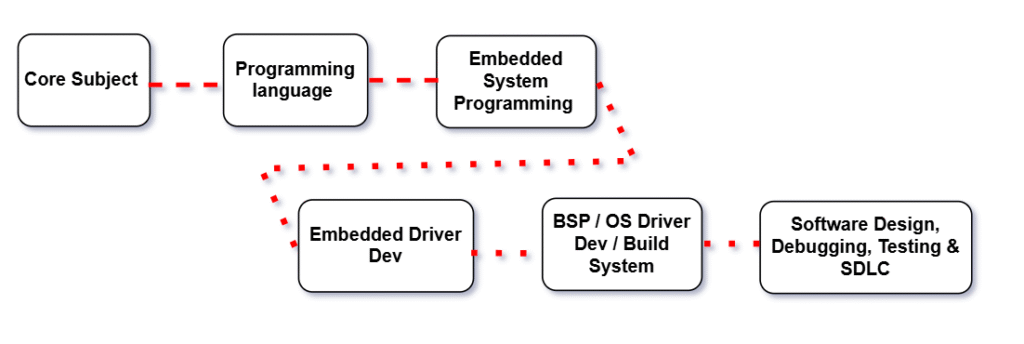
    Embedded Software Roadmap

    Step 1: Master the Core Subjects of Embedded Systems

    1.1 Digital Electronics

    Digital Electronics is the foundation of modern computing and embedded systems. It harnesses the power of binary logic—0s and 1s—to design systems that are precise, reliable, and scalable. As the first step in the Embedded Software Roadmap, mastering digital electronics is essential. From microprocessors to embedded controllers, digital electronics enables the creation of intelligent hardware through logic gates, Boolean algebra, and state-driven systems. This knowledge sets the stage for developing efficient and robust embedded software.

    At its core, digital electronics replaces analog ambiguity with digital precision, making it the heart of systems like communication devices, automation units, robotics, and consumer electronics. By combining combinational and sequential circuits, engineers can design everything from simple adders to complex programmable logic devices like FPGAs.

    With digital design, we build the brains of technology—machines that think, decide, and act based on logic and encoded instructions. It’s not just about electronics—it’s about empowering innovation through logical architecture.

    Understand how electronic signals represent data:

    • Number systems: Binary, Hexadecimal, BCD
    • Logic Gates: AND, OR, NOT, NAND, NOR, XOR
    • Flip-Flops and Registers
    • Combinational vs Sequential Circuits
    • Multiplexers, Encoders, Decoders

    Popular Microcontrollers to Explore:

    • AVR: ATmega328P (used in Arduino)
    • ARM: STM32, ESP32, nRF52

    1.2 Operating Systems (OS)

    Digital Electronics is the foundation of modern computing and embedded systems. It harnesses the power of binary logic—0s and 1s—to design systems that are precise, reliable, and scalable. As the first step in the Embedded Software Roadmap, mastering digital electronics is essential. From microprocessors to embedded controllers, digital electronics enables the creation of intelligent hardware through logic gates, Boolean algebra, and state-driven systems. This knowledge sets the stage for developing efficient and robust embedded software.

    As we move forward in the Embedded Software Roadmap, we encounter the critical role of Operating Systems.

    An Operating System (OS) is the unseen force that transforms hardware into a functional and responsive digital environment. Acting as the central coordinator, it manages everything—from running applications and allocating memory to handling user input and controlling hardware components.

    It provides an abstraction layer, allowing developers and users to interact with complex machines through simple, intuitive interfaces. Whether it’s scheduling tasks, managing filesystems, or ensuring secure multitasking, the OS silently enforces structure and efficiency beneath every click and tap.

    From real-time embedded platforms like FreeRTOS, QNX, and VxWorks to general-purpose systems like Linux, Windows, and macOS, Operating Systems are not just software—they are digital ecosystems that balance performance, reliability, and usability.

    Why it’s important: Many embedded systems run on RTOS (like FreeRTOS, VxWorks) or Embedded Linux. Understanding OS concepts helps you manage processes, memory, and scheduling efficiently.

    Topics to Cover:

    • Process vs Thread
    • Memory Management (Heap, Stack, Paging)
    • CPU Scheduling Algorithms
    • Interprocess Communication (IPC): semaphores, mutex, pipes
    • Real-Time Operating Systems (RTOS): concepts of tasks, preemption, priority inversion
    • Embedded Linux basics: init system, daemons, file system layout

    1.3 Computer Architecture

    Computer Architecture defines the conceptual design and operational framework of a computer system. It is the strategic art of organizing hardware components and establishing how they interact to execute instructions efficiently and reliably.

    In the Embedded Software Roadmap, understanding computer architecture is a critical step—especially for developers working close to the hardware. This architectural blueprint includes the internal structure of the CPU—such as the control unit, ALU, and registers—as well as memory hierarchy, I/O mechanisms, and instruction sets. It governs how software communicates with hardware, how data moves through the system, and how performance can be improved using techniques like pipelining, caching, and parallel processing.

    Why it matters: Embedded development often involves bare-metal programming, writing assembly code, or optimizing C/C++ for resource-constrained environments. A solid grasp of computer architecture empowers developers to write efficient code, debug at the hardware level, and fine-tune performance for real-time applications.

    In essence, computer architecture transforms raw silicon into a purposeful computing engine—balancing speed, power, and scalability to meet the demands of modern embedded systems..

    Topics to Cover:

    • Instruction Set Architecture (ISA): RISC vs CISC
    • ARM Cortex-M and ARMv7 architecture
    • Registers, ALU, Control Unit
    • Pipelining and hazards
    • Caches (L1/L2), memory hierarchy
    • Memory-mapped I/O
    • Endianness

    1.4 Computer Networks

    As embedded systems evolve, connectivity becomes increasingly vital. Computer Networks form the backbone of modern communication, enabling devices to share data, resources, and services—whether they’re part of a smart home, a vehicle, or a global cloud infrastructure.

    In the Embedded Software Roadmap, understanding computer networks is crucial for building connected and intelligent embedded systems. Networks are built on layered protocols, starting from physical connections and data link layers to higher-level transport and application services. These layers work together to define how information is packaged, transmitted, routed, and received reliably and securely.

    From wired LANs in industrial automation to wireless technologies powering IoT ecosystems, networks allow embedded devices to interact in real-time, share sensor data, receive firmware updates, and integrate with cloud platforms.

    Why it’s important: Many modern embedded systems are no longer standalone. Devices often operate as part of a larger connected environment, making it essential to understand networking protocols like TCP/IP, UDP, MQTT, HTTP, and Bluetooth. This knowledge allows developers to implement secure, scalable, and efficient communication in embedded applications.

    More than just infrastructure, computer networks serve as the digital nervous system of embedded and IoT applications—ensuring smooth, synchronized, and intelligent operations across distributed systems.

    Topics to Cover:

    • OSI Model and TCP/IP
    • IP, UDP, TCP – Packet structures, handshakes
    • HTTP/HTTPS protocols
    • MQTT and CoAP (for IoT)
    • Bluetooth, Wi-Fi, ZigBee (basic wireless comm.)
    • Socket programming basics

    Step 2: Master the Programming Language

    At the heart of embedded software development lies programming languages—tools that transform ideas into functional systems. In the Embedded Software Roadmap, mastering the right programming languages is a fundamental step. These languages enable developers to write efficient, optimized code that directly controls hardware and processes data in real-time.

    For embedded systems, C and C++ are the most widely used languages due to their efficiency, low-level hardware access, and performance. C is often preferred for bare-metal development because it allows precise control over system resources, while C++ introduces object-oriented features that enhance code structure, maintainability, and scalability.

    In addition to C/C++, many embedded developers also explore Python for higher-level tasks like testing, automation, and scripting, as well as Assembly for low-level performance tuning. Understanding these languages provides the flexibility to tackle various embedded development challenges, whether you’re programming microcontrollers, designing device drivers, or developing real-time applications.

    Why it’s important: Mastery of these languages allows embedded engineers to write efficient, low-level code that interacts directly with hardware, ensuring fast execution and minimal resource consumption. Additionally, knowledge of object-oriented programming in C++ supports building modular and maintainable systems, which is crucial for complex embedded projects.

    In essence, mastering programming languages empowers embedded software engineers to translate hardware requirements into functional code—balancing performance, resource utilization, and reliability in every line of code.

    2.1 Start with Embedded C Programming

    Why C?
    C is the de facto standard for embedded development because of its:

    • Low-level access to memory (pointers)
    • Speed and minimal overhead
    • Hardware-level register manipulation
    • Portability across microcontrollers

    Topics to Master in C:

    Basics:

    • Data types (uint8_t, uint16_t, etc. from <stdint.h>)
    • Operators, Control flow, Functions

    Intermediate:

    • Pointers, Arrays, Strings
    • Bitwise operations (|, &, ^, ~, <<, >>)
    • Structs, Enums, Typedef
    • Header files and Modular programming
    • Makefiles and Compilation

    Advanced:

    • Memory management: Stack vs Heap
    • const, volatile, static, extern
    • Inline functions, Macros, Preprocessor directives
    • Interrupt Service Routines (ISRs) in C
    • Working with hardware registers (*(volatile uint32_t*)0x40021000 = 0x01;)
    Category Topics Notes / Relevance
    Basics of C Introduction to C
    Data Types, Variables, Constants
    Operators: Arithmetic, Relational, Logical, Bitwise, Assignment
    Expressions & Precedence
    Input/Output functions (printf, scanf)
    Comments & Coding Standards
    Foundation for Embedded C programming
    Control Statements if, if-else, nested if
    switch-case
    Loops: for, while, do-while
    break, continue, goto statements
    Essential for program flow and decision-making
    Functions Function declaration & definition
    Parameter passing: by value, by reference
    Recursion
    Inline functions
    Library functions & custom headers
    Code modularity and reusability in embedded projects
    Arrays & Strings Single & Multidimensional arrays
    String handling & manipulation
    Memory considerations in embedded systems
    Used for data storage and sensor/memory interfacing
    Pointers & Memory Management Pointer basics & arithmetic
    Pointers with arrays, strings, and functions
    Dynamic memory allocation: malloc, calloc, free
    Memory-mapped I/O in embedded systems
    Critical for efficient memory use and hardware interfacing
    Structures & Unions struct declaration & usage
    Nested structs
    Union & enum usage
    Bit-fields for memory optimization
    Typedef usage
    Used for organizing sensor data, registers, and peripherals
    Preprocessor Directives #define, #include
    Conditional Compilation: #ifdef, #ifndef, #endif
    Macro functions
    Used for portable embedded code and configuration
    Bitwise Programming Bitwise Operators: &, |, ^, ~, <<, >>
    Bit masking, setting, clearing, toggling bits
    Shifting for efficient operations
    Flags & status registers handling
    Essential for registers, GPIO, and low-level MCU control
    Embedded-Specific Topics Volatile keyword & its importance
    Register-level programming
    Interrupt Service Routines (ISR) basics
    GPIO, ADC, DAC, PWM interfacing
    Timer & counter programming
    Memory-mapped I/O
    Watchdog timer usage
    Direct MCU programming and real-time embedded applications
    File Handling & EEPROM/Flash File handling in C (for RTOS/host environment)
    Reading/writing persistent memory
    EEPROM/Flash interfacing
    Persistent storage for embedded systems
    Advanced Embedded C Concepts Memory alignment & padding
    Inline assembly in C
    Using const, static, extern effectively
    Real-Time Operating System (RTOS) integration basics
    Modular programming & header/source file structure
    Advanced control over performance, memory, and RTOS integration
    Debugging & Testing Using GDB for embedded systems
    Unit testing with Google Test or Ceedling
    Using serial debugging (UART)
    LED and buzzer debugging
    Watchpoints, breakpoints, and logging
    Critical for reliable embedded software development

    Step 2.1: C++

    Once you’ve got a handle on C, it’s time to go deeper into C++, which is widely used in automotive, RTOS-based, and IoT embedded systems.

    a)Learn Basic C++

    Keywords: basic C++ tutorial, C++ syntax, C++ for beginners

    Start with the fundamentals:

    • Data types & variables
    • Conditionals and loops
    • Functions and recursion
    • Arrays and strings
    • Pointers and references
    • Dynamic memory (new, delete)
    • Namespaces, inline functions, function overloading

    🎯 Practice via platforms like LeetCode, HackerRank, or using mini console-based apps.

    b) Understand OOPs Concepts

    In the world of embedded software development, Object-Oriented Programming (OOP) is a powerful design paradigm that structures code around real-world entities. Instead of focusing solely on procedures or functions, OOP organizes software into objects—modular, reusable units that encapsulate both data and behavior. This approach makes the code more intuitive, maintainable, and scalable.

    In the Embedded Software Roadmap, understanding OOP concepts like encapsulation, inheritance, polymorphism, and abstraction is essential for developing robust embedded systems, especially as applications grow in complexity. By focusing on what things are (objects) and what they do (methods), developers can model real-world systems more naturally, improving both code readability and flexibility.

    Why it’s important: For embedded systems, OOP allows you to write cleaner, more organized code. It enables better reuse of software components, which can be critical when developing complex systems with limited resources. By applying OOP principles, embedded developers can design more scalable and maintainable systems, while also reducing errors and simplifying debugging.

    In essence, mastering OOP in embedded software development provides the tools to design systems that are not only functional but also easier to manage and extend over time—ensuring long-term efficiency and adaptability.

    Object-Oriented Programming is what gives C++ its real power.

    • Classes and Objects
    • Encapsulation, Abstraction
    • Inheritance (single, multiple, hybrid)
    • Polymorphism (compile-time & runtime)
    • Constructors and Destructors
    • this pointer, friend functions, operator overloading
    • const, static, virtual, pure virtual functions

    Note: In embedded, avoid dynamic memory allocation and deep inheritance trees.

    c)Learn STL (Standard Template Library)

    The Standard Template Library (STL) is a powerful feature of C++ that brings the elegance of generic programming to everyday development. It offers a rich set of predefined classes and functions—ready to manage data structures and algorithms with optimal efficiency and minimal effort.

    STL is useful even in high-end embedded systems or while writing test utilities.

    Key STL components to learn:

    • Containers: vector, list, deque, stack, queue, set, map
    • Algorithms: sort, find, count, accumulate, for_each
    • Iterators: Input, Output, Forward, Bidirectional, Random access
    • Function Objects & Lambda Expressions
    • Templates: Function and class templates

    d)Practice DSA (Data Structures & Algorithms)

    Data Structures and Algorithms (DSA) form the strategic core of software development, providing the tools and techniques needed to organize data and solve problems efficiently. While data structures define how information is stored, algorithms dictate the logic to process and transform it.

    From managing dynamic memory with linked lists and trees to optimizing decisions through sorting, searching, and graph traversal, DSA equips developers to think critically and code smartly. It transforms brute-force solutions into optimized, scalable approaches—essential in everything from system design to real-time applications.

    Mastering DSA isn’t just about writing code—it’s about developing a problem-solving mindset that balances time, space, and logic to build high-performance software in the real world.

    Embedded engineers may not need complex DSA every day, but knowing it improves problem-solving and code quality.

    Topics to master:

    • Arrays, Strings, Linked Lists
    • Stacks, Queues
    • Trees, Graphs, Tries
    • Sorting Algorithms: Quick, Merge, Insertion, Selection
    • Searching: Binary search, Linear search
    • Hashing
    • Recursion and Dynamic Programming

    🎯 Practice on Codeforces, LeetCode, and GeeksforGeeks.

    💛 Support Embedded Prep

    If you find our tutorials helpful and want to support our mission of sharing high-quality embedded system knowledge, you can contribute by buying us a coffee. Every small contribution helps us keep creating valuable content for learners like you. ☕

    Thank you for your support — it truly keeps Embedded Prep growing. 💻✨

    e)Build a C++ Project Using Qt

    Creating a C++ project with Qt is the perfect fusion of high-performance backend logic and a powerful cross-platform GUI framework. Qt empowers developers to bring their C++ code to life with intuitive interfaces, event-driven programming, and modular architecture.

    In this approach, core functionality is implemented using the robustness of C++, while Qt handles the presentation layer through its flexible widgets, signals and slots mechanism, and UI design tools. Whether it’s a data visualization dashboard, a custom tool, or a real-time system monitor, Qt makes it easy to integrate rich user experiences with efficient native code.

    Building a project with Qt not only sharpens object-oriented programming skills but also teaches practical concepts like multi-threading, event handling, resource management, and cross-platform deployment—all in a unified development environment.

    Qt is widely used in embedded GUIs (especially for infotainment, industrial devices, dashboards).

    Steps:

    • Install Qt Creator and set up a CMake-based project
    • Learn Qt Widgets or QML for UI
    • Connect buttons, sliders, and sensors using signals and slots
    • Use multithreading with QThread or QtConcurrent
    • Integrate serial communication with QSerialPort (to talk to microcontrollers)
    • Apply OOP design patterns (Observer, Singleton, etc.)

    Project Ideas:

    • Sensor Dashboard using Serial + Plot
    • Embedded Device Simulator (LEDs, buttons)
    • Audio Player UI (with QMediaPlayer)
    • Home automation GUI to control ESP32/Arduino via serial

    🛠 Bonus: Try to cross-compile the Qt app for ARM/Linux target (e.g., Raspberry Pi or BeagleBone).on bare-metal safe subsets.

    2.3 Assembly Language (Bonus)

    Assembly Language is the closest human-readable form of programming that directly interacts with a system’s hardware. It acts as a thin layer between machine code and high-level programming, providing fine-grained control over a processor’s operations.

    Each instruction in Assembly corresponds to a single machine-level command, allowing developers to manipulate registers, memory addresses, I/O ports, and control flow with exact precision. This low-level access makes Assembly indispensable for performance-critical, time-sensitive, and resource-constrained environments such as embedded systems, operating systems, and device drivers.

    Learning Assembly Language offers deep insights into CPU architecture, instruction sets, and how software translates into actual machine operations. It is not just a programming tool—it’s a window into the very core of computing.

    When ultra-precise control is needed:

    • Learn basic ARM Cortex-M Assembly (or AVR)
    • Understand registers, stack frames
    • Learn how to optimize critical sections

    2.4 Python for Embedded Automation and Tools

    Python has become an indispensable tool in the embedded systems world, offering a high-level language that enhances productivity while maintaining the low-level precision required for embedded automation. By leveraging Python in embedded environments, developers can rapidly prototype, automate processes, and streamline toolchains without sacrificing performance.

    Python excels in creating custom automation scripts, interacting with hardware interfaces, and building tooling that simplifies development workflows. Whether it’s controlling GPIO pins, interfacing with sensors, or automating testing procedures, Python brings simplicity and flexibility to embedded systems, making tasks like data logging, hardware testing, and system monitoring much more efficient.

    With libraries such as RPi.GPIO, PySerial, and PyTest, Python enables seamless integration between embedded platforms and the tools used for development, testing, and debugging. It’s the perfect language for rapid development and automation, bridging the gap between embedded hardware and sophisticated software control.

    Python isn’t usually used directly on MCUs but is great for:

    • Writing test scripts for embedded hardware
    • Serial communication (pyserial)
    • Parsing logs, files, and test reports
    • GUI with Tkinter or PyQt
    • Data plotting with matplotlib

    Embedded Use Cases:

    • Automate firmware flashing over USB/UART
    • Data logger scripts
    • Backend control panel for IoT devices
    • Unit test automation

    2.5 Shell Scripting (Bash) for Embedded Linux

    Shell scripting, particularly with Bash, is a powerful and flexible tool for managing and automating tasks in Embedded Linux environments. It allows developers to streamline system administration, automate device configurations, and control the boot process—all through simple, concise commands.

    In the realm of embedded systems, Bash scripts serve as the bridge between hardware and software, facilitating tasks like system startup configuration, file manipulation, hardware diagnostics, and process management. The efficiency of Bash lies in its ability to manipulate files, manage system resources, and interact with the Linux kernel—all without needing to write complex C code.

    A must-have for embedded Linux developers:

    • Basics: if, for, while, variables, functions
    • File operations, logging, redirections
    • Using grep, awk, sed, cut
    • Automate build, flash, and deploy pipelines
    • Write scripts to configure GPIO, I2C, or SPI on Linux boards

    Used heavily in Yocto, Buildroot, init scripts, and service management.

    Step 3: Systems Programming and Embedded Driver Development with ARM Cortex M3/M4

    Microcontroller & Peripheral Programming

    Basic Embeddded Topic

    Note : To gain a deeper understanding of Systems Programming on ARM Cortex-M3/M4 MPU, it is highly recommended to engage in hands-on practical exercises

    Communication Protocol

    • I2C
    • SPI
    • UART / USART
    • I2S
    • TC/IP
    • UDP
    • Ethernet
    • CAN
    • LIN
    • BT / WIFI / USB

    Note : For an in-depth understanding, consider mastering microcontroller development with a focus on embedded driver development, including I2C, GPIO, USART, timers, PWM, CAN, RTC, STM32-LTDC, LCD-TFT, and LVGL.

    Popular MCUs to practice:

    • Atmega328p (Arduino Uno)
    • STM32F103, STM32F4 series
    • ESP32 (for Wi-Fi + BLE)
    • NXP, Renesas, TI MCUs

    Complete Electronics Core Topics Every Embedded Software Engineer Must Know (ECE/EEE)

    Category Topics Notes / Relevance
    Basic Electrical & Electronics Voltage, Current, Resistance, Power, Energy
    Ohm’s Law & Kirchhoff’s Laws
    Series & Parallel Circuits
    AC & DC Fundamentals, RMS & Peak values
    Passive Components: Resistors, Capacitors, Inductors
    Semiconductors: Diodes, LEDs, BJTs, MOSFETs
    Voltage dividers, RC/RL/RLC circuits
    Foundation for understanding circuits and embedded interfacing
    Digital Electronics & Logic Design Number Systems: Binary, Octal, Hexadecimal, BCD
    Logic Gates: AND, OR, NOT, NAND, NOR, XOR, XNOR
    Boolean Algebra, Truth Tables
    Combinational Logic: MUX, DEMUX, Encoders, Decoders
    Sequential Logic: Flip-Flops, Latches, Counters, Registers
    Timers & Oscillators (e.g., 555 Timer)
    Core for MCU programming, GPIO, interrupts, and logic circuits
    Microcontrollers & Microprocessors MCU vs MPU Architecture
    GPIO, Input/Output Interfacing
    Timers & PWM
    Interrupts: External & Internal
    Communication Protocols: UART, SPI, I2C, CAN, USB, Ethernet
    Embedded-specific hardware control and communication
    Analog Electronics Operational Amplifiers (Buffer, Comparator)
    Filters: Low-pass, High-pass, Band-pass
    Signal Conditioning: Amplification, Level Shifting
    ADC & DAC basics
    Sensor interfacing, analog signal processing, and data conversion
    Power & Electronics Power Supplies: Linear & Switching
    Voltage Levels: 3.3V, 5V, 12V
    Battery Basics (Li-ion, NiMH, Lead-Acid)
    Power Sequencing & Protection: Fuses, ESD, Decoupling Capacitors
    Ensures safe operation of embedded hardware
    Sensors & Actuators Sensors: Temperature, Humidity, Motion, Gas, Light, Pressure
    Actuators: Motors (DC, Stepper, Servo), Relays, Solenoids
    Interfacing: GPIO, ADC, PWM, Signal Levels
    Essential for real-world embedded projects and IoT applications
    Communication & Signal Theory Modulation Basics: AM, FM, Pulse
    Serial Communication: RS232, RS485, UART, SPI, I2C, CAN
    Data Conversion: ADC/DAC
    EMI/EMC Basics
    Reliable communication and understanding noise in embedded systems
    Embedded-Specific Topics Switch Debouncing (Hardware & Software)
    Level Shifting (3.3V ↔ 5V)
    Low Power Electronics & Sleep Modes
    PCB Reading & Pinout Understanding
    Critical for MCU design, debugging, and power-efficient applications

    Step 4: Driver Development on the Operating System (OS) and Build System
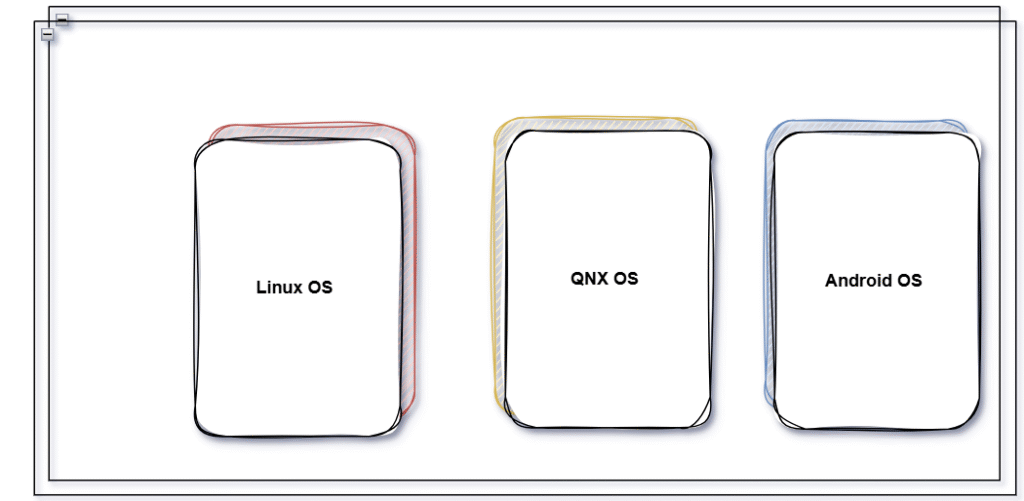
    Driver Development on the Operating System

    Linux System Programming , Kernel Programming and Drivers devlopment

    • Linux Kernel Architecture
    • Kernel Modules
    • Device Drivers Overview
    • Character Device Drivers
    • Block Device Drivers
    • Interrupt Handling in Linux
    • GPIO Driver Development
    • I2C Driver Development
    • SPI Driver Development
    • UART Driver Development
    • PWM Driver Development
    • DMA in Linux Drivers
    • Power Management in Linux Drivers
    • File Operations in Device Drivers
    • Linux Kernel Debugging (using dmesg, gdb, etc.)
    • System Calls & User Space Communication
    • PCIe Device Drivers
    • USB Device Drivers
    • Networking Drivers
    • Device Tree & DTS files

    RTOS (Real-Time Operating System) [FreeRTOS or QNX]

    • RTOS Architecture & Basics
    • Task Scheduling in RTOS
    • Interrupt Handling in RTOS
    • RTOS Memory Management
    • Semaphore, Mutex, and Event Flags
    • RTOS Timers
    • RTOS for Embedded Systems
    • Bare-Metal vs RTOS Applications
    • RTOS Device Drivers
    • RTOS-Specific I/O Driver Development
    • RTOS with FreeRTOS / embOS / Micrium
    • Inter-Process Communication in RTOS
    • RTOS Power Management
    • RTOS Porting to Custom Hardware
    • RTOS and Network Stack Integration (e.g., lwIP)

    QNX Interview Question Link : Master QNX OS Interview Questions

    Bootloaders

    • Boot Process Overview
    • U-Boot Basics
    • Customizing U-Boot for Embedded Systems
    • Bootloader Initialization
    • Bootloader Device Drivers
    • Bootloader and Kernel Image Management
    • Bootloader for Flash Memory
    • Bootloader Debugging and Troubleshooting

    Compiler & Toolchain (GCC)

    • GCC Command-line Options
    • GCC Compilation Stages (Preprocessing, Compilation, Assembly, Linking)
    • Cross Compilation
    • Linking and Object Files (.o, .a, .so)
    • Optimization Flags
    • Debug Flags & Symbols (-g, -O0 to -O3)
    • Linker Scripts (Basics)
    • Toolchain Components: as, ld, objdump, nm, readelf

    Build System

    • Makefile Basics
    • Makefile Variables, Targets, and Rules
    • Makefile for Embedded Projects
    • CMake Basics
    • Writing CMakeLists.txt
    • CMake vs Make
    • Cross-compilation with CMake

    Bash Scripting

    • Shell Scripting Basics
    • Conditional Statements and Loops
    • Functions in Shell
    • Script for Build Automation
    • Script for Device Flashing
    • Logging and Error Handling in Scripts

    Docker

    • Docker Basics & Architecture
    • Creating Dockerfiles
    • Docker Images vs Containers
    • Building and Running Embedded Dev Environments
    • Docker Volumes and Networking
    • Using Docker for Cross-compilation
    • Docker Compose (Optional)

    Yocto Project

    • Yocto Basics & Directory Structure
    • BitBake and Recipes
    • Layers, Metadata, and Machine Config
    • Writing a Simple BitBake Recipe
    • Adding a Custom Layer
    • Building a Minimal Linux Image
    • Adding Kernel Modules or Drivers
    • Deploying to Hardware
    • Yocto with U-Boot & Device Tree
    • Debugging Yocto Builds

    Step 5: Software Design, Debugging, Testing & SDLC

    Design & Architecture

    • UML Diagrams (Use Case, Class, Sequence, Activity)
    • UML State Machine Diagrams
    • Finite State Machines (FSM)
    • Software Architecture Patterns (Layered, Modular, etc.)
    • Real-Time System Design Concepts

    Version Control

    • Git Basics (clone, commit, push, pull)
    • Branching & Merging
    • Git Workflow (Feature Branch, Git Flow)
    • Conflict Resolution
    • Git Rebase vs Merge
    • Git Tags and Releases

    Debugging Tools

    • SWD (Serial Wire Debug)
    • JTAG (Joint Test Action Group)
    • GDB Basics and Commands
    • Remote Debugging with GDB
    • Breakpoints, Watchpoints, Backtrace
    • Disassembly and Register Inspection
    • Debugging on Bare-Metal & RTOS

    SDLC (Software Development Life Cycle)

    • Requirements Analysis
    • Design Phase
    • Implementation Phase
    • Testing & Integration
    • Maintenance Phase
    • Agile Model
    • Waterfall Model (for comparison)

    Testing & Quality

    • Test Driven Development (TDD)
    • Unit Testing Frameworks (Google Test, Unity)
    • Integration Testing Basics
    • System Testing
    • Static Code Analysis Tools (Cppcheck, Clang-Tidy, PC-lint)
    • MISRA-C / MISRA-C++ Guidelines
    • Code Coverage Tools
    • Continuous Integration Basics (Jenkins, GitHub Actions)

    Test Equipment Usage

    • Using a Multimeter (Voltage, Current, Continuity)
    • Using a Logic Analyzer (Protocol Decoding: UART, SPI, I2C)
    • Using an Oscilloscope (Waveform Analysis, Triggering, Noise Detection)
    • Using Power Supply and Lab Tools Safely

    Board Bring-up Skills

    • Power-On Checks and Voltage Rails
    • Clock Signal Verification
    • Reset Circuit Validation
    • Boot Logs & Serial Debugging
    • Flashing Bootloaders and Firmware
    • Verifying Peripheral Functionality
    • Connectivity Tests (USB, Ethernet, CAN)
    • Interface Testing (UART, I2C, SPI, GPIO)

    Step 6: Embedded System Job Roles

    Core Embedded Development

    • Embedded Software Engineer
    • Firmware Engineer
    • Embedded Systems Developer
    • Bare-metal Embedded Developer
    • RTOS Developer

    Application & Middleware

    • Embedded C++ Application Developer
    • Middleware Software Engineer
    • Qt Application Developer (for GUI on embedded devices)
    • HMI Developer (Human Machine Interface)

    Driver and OS Layer

    • Linux Device Driver Developer
    • Kernel Developer (Linux/RTOS)
    • Board Support Package (BSP) Engineer
    • Embedded Linux Engineer
    • RTOS Kernel/Porting Engineer

    Communication & Protocols

    • Protocol Stack Developer (CAN, UDS, TCP/IP, etc.)
    • IoT Firmware Developer
    • Connectivity Engineer (Bluetooth, Zigbee, Wi-Fi, LoRa)
    • Wireless Communication Engineer

    Testing and QA

    • Embedded Test Engineer
    • Validation & Verification Engineer
    • Hardware-in-the-Loop (HIL) Test Engineer
    • Automation Test Engineer (Python, Robot Framework)
    • Software Quality Engineer (Static/Dynamic Analysis)

    Debug & Diagnostics

    • Embedded Debugging Engineer
    • Field Application Engineer (FAE)
    • Diagnostics Software Engineer (UDS, ISO 14229)

    Hardware-Software Co-design

    • Embedded Hardware Engineer
    • FPGA Developer (Verilog/VHDL)
    • SoC Integration Engineer
    • PCB Bring-up and Debug Engineer

    AI/ML and Embedded Intelligence

    • Embedded AI/ML Developer (TinyML)
    • Edge Computing Engineer
    • Vision-based Embedded Developer (OpenCV, TensorFlow Lite)

    Build, Release, and Automation

    • Yocto Build Engineer
    • DevOps for Embedded Systems
    • CI/CD Engineer (for Embedded Projects)
    • Toolchain & Compiler Specialist

    Project Management & Process

    • Embedded Project Manager
    • Scrum Master (for Embedded Teams)
    • ASPICE/AUTOSAR Compliance Engineer

    Special thanks to @mr-raj for contributing to this article on Embedded Prep

    S.No Question
    1What is embedded C?
    2What is an embedded system?
    3Differentiate between a microprocessor and a microcontroller.
    4Explain the various data types in C used for embedded systems.
    5What are the basic differences between C and embedded C?
    6How do you declare a constant in embedded C?
    7What is the keyword “volatile” used for in embedded C?
    8Explain the difference between static and dynamic memory allocation in embedded C.
    9What is an interrupt and how is it handled in embedded C?
    10Explain the concept of polling versus interrupt-driven I/O.
    11How do you perform bitwise operations in embedded C?
    12Describe the process of creating a delay in embedded C.
    13What is the significance of the “restrict” keyword in embedded C?
    14Explain the purpose of the “const” keyword in embedded C.
    15How do you declare and use a pointer in embedded C?
    16What is a structure in embedded C and how is it used?
    17Describe the role of the “typedef” keyword in embedded C.
    18Explain the concept of bit fields in embedded C.
    19What is a union and how is it used in embedded C?
    20What are the advantages of using bit manipulation in embedded C?
    21Describe the “volatile” keyword and its importance in embedded C.
    22Explain the concept of portability in embedded C programming.
    23How do you implement a circular buffer in embedded C?
    24What is the difference between little-endian and big-endian byte ordering in embedded systems?
    25How do you implement a finite state machine in embedded C?
    26Describe the process of handling errors in embedded C programming.
    27Explain the role of the linker in embedded C programming.
    28What is the significance of the “extern” keyword in embedded C?
    29How do you perform input/output operations in embedded C?
    30Describe the concept of real-time operating systems (RTOS) in embedded C.
    31How do you handle multi-threading in embedded C?
    32What is the purpose of the “inline” keyword in embedded C?
    33Explain the concept of interrupt latency in embedded systems.
    34How do you implement a watchdog timer in embedded C?
    35Describe the process of programming timers in embedded C.
    36What are the different types of memory available in embedded systems?
    37How do you perform memory-mapped I/O in embedded C?
    38Explain the concept of DMA (Direct Memory Access) in embedded systems.
    39How do you handle endianness issues in embedded C?
    40Describe the process of implementing a software stack in embedded C.
    41What is the role of a bootloader in embedded systems?
    42How do you debug embedded C code?
    43Explain the concept of cache memory and its impact on embedded systems.
    44How do you handle floating-point arithmetic in embedded C?
    45Describe the process of implementing a communication protocol in embedded C.
    46What is the role of the startup code in embedded systems?
    47How do you perform memory alignment in embedded C?
    48Explain the concept of memory-mapped peripherals in embedded systems.
    49How do you handle power management in embedded C?
    50Describe the process of implementing a state machine in embedded C.
    51What is a pointer-to-function in embedded C?
    52How do you perform code optimization in embedded C?
    53Explain the concept of real-time scheduling in embedded systems.
    54How do you implement a circular linked list in embedded C?
    55Describe the process of implementing a hardware driver in embedded C.
    56What is the role of the stack pointer in embedded systems?
    57How do you perform memory pooling in embedded C?
    58Explain the concept of hardware-software co-design in embedded systems.
    59How do you handle multi-tasking in embedded C?
    60Describe the process of implementing a state transition table in embedded C.
    61What is the role of the program counter in embedded systems?
    62How do you perform fixed-point arithmetic in embedded C?
    63Explain the concept of real-time constraints in embedded systems.
    64How do you implement a priority queue in embedded C?
    65Describe the process of implementing a device driver in embedded C.
    66What is the role of the status register in embedded systems?
    67How do you perform memory-mapped file I/O in embedded C?
    68Explain the concept of multi-core processing in embedded systems.
    69How do you handle concurrency issues in embedded C?
    70Describe the process of implementing a message passing mechanism in embedded C.
    71What is the role of the interrupt vector table in embedded systems?
    72How do you perform fixed-size memory allocation in embedded C?
    73Explain the concept of real-time task synchronization in embedded systems.
    74How do you implement a priority-based scheduler in embedded C?
    75Describe the process of implementing a file system in embedded C.
    76What is the role of the system control register in embedded systems?
    77How do you perform memory-mapped I/O with direct addressing in embedded C?
    78Explain the concept of hardware acceleration in embedded systems.
    79How do you handle resource contention in embedded C?
    80Describe the process of implementing a power management scheme in embedded C.
    81What is the role of the interrupt service routine in embedded systems?
    82How do you perform dynamic memory allocation in embedded C?
    83Explain the concept of real-time task synchronization using semaphores in embedded systems.
    84How do you implement a round-robin scheduler in embedded C?
    85Describe the process of implementing a communication protocol stack in embedded C.
    86What is the role of the memory management unit in embedded systems?
    87How do you perform memory-mapped I/O with indirect addressing in embedded C?
    88Explain the concept of hardware/software partitioning in embedded systems.
    89How do you handle inter-process communication in embedded C?
    90Describe the process of implementing a real-time operating system kernel in embedded C.
    91What is the role of the system timer in embedded systems?
    92How do you perform memory-mapped I/O with bank switching in embedded C?
    93Explain the concept of hardware verification in embedded systems.
    94How do you handle synchronization issues in embedded C?
    95Describe the process of implementing a memory management scheme in embedded C.
    96What is the role of the interrupt controller in embedded systems?
    97How do you perform memory-mapped I/O with memory-mapped registers in embedded C?
    98Explain the concept of hardware-in-the-loop testing in embedded systems.
    99How do you handle real-time constraints in embedded C?
    100Describe the process of implementing a task scheduler in embedded C.
    101What is the role of the watchdog timer in embedded systems?
    102How do you perform memory-mapped I/O with memory-mapped files in embedded C?
    103Explain the concept of hardware debugging in embedded systems.
    104How do you handle exception handling in embedded C?
    105Describe the process of implementing a device driver framework in embedded C.
    106What is the role of the reset vector in embedded systems?
    107How do you perform memory-mapped I/O with memory-mapped peripherals in embedded C?
    108Explain the concept of hardware emulation in embedded systems.
    109How do you handle real-time task synchronization using message queues in embedded C?
    110Describe the process of implementing a real-time scheduler in embedded C.
    111What is the role of the memory protection unit in embedded systems?
    112How do you perform memory-mapped I/O with memory-mapped ports in embedded C?
    113Explain the concept of hardware co-simulation in embedded systems.
    114How do you handle real-time task synchronization using event flags in embedded C?
    115Describe the process of implementing a fault-tolerant system in embedded C.
    116What is the role of the power management unit in embedded systems?
    117How do you perform memory-mapped I/O with memory-mapped devices in embedded C?
    118Explain the concept of hardware validation in embedded systems.
    119How do you handle real-time task synchronization using mutexes in embedded C?
    120Describe the process of implementing a real-time communication protocol in embedded C.
    121What is the role of the memory controller in embedded systems?
    122How do you perform memory-mapped I/O with memory-mapped buffers in embedded C?
    123Explain the concept of hardware synthesis in embedded systems.
    124How do you handle real-time task synchronization using condition variables in embedded C?
    125Describe the process of implementing a real-time file system in embedded C.
    126What is the role of the peripheral controller in embedded systems?
    127How do you perform memory-mapped I/O with memory-mapped displays in embedded C?
    128Explain the concept of hardware modelling in embedded systems.
    129How do you handle real-time task synchronization using semaphores and priority inversion in embedded C?
    130Describe the process of implementing a real-time network stack in embedded C.
    131What is the role of the DMA controller in embedded systems?
    132How do you perform memory-mapped I/O with memory-mapped sensors in embedded C?
    133Explain the concept of hardware simulation in embedded systems.
    134How do you handle real-time task synchronization using spinlocks in embedded C?
    135Describe the process of implementing a real-time file system journal in embedded C.
    136What is the role of the interrupt controller in embedded systems?
    137How do you perform memory-mapped I/O with memory-mapped timers in embedded C?
    138Explain the concept of hardware acceleration using FPGA in embedded systems.
    139How do you handle real-time task synchronization using priority inheritance in embedded C?
    140Describe the process of implementing a real-time memory management scheme in embedded C.
    141What is the role of the interrupt vector table in embedded systems?
    142How do you perform memory-mapped I/O with memory-mapped ADCs in embedded C?
    143Explain the concept of hardware co-design using high-level synthesis in embedded systems.
    144How do you handle real-time task synchronization using priority ceiling protocol in embedded C?
    145Describe the process of implementing a real-time communication protocol stack in embedded C.
    146What is the role of the system timer in embedded systems?
    147How do you perform memory-mapped I/O with memory-mapped DACs in embedded C?
    148Explain the concept of hardware-in-the-loop testing using virtual prototypes in embedded systems.
    149How do you handle real-time task synchronization using reader-writer locks in embedded C?
    150Describe the process of implementing a real-time fault-tolerant system in embedded C.
    151What is the role of the watchdog timer in embedded systems?
    152How do you perform memory-mapped I/O with memory-mapped PWMs in embedded C?
    153Explain the concept of hardware debugging using JTAG in embedded systems.
    154How do you handle real-time task synchronization using priority ceiling emulation in embedded C?
    155Describe the process of implementing a real-time virtual file system in embedded C.
    156What is the role of the reset vector in embedded systems?
    157How do you perform memory-mapped I/O with memory-mapped UARTs in embedded C?
    158Explain the concept of hardware emulation using virtual platforms in embedded systems.
    159How do you handle real-time task synchronization using message-passing rendezvous in embedded C?
    160Describe the process of implementing a real-time distributed system in embedded C.
    161What is the role of the memory protection unit in embedded systems?
    162How do you perform memory-mapped I/O with memory-mapped SPIs in embedded C?
    163Explain the concept of hardware co-simulation using System C in embedded systems.
    164How do you handle real-time task synchronization using priority-based spinlocks in embedded C?
    165Describe the process of implementing a real-time fault-tolerant communication protocol in embedded C.
    166What is the role of the power management unit in embedded systems?
    167How do you perform memory-mapped I/O with memory-mapped I2Cs in embedded C?
    168Explain the concept of hardware validation using formal methods in embedded systems.
    169How do you handle real-time task synchronization using priority-based semaphores in embedded C?
    170Describe the process of implementing a real-time secure file system in embedded C.
    171What is the role of the memory controller in embedded systems?
    172How do you perform memory-mapped I/O with memory-mapped GPIOs in embedded C?
    173Explain the concept of hardware synthesis using high-level languages in embedded systems.
    174How do you handle real-time task synchronization using priority-based condition variables in embedded C?
    175Describe the process of implementing a real-time embedded database system in embedded C.
    176What is the role of the peripheral controller in embedded systems?
    177How do you perform memory-mapped I/O with memory-mapped PWMs in embedded C?
    178Explain the concept of hardware modeling using hardware description languages in embedded systems.
    179How do you handle real-time task synchronization using priority-based mutexes in embedded C?
    180Describe the process of implementing a real-time secure communication protocol stack in embedded C.
    181What is the role of the DMA controller in embedded systems?
    182How do you perform memory-mapped I/O with memory-mapped UARTs in embedded C?
    183Explain the concept of hardware acceleration using GPU in embedded systems.
    184How do you handle real-time task synchronization using priority-based reader-writer locks in embedded C?
    185Describe the process of implementing a real-time embedded web server in embedded C.
    186What is the role of the interrupt controller in embedded systems?
    187How do you perform memory-mapped I/O with memory-mapped SPIs in embedded C?
    188Explain the concept of hardware co-design using IP cores in embedded systems.
    189How do you handle real-time task synchronization using priority-based rendezvous in embedded C?
    190Describe the process of implementing a real-time distributed communication protocol stack in embedded C.

    1. What is embedded software?

    Embedded software is a specialized type of software designed to run on hardware devices like microcontrollers, sensors, or boards such as Arduino, STM32, or Raspberry Pi. It controls specific functions within a larger system, often in real-time.

    2. Is this roadmap suitable for complete beginners?

    Yes! This roadmap is designed for absolute beginners with no prior experience in embedded systems. Whether you’re a student or a career switcher, you’ll find easy-to-follow steps, project ideas, and learning paths.

    3.Do I need to know C or C++ to get started?

    Knowing C is highly recommended, as it’s the foundation of embedded programming. However, our roadmap starts from scratch and will guide you to learn C and eventually C++ at a comfortable pace.

    4.What hardware do I need as a beginner?

    You can start with basic, affordable boards like:
    Arduino Uno
    ESP32 or ESP8266 (for IoT projects)
    STM32 (for advanced learning)
    These boards are beginner-friendly and widely supported by tutorials.

    5.Do I need electronics knowledge to start embedded programming?

    Only basic electronics knowledge is needed. The roadmap includes beginner-friendly explanations of resistors, capacitors, GPIOs, sensors, and circuits with diagrams and examples.

    6.Can I follow this roadmap while working or studying full-time?

    Absolutely! The guide is broken down into Step wise milestones, so you can learn at your own pace — even if you have just a few hours per week.

    7.What tools and software are covered in the roadmap?

    You’ll learn how to use:
    Arduino IDE
    PlatformIO
    STM32CubeIDE
    QEMU (for emulation)
    Git & GitHub
    Linux terminal basics
    GCC compiler and Makefiles

    8.Does the roadmap include real-world projects?

    Yes! You’ll work on practical projects like:
    LED blinking
    Temperature & humidity monitor
    IoT gas alert system
    Audio player with amplifier
    Real-time sensor dashboard with Python and web interface

    9.Is Linux knowledge required?

    Basic Linux knowledge is helpful but not mandatory. The roadmap includes a beginner section to get you comfortable with Linux commands, scripting, and embedded Linux fundamentals.

    10.What’s the goal of this roadmap?

    The roadmap aims to help you:
    ✅ Build a strong foundation in embedded systems
    ✅ Learn to work with real hardware
    ✅ Understand drivers, RTOS, and protocols
    ✅ Create portfolio-worthy projects
    ✅ Prepare for embedded job interviews

    11.Where can I find the full roadmap?

    The complete guide is available on our website/blog: Embedded Prep Master – Make sure to bookmark it and follow us for updates!

    You can also Visit other tutorials of Embedded Prep 

    Special thanks to @mr-raj for contributing to this article on Embedded Prep

  • A complete guide of ALSA (Advanced Linux Sound Architecture 2026)

    ALSA : A Complete Guide (Advanced Linux Sound Architecture 2026) covers ALSA basics, architecture, drivers, mixer, playback, recording & embedded Linux audio.

    What is ALSA (Advanced Linux Sound Architecture)

    ALSA : Advanced Linux Sound Architecture is a sound system framework and part of the Linux kernel that provides audio and MIDI functionality to Linux-based systems. It is responsible for handling audio device drivers, sound processing, and communication between the operating system and audio hardware

    Key Features of ALSA (Advanced Linux Sound Architecture) in Linux

    Key Features of ALSA : ALSA is a low-level audio subsystem in Linux that provides essential audio functionalities. Below is a detailed explanation of its key features:

    1. Low-Level Hardware Access of ALSA

    What it means:
    ALSA interacts directly with the sound card via kernel drivers, bypassing unnecessary layers for efficient audio processing.

    Why it matters:

    • Provides low-latency audio operations.
    • Enables direct control over hardware features (bit depth, sample rate, etc.).
    • Allows custom driver development for new audio hardware.

    Example:
    To check the list of available ALSA sound cards in Linux:

    cat /proc/asound/cards

    This outputs detected sound cards and their driver details.

    2. Multiple Sound Card Support

    What it means:
    ALSA can manage multiple sound cards in a system simultaneously. You can specify which card to use for playback or recording.

    Why it matters:

    • Useful in systems with integrated and external sound cards (e.g., USB sound cards).
    • Allows virtual sound routing between different devices.

    Example:
    To list all available sound devices:

    aplay -l

    To play audio using a specific card:

    aplay -D plughw:1,0 myaudio.wav

    This plays myaudio.wav on sound card 1, device 0.

    3. PCM (Pulse Code Modulation) Support

    What it means:
    PCM is the format in which digital audio data is stored and processed. ALSA’s PCM API allows fine-grained control over sample rate, bit depth, and channels.

    Why it matters:

    • Supports high-quality audio playback and recording.
    • Allows developers to configure buffer sizes, period sizes, and sample rates for audio streams.

    Example:
    To record CD-quality audio (44.1 kHz, 16-bit, stereo):

    arecord -d 10 -f cd -t wav myrecording.wav

    This records a 10-second audio file.

    4. Mixer Interface

    What it means:
    The ALSA Mixer allows you to control volume, mute/unmute channels, and configure input/output levels.

    Why it matters:

    • Essential for adjusting audio levels and channel mixing.
    • Useful for configuring microphone and speaker balance.
    • Can be used to programmatically modify audio settings.

    Example:
    To launch a GUI-based audio mixer:

    alsamixer

    To change volume via command line:

    amixer set Master 80%

    This sets the Master volume to 80%.

    5. MIDI (Musical Instrument Digital Interface) Support

    What it means:
    MIDI allows ALSA to interface with musical instruments, synthesizers, and software-based sequencers.

    Why it matters:

    • Enables MIDI-based music production on Linux.
    • Provides real-time processing of MIDI events.
    • Works with software like FluidSynth, TiMidity++, etc.

    Example:
    To list MIDI devices:

    aconnect -l

    To connect a MIDI keyboard to a software synthesizer:

    aconnect 20:0 128:0

    6. Plug-In System for Audio Processing

    What it means:
    ALSA supports software-based plugins that can modify or enhance the audio stream.

    Why it matters:

    • Enables resampling, format conversion, and equalization.
    • Allows chaining multiple effects.
    • Useful for virtual surround sound or sample rate conversion.

    Example:
    To configure an ALSA asoundrc file to use a plugin:

    pcm.!default {
        type plug
        slave.pcm \"hw:0,0\"
    }

    This ensures ALSA automatically converts audio formats to match the hardware’s capabilities.

    7. Efficient Sound Processing

    What it means:
    ALSA ensures low-latency and efficient buffering for high-performance audio applications.

    Why it matters:

    • Realtime audio processing is crucial for professional applications (e.g., DAWs like Ardour).
    • Low CPU overhead allows smooth playback even on embedded systems.

    Example:
    To check the buffer settings for an audio device:

    cat /proc/asound/card0/pcm0p/sub0/hw_params

    You can tweak buffer sizes in ALSA configuration files for better performance.

    Soundcore Anker Life Q20 Headphones

    Soundcore Anker Life Q20 Headphones

    Hybrid Active Noise Cancelling, Wireless Over Ear Bluetooth Headphones with 60H Playtime, Hi-Res Audio, Deep Bass, Foam Ear Cups, Travel & Office Friendly, USB-C Charging.

    🔥 Buy on Amazon

    8. Asynchronous and Synchronous APIs

    What it means:
    ALSA provides two ways to handle audio operations:

    • Synchronous API: Blocks execution until audio operation completes.
    • Asynchronous API: Allows background audio processing.

    Why it matters:

    • Asynchronous mode is useful for real-time streaming applications.
    • Developers can choose the API based on performance needs.

    Example:
    A basic C program for asynchronous ALSA playback:

    #include <alsa/asoundlib.h>
    int main() {
        snd_pcm_t *handle;
        snd_pcm_open(&handle, \"default\", SND_PCM_STREAM_PLAYBACK, 0);
        snd_pcm_close(handle);
        return 0;
    }

    This opens an ALSA PCM playback device asynchronously.

    💛 Support Embedded Prep

    If you find our tutorials helpful and want to support our mission of sharing high-quality embedded system knowledge, you can contribute by buying us a coffee. Every small contribution helps us keep creating valuable content for learners like you. ☕

    Thank you for your support — it truly keeps Embedded Prep growing. 💻✨

    Features of ALSA (Advanced Linux Sound Architecture) in Linux

    • Low-Level Hardware Access – Directly interacts with audio hardware through kernel drivers.
    • Multiple Sound Card Support – Can manage multiple audio devices simultaneously.
    • PCM (Pulse Code Modulation) Support – Handles digital audio playback and recording.
    • Mixer Interface – Controls volume, mute, and other settings.
    • MIDI Support – Allows MIDI device handling for music applications.
    • Plug-In System – Supports audio effect processing via software.
    • Efficient Sound Processing – Provides low-latency, high-performance audio handling.

    ALSA (Advanced Linux Sound Architecture) Components in Linux

    • Kernel Drivers:
      • ALSA drivers are built into the Linux kernel and interact with hardware.
      • Example: /proc/asound/cards lists detected sound cards.
    • User-Space Library (libasound):
      • The alsa-lib package provides the API to interact with sound devices.
      • Applications use this library to communicate with ALSA.
    • Utilities & Tools:
      • aplay / arecord – Play and record audio.
      • alsamixer – Adjust volume and other settings.
      • amixer – Command-line tool to control audio settings.

    Basic ALSA (Advanced Linux Sound Architecture ) Commands in Linux:

    • List audio devices: aplay -l
    • Play a WAV file: aplay test.wav
    • Record audio from a microphone: arecord -d 10 -f cd test.wav
    • Open the mixer interface: alsamixer
    • Save and restore ALSA settings: alsactl store alsactl restore

    How ALSA (Advanced Linux Sound Architecture ) Works in Linux:

    • The Linux kernel loads ALSA drivers for the detected sound card.
    • Applications use the libasound library to send/receive audio.
    • Audio is processed through ALSA’s PCM interface.
    • ALSA provides mixing, resampling, and routing capabilities.

    1. Cloning the ALSA Source Code

    ALSA consists of multiple components, mainly:

    • alsa-lib (User-space library)
    • alsa-utils (Utilities like aplay, arecord, alsamixer)
    • alsa-tools (Extra tools for debugging, MIDI handling)
    • alsa-plugins (Audio plugins like rate conversion, Bluetooth support)
    • alsa-firmware (Firmware for certain sound cards)
    • alsa-driver (Kernel drivers, but now merged into the Linux kernel)

    Clone the ALSA Source Code from GitHub:

    # Create a directory for ALSA development
    mkdir ~/alsa-dev && cd ~/alsa-dev
    # Clone ALSA core library (user-space API)
    git clone https://github.com/alsa-project/alsa-lib.git
    # Clone ALSA utilities (CLI tools like aplay, arecord, alsamixer)
    git clone https://github.com/alsa-project/alsa-utils.git
    # Clone ALSA tools (extra tools for debugging and testing)
    git clone https://github.com/alsa-project/alsa-tools.git
    # Clone ALSA plugins (for extended functionality)
    git clone https://github.com/alsa-project/alsa-plugins.git
    # Clone ALSA firmware (for some sound cards that require it)
    git clone https://github.com/alsa-project/alsa-firmware.git
    

    2. ALSA Folder Structure (Inside the Repositories)

    Once cloned, each repository follows a structured format. Below is a breakdown of alsa-lib and alsa-utils:

    Inside alsa-lib (Core Library)

    alsa-lib/
    ├── include/            # Header files (ALSA API definitions)
    │   ├── alsa/           # Main ALSA headers
    │   ├── pcm.h           # PCM audio handling
    │   ├── mixer.h         # Mixer control interface
    │   ├── seq.h           # MIDI sequencer API
    │   ├── control.h       # Sound card control interface
    │   ├── asoundlib.h     # Primary API for ALSA applications
    │   └── conf.h          # ALSA configuration
    │
    ├── src/                # Source code for ALSA library
    │   ├── pcm/            # PCM playback/recording implementation
    │   ├── mixer/          # Mixer control implementation
    │   ├── seq/            # MIDI sequencer implementation
    │   ├── control/        # Sound card control implementation
    │   ├── conf/           # ALSA configuration parsing
    │   ├── memalloc.c      # Memory allocation for ALSA buffers
    │   ├── timer.c         # Timer management for audio events
    │   └── utils.c         # Helper functions
    │
    ├── conf/               # Configuration files for ALSA
    │   ├── alsa.conf       # Main ALSA configuration file
    │   ├── pcm.conf        # Default PCM settings
    │   └── mixer.conf      # Default mixer settings
    │
    ├── test/               # Test programs for ALSA API
    │   ├── test_pcm.c      # Test PCM playback and recording
    │   ├── test_mixer.c    # Test mixer functionalities
    │   ├── test_seq.c      # Test MIDI sequencing
    │   └── Makefile.am     # Automake build system file
    │
    ├── doc/                # Documentation (ALSA API details)
    ├── configure.ac        # Autotools configuration script
    ├── Makefile.am         # Automake build file
    └── README.md           # Project overview and instructions
    

    Inside alsa-utils (CLI Utilities like aplay, alsamixer)

    alsa-utils/
    ├── include/           # Header files for ALSA utilities
    ├── src/               # Source code of CLI utilities
    │   ├── aplay/         # `aplay` command-line audio player
    │   ├── arecord/       # `arecord` command-line audio recorder
    │   ├── alsamixer/     # `alsamixer` graphical mixer control
    │   ├── amixer/        # `amixer` command-line mixer control
    │   ├── speaker-test/  # `speaker-test` for testing sound output
    │   └── alsactl/       # `alsactl` for saving/restoring sound state
    │
    ├── doc/               # Documentation for ALSA utilities
    ├── configure.ac       # Autotools configuration script
    ├── Makefile.am        # Automake build system file
    └── README.md          # Project overview
    

    3. Building and Compiling ALSA

    Most ALSA components use Autotools (autoconf, automake, libtool) or CMake. Follow these steps to build alsa-lib:

    Install Dependencies

    sudo apt update
    sudo apt install -y build-essential autoconf libtool pkg-config
    

    Compile alsa-lib (User-Space API)

    cd ~/alsa-dev/alsa-lib
    # Generate configuration script
    autoreconf --install
    # Configure the build (use --prefix=/usr for system-wide install)
    ./configure --prefix=/usr
    # Compile the library
    make -j$(nproc)
    # Install it (you may need sudo)
    sudo make install
    

    Compile alsa-utils (CLI Tools)

    cd ~/alsa-dev/alsa-utils
    # Generate configuration script
    autoreconf --install
    # Configure the build
    ./configure --prefix=/usr
    # Compile ALSA utilities
    make -j$(nproc)
    # Install utilities like `aplay`, `arecord`, `alsamixer`
    sudo make install
    

    After this, aplay and arecord should be available system-wide.

    4. Running ALSA After Compilation

    After building ALSA, check if it works:

    Verify ALSA Installation

    alsactl init
    aplay -l      # List playback devices
    arecord -l    # List recording devices

    Test Audio Playback

    aplay /usr/share/sounds/alsa/test.wav

    Test Audio Recording

    arecord -d 5 -f cd test.wav
    aplay test.wav

    5. Debugging and Logs

    If ALSA doesn\’t work correctly, check:

    View ALSA Logs

    dmesg | grep -i alsa
    journalctl -xe | grep -i alsa

    Manually Load ALSA Kernel Modules

    sudo modprobe snd-pcm
    sudo modprobe snd-hda-intel

    Restart ALSA

    sudo alsactl restore
    sudo systemctl restart alsa-utils

    Setting Up ALSA Development Environment

    Before coding, install the necessary ALSA libraries:

    sudo apt update
    sudo apt install -y libasound2-dev

    C++ Code for Audio Playback using ALSA

    1. Writing a Simple ALSA Program in C++

    A basic ALSA program in C++ will:
    Open an audio device
    Set hardware parameters (sample rate, format, channels)
    Write audio data to the device

    Here’s a minimal example to play silence (just for testing):

    #include <iostream>
    #include <alsa/asoundlib.h>
    #define PCM_DEVICE \"default\"
    int main() {
        snd_pcm_t *pcm_handle;
        snd_pcm_hw_params_t *params;
        unsigned int rate = 44100;
        int err;
        // Open PCM device for playback
        if ((err = snd_pcm_open(&pcm_handle, PCM_DEVICE, SND_PCM_STREAM_PLAYBACK, 0)) < 0) {
            std::cerr << \"Error opening PCM device: \" << snd_strerror(err) << std::endl;
            return 1;
        }
        // Set hardware parameters
        snd_pcm_hw_params_malloc(&params);
        snd_pcm_hw_params_any(pcm_handle, params);
        snd_pcm_hw_params_set_access(pcm_handle, params, SND_PCM_ACCESS_RW_INTERLEAVED);
        snd_pcm_hw_params_set_format(pcm_handle, params, SND_PCM_FORMAT_S16_LE);
        snd_pcm_hw_params_set_channels(pcm_handle, params, 2);
        snd_pcm_hw_params_set_rate_near(pcm_handle, params, &rate, 0);
        snd_pcm_hw_params(pcm_handle, params);
        snd_pcm_hw_params_free(params);
        // Prepare buffer and write silence
        char buffer[4096] = {0};
        for (int i = 0; i < 100; i++) {
            snd_pcm_writei(pcm_handle, buffer, sizeof(buffer) / 4);
        }
        // Close PCM device
        snd_pcm_drain(pcm_handle);
        snd_pcm_close(pcm_handle);
        return 0;
    }
    

    Compile & Run

    g++ -o alsa_playback alsa_playback.cpp -lasound
    ./alsa_playback

    This program initializes ALSA, configures it for playback, and writes silent audio to the sound card.

    2. Modifying ALSA Source Code

    If you want to customize ALSA itself, you need to modify its source code.

    Clone ALSA Source Code

    git clone https://github.com/alsa-project/alsa-lib.git
    cd alsa-lib

    Modify ALSA Functions

    For example, to add debug logs in snd_pcm_writei(), edit src/pcm/pcm.c:

    printf(\"[DEBUG] PCM write called with size: %d\\n\", size);

    Then rebuild ALSA:

    ./configure --prefix=/usr
    make -j$(nproc)
    sudo make install

    Now, every time an app calls snd_pcm_writei(), it will print a debug message.

    3. ALSA Plugin & Driver Development

    You can create custom ALSA plugins or even write a driver.

    Custom Plugin Example

    1️⃣ Clone ALSA plugins:

    git clone https://github.com/alsa-project/alsa-plugins.git  
    cd alsa-plugins
    

    2️⃣ Create src/custom_plugin.c:

    #include <stdio.h>
    #include <alsa/asoundlib.h>
    int snd_pcm_custom_open(snd_pcm_t **pcm, const char *name, snd_pcm_stream_t stream, int mode) {
        printf(\"[Custom Plugin] Opened PCM device: %s\\n\", name);
        return snd_pcm_open(pcm, name, stream, mode);
    }

    3️⃣ Compile & Install:

    ./configure --prefix=/usr
    make -j$(nproc)
    sudo make install

    ALSA Kernel Driver Skeleton

    #include <linux/module.h>
    #include <linux/init.h>
    #include <sound/core.h>
    #include <sound/pcm.h>
    static int __init alsa_driver_init(void) {
        pr_info(\"[ALSA Driver] Initialized!\\n\");
        return 0;
    }
    static void __exit alsa_driver_exit(void) {
        pr_info(\"[ALSA Driver] Exiting!\\n\");
    }
    module_init(alsa_driver_init);
    module_exit(alsa_driver_exit);
    MODULE_LICENSE(\"GPL\");
    MODULE_AUTHOR(\"Your Name\");
    MODULE_DESCRIPTION(\"Custom ALSA Driver\");
    

    Compile & Load:

    make -C /lib/modules/$(uname -r)/build M=$(pwd) modules
    sudo insmod custom_alsa_driver.ko
    

    Audio-related terms

    1️⃣ General Audio Terms

    • Audio Signal – A representation of sound as an electrical signal (analog or digital).
    • Frequency (Hz) – The number of cycles per second in a sound wave (e.g., 440 Hz for A4 note).
    • Amplitude – The strength of a sound wave, determining loudness.
    • Bit Depth – The number of bits used to represent each audio sample (e.g., 16-bit, 24-bit).
    • Sample Rate (kHz) – How often an audio signal is sampled per second (44.1 kHz, 48 kHz).
    • Channel – A single independent audio signal (mono = 1, stereo = 2, 5.1 surround = 6).

    2️⃣ PCM (Pulse Code Modulation) & Digital Audio

    • PCM (Pulse Code Modulation) – A digital representation of an analog signal by sampling at regular intervals.
    • Linear PCM (LPCM) – A lossless format where samples are directly proportional to the analog waveform.
    • Interleaved PCM – Multi-channel PCM data is stored in an alternating pattern (L, R, L, R).
    • Non-Interleaved PCM – Each channel’s data is stored separately (LLLL RRRR).
    • SNR (Signal-to-Noise Ratio) – The ratio of desired signal to background noise (higher is better).
    • THD (Total Harmonic Distortion) – The amount of distortion in an audio signal (lower is better).
    • Jitter – Timing variations in digital audio transmission, causing distortion.

    3️⃣ Audio Hardware Components

    • ADC (Analog-to-Digital Converter) – Converts analog signals (e.g., from a mic) into digital data.
    • DAC (Digital-to-Analog Converter) – Converts digital audio (e.g., PCM) back into an analog signal.
    • Codec (Coder-Decoder) – A chip that contains both ADC and DAC for audio processing.
    • Op-Amp (Operational Amplifier) – Used in audio circuits for amplification.
    • PLL (Phase-Locked Loop) – Used in clock synchronization for digital audio interfaces.
    • Amplifier – Boosts audio signal strength for speakers or headphones.
    • Speaker Driver – The physical component that converts an electrical signal into sound waves.
    • Microphone – Captures sound waves and converts them into electrical signals.

    4️⃣ Audio Compression & Formats

    • Lossless Audio – Retains all data (FLAC, WAV, ALAC).
    • Lossy Audio – Removes some data for compression (MP3, AAC, OGG).
    • Bitrate (kbps) – The amount of data processed per second in an audio file (128 kbps, 320 kbps).
    • CBR (Constant Bitrate) – The bitrate stays the same throughout the audio file.
    • VBR (Variable Bitrate) – The bitrate changes depending on the audio complexity.
    • DSP (Digital Signal Processing) – Algorithms used to modify, filter, or enhance audio signals.

    5️⃣ Audio Interfaces & Communication Protocols

    • I2S (Inter-IC Sound) – A common digital audio interface between microcontrollers and audio chips.
    • TDM (Time-Division Multiplexing) – A protocol for transmitting multiple audio channels over a single bus.
    • I2C (Inter-Integrated Circuit) – Used for configuring audio codecs and peripherals.
    • SPI (Serial Peripheral Interface) – Used in some audio DACs for high-speed communication.
    • PCM Clock Signals:
      • Bit Clock (BCLK) – Synchronizes the data transmission in PCM.
      • Word Clock (WCLK/LRCLK) – Indicates the start of a new audio sample.
      • Master Clock (MCLK) – A high-frequency clock driving the audio system.

    6️⃣ ALSA & Linux Audio Terms

    • ALSA (Advanced Linux Sound Architecture) – The main sound system in Linux.
    • JACK (Jack Audio Connection Kit) – A low-latency audio system for professional use.
    • PulseAudio – A sound server on top of ALSA for user-friendly mixing and management.
    • snd_pcm_open() – The function to open an ALSA PCM device for audio playback or recording.
    • snd_pcm_hw_params() – Used to configure ALSA hardware settings like format and sample rate.
    • PCM Device – An ALSA playback or recording interface (default, hw:0,0).
    • Mixer – Adjusts volume levels, channel routing, and audio effects.
    • DMIX – An ALSA plugin for mixing multiple audio streams together.

    7️⃣ Embedded & Real-Time Audio Concepts

    • Real-Time Processing – Ensuring low-latency audio processing, important for VoIP and music apps.
    • Low-Latency Kernel – A Linux kernel optimized for real-time audio.
    • Audio Buffer – Temporary storage for audio data before processing.
    • Overrun/Underrun – Audio buffer issues causing glitches in playback or recording.
    • HRTF (Head-Related Transfer Function) – Used for 3D spatial audio processing.

    8️⃣ Professional & Advanced Audio Technologies

    • MIDI (Musical Instrument Digital Interface) – A protocol for electronic musical instruments.
    • ASIO (Audio Stream Input/Output) – A Windows-based low-latency audio driver.
    • DTS (Digital Theater Systems) – A surround sound format used in movies.
    • Dolby Atmos – A 3D spatial sound format for immersive audio experiences.
    • Binaural Audio – A technique that mimics human hearing for a 3D sound experience.

    ALSA complete architecture

    ALSA Architecture Overview

    1️⃣ User Space (Applications & Libraries)

    This is where audio applications and APIs interact with ALSA.

    🔹 Audio Applications:

    • Media Players: VLC, MPV, Audacious
    • Communication: Skype, Zoom
    • DAWs (Digital Audio Workstations): Ardour, Audacity

    🔹 Audio Libraries & APIs:

    • ALSA API (libasound) – Native ALSA API for direct control.
    • PulseAudio (Optional) – High-level sound server for managing multiple audio streams.
    • JACK (Optional) – Real-time low-latency audio framework.

    🔹 Sysfs & Procfs Interfaces

    • /proc/asound/ – Debugging ALSA devices.
    • /sys/class/sound/ – Kernel interaction with user space.

    2️⃣ ALSA User Space Libraries

    • libasound (ALSA C API)
      • Provides high-level API functions for applications to interact with ALSA.
      • Functions like snd_pcm_open() are used for playback and recording.
      • Uses IOCTL (Input/Output Control) calls to talk to ALSA kernel drivers.
    • ALSA Plugins (dmix, dsnoop, softvol, etc.)
      • dmix – Software mixing (mix multiple audio streams).
      • dsnoop – Allows multiple applications to record audio simultaneously.
      • softvol – Implements software volume control.

    3️⃣ Kernel Space (ALSA Core)

    This is the core of ALSA where the real work happens.

    🔹 ALSA Kernel Modules:

    • snd_pcm.ko – Handles PCM (Pulse Code Modulation) audio streams.
    • snd_timer.ko – Provides timing functions for audio processing.
    • snd_mixer.ko – Manages volume, channels, and mixing.
    • snd_seq.ko – MIDI sequencer support.

    🔹 Device Drivers (Sound Card Drivers)

    • ALSA interacts with sound card drivers via /dev/snd/ interfaces.
    • Each sound card has a driver that follows ALSA’s PCM framework.

    🔹 Important Kernel Functions:

    • sound/core/pcm.c – Implements PCM playback and recording.
    • sound/core/control.c – Handles audio controls like volume.
    • sound/core/hwdep.c – Hardware-dependent (low-level) controls.

    4️⃣ Kernel Space (ALSA Hardware Abstraction)

    🔹 PCM Core Layer

    • Converts user-space PCM audio into a format the hardware understands.
    • Manages ring buffers to avoid underruns/overruns.

    🔹 DMA (Direct Memory Access) Engine

    • Transfers audio data from system memory to the sound card without CPU overhead.

    🔹 I/O Interfaces (I2S, TDM, AC’97, HD Audio, USB Audio, etc.)

    • I2S (Inter-IC Sound) – Used in embedded systems and ARM boards.
    • TDM (Time-Division Multiplexing) – Multi-channel audio transmission.
    • AC’97 (Audio Codec \’97) – Legacy PC audio standard.
    • HDA (High Definition Audio) – Used in modern Intel/AMD PC sound cards.
    • USB Audio – External sound cards and microphones.

    5️⃣ Hardware Level (Sound Card, Codec, DAC, Speaker)

    🔹 Sound Card (Integrated or External)

    • Interfaces with ALSA via PCI, USB, I2C, SPI, etc.

    🔹 Audio Codec (ADC + DAC)

    • ADC (Analog-to-Digital Converter) – Converts microphone input into digital signals.
    • DAC (Digital-to-Analog Converter) – Converts digital audio into an analog signal for speakers.

    🔹 Amplifier & Speaker

    • Amplifier – Boosts audio signal for output.
    • Speaker / Headphone Output – Converts electrical signals into sound.

    ALSA Audio Flow (From Application to Speaker)

    Example: Playing an Audio File in VLC 1️⃣ User Space:

    • VLC requests ALSA for playback using libasound.
    • snd_pcm_open(\"default\") opens the PCM device.

    2️⃣ ALSA API & Plugins:

    • snd_pcm_writei() writes PCM data.
    • If mixing is needed, Dmix handles it.

    3️⃣ Kernel Space (ALSA Core):

    • snd_pcm.ko processes the request.
    • DMA controller moves PCM data from RAM to the sound card.

    4️⃣ Hardware Level (Sound Card, Codec, Speaker):

    • The sound card receives PCM data via I2S/TDM.
    • The DAC converts digital PCM into an analog signal.
    • The amplifier boosts the signal.
    • The speaker produces sound waves.

    ALSA Device Files (/dev/snd/)

    Device FileDescription
    /dev/snd/controlC0Mixer & volume control
    /dev/snd/pcmC0D0pPCM playback device
    /dev/snd/pcmC0D0cPCM capture (recording) device
    /dev/snd/timerALSA timing functions

    To list all ALSA devices:

    aplay -l   # List playback devices
    arecord -l # List recording devices
    

    ALSA Debugging Tools

    1️⃣ Check ALSA Kernel Modules

    lsmod | grep snd

    2️⃣ Check Sound Card Details

    cat /proc/asound/cards

    3️⃣ Test PCM Audio Playback

    aplay -D hw:0,0 test.wav

    4️⃣ Check ALSA Mixer

    alsamixer

    5️⃣ Check ALSA Logs

    dmesg | grep snd

    Summary (From User Space to Speaker)

    [User Space]    ─→  [ALSA API & Plugins]  ─→  [ALSA Kernel]  ─→  [Sound Card Driver]  
    (ALSA Library)       (libasound, dmix)          (PCM, DMA)        (I2S, HDA, USB)
    [Sound Card]  ─→  [Codec (ADC/DAC)]  ─→  [Amplifier]  ─→  [Speaker]
    (PCI, USB, I2C)      (PCM to Analog)          (Boost Signal)      (Final Output)
    

    Writing an ALSA Driver for a Custom Codec

    Writing an ALSA driver for a custom audio codec involves multiple layers, from defining the codec driver to integrating it with the ALSA SoC (ASoC) framework.

    Steps to Write an ALSA Driver for a Custom Codec

    1️⃣ Understand ALSA SoC (ASoC) Framework

    ALSA System-on-Chip (ASoC) provides a modular framework for handling embedded audio devices, splitting the driver into three main components:

    • Machine Driver – Describes the connections between CPU, codec, and platform.
    • CPU DAI (Digital Audio Interface) Driver – Handles the SoC\’s PCM/I2S/TDM interface.
    • Codec Driver – Controls the actual audio codec (ADC/DAC).

    ALSA SoC Architecture

    [ User Space ]
      ├── ALSA API (libasound)
      ├── alsamixer / aplay
    [ Kernel Space ]
      ├── ALSA Core (sound/soc)
      │    ├── Machine Driver
      │    ├── CPU DAI Driver
      │    ├── Codec Driver
      │    ├── DMA Engine
    [ Hardware ]
      ├── I2S / TDM / AC97
      ├── Audio Codec (ADC/DAC)
      ├── Speaker / Headphones
    

    2️⃣ Set Up Your Development Environment

    You need:
    ✅ Kernel source code
    ✅ Cross-compiler (for embedded development)
    ✅ ALSA utilities (alsa-utils, aplay, arecord)
    ✅ Test hardware (custom codec board)

    Download ALSA source code if modifying existing drivers:

    git clone git://git.alsa-project.org/alsa-kernel.git
    cd alsa-kernel

    3️⃣ Implement the Codec Driver

    The codec driver is responsible for:
    ✅ Registering the codec with ASoC
    ✅ Configuring registers via I2C/SPI
    ✅ Implementing power management
    ✅ Defining audio controls (mixer, volume, mute)

    Example: Basic ALSA Codec Driver (my_codec.c)

    #include <sound/soc.h>
    static const struct snd_kcontrol_new my_codec_controls[] = {
        SOC_SINGLE(\"Playback Volume\", 0x02, 0, 255, 0),
    };
    static struct snd_soc_dai_driver my_codec_dai = {
        .name = \"my_codec_dai\",
        .playback = {
            .stream_name = \"Playback\",
            .channels_min = 1,
            .channels_max = 2,
            .rates = SNDRV_PCM_RATE_8000_48000,
            .formats = SNDRV_PCM_FMTBIT_S16_LE | SNDRV_PCM_FMTBIT_S24_LE,
        },
    };
    static int my_codec_probe(struct snd_soc_component *component) {
        dev_info(component->dev, \"My Codec Driver Initialized\\n\");
        return 0;
    }
    static struct snd_soc_component_driver my_codec_driver = {
        .probe = my_codec_probe,
        .controls = my_codec_controls,
        .num_controls = ARRAY_SIZE(my_codec_controls),
    };
    static int my_codec_i2c_probe(struct i2c_client *client,
                                  const struct i2c_device_id *id) {
        return devm_snd_soc_register_component(&client->dev,
                                               &my_codec_driver,
                                               &my_codec_dai, 1);
    }
    static const struct i2c_device_id my_codec_id[] = {
        {\"my_codec\", 0},
        {}
    };
    static struct i2c_driver my_codec_i2c_driver = {
        .driver = {
            .name = \"my_codec\",
        },
        .probe = my_codec_i2c_probe,
        .id_table = my_codec_id,
    };
    module_i2c_driver(my_codec_i2c_driver);
    MODULE_LICENSE(\"GPL\");
    

    Key Sections Explained

    • my_codec_controls – Defines mixer controls like volume.
    • my_codec_dai – Describes the codec’s Digital Audio Interface (DAI) settings.
    • my_codec_probe – Registers the codec with ALSA.
    • my_codec_i2c_probe – Initializes the codec via I2C.
    • module_i2c_driver(my_codec_i2c_driver); – Registers the driver in the kernel.

    4️⃣ Implement the Machine Driver

    The machine driver defines how the codec and CPU interact.

    Example: Machine Driver (my_machine.c)

    #include <sound/soc.h>
    static struct snd_soc_card my_snd_card = {
        .name = \"My ALSA Machine\",
        .owner = THIS_MODULE,
    };
    static int my_machine_probe(struct platform_device *pdev) {
        struct snd_soc_card *card = &my_snd_card;
        card->dev = &pdev->dev;
        return devm_snd_soc_register_card(&pdev->dev, card);
    }
    static struct platform_driver my_machine_driver = {
        .driver = {
            .name = \"my_machine\",
            .owner = THIS_MODULE,
        },
        .probe = my_machine_probe,
    };
    module_platform_driver(my_machine_driver);
    MODULE_LICENSE(\"GPL\");
    

    Key Sections Explained

    • my_snd_card – Defines the ALSA sound card.
    • my_machine_probe – Registers the machine driver.
    • module_platform_driver() – Registers the driver in the kernel.

    5️⃣ Register the Driver in the Device Tree

    Modify the device tree (.dts) to specify your codec’s connection.

    Example: Device Tree Configuration (my_board.dts)

    &i2c1 {
        my_codec: my_codec@1a {
            compatible = \"my_codec\";
            reg = <0x1a>;
        };
    };
    &sound {
        compatible = \"my_machine\";
        audio-codec = <&my_codec>;
    };
    

    Key Sections Explained

    • my_codec@1a – Defines the I2C address of the codec.
    • compatible = \"my_codec\"; – Links to the codec driver.
    • &sound – Associates the codec with the sound card.

    6️⃣ Compile & Load the Driver

    1️⃣ Build the ALSA modules

    make -C /lib/modules/$(uname -r)/build M=$(pwd) modules

    2️⃣ Insert the kernel module

    sudo insmod my_codec.ko

    3️⃣ Check if ALSA recognizes the driver

    aplay -l   # List ALSA playback devices
    arecord -l # List ALSA recording devices

    4️⃣ Test Audio Playback

    aplay -D hw:0,0 test.wav

    7️⃣ Debugging & Logs

    1️⃣ Check Kernel Logs

    dmesg | grep snd

    2️⃣ Check ALSA Controls

    amixer controls

    3️⃣ Check PCM Info

    cat /proc/asound/cards

    How to Customize an Existing ALSA Driver?

    Customizing an existing ALSA driver requires modifying the kernel source code, rebuilding the module, and testing your changes. This process involves:

    ✅ Identifying the target ALSA driver
    ✅ Modifying the source code
    ✅ Recompiling and inserting the new module
    ✅ Testing and debugging the changes

    Steps to Customize an Existing ALSA Driver

    1️⃣ Identify the Target ALSA Driver

    First, determine which ALSA driver is handling your audio device.

    List all ALSA sound cards

    cat /proc/asound/cards

    Find the loaded ALSA driver module

    lsmod | grep snd

    Example output:

    snd_soc_wm8994      32768  1
    snd_pcm             114688  3 snd_soc_wm8994,snd_soc_core,snd_pcm_dmaengine

    Here, snd_soc_wm8994 is the driver we might want to modify.

    Find the driver source file

    ALSA driver source files are located in the Linux kernel source tree, usually under:

    sound/soc/
    sound/pci/
    sound/usb/
    sound/core/

    For example, if you are working with wm8994, find its source file:

    find /usr/src/linux -name \"wm8994*.c\"

    2️⃣ Get the ALSA Kernel Source Code

    If you don’t have the ALSA kernel source, clone it:

    git clone git://git.alsa-project.org/alsa-kernel.git
    cd alsa-kernel

    Alternatively, if modifying a driver from the Linux kernel:

    git clone --depth 1 https://github.com/torvalds/linux.git
    cd linux

    3️⃣ Modify the ALSA Driver Source Code

    Example: Customizing wm8994.c to Change Default Volume

    1️⃣ Open the driver file:

    vim sound/soc/codecs/wm8994.c

    2️⃣ Locate the default volume control register:
    Find lines like:

    SOC_SINGLE(\"Playback Volume\", WM8994_DAC_DIGITAL_VOLUME, 0, 255, 0),

    Modify the default volume level:

    SOC_SINGLE(\"Playback Volume\", WM8994_DAC_DIGITAL_VOLUME, 0, 200, 0),

    3️⃣ Save the file and exit.

    Example: Adding a Custom Debug Print in the Driver

    To add debugging info, modify probe():

    static int wm8994_probe(struct snd_soc_component *component) {
        dev_info(component->dev, \"Custom ALSA Driver Modification: Initializing WM8994\\n\");
        return 0;
    }

    4️⃣ Recompile the ALSA Module

    Navigate to the kernel directory:

    cd /usr/src/linux

    Compile only the modified ALSA driver:

    make -C /lib/modules/$(uname -r)/build M=$(pwd)/sound/soc/codecs modules

    If modifying multiple ALSA components, recompile all ALSA modules:

    make -C /lib/modules/$(uname -r)/build M=$(pwd)/sound modules

    5️⃣ Unload the Existing ALSA Module

    Before inserting the new module, remove the existing one:

    sudo rmmod snd_soc_wm8994

    6️⃣ Insert the Customized ALSA Module

    sudo insmod sound/soc/codecs/snd-soc-wm8994.ko

    Confirm it is loaded:

    lsmod | grep snd

    7️⃣ Test the Customized ALSA Driver

    List Available ALSA Controls

    amixer controls

    Check the Default Volume (Modified Earlier)

    amixer get \'Playback Volume\'

    Play Audio

    aplay -D hw:0,0 test.wav

    Check Kernel Logs for Debug Messages

    dmesg | grep snd

    You should see:

    [  123.456] Custom ALSA Driver Modification: Initializing WM8994

    8️⃣ Debugging and Troubleshooting

    1️⃣ Check If the Modified Driver Is Loaded

    cat /proc/asound/modules

    2️⃣ Check If the Sound Card Is Recognized

    cat /proc/asound/cards

    3️⃣ Enable Debugging Logs in ALSA

    echo 1 > /sys/module/snd/parameters/debug

    4️⃣ Enable Debug Messages in dmesg

    dmesg | grep snd

    End-to-end ALSA use case with a custom codec driver

    1️⃣ High-Level Architecture

    🔹 User Application (C/C++) → Talks to ALSA API
    🔹 ALSA User-Space (libasound, alsa-utils) → Manages Audio
    🔹 ALSA Kernel Driver (Custom Codec) → Interacts with Hardware
    🔹 Hardware (I2S, SPI, I2C, PCM, DAC/ADC) → Processes Audio

    2️⃣ Steps to Implement the Solution

    Step 1: Write the Custom ALSA Codec Driver

    You need to implement an ALSA codec driver inside the Linux Kernel.

    ✅ Driver Location:
    ALSA codec drivers are typically found in:

    linux/sound/soc/codecs/

    For a new codec, create a new file:

    cd linux/sound/soc/codecs
    touch snd-soc-mycodec.c

    ✅ Basic Driver Structure: Your codec driver should:

    • Register Codec with ALSA
    • Handle DAI (Digital Audio Interface)
    • Expose Mixer Controls (Volume, Gain, Mute)
    • Handle I2C/SPI Configuration (if applicable)
    • Register Platform Driver

    Example skeleton (snd-soc-mycodec.c):

    #include <sound/soc.h>
    static struct snd_soc_dai_driver mycodec_dai = {
        .name = \"mycodec-dai\",
        .playback = {
            .stream_name = \"Playback\",
            .channels_min = 1,
            .channels_max = 2,
            .rates = SNDRV_PCM_RATE_8000_192000,
            .formats = SNDRV_PCM_FMTBIT_S16_LE,
        },
    };
    static struct snd_soc_codec_driver mycodec_driver = {
        .component_driver = {
            .controls = mycodec_controls,
            .num_controls = ARRAY_SIZE(mycodec_controls),
        },
    };
    static int mycodec_probe(struct snd_soc_component *component) {
        pr_info(\"Custom ALSA Codec Driver Initialized!\\n\");
        return 0;
    }
    static struct i2c_driver mycodec_i2c_driver = {
        .driver = {
            .name = \"mycodec\",
        },
        .probe = mycodec_probe,
    };
    module_i2c_driver(mycodec_i2c_driver);
    MODULE_LICENSE(\"GPL\");
    

    ✅ Rebuild and Load the Driver:

    make -C /lib/modules/$(uname -r)/build M=$(pwd)/sound/soc/codecs modules
    sudo insmod snd-soc-mycodec.ko
    

    🔷 Step 2: Define Device Tree (For Embedded Boards)

    If using an embedded system like BeagleBone/STM32, add this to dts:

    &i2c1 {
        mycodec: mycodec@1a {
            compatible = \"mycompany,mycodec\";
            reg = <0x1a>;
        };
    };

    Compile and update the device tree:

    dtc -I dts -O dtb -o mydevice.dtb mydevice.dts
    

    Step 3: Write a User-Space ALSA Application (C/C++)

    Now, write a C++ ALSA user-space application to send audio to the driver.

    ✅ Install ALSA Library

    sudo apt install libasound2-dev

    ✅ C++ Code to Play Audio (alsa_player.cpp)

    #include <alsa/asoundlib.h>
    #include <iostream>
    int main() {
        snd_pcm_t *pcm_handle;
        snd_pcm_open(&pcm_handle, \"hw:0,0\", SND_PCM_STREAM_PLAYBACK, 0);
        snd_pcm_set_params(pcm_handle, SND_PCM_FORMAT_S16_LE, SND_PCM_ACCESS_RW_INTERLEAVED, 2, 44100, 1, 500000);
        FILE *fp = fopen(\"test.wav\", \"rb\");
        char buffer[4096];
        while (fread(buffer, 1, sizeof(buffer), fp) > 0) {
            snd_pcm_writei(pcm_handle, buffer, sizeof(buffer) / 4);
        }
        fclose(fp);
        snd_pcm_close(pcm_handle);
        return 0;
    }
    

    ✅ Compile and Run

    g++ alsa_player.cpp -o alsa_player -lasound
    ./alsa_player
    

    🔷 Step 4: Debug and Test

    ✅ Check if Codec is Detected

    cat /proc/asound/cards

    ✅ List Available PCM Devices

    aplay -l

    ✅ Check if the Driver is Loaded

    lsmod | grep mycodec

    ✅ Run ALSA Test

    aplay -D hw:0,0 test.wav

    What is a Custom ALSA Codec Driver in the Linux Kernel?

    A Custom ALSA Codec Driver is a Linux kernel module that enables the ALSA (Advanced Linux Sound Architecture) framework to communicate with audio codecs (ADC/DAC chips) in embedded or custom hardware. This driver ensures audio data is properly processed, converted, and transferred between the CPU and the audio codec over interfaces like I2S, SPI, I2C, or PCM.

    ALSA Driver Layers in Linux

    The ALSA driver is divided into four main layers, moving from user space to hardware:

    1️⃣ User Space (Applications & Libraries)

    • Applications (e.g., aplay, VLC, or a custom C++ app)
    • ALSA Library (libasound)

    2️⃣ ALSA Kernel Framework

    • Core ALSA Subsystem (sound/core/)
    • PCM (Playback/Capture) Interface (sound/pcm/)
    • Control Interface (Mixer, Volume, Mute, etc.)

    3️⃣ ALSA ASoC (Advanced Sound on Chip)

    • Machine Driver (sound/soc/) – Defines board-specific routing
    • Platform Driver (sound/soc/soc-core.c) – Handles I/O data transfer
    • Codec Driver (sound/soc/codecs/) – Communicates with DAC/ADC chips

    4️⃣ Hardware (Codec Chip, I2S, SPI, PCM, DAC/ADC)

    • The physical audio codec chip converts analog ↔ digital audio.

    What Does an ALSA Codec Driver Do?

    A codec driver is responsible for:

    ✅ Registering the Codec with ALSA
    ✅ Defining Digital Audio Interfaces (DAI) (e.g., I2S, PCM)
    ✅ Setting Up Mixer Controls (volume, gain, mute)
    ✅ Handling Data Transfer between CPU and codec

    Steps to Write a Custom ALSA Codec Driver

    Here’s a step-by-step breakdown of how to write an ALSA codec driver inside the Linux kernel.

    Step 1: Create a New Codec Driver File

    Navigate to the ALSA codec driver directory and create a new source file:

    cd linux/sound/soc/codecs/
    touch snd-soc-mycodec.c

    Step 2: Register the Codec with ALSA

    Open snd-soc-mycodec.c and add the basic ALSA codec registration code:

    #include <linux/module.h>
    #include <sound/soc.h>
    static const struct snd_soc_dapm_widget mycodec_widgets[] = {
        SND_SOC_DAPM_OUTPUT(\"Speaker\"),
        SND_SOC_DAPM_INPUT(\"Mic\"),
    };
    static const struct snd_soc_dapm_route mycodec_routes[] = {
        {\"Speaker\", NULL, \"Playback\"},
        {\"Capture\", NULL, \"Mic\"},
    };
    // Codec Driver Definition
    static struct snd_soc_codec_driver mycodec_driver = {
        .dapm_widgets = mycodec_widgets,
        .num_dapm_widgets = ARRAY_SIZE(mycodec_widgets),
        .dapm_routes = mycodec_routes,
        .num_dapm_routes = ARRAY_SIZE(mycodec_routes),
    };
    static int mycodec_probe(struct snd_soc_component *component)
    {
        pr_info(\"Custom ALSA Codec Driver Initialized!\\n\");
        return 0;
    }
    static struct i2c_driver mycodec_i2c_driver = {
        .driver = {
            .name = \"mycodec\",
        },
        .probe = mycodec_probe,
    };
    module_i2c_driver(mycodec_i2c_driver);
    MODULE_LICENSE(\"GPL\");

    Step 3: Define the Digital Audio Interface (DAI)

    In ALSA, the DAI (Digital Audio Interface) defines the supported sample rates, formats, and capabilities of the codec.

    Add this DAI structure to snd-soc-mycodec.c:

    static struct snd_soc_dai_driver mycodec_dai = {
        .name = \"mycodec-dai\",
        .playback = {
            .stream_name = \"Playback\",
            .channels_min = 1,
            .channels_max = 2,
            .rates = SNDRV_PCM_RATE_8000_192000,
            .formats = SNDRV_PCM_FMTBIT_S16_LE,
        },
        .capture = {
            .stream_name = \"Capture\",
            .channels_min = 1,
            .channels_max = 2,
            .rates = SNDRV_PCM_RATE_8000_192000,
            .formats = SNDRV_PCM_FMTBIT_S16_LE,
        },
    };

    This sets up:

    • Playback & Capture support
    • 1-2 audio channels
    • PCM sample rates (8kHz – 192kHz)

    Step 4: Modify Device Tree for Embedded Systems

    If using a custom board (e.g., BeagleBone, STM32, Raspberry Pi), update the Device Tree (.dts):

    &i2c1 {
        mycodec: mycodec@1a {
            compatible = \"mycompany,mycodec\";
            reg = <0x1a>;
        };
    };

    Compile it:

    dtc -I dts -O dtb -o mydevice.dtb mydevice.dts
    

    Step 5: Build and Load the ALSA Codec Driver

    Compile the driver:

    make -C /lib/modules/$(uname -r)/build M=$(pwd)/sound/soc/codecs modules

    Load it:

    sudo insmod snd-soc-mycodec.ko

    Check if it’s detected:

    lsmod | grep mycodec

    List ALSA cards:

    cat /proc/asound/cards

    Step 6: Test with an ALSA User-Space Application

    Now, write a C++ ALSA application to test playback.

    ✅ Install ALSA library

    sudo apt install libasound2-dev

    ✅ Write a simple ALSA playback program (alsa_play.cpp)

    #include <alsa/asoundlib.h>
    #include <iostream>
    int main() {
        snd_pcm_t *pcm_handle;
        snd_pcm_open(&pcm_handle, \"hw:0,0\", SND_PCM_STREAM_PLAYBACK, 0);
        snd_pcm_set_params(pcm_handle, SND_PCM_FORMAT_S16_LE, SND_PCM_ACCESS_RW_INTERLEAVED, 2, 44100, 1, 500000);
        FILE *fp = fopen(\"test.wav\", \"rb\");
        char buffer[4096];
        while (fread(buffer, 1, sizeof(buffer), fp) > 0) {
            snd_pcm_writei(pcm_handle, buffer, sizeof(buffer) / 4);
        }
        fclose(fp);
        snd_pcm_close(pcm_handle);
        return 0;
    }
    

    ✅ Compile and Run

    g++ alsa_play.cpp -o alsa_play -lasound
    ./alsa_play

    ✅ Test Audio

    aplay -D hw:0,0 test.wav

    How to Configure the Device Tree for a Custom ALSA Codec?

    In embedded Linux, the Device Tree (DT) is used to describe hardware components, including custom audio codecs connected via I²C, SPI, or other interfaces. Configuring the Device Tree correctly ensures that the ALSA SoC (ASoC) framework can detect and use the custom codec in your system.

    Steps to Configure the Device Tree for a Custom Codec

    1️⃣ Identify Your Codec Interface

    Before modifying the Device Tree, determine:
    ✅ How is the codec connected? (I²C, SPI, PCM, AC\’97, etc.)
    ✅ Which CPU I2S (or DAI) interface is used? (e.g., I2S0, SAI1, PCM1)
    ✅ What is the I²C/SPI address of the codec?

    2️⃣ Locate the Device Tree Source File

    The Device Tree source files (.dts and .dtsi) are usually found in:

    arch/arm/boot/dts/      # For ARM-based boards (e.g., BeagleBone, STM32, Raspberry Pi)
    arch/x86/boot/dts/      # For x86-based boards

    Example: If you are working with BeagleBone Black, the file could be:

    arch/arm/boot/dts/am335x-boneblack.dts

    3️⃣ Modify the Device Tree for the Codec

    Let\’s assume:

    • The custom codec is named mycodec
    • It communicates via I²C1 at address 0x1a
    • The CPU uses I2S0 (McASP0) as the Digital Audio Interface (DAI)

    🔹 Add Codec Node (I²C Example)

    &i2c1 {
        mycodec: mycodec@1a {
            compatible = \"mycompany,mycodec\";
            reg = <0x1a>;  // I²C Address of codec
            #sound-dai-cells = <0>;
        };
    };
    

    If your codec is connected via SPI, modify as follows:

    &spi1 {
        mycodec: mycodec@0 {
            compatible = \"mycompany,mycodec\";
            reg = <0>;
            spi-max-frequency = <1000000>;  // 1MHz
        };
    };

    Define the CPU DAI (I2S/PCM Interface)

    The CPU needs to expose its I²S or PCM interface as a sound node:

    &mcasp0 {
        pinctrl-names = \"default\";
        pinctrl-0 = <&mcasp0_pins>;
        status = \"okay\";
        op-mode = <0>;         // 0: I2S mode
        tdm-slots = <2>;       // Stereo (Left + Right)
        num-serializer = <4>;  // Number of audio lines
        serial-dir = < 0 1 1 1 >; // TX/RX configuration
        dai {
            sound-dai = <&mcasp0>;
        };
    };
    • op-mode = <0>; → I2S mode
    • tdm-slots = <2>; → Stereo (2 channels)
    • num-serializer = <4>; → 4 total I/O lines
    • serial-dir = <0 1 1 1>; → 1 input, 3 outputs

    Link the Codec and CPU to Create a Sound Card

    Now, create a sound node that connects the CPU DAI (I2S/PCM) to the codec.

    /sound {
        compatible = \"simple-audio-card\";
        simple-audio-card,name = \"CustomAudio\";
        
        simple-audio-card,format = \"i2s\";
        simple-audio-card,bitclock-master = <&sound_cpu>;
        simple-audio-card,frame-master = <&sound_cpu>;
        sound_cpu: simple-audio-card,cpu {
            sound-dai = <&mcasp0>;
        };
        sound_codec: simple-audio-card,codec {
            sound-dai = <&mycodec>;
        };
    };
    • Defines a virtual sound card named \"CustomAudio\".
    • simple-audio-card,format = \"i2s\"; → Uses I2S protocol.
    • bitclock-master and frame-master specify clocking.
    • sound_cpu points to the CPU\’s I2S DAI (McASP0).
    • sound_codec links to the mycodec node from I²C/SPI.

    Compile and Load the Device Tree

    After modifying the .dts file, compile it into a .dtb file:

    dtc -I dts -O dtb -o myboard.dtb myboard.dts

    Copy the .dtb to the boot partition:

    sudo cp myboard.dtb /boot/dtbs/

    Reboot the system:

    sudo reboot

    Check if the codec is detected:

    cat /proc/asound/cards

    5️⃣ Test Audio with ALSA

    Once the device tree is correctly set up, test the ALSA sound interface:

    🔹 List detected ALSA devices:

    aplay -l

    🔹 Play a test sound:

    aplay -D hw:0,0 /usr/share/sounds/alsa/Front_Center.wav

    🔹 Check ALSA mixer controls:

    alsamixer

    🔹 Record a sound (if capture is supported):

    arecord -D hw:0,0 -f cd -t wav test_record.wav

    FAQs for a complete guide on the Advanced Linux Sound Architecture (ALSA):

    1. What is Advanced Linux Sound Architecture (ALSA)?

    Answer: ALSA is a software framework and part of the Linux kernel that provides device drivers for sound cards and manages audio interfaces. It enables communication between the operating system and audio hardware, offering features like multi-channel support, digital audio processing, and high-quality audio playback/recording.

    2. How does ALSA differ from OSS (Open Sound System)?

    Answer: OSS is an older sound architecture that provided basic audio functionality, while ALSA is a more modern and flexible system with support for multiple sound cards, advanced features like MIDI, and better performance. ALSA has largely replaced OSS in most Linux distributions.

    3. What are the key components of ALSA?

    Answer: The key components of ALSA include:

    • ALSA Kernel Drivers: Interface between hardware and the operating system.
    • ALSA Library (libasound): Provides user-space programs with API access to ALSA functions.
    • ALSA Mixer: Allows users to control the sound volume and settings for different devices.
    • ALSA Utilities: Tools like aplay, arecord, and alsamixer for managing and configuring audio settings.

    4. What is the ALSA Mixer?

    Answer: The ALSA Mixer is a command-line tool and a graphical interface (e.g., alsamixer or pavucontrol) that allows users to control the volume levels, enable/disable audio channels, and configure audio settings for sound devices on Linux.

    5. How do I install ALSA on my Linux system?

    Answer: Most modern Linux distributions come with ALSA pre-installed. However, if you need to install or update it manually, you can use your package manager. For example:

    • On Debian/Ubuntu: sudo apt install alsa-utils
    • On Fedora: sudo dnf install alsa-utils
    • On Arch Linux: sudo pacman -S alsa-utils

    6. How do I configure ALSA for multi-channel sound?

    Answer: To configure multi-channel audio, you will need to modify the ALSA configuration files (e.g., /etc/asound.conf or ~/.asoundrc). You can specify the sound card, channels, and routing for multiple outputs. Additionally, tools like alsamixer and speaker-test can help you verify the setup.

    7. What are common ALSA troubleshooting steps?

    Answer:

    • Ensure the ALSA service is running (systemctl restart alsa-utils).
    • Check if the correct sound card is selected (aplay -l).
    • Use alsamixer to check and adjust the volume levels.
    • Reinstall ALSA packages if necessary (sudo apt reinstall alsa-utils).
    • Check system logs for errors related to audio (dmesg | grep snd).

    8. How do I use ALSA with PulseAudio?

    Answer: ALSA and PulseAudio can work together, with PulseAudio acting as a sound server on top of ALSA. PulseAudio uses ALSA for hardware interfacing. If PulseAudio is installed, ALSA will automatically route its audio through it. To configure, ensure that both PulseAudio and ALSA packages are installed and that PulseAudio is configured to use ALSA as the backend.

    9. What are the advantages of ALSA over other sound systems?

    Answer: ALSA provides better support for modern hardware, including multiple audio devices, MIDI functionality, and higher-quality audio output. It also offers low-latency support and is highly customizable, making it ideal for advanced audio setups.

    10. Can I use ALSA to record audio from multiple sources simultaneously?

    Answer: Yes, ALSA can handle multiple audio streams simultaneously, provided the correct configuration is set up. You can use tools like arecord or jack (for more advanced setups) to record from multiple audio sources at once. Ensure your sound card supports multi-channel recording, and configure the appropriate channels in your ALSA configuration files.

    Thank you for exploring A complete guide of Advanced Linux Sound Architecture (ALSA) ! Stay ahead in embedded systems with expert insights, hands-on projects, and in-depth guides. Follow Embedded Prep for the latest trends, best practices, and step-by-step tutorials to enhance your expertise. Keep learning, keep innovating!

    You can also Visit other tutorials of Embedded Prep 

  • Little Endian and Big Endian : A Complete Guide (2026)

    Little Endian and Big Endian

    Little Endian and Big Endian : Understand the key differences in endianness, how they affect data storage, and why it matters in computer architecture and network communication.

    Imagine this: You’re debugging your first embedded C program on a microcontroller. Everything seems fine — the code compiles, runs, and even prints numbers. But suddenly, your integer values look weird. Instead of 0x12345678, you see 0x78563412.

    You double-check your logic, your memory addresses, even your compiler settings — everything looks perfect. Frustration builds up until your senior calmly asks,

    “Did you check your system’s endianness?”

    That’s the moment it clicks — you’ve just met one of the most fascinating yet confusing concepts in computer architecture: Endianness — the way computers store and read bytes in memory.

    This guide will cover Little Endian and Big Endian The difference between Little Endian and Big Endian , Their advantages and disadvantages , Use cases in processors, networking, and embedded systems , How to detect and handle endianness in programming

    Little Endian and Big Endian : Endianness is an essential concept in computer architecture that determines the byte order used for storing multi-byte data in memory. Different systems use different formats, which can cause compatibility issues when transferring data between processors, file formats, or networks.

    By the end, you’ll have a solid understanding of endianness and how it impacts system design.

    What is Endianness?

    Endianness refers to how bytes are arranged in memory when storing multi-byte data types like integers and floating-point numbers.

    There are two primary types of endianness:

    • Little-endian: The least significant byte (LSB) is stored first (lowest memory address).
    • Big-endian: The most significant byte (MSB) is stored first (lowest memory address).

    Understanding endianness is crucial in system programming, embedded systems, and network communication.

    Little Endian: Explained

    In a little-endian system, the least significant byte (LSB) is stored first, meaning lower memory addresses contain smaller parts of the number.

    Example on Little Endian and Big Endian

    Let\’s store a 32-bit hexadecimal number 0x12345678 in little-endian format:

    Memory AddressValue
    000x78
    010x56
    020x34
    030x12

    Common Little Endian Processors | Little Endian and Big Endian

    • Intel x86/x64 processors
    • ARM (default mode)
    • AMD architectures

    Advantages of Little Endian

    Easier arithmetic operations, as the LSB is stored first
    Common in modern processors, making it widely used

    Disadvantages of Little Endian

    Less intuitive for humans, as numbers appear reversed
    Requires byte-swapping when working with big-endian systems

    What is Big Endian : Explained

    Big Endian : In a big-endian system, the most significant byte (MSB) is stored first, making it more natural for humans to read.

    Example

    Storing 0x12345678 in big-endian format:

    Memory AddressValue
    000x12
    010x34
    020x56
    030x78

    Common Big Endian Processors

    IBM PowerPC
    Motorola 68K
    SPARC architectures

    Advantages of Big Endian

    More intuitive for human reading, as numbers are stored in their natural order
    Used in network protocols, such as TCP/IP

    Disadvantages of Big Endian

    Less efficient for arithmetic operations, since LSB is stored last
    Less common in modern CPUs, requiring conversions

    Little Endian and Big Endian: Key Differences

    FeatureLittle EndianBig Endian
    Byte OrderLSB firstMSB first
    Common ProcessorsIntel, AMD, ARMPowerPC, SPARC, Motorola
    Network UseNo (requires conversion)Yes (network byte order)
    Arithmetic OperationsEasierHarder
    ReadabilityLess intuitiveMore intuitive

    💛 Support Embedded Prep

    If you find our tutorials helpful and want to support our mission of sharing high-quality embedded system knowledge, you can contribute by buying us a coffee. Every small contribution helps us keep creating valuable content for learners like you. ☕

    Thank you for your support — it truly keeps Embedded Prep growing. 💻✨

    How to Check Endianness in Programming?

    Little Endian and Big Endian : Most programming languages provide ways to detect endianness.

    Detecting Endianness in C/C++ | Little Endian and Big Endian

    #include <stdio.h>
    int main() {
        unsigned int num = 1;
        char *ptr = (char*)&num;
        if (*ptr == 1)
            printf(\"Little Endian\\n\");
        else
            printf(\"Big Endian\\n\");
        return 0;
    }
    

    Checking Endianness in Python | Little Endian and Big Endian

    import sys
    print(\"Little Endian\" if sys.byteorder == \"little\" else \"Big Endian\")
    

    Byte Swapping in C | Little Endian and Big Endian

    To convert between endian formats:

    #include <stdint.h>
    #include <stdio.h>
    uint32_t swap_endian(uint32_t num) {
        return ((num >> 24) & 0xFF) | ((num >> 8) & 0xFF00) |
               ((num << 8) & 0xFF0000) | ((num << 24) & 0xFF000000);
    }
    

    Endianness in Networking (Network Byte Order)

    Most network protocols (like TCP/IP) use big-endian format (also called \”network byte order\”).

    Converting to Network Byte Order in C

    #include <arpa/inet.h>
    uint32_t ip = htonl(0x12345678); // Converts to network byte order (big-endian)
    

    Significance of Most Significant Byte (MSbyte) in Little and Big Endian

    When dealing with computer architecture, memory storage, and data representation, endianness plays a crucial role in how multi-byte data is organized. The Most Significant Byte (MSbyte) is a key component in this representation, and its position varies based on whether the system follows Little Endian or Big Endian format.

    1. What is the Most Significant Byte (MSbyte)?

    The MSbyte is the byte containing the most significant (largest) part of the data. In a multi-byte number, it holds the highest order bits. For example:

    • In a 4-byte integer:
      • 0x12345678 → 0x12 is the MSbyte.
    • In a 2-byte value:
      • 0xABCD → 0xAB is the MSbyte.

    2. Little Endian vs. Big Endian Representation

    Little Endian

    • In Little Endian systems, the least significant byte (LSbyte) is stored first in memory, and the most significant byte is stored last.
    • Memory order: Value: 0x12345678 Memory: 78 56 34 12
    • The MSbyte (0x12) is placed at the highest memory address.

    ✅ Advantages of Little Endian:

    • Simpler arithmetic operations, as the least significant part comes first.
    • Commonly used in x86 and ARM architectures.

    Big Endian

    • In Big Endian systems, the most significant byte is stored first, followed by the less significant bytes.
    • Memory order: Value: 0x12345678 Memory: 12 34 56 78
    • The MSbyte (0x12) is placed at the lowest memory address.

    ✅ Advantages of Big Endian:

    • Easier to read hex dumps and memory representations (since the bytes are in the same order as the actual value).
    • Used in network protocols (TCP/IP) and certain RISC architectures.
    Little Endian and Big Endian : A Complete Guide (2025)
    Little Endian and Big Endian : A Complete Guide (2025)

    3. Importance of MSbyte in Endian Representation

    A. Data Interpretation

    The position of the MSbyte determines how a system reads and interprets multi-byte data.

    • On a Little Endian system, the MSbyte is at the higher address, which can lead to potential issues if interpreted incorrectly on a Big Endian system.
    • Example:
      • Value: 0x1234
      • Little Endian memory: 34 12
      • Big Endian memory: 12 34
      • Incorrect interpretation due to endianness mismatch can lead to data corruption or unexpected values.

    B. Communication Protocols

    In network protocols, such as TCP/IP, Big Endian (also called network byte order) is used.

    • When sending data between Big Endian and Little Endian systems, the MSbyte’s position must be properly adjusted to avoid communication errors.

    C. Performance and Efficiency

    • On Little Endian systems, operations like arithmetic and bitwise shifts are more efficient since they start processing from the least significant side.
    • On Big Endian systems, reading memory in a human-readable format is straightforward due to the MSbyte-first ordering.

    4. Pitfalls and Compatibility Issues

    • Cross-platform incompatibility: When moving binary data between Little Endian and Big Endian systems, incorrect handling of the MSbyte can lead to incorrect values.
    • File formats and serialization:
      • Some file formats specify endianness, while others do not.
      • Improper handling of the MSbyte can result in corrupted data when interpreting file headers.

    5. Conclusion on Little Endian and Big Endian

    The Most Significant Byte (MSbyte) plays a vital role in multi-byte data representation. Its position varies based on the endianness of the system:

    • In Little Endian, the MSbyte is stored last.
    • In Big Endian, the MSbyte is stored first.

    FAQ: Frequently Asked Questions | Little Endian and Big Endian

    1. Why is Endianness Important?

    Endianness affects data storage and transfer between different systems. It is critical for cross-platform compatibility.

    2. Which Endianness is Better?

    Neither is inherently better; little-endian is preferred in modern CPUs, while big-endian is used in networking.

    3. How Do I Convert Between Endianness?

    By byte-swapping, using built-in functions like htonl() and ntohl() in C or struct.pack() in Python.

    4. Does Endianness Affect Single-Byte Data?

    No, endianness only applies to multi-byte data types.

    5. What is Network Byte Order?

    Network protocols use big-endian (network byte order) for consistent data transfer between different systems.

    Top Interview Questions on Little Endian and Big Endian

    Now that you have a complete understanding of Little Endian and Big Endian, you are ready to confidently tackle related problems and ace interviews in one shot. Focus on mastering questions such as:

    • What is endianness, and why does it matter?
    • Explain the difference between little-endian and big-endian.
    • Which processors use little-endian vs. big-endian?
    • How would you check a system\’s endianness in C?
    • How does endianness affect network communication?
    • What is byte swapping, and when is it needed?
    • Why do network protocols use big-endian format?
    • How does endianness impact embedded systems?
    • What are real-world examples where endianness caused problems?
    • How do you handle endianness in cross-platform applications?

    Conclusion on Little Endian and Big Endian

    Endianness is a fundamental concept in computer architecture, networking, and embedded systems. Understanding it helps in writing cross-platform applications, debugging low-level software, and preventing data corruption.

    Thank you for exploring this Little Endian and Big Endian : A Complete Guide tutorials ! Stay ahead in embedded systems with expert insights, hands-on projects, and in-depth guides. Follow Embedded Prep for the latest trends, best practices, and step-by-step tutorials to enhance your expertise. Keep learning, keep innovating!

    You can also Visit other tutorials of Embedded Prep 

  • 50 Proven ALSA Interview Questions for Guaranteed Success (2026)

    50 Proven ALSA Interview Questions for Guaranteed 2026 Success is a complete, beginner-to-advanced guide covering ALSA architecture, PCM, mixer, drivers, debugging, and real Linux audio interview questions to help you crack embedded and Linux audio interviews confidently.

    Basic ALSA Questions | ALSA Interview Questions

    ALSA interview questions : Are you preparing for an interview involving the Advanced Linux Sound Architecture (ALSA)? This post covers 50 essential ALSA interview questions tailored for 2026, helping you brush up on key concepts, technical details, and real-world applications. Whether you\’re a beginner or an experienced professional, these questions will help you assess your knowledge on ALSA drivers, user-space libraries, audio processing, PCM interfaces, mixer controls, and debugging techniques. Stay ahead of the curve with these up-to-date and practical ALSA interview questions!

    1. What is ALSA, and how does it differ from OSS (Open Sound System)?

    Advanced Linux Sound Architecture (ALSA) is a framework for handling sound on Linux systems. It provides:

    • Low-level kernel drivers for audio devices
    • A user-space library (libasound) to simplify application development
    • Features like software mixing, MIDI support, and audio processing

    Differences between ALSA and OSS:

    FeatureALSAOSS (Open Sound System)
    ArchitectureModular, supports multiple devicesOlder, monolithic design
    Full Duplex SupportYesLimited in OSSv3
    Hardware MixingYesLimited
    User-Space APIlibasoundOSS /dev/dsp interface
    Multiple ApplicationsUses software mixing (dmix)Required hardware mixing
    Default in LinuxDefault since Linux 2.6Replaced by ALSA

    OSS was the default in early Linux versions but was replaced by ALSA due to flexibility and better hardware support.

    2. What are the key components of the ALSA architecture (ALSA Interview Questions)?

    The ALSA architecture consists of three major layers:

    • Kernel Space (Driver Layer)
      • Hardware-specific drivers (for sound cards)
      • Core ALSA driver modules (snd-* modules)
      • Interfaces like PCM, MIDI, control interfaces
    • User-Space Library (libasound)
      • Provides API for applications
      • Abstracts low-level kernel interfaces
      • Supports PCM streaming, MIDI, and device controls
    • User-Space Applications & Utilities
      • Command-line utilities: aplay, arecord, alsamixer, amixer
      • GUI-based applications: PulseAudio, JACK

    3. Explain the role of PCM (Pulse Code Modulation) in ALSA.

    PCM (Pulse Code Modulation) is a method of digitally representing analog signals.
    In ALSA, PCM acts as the interface for audio data streams, allowing applications to send/receive raw audio samples.

    PCM in ALSA includes:

    • Hardware PCM (hw:x,y) – Direct access to the sound card\’s PCM interface
    • Software PCM (plug:device_name) – Handles conversion (e.g., resampling, mixing)
    • Default PCM (default) – Uses the system\’s default configuration

    PCM devices allow for audio playback and recording, and they support various parameters like:

    • Sample rate (e.g., 44.1 kHz, 48 kHz, 96 kHz)
    • Bit depth (e.g., 16-bit, 24-bit, 32-bit)
    • Number of channels (mono, stereo, 5.1 surround)

    4. What is an ALSA sound card, and how is it represented in Linux?

    A sound card in ALSA is a hardware or virtual device that handles audio playback/recording.(ALSA Interview Questions)

    • ALSA identifies sound cards using an index number (cardX)
    • Each sound card has one or more devices (deviceY)

    Example structure:

    /proc/asound/cards
    /sys/class/sound/

    To list sound cards:

    cat /proc/asound/cards

    Example output:

    0 [PCH]: HDA-Intel - HDA Intel PCH
    1 [USB]: USB-Audio - Logitech USB Headset

    Here, PCH is the internal sound card (card0), and USB is an external USB sound device (card1).

    5. What are ALSA controls (Mixer, Volume, Switches)?

    ALSA provides a mixer interface that allows you to control audio settings, such as:

    • Volume Control – Adjusts playback and recording levels
    • Switches – Toggles features like mute, mic boost
    • Gain and Attenuation – Controls input/output signal strength
    • Audio Routing – Determines the audio path (e.g., speakers vs. headphones)

    To list available controls:

    amixer controls

    To adjust volume:

    amixer set Master 80%

    GUI-based control can be done using:

    alsamixer

    6. How do you list available sound cards in ALSA?

    To list sound cards:

    cat /proc/asound/cards

    or use:

    aplay -l    # Lists playback devices
    arecord -l  # Lists recording devices

    Example output:

    List of PLAYBACK Hardware Devices 
    card 0: PCH [HDA Intel PCH], device 0: ALC892 Analog [ALC892 Analog]

    Here, card 0, device 0 refers to the primary audio device.

    7. How do you check available PCM devices?

    To check playback PCM devices:

    aplay -L

    To check recording PCM devices:

    arecord -L

    This lists devices like:

    hw:0,0
    default
    plug:dmix
    • hw:0,0 → Direct hardware access
    • default → System-defined default PCM
    • plug:dmix → Software mixer

    8. How do you test audio playback and recording using ALSA utilities?

    • To test playback:
    aplay -D hw:0,0 /usr/share/sounds/alsa/test.wav
    • To test recording:
    arecord -D hw:0,0 -f cd test.wav

    This records audio and saves it as test.wav.

    • To check speaker output:
    speaker-test -D hw:0,0 -c 2 -t wav

    This plays test tones in stereo.

    9. What is the function of the ALSA Mixer?

    The ALSA Mixer manages audio controls on a sound card. It allows:

    • Adjusting playback and recording volume
    • Muting/unmuting audio channels
    • Configuring input/output sources

    Common utilities:

    • alsamixer → Graphical terminal-based mixer
    • amixer → Command-line control

    Example commands:

    alsamixer      # Opens the mixer UI
    amixer set Master 50%    # Sets volume to 50%

    💛 Support Embedded Prep

    If you find our tutorials helpful and want to support our mission of sharing high-quality embedded system knowledge, you can contribute by buying us a coffee. Every small contribution helps us keep creating valuable content for learners like you. ☕

    Thank you for your support — it truly keeps Embedded Prep growing. 💻✨

    10. How does ALSA handle multiple applications trying to access the same audio device?

    ALSA provides software mixing (dmix) to allow multiple applications to use the same audio device.

    • Hardware Mixing – If the sound card supports it, multiple streams can be mixed in hardware.
    • Software Mixing (dmix) – If hardware mixing isn’t available, ALSA uses a software-based mixer.
    • PulseAudio / JACK – Higher-level sound servers handle multi-client audio mixing.

    To enable dmix, ALSA configures a default ~/.asoundrc:

    pcm.!default {
        type plug
        slave.pcm \"dmix\"
    }

    Applications then route through dmix instead of directly accessing the hardware.

    ALSA User-Space Programming Questions | ALSA Interview Questions

    1. How do you open an ALSA PCM device in C++?

    In C++, you open an ALSA PCM (Pulse Code Modulation) device using the snd_pcm_open() function, which initializes the PCM device for playback or recording.

    Example: Opening a PCM Device

    #include <alsa/asoundlib.h>
    #include <iostream>
    int main() {
        snd_pcm_t *pcm_handle;
        const char *device_name = \"default\";  // Can also be \"hw:0,0\" for direct access
        int err = snd_pcm_open(&pcm_handle, device_name, SND_PCM_STREAM_PLAYBACK, 0);
        if (err < 0) {
            std::cerr << \"Error opening PCM device: \" << snd_strerror(err) << std::endl;
            return -1;
        }
        std::cout << \"PCM device opened successfully.\" << std::endl;
        snd_pcm_close(pcm_handle);  // Always close the device when done
        return 0;
    }
    

    2. How do you configure ALSA for a specific sample rate and bit depth?

    After opening a PCM device, you configure its parameters using the snd_pcm_hw_params_* functions.

    Steps for Configuration

    • Allocate a snd_pcm_hw_params_t structure.
    • Set the access type (interleaved or non-interleaved).
    • Set the sample format (e.g., 16-bit, 32-bit).
    • Set the sample rate (e.g., 44100 Hz, 48000 Hz).
    • Set the number of channels (mono/stereo).
    • Apply the configuration using snd_pcm_hw_params().

    Example: Configuring Sample Rate and Bit Depth

    #include <alsa/asoundlib.h>
    #include <iostream>
    int main() {
        snd_pcm_t *pcm_handle;
        snd_pcm_hw_params_t *params;
        unsigned int sample_rate = 44100;
        int dir = 0;
        snd_pcm_open(&pcm_handle, \"default\", SND_PCM_STREAM_PLAYBACK, 0);
        snd_pcm_hw_params_alloca(&params);
        snd_pcm_hw_params_any(pcm_handle, params);
        snd_pcm_hw_params_set_access(pcm_handle, params, SND_PCM_ACCESS_RW_INTERLEAVED);
        snd_pcm_hw_params_set_format(pcm_handle, params, SND_PCM_FORMAT_S16_LE);
        snd_pcm_hw_params_set_channels(pcm_handle, params, 2);
        snd_pcm_hw_params_set_rate_near(pcm_handle, params, &sample_rate, &dir);
        snd_pcm_hw_params(pcm_handle, params);
        std::cout << \"PCM configured: 44100 Hz, 16-bit, stereo\" << std::endl;
        snd_pcm_close(pcm_handle);
        return 0;
    }
    

    3. What are the different PCM stream types supported by ALSA?

    ALSA supports two main PCM stream types:

    • SND_PCM_STREAM_PLAYBACK → Used for audio output (playing sound).
    • SND_PCM_STREAM_CAPTURE → Used for audio input (recording sound).

    4. How do you read/write audio samples using ALSA in C++?

    You read/write PCM data using snd_pcm_writei() and snd_pcm_readi() for interleaved mode.

    Example: Writing Audio Samples (Playback)

    #include <alsa/asoundlib.h>
    #include <iostream>
    #include <vector>
    int main() {
        snd_pcm_t *pcm_handle;
        snd_pcm_open(&pcm_handle, \"default\", SND_PCM_STREAM_PLAYBACK, 0);
        snd_pcm_hw_params_t *params;
        snd_pcm_hw_params_alloca(&params);
        snd_pcm_hw_params_any(pcm_handle, params);
        snd_pcm_hw_params_set_access(pcm_handle, params, SND_PCM_ACCESS_RW_INTERLEAVED);
        snd_pcm_hw_params_set_format(pcm_handle, params, SND_PCM_FORMAT_S16_LE);
        snd_pcm_hw_params_set_channels(pcm_handle, params, 2);
        unsigned int sample_rate = 44100;
        snd_pcm_hw_params_set_rate_near(pcm_handle, params, &sample_rate, nullptr);
        snd_pcm_hw_params(pcm_handle, params);
        int buffer_size = 1024;  // Frame count
        std::vector<short> buffer(buffer_size * 2, 0);  // Stereo buffer
        // Write zeroed buffer to produce silence
        snd_pcm_writei(pcm_handle, buffer.data(), buffer_size);
        snd_pcm_close(pcm_handle);
        return 0;
    }
    

    5. What is the difference between blocking and non-blocking ALSA I/O?

    Mode (ALSA Interview Questions) Behavior (ALSA Interview Questions)
    Blocking ModeThe function waits until the requested operation completes.
    Non-Blocking ModeThe function returns immediately if the operation cannot be performed.
    • Use blocking mode for normal playback.
    • Use non-blocking mode (SND_PCM_NONBLOCK) for low-latency applications.
    snd_pcm_open(&pcm_handle, \"default\", SND_PCM_STREAM_PLAYBACK, SND_PCM_NONBLOCK);
    

    6. How do you set up an ALSA capture stream for recording audio?

    To record audio, you open a PCM device in capture mode (SND_PCM_STREAM_CAPTURE) and use snd_pcm_readi().

    Example: Recording Audio

    #include <alsa/asoundlib.h>
    #include <iostream>
    #include <vector>
    #include <fstream>
    int main() {
        snd_pcm_t *pcm_handle;
        snd_pcm_open(&pcm_handle, \"default\", SND_PCM_STREAM_CAPTURE, 0);
        snd_pcm_hw_params_t *params;
        snd_pcm_hw_params_alloca(&params);
        snd_pcm_hw_params_any(pcm_handle, params);
        snd_pcm_hw_params_set_access(pcm_handle, params, SND_PCM_ACCESS_RW_INTERLEAVED);
        snd_pcm_hw_params_set_format(pcm_handle, params, SND_PCM_FORMAT_S16_LE);
        snd_pcm_hw_params_set_channels(pcm_handle, params, 1);
        unsigned int sample_rate = 44100;
        snd_pcm_hw_params_set_rate_near(pcm_handle, params, &sample_rate, nullptr);
        snd_pcm_hw_params(pcm_handle, params);
        std::vector<short> buffer(1024);
        std::ofstream file(\"recorded.raw\", std::ios::binary);
        snd_pcm_readi(pcm_handle, buffer.data(), buffer.size());
        file.write(reinterpret_cast<const char*>(buffer.data()), buffer.size() * sizeof(short));
        file.close();
        snd_pcm_close(pcm_handle);
        return 0;
    }
    

    7. How do you implement buffer management in ALSA?

    • Frames: Smallest audio unit in ALSA.
    • Periods: A set of frames processed at once.
    • Buffer: Holds multiple periods.

    Use:

    snd_pcm_hw_params_set_period_size_near(pcm_handle, params, &frames, &dir);
    snd_pcm_hw_params_set_buffer_size_near(pcm_handle, params, &buffer_size);
    

    8. What is an interleaved vs. non-interleaved audio buffer format?

    Formatv(ALSA Interview Questions)Description (ALSA Interview Questions)
    InterleavedChannels are stored sequentially (L R L R L R)
    Non-InterleavedSeparate memory buffers for each channel (L L L and R R R)

    9. How do you handle underruns and overruns in ALSA?

    • Underrun: Occurs when playback buffer runs out of data (ALSA Interview Questions).
    • Overrun: Occurs when recording buffer is full before being processed.

    To recover from underrun/overrun:

    if (snd_pcm_prepare(pcm_handle) < 0) {
        std::cerr << \"Failed to recover from buffer error\" << std::endl;
    }
    

    10. Explain the difference between direct hardware access and plughw in ALSA.

    ModeDescription
    hw:Direct access to hardware (no resampling)
    plughw:Uses ALSA’s software layer for format conversion

    Use hw for low-latency, plughw for compatibility.

    ALSA Driver Development Questions | ALSA Interview Questions

    1. What is ALSA SoC (ASoC), and how does it work?

    ALSA System on Chip (ASoC) is a Linux kernel framework designed for embedded audio systems, particularly SoCs with onboard audio hardware. It simplifies the development of ALSA drivers by (ALSA Interview Questions) breaking them into modular components:

    • Codec Driver → Manages the audio codec (e.g., WM8960, PCM5122).
    • Platform Driver → Handles SoC-specific audio DMA and I/O.
    • Machine Driver → Connects the codec and platform drivers, defining board-specific settings.
    • DAI (Digital Audio Interface) → Facilitates data transfer between SoC and codec (e.g., I2S, TDM).

    How ASoC Works

    • The machine driver registers the codec and platform components.
    • The codec driver manages audio signal processing.
    • The platform driver handles the data flow.
    • The ASoC core coordinates these components, allowing flexibility across different SoCs and codecs.

    2. Explain the role of a Codec Driver in ALSA.

    A codec driver in ALSA (ALSA Interview Questions) is responsible for configuring and controlling the audio codec, which handles audio signal processing like:

    • ADC (Analog-to-Digital Conversion) for recording.
    • DAC (Digital-to-Analog Conversion) for playback.
    • Mixer controls (volume, mute, gain).
    • Power management (turning on/off audio paths).

    Example: Codec Driver Structure

    static const struct snd_soc_dapm_widget my_codec_widgets[] = {
        SND_SOC_DAPM_OUTPUT(\"Speaker\"),
        SND_SOC_DAPM_INPUT(\"Mic\"),
    };
    static const struct snd_soc_component_driver my_codec_driver = {
        .dapm_widgets = my_codec_widgets,
        .num_dapm_widgets = ARRAY_SIZE(my_codec_widgets),
    };
    static int my_codec_probe(struct snd_soc_component *component)
    {
        return 0;
    }
    static struct snd_soc_codec_driver my_codec = {
        .probe = my_codec_probe,
    };
    

    3. What is a Machine Driver, and why is it needed in ALSA?

    A machine driver links the platform driver (SoC-specific) and codec driver (audio chip-specific) by:

    • Defining DAI links (e.g., I2S connections between SoC and codec).
    • Configuring the routing of audio signals.
    • Managing power sequencing.

    Example: Machine Driver

    static struct snd_soc_dai_link my_dai_link = {
        .name = \"I2S Codec\",
        .stream_name = \"Audio Stream\",
        .cpu_dai_name = \"I2S0\",
        .codec_dai_name = \"wm8960-hifi\",
        .platform_name = \"my-platform\",
        .codec_name = \"wm8960.1-001a\",
    };
    static struct snd_soc_card my_asoc_card = {
        .name = \"MyAudioBoard\",
        .owner = THIS_MODULE,
        .dai_link = &my_dai_link,
        .num_links = 1,
    };
    static int my_asoc_probe(struct platform_device *pdev)
    {
        return devm_snd_soc_register_card(&pdev->dev, &my_asoc_card);
    }
    static struct platform_driver my_asoc_driver = {
        .driver = {
            .name = \"my-audio\",
        },
        .probe = my_asoc_probe,
    };
    

    4. What is a Platform Driver in ALSA?

    The platform driver handles:

    • DMA (Direct Memory Access) transfers for audio data.
    • Clock management for the audio subsystem.
    • Interrupts related to audio streaming.

    Example: Platform Driver Skeleton

    static const struct snd_pcm_hardware my_pcm_hardware = {
        .info = SNDRV_PCM_INFO_MMAP | SNDRV_PCM_INFO_INTERLEAVED,
        .formats = SNDRV_PCM_FMTBIT_S16_LE,
        .rate_min = 8000,
        .rate_max = 48000,
        .channels_min = 1,
        .channels_max = 2,
    };
    static int my_pcm_open(struct snd_pcm_substream *substream)
    {
        snd_pcm_set_runtime_hwparams(substream, &my_pcm_hardware);
        return 0;
    }
    static struct snd_pcm_ops my_pcm_ops = {
        .open = my_pcm_open,
        .hw_params = my_pcm_hw_params,
        .trigger = my_pcm_trigger,
    };
    static int my_platform_probe(struct platform_device *pdev)
    {
        return snd_pcm_new(&pdev->dev, \"My PCM\", 0, 1, 1, NULL);
    }
    static struct platform_driver my_platform_driver = {
        .probe = my_platform_probe,
        .driver = {
            .name = \"my-audio-platform\",
        },
    };
    

    5. What are DAI (Digital Audio Interfaces), and how do they work?

    A DAI (Digital Audio Interface) transfers audio data between SoC and codec using protocols like:

    • I2S (Inter-IC Sound) → Standard audio protocol.
    • TDM (Time-Division Multiplexing) → Multi-channel support.
    • AC97, SPI, and PCM → Other formats.

    DAI Configuration Example

    static struct snd_soc_dai_link my_dai_link = {
        .name = \"I2S Interface\",
        .stream_name = \"Playback\",
        .cpu_dai_name = \"i2s.0\",
        .codec_dai_name = \"wm8960-hifi\",
        .dai_fmt = SND_SOC_DAIFMT_I2S | SND_SOC_DAIFMT_NB_NF,
    };
    

    6. How do you register a new ALSA driver in the Linux kernel?

    • Define the driver structure (platform_driver, i2c_driver, or spi_driver).
    • Implement the probe() and remove() functions.
    • Register the driver with module_platform_driver().
    static struct platform_driver my_asoc_driver = {
        .driver = {
            .name = \"my-audio\",
        },
        .probe = my_asoc_probe,
    };
    module_platform_driver(my_asoc_driver);
    

    7. How do you handle I2S communication in an ALSA driver?

    • Configure the I2S DAI in the machine driver.
    • Set correct clocking and data formats.
    • Ensure the right bit depth and sample rate.

    8. What are ALSA PCM operations, and how are they implemented in a driver?

    PCM operations define how audio data is managed:

    • open() → Initializes the PCM device.
    • hw_params() → Configures the hardware.
    • trigger() → Starts or stops audio streaming.
    • pointer() → Returns buffer position.
    static struct snd_pcm_ops my_pcm_ops = {
        .open = my_pcm_open,
        .hw_params = my_pcm_hw_params,
        .trigger = my_pcm_trigger,
        .pointer = my_pcm_pointer,
    };
    

    9. How do you define DTS (Device Tree) bindings for a custom codec?

    Device Tree describes hardware configuration.

    Example DTS for an I2S Codec

    &i2s0 {
        status = \"okay\";
        codec@1a {
            compatible = \"wm8960\";
            reg = <0x1a>;
        };
    };
    

    10. How do you debug an ALSA driver if no sound is coming out?

    • Check driver logs: dmesg | grep ALSA
    • Verify registered sound cards: aplay -l
    • Check PCM devices: aplay -L
    • Use ALSA test tools: speaker-test -D hw:0,0 -c 2
    • Enable ALSA debugging: echo 1 > /sys/module/snd/parameters/debug

    Custom Codec & Driver Modification | ALSA Interview Questions

    1. How do you write a custom ALSA codec driver from scratch?

    Writing a custom ALSA codec driver involves implementing an ASoC (ALSA System-on-Chip) codec driver that interfaces with a hardware codec.(ALSA Interview Questions) The driver should handle audio data transmission, mixer controls, and power management.

    Steps to Write a Custom Codec Driver:

    • Define the codec driver structure:
      • Implement DAPM (Dynamic Audio Power Management) widgets.
      • Define mixer controls (volume, mute, gain).
      • Register PCM operations.
    • Implement codec probe function:
      • Initialize the codec.
      • Set up I2C/SPI communication.
      • Configure registers.
    • Define DAI (Digital Audio Interface) settings:
      • Specify supported formats (I2S, PCM, TDM).
      • Configure clocking and bit-depth.
    • Register the codec with the ALSA framework.

    Example Codec Driver Skeleton (I2C-based)

    static const struct snd_kcontrol_new my_codec_controls[] = {
        SOC_SINGLE(\"Playback Volume\", 0x10, 0, 255, 0),
    };
    static const struct snd_soc_dapm_widget my_codec_dapm_widgets[] = {
        SND_SOC_DAPM_OUTPUT(\"Speaker\"),
        SND_SOC_DAPM_INPUT(\"Mic\"),
    };
    static const struct snd_soc_component_driver my_codec_driver = {
        .controls = my_codec_controls,
        .num_controls = ARRAY_SIZE(my_codec_controls),
        .dapm_widgets = my_codec_dapm_widgets,
        .num_dapm_widgets = ARRAY_SIZE(my_codec_dapm_widgets),
    };
    static int my_codec_probe(struct snd_soc_component *component)
    {
        dev_info(component->dev, \"Custom Codec Initialized\\n\");
        return 0;
    }
    static int my_codec_i2c_probe(struct i2c_client *client, const struct i2c_device_id *id)
    {
        return devm_snd_soc_register_component(&client->dev, &my_codec_driver, NULL, 0);
    }
    static struct i2c_driver my_codec_i2c_driver = {
        .driver = {
            .name = \"my_codec\",
        },
        .probe = my_codec_i2c_probe,
    };
    module_i2c_driver(my_codec_i2c_driver);
    

    2. What modifications are required to add support for a new codec in ALSA?

    To add support for a new audio codec in ALSA, you need to modify the machine driver and device tree to recognize the new codec.

    Required Modifications:

    • Add the new codec driver to the Linux kernel (sound/soc/codecs/).
    • Modify the Machine Driver (sound/soc/soc-xxx/) to:
      • Update the DAI link (snd_soc_dai_link).
      • Change the codec name and DAI settings.
    • Modify the Device Tree (DTS) to:
      • Register the codec under I2C or SPI.
      • Configure the codec’s regulator and clock settings.

    Example Device Tree Changes

    &i2c1 {
        codec@1a {
            compatible = \"my,new-codec\";
            reg = <0x1a>;
        };
    };
    

    3. How do you modify an existing ALSA driver for a different I2C/SPI address?

    If the codec is connected to a different I2C/SPI address, update:

    • Device Tree (DTS):
      • Change the reg field.
    • Kernel Driver:
      • Modify the i2c_device_id table.

    Example Modification in DTS

    &i2c1 {
        codec@1b {  // Changed from 0x1a to 0x1b
            compatible = \"existing-codec\";
            reg = <0x1b>;
        };
    };
    

    Modification in Codec Driver

    static const struct i2c_device_id my_codec_i2c_id[] = {
        { \"my_codec\", 0 },
        { }
    };
    MODULE_DEVICE_TABLE(i2c, my_codec_i2c_id);
    

    4. How do you modify ALSA to support a new sample rate or bit depth?

    Modify the PCM hardware constraints in the codec or platform driver.

    Example: Updating Sample Rate and Bit Depth

    static struct snd_pcm_hardware my_pcm_hardware = {
        .formats = SNDRV_PCM_FMTBIT_S16_LE | SNDRV_PCM_FMTBIT_S24_LE,
        .rate_min = 8000,
        .rate_max = 96000,
        .channels_min = 1,
        .channels_max = 2,
    };
    

    5. How do you implement custom mixer controls in an ALSA codec driver?

    Use the snd_kcontrol_new structure to define mixer controls.

    Example: Adding a Volume Control

    static const struct snd_kcontrol_new my_codec_controls[] = {
        SOC_SINGLE(\"Master Volume\", 0x02, 0, 127, 0),
    };
    

    6. What is the role of snd_soc_register_codec() in an ALSA codec driver?

    It registers the codec driver with the ALSA framework. It links the codec to the machine driver.

    Example Usage

    return snd_soc_register_codec(&i2c->dev, &my_codec_driver, &my_dai_driver, 1);
    

    7. How do you modify an ALSA machine driver to support a new board?

    Modify the machine driver to:

    • Change DAI links to match the new codec.
    • Update the device tree references.

    Example Modification in Machine Driver

    static struct snd_soc_dai_link my_new_board_dai_link = {
        .name = \"NewBoard I2S\",
        .codec_dai_name = \"newcodec-hifi\",
    };
    

    8. How do you write a custom ALSA PCM driver?

    A PCM driver manages audio buffering, DMA, and playback/capture.

    PCM Driver Implementation Steps

    • Define PCM hardware parameters.
    • Implement PCM operations (open, hw_params, trigger).
    • Register the PCM device.

    Example PCM Driver

    static int my_pcm_open(struct snd_pcm_substream *substream)
    {
        snd_pcm_set_runtime_hwparams(substream, &my_pcm_hardware);
        return 0;
    }
    static struct snd_pcm_ops my_pcm_ops = {
        .open = my_pcm_open,
        .hw_params = my_pcm_hw_params,
    };

    9. How do you enable dynamic power management in ALSA drivers?

    Enable DAPM (Dynamic Audio Power Management).

    Example DAPM Implementation

    static const struct snd_soc_dapm_widget my_codec_dapm_widgets[] = {
        SND_SOC_DAPM_INPUT(\"Mic\"),
        SND_SOC_DAPM_OUTPUT(\"Speaker\"),
    };

    10. How do you test and debug a custom ALSA codec driver?

    Debugging Steps

    • Check if ALSA detects the codec: aplay -l
    • Check for ALSA driver errors: dmesg | grep ALSA
    • Test playback: speaker-test -D hw:0,0 -c 2
    • Verify audio controls: amixer controls
    • Enable ALSA kernel debug messages: echo 1 > /sys/module/snd/parameters/debug

    Summary

    Question (ALSA Interview Questions)Key Takeaways (ALSA Interview Questions)
    Writing a custom codec driverImplement mixer controls, PCM ops, DAPM, and register the codec.
    Modifying ALSA for a new codecUpdate machine driver, device tree, and register the codec.
    Changing I2C/SPI addressModify reg field in DTS and driver probe function.
    Supporting a new sample rateModify PCM hardware constraints.
    Implementing mixer controlsUse snd_kcontrol_new for volume, mute, and gain.
    snd_soc_register_codec()Registers the codec with the ALSA framework.
    Modifying machine driverChange dai_link settings for new hardware.
    Writing a PCM driverDefine PCM ops, hw_params, and trigger functions.
    Enabling power managementUse DAPM widgets to manage power dynamically.
    Debugging an ALSA codec driverCheck aplay -l, dmesg, and use speaker-test.

    ALSA Plugins and Advanced Topics | ALSA Interview Questions

    1. What are ALSA plugins, and why are they used?

    ALSA plugins provide software-based extensions that enhance audio handling without modifying the underlying hardware drivers. (ALSA Interview Questions) They are used for:

    • Software mixing (dmix for multiple streams).
    • Resampling (rate plugin for different sample rates).
    • Channel remapping (route plugin).
    • Virtual devices (creating loopbacks or null sinks).
    • Interfacing with higher-level audio systems like PulseAudio or PipeWire.

    Common ALSA Plugins (ALSA Interview Questions)

    PluginFunction
    dmixSoftware mixing for multiple streams.
    dsnoopCapturing from multiple applications.
    rateSample rate conversion.
    routeChannel remapping and mixing.
    equalSoftware equalizer (via LADSPA).
    softvolPer-stream software volume control.

    2. How do you configure dmix for software mixing in ALSA?

    dmix allows multiple applications to play audio simultaneously (ALSA Interview Questions) on hardware that does not support hardware mixing.

    Example: Configuring dmix in /etc/asound.conf

    pcm.dmixed {
        type dmix
        ipc_key 1024
        slave {
            pcm \"hw:0,0\"
            rate 48000
            format S16_LE
            period_time 0
            period_size 1024
            buffer_size 4096
        }
    }
    pcm.!default {
        type plug
        slave.pcm \"dmixed\"
    }
    

    Usage:

    • Redirects all application audio to the dmixed device.
    • Enables multiple applications to play sounds at the same time.

    3. What is the purpose of the asound.conf file?

    The asound.conf file (global) and ~/.asoundrc (user-level) are used to customize ALSA configurations without modifying kernel drivers.

    Use Cases

    • Set a default audio device.
    • Configure dmix for software mixing.
    • Define virtual devices.
    • Enable loopback for audio routing.
    • Modify buffering settings for low latency.

    4. How do you create a virtual ALSA device?

    A virtual ALSA device routes audio through software without needing real hardware.

    Example: Virtual Null Device

    pcm.null {
        type null
    }
    
    • This allows applications to \”play\” audio without actual sound output.

    Example: Virtual Loopback for Recording

    pcm.virtual {
        type plug
        slave.pcm \"hw:Loopback,1,0\"
    }
    • This allows capturing audio from the virtual device.

    5. How do you implement an ALSA loopback device?

    ALSA loopback devices allow internal audio routing between playback and capture.(ALSA Interview Questions)

    Enable the Loopback Device

    modprobe snd-aloop
    • This creates a virtual hw:Loopback device.

    Record from the loopback device

    arecord -D hw:Loopback,1,0 -f cd output.wav
    • Captures the playback audio.

    Playback through the loopback device

    aplay -D hw:Loopback,0,0 input.wav

    6. How does ALSA integrate with PulseAudio or PipeWire?

    ALSA can redirect audio to PulseAudio or PipeWire, which handle mixing, resampling, and network streaming.

    ALSA to PulseAudio | ALSA Interview Questions

    PulseAudio provides an ALSA plugin that redirects sound.

    pcm.!default {
        type pulse
    }
    ctl.!default {
        type pulse
    }
    • Applications using ALSA will output sound via PulseAudio.

    ALSA to PipeWire

    PipeWire replaces PulseAudio while maintaining ALSA compatibility.

    systemctl --user enable --now pipewire pipewire-pulse
    • Ensures that ALSA applications send audio to PipeWire.

    7. What are ALSA UCM (Use Case Manager) Profiles?

    ALSA UCM (Use Case Manager) is used to define audio routing for complex hardware setups. It is common in embedded devices (e.g., smartphones, IoT devices).

    Example UCM Profile (/usr/share/alsa/ucm/mydevice/HiFi.conf)

    SectionUseCase.\"HiFi\" {
        File \"HiFi\"
        Comment \"High fidelity playback\"
    }
    • Helps switch between different audio modes (e.g., headset, speaker, HDMI).

    8. How do you configure ALSA for low-latency audio?

    Low-latency audio is critical for real-time applications like gaming, music production, and VoIP.

    Best Practices for Low-Latency Audio in ALSA

    • Increase buffer settings in asound.conf: pcm.lowlatency { type hw card 0 period_time 0 period_size 128 buffer_size 512 }
    • Use a real-time kernel (low-latency patches for Linux).
    • Use JACK instead of ALSA for ultra-low-latency audio.
    • Disable power-saving features in alsa-base.conf: options snd_hda_intel power_save=0

    9. How do you enable and use multi-channel audio (5.1, 7.1 surround sound)?

    ALSA supports multi-channel audio by remapping channels in asound.conf.

    Example: Enabling 5.1 Surround Sound

    pcm.surround51 {
        type route
        slave.pcm \"hw:0,0\"
        ttable.0.0 1
        ttable.1.1 1
        ttable.2.4 1
        ttable.3.5 1
        ttable.4.2 1
        ttable.5.3 1
    }
    • This maps ALSA’s default stereo output to 6-channel audio.

    Testing 5.1 Audio

    speaker-test -D surround51 -c 6 -t wav
    • Ensures all speakers work correctly.

    10. How do you implement an ALSA DSP filter (Equalizer, Noise Cancellation, etc.)?

    DSP filters allow real-time audio processing in ALSA.

    Using the LADSPA Equalizer

    • Install LADSPA plugins: sudo apt install swh-plugins
    • Configure ALSA Equalizer in asound.conf: pcm.equal { type ladspa slave.pcm \"plughw:0,0\" path \"/usr/lib/ladspa/mbeq_1197.so\" control.1 5.0 5.0 5.0 5.0 5.0 5.0 5.0 5.0 5.0 5.0 }
    • Apply the equalizer: aplay -D equal sample.wav

    Using SOF (Sound Open Firmware) for DSP

    • SOF provides advanced DSP effects like noise cancellation and voice enhancement.
    • It requires firmware support and is commonly used on Intel and Qualcomm platforms.

    Debugging & Troubleshooting ALSA | ALSA Interview Questions

    1. How do you check ALSA logs using dmesg?

    The dmesg command displays kernel logs, including ALSA-related messages.

    Check ALSA-specific logs

    dmesg | grep -i alsa
    • Helps identify driver initialization and errors.

    Check codec driver logs

    dmesg | grep -i codec
    • Useful for I2C/SPI communication issues.

    Check I2S-related logs

    dmesg | grep -i i2s
    • Helps debug I2S frame sync issues.

    2. How do you enable ALSA debug logs in the kernel?

    Enable ALSA debug logs by modifying the kernel parameters.

    Method 1: Enable dynamic ALSA debugging

    echo \"file sound/* +p\" > /sys/kernel/debug/dynamic_debug/control
    • Enables debug logs for all ALSA-related kernel files.

    Method 2: Set ALSA debug messages via boot parameters

    Add the following to the bootloader (GRUB or U-Boot):

    snd.debug=1

    Method 3: Compile the kernel with ALSA debug support

    Recompile the kernel with:

    CONFIG_SND_DEBUG=y
    CONFIG_SND_DEBUG_VERBOSE=y
    • Enables detailed logging.

    3. How do you test ALSA with aplay and arecord?

    Test playback with aplay

    aplay -D hw:0,0 -f cd test.wav
    • Plays test.wav using hardware card 0, device 0.

    Test capture with arecord

    arecord -D hw:0,0 -f cd -d 10 test_record.wav
    
    • Records 10 seconds of audio in CD quality.

    List available ALSA devices

    aplay -l  # Playback devices
    arecord -l  # Capture devices
    

    4. How do you debug no sound output in ALSA?

    Step 1: Check if the ALSA driver is loaded

    lsmod | grep snd
    
    • If missing, manually load it: modprobe snd_soc_yourcodec

    Step 2: Check ALSA controls (amixer)

    amixer -c 0
    
    • Ensure volume is not muted (MM indicates mute).
    • Unmute: amixer set Master unmute amixer set PCM 100%

    Step 3: Check if the correct device is selected

    cat /proc/asound/cards
    
    • If the wrong card is default, force selection in /etc/asound.conf: defaults.pcm.card 1 defaults.ctl.card 1

    Step 4: Check for kernel errors

    dmesg | tail -50
    
    • Look for codec initialization errors.

    Step 5: Verify I2S communication

    cat /proc/asound/pcm
    
    • Ensure that I2S is configured.

    5. How do you identify I2S frame sync issues?

    Check I2S configuration

    cat /sys/kernel/debug/asoc/platforms
    
    • Lists the configured I2S platform drivers.

    Use arecord to monitor incoming I2S signals

    arecord -D hw:0,0 -f cd -vvv
    
    • If data is missing or corrupted, check frame sync (FS) signals.

    Use an oscilloscope or logic analyzer

    • Check for bit clock (BCLK) and frame sync (FS) activity.
    • Common frame sync errors:
      • FS missing → Codec not initialized.
      • Incorrect FS polarity → Mismatch between SoC and codec.

    6. How do you check if an ALSA codec is detected correctly?

    Check if codec is registered

    cat /proc/asound/cards
    
    • The codec should appear as an audio card.

    Verify codec driver is loaded

    lsmod | grep snd_soc
    
    • If missing, manually load: modprobe snd_soc_yourcodec

    Check I2C/SPI communication

    For I2C codecs:

    i2cdetect -y 1
    
    • Ensure the codec’s I2C address appears.

    For SPI codecs:

    dmesg | grep spi
    
    • Look for SPI transfer errors.

    7. What tools can be used to debug ALSA audio paths?

    ToolPurpose
    dmesgChecks driver logs for initialization issues.
    aplay/arecordTests playback and capture.
    amixerChecks and modifies audio controls.
    alsamixerGUI-based mixer for volume settings.
    speaker-testPlays test tones to verify speakers.
    i2cdetectChecks I2C codec connectivity.
    alsa-info.shCollects detailed ALSA system info.

    Run alsa-info.sh to generate a debug report

    alsa-info.sh --upload
    
    • Uploads ALSA logs for analysis.

    8. How do you test ALSA drivers with speaker-test?

    Test mono/stereo playback

    speaker-test -D hw:0,0 -c 2 -t sine
    
    • Plays a sine wave on left and right channels.

    Test multi-channel audio (e.g., 5.1 surround)

    speaker-test -D surround51 -c 6 -t wav
    
    • Verifies multi-channel output.

    Test different sample rates

    speaker-test -D hw:0,0 -r 48000 -t pink
    
    • Ensures playback works at 48 kHz.

    9. What are common Device Tree issues in ALSA?

    Common DTS Issues

    IssueDebugging Step
    Codec not detectedCheck `dmesg
    Wrong codec driverVerify compatible string in DTS.
    No I2S soundCheck `dmesg
    Wrong audio routingValidate sound-dai and simple-audio-card nodes.

    Example of a Correct ALSA Device Tree Entry

    &i2c1 {
        codec@1a {
            compatible = \"ti,tlv320aic32x4\";
            reg = <0x1a>;
            #sound-dai-cells = <0>;
        };
    };
    &sound {
        compatible = \"simple-audio-card\";
        simple-audio-card,format = \"i2s\";
        simple-audio-card,cpu {
            sound-dai = <&i2s1>;
        };
        simple-audio-card,codec {
            sound-dai = <&codec>;
        };
    };
    
    • Ensures the correct codec driver is loaded.

    10. How do you check the current active audio route in ALSA?

    Use alsactl to list the active audio configuration

    alsactl store -f /tmp/alsa.state
    cat /tmp/alsa.state
    
    • Shows the current audio routes and settings.

    Check the ALSA topology (procfs method)

    cat /proc/asound/card0/pcm0p/info
    
    • Displays active PCM streams.

    Use pactl if PulseAudio is involved

    pactl list sinks
    
    • Shows the current output routing.

    ALSA vs Other Audio Frameworks (ALSA Interview Questions)

    1. How does ALSA compare to PulseAudio, OSS, and PipeWire?

    FeatureALSAPulseAudioOSS (Open Sound System)PipeWire
    TypeLow-level Kernel APIUser-space Sound ServerLegacy Kernel APIModern Sound Server
    LatencyLow (hardware access)Higher (buffering)LowVery Low
    Multiple Audio StreamsNeeds dmix pluginYes (default)No (single process access)Yes
    Network Audio SupportNoYesNoYes
    Bluetooth SupportNoYesNoYes
    Professional Audio (Pro-Audio)Yes (via JACK)NoNoYes (JACK-compatible)
    UsageDirect hardware controlDesktop systemsLegacy Unix systemsNext-gen Linux audio
    • ALSA is best for low-level access and embedded systems.
    • PulseAudio is best for desktop sound mixing.
    • OSS is deprecated in favor of ALSA.
    • PipeWire is the future for desktop and pro-audio.

    2. When should you use ALSA instead of PulseAudio?

    Use CaseALSAPulseAudio
    Embedded Systems (Raspberry Pi, BeagleBone, Qualcomm SoC)✅ Best choice❌ Not required
    Low-latency applications (e.g., real-time audio processing, music production)✅ Preferred❌ Too much latency
    Direct hardware access (e.g., ALSA driver development, debugging)✅ Required❌ Not needed
    Consumer Linux desktops (Ubuntu, Fedora, Arch, etc.)❌ Too low-level✅ Default
    Bluetooth audio (headphones, speakers, etc.)❌ No support✅ Built-in support

    Use ALSA when you need low-level hardware control or real-time performance.
    Use PulseAudio when you need mixing, Bluetooth, or network audio.

    3. How does ALSA handle multiple audio sources compared to PulseAudio?

    ALSA (Using dmix)

    • By default, ALSA allows only one process to access a device at a time.
    • To allow multiple streams, dmix (software mixing) must be enabled: pcm.!default { type plug slave.pcm \"dmix\" }
    • This is manual configuration, making it less user-friendly.

    PulseAudio (Automatic Mixing)

    • PulseAudio mixes all streams by default without user configuration.
    • Uses buffering, which increases latency but improves usability.
    • Example: YouTube and VLC can play audio simultaneously.

    ALSA needs manual dmix setup for multiple sources, whereas PulseAudio does it automatically (ALSA Interview Questions)

    4. What is ALSA-lib, and how does it interact with ALSA drivers?

    ALSA Architecture

    • Kernel Space: ALSA drivers interact with hardware.
    • User Space: ALSA-lib (libasound.so) provides an API for applications.

    How ALSA-lib Works

    • ALSA-lib provides:
      • Abstraction: Applications don’t need direct kernel interaction.
      • PCM API: For playing and recording sound.
      • Mixer API: For volume control.
      • Control API: For querying hardware state.

    Example ALSA-lib API Usage (C Code)

    #include <alsa/asoundlib.h>
    int main() {
        snd_pcm_t *handle;
        snd_pcm_open(&handle, \"default\", SND_PCM_STREAM_PLAYBACK, 0);
        snd_pcm_close(handle);
        return 0;
    }
    

    ALSA-lib is the user-space API that simplifies ALSA hardware access (ALSA Interview Questions)

    5. How does ALSA interact with JACK Audio Connection Kit?

    FeatureALSAJACK
    Main PurposeGeneral AudioLow-latency, Pro-Audio
    LatencyLowUltra-Low
    Multiple StreamsNeeds dmixYes
    Use CaseStandard audio playbackMusic production, professional audio routing

    Connecting ALSA with JACK

    • Use ALSA as JACK’s backend: jackd -d alsa -d hw:0
      • Uses ALSA as a low-latency audio engine.
    • Bridge ALSA to JACK: alsa_out -j alsa_bridge -d hw:0

    ALSA is low-level, whereas JACK is optimized for ultra-low-latency professional audio.

    Embedded Linux & ALSA Use-Case Questions

    1. How do you port ALSA to a new embedded platform (e.g., STM32, BeagleBone, ESP32, etc.)?

    Porting ALSA to an embedded platform involves (ALSA Interview Questions) configuring the kernel, writing drivers, and integrating user-space applications. The key steps are:

    Step 1: Enable ALSA in the Linux Kernel

    • In the kernel configuration (make menuconfig), enable ALSA: Device Drivers ---> Sound card support ---> Advanced Linux Sound Architecture ---> <*> ALSA for SoC audio support
    • Select the SoC-specific driver (e.g., snd-soc-stm32 for STM32).

    Step 2: Write/Modify the ALSA Machine Driver

    • Define the I2S, I2C, or SPI connections for the codec.
    • Example for an STM32 board: static struct snd_soc_dai_link my_board_dai = { .name = \"I2S Codec\", .stream_name = \"I2S Audio\", .cpu_dai_name = \"stm32-i2s\", .codec_dai_name = \"wm8731-hifi\", .platform_name = \"stm32-audio\", .codec_name = \"wm8731.0-001a\", };
    • Register the machine driver using snd_soc_register_card().

    Step 3: Define Device Tree Bindings

    • The Device Tree (.dts) should describe the audio hardware: &i2s2 { status = \"okay\"; pinctrl-names = \"default\"; pinctrl-0 = <&i2s2_pins_a>; }; &i2c1 { codec: wm8731@1a { compatible = \"wlf,wm8731\"; reg = <0x1a>; }; };
    • Load the device tree and check logs using dmesg | grep ALSA.

    Step 4: Compile and Boot Kernel with ALSA Support

    • Build the kernel and root filesystem.
    • Boot the board and check: aplay -l # List audio playback devices arecord -l # List recording devices

    Key Challenges for 50 ALSA interview questions 2026 :

    • I2S timing issues → Use an oscilloscope.
    • Incorrect codec configuration → Debug using dmesg logs.
    • DMA transfer errors → Check buffer management.

    2. How do you configure ALSA for a low-power embedded system?

    Techniques to Reduce Power Consumption for ALSA Interview Questions

    1. Enable ALSA Dynamic Power Management (DPM)

    • Many embedded codecs support power-down modes when not in use.
    • Enable in the machine driver: snd_soc_dapm_disable_pin(&card->dapm, \"Headphone Jack\");

    2. Reduce Clock Usage (Lower Sample Rate)

    • Set a lower sampling rate in the driver or user application: aplay -r 16000 -f S16_LE audio.wav # Use 16kHz instead of 48kHz

    3. Optimize DMA Buffering

    • Configure smaller DMA buffers to save power: snd_pcm_hw_params_set_buffer_size_near(handle, params, 1024);

    4. Use Wake-on-Sound Features

    • Some SoCs allow waking up from deep sleep on audio events.

    Best Practices for 50 ALSA interview questions 2026 :
    ✅ Reduce sample rates & buffer sizes.
    ✅ Use power-down modes for idle states.
    ✅ Optimize clock configurations.

    3. What are the key considerations when designing an ALSA-based audio application?

    1. Hardware Selection

    • Choose low-latency audio codecs (e.g., WM8731, TLV320AIC).
    • Ensure I2S or TDM support if multiple channels are needed.

    2. Latency and Buffer Management

    • Use low-latency buffers in ALSA: snd_pcm_hw_params_set_period_size_near(handle, params, &period_size, 0);
    • Choose interleaved or non-interleaved formats based on application.

    3. Power Consumption

    • Implement dynamic clock gating.
    • Use low-power codecs.

    4. Audio Processing Features

    • Implement noise cancellation, echo suppression if needed.
    • Use ALSA DSP filters for equalization.

    Best Practices for 50 ALSA interview questions 2026 :
    ✅ Choose hardware with low latency.
    ✅ Optimize buffer management.
    ✅ Implement power-saving strategies.

    4. How do you optimize ALSA for real-time audio processing?

    1. ALSA Interview Questions : Use Real-Time Scheduling

    • Set high-priority threads: struct sched_param param; param.sched_priority = 99; pthread_setschedparam(pthread_self(), SCHED_FIFO, &param);

    2. ALSA Interview Questions : Reduce ALSA Buffer Latency

    • Configure ALSA with low-latency parameters: aplay -D hw:0 -r 48000 -f S16_LE -B 512 -P 128 audio.wav

    3. ALSA Interview Questions : Use Zero-Copy DMA Transfers

    • Reduce CPU usage by enabling direct DMA access in the ALSA driver.

    4. ALSA Interview Questions : Optimize ALSA IRQ Handling

    • Use threaded IRQs for real-time scheduling: irq_set_irq_type(irq, IRQF_TRIGGER_RISING);

    Key Considerations for 50 ALSA interview questions 2026 :
    ✅ Use real-time scheduling.
    ✅ Optimize DMA transfers.
    ✅ Minimize buffer sizes for lower latency.

    5.ALSA Interview Questions : How do you implement voice processing and echo cancellation in ALSA?

    1. Use ALSA Plugin for Software DSP

    • ALSA provides plugins for audio processing.
    • Enable noise suppression and echo cancellation using LADSPA: pcm.echo_cancel { type ladspa slave.pcm \"hw:0\" path \"/usr/lib/ladspa\" plugins [ { label \"aec\" input_channels 2 output_channels 2 } ] }

    2. Use an External DSP (Hardware-Based Echo Cancellation)

    • Some codecs support built-in echo cancellation (e.g., Qualcomm ADSP).
    • Configure echo cancellation in the driver: snd_soc_component_write(codec, WM8731_EQ_CTRL, 0x02);

    3. Implement Software-Based Echo Cancellation (Speex, WebRTC)

    • Use Speex DSP Library: SpeexEchoState *st = speex_echo_state_init(1024, 4096); speex_echo_cancel(st, input, echo, output, &Y);

    4. Enable ALSA UCM (Use Case Manager) for Voice Processing

    • Configure UCM profiles for voice processing in /usr/share/alsa/ucm/: SectionDevice.\"Voice Call\" { ConflictingDevice \"Music\" EnableSequence [ cdev \"hw:0\" cset \"name=\'Echo Cancellation\' on\" ] }

    Best Practices:
    1.Use LADSPA for software echo cancellation.
    2.Utilize DSP offloading when available.
    3.Configure ALSA UCM for voice processing.

    FAQ : ALSA Interview Questions

    What is ALSA, and how is it different from OSS?

    • ALSA (Advanced Linux Sound Architecture) is the default sound system in Linux, replacing OSS (Open Sound System). It supports modern audio features like multiple sound cards, software mixing, and low-latency audio.

    What are the main components of ALSA?

    • ALSA consists of:
      • ALSA Kernel Drivers (for hardware interaction)
      • ALSA-lib (User-space API)
      • PCM Interface (for audio streaming)
      • Mixer Interface (for volume and controls)

    How do you list available sound cards in ALSA?

    • Use: aplay -l for playback devices, arecord -l for recording devices.
    • Check: /proc/asound/cards for a list of detected sound cards.

    What is an ALSA PCM device, and how do you use it?

    • PCM (Pulse Code Modulation) devices handle digital audio streams.
    • Programs can open an ALSA PCM device using snd_pcm_open() in C++.

    How do you debug ALSA issues in Linux?

    • Check logs: dmesg | grep -i alsa
    • Use alsamixer to adjust volume settings.
    • Run speaker-test -c 2 -t wav to test audio output.

    What is an ALSA codec driver, and why is it needed?

    • An ALSA codec driver interfaces with audio chips (DAC/ADC).
    • It is required for configuring I2S, sampling rates, and audio formats.

    How do you modify an existing ALSA driver for a custom board?

    • Update the Device Tree to match hardware settings.
    • Modify the Machine Driver to support the new audio path.
    • Recompile and reload the kernel module for ALSA.

    How do you write a simple ALSA playback application in C++?

    • Open a PCM device using snd_pcm_open().
    • Set parameters like sample rate, format, and buffer size.
    • Write audio data using snd_pcm_writei().

    MCQ questions with the keyword ALSA Interview Questions

    Here are MCQ descriptions with the keyword ALSA Interview Questions included in each one:

    ✅ ALSA Interview Questions – 1:

    What does ALSA stand for in Linux audio architecture?
    A) Advanced Linux Sound Architecture
    B) Automated Linux Sound Adapter
    C) Audio Linux System Access
    D) Advanced Low-Level Sound Application
    Answer: A) Advanced Linux Sound Architecture

    ✅ ALSA Interview Questions – 2:

    Which command is used to list all ALSA-supported sound cards?
    A) aplay -l
    B) alsa-info
    C) alsactl list
    D) amixer -l
    Answer: A) aplay -l

    ✅ ALSA Interview Questions – 3:

    In ALSA, which API is used to handle PCM streams in user space?
    A) snd_pcm_open()
    B) snd_card_open()
    C) alsa_pcm_init()
    D) pcm_stream_create()
    Answer: A) snd_pcm_open()

    ✅ ALSA Interview Questions – 4:

    Which ALSA configuration file is commonly used to define the audio device settings?
    A) /etc/alsa.conf
    B) /etc/asound.conf
    C) /usr/bin/alsa_config
    D) /usr/local/alsa.conf
    Answer: B) /etc/asound.conf

    ✅ ALSA Interview Questions – 5:

    What is the purpose of alsamixer in ALSA?
    A) To control audio volume and mixer settings
    B) To display active audio streams
    C) To compile ALSA drivers
    D) To configure PCM buffers
    ✅ Answer: A) To control audio volume and mixer settings

    Thank you for exploring this ALSA Interview Questions ! Stay ahead in embedded systems with expert insights, hands-on projects, and in-depth guides. Follow Embedded Prep for the latest trends, best practices, and step-by-step tutorials to enhance your expertise. Keep learning, keep innovating !

    You can also Visit other tutorials of Embedded Prep 

  • Master Storage Classes in C interview questions 2026

    Master Storage Classes in C with these 2025 interview questions. Learn auto, register, static, and extern usage, scope, lifetime, and best practices to ace C interviews.

    Master Storage Classes in C : Interview Questions 2025

    Are you preparing for your next C programming interview in 2025? Don’t overlook the Storage Classes – a frequently asked yet underrated topic that often catches candidates off guard! In this comprehensive guide, we break down all the essential storage classes in C (auto, register, static, and extern) with practical examples, memory behavior, and real-world use cases.

    Whether you’re a beginner aiming to strengthen your fundamentals or an experienced programmer brushing up for interviews, this post is tailored to help you:

    • Understand the purpose of each storage class
    • Learn their scope, lifetime, and linkage
    • Tackle tricky interview questions with confidence
    • Practice real-time code examples and MCQs

    Bonus: Expert tips, diagrams, and use-case scenarios included!

    Let’s demystify the storage classes and turn this topic into your strength. Start reading and get one step closer to acing your C interview in 2025!

    • auto
    • extern
    • static
    • register

    1. auto Storage Class

    • Definition: auto is the default storage class for local variables.
    • Scope: Local to the block where it is defined.
    • Lifetime: Exists until the block/function ends.
    • Visibility: Not accessible outside the block.
    • Default Value: Garbage (undefined).

    Example of auto Storage classes :

    #include <stdio.h>
    void testFunction() {
        auto int x = 10;  // \'auto\' is optional, same as int x = 10;
        printf(\"Value of x: %d\\n\", x);
    }
    int main() {
        testFunction();
        return 0;
    }
    

    Key Points of auto Storage classes :

    • Automatically allocated when the function/block is called.
    • Destroyed when the function/block exits.
    • Cannot be accessed outside the function/block.

    Interview Questions based on auto Storage classes:

    • What is the default storage class of a local variable in C?
    • Can an auto variable be accessed outside its function?
    • How does an auto variable differ from a static variable?

    2. extern Storage Class

    • Definition: extern is used to declare a global variable in one file and define it in another.
    • Scope: Global (visible throughout the program).
    • Lifetime: Exists as long as the program runs.
    • Visibility: Accessible in all files (if declared with extern).
    • Default Value: Zero (0).

    Example (Multiple Files Usage) for Storage classes :

    File: main.c

    #include <stdio.h>
    // Declaration of external variable (defined in another file)
    extern int count;
    void display() {
        printf(\"Count: %d\\n\", count);
    }
    int main() {
        display();
        return 0;
    }
    

    File: data.c

    // Definition of external variable
    int count = 10;
    

    Compile & Run

    gcc main.c data.c -o output
    ./output
    

    Output: Count: 10

    Key Points of Storage classes :

    • Used for global variables and function definitions across multiple files.
    • Declaration using extern does not allocate memory, only references it.
    • Definition (without extern) allocates memory.

    Interview Questions of Storage classes:

    • What is the difference between declaration and definition of a variable?
    • Can extern be used for functions? (Yes, by default functions are extern)
    • What happens if an extern variable is not defined anywhere?

    3. static Storage Class

    • Definition: static variables retain their values across function calls.
    • Scope:
      • Local Static Variable: Limited to the function/block where it is defined.
      • Global Static Variable: Limited to the file where it is defined.
    • Lifetime: Exists throughout the program execution.
    • Visibility:
      • Local Static: Visible only in the function.
      • Global Static: Not accessible outside the file.
    • Default Value: Zero (0).

    💛 Support Embedded Prep

    If you find our tutorials helpful and want to support our mission of sharing high-quality embedded system knowledge, you can contribute by buying us a coffee. Every small contribution helps us keep creating valuable content for learners like you. ☕

    Thank you for your support — it truly keeps Embedded Prep growing. 💻✨

    Example 1: Local Static Variable

    #include <stdio.h>
    void counter() {
        static int count = 0;  // Retains value between function calls
        count++;
        printf(\"Count: %d\\n\", count);
    }
    int main() {
        counter(); // Output: Count: 1
        counter(); // Output: Count: 2
        counter(); // Output: Count: 3
        return 0;
    }
    

    Example 2: Global Static Variable

    File: static_var.c

    #include <stdio.h>
    static int globalCount = 10;  // This variable is NOT accessible in other files
    void display() {
        printf(\"Global Count: %d\\n\", globalCount);
    }
    

    File: main.c

    #include <stdio.h>
    // extern int globalCount;  // This will cause a linker error!
    int main() {
        // printf(\"Global Count: %d\\n\", globalCount);  // Not accessible
        return 0;
    }
    

    Key Observation: globalCount is limited to static_var.c and cannot be accessed in main.c.

    Key Points of Storage classes:

    • Local Static Variables retain values between function calls.
    • Global Static Variables restrict visibility to the file.
    • Useful in scenarios like counters, cache implementations, and module-specific global variables.

    Interview Questions of Storage classes:

    • What is the difference between static and auto variables?
    • Can we use a static variable inside a function?
    • What happens if we declare a global variable as static?

    4. register Storage Class

    • Definition: Suggests that the variable be stored in CPU registers instead of RAM.
    • Scope: Local to the block where it is defined.
    • Lifetime: Exists until the function/block ends.
    • Visibility: Not accessible outside the function/block.
    • Default Value: Garbage (undefined).
    • Key Restriction: Cannot use & (address-of) operator on register variables.

    Example:

    #include <stdio.h>
    void testFunction() {
        register int x = 5;  // Hints compiler to store in CPU register
        printf(\"Value of x: %d\\n\", x);
    }
    int main() {
        testFunction();
        return 0;
    }
    

    Example: Error Case (& Operator)

    #include <stdio.h>
    int main() {
        register int x = 10;
        printf(\"%p\\n\", &x);  // ❌ Error: Cannot get address of register variable
        return 0;
    }
    

    Error: cannot take the address of register variable x.

    Key Points of Storage classes:

    • register is just a hint; compiler may ignore it.
    • Useful for performance-critical variables like loop counters.
    • No guarantee that the variable will be stored in registers.

    Interview Questions of Storage classes:

    • What is the purpose of the register storage class?
    • Can we declare a pointer to a register variable? (No)
    • What happens if the compiler cannot store a register variable in a CPU register?

    Comparison Table of Storage classes :

    Storage ClassScopeLifetimeDefault ValueSpecial Features
    autoLocalFunction/blockGarbageDefault storage class for local variables
    externGlobalWhole programZero (0)Used for global variables across multiple files
    staticLocal/GlobalWhole programZero (0)Retains value between function calls, file scope for global static variables
    registerLocalFunction/blockGarbageSuggests CPU register usage, address (&) not allowed

    FAQ (Frequently Asked Questions) on Storage Classes in C and C++:

    1. What are storage classes in C/C++?

    Storage classes define the scope, lifetime, and visibility of variables and functions in a program. They determine where and how a variable is stored in memory.

    2. What are the different types of storage classes in C/C++?

    There are four main storage classes:

    • auto – Default for local variables (stored in stack).
    • register – Hints to store the variable in a CPU register for faster access.
    • static – Retains the value of a variable between function calls.
    • extern – Refers to a global variable defined in another file.

    3. What is the default storage class for variables in C?

    By default, local variables have the auto storage class.

    4. What is the difference between auto and register storage classes?

    Featureautoregister
    StorageStackCPU register (if available)
    ScopeLocalLocal
    LifetimeFunction callFunction call
    Access via &YesNo (register variables don’t have a memory address)
    SpeedNormalFaster (if stored in a register)

    5. Can we take the address of a register variable?

    No. The register storage class suggests the variable be stored in a CPU register, which doesn’t have a memory address.

    register int x = 10;
    printf(\"%p\", &x); // ❌ Error: Cannot take address of register variable
    

    6. What is the purpose of static storage class in C/C++?

    The static storage class is used to:

    • Retain a variable’s value across function calls (inside a function).
    • Restrict the scope of a global variable to the same file (internal linkage).

    ✅ Example (Inside a function):

    void counter() {
        static int count = 0; // Value persists
        count++;
        printf(\"%d\\n\", count);
    }
    int main() {
        counter(); // Output: 1
        counter(); // Output: 2
        return 0;
    }
    

    ✅ Example (File Scope – Internal Linkage):

    static int var = 10; // Only accessible within this file
    

    7. What is the difference between static and extern variables?

    Featurestaticextern
    ScopeLimited to the same fileAccessible across multiple files
    LifetimeThroughout the programThroughout the program
    Use CaseKeeps variable private to the fileShares variable across files

    8. Can we use static inside a class in C++?

    Yes. In C++, static can be used inside a class to create class variables (shared across all objects).

    ✅ Example (C++ static member variable):

    class Test {
        static int count; // Shared by all objects
    public:
        void increment() { count++; }
        void show() { std::cout << count << std::endl; }
    };
    int Test::count = 0; // Must be defined outside the class
    

    9. What happens if we declare a variable as extern but don’t define it?

    If a variable is declared with extern but not defined anywhere, the compiler will throw a linking error.

    ✅ Example (Correct Usage across files):
    File 1 (file1.c):

    int num = 10; // Global definition
    

    File 2 (file2.c):

    extern int num; // Declaration
    printf(\"%d\", num); // ✅ Works fine
    

    ❌ Incorrect (Missing Definition):

    extern int num;
    printf(\"%d\", num); // ❌ Linker Error: Undefined reference to \'num\'
    

    10. Can a function be declared as static?

    Yes. A static function has file scope, meaning it can only be accessed within the file where it is declared.

    ✅ Example:

    static void helper() {
        printf(\"This function is only accessible in this file.\");
    }
    

    11. What is the difference between static and global variables?

    Featurestatic (Global Scope)Global Variable
    ScopeLimited to the fileAccessible in all files
    LifetimeProgram lifetimeProgram lifetime
    Use CaseHides from other filesAccessible everywhere

    ✅ Example:

    static int a = 10; // Accessible only in this file
    int b = 20;        // Accessible in all files if declared with `extern`
    

    12. Can a global variable be static and extern at the same time?

    No. static restricts visibility to the file, while extern is used to access a variable globally across multiple files. They conflict with each other.

    13. Where are storage class variables stored in memory?

    Storage ClassStored In
    autoStack
    registerCPU Register (if available)
    staticData Segment (BSS or initialized)
    externData Segment

    14. What is the difference between static and const in C/C++?

    Featurestaticconst
    ScopeCan be global or localLocal by default
    LifetimeThroughout the programDepends on where it is defined
    Modifiable?YesNo (Read-only)

    ✅ Example (Difference):

    static int x = 10;  // Accessible only in this file
    const int y = 20;   // Cannot be modified
    

    15. Can static and volatile be used together?

    Yes. static controls lifetime, while volatile tells the compiler not to optimize the variable.

    ✅ Example (Using static volatile):

    static volatile int flag = 1;
    

    🔹 Useful in embedded systems where the variable is modified by hardware (e.g., interrupts).

    16. Can we use extern with functions?

    Yes. By default, functions in C have external linkage, so extern is redundant but still valid.

    ✅ Example:

    extern void func(); // Declaration
    void func() {
        printf(\"Hello World\");
    }
    

    17. How does extern \"C\" work in C++?

    C++ uses name mangling, so extern \"C\" ensures the function is linked using C-style linkage (useful when calling C functions from C++).

    ✅ Example (C++ Code Calling C Function):

    extern \"C\" void hello(); // Declaring C function

    18. Which storage class should be used for embedded programming?

    • register → Fast access variables.
    • static → Retain values (e.g., sensor data).
    • volatile → Prevent compiler optimizations (e.g., ISR flags).
    • extern → Share global variables across files.

    19. Why is static used in embedded systems?

    • Reduces RAM usage by keeping variables in non-volatile memory (data segment).
    • Avoids unnecessary stack allocation.
    • Improves performance by retaining values across function calls.

    20. What are the best practices for using storage classes?

    ✔️ Use static for file-private variables.
    ✔️ Use register for frequently accessed variables (if needed).
    ✔️ Use extern for global variables shared across files.
    ✔️ Avoid too many global variables (use static instead).

    Here are 20 Multiple Choice Questions (MCQs) on Storage Classes in C and C++:

    1. What is the default storage class for local variables in C?

    a) auto
    b) static
    c) register
    d) extern

    ✅ Answer: a) auto

    2. Which storage class is used to retain a variable’s value across function calls?

    a) auto
    b) static
    c) register
    d) extern

    ✅ Answer: b) static

    3. Where are register variables stored?

    a) Heap
    b) Stack
    c) CPU Register
    d) Data Segment

    ✅ Answer: c) CPU Register

    4. Which storage class makes a global variable accessible across multiple files?

    a) static
    b) extern
    c) register
    d) auto

    ✅ Answer: b) extern

    5. What happens if you take the address of a register variable?

    a) It returns the memory address
    b) It results in a compilation error
    c) It returns NULL
    d) It gives unpredictable behavior

    ✅ Answer: b) It results in a compilation error

    6. What is the lifetime of a static variable declared inside a function?

    a) Until the function exits
    b) Throughout the program execution
    c) Until the next function call
    d) Depends on compiler optimization

    ✅ Answer: b) Throughout the program execution

    7. Which storage class ensures a function is not accessible from other files?

    a) extern
    b) register
    c) static
    d) auto

    ✅ Answer: c) static

    8. Where are static variables stored in memory?

    a) Stack
    b) Heap
    c) Data Segment
    d) CPU Register

    ✅ Answer: c) Data Segment

    9. What is the scope of an auto variable?

    a) Function-level (local scope)
    b) Global scope
    c) File-level
    d) System-wide

    ✅ Answer: a) Function-level (local scope)

    10. What is the primary purpose of the extern keyword?

    a) To make variables private to a file
    b) To declare a variable defined in another file
    c) To store a variable in a CPU register
    d) To keep a variable’s value persistent

    ✅ Answer: b) To declare a variable defined in another file

    11. Which keyword is used to restrict a global variable’s access to the same file?

    a) extern
    b) auto
    c) static
    d) volatile

    ✅ Answer: c) static

    12. Which of the following is true about register variables?

    a) They are guaranteed to be stored in CPU registers
    b) They can be accessed from other files
    c) They have a local scope
    d) They can be modified by external programs

    ✅ Answer: c) They have a local scope

    13. How many times is memory allocated for a static variable in a function?

    a) Every time the function is called
    b) Only once
    c) Never
    d) Once per function call

    ✅ Answer: b) Only once

    14. Can a static variable be initialized inside a function?

    a) No, it must be global
    b) Yes, but it retains its value across calls
    c) No, only extern variables can
    d) Yes, but it is destroyed after function exits

    ✅ Answer: b) Yes, but it retains its value across calls

    15. What will happen if a global variable is declared as static?

    a) It can be accessed from other files
    b) It will be stored in CPU registers
    c) It will be limited to the current file
    d) It will cause an error

    ✅ Answer: c) It will be limited to the current file

    16. Which storage class should be used for sharing global variables across multiple files?

    a) auto
    b) static
    c) register
    d) extern

    ✅ Answer: d) extern

    17. What is the difference between static and extern storage classes?

    a) static restricts variable scope, extern extends it
    b) static is for global variables only
    c) extern variables cannot be modified
    d) static variables cannot be initialized

    ✅ Answer: a) static restricts variable scope, extern extends it

    18. In C++, what does static do when used inside a class?

    a) Creates a variable that belongs to a single instance
    b) Makes the variable global
    c) Creates a class variable shared by all objects
    d) Prevents inheritance

    ✅ Answer: c) Creates a class variable shared by all objects

    19. Where are extern variables stored?

    a) Heap
    b) Stack
    c) Data Segment
    d) Register

    ✅ Answer: c) Data Segment

    20. Which storage class should be used for variables that must be frequently accessed?

    a) static
    b) register
    c) extern
    d) auto

    ✅ Answer: b) register

    Thank you for exploring this Storage classes tutorial ! Stay ahead in embedded systems with expert insights, hands-on projects, and in-depth guides. Follow Embedded Prep for the latest trends, best practices, and step-by-step tutorials to enhance your expertise. Keep learning, keep innovating!

    You can also Visit other tutorials of Embedded Prep :

  • Master Build Process in C from Source Code to Executable (2026)

    Master the Build Process in C from source code to executable. Learn preprocessing, compilation, assembly, and linking for 2025 interviews.

    Master the Build Process in C from source code to executable in this complete 2025 guide. Learn each stage of the Build Process including preprocessing, compilation, assembly, and linking with clear explanations and real interview-oriented insights. Understand how source files are transformed into object files and finally into an executable, along with the role of compilers, assemblers, linkers, and build tools like GCC and Make. This guide is perfect for beginners, embedded engineers, and interview preparation, helping you troubleshoot build errors, optimize builds, and gain a strong foundation in C programming internals. Boost your understanding of the Build Process and confidently answer C interview questions in 2025.

    Build Process in C from ource Code to Executable : Understanding the build process in C is crucial for developers, especially those working with embedded systems, operating systems, or performance-critical applications. The process of transforming human-readable C source code into an executable involves multiple stages. Let’s dive deep into these stages and understand their significance.

    Stages of the Build Process

    The C build process consists of the following major stages:

    • Preprocessing
    • Compilation
    • Assembly
    • Linking

    Each of these stages plays a vital role in generating the final executable file.

    1. Preprocessing (Expanding Macros and Includes)

    The first stage of the build process is preprocessing, where the C preprocessor (cpp) expands macros, processes #include files, and handles conditional compilation directives like #ifdef.

    Key Tasks in Preprocessing:

    • Expands macros (#define)
    • Replaces header file includes (#include)
    • Handles conditional compilation (#ifdef, #ifndef, #endif)

    Example:
    Consider the following program.c:

    #include <stdio.h>  
    #define PI 3.14  
    int main() {  
        printf(\"Value of PI: %f\\n\", PI);  
        return 0;  
    }
    

    After preprocessing, the code will look like this:

    // Expanded version after preprocessing  
    #include <stdio.h>  
    int main() {  
        printf(\"Value of PI: %f\\n\", 3.14);  
        return 0;  
    }
    

    To see the preprocessed output, use:

    gcc -E program.c -o program.i  
    

    2. Compilation (Converting C Code to Assembly)

    In this stage, the compiler (gcc, clang) translates the preprocessed source code into assembly language, which is a low-level representation of the code.

    Example:

    gcc -S program.i -o program.s  
    

    This generates an assembly file (program.s) containing processor-specific instructions.

    Example assembly output (simplified):

    .section .text  
    .globl main  
    main:  
        pushq   %rbp  
        movq    %rsp, %rbp  
        movl    $0, %eax  
        popq    %rbp  
        ret  
    

    3. Assembly (Converting Assembly to Machine Code)

    The assembler (as) takes the assembly code and converts it into machine code, producing an object file (.o file).

    Command to generate object file:

    gcc -c program.s -o program.o  
    

    The .o file contains binary instructions but is not yet a complete executable because it still needs linking.

    4. Linking (Combining Object Files to Create an Executable)

    The linker (ld) combines multiple object files and links necessary system libraries to produce the final executable.

    • Resolves function calls (e.g., linking printf() to libc).
    • Merges object files (.o) into a single executable.
    • Allocates memory for variables and functions.

    Command to link:

    gcc program.o -o program  
    

    After linking, the final executable (program) is created and ready to run:

    ./program  
    

    Complete Build Process in One Command

    Instead of running all steps separately, we can compile and link in one step using:

    gcc program.c -o program  
    

    This internally performs preprocessing → compilation → assembly → linking automatically.

    Understanding Static and Dynamic Linking

    Static Linking:

    • Includes all required libraries in the executable.
    • Larger file size but runs independently.
    • Example: gcc -static program.c -o program

    Dynamic Linking:

    • Links external libraries at runtime (e.g., glibc).
    • Smaller executable but requires shared libraries (.so files).
    • Example: gcc program.c -o program -lm # Links math library dynamically

    Build Automation with Makefiles

    For large projects with multiple files, Makefiles automate the build process efficiently.

    Example Makefile:

    program: main.o helper.o  
        gcc main.o helper.o -o program  
    main.o: main.c  
        gcc -c main.c  
    helper.o: helper.c  
        gcc -c helper.c  
    clean:  
        rm -f *.o program  
    

    To build the program, simply run:

    make  
    

    To clean object files:

    make clean  

    💛 Support Embedded Prep

    If you find our tutorials helpful and want to support our mission of sharing high-quality embedded system knowledge, you can contribute by buying us a coffee. Every small contribution helps us keep creating valuable content for learners like you. ☕

    Thank you for your support — it truly keeps Embedded Prep growing. 💻✨

    Interview Questions of build process

    Build Process Basics

    1. What are the steps involved in the build process of a C/C++ program?
    2. What is the difference between compilation and linking?
    3. What happens during preprocessing? Can you give examples of preprocessing directives?
    4. What is an object file?
    5. Why do we need a linker in the build process?

    Makefile and Build Automation

    1. What is a Makefile and why is it used?
    2. Explain the structure of a Makefile. What are targets, prerequisites, and commands?
    3. How does make know when to rebuild a file?
    4. What is the difference between make and cmake?
    5. What is a phony target in Makefile and why do we use .PHONY?

    Toolchain and Cross-Compilation

    1. What is a cross-compiler and when do you use it?
    2. What’s the difference between gcc and g++?
    3. What are the different stages involved when using a cross-toolchain for embedded development?
    4. How do you build an image for an embedded board using a build system like Yocto or Buildroot?

    Build Configuration and Optimization

    1. What are common compiler optimization flags you use?
    2. What’s the purpose of flags like -Wall, -O2, -g, -std=c99, etc.?
    3. What’s the difference between static and dynamic linking?
    4. How do you debug a build error due to a missing symbol or header file?

    Advanced / Real-World Scenarios

    1. Have you written a custom Makefile or modified a Yocto recipe? Explain.
    2. How do you include third-party libraries in your build process?
    3. Have you used build systems like Yocto, CMake, or Bazel? Compare them.
    4. What’s the role of the linker script in embedded systems?

    Conclusion

    Understanding the build process helps in optimizing code, debugging errors, and improving performance. Whether you\’re debugging linking errors, reducing compilation time, or managing dependencies in large projects, mastering these stages is essential for any C developer.

    Thank you for exploring Build Process in C ! Stay ahead in embedded systems with expert insights, hands-on projects, and in-depth guides. Follow Embedded Prep for the latest trends, best practices, and step-by-step tutorials to enhance your expertise. Keep learning, keep innovating!

    You can also Visit other tutorials of Embedded Prep 

  • Mastering Structures and Unions in C: 5 Powerful Tips for 2026 Success

    Master structures and unions in C with powerful tips for 2026. Learn memory layout, use cases, best practices, and common mistakes in C programming.

    It’s a quiet evening, and I’m sitting at my desk with a cup of coffee. The soft hum of my laptop fills the room as I revisit my old C projects. I remember the first time I encountered structures and unions in C — the concepts seemed powerful but complex. Over time, I realized that mastering them wasn’t just about writing code; it was about understanding how they shape memory, improve efficiency, and make programs robust. In 2025, with embedded systems growing more advanced, having a solid grasp on these concepts is more important than ever. This guide will share 5 powerful tips to help you master structures and unions in C for success in your projects and interviews.

    Structure in c

    Structure and Union in c : A structure in C is a user-defined data type that groups related variables of different data types under a single name. Each member of a structure has its own memory location.

    Syntax of Structure in c

    struct Student {
        int id;
        char name[50];
        float marks;
    };
    
    • Each member is allocated memory separately.
    • Accessed using the dot (.) operator.

    Example of structure in c

    #include <stdio.h>
    
    struct Student {
        int id;
        char name[50];
        float marks;
    };
    
    int main() {
        struct Student s1 = {101, \"Alice\", 85.5};
    
        printf(\"ID: %d\\n\", s1.id);
        printf(\"Name: %s\\n\", s1.name);
        printf(\"Marks: %.2f\\n\", s1.marks);
    
        return 0;
    }
    

    Union in c

    A union is a user-defined data type similar to a structure, but in a union, all members share the same memory location. The size of the union is equal to the size of the largest member.

    Syntax of Union in c

    union Data {
        int id;
        char name[50];
        float marks;
    };
    
    • Only one member can hold a value at a time.
    • Accessed using the dot (.) operator.

    Example of union in c

    #include <stdio.h>
    
    union Data {
        int id;
        char name[50];
        float marks;
    };
    
    int main() {
        union Data d1;
    
        d1.id = 101;
        printf(\"ID: %d\\n\", d1.id);
    
        d1.marks = 85.5;  // Overwrites \'id\' value
        printf(\"Marks: %.2f\\n\", d1.marks);
    
        return 0;
    }
    

    Difference Between Structure and Union

    FeatureStructureUnion
    MemoryEach member has its own memory.All members share the same memory.
    SizeSum of all members\’ sizes.Size of the largest member.
    StorageStores multiple values at a time.Stores only one value at a time.
    AccessAll members can be accessed independently.Only the last assigned member holds a valid value.
    Use CaseUsed when all members need to hold values.Used when only one value is needed at a time to save memory.

    Pointer in Structure in C

    A pointer to a structure is a pointer that holds the address of a structure variable. This allows efficient manipulation of structure data.

    Declaring a Pointer to a Structure

    struct Student {
        int id;
        char name[50];
        float marks;
    };
    
    struct Student *ptr; // Pointer to a structure
    

    💛 Support Embedded Prep

    If you find our tutorials helpful and want to support our mission of sharing high-quality embedded system knowledge, you can contribute by buying us a coffee. Every small contribution helps us keep creating valuable content for learners like you. ☕

    Thank you for your support — it truly keeps Embedded Prep growing. 💻✨

    Accessing Structure Members Using Pointer

    Since a structure pointer holds the address of a structure, we use the -> (arrow operator) to access its members.

    Example

    #include <stdio.h>
    
    struct Student {
        int id;
        char name[50];
        float marks;
    };
    
    int main() {
        struct Student s1 = {101, \"Alice\", 85.5};  // Structure variable
        struct Student *ptr = &s1;  // Pointer to structure
    
        // Accessing members using pointer
        printf(\"ID: %d\\n\", ptr->id);
        printf(\"Name: %s\\n\", ptr->name);
        printf(\"Marks: %.2f\\n\", ptr->marks);
    
        return 0;
    }
    

    Output:

    ID: 101
    Name: Alice
    Marks: 85.50
    

    Instead of ptr->id, we can also use (*ptr).id, but -> is preferred.

    Dynamic Memory Allocation for Structure Pointer

    You can dynamically allocate memory to a structure using malloc().

    Example

    #include <stdio.h>
    #include <stdlib.h>
    
    struct Student {
        int id;
        char name[50];
        float marks;
    };
    
    int main() {
        struct Student *ptr;
        ptr = (struct Student *)malloc(sizeof(struct Student));  // Memory allocation
    
        if (ptr == NULL) {
            printf(\"Memory allocation failed\\n\");
            return 1;
        }
    
        // Assign values
        ptr->id = 102;
        strcpy(ptr->name, \"Bob\");
        ptr->marks = 90.2;
    
        // Print values
        printf(\"ID: %d\\n\", ptr->id);
        printf(\"Name: %s\\n\", ptr->name);
        printf(\"Marks: %.2f\\n\", ptr->marks);
    
        free(ptr);  // Free allocated memory
        return 0;
    }
    

    Array of Structure Pointers

    We can create an array of pointers to structures for handling multiple records.

    Example

    #include <stdio.h>
    
    struct Student {
        int id;
        char name[50];
        float marks;
    };
    
    int main() {
        struct Student s1 = {101, \"Alice\", 85.5};
        struct Student s2 = {102, \"Bob\", 90.2};
    
        struct Student *arr[] = {&s1, &s2};  // Array of structure pointers
    
        for (int i = 0; i < 2; i++) {
            printf(\"ID: %d, Name: %s, Marks: %.2f\\n\", arr[i]->id, arr[i]->name, arr[i]->marks);
        }
    
        return 0;
    }
    

    Structure Pointer Inside Another Structure

    A structure can have a pointer to another structure.

    Example

    #include <stdio.h>
    
    struct Address {
        char city[50];
        int pin;
    };
    
    struct Student {
        int id;
        struct Address *addr;  // Pointer to Address structure
    };
    
    int main() {
        struct Address addr1 = {\"New York\", 12345};
        struct Student s1 = {101, &addr1};  // Assign address pointer
    
        printf(\"Student ID: %d\\n\", s1.id);
        printf(\"City: %s\\n\", s1.addr->city);
        printf(\"Pin: %d\\n\", s1.addr->pin);
    
        return 0;
    }
    

    Pointer in Union in C

    A pointer to a union is similar to a pointer to a structure, but since a union shares memory among its members, only one member can hold a valid value at a time.

    Declaring a Pointer to a Union

    union Data {
        int id;
        float marks;
        char name[50];
    };
    
    union Data *ptr; // Pointer to a union
    

    Accessing Union Members Using Pointer

    Since a union pointer holds the address of a union variable, we use the -> (arrow operator) to access its members.

    Example

    #include <stdio.h>
    
    union Data {
        int id;
        float marks;
        char name[50];
    };
    
    int main() {
        union Data d1;  // Union variable
        union Data *ptr = &d1;  // Pointer to union
    
        ptr->id = 101;
        printf(\"ID: %d\\n\", ptr->id);
    
        ptr->marks = 85.5;  // Overwrites id
        printf(\"Marks: %.2f\\n\", ptr->marks);
    
        return 0;
    }
    

    Output:

    ID: 101
    Marks: 85.50
    

    Notice that the id value is lost when we assign marks, as they share the same memory.

    Dynamic Memory Allocation for Union Pointer

    We can allocate memory dynamically to a union pointer using malloc().

    Example

    #include <stdio.h>
    #include <stdlib.h>
    #include <string.h>
    
    union Data {
        int id;
        float marks;
        char name[50];
    };
    
    int main() {
        union Data *ptr;
        ptr = (union Data *)malloc(sizeof(union Data));  // Memory allocation
    
        if (ptr == NULL) {
            printf(\"Memory allocation failed\\n\");
            return 1;
        }
    
        ptr->id = 102;
        printf(\"ID: %d\\n\", ptr->id);
    
        ptr->marks = 90.2;  // Overwrites id
        printf(\"Marks: %.2f\\n\", ptr->marks);
    
        strcpy(ptr->name, \"Bob\");  // Overwrites marks
        printf(\"Name: %s\\n\", ptr->name);
    
        free(ptr);  // Free allocated memory
        return 0;
    }
    

    Array of Union Pointers

    We can create an array of pointers to unions to manage multiple data records.

    Example

    #include <stdio.h>
    
    union Data {
        int id;
        float marks;
    };
    
    int main() {
        union Data d1, d2;
        union Data *arr[] = {&d1, &d2};  // Array of union pointers
    
        arr[0]->id = 101;
        printf(\"ID: %d\\n\", arr[0]->id);
    
        arr[1]->marks = 92.5;
        printf(\"Marks: %.2f\\n\", arr[1]->marks);
    
        return 0;
    }
    

    Union Pointer Inside a Structure

    A structure can have a pointer to a union.

    Example

    #include <stdio.h>
    
    union Data {
        int id;
        float marks;
    };
    
    struct Student {
        int roll_no;
        union Data *info;  // Pointer to a union
    };
    
    int main() {
        union Data d1;
        d1.id = 101;
    
        struct Student s1;
        s1.roll_no = 1;
        s1.info = &d1;  // Assign union pointer to structure
    
        printf(\"Roll No: %d\\n\", s1.roll_no);
        printf(\"ID: %d\\n\", s1.info->id);
    
        return 0;
    }
    

    How does the system behave when one structure variable is assigned to another?

    When you assign one structure variable to another, the system performs a member-by-member (field-by-field) copy. This means every value inside the structure is copied from the source to the destination, as long as both structures belong to the same structure type.

    In simple terms:
    All data inside the structure gets duplicated exactly, just like copying one folder into another.

    Key Points

    1. Deep Copy vs Shallow Copy (Important for interviews & SEO)

    • The assignment creates a shallow copy, not a deep copy.
    • But for normal data types (int, float, char arrays), shallow copy works exactly like deep copy because values get fully copied.
    • If the structure contains pointers, only the pointer address is copied—not the data it points to.

    Example

    #include <stdio.h>
    
    struct Student {
        int id;
        float marks;
    };
    
    int main() {
        struct Student s1 = {101, 92.5};
        struct Student s2;
    
        s2 = s1; // Structure assignment
    
        printf("s2.id = %d\n", s2.id);
        printf("s2.marks = %.2f\n", s2.marks);
    
        return 0;
    }
    

    What happens here?

    • s1.id → copied to s2.id
    • s1.marks → copied to s2.marks
      The two structures become independent, but contain the same data.

    Important Notes

    • Structure assignment works only if both variables are of the same structure type.
    • It is safe, fast, and supported in C, unlike some other languages.
    • After copying, changing one structure does not affect the other, unless they share pointer addresses.

    Interview Questions on struct in C

    1. Basic Questions

    • What is a struct in C?
    • How does a struct differ from a normal variable?
    • Can a structure contain different data types?
    • How do you define and declare a structure in C?
    • What is the difference between struct and union?
    • How can we initialize a structure in C?
    • How do you access structure members?
    • What is the size of an empty structure in C?
    • Can a structure have an array as a member?
    • Can we declare a structure without defining its members?

    2. Advanced Questions

    • What happens when you assign one structure variable to another?
    • Can you compare two structures using == operator? Why or why not?
    • How can you pass a structure to a function?
    • What is the difference between passing a structure by value and by reference?
    • How do you return a structure from a function?
    • Can a structure contain a pointer to itself? Explain with an example.
    • What is a self-referential structure? Where is it used?
    • Can a structure be nested inside another structure? Provide an example.
    • How is memory allocated for structures in C?
    • How can we reduce structure padding in C?

    3. Struct with Pointers

    • How do you declare a pointer to a structure?
    • What is the difference between ptr->member and (*ptr).member?
    • How do you dynamically allocate memory for a structure using malloc()?
    • Can a structure contain a pointer to another structure? Explain.
    • How do you create an array of structure pointers?
    • How do you free dynamically allocated structures?

    4. Typedef and Struct

    • What is the use of typedef with structures?
    • What is the difference between typedef struct and struct?
    • How do you define an alias for a structure using typedef?
    • What are the advantages of using typedef with structures?

    5. Struct in Real-Time Scenarios

    • How are structures used in embedded systems?
    • How are structures useful in writing device drivers?
    • How do structures help in creating linked lists and trees?
    • Can we create an array of structures? Provide an example.
    • How are structures stored in memory, and how does alignment affect them?
    • What is structure packing, and how is it done in C?
    • What is the use of #pragma pack(1) in structures?
    • How does endianness affect structure storage?
    • How are structures used for network packet handling?
    • How do we write a structure to a file using fwrite()?

    6. Struct vs Other Data Types

    • What is the difference between a struct and a class in C++?
    • How is struct different from enum?
    • Can we have function pointers inside a structure?
    • Can a structure be defined inside a function? What are the implications?
    • Can a structure be declared as const?
    • Can a structure be volatile? What does it mean?

    7. Miscellaneous

    • Can you store a structure in a union?
    • Can we have an anonymous structure in C?
    • How do you create a structure with flexible array members?
    • What is the use of offsetof() macro in C?

    Interview Questions on union in C

    Here is a comprehensive list of union-related interview questions categorized by difficulty level:

    1. Basic Questions

    • What is a union in C?
    • How does a union differ from a struct?
    • What is the syntax of defining and using a union in C?
    • How is memory allocated for a union?
    • What is the size of a union?
    • Can a union store multiple values at the same time?
    • How do you initialize a union in C?
    • How do you access union members?
    • What happens when you assign a value to one member of a union?
    • Can we compare two union variables using ==?

    2. Advanced Questions

    • What is the difference between typedef struct and typedef union?
    • Can a union contain a pointer to itself?
    • How do you pass a union to a function?
    • How do you return a union from a function?
    • What happens if a union has members of different data types and we access the wrong member?
    • What is type punning in union?
    • How can a union be used for endianness conversion?
    • What happens if we use sizeof() on a union?
    • How does union help in saving memory in embedded systems?
    • Can a union contain an array?

    3. Union with Pointers

    • How do you declare a pointer to a union?
    • What is the difference between ptr->member and (*ptr).member in unions?
    • How do you dynamically allocate memory for a union?
    • Can a union contain a pointer as one of its members?
    • How do you create an array of union pointers?

    4. Union with Structures

    • Can a union be inside a struct? Provide an example.
    • Can a struct be inside a union? What are the implications?
    • What is the use case of anonymous unions inside a structure?
    • How do you access a union member inside a structure?
    • How do you manage alignment and padding in structures containing unions?

    5. Real-World Use Cases of Union

    • How are unions used in embedded systems?
    • How does a union help in bit-field manipulation?
    • How are unions used in device drivers?
    • Why are unions useful for memory-mapped registers?
    • How does a union help in interpreting raw data formats?

    6. Best Practices and Miscellaneous

    • What are the advantages and disadvantages of using a union?
    • When should you use a union instead of a struct?
    • Can a union be volatile? When is it useful?
    • What are the risks of using a union with multiple data types?
    • Can we use union inside a union?

    FAQ: Structures and Unions in C – Types, Usage, and Examples

    Frequently Asked Questions (FAQ) on Structures in C

    1. What is a struct in C?

    A struct (structure) in C is a user-defined data type that groups variables of different types under a single name.

    Example:

    struct Student {
        int id;
        char name[50];
        float marks;
    };
    

    2. What is typedef struct and why is it used?

    typedef struct allows you to define a structure with a shorthand alias, improving code readability.

    Example:

    typedef struct {
        int id;
        char name[50];
    } Student;
    

    Now, Student can be used instead of struct Student.

    3. What is a Nested Structure in C?

    A nested structure is a structure inside another structure.

    Example:

    struct Address {
        char city[50];
        int pin;
    };
    
    struct Student {
        int id;
        struct Address addr;  // Nested struct
    };
    

    4. What is a Bit Field Structure in C?

    A bit field structure allows memory-efficient storage of data using specific bit widths.

    Example:

    struct Status {
        unsigned int ready : 1;
        unsigned int error : 1;
        unsigned int processing : 2;
    };
    

    5. What is a Self-Referential Structure in C?

    A self-referential structure is a structure that contains a pointer to itself, commonly used in linked lists.

    Example:

    struct Node {
        int data;
        struct Node *next;  // Self-reference
    };
    

    6. What is an Anonymous Structure in C?

    An anonymous structure is a structure without a name, usually defined within another structure or union.

    Example:

    struct {
        int id;
        char name[50];
    } student;
    

    7. What is a Flexible Array Member in a Structure?

    A flexible array member is an array with an unspecified size at the end of a structure.

    Example:

    struct Data {
        int length;
        char buffer[];  // Flexible array member
    };
    

    8. What is a Packed Structure in C?

    A packed structure reduces padding and optimizes memory usage by forcing strict alignment.

    Example:

    #pragma pack(1)  
    struct PackedData {
        char a;
        int b;
    };
    

    9. What is a Structure with Function Pointers?

    A structure can contain function pointers to store and invoke functions dynamically.

    Example:

    struct Operation {
        int (*add)(int, int);
    };
    

    10. How are Structures Used in Linked Lists and Trees?

    Structures help in data representation for linked lists and trees using self-referential pointers.

    Example (Linked List Node):

    struct Node {
        int data;
        struct Node* next;
    };
    

    Frequently Asked Questions (FAQ) on Unions in C

    1. What is a union in C?

    A union is a user-defined data type where all members share the same memory location, making it memory-efficient.

    Example:

    union Data {
        int id;
        float marks;
    };
    

    2. What is typedef union and why is it used?

    typedef union creates a union alias for easier use.

    Example:

    typedef union {
        int id;
        float marks;
    } Data;
    

    3. What is an Anonymous Union in C?

    An anonymous union is a union without a name, directly embedded within a structure.

    Example:

    struct {
        union {
            int id;
            float marks;
        };
    } student;
    

    4. What is a Self-Referential Union in C?

    A self-referential union contains a pointer to itself, similar to a self-referential structure.

    Example:

    union Node {
        int data;
        union Node *next;
    };
    

    5. What is a Bit Field Union in C?

    A bit field union allows memory-efficient representation using bit fields.

    Example:

    union Status {
        struct {
            unsigned int ready : 1;
            unsigned int error : 1;
            unsigned int processing : 2;
        };
        int full_status;
    };
    

    6. How is a Union Used Inside a Structure?

    A union can be embedded in a structure to allow flexible data representation.

    Example:

    struct Employee {
        int empID;
        union {
            int salary;
            float hourly_rate;
        } pay;
    };
    

    7. What Happens When a Union Contains Different Data Types?

    Only one member can hold valid data at a time, so assigning one member will overwrite others.

    Example:

    union Data {
        int id;
        float marks;
    };
    
    union Data d;
    d.id = 100;
    printf(\"%d\", d.id);
    d.marks = 85.5;
    printf(\"%f\", d.marks);  // Overwrites previous data
    

    8. How are Unions Used in Device Drivers?

    Unions help in accessing hardware registers and memory-mapped I/O efficiently.

    Example:

    union Register {
        struct {
            unsigned int enable : 1;
            unsigned int mode : 2;
            unsigned int reserved : 5;
        };
        unsigned char reg_value;
    };
    

    9. How Does a Union Optimize Memory Usage?

    Since all union members share the same memory, it reduces memory consumption compared to structures.

    10. What is Type Punning Using Unions?

    Type punning allows interpreting a memory region as different data types.

    Example:

    union Convert {
        int i;
        float f;
    };
    
    union Convert c;
    c.i = 1065353216;  // Binary representation of 1.0 in IEEE 754
    printf(\"%f\", c.f);  // Prints 1.0
    

    Conclusion: Understanding Structures and Unions in C

    Structures and unions are fundamental building blocks in C programming, enabling efficient data organization and memory management.

    • Structures (struct) allow grouping multiple variables of different data types, making them ideal for defining complex data models like linked lists, trees, and configuration settings. They offer data encapsulation, structured representation, and ease of access.
    • Unions (union) provide a memory-efficient alternative where multiple variables share the same memory location. They are particularly useful in scenarios where only one variable is needed at a time, such as device drivers, low-level memory handling, and hardware register manipulation.

    Key Takeaways

    Use structures when you need to store and access multiple fields independently.
    Use unions when memory optimization is critical, and only one field needs to be accessed at a time.
    Both structures and unions support pointers, typedef, nesting, bit fields, and function pointers, making them versatile tools for embedded systems, networking, and system programming.
    Understanding how to leverage these data types efficiently can lead to optimized memory usage, better performance, and scalable software design.

    Mastering structures and unions will significantly enhance your C programming skills, especially if you work in embedded systems, low-level programming, or high-performance applications. Keep exploring, experimenting, and optimizing!

    Structures and unions in C are user-defined data types that allow grouping of variables. Structures group variables of different data types under a single name, with each member having its own memory location. Unions, on the other hand, allow storing different data types in the same memory location, with the size of the union being equal to its largest member.

    Frequently Asked Questions (FAQ) on Structures and Unions in C

    1. What is a structure in C? A structure in C is a user-defined data type that groups related variables of different data types under a single name. Each member of a structure has its own memory location.

    2. How do you define a structure in C? A structure is defined using the struct keyword, followed by the structure name and a block containing the member declarations. For example:

    struct Student {
        int id;
        char name[50];
        float marks;
    };
    

    3. How do you access members of a structure? Members of a structure are accessed using the dot (.) operator with the structure variable. For example:

    struct Student s1;
    s1.id = 101;
    

    4. What is a union in C? A union in C is a user-defined data type similar to a structure, but in a union, all members share the same memory location. This means only one member can hold a value at any given time.

    5. How do you define a union in C? A union is defined using the union keyword, followed by the union name and a block containing the member declarations. For example:

    union Data {
        int id;
        char name[50];
        float marks;
    };
    

    6. How do you access members of a union? Members of a union are accessed using the dot (.) operator with the union variable. For example:

    union Data d1;
    d1.id = 101;
    

    7. What is the main difference between structures and unions? The main difference is in memory allocation. In structures, each member has its own memory location, allowing multiple members to hold values simultaneously. In unions, all members share the same memory location, so only one member can hold a value at a time.

    8. How do you declare a pointer to a structure? A pointer to a structure is declared by specifying the structure type followed by an asterisk (*) and the pointer name. For example:

    struct Student *ptr;
    

    9. How do you access structure members using a pointer? When using a pointer to a structure, members are accessed using the arrow (->) operator. For example:

    struct Student s1;
    struct Student *ptr = &s1;
    ptr->id = 101;
    

    10. How do you dynamically allocate memory for a structure pointer? Dynamic memory allocation for a structure pointer is done using the malloc function. For example:

    struct Student *ptr = (struct Student *)malloc(sizeof(struct Student));
    

    11. Can structures contain pointers to themselves? Yes, structures can contain pointers to themselves, enabling the creation of complex data structures like linked lists. For example:

    struct Node {
        int data;
        struct Node *next;
    };
    

    12. Can unions be nested within structures? Yes, unions can be nested within structures to create flexible data structures. For example:

    struct Container {
        int type;
        union {
            int intValue;
            float floatValue;
            char *stringValue;
        } data;
    };
    

    13. What are bit fields in structures? Bit fields allow the allocation of a specific number of bits to structure members, enabling memory-efficient storage of data requiring limited bit-width. For example:

    struct {
        unsigned int flag : 1;
        unsigned int value : 4;
    } bitField;
    

    14. How do you initialize structures and unions? Structures and unions can be initialized at the time of declaration. For structures:

    struct Student s1 = {101, \"Alice\", 85.5};
    

    For unions:

    union Data d1 = {101};
    

    15. What are anonymous unions? Anonymous unions are unions without a name, allowing their members to be accessed directly without a union variable. They are typically used within structures. For example:

    struct Example {
        int type;
        union {
            int intValue;
            float floatValue;
        };
    };
    

    16. What are the use cases for structures and unions? Structures are used when multiple related variables of different types need to be grouped together, each holding its own value. Unions are used when a variable may hold different types of data at different times, conserving memory by sharing the same memory location.

    Thank you for exploring this tutorial! Stay ahead in embedded systems with expert insights, hands-on projects, and in-depth guides. Follow Embedded Prep for the latest trends, best practices, and step-by-step tutorials to enhance your expertise. Keep learning, keep innovating!