Category: Embedded Prep

  • Master ARM Cortex-M Exception Handling (2026)

    What is Exception Handling in ARM Cortex-M?

    ARM Cortex-M Exception Handling: In ARM Cortex-M, exceptions are interrupts and system events that cause the processor to temporarily stop the main program and execute a special function (handler) to deal with it.

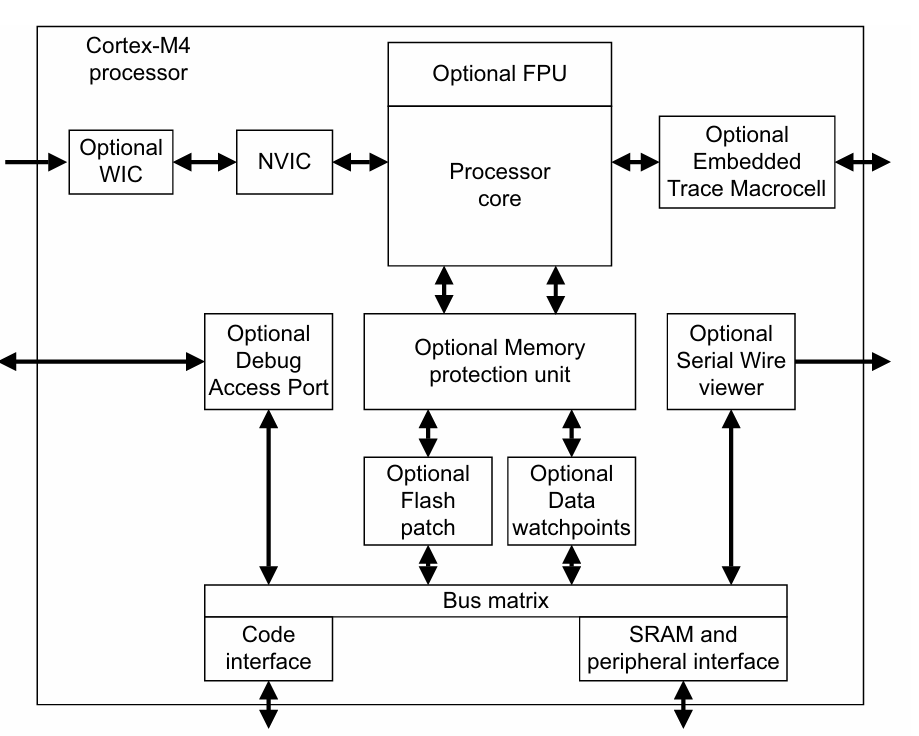
    ✅ Cortex-M CPUs have a built-in Nested Vectored Interrupt Controller (NVIC) that supports exceptions, prioritization, nesting, and vector table.

    Types of Exceptions

    CategoryExamplesTriggered By
    System ExceptionsReset, NMI, HardFault, SysTick, PendSV, etc.System events or faults
    Fault ExceptionsMemManage, BusFault, UsageFaultErrors in code or hardware
    External Interrupts (IRQs)Timer, GPIO, UART, etc.Peripheral hardware requests

    What is an Exception?

    An exception is a special event that interrupts the normal program execution and transfers control to a special function called an exception handler.

    You can think of it like this:

    “Hey CPU, stop what you’re doing. Something important just happened. Handle it now!”

    Types of Exceptions in Cortex-M4

    The ARM Cortex-M4 processor has two main types of exceptions:

    TypeDescription
    Interrupts (IRQs)Triggered by external devices like timers, buttons, UART, etc.
    System ExceptionsTriggered internally by the processor (like faults, system calls, etc.)

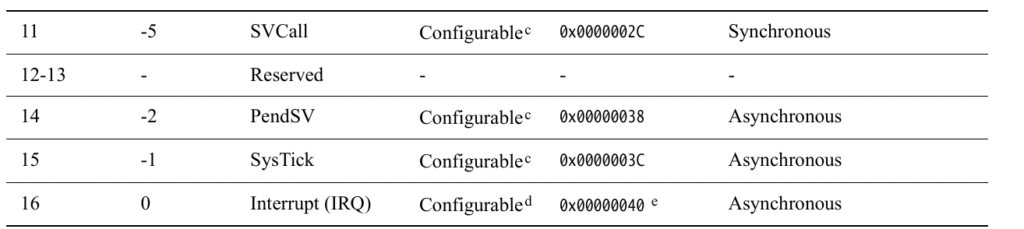
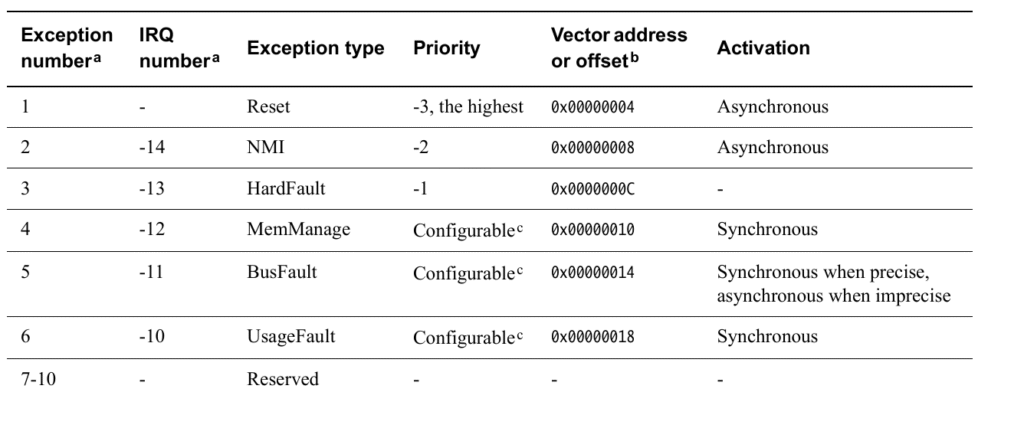
    List of System Exceptions (with vector numbers)

    Here are some common system exceptions:

    Exception NameVector NumberDescription
    Reset1Happens when the processor starts or is reset.
    NMI (Non-Maskable Interrupt)2A high-priority interrupt that cannot be disabled.
    HardFault3Happens when something goes seriously wrong (e.g., invalid memory access).
    MemManage Fault4Memory protection violation.
    BusFault5Bus error during instruction/data access.
    UsageFault6Illegal instructions (like divide by zero, etc).
    SVCall11Supervisor Call (used in RTOS or OS).
    PendSV14Used in context switching in RTOS.
    SysTick15Timer interrupt, often used for OS ticks.

    What Happens When an Exception Occurs?

    1. Processor saves context (automatically):
      • Saves registers: R0-R3, R12, LR, PC, xPSR onto the stack.
    2. Jumps to the exception handler:
      • The address is taken from the vector table.
    3. Executes handler function.
    4. Returns to where it was using BX LR or exception return sequence.

    Vector Table

    The vector table is a list of addresses stored at the beginning of memory (0x00000000). Each entry is a pointer to the handler for each exception.

    Example:

    void (* const vector_table[])() __attribute__((section(".isr_vector"))) = {
        (void*) 0x20002000,   // Initial Stack Pointer
        Reset_Handler,        // Reset
        NMI_Handler,          // NMI
        HardFault_Handler,    // HardFault
        ...
    };

    Common Fault Exceptions

    1. HardFault

    • Most serious.
    • Happens when no other fault handler catches the error.
    • Example: Dereferencing a NULL pointer.

    2. MemManage Fault

    • Related to memory protection (MPU).
    • Example: Accessing restricted memory.

    3. BusFault

    • Caused by bus errors during instruction fetch or data access.
    • Example: Accessing non-existent memory address.

    4. UsageFault

    • Caused by incorrect use of instructions.
    • Example: Division by zero, unaligned access.

    How to Write a Simple Exception Handler

    Example for HardFault:

    void HardFault_Handler(void) {
        while (1) {
            // Stay here forever - you can add logging or LED blink
        }
    }
    

    SysTick and PendSV (RTOS Related)

    • SysTick: Regular timer interrupt (e.g., every 1ms) used to keep track of time.
    • PendSV: Used for context switching in operating systems.

    These are critical for implementing real-time operating systems.

    Registers Involved

    • xPSR (Program Status Register): Gives status of current program state.
    • LR (Link Register): Helps in return from exception.
    • PC (Program Counter): Address of the instruction being executed.

    Debugging Tips

    • Check the value of the LR (Link Register) to know where the exception came from.
    • You can decode the value of LR to understand the exception return type (called EXC_RETURN).

    Exception Types in Cortex-M4 (Made Simple)

    1. Reset

    • What is it?
      It happens when you first turn on the microcontroller (power-up) or when it’s manually reset (like pressing a reset button).
    • What does it do?
      The processor starts from the beginning — it looks at a specific address (in the vector table) and starts running your main code.
    • Think of it like:
      Turning off and on your computer — it restarts from scratch.

    2. NMI (Non-Maskable Interrupt)

    • What is it?
      It’s a very important interrupt that cannot be ignored or turned off.
    • When does it happen?
      Triggered by special hardware problems or important peripherals.
    • Why is it special?
      • It can’t be blocked by other interrupts.
      • Only the Reset has a higher priority than NMI.
    • Think of it like:
      A fire alarm — it will ring no matter what else is going on.

    3. HardFault

    • What is it?
      A major error that happens when something really bad occurs — like accessing invalid memory or when another exception fails.
    • When does it happen?
      • Program tries to use a bad address.
      • An exception cannot be handled properly.
    • What makes it special?
      • Has very high priority (second only to Reset and NMI).
      • Can’t be ignored if it happens.
    • Think of it like:
      A system crash or blue screen. The processor doesn’t know what to do and enters a special error state.

    4. MemManage Fault

    • What is it?
      A memory access error — trying to read or write to protected or forbidden areas in memory.
    • Example:
      Trying to execute code in a non-executable area.
    • Think of it like:
      You tried opening a locked door. You’re not allowed in.

    5. BusFault

    • What is it?
      Happens when something goes wrong while moving data to or from memory (like over a bus).
    • Example:
      You try to read from a memory location that doesn’t respond or doesn’t exist.
    • Think of it like:
      A delivery truck goes to an address, but no one is there to accept the package.

    6. UsageFault

    • What is it?
      Happens when you use instructions incorrectly.
    • Examples:
      • Using an undefined instruction
      • Dividing by zero
      • Using misaligned memory access
    • Think of it like:
      Typing a wrong command in a computer program — something the processor doesn’t understand.

    7. SVCall (Supervisor Call)

    • What is it?
      It’s triggered by a special instruction in the program (called SVC).
    • Why is it used?
      To ask the operating system for help — like calling a system function or driver.
    • Think of it like:
      A customer service call — your code is asking the OS for assistance.

    8. PendSV (Pending Supervisor Call)

    • What is it?
      A special interrupt used for context switching in an operating system.
    • When is it used?
      When the OS wants to switch from one task to another.
    • Think of it like:
      Switching between open apps on your phone — only when the current one is done.

    9. SysTick

    • What is it?
      A system timer interrupt that goes off at regular time intervals (like every 1 millisecond).
    • Why is it useful?
      • Used by RTOS (real-time operating systems) to keep track of time.
      • Helps schedule tasks.
    • Think of it like:
      A ticking clock that reminds the CPU to check tasks.

    10. Interrupt (IRQ)

    • What is it?
      Regular interrupts triggered by external devices like:
      • Timers
      • Buttons
      • Sensors
    • Why are they important?
      Peripherals use IRQs to alert the processor when they need attention.
    • Think of it like:
      Your phone buzzing — something needs your attention.

    Summary Table

    Exception TypeSimple MeaningWho Triggers ItCan It Be Turned Off?
    ResetSystem restartPower or reset buttonNo
    NMIEmergency interruptHardwareNo
    HardFaultSerious errorProcessorNo
    MemManageBad memory accessProcessorYes
    BusFaultMemory bus errorProcessorYes
    UsageFaultWrong instructionProcessorYes
    SVCallSystem service requestSoftwareYes
    PendSVTask switch requestSoftware/OSYes
    SysTickTimer interruptTimerYes
    IRQNormal interruptPeripheralsYes

    Final Notes

    • Exceptions help the processor react to important or error conditions.
    • Some are triggered by hardware (like Reset, NMI), some by your own code (like SVCall).
    • Faults like HardFault, UsageFault help catch bugs and protect your system.
    What Are Exception States?

    When an exception (like an interrupt or a fault) occurs, the processor doesn’t just instantly handle it — instead, that exception goes through different states.

    Think of it like a queue at a doctor’s clinic:

    • You wait your turn (Pending)
    • You go inside to be treated (Active)
    • You’re done and leave (Inactive)
    • And sometimes, you’re inside while someone else knocks — that’s Active and Pending!

    The 4 States of an Exception

    1. Inactive

    • What it means:
      Nothing is happening — the exception is not triggered or being serviced.
    • Example:
      No interrupt from a button press or sensor — the CPU is doing regular work.

    2. Pending

    • What it means:
      The exception is waiting to be handled by the processor.
    • How it gets here:
      • A peripheral device (like a timer or sensor) sends an interrupt.
      • Software writes to a register to generate an interrupt.
    • Example:
      You press a button → that sends an interrupt → the exception becomes pending, waiting for the CPU to respond.

    3. Active

    • What it means:
      The CPU is currently handling the exception — it’s running the exception handler code.
    • Example:
      The CPU stops what it was doing and jumps to the interrupt handler for your button press.

    4. Active and Pending

    • What it means:
      The CPU is already handling this exception, and another one just came in from the same source — so now it’s both active and pending.
    • Important Note:
      • The CPU won’t handle the new request until the current one finishes.
      • This can happen if, for example, a timer interrupt happens again while the CPU is still handling the previous one.

    Key Notes (Simplified)

    🔁 Can one exception interrupt another?

    Yes! If a higher priority exception occurs while a lower priority one is being handled, it can interrupt it.
    Then both are in Active state, but the higher one is being serviced.

    Table Summary

    StateWhat it means
    InactiveNothing is happening. Not triggered or running.
    PendingWaiting in line. Triggered but not yet handled.
    ActiveCPU is handling it right now.
    Active & PendingCPU is still handling it, but another trigger from the same source just came.

    Real-World Analogy

    Imagine you’re a doctor (CPU) at a clinic:

    • Inactive: No patients in the waiting room.
    • Pending: A patient arrives and takes a seat in the waiting room.
    • Active: You’re currently treating a patient.
    • Active & Pending: While treating a patient, the same patient sends a new report (like a new symptom appears) — you’ll check that next.

    What is the System Control Block (SCB)?

    The System Control Block (SCB) is a special part of the ARM Cortex-M microcontroller that helps the system control and manage important operations, especially related to exceptions and faults (like errors or interrupts).

    Think of SCB as the “Control Room” of the system

    Just like a control room in a building handles alarms, system messages, and settings, the SCB handles things like:

    • Configuration settings
    • Control of system behavior
    • Reports on errors and exceptions

    What exactly does SCB do?

    1. Stores Information:
      • It contains information about how the system is set up.
      • For example, it knows what kind of CPU core you’re using and other system details.
    2. Controls Exceptions:
      • Exceptions are special events like:
        • An interrupt from a timer
        • A fault caused by invalid memory access
      • SCB helps control how the system responds to these events.
    3. Helps in Debugging:
      • It can report errors or faults that occur, which helps you debug your code.

    Where is it used?

    • It’s part of the core of ARM Cortex-M processors.
    • Used when handling:
      • Fault exceptions like hard faults or memory faults
      • System resets
      • Vector table settings (which tell the system what to do when something happens)

    Registers in SCB (just names for now):

    Here are some important registers inside the SCB (you don’t have to memorize them yet):

    • CPUID: Tells which processor you’re using
    • ICSR: Controls system exceptions
    • AIRCR: Lets you request a system reset
    • SCR: Controls system sleep modes
    • CCR: Enables/disables certain features like fault trapping
    • SHCSR: Shows which exceptions are enabled or active

    In Short:

    The SCB is a built-in control unit in ARM Cortex-M processors that manages exceptions, faults, and system control features like resets and sleep modes. It’s like the system’s supervisor.

    System Control Block (SCB) registers are part of the Cortex-M System Control Space, which provides system-level configuration and control features like interrupt priority, fault handling, system reset, and debug support.

    Here’s a breakdown of each column:

    Columns

    ColumnMeaning
    AddressThe memory-mapped address of the register in the SCB address space.
    NameName of the register.
    TypeRead/Write access: RW (Read/Write), RO (Read-Only), etc.
    Required PrivilegeOnly privileged code (like kernel or supervisor mode) can access it.
    Reset ValueThe value stored in the register after reset.
    DescriptionFunction of the register.

    Important Registers Explained

    RegisterAddressPurpose
    ACTLR0xE000E008Auxiliary Control Register – Enables/Disables implementation-specific features.
    CPUID0xE000ED00CPUID Base Register – Read-only; identifies the processor type and revision.
    ICSR0xE000ED04Interrupt Control and State Register – Controls pending interrupts and tracks the current interrupt number.
    VTOR0xE000ED08Vector Table Offset Register – Points to the interrupt vector table in memory.
    AIRCR0xE000ED0CApplication Interrupt and Reset Control Register – Software reset, endianness config, interrupt priority grouping.
    SCR0xE000ED10System Control Register – Configures deep sleep, sleep-on-exit, etc.
    CCR0xE000ED14Configuration and Control Register – Enables stack alignment, fault traps, etc.
    SHPRx0xE000ED18 to 0xE000ED20System Handler Priority Registers – Set priorities for system exceptions like SVCall, PendSV, SysTick.
    SHCSR0xE000ED24System Handler Control and State Register – Enables system exceptions and indicates their active/pending states.
    CFSR0xE000ED28Configurable Fault Status Register – Reports details of usage, bus, or memory faults.
    MMSR/BFSR/UFSR(parts of CFSR)Subfields of the CFSR to provide more specific fault information.
    HFSR0xE000ED2CHardFault Status Register – Indicates causes of HardFault exceptions.
    MMAR0xE000ED34MemManage Fault Address Register – Address that caused memory fault.
    BFAR0xE000ED38BusFault Address Register – Address that caused bus fault.
    AFSR0xE000ED3CAuxiliary Fault Status Register – Optional register for vendor-specific fault status.

    Key Concepts

    • Privileged Access: These registers can only be modified in privileged mode, ensuring the kernel has control over critical system behavior.
    • Reset Values: These default values indicate the state of the register after a system reset.
    • Exception Handling: Many of these registers are used for handling and prioritizing faults/exceptions.
    Enable PendSV and fault exceptions (Memory Management, BusFault, UsageFault) on an ARM Cortex-M processor, you’ll work with specific SCB system control registers. These are:

    1. Enabling PendSV Exception

    PendSV (Pendable Service Call) is enabled by default, but you may need to:

    • Set its priority to control preemption.
    • Pend it manually using ICSR.

    ✅ Set PendSV Priority (lowest)

    #define SCB_SHPR3    (*(volatile uint32_t *)0xE000ED20)
    #define PENDSV_PRIO_POS  16  // Bits 23:16 are for PendSV priority
    
    void enable_pendsv_lowest_priority(void) {
        // Set PendSV to lowest priority (0xFF)
        SCB_SHPR3 |= (0xFF << PENDSV_PRIO_POS);
    }
    

    ✅ Manually Pend the PendSV exception

    #define SCB_ICSR     (*(volatile uint32_t *)0xE000ED04)
    #define ICSR_PENDSVSET (1 << 28)
    
    void trigger_pendsv(void) {
        SCB_ICSR |= ICSR_PENDSVSET;  // Set bit 28 to pend PendSV
    }
    

    PendSV Handler Setup

    You must implement the handler function like this:

    void PendSV_Handler(void) {
        // Your context switch or deferred processing here
    }
    

    2. Enabling Fault Exceptions

    By default, fault handlers are disabled (except HardFault). You must enable:

    • Memory Management Fault
    • BusFault
    • UsageFault

    ✅ Use SCB_SHCSR to enable faults:

    #define SCB_SHCSR     (*(volatile uint32_t *)0xE000ED24)
    
    #define MEMFAULTENA   (1 << 16)
    #define BUSFAULTENA   (1 << 17)
    #define USGFAULTENA   (1 << 18)
    
    void enable_fault_exceptions(void) {
        SCB_SHCSR |= (MEMFAULTENA | BUSFAULTENA | USGFAULTENA);
    }
    

    Fault Handler Implementations

    You must implement handlers for these faults, or the system will go into HardFault if they occur:

    void MemManage_Handler(void) {
        // Handle memory fault
    }
    
    void BusFault_Handler(void) {
        // Handle bus fault
    }
    
    void UsageFault_Handler(void) {
        // Handle undefined instruction, divide by zero, etc.
    }
    

    Summary

    ExceptionEnable BitRegisterHandler
    PendSV(default enabled)SHPR3 (priority)PendSV_Handler()
    MemManageBit 16SHCSRMemManage_Handler()
    BusFaultBit 17SHCSRBusFault_Handler()
    UsageFaultBit 18SHCSRUsageFault_Handler()

    Manual triggering and handling of an interrupt (USART3) on an ARM Cortex-M processor, typically used in STM32 microcontrollers :

    /**
      ******************************************************************************
      * @file    main.c
      * @author  Nish
      * @version V1.0
      * @brief   Custom implementation: Triggering USART3 interrupt manually.
      ******************************************************************************
    */
    
    #if !defined(__SOFT_FP__) && defined(__ARM_FP)
      #warning "FPU is not initialized, but the project is compiling for an FPU. Please initialize the FPU before use."
    #endif
    
    #include <stdint.h>
    #include <stdio.h>
    
    #define USART3_IRQNO 39
    
    int main(void)
    {
    	// Step 1: Manually set the pending bit for USART3 interrupt in NVIC ISPR1
    	uint32_t *pISPR1 = (uint32_t*)0xE000E204;
    	*pISPR1 |= (1 << (USART3_IRQNO % 32));  // Force USART3 interrupt to pending state
    
    	// Step 2: Enable USART3 interrupt in NVIC ISER1
    	uint32_t *pISER1 = (uint32_t*)0xE000E104;
    	*pISER1 |= (1 << (USART3_IRQNO % 32));  // Allow USART3 interrupt to be serviced
    
    	// Infinite loop: Wait for interrupt to occur
    	for (;;);
    }
    
    // Custom ISR for USART3 interrupt
    void USART3_IRQHandler(void)
    {
    	printf("Inside custom USART3 ISR\n");
    }

    
  • Master What Is Flash Memory? Types, Uses & Examples Explained | SSC CGL Computer Delhi Police 2026

    Welcome to What Is Flash Memory? Types, Uses & Examples Explained SSC CGL Computer Delhi Police beginner-friendly tutorial on Flash Memory, specially crafted for students, tech enthusiasts, and aspirants preparing for competitive exams like SSC, RRB, Banking, and other government job tests.

    In this tutorial, you will learn:
    ✅ What Flash Memory is and how it works
    ✅ The difference between volatile and non-volatile memory
    ✅ Types of ROM: PROM, EPROM, EEPROM, Flash
    ✅ NAND vs NOR Flash – key differences, use cases, and examples
    ✅ Where Flash Memory is used in modern devices
    ✅ The history and latest trends in Flash Memory (3D NAND, QLC, SSDs, etc.)
    ✅ Important advantages and disadvantages
    ✅ 17+ MCQs to test your understanding

    Whether you’re new to computer memory or brushing up for an exam, this easy-to-understand guide is perfect for mastering the concept of Flash Memory with real-life examples and clear explanations.

    What is Flash Memory?

    Flash memory is a type of electronic storage. It lets your devices like phones, laptops, USB drives, and even smart TVs store information even when the power is turned off. If you’ve ever saved a file to a USB stick or taken a photo with your phone, you’ve used flash memory!

    🧩 1. ROM (Read-Only Memory)

    • Data is permanently written during manufacturing
    • Cannot be modified by users
    • Used for storing firmware

    🔧 2. PROM & EPROM

    • PROM: Programmable once
    • EPROM: Erasable using UV light, then reprogrammable
    • Slow and inconvenient for updates

    Evolution from EEPROM to Flash Memory

    💡 3. EEPROM (Electrically Erasable Programmable ROM)

    • Can be erased and rewritten electrically
    • Byte-level access (one byte at a time)
    • Slower and costly for large data storage

    ⚡ Volatile Memory

    • Requires power to retain data
    • Data is lost when power is off
    • Faster than non-volatile memory
    • Used for temporary storage
    • Examples: RAM (Random Access Memory), Cache

    🔋 Non-Volatile Memory

    • Retains data even when power is off
    • Slower than volatile memory
    • Used for permanent storage
    • Essential for saving files and OS
    • Examples: Flash Memory, SSD, HDD, ROM

    💾 Volatile vs Non-Volatile Memory

    History of Flash Memory

    🌟 1980s – The Invention
    Flash memory was invented in the early 1980s by Dr. Fujio Masuoka at Toshiba. The goal was to make a type of memory that could store data even when not powered, and could be easily erased and rewritten.

    There are two main types:

    • NOR Flash: Good for fast reading (like in BIOS chips).
    • NAND Flash: Cheaper and faster for writing and erasing. Most modern devices use NAND.

    Toshiba introduced the first NAND flash chip in 1987, and things took off from there!

    🔸 NAND Flash – Great for Storing Lots of Data
    ✅ Stores a lot of data in a small space
    ✅ Faster at saving and deleting data
    ✅ Cheaper
    ❌ Not good for running programs directly from it
    Used in: USB drives, SSDs (solid-state drives), Memory cards, Smartphones
    🟢 Think of it like a backpack — you can fit a lot in it, but it’s slower to find one small item.

    🔸 NOR Flash – Great for Running Code
    ✅ Good for reading small pieces of data quickly
    ✅ You can run programs directly from it (like your phone’s firmware)
    ❌ Slower to save or delete data
    ❌ More expensive
    Used in: Microcontrollers (like in washing machines, cars), BIOS chips in computers
    🟢 Think of it like a bookshelf — easy to pick out a book and start reading, but harder to move things around.

    How Does Flash Memory Work?

    Flash memory stores data using electrical charges in tiny cells called transistors. Unlike RAM, it doesn’t need constant power to keep the data, which is why your phone still remembers your photos even when it’s off.

    You can:

    • Read data (like opening a file)
    • Write data (like saving a photo)
    • Erase data (like deleting a file)

    It’s called “flash” because all the data in a block can be erased in a flash, or all at once.

    Where Is Flash Memory Used?

    Flash memory is everywhere today:

    • Smartphones and Tablets
    • USB drives
    • Solid State Drives (SSDs) in computers
    • Memory cards in cameras
    • Game consoles
    • Smart appliances, like fridges or TVs

    Latest Trends in Flash Memory (as of 2025)

    Flash memory has come a long way since the 1980s. Here’s what’s hot now:
    1. 3D NAND Technology

    • Instead of just placing memory cells side by side (2D), manufacturers now stack them vertically—like a memory skyscraper.
    • Increases storage in the same space and lowers cost.

    2. QLC NAND (Quad-Level Cell)

    • Traditional memory stored 1 bit per cell.
    • QLC stores 4 bits per cell, meaning more data fits in the same chip.
    • It’s cheaper, but not as durable.

    3. SSD Growth

    • SSDs (Solid State Drives) have become common in laptops and gaming systems.
    • They are replacing hard drives because they’re faster and more reliable.

    4. Portable Flash Storage

    • USB drives, SD cards, and external SSDs are now faster and have much larger storage capacity—for example, 1 TB flash drives!

    5. AI & Data Centers

    • With the rise of AI, huge data centers need fast, reliable storage. Flash memory is a key player because of its speed.

    Why Flash Memory is Important in Modern Devices

    ✅ Non-Volatile Storage – Retains data even when power is off
    🚀 Fast Read/Write Speeds – Enables quick boot times, app loading, and file access
    🔋 Low Power Consumption – Ideal for mobile and battery-powered devices
    📏 Compact Size – Small and lightweight
    💪 No Moving Parts – More durable and shock-resistant
    🧠 Used as Primary Storage – Found in SSDs, smartphones, tablets, and even smart TVs
    📈 Supports Modern Tech – Essential for AI, gaming, 4K video, and data centers

    Fun Facts of Flash memory

    • Flash memory has no moving parts—that’s why it’s more durable than a hard drive.
    • Your smartphone likely has NAND flash as its main storage.
    • Apple, Samsung, Western Digital, and Micron are some of the biggest players in the flash memory market.
    • Erases data in blocks, not bytes → Much faster than EEPROM

    🔮 What’s Next?

    Flash memory will keep getting:

    • Smaller
    • Faster
    • Cheaper
    • More reliable

    New materials and tech (like MRAM or ReRAM) might someday replace flash, but for now, flash memory is still the king of storage.

    Flash Memory – Multiple Choice Questions (MCQs)

    1. Which of the following is true about flash memory?
    A. It is volatile memory
    B. It requires power to retain data
    C. It is a type of EEPROM
    D. It is slower than hard disk drives
    ✅ Answer: C. It is a type of EEPROM

    2. Flash memory is commonly used in:
    A. RAM modules
    B. Hard disk drives
    C. USB drives and SSDs
    D. Optical drives
    ✅ Answer: C. USB drives and SSDs

    3. Which of the following is NOT a characteristic of flash memory?
    A. Non-volatile
    B. Fast read access
    C. Unlimited write cycles
    D. No moving parts
    ✅ Answer: C. Unlimited write cycles

    4. The two main types of flash memory are:
    A. Static and Dynamic
    B. Volatile and Non-volatile
    C. NOR and NAND
    D. ROM and RAM
    ✅ Answer: C. NOR and NAND

    5. Which type of flash memory is typically used for code execution (XIP – Execute In Place)?
    A. NAND Flash
    B. DRAM
    C. NOR Flash
    D. SRAM
    ✅ Answer: C. NOR Flash

    6. Why is NAND flash more commonly used in mass storage applications than NOR flash?
    A. It has faster access times
    B. It is more expensive
    C. It has higher density and lower cost
    D. It supports XIP
    ✅ Answer: C. It has higher density and lower cost

    7. Which of the following operations wears out flash memory over time?
    A. Reading
    B. Writing and Erasing
    C. Formatting
    D. Defragmenting
    ✅ Answer: B. Writing and Erasing

    8. In a solid-state drive (SSD), which memory technology is primarily used?
    A. DRAM
    B. SRAM
    C. NAND Flash
    D. Magnetic Disk
    ✅ Answer: C. NAND Flash

    9. Which of the following statements about NAND flash memory is correct?
    A. It has a lower write speed than NOR
    B. It is better suited for high-speed code execution
    C. It is less dense than NOR
    D. It is ideal for large storage applications
    ✅ Answer: D. It is ideal for large storage applications

    10. What does EEPROM stand for?
    A. Electrically Erasable Programmable Read-Only Memory
    B. Electronic Erased and Programmed ROM
    C. Enhanced Electrical Programmable ROM
    D. Erasable Electrical Programmable ROM
    ✅ Answer: A. Electrically Erasable Programmable Read-Only Memory

    11. Flash memory erases data in units called:
    A. Bits
    B. Bytes
    C. Pages
    D. Blocks
    ✅ Answer: D. Blocks

    12. Which of the following is an advantage of flash memory over traditional magnetic hard drives?
    A. Moving parts increase durability
    B. Slower access time
    C. Greater power consumption
    D. Faster read/write speeds
    ✅ Answer: D. Faster read/write speeds

    13. Which type of flash memory provides higher reliability and longer lifespan?
    A. SLC (Single-Level Cell)
    B. MLC (Multi-Level Cell)
    C. TLC (Triple-Level Cell)
    D. QLC (Quad-Level Cell)
    ✅ Answer: A. SLC (Single-Level Cell)

    14. Which is a major disadvantage of using flash memory?
    A. Volatile nature
    B. High power consumption
    C. Limited number of write/erase cycles
    D. Large physical size
    ✅ Answer: C. Limited number of write/erase cycles

    15. What is the primary reason for wear-leveling algorithms in flash storage?
    A. Improve speed
    B. Protect against data loss due to power failure
    C. Extend the lifespan of the flash memory
    D. Increase storage capacity
    ✅ Answer: C. Extend the lifespan of the flash memory

    16. Which of the following devices uses flash memory internally?
    A. CD-ROM
    B. Floppy Disk
    C. USB Pen Drive
    D. Blu-ray Disc
    ✅ Answer: C. USB Pen Drive

    17. What is the smallest erasable unit in NAND flash memory?
    A. Byte
    B. Sector
    C. Page
    D. Block
    ✅ Answer: D. Block

    Here’s an SEO-friendly FAQ section for your page titled:
    “Master What Is Flash Memory? Types, Uses & Examples Explained | SSC CGL Computer Delhi Police 2025”

    Frequently Asked Questions (FAQs)

    Q1. What is Flash Memory in simple words?
    A: Flash memory is a type of non-volatile storage that retains data even when the power is off. It is widely used in USB drives, memory cards, SSDs, smartphones, and more. It allows fast read/write and is more durable than hard drives.

    Q2. What are the two main types of Flash Memory?
    A: The two main types are NAND Flash (used for storage like SSDs and USB drives) and NOR Flash (used in devices where code is executed directly like BIOS or firmware in microcontrollers).

    Q3. Why is Flash Memory important in SSC CGL and Delhi Police Computer Awareness exams?
    A: Questions on memory types, including flash memory, are commonly asked in SSC CGL, Delhi Police, and other computer awareness sections. Knowing the types, uses, and advantages of flash memory helps score better in competitive exams.

    Q4. Is Flash Memory volatile or non-volatile?
    A: Flash memory is non-volatile, meaning it does not lose data when the power is turned off—unlike RAM.

    Q5. How does Flash Memory differ from EEPROM?
    A: Flash memory is a type of EEPROM but is faster and erases data in blocks, whereas EEPROM erases one byte at a time. Flash is more suitable for larger data storage.

    Q6. Where is Flash Memory used in daily life?
    A: Flash memory is used in smartphones, laptops (SSD), USB pen drives, cameras (memory cards), smart TVs, game consoles, and even modern washing machines and cars.

    Q7. What are the benefits of Flash Memory?
    A:
    ✅ Fast read/write speed
    ✅ Low power consumption
    ✅ Compact size
    ✅ Durable (no moving parts)
    ✅ Non-volatile (retains data without power)

    Q8. Which companies make Flash Memory chips?
    A: Major companies include Samsung, Micron, Western Digital, Intel, and Toshiba. These manufacturers supply flash memory for consumer and industrial devices.

    Q9. What is the future of Flash Memory?
    A: Trends like 3D NAND, QLC, and flash for AI data centers are shaping the future. Flash memory is becoming smaller, faster, cheaper, and more reliable each year.

    Q10. Are MCQs on Flash Memory asked in SSC, Railway, or Delhi Police exams?
    A: Yes, MCQs on flash memory (types, advantages, NOR vs NAND, non-volatility, use cases) are frequently asked in SSC CGL, RRB, Delhi Police, Banking, and other government exams.

    You can also Visit other tutorials of Embedded Prep 

    Special thanks to @mr-raj for contributing to this article on EmbeddedPrep

  • Master Beginner-Friendly Guide to Memory Management in QNX (2026)

    Memory management in QNX is a crucial part of any operating system. It refers to the way an OS handles computer memory (RAM), ensuring every program gets the memory it needs, without interfering with others. Whether you’re building apps or embedded systems, understanding memory management helps you write efficient and safe code.

    What is Memory Management QNX?

    Memory Management QNX is the process of:

    • Allocating memory to programs when they need it
    • Keeping track of who owns which piece of memory
    • Reclaiming memory when it’s no longer needed

    The Operating System (OS) handles this using both hardware features and internal data structures like memory maps and tables.

    Types of Memory Management QNX

    There are generally two types of memory to understand:

    TypeDescription
    Physical MemoryThe actual RAM chips installed in your device
    Virtual MemoryA software-based illusion that makes programs believe they have more memory

    Let’s look into both.

    Physical vs Virtual Memory Management in QNX

    FeaturePhysical MemoryVirtual Memory
    Actual hardware?Yes (RAM chips)No, it’s an abstraction
    Size limitations?Limited to installed RAMCan be larger (uses disk as backup)
    Access speedVery fastSlower when using swap (disk)
    Visibility to appNot directly accessedApps see virtual memory addresses

    The OS maps virtual addresses to physical addresses. This allows for process isolation, better security, and memory efficiency.

    Memory Management Techniques

    1. Paging: Breaks memory into fixed-size pages and maps them virtually.
    2. Segmentation: Divides memory into variable-size segments (used in older systems).
    3. Memory Allocation:
      • Static: At compile-time (e.g., global variables)
      • Dynamic: At runtime (e.g., malloc() in C)
    4. Garbage Collection: Some languages (e.g., Java) automatically clean unused memory.
    5. Swapping: Moves data between RAM and disk to free space.

    Memory Protection in QNX OS

    Memory protection prevents one process from accessing another’s memory. This ensures:

    • Security (no data leaks)
    • Stability (bad code doesn’t crash the whole system)
    • Isolation (multiple users/processes run safely)

    How Is Memory Managed in QNX?

    QNX is a real-time operating system (RTOS) widely used in embedded systems (like cars, medical devices). It takes memory management very seriously due to real-time and safety-critical needs.

    1. Microkernel Architecture

    • QNX uses a microkernel design: only essential services run in the kernel.
    • Most drivers and services run as separate user-space processes.

    This reduces the risk of memory corruption across the system.

    2. Virtual Memory Support

    QNX provides per-process virtual memory:

    • Each process has its own virtual address space
    • Memory is managed by the Memory Manager (procnto)

    QNX supports:

    • Demand paging
    • Copy-on-write
    • Shared memory

    3. Physical vs Virtual Memory Management QNXin QNX

    AspectPhysical Memory in QNXVirtual Memory in QNX
    What it isReal RAM used by the systemVirtual address space seen by processes
    How it’s managedAllocated by kernel/memory managerManaged through page tables and mappings
    Process accessIndirect access through mappingDirect use (via APIs like mmap, malloc, etc.)
    IsolationNot isolated unless mapped properlyIsolated by default

    How QNX Handles Memory Protection Between Processes

    QNX uses hardware memory protection (MMU – Memory Management Unit) and virtual memory mapping to enforce safety.

    Here’s how it protects memory:

    • Each process runs in its own address space
    • The MMU ensures no process can access another’s memory unless explicitly shared
    • Shared memory can be created using QNX IPC (Inter-Process Communication) methods
    • Faults (like invalid access) generate signals (e.g., SIGSEGV), preventing crashes

    Tools & APIs in QNX:

    • mmap() – for mapping files/devices into memory
    • shm_open() and mmap() – for shared memory between processes
    • malloc() / calloc() – dynamic memory allocation
    • sbrk() – old style heap management (rarely used in modern apps)

    💛 Support Embedded Prep

    If you find our tutorials helpful and want to support our mission of sharing high-quality embedded system knowledge, you can contribute by buying us a coffee. Every small contribution helps us keep creating valuable content for learners like you. ☕

    Thank you for your support — it truly keeps Embedded Prep growing. 💻✨

    Summary

    ConceptExplanation
    Memory ManagementThe OS allocates, tracks, and protects memory for applications
    Physical vs Virtual MemoryPhysical is real RAM; virtual is software-managed illusion for each process
    Memory ProtectionPrevents apps from interfering with each other’s memory
    QNX Memory ManagementUses virtual memory, MMU, and microkernel for high security and reliability
    Memory Protection in QNXEnforced using hardware + kernel policies; each process is isolated

    QNX’s memory management system is designed to be efficient, safe, and flexible, especially for real-time and embedded environments.

    Here’s what you should remember as a beginner:

    • Every process in QNX has its own virtual address space, which protects it from other processes.
    • The Memory Manager (procnto) handles requests for memory, such as allocating and freeing memory, and managing shared memory.
    • QNX supports both physical and virtual memory, and uses techniques like demand paging and copy-on-write to make memory use more efficient.
    • Shared memory and memory-mapped files let processes exchange data quickly and safely.
    • If a process tries to access memory it doesn’t own, QNX will catch the error and send a signal like SIGSEGV (Segmentation Fault) to prevent system crashes.
    • You can control memory directly using functions like malloc(), mmap(), shm_open(), and more.

    The Persistence of Memory Management in QNX

    “Memory in QNX is a bit like Salvador Dalí’s melting clocks — flexible, layered, and sometimes strange — but with a solid purpose.”
    — You, becoming an embedded developer

    1. What is “Memory” Anyway?

    In QNX, memory means anything you can access using a physical address — and that includes more than just RAM.

    2. The Main Memory Types (with Examples)

    RAM vs. Non-RAM

    • RAM: This is your regular, read-write memory. Think of it like a desk you can work on.
      • Example: Variables, stack, heap.
    • Non-RAM: Memory that looks like RAM but actually talks to hardware.
      • Example: Device registers (like talking to your graphics card or USB controller via memory).

    🔍 Tip: You can read/write non-RAM like RAM, but it may do things like control hardware instead of just storing data.

    SYSRAM vs. Non-SYSRAM

    This is QNX-specific.

    • SYSRAM: RAM that is available for general use after the OS boots.
      • Used by malloc() and mmap().
    • Non-SYSRAM: RAM reserved for special purposes (like USB, camera, GPU).
      • You can’t use it casually — it’s set aside by the system startup.

    Pageable vs. Wired Memory

    • Pageable: Memory is reserved for you, but it’s not tied to physical RAM yet.
      • Like having a hotel room key, but the room isn’t ready yet.
      • Used for regular malloc() or file-backed memory.
    • Wired: Memory is immediately tied to a real RAM location.
      • Like buying a house instead of just booking a room.

    3. How Specific Can You Be?

    You can ask for memory with different levels of specificity:

    LevelExample
    Very generalmalloc() → OS picks the best place
    File-backedmmap(file) → memory reflects file
    Specific rangeMemory below 4 GB for 32-bit systems
    Exact physical addressMemory-mapped I/O → must match exactly

    4. Contiguity: Does Memory Need to Be Together?

    Non-contiguous

    • Memory is scattered in chunks.
    • Default for most allocations like malloc().

    Contiguous

    • Memory is in one solid block.
    • Needed for DMA or certain hardware devices.

    Mostly contiguous

    • Try to get a big block, but don’t waste time if it’s hard to find.
    • A balance between performance and speed.

    5. Shared vs. Private Memory

    • Shared: Changes are visible to everyone mapping that memory.
      • Like a Google Doc — live edits!
    • Private: Your own copy; changes are not visible to others.
      • Like saving a PDF — now it’s yours.

    6. Memory Attributes

    Memory can be further customized using:

    • Caching policies: Should memory be cached or not?
    • Ordering: When working with hardware, should memory accesses be reordered?

    These attributes matter a lot in embedded and real-time systems.

    7. Object-Backed vs. Direct Mapping

    • Object-backed: Memory is tied to a file or object (e.g., a file on disk).
    • Direct-mapped: You map a specific physical memory region directly — common for device registers.

    Final Thoughts: Like Dalí’s Clocks

    Just like in The Persistence of Memory, QNX’s memory isn’t rigid — it melts and shapes itself based on how you ask for it.

    ✅ Want general-purpose memory? Use malloc() — the OS will find something for you.
    🔧 Need control? Use mmap() with precise addresses or flags.
    ⚠️ Working with hardware? Be very specific, use direct mappings, and think about caching and access order.

    TL;DR: QNX Memory Management Simplified

    ConceptSimple Meaning
    RAMUsable memory (read/write)
    Non-RAMLooks like memory, talks to hardware
    SYSRAMGeneral-purpose memory available post-boot
    PageableReserved but not backed yet
    WiredImmediately tied to physical memory
    ContiguousOne solid block of memory
    SharedVisible to all processes
    PrivateOnly for you

    Understanding QNX Memory Management Regions

    In QNX, the memory system is organized into named regions to help you clearly understand how memory is used in your system. These regions give developers insight into what parts of memory are used for what purposes—whether it’s RAM, ROM, or memory-mapped devices.

    Top-Level Memory Regions

    RegionDescription
    /ioMemory-mapped I/O — not RAM. Used to communicate with hardware devices.
    /memoryDescribes all the physical memory the processor can access.

    What’s Inside /memory

    This is where things get more detailed. QNX breaks /memory into smaller, more meaningful areas:

    PathDescription
    /memory/acpi_rsdpStores ACPI info — used by the system to understand hardware layout.
    /memory/below4GMemory addresses below 4 GB (important for 32-bit addressing).
    /memory/bootramRAM reserved for apps in the image filesystem (preloaded at boot).
    /memory/deviceMemory dedicated to devices.
    /memory/imagefsMemory used for the image filesystem, where boot files are stored.
    /memory/isaMemory mapped for ISA devices (older hardware standard).
    /memory/lapicLocal APIC (Advanced Programmable Interrupt Controller) info.
    /memory/romRead-Only Memory region.
    /memory/startupMemory used during the boot/startup phase of the system.

    RAM Regions

    These are the actual RAM portions within other memory areas:

    RAM PathDescription
    /memory/below4G/ramRAM under 4 GB
    /memory/device/ramRAM used by devices
    /memory/isa/ramRAM related to ISA device space

    SYSRAM Regions

    SYSRAM is a special kind of RAM used by the OS and system services. It’s found under multiple areas:

    SYSRAM PathPurpose
    /memory/below4G/ram/sysramSYSRAM under 4 GB
    /memory/device/ram/sysramDevice memory reserved for system use
    /memory/isa/ram/sysramISA-related system memory

    Not Currently Used

    • /virtual and /virtual/vboot: These are reserved regions but not currently used by QNX.

    Understanding Memory Objects in QNX

    In QNX, a memory object is like a container that holds physical memory behind the scenes. It acts as the source or backing for any memory you access via mapping, sharing, or file-based memory.

    Think of a memory object like a box in which memory pages (pieces of RAM or storage-backed memory) are stored — and you can open that box through different APIs.

    What Makes Up a Memory Object?

    1. Layout

    This means how physical memory pages are arranged inside the object.

    • If you mapped a file, some of its pages might already be loaded into memory, and some might not — but they’re still part of the “layout.”
    • If you asked for contiguous memory using shm_ctl(), then all pages are already in place.
    • A memory object can include more than one range of memory.

    Analogy: Imagine a photo album — some pages have photos (memory pages loaded), and some are blank (not loaded yet), but the layout includes all of them.

    2. Content

    This is the actual data held inside the memory object.

    For example, if you mapped a file, the file’s contents are the content of the memory object.

    Lifecycle of a Memory Object

    A memory object is like a shared document with a reference count that keeps track of how many users (processes) are using it.

    • When a process creates, duplicates, or maps the object → reference count increases.
    • When processes unmap or disconnect from it → reference count decreases.
    • When no one is using it anymore (reference count = 0) → QNX destroys the object automatically.

    Examples of Memory Objects

    TypeWhat it does
    Memory-mapped filesBack memory with file content
    shm_open() + ftruncate()Create shared memory you can resize
    `mmap(MAP_ANONMAP_PHYS)`
    Anonymous memoryPer-process memory from malloc() or stack

    Important Note: Directly mapping physical addresses does not create a memory object.

    Key APIs for Working with Memory Objects

    APIUse Case
    shm_open()Create or open a shared memory object under /dev/shmem
    posix_typed_mem_open()Open a named memory pool to allocate memory from it
    shm_ctl()Control the layout of a memory object created with shm_open()
    mmap()Map the object into virtual memory so you can access it
    ftruncate()Resize the object (usually used with shared memory)

    In Simple Words…

    A memory object in QNX is:

    • A way to organize and manage physical memory behind the scenes.
    • Used in shared memory, file mappings, and special memory regions.
    • Created and managed using functions like shm_open(), mmap(), and ftruncate().
    • Automatically cleaned up when nobody is using it anymore.

    1. Memory Protection in QNX

    • Microkernel-based architecture: Each process (even device drivers) is isolated. If one crashes, others stay safe.
    • Fault containment: Errors stay confined to the process that caused them.

    2. Virtual vs Physical Memory

    • Virtual memory: What your program sees.
    • Physical memory: What exists in hardware.
    • Mapped via page tables: Virtual memory is mapped to non-contiguous physical pages, typically 4 KB in size.

    3. Memory Object

    • A container for physical memory pages.
    • May back shared memory, files, or anonymous memory.
    • Lifecycle tracked via reference count: created, mapped, unmapped, etc.

    Examples:

    • shm_open() + ftruncate() → shared memory object
    • mmap() → creates or maps memory (can use MAP_ANON, MAP_PHYS)
    • shm_ctl() → fine-grained control in QNX

    4. Types of Memory in a Process

    Memory TypeDescription
    ProgramCode and global/static data (read-only and read-write)
    StackPer-thread memory for local variables, grows/shrinks per function calls
    HeapDynamically allocated memory via malloc(), free() etc.
    Shared LibraryLoaded .so files: code shared, data is private per process
    ObjectMapped physical memory, shared memory, device memory (e.g., GPU memory)

    5. Stack Memory: Special Notes

    • Reserved in virtual memory, but allocated physically on demand.
    • Guard page at end → detects overflow, triggers SIGSEGV.
    • Stack appears contiguous, but may not be physically so.

    6. Heap Memory: How malloc() Works

    • Library requests memory via mmap().
    • Breaks large pages into chunks.
    • Maintains metadata (small overhead per block).
    • Coalesces freed blocks and may return them to OS.

    7. ASLR (Address Space Layout Randomization)

    • Randomizes memory layout to improve security.
    • Enabled by default (procnto -mr), but configurable:
      • Use posix_spawnattr_setaslr() to control it.
      • Inspect with devctl() and _NTO_PF_ASLR flag.

    What is Memory Initialization?

    When your program needs memory (e.g., to store data), the system gives it virtual memory pages. These virtual pages must point to actual physical memory pages. This link is often created using a system call like mmap().

    But here’s a critical question:
    👉 Is that memory filled with something, or is it just random garbage?
    That’s where memory initialization comes in.

    Why Memory Initialization Is Important

    Imagine you’re working with passwords or other sensitive information.
    If you free memory but don’t clear it first, the next program that uses it might see your data!

    So, it’s good practice to initialize (clear) memory before use or overwrite it before release.

    When Is Memory Automatically Initialized to Zero?

    These are the cases where the OS gives you clean memory filled with zeroes:

    1. Anonymous memory allocation (MAP_ANON)
      • You ask for memory not backed by any file or device.
      • OS gives you a fresh, zeroed-out memory block.
    2. First time mapping a shared memory object (unless from non-SYSRAM typed memory)
      • Shared memory that hasn’t been written to yet is initialized to zero.
    3. Typed memory from SYSRAM
      • SYSRAM is safe and zeroed by default.
    4. Tail of file-backed mappings if the file is not page-aligned
      • Example: If you map a file that’s 3000 bytes, but a memory page is 4096 bytes, the leftover 1096 bytes are filled with zeroes.

    When Is Memory Not Initialized?

    These are risky cases where memory might contain old data:

    1. Re-mapping existing shared memory
      • If someone already wrote data to it, you’ll see that old data.
    2. Typed memory not from SYSRAM
      • Some memory regions don’t auto-clear.
    3. Physical memory mappings using MAP_PHYS (without MAP_ANON)
      • You get a direct view of some physical memory — it may have anything in it.

    What About File-Backed Mappings?

    When you map a file (e.g., with mmap(file)), the memory is filled with the contents of the file, not zeroes.
    The only exception is the tail, as we discussed, if the file size is not a multiple of the page size.

    Summary Table

    ScenarioMemory Initialized?
    MAP_ANON (anonymous mapping)✅ Yes (zeroed)
    First-time shared memory (SYSRAM)✅ Yes
    Typed memory from SYSRAM✅ Yes
    File mapping (tail only if not page-sized)✅ Yes
    Existing shared memory❌ No
    Typed memory not from SYSRAM❌ No
    Physical mapping with MAP_PHYS❌ No
    File-backed mapping⚠️ Initialized to file contents

    mmap() in C to understand memory initialization.

    Goal:

    We’ll create two examples:

    1. Anonymous mapping – memory will be initialized to zero.
    2. File-backed mapping – memory will be filled with the file’s content.

    Anonymous Mapping (MAP_ANON) Example

    #include <stdio.h>
    #include <stdlib.h>
    #include <sys/mman.h>
    #include <unistd.h>
    #include <string.h>
    
    int main() {
        size_t size = 4096;  // One memory page
    
        // Anonymous mmap
        void *addr = mmap(NULL, size, PROT_READ | PROT_WRITE,
                          MAP_PRIVATE | MAP_ANONYMOUS, -1, 0);
        
        if (addr == MAP_FAILED) {
            perror("mmap");
            exit(EXIT_FAILURE);
        }
    
        // Check contents (should be all zeroes)
        unsigned char *data = (unsigned char *)addr;
        printf("First 10 bytes of anonymous mmap:\n");
        for (int i = 0; i < 10; i++) {
            printf("%02x ", data[i]);  // should all be 00
        }
        printf("\n");
    
        munmap(addr, size);
        return 0;
    }
    

    What this does:

    • Allocates 4KB of memory.
    • Because it’s anonymous (MAP_ANONYMOUS), memory is initialized to zero.
    • Prints the first 10 bytes, which should all be 00.

    File-Backed Mapping Example

    Create a file named testfile.txt with some content:

    echo "Hello mmap!" > testfile.txt
    

    Now the code:

    #include <stdio.h>
    #include <stdlib.h>
    #include <sys/mman.h>
    #include <fcntl.h>
    #include <unistd.h>
    #include <string.h>
    
    int main() {
        int fd = open("testfile.txt", O_RDONLY);
        if (fd < 0) {
            perror("open");
            return 1;
        }
    
        size_t size = 4096;
        void *addr = mmap(NULL, size, PROT_READ, MAP_PRIVATE, fd, 0);
        if (addr == MAP_FAILED) {
            perror("mmap");
            close(fd);
            return 1;
        }
    
        printf("Content of memory-mapped file:\n");
        write(STDOUT_FILENO, addr, 20);  // print first 20 bytes
    
        munmap(addr, size);
        close(fd);
        return 0;
    }
    

    What this does:

    • Maps testfile.txt into memory.
    • Reads the first 20 bytes.
    • These bytes will reflect exactly what’s in the file, not zeroes.

    What is the Heap?

    Think of the heap as a big storage room in your computer’s memory. When your program runs and it needs some extra space to store data (like creating a list that changes size), it goes to this storage room and says:

    “Hey, I need a box of size X.”

    That’s where dynamic memory allocation comes in.

    How Do You Request Memory?

    In C or C++, you use special tools (functions) to request memory from the heap:

    • malloc(size) – Ask for a box of memory of a certain size.
    • calloc(num, size) – Ask for a box of memory for multiple items and initialize them to zero.
    • realloc(ptr, new_size) – Resize a previously requested memory box.
    • free(ptr) – Return the box when you’re done using it.

    In C++, we usually use:

    • new (instead of malloc)
    • delete (instead of free)

    How Does the Memory Allocator Work?

    Imagine a memory allocator as a manager of the storage room. This manager:

    1. Tracks which boxes are in use.
    2. Keeps info about each box, like its size (usually in a little label in front of the box).
    3. Keeps a list of available boxes (called the free list), so it doesn’t waste memory.

    When you ask for memory, the allocator checks its list:

    • If it finds a free box of the right size, it gives it to you.
    • If there’s not enough space, it makes the room bigger (asks the OS for more memory).

    What Happens When You Free Memory?

    When you call free(ptr):

    • The memory is not immediately deleted.
    • It goes back to the free list, so the allocator can reuse it later.

    Sometimes, if enough memory is freed, the runtime might return some memory back to the operating system.

    Summary

    ActionWhat Happens
    malloc()Ask for memory from the heap
    free()Give memory back to be reused
    Memory allocatorKeeps track of used and free blocks
    HeapThe program’s dynamic storage area
    Free listList of memory blocks that can be reused

  • Master QNX OS Interview Questions : Ace Your Next Interview 2026

    QNX OS Interview Questions : Mastering QNX OS Interview Questions: Ace Your Next Interview 2025 is a comprehensive guide designed to help you navigate the complexities of QNX OS and excel in interviews. Whether you’re a seasoned embedded software engineer or a newcomer to the QNX ecosystem, this resource offers carefully curated questions and answers, along with insightful explanations to sharpen your skills.

    Dive into the core concepts of QNX OS, including real-time performance, system architecture, device drivers, inter-process communication (IPC), and more. With this guide, you’ll not only be prepared to tackle the technical challenges but also gain a deeper understanding of QNX OS’s unique features and how they apply to real-world embedded systems.

    Perfect for 2025 job seekers, this guide provides expert-level knowledge and practical examples to help you stand out in competitive interviews. Whether you’re preparing for your first QNX-related interview or seeking to refine your expertise, this resource equips you with the knowledge to confidently answer tough questions and demonstrate your mastery of QNX OS.

    Master QNX OS Interview Questions Ace Your Next Interview 2025
    Master QNX OS Interview Questions Ace Your Next Interview 2025

    QNX OS Interview Questions

    1. QNX Basics

    • What is QNX? How is it different from other RTOS?
    • What are the key features of QNX Neutrino microkernel architecture?
    • Explain the microkernel vs monolithic kernel.
    • What is the role of the Process Manager in QNX?
    • Describe QNX’s message-passing mechanism.

    2. Process and Thread Management

    • How are threads managed in QNX?
    • What are the different thread scheduling policies in QNX?
    • Explain priority inheritance and ceiling protocols in QNX.
    • How do you create and manage processes and threads in QNX?
    • Difference between process and thread in QNX.

    3. IPC (Inter-Process Communication)

    • Explain the QNX message-passing mechanism (MsgSend, MsgReceive, MsgReply).
    • What is a channel and connection in QNX?
    • What is a pulse in QNX and how is it used?
    • How is shared memory implemented in QNX?

    4. Device Drivers

    • What are the types of device drivers in QNX?
    • How do you write a resource manager in QNX?
    • What is a devctl() and how is it used?
    • How does QNX handle hotplugging and device enumeration?

    5. Memory Management

    • How is memory managed in QNX?
    • What is the difference between physical and virtual memory in QNX?
    • How does QNX handle memory protection between processes?

    6. File System and I/O

    • Which file systems are supported in QNX?
    • How does QNX manage block vs character devices?
    • How is the /dev filesystem implemented in QNX?

    7. Debugging and Development Tools

    • How do you debug applications in QNX?
    • What is the QNX Momentics IDE?
    • Explain pdebug, pidin, and lsproc.

    8. Real-time Concepts

    • How does QNX ensure real-time performance?
    • What is priority inversion and how does QNX handle it?
    • Can you give an example of writing a real-time application in QNX?

    9. Boot Process and System Startup

    • Explain the QNX boot process.
    • How do you customize a QNX boot image?
    • What is an IFS (Image File System) in QNX?

    10. Networking and Protocols

    • How is TCP/IP stack integrated in QNX?
    • How do you configure network interfaces in QNX?
    • How do you implement a socket-based server in QNX?

    11. System Performance and Optimization

    • How do you measure CPU and memory usage in QNX?
    • How to reduce latency in a real-time QNX system?
    • What tools are available for performance profiling in QNX?

    Basic Level QNX OS Interview Questions | QNX Fundamentals

    1. What is QNX and where is it used?
    2. Explain the architecture of the QNX Neutrino RTOS.
    3. What is a microkernel and how does QNX use it?
    4. How is QNX different from Linux?
    5. What is a message-passing system in QNX?
    6. Describe the role of the proc process in QNX.
    7. What is a resource manager in QNX?
    8. How does QNX handle multitasking?
    9. Explain priority inheritance in QNX.
    10. What file systems are supported by QNX?

    Intermediate Level QNX OS Interview Questions | Processes, Threads, IPC

    1. What are the differences between a process and a thread in QNX?
    2. How does QNX implement Inter-Process Communication (IPC)?
    3. What is the difference between synchronous and asynchronous messaging?
    4. How can two processes communicate in QNX?
    5. What are pulses in QNX and how are they used?
    6. What is a channel and a connection ID in QNX?
    7. Explain how signals are handled in QNX.
    8. How do you create and manage threads in QNX?
    9. What tools can be used to debug QNX applications?
    10. How is memory protection handled in QNX?

    Advanced Level QNX OS Interview Questions | Drivers, Real-Time, Optimization

    1. How do you write a device driver in QNX?
    2. What is a real-time thread, and how is it created in QNX?
    3. How does QNX ensure determinism in scheduling?
    4. What are some ways to optimize performance in a QNX system?
    5. How does QNX manage hardware interrupts?
    6. What is the role of the priority and scheduling policy in QNX?
    7. How does QNX handle deadlocks?
    8. Explain adaptive partitioning scheduling in QNX.
    9. What is the role of the startup program in a QNX system?
    10. What is the difference between Photon microGUI and QNX Momentics IDE?

    QNX Momentics and Development Tools

    1. What is QNX Momentics IDE and what are its features?
    2. How do you profile and debug an application in Momentics?
    3. How is System Profiler used?
    4. What is the role of the QNX System Builder?
    5. How do you deploy an application on a QNX target board?

    Networking and File Systems

    1. How does QNX handle networking?
    2. What is io-pkt in QNX?
    3. How do you configure IP addresses in QNX?
    4. How is network debugging handled?
    5. How do you mount a file system in QNX?

    Common QNX Commands

    1. What does the ps command do in QNX?
    2. How do you find which processes are using the most CPU?
    3. What is the use of sin, on, and pidin commands?
    4. How do you kill a process in QNX?
    5. How can you check the memory usage in QNX?

    You can also Visit other tutorials of Embedded Prep 

    Special thanks to @mr-raj for contributing to this article on EmbeddedPrep

  • Master Inter-Process Communication 2026

    What is IPC (Inter-Process Communication)?

    IPC (Inter-Process Communication) refers to mechanisms that allow multiple processes to communicate and synchronize with each other. Since processes in most operating systems run in isolated memory spaces, they require specific techniques to exchange data and coordinate actions. IPC methods include:

    • Message Passing
    • Shared Memory
    • Pipes
    • Signals
    • Sockets
    • Semaphores and Mutexes

    QNX Message-Passing Mechanism

    QNX uses a synchronous message-passing IPC mechanism, which is reliable, secure, and real-time friendly. It is the core method for communication between processes in QNX Neutrino RTOS.

    The key functions are:

    MsgSend()

    • Used by a client process to send a message to a server process.
    • It blocks the client until the server replies.
    • Syntax: int MsgSend(int coid, const void *smsg, int sbytes, void *rmsg, int rbytes);
      • coid: Connection ID to the server
      • smsg: Pointer to the send buffer
      • sbytes: Size of the send buffer
      • rmsg: Pointer to the receive buffer (for the reply)
      • rbytes: Size of the receive buffer

    MsgReceive()

    • Used by the server to receive a message from any client.
    • It blocks until a message arrives.
    • Syntax: int MsgReceive(int chid, void *msg, int bytes, struct _msg_info *info);
      • chid: Channel ID created by ChannelCreate()
      • msg: Pointer to buffer where message will be received
      • bytes: Size of the buffer
      • info: (Optional) Message info like sender’s PID

    MsgReply()

    • Used by the server to reply to the client after processing the request.
    • Unblocks the client’s MsgSend().
    • Syntax: int MsgReply(int rcvid, int status, const void *msg, int bytes);
      • rcvid: Receive ID obtained from MsgReceive()
      • status: Status code (usually 0 for success)
      • msg: Reply buffer
      • bytes: Size of reply

    Message Passing Flow in QNX:

    Client Process            Kernel             Server Process
      |                        |                     |
      |---- MsgSend() -------->|                     |
      |                        |---- MsgReceive() -->|
      |                        |<--- MsgReply() -----|
      |<-----------------------|                     |
    

    Summary

    • MsgSend() → sends a message and waits for a reply.
    • MsgReceive() → blocks until a message is received.
    • MsgReply() → sends the reply and unblocks the client.

    This model ensures synchronization, security, and determinism, ideal for real-time embedded systems.

    What is a channel and connection in QNX?

    In QNX’s message-passing IPC model, channels and connections are fundamental components that facilitate communication between processes.

    Channel (Server-Side)

    • A channel is created by a server process using ChannelCreate().
    • It acts as a message queue where incoming messages from clients are placed.
    • The server listens for messages on the channel using MsgReceive().

    Key Points:

    • Each channel has a channel ID (chid).
    • One process can create multiple channels.
    • Think of it as a doorway where clients knock (send messages) to get service.

    Example:

    int chid = ChannelCreate(0);  // Create a channel
    

    Connection (Client-Side)

    • A connection is created by a client using ConnectAttach().
    • It connects the client process to the server’s channel.
    • The function returns a connection ID (coid) used in MsgSend().

    Key Points:

    • A client must know the server’s PID and channel ID to connect.
    • Connections are lightweight and kernel-managed.
    • Think of it as a phone line that connects the client to the server’s message queue.

    Example:

    int coid = ConnectAttach(0, server_pid, server_chid, _NTO_SIDE_CHANNEL, 0);
    

    Channel–Connection Analogy:

    ConceptAnalogy
    ChannelCustomer Service Counter (server)
    ConnectionPhone line or customer calling (client)
    MsgSendMaking the call and stating the request
    MsgReceiveServer picking up the call
    MsgReplyServer giving a response

    Summary:

    TermCreated ByUsed InDescription
    ChannelServerChannelCreate, MsgReceiveEntry point for incoming messages
    ConnectionClientConnectAttach, MsgSendLink between client and server’s channel
    Here’s a simple example demonstrating how to use ChannelCreate() on the server side and ConnectAttach() on the client side in QNX using message passing (MsgSend, MsgReceive, MsgReply).

    Server Code (server.c)

    #include <stdio.h>
    #include <stdlib.h>
    #include <unistd.h>
    #include <sys/neutrino.h>
    
    int main() {
        int chid = ChannelCreate(0);  // Create a channel
        if (chid == -1) {
            perror("ChannelCreate");
            exit(EXIT_FAILURE);
        }
    
        printf("Server PID: %d, Channel ID: %d\n", getpid(), chid);
    
        char msg[100];
        int rcvid;
    
        while (1) {
            rcvid = MsgReceive(chid, msg, sizeof(msg), NULL);
            if (rcvid == -1) {
                perror("MsgReceive");
                continue;
            }
    
            printf("Server received: %s\n", msg);
            MsgReply(rcvid, 0, "ACK from server", 16);
        }
    
        return 0;
    }
    

    Client Code (client.c)

    #include <stdio.h>
    #include <stdlib.h>
    #include <unistd.h>
    #include <sys/neutrino.h>
    
    int main() {
        int server_pid;
        printf("Enter Server PID: ");
        scanf("%d", &server_pid);
    
        int coid = ConnectAttach(0, server_pid, 1, _NTO_SIDE_CHANNEL, 0);  // Connect to server's channel 1
        if (coid == -1) {
            perror("ConnectAttach");
            exit(EXIT_FAILURE);
        }
    
        const char *message = "Hello from client";
        char reply[100];
    
        if (MsgSend(coid, message, strlen(message) + 1, reply, sizeof(reply)) == -1) {
            perror("MsgSend");
        } else {
            printf("Client received reply: %s\n", reply);
        }
    
        ConnectDetach(coid);
        return 0;
    }
    

    How to Run:

    1. Compile: gcc server.c -o server gcc client.c -o client
    2. Open two terminals.
    3. Run the server in one terminal: ./server
    4. Note the PID and use it in the client when prompted: ./client

    What is a pulse in QNX and how is it used?

    A pulse in QNX is a lightweight, asynchronous notification that can be sent between threads or processes through a channel, like a minimal message without a payload.

    Key Characteristics of Pulses:

    • Lightweight: Smaller and faster than full messages.
    • Asynchronous: Sent without waiting for a reply.
    • No data payload: Only delivers a small integer code and value.
    • Delivered via MsgReceive() just like regular messages.
    • Used for:
      • Timer expirations
      • Signal notifications
      • Interrupt service routines
      • User-defined events

    Pulse Structure:

    When a pulse is received, it appears in the MsgReceive() as a struct _pulse, which looks like:

    struct _pulse {
        uint16_t type;      // Always _PULSE_TYPE
        uint16_t subtype;   // Custom or system-defined subtype
        int8_t   code;      // Short code (user-defined or system)
        int8_t   priority;
        int16_t  scoid;
        pid_t    pid;
        int32_t  value;     // Custom user-defined value
    };
    

    How to Use a Pulse

    Step 1: Server creates a channel

    int chid = ChannelCreate(0);
    

    Step 2: Client connects to the server

    int coid = ConnectAttach(0, pid, chid, _NTO_SIDE_CHANNEL, 0);
    

    Step 3: Send a pulse using MsgSendPulse()

    MsgSendPulse(coid, getprio(0), PULSE_CODE, PULSE_VALUE);
    
    • coid: Connection ID
    • getprio(0): Current thread priority
    • PULSE_CODE: A small user-defined code (e.g., 1)
    • PULSE_VALUE: A small user-defined value (e.g., 100)

    Step 4: Server handles the pulse

    struct _pulse pulse;
    int rcvid = MsgReceive(chid, &pulse, sizeof(pulse), NULL);
    
    if (rcvid == 0) {
        // It's a pulse
        if (pulse.code == PULSE_CODE) {
            printf("Received pulse with value: %d\n", pulse.value);
        }
    }
    

    Pulses always return rcvid == 0 in MsgReceive().

    Use Case Examples:

    • Notify a server thread from a timer (e.g., TimerCreate() + SIGEV_PULSE)
    • Notify a process that an event has occurred (e.g., file ready, button pressed)
    • Efficient inter-thread notifications without full messages

    Pulse vs Message:

    FeatureMessagePulse
    SizeLargerSmall (struct _pulse)
    Reply NeededYes (MsgReply())No
    BlockingYes (MsgSend() blocks)No (MsgSendPulse() is non-blocking)
    Use CaseFull request/responseSimple event notification

    How is Shared Memory Implemented in QNX?

    In QNX Neutrino RTOS, shared memory allows multiple processes to access the same region of memory, enabling fast data exchange without copying. It is suitable for high-throughput communication, unlike message passing, which is better for synchronization and control.

    Key Functions for Shared Memory in QNX

    QNX follows POSIX-compliant shared memory APIs. The steps are:

    Step-by-Step Implementation

    1. Create/Open a Shared Memory Object

    Use shm_open() to create or open a shared memory region.

    int shm_fd = shm_open("/my_shm", O_CREAT | O_RDWR, 0666);
    
    • /my_shm: Name of the shared memory object (must begin with /)
    • O_CREAT: Create if it doesn’t exist
    • O_RDWR: Open for read/write
    • 0666: File permission

    2. Set the Size of Shared Memory

    Use ftruncate() to set the size of the memory.

    ftruncate(shm_fd, sizeof(struct shared_data));
    

    3. Map the Shared Memory into Address Space

    Use mmap() to map the object into the process’s memory space.

    struct shared_data* ptr = mmap(0, sizeof(struct shared_data),
                                    PROT_READ | PROT_WRITE,
                                    MAP_SHARED, shm_fd, 0);
    
    • PROT_READ | PROT_WRITE: Permissions
    • MAP_SHARED: Changes are visible to other processes

    4. Access the Memory

    Read/write directly using the pointer:

    ptr->counter = 10;
    

    5. Unmap and Unlink (When Done)

    To clean up:

    munmap(ptr, sizeof(struct shared_data));
    close(shm_fd);
    shm_unlink("/my_shm");  // Only once, when you're done permanently
    

    Synchronization Tip

    Shared memory is fast but not synchronized. You need to use:

    • Mutexes or semaphores (e.g., pthread_mutex_t)
    • Named semaphores using sem_open() for inter-process locking

    Example Shared Data Structure

    struct shared_data {
        int counter;
        pthread_mutex_t lock;
    };
    

    To use pthread_mutex_t across processes, initialize it with:

    pthread_mutexattr_t attr;
    pthread_mutexattr_init(&attr);
    pthread_mutexattr_setpshared(&attr, PTHREAD_PROCESS_SHARED);
    pthread_mutex_init(&ptr->lock, &attr);
    

    Summary

    StepAction
    1shm_open() – create or open shared memory
    2ftruncate() – set size
    3mmap() – map to virtual address space
    4Access memory as needed
    5Use mutex/semaphore for safe access
    6munmap() and shm_unlink() to clean up
  • Master Storage Classes in C interview questions 2026

    Master Storage Classes in C with these 2025 interview questions. Learn auto, register, static, and extern usage, scope, lifetime, and best practices to ace C interviews.

    Master Storage Classes in C : Interview Questions 2025

    Are you preparing for your next C programming interview in 2025? Don’t overlook the Storage Classes – a frequently asked yet underrated topic that often catches candidates off guard! In this comprehensive guide, we break down all the essential storage classes in C (auto, register, static, and extern) with practical examples, memory behavior, and real-world use cases.

    Whether you’re a beginner aiming to strengthen your fundamentals or an experienced programmer brushing up for interviews, this post is tailored to help you:

    • Understand the purpose of each storage class
    • Learn their scope, lifetime, and linkage
    • Tackle tricky interview questions with confidence
    • Practice real-time code examples and MCQs

    Bonus: Expert tips, diagrams, and use-case scenarios included!

    Let’s demystify the storage classes and turn this topic into your strength. Start reading and get one step closer to acing your C interview in 2025!

    • auto
    • extern
    • static
    • register

    1. auto Storage Class

    • Definition: auto is the default storage class for local variables.
    • Scope: Local to the block where it is defined.
    • Lifetime: Exists until the block/function ends.
    • Visibility: Not accessible outside the block.
    • Default Value: Garbage (undefined).

    Example of auto Storage classes :

    #include <stdio.h>
    void testFunction() {
        auto int x = 10;  // \'auto\' is optional, same as int x = 10;
        printf(\"Value of x: %d\\n\", x);
    }
    int main() {
        testFunction();
        return 0;
    }
    

    Key Points of auto Storage classes :

    • Automatically allocated when the function/block is called.
    • Destroyed when the function/block exits.
    • Cannot be accessed outside the function/block.

    Interview Questions based on auto Storage classes:

    • What is the default storage class of a local variable in C?
    • Can an auto variable be accessed outside its function?
    • How does an auto variable differ from a static variable?

    2. extern Storage Class

    • Definition: extern is used to declare a global variable in one file and define it in another.
    • Scope: Global (visible throughout the program).
    • Lifetime: Exists as long as the program runs.
    • Visibility: Accessible in all files (if declared with extern).
    • Default Value: Zero (0).

    Example (Multiple Files Usage) for Storage classes :

    File: main.c

    #include <stdio.h>
    // Declaration of external variable (defined in another file)
    extern int count;
    void display() {
        printf(\"Count: %d\\n\", count);
    }
    int main() {
        display();
        return 0;
    }
    

    File: data.c

    // Definition of external variable
    int count = 10;
    

    Compile & Run

    gcc main.c data.c -o output
    ./output
    

    Output: Count: 10

    Key Points of Storage classes :

    • Used for global variables and function definitions across multiple files.
    • Declaration using extern does not allocate memory, only references it.
    • Definition (without extern) allocates memory.

    Interview Questions of Storage classes:

    • What is the difference between declaration and definition of a variable?
    • Can extern be used for functions? (Yes, by default functions are extern)
    • What happens if an extern variable is not defined anywhere?

    3. static Storage Class

    • Definition: static variables retain their values across function calls.
    • Scope:
      • Local Static Variable: Limited to the function/block where it is defined.
      • Global Static Variable: Limited to the file where it is defined.
    • Lifetime: Exists throughout the program execution.
    • Visibility:
      • Local Static: Visible only in the function.
      • Global Static: Not accessible outside the file.
    • Default Value: Zero (0).

    💛 Support Embedded Prep

    If you find our tutorials helpful and want to support our mission of sharing high-quality embedded system knowledge, you can contribute by buying us a coffee. Every small contribution helps us keep creating valuable content for learners like you. ☕

    Thank you for your support — it truly keeps Embedded Prep growing. 💻✨

    Example 1: Local Static Variable

    #include <stdio.h>
    void counter() {
        static int count = 0;  // Retains value between function calls
        count++;
        printf(\"Count: %d\\n\", count);
    }
    int main() {
        counter(); // Output: Count: 1
        counter(); // Output: Count: 2
        counter(); // Output: Count: 3
        return 0;
    }
    

    Example 2: Global Static Variable

    File: static_var.c

    #include <stdio.h>
    static int globalCount = 10;  // This variable is NOT accessible in other files
    void display() {
        printf(\"Global Count: %d\\n\", globalCount);
    }
    

    File: main.c

    #include <stdio.h>
    // extern int globalCount;  // This will cause a linker error!
    int main() {
        // printf(\"Global Count: %d\\n\", globalCount);  // Not accessible
        return 0;
    }
    

    Key Observation: globalCount is limited to static_var.c and cannot be accessed in main.c.

    Key Points of Storage classes:

    • Local Static Variables retain values between function calls.
    • Global Static Variables restrict visibility to the file.
    • Useful in scenarios like counters, cache implementations, and module-specific global variables.

    Interview Questions of Storage classes:

    • What is the difference between static and auto variables?
    • Can we use a static variable inside a function?
    • What happens if we declare a global variable as static?

    4. register Storage Class

    • Definition: Suggests that the variable be stored in CPU registers instead of RAM.
    • Scope: Local to the block where it is defined.
    • Lifetime: Exists until the function/block ends.
    • Visibility: Not accessible outside the function/block.
    • Default Value: Garbage (undefined).
    • Key Restriction: Cannot use & (address-of) operator on register variables.

    Example:

    #include <stdio.h>
    void testFunction() {
        register int x = 5;  // Hints compiler to store in CPU register
        printf(\"Value of x: %d\\n\", x);
    }
    int main() {
        testFunction();
        return 0;
    }
    

    Example: Error Case (& Operator)

    #include <stdio.h>
    int main() {
        register int x = 10;
        printf(\"%p\\n\", &x);  // ❌ Error: Cannot get address of register variable
        return 0;
    }
    

    Error: cannot take the address of register variable x.

    Key Points of Storage classes:

    • register is just a hint; compiler may ignore it.
    • Useful for performance-critical variables like loop counters.
    • No guarantee that the variable will be stored in registers.

    Interview Questions of Storage classes:

    • What is the purpose of the register storage class?
    • Can we declare a pointer to a register variable? (No)
    • What happens if the compiler cannot store a register variable in a CPU register?

    Comparison Table of Storage classes :

    Storage ClassScopeLifetimeDefault ValueSpecial Features
    autoLocalFunction/blockGarbageDefault storage class for local variables
    externGlobalWhole programZero (0)Used for global variables across multiple files
    staticLocal/GlobalWhole programZero (0)Retains value between function calls, file scope for global static variables
    registerLocalFunction/blockGarbageSuggests CPU register usage, address (&) not allowed

    FAQ (Frequently Asked Questions) on Storage Classes in C and C++:

    1. What are storage classes in C/C++?

    Storage classes define the scope, lifetime, and visibility of variables and functions in a program. They determine where and how a variable is stored in memory.

    2. What are the different types of storage classes in C/C++?

    There are four main storage classes:

    • auto – Default for local variables (stored in stack).
    • register – Hints to store the variable in a CPU register for faster access.
    • static – Retains the value of a variable between function calls.
    • extern – Refers to a global variable defined in another file.

    3. What is the default storage class for variables in C?

    By default, local variables have the auto storage class.

    4. What is the difference between auto and register storage classes?

    Featureautoregister
    StorageStackCPU register (if available)
    ScopeLocalLocal
    LifetimeFunction callFunction call
    Access via &YesNo (register variables don’t have a memory address)
    SpeedNormalFaster (if stored in a register)

    5. Can we take the address of a register variable?

    No. The register storage class suggests the variable be stored in a CPU register, which doesn’t have a memory address.

    register int x = 10;
    printf(\"%p\", &x); // ❌ Error: Cannot take address of register variable
    

    6. What is the purpose of static storage class in C/C++?

    The static storage class is used to:

    • Retain a variable’s value across function calls (inside a function).
    • Restrict the scope of a global variable to the same file (internal linkage).

    ✅ Example (Inside a function):

    void counter() {
        static int count = 0; // Value persists
        count++;
        printf(\"%d\\n\", count);
    }
    int main() {
        counter(); // Output: 1
        counter(); // Output: 2
        return 0;
    }
    

    ✅ Example (File Scope – Internal Linkage):

    static int var = 10; // Only accessible within this file
    

    7. What is the difference between static and extern variables?

    Featurestaticextern
    ScopeLimited to the same fileAccessible across multiple files
    LifetimeThroughout the programThroughout the program
    Use CaseKeeps variable private to the fileShares variable across files

    8. Can we use static inside a class in C++?

    Yes. In C++, static can be used inside a class to create class variables (shared across all objects).

    ✅ Example (C++ static member variable):

    class Test {
        static int count; // Shared by all objects
    public:
        void increment() { count++; }
        void show() { std::cout << count << std::endl; }
    };
    int Test::count = 0; // Must be defined outside the class
    

    9. What happens if we declare a variable as extern but don’t define it?

    If a variable is declared with extern but not defined anywhere, the compiler will throw a linking error.

    ✅ Example (Correct Usage across files):
    File 1 (file1.c):

    int num = 10; // Global definition
    

    File 2 (file2.c):

    extern int num; // Declaration
    printf(\"%d\", num); // ✅ Works fine
    

    ❌ Incorrect (Missing Definition):

    extern int num;
    printf(\"%d\", num); // ❌ Linker Error: Undefined reference to \'num\'
    

    10. Can a function be declared as static?

    Yes. A static function has file scope, meaning it can only be accessed within the file where it is declared.

    ✅ Example:

    static void helper() {
        printf(\"This function is only accessible in this file.\");
    }
    

    11. What is the difference between static and global variables?

    Featurestatic (Global Scope)Global Variable
    ScopeLimited to the fileAccessible in all files
    LifetimeProgram lifetimeProgram lifetime
    Use CaseHides from other filesAccessible everywhere

    ✅ Example:

    static int a = 10; // Accessible only in this file
    int b = 20;        // Accessible in all files if declared with `extern`
    

    12. Can a global variable be static and extern at the same time?

    No. static restricts visibility to the file, while extern is used to access a variable globally across multiple files. They conflict with each other.

    13. Where are storage class variables stored in memory?

    Storage ClassStored In
    autoStack
    registerCPU Register (if available)
    staticData Segment (BSS or initialized)
    externData Segment

    14. What is the difference between static and const in C/C++?

    Featurestaticconst
    ScopeCan be global or localLocal by default
    LifetimeThroughout the programDepends on where it is defined
    Modifiable?YesNo (Read-only)

    ✅ Example (Difference):

    static int x = 10;  // Accessible only in this file
    const int y = 20;   // Cannot be modified
    

    15. Can static and volatile be used together?

    Yes. static controls lifetime, while volatile tells the compiler not to optimize the variable.

    ✅ Example (Using static volatile):

    static volatile int flag = 1;
    

    🔹 Useful in embedded systems where the variable is modified by hardware (e.g., interrupts).

    16. Can we use extern with functions?

    Yes. By default, functions in C have external linkage, so extern is redundant but still valid.

    ✅ Example:

    extern void func(); // Declaration
    void func() {
        printf(\"Hello World\");
    }
    

    17. How does extern \"C\" work in C++?

    C++ uses name mangling, so extern \"C\" ensures the function is linked using C-style linkage (useful when calling C functions from C++).

    ✅ Example (C++ Code Calling C Function):

    extern \"C\" void hello(); // Declaring C function

    18. Which storage class should be used for embedded programming?

    • register → Fast access variables.
    • static → Retain values (e.g., sensor data).
    • volatile → Prevent compiler optimizations (e.g., ISR flags).
    • extern → Share global variables across files.

    19. Why is static used in embedded systems?

    • Reduces RAM usage by keeping variables in non-volatile memory (data segment).
    • Avoids unnecessary stack allocation.
    • Improves performance by retaining values across function calls.

    20. What are the best practices for using storage classes?

    ✔️ Use static for file-private variables.
    ✔️ Use register for frequently accessed variables (if needed).
    ✔️ Use extern for global variables shared across files.
    ✔️ Avoid too many global variables (use static instead).

    Here are 20 Multiple Choice Questions (MCQs) on Storage Classes in C and C++:

    1. What is the default storage class for local variables in C?

    a) auto
    b) static
    c) register
    d) extern

    ✅ Answer: a) auto

    2. Which storage class is used to retain a variable’s value across function calls?

    a) auto
    b) static
    c) register
    d) extern

    ✅ Answer: b) static

    3. Where are register variables stored?

    a) Heap
    b) Stack
    c) CPU Register
    d) Data Segment

    ✅ Answer: c) CPU Register

    4. Which storage class makes a global variable accessible across multiple files?

    a) static
    b) extern
    c) register
    d) auto

    ✅ Answer: b) extern

    5. What happens if you take the address of a register variable?

    a) It returns the memory address
    b) It results in a compilation error
    c) It returns NULL
    d) It gives unpredictable behavior

    ✅ Answer: b) It results in a compilation error

    6. What is the lifetime of a static variable declared inside a function?

    a) Until the function exits
    b) Throughout the program execution
    c) Until the next function call
    d) Depends on compiler optimization

    ✅ Answer: b) Throughout the program execution

    7. Which storage class ensures a function is not accessible from other files?

    a) extern
    b) register
    c) static
    d) auto

    ✅ Answer: c) static

    8. Where are static variables stored in memory?

    a) Stack
    b) Heap
    c) Data Segment
    d) CPU Register

    ✅ Answer: c) Data Segment

    9. What is the scope of an auto variable?

    a) Function-level (local scope)
    b) Global scope
    c) File-level
    d) System-wide

    ✅ Answer: a) Function-level (local scope)

    10. What is the primary purpose of the extern keyword?

    a) To make variables private to a file
    b) To declare a variable defined in another file
    c) To store a variable in a CPU register
    d) To keep a variable’s value persistent

    ✅ Answer: b) To declare a variable defined in another file

    11. Which keyword is used to restrict a global variable’s access to the same file?

    a) extern
    b) auto
    c) static
    d) volatile

    ✅ Answer: c) static

    12. Which of the following is true about register variables?

    a) They are guaranteed to be stored in CPU registers
    b) They can be accessed from other files
    c) They have a local scope
    d) They can be modified by external programs

    ✅ Answer: c) They have a local scope

    13. How many times is memory allocated for a static variable in a function?

    a) Every time the function is called
    b) Only once
    c) Never
    d) Once per function call

    ✅ Answer: b) Only once

    14. Can a static variable be initialized inside a function?

    a) No, it must be global
    b) Yes, but it retains its value across calls
    c) No, only extern variables can
    d) Yes, but it is destroyed after function exits

    ✅ Answer: b) Yes, but it retains its value across calls

    15. What will happen if a global variable is declared as static?

    a) It can be accessed from other files
    b) It will be stored in CPU registers
    c) It will be limited to the current file
    d) It will cause an error

    ✅ Answer: c) It will be limited to the current file

    16. Which storage class should be used for sharing global variables across multiple files?

    a) auto
    b) static
    c) register
    d) extern

    ✅ Answer: d) extern

    17. What is the difference between static and extern storage classes?

    a) static restricts variable scope, extern extends it
    b) static is for global variables only
    c) extern variables cannot be modified
    d) static variables cannot be initialized

    ✅ Answer: a) static restricts variable scope, extern extends it

    18. In C++, what does static do when used inside a class?

    a) Creates a variable that belongs to a single instance
    b) Makes the variable global
    c) Creates a class variable shared by all objects
    d) Prevents inheritance

    ✅ Answer: c) Creates a class variable shared by all objects

    19. Where are extern variables stored?

    a) Heap
    b) Stack
    c) Data Segment
    d) Register

    ✅ Answer: c) Data Segment

    20. Which storage class should be used for variables that must be frequently accessed?

    a) static
    b) register
    c) extern
    d) auto

    ✅ Answer: b) register

    Thank you for exploring this Storage classes tutorial ! Stay ahead in embedded systems with expert insights, hands-on projects, and in-depth guides. Follow Embedded Prep for the latest trends, best practices, and step-by-step tutorials to enhance your expertise. Keep learning, keep innovating!

    You can also Visit other tutorials of Embedded Prep :

  • Master Build Process in C from Source Code to Executable (2026)

    Master the Build Process in C from source code to executable. Learn preprocessing, compilation, assembly, and linking for 2025 interviews.

    Master the Build Process in C from source code to executable in this complete 2025 guide. Learn each stage of the Build Process including preprocessing, compilation, assembly, and linking with clear explanations and real interview-oriented insights. Understand how source files are transformed into object files and finally into an executable, along with the role of compilers, assemblers, linkers, and build tools like GCC and Make. This guide is perfect for beginners, embedded engineers, and interview preparation, helping you troubleshoot build errors, optimize builds, and gain a strong foundation in C programming internals. Boost your understanding of the Build Process and confidently answer C interview questions in 2025.

    Build Process in C from ource Code to Executable : Understanding the build process in C is crucial for developers, especially those working with embedded systems, operating systems, or performance-critical applications. The process of transforming human-readable C source code into an executable involves multiple stages. Let’s dive deep into these stages and understand their significance.

    Stages of the Build Process

    The C build process consists of the following major stages:

    • Preprocessing
    • Compilation
    • Assembly
    • Linking

    Each of these stages plays a vital role in generating the final executable file.

    1. Preprocessing (Expanding Macros and Includes)

    The first stage of the build process is preprocessing, where the C preprocessor (cpp) expands macros, processes #include files, and handles conditional compilation directives like #ifdef.

    Key Tasks in Preprocessing:

    • Expands macros (#define)
    • Replaces header file includes (#include)
    • Handles conditional compilation (#ifdef, #ifndef, #endif)

    Example:
    Consider the following program.c:

    #include <stdio.h>  
    #define PI 3.14  
    int main() {  
        printf(\"Value of PI: %f\\n\", PI);  
        return 0;  
    }
    

    After preprocessing, the code will look like this:

    // Expanded version after preprocessing  
    #include <stdio.h>  
    int main() {  
        printf(\"Value of PI: %f\\n\", 3.14);  
        return 0;  
    }
    

    To see the preprocessed output, use:

    gcc -E program.c -o program.i  
    

    2. Compilation (Converting C Code to Assembly)

    In this stage, the compiler (gcc, clang) translates the preprocessed source code into assembly language, which is a low-level representation of the code.

    Example:

    gcc -S program.i -o program.s  
    

    This generates an assembly file (program.s) containing processor-specific instructions.

    Example assembly output (simplified):

    .section .text  
    .globl main  
    main:  
        pushq   %rbp  
        movq    %rsp, %rbp  
        movl    $0, %eax  
        popq    %rbp  
        ret  
    

    3. Assembly (Converting Assembly to Machine Code)

    The assembler (as) takes the assembly code and converts it into machine code, producing an object file (.o file).

    Command to generate object file:

    gcc -c program.s -o program.o  
    

    The .o file contains binary instructions but is not yet a complete executable because it still needs linking.

    4. Linking (Combining Object Files to Create an Executable)

    The linker (ld) combines multiple object files and links necessary system libraries to produce the final executable.

    • Resolves function calls (e.g., linking printf() to libc).
    • Merges object files (.o) into a single executable.
    • Allocates memory for variables and functions.

    Command to link:

    gcc program.o -o program  
    

    After linking, the final executable (program) is created and ready to run:

    ./program  
    

    Complete Build Process in One Command

    Instead of running all steps separately, we can compile and link in one step using:

    gcc program.c -o program  
    

    This internally performs preprocessing → compilation → assembly → linking automatically.

    Understanding Static and Dynamic Linking

    Static Linking:

    • Includes all required libraries in the executable.
    • Larger file size but runs independently.
    • Example: gcc -static program.c -o program

    Dynamic Linking:

    • Links external libraries at runtime (e.g., glibc).
    • Smaller executable but requires shared libraries (.so files).
    • Example: gcc program.c -o program -lm # Links math library dynamically

    Build Automation with Makefiles

    For large projects with multiple files, Makefiles automate the build process efficiently.

    Example Makefile:

    program: main.o helper.o  
        gcc main.o helper.o -o program  
    main.o: main.c  
        gcc -c main.c  
    helper.o: helper.c  
        gcc -c helper.c  
    clean:  
        rm -f *.o program  
    

    To build the program, simply run:

    make  
    

    To clean object files:

    make clean  

    💛 Support Embedded Prep

    If you find our tutorials helpful and want to support our mission of sharing high-quality embedded system knowledge, you can contribute by buying us a coffee. Every small contribution helps us keep creating valuable content for learners like you. ☕

    Thank you for your support — it truly keeps Embedded Prep growing. 💻✨

    Interview Questions of build process

    Build Process Basics

    1. What are the steps involved in the build process of a C/C++ program?
    2. What is the difference between compilation and linking?
    3. What happens during preprocessing? Can you give examples of preprocessing directives?
    4. What is an object file?
    5. Why do we need a linker in the build process?

    Makefile and Build Automation

    1. What is a Makefile and why is it used?
    2. Explain the structure of a Makefile. What are targets, prerequisites, and commands?
    3. How does make know when to rebuild a file?
    4. What is the difference between make and cmake?
    5. What is a phony target in Makefile and why do we use .PHONY?

    Toolchain and Cross-Compilation

    1. What is a cross-compiler and when do you use it?
    2. What’s the difference between gcc and g++?
    3. What are the different stages involved when using a cross-toolchain for embedded development?
    4. How do you build an image for an embedded board using a build system like Yocto or Buildroot?

    Build Configuration and Optimization

    1. What are common compiler optimization flags you use?
    2. What’s the purpose of flags like -Wall, -O2, -g, -std=c99, etc.?
    3. What’s the difference between static and dynamic linking?
    4. How do you debug a build error due to a missing symbol or header file?

    Advanced / Real-World Scenarios

    1. Have you written a custom Makefile or modified a Yocto recipe? Explain.
    2. How do you include third-party libraries in your build process?
    3. Have you used build systems like Yocto, CMake, or Bazel? Compare them.
    4. What’s the role of the linker script in embedded systems?

    Conclusion

    Understanding the build process helps in optimizing code, debugging errors, and improving performance. Whether you\’re debugging linking errors, reducing compilation time, or managing dependencies in large projects, mastering these stages is essential for any C developer.

    Thank you for exploring Build Process in C ! Stay ahead in embedded systems with expert insights, hands-on projects, and in-depth guides. Follow Embedded Prep for the latest trends, best practices, and step-by-step tutorials to enhance your expertise. Keep learning, keep innovating!

    You can also Visit other tutorials of Embedded Prep 

  • Master Memory Layout of C Programs (2026)

    Master the Memory Layout of C Programs in 2026. Learn stack, heap, data, BSS, and text segments with clear explanations for interviews.

    Memory Layout of C Programs : Understanding the memory layout of C programs is crucial for every developer, especially those working with embedded systems, operating systems, or low-level programming. C provides direct access to memory, and knowing how it is structured can help in debugging, optimization, and efficient resource utilization.

    Memory Segments in a C Program

    A C program is typically divided into five major memory segments:

    • Text Segment (Code Segment)
    • Initialized Data Segment
    • Uninitialized Data Segment (BSS)
    • Heap Segment
    • Stack Segment

    Let\’s explore each of these in detail.

    1. Text Segment (Code Segment)

    The text segment stores the executable code of the program. It is usually read-only to prevent accidental modification of instructions, ensuring program stability and security.

    • Contains machine instructions.
    • Typically marked as read-only.
    • Shared among multiple instances of the same program to optimize memory usage.

    Example:

    void function() {
        printf(\"Hello, World!\\n\");
    }
    

    The function() resides in the text segment.

    2. Initialized Data Segment

    This segment contains global and static variables that are explicitly initialized before execution.

    • Divided into read-only and read-write sections.
    • Memory is allocated at compile-time.

    Example:

    int global_var = 10;   // Stored in initialized data segment
    static int static_var = 20;  // Also in initialized data segment
    

    3. Uninitialized Data Segment (BSS)

    This segment stores global and static variables that are uninitialized or initialized to zero.

    • Allocated at runtime and initialized to zero by default.
    • Saves space since uninitialized variables don’t need explicit storage in the binary file.

    Example:

    int uninitialized_global;  // Stored in BSS segment
    static int static_var;     // Stored in BSS segment
    

    4. Heap Segment

    The heap is used for dynamic memory allocation at runtime via functions like malloc(), calloc(), and realloc().

    • Grows dynamically as needed.
    • Must be managed manually (free() should be used to avoid memory leaks).

    Example:

    #include <stdlib.h>
    int main() {
        int *ptr = (int *)malloc(sizeof(int) * 5); // Allocates memory in the heap
        free(ptr);  // Frees allocated memory
        return 0;
    }
    

    5. Stack Segment

    The stack is used for function calls, local variables, and control flow.

    • Follows LIFO (Last In, First Out) principle.
    • Grows downward in memory.
    • Automatically managed (allocation and deallocation are handled by function calls and returns).

    Example:

    void myFunction() {
        int local_var = 5;  // Stored in stack
    }
    

    Each function call creates a new stack frame that includes local variables and return addresses.

    Memory Layout Representation

    A typical C program’s memory layout looks like this:

    --------------------------- (High Memory)
    |      Command-Line Args   |
    ---------------------------
    |      Environment Vars    |
    ---------------------------
    |         Stack           |
    |       (grows down)      |
    ---------------------------
    |         Heap            |
    |      (grows up)         |
    ---------------------------
    |    Uninitialized Data   |
    |         (BSS)           |
    ------------------------------
    |    Initialized Data     |
    -------------------------------
    |       Text Segment      |
    --------------------------- (Low Memory)
    

    Key Considerations

    • Stack Overflow: If too many function calls are made without returning (e.g., infinite recursion), the stack may overflow.
    • Memory Fragmentation: Improper memory management in the heap can lead to fragmentation, reducing efficiency.
    • Data Security: Marking code segments as read-only prevents accidental overwriting and security vulnerabilities.

    What is .rodata

    In the memory layout of C programs, .rodata refers to a section in memory that holds read-only data. This section typically stores constant values or string literals that do not change during the execution of the program.

    Key points about .rodata:

    • Read-Only Data: As the name suggests, data stored in this section is read-only, meaning the program cannot modify it during runtime. Attempting to do so may result in a segmentation fault or other undefined behavior.
    • Common Data Types: The .rodata section generally contains:
      • String literals, e.g., \"Hello, World!\"
      • Constant variables, such as const int x = 42;
      • Other constant data like arrays or static data that are initialized with constant values.
    • Location in Memory Layout: The .rodata section is typically placed after the text section (which contains the program\’s executable code) but before the data section (which contains variables with mutable values). Its exact position can vary depending on the system and compiler, but it is generally placed in the read-only portion of the address space.
    • Why is it Important?
      • Optimization: Storing constant values in a read-only section can improve program optimization by enabling certain compiler or linker optimizations, like de-duplication (if the same constant is used multiple times, it is stored only once).
      • Memory Protection: By placing constant data in a separate section marked as read-only, it helps prevent accidental modification, providing a layer of safety.

    Example:

    #include <stdio.h>
    int main() {
        const int x = 5;            // x might go in .rodata section
        const char *str = \"Hello\";  // String literal goes in .rodata section
        printf(\"%d %s\\n\", x, str);
        return 0;
    }

    In the example above:

    • The string literal \"Hello\" is stored in the .rodata section.
    • The constant integer x may also be placed in .rodata by the compiler (depending on how the compiler optimizes the program).

    💛 Support Embedded Prep

    If you find our tutorials helpful and want to support our mission of sharing high-quality embedded system knowledge, you can contribute by buying us a coffee. Every small contribution helps us keep creating valuable content for learners like you. ☕

    Thank you for your support — it truly keeps Embedded Prep growing. 💻✨

    FAQ for Memory Layout of C Programs

    1. What are the main sections in the memory layout of a C program?

    The memory layout of a C program typically consists of the following sections:

    • Text Segment (Code Segment): Contains the executable code of the program.
    • Data Segment:
      • Initialized Data: Stores global and static variables that are initialized by the programmer.
      • Uninitialized Data (BSS): Stores global and static variables that are uninitialized (i.e., variables with no explicit initial value).
    • Heap: Used for dynamic memory allocation (via malloc, calloc, realloc, etc.). This area grows and shrinks during the program\’s execution.
    • Stack: Stores local variables, function parameters, and return addresses. The stack grows and shrinks as functions are called and return.
    • .rodata (Read-Only Data): Holds constant values, string literals, and other constant data that cannot be modified during execution.

    2. What is the stack used for in memory?

    The stack is used for managing function calls. It stores:

    • Local variables within functions.
    • Function call information (return addresses).
    • Function parameters passed during function calls. The stack grows downwards (from higher memory addresses to lower addresses), and memory is automatically reclaimed when a function returns.

    3. What is the heap used for in memory?

    The heap is used for dynamic memory allocation, where memory is allocated at runtime using functions like malloc, calloc, realloc, or free. It grows upwards (from lower memory addresses to higher ones). Unlike the stack, memory in the heap is not automatically reclaimed when a function returns, so you must manually manage memory (via free).

    4. What is the BSS segment?

    The BSS (Block Started by Symbol) segment stores uninitialized global and static variables. Variables in the BSS segment are automatically initialized to zero or null pointers. The BSS section typically occupies a larger part of the memory compared to initialized data because uninitialized variables do not need to be stored in the program\’s binary.

    5. What is the .rodata section?

    The .rodata section (read-only data) stores constant data like string literals, constant variables, and other values that do not change during the execution of the program. The data in this section is marked as read-only to prevent accidental modification, ensuring safety and preventing bugs.

    6. How does memory layout affect program performance?

    Memory layout can impact program performance in several ways:

    • Cache Locality: The arrangement of data in memory can influence cache efficiency. Placing related data close together can reduce cache misses.
    • Stack and Heap Management: If stack and heap memory grow into each other due to excessive memory allocation or deep recursion, it can cause a stack overflow or heap corruption, resulting in crashes.
    • Memory Fragmentation: Excessive dynamic memory allocation and deallocation in the heap can lead to fragmentation, causing inefficient memory use.

    7. What is memory alignment, and why is it important in C programs?

    Memory alignment refers to the arrangement of data in memory so that data types are placed at addresses that are multiples of their size. For example, a 4-byte int should be placed at an address that is a multiple of 4. Proper alignment ensures efficient memory access, better performance, and avoids potential errors, especially on architectures that impose strict alignment constraints.

    8. What happens if the stack grows too large?

    If the stack grows too large (due to deep recursion, large local variables, etc.), it may overflow, causing a stack overflow. This is a type of runtime error where the stack exceeds its allocated memory, leading to a crash or undefined behavior. It\’s important to manage stack usage carefully.

    9. What is a segmentation fault, and how does it relate to memory layout?

    A segmentation fault (segfault) occurs when a program tries to access a memory location that it isn\’t allowed to, such as reading or writing to memory outside the boundaries of the stack, heap, or data sections. It can happen due to bugs like dereferencing null pointers, accessing out-of-bounds array elements, or modifying read-only memory (like the .rodata section).

    10. What is the difference between the data segment and the BSS segment?

    • Data Segment: This contains initialized global and static variables. The values are set during compilation or initialization.
    • BSS Segment: This contains uninitialized global and static variables, which are initialized to zero at runtime.

    11. How is memory layout related to system architecture?

    The memory layout can differ depending on the system architecture (e.g., x86, ARM, MIPS) and operating system (e.g., Linux, Windows). For example:

    • Some architectures may require stricter alignment than others.
    • The layout of the heap and stack, and how they grow, can be different on different systems.
    • OS-specific features (such as memory protection) can affect the placement of segments like .rodata or .text.

    12. Why is the text section typically read-only?

    The text section, which contains executable code, is usually marked as read-only to prevent accidental modification of the program’s code while running. This also helps with security by making it harder for attackers to inject malicious code into the program\’s execution flow.

    Interview questions related to the memory layout of C programs

    General Memory Layout Questions:

    • What is the memory layout of a C program?
      • Explain the different sections in a typical C program\’s memory layout (text, data, BSS, heap, stack, .rodata, etc.).
    • What is the difference between the data segment and the BSS segment?
      • How are they different in terms of initialization?
    • Can you explain the role of the stack in a C program?
      • What happens when the stack overflows?
    • What is the heap, and how is it used in C programs?
      • How does dynamic memory allocation and deallocation work with malloc, calloc, and free?
    • What is the .rodata section, and why is it used in C programs?
      • What kind of data does it contain, and why is it important for optimization and safety?
    • What is a segmentation fault? How does it relate to the memory layout of a C program?
      • Provide examples where segmentation faults might occur due to incorrect memory handling.
    • Why are the text and data segments separated in memory?
      • Explain the importance of separating code (text) from data.
    • How does memory alignment impact performance in C?
      • What happens if data is not properly aligned? How does alignment differ on different systems or architectures?
    • What is a stack overflow, and how can it happen?
      • Describe a scenario where a stack overflow might occur in a C program.
    • What is the role of the .text section in a C program\’s memory layout?
      • What type of data is stored here, and why is it typically read-only?

    Heap and Stack Management:

    • How does memory fragmentation affect the heap in C?
      • How can fragmentation be mitigated or reduced in C programs?
    • What is the difference between malloc and calloc in terms of memory allocation?
      • Explain how each function behaves and when you might use one over the other.
    • What is a memory leak in C? How do you avoid it?
      • How does improper memory management lead to memory leaks, and how can they be avoided?
    • Explain the concept of memory fragmentation and how it affects the heap.
      • What causes memory fragmentation, and how can it be reduced or eliminated?

    Advanced and System-Level Questions:

    • How does the operating system handle memory protection in a C program?
      • How do operating systems prevent a C program from writing to memory it shouldn’t access?
    • What is the difference between static and dynamic memory allocation in C?
      • Discuss both memory allocation strategies and how they differ in terms of memory management and usage.
    • How does the linker handle different segments in memory?
      • How are global variables, constants, and functions placed in different sections?
    • How does function recursion impact the stack?
      • What happens to the stack during recursive function calls, and how does deep recursion affect memory usage?
    • What is a \”segmentation fault,\” and how can it occur due to improper handling of memory in C programs?
      • Provide a code example that could lead to a segmentation fault.
    • Explain what happens when you call free on a pointer that was not allocated dynamically.
      • What issues can arise from attempting to free a pointer incorrectly?

    Code-Related Questions:

    • What will happen if you try to modify a string literal in C?
      • Explain the outcome and why it happens in the context of memory layout.
    • What are the potential consequences of exceeding the stack size?
      • How does the stack size limit affect function calls and local variable allocation?
    • What are some ways to prevent memory leaks in C?
      • How can you ensure that every dynamically allocated memory is properly freed?
    • Can you explain the difference between a \”dangling pointer\” and a \”null pointer\”?
      • How can each of them cause issues, and how do you prevent them?

    Performance and Optimization:

    • How can you optimize memory usage in a C program?
      • What strategies can you use to optimize memory allocation and reduce waste?
    • What is the role of const in memory layout?
      • How does the const keyword impact memory sections like .rodata or the stack?
    • How does memory layout influence program performance on multi-core systems?
      • How does memory access pattern and layout affect cache efficiency and overall performance?
    • What is the difference between a stack and a heap, and when would you use each for memory allocation?
      • In what scenarios would you prefer stack memory over heap memory, and vice versa?

    Debugging and Analysis:

    • How would you debug a memory corruption issue related to the stack or heap?
      • What tools or methods would you use to identify and fix memory corruption?
    • What is the role of a memory profiler, and how does it help in managing memory in C programs?
      • Can you describe any tools or techniques you use to profile memory usage in C?

    Thank you for exploring Memory Layout of C Programs ! Stay ahead in embedded systems with expert insights, hands-on projects, and in-depth guides. Follow Embedded Prep for the latest trends, best practices, and step-by-step tutorials to enhance your expertise. Keep learning, keep innovating!

    You can also Visit other tutorials of Embedded Prep 

  • Master Top 50 Must-Know Pointers Interview Questions in C and C++ (Ace Your Next Interview!

    Pointers Interview Question on C and C++ : Pointers are one of the most powerful and essential features of C and C++. They allow efficient memory manipulation and direct interaction with hardware. In this blog post, we will explore various types of pointers, their descriptions, and usage examples.

    Here are some important pointer-related interview questions, covering NULL pointers, dangling pointers, wild pointers, function pointers, and more. You can use these to write your blog post.

    Basic Pointer Questions

    1. What is a pointer in C/C++?

    A pointer is a variable that stores the memory address of another variable. It allows direct access and manipulation of memory, making it a powerful feature in C and C++.

    2. How do you declare and initialize a pointer?

    A pointer is declared using the * symbol. Initialization can be done in multiple ways:

    int a = 10;        // Normal variable
    int* ptr = &a;     // Pointer storing the address of \'a\'
    

    Alternatively, you can initialize a pointer to nullptr:

    int* ptr = nullptr;  // Pointer initialized to null (C++11 onwards)
    

    3. What happens if you try to dereference an uninitialized pointer?

    Dereferencing an uninitialized pointer (wild pointer) leads to undefined behavior, which may cause a segmentation fault or crash. Example:

    int* ptr;       // Uninitialized pointer
    std::cout << *ptr;  // Undefined behavior (may crash)
    

    4. What is the difference between a pointer and a reference in C++?

    FeaturePointerReference
    Syntaxint* ptr = &x;int& ref = x;
    NullabilityCan be nullptrCannot be null
    ReassignmentCan change what it points toCannot be changed after initialization
    Memory AddressStores an address explicitlyActs as an alias for the variable

    5. How can you print the address stored in a pointer?

    You can print the address using cout in C++ or printf in C:

    int a = 10;
    int* ptr = &a;
    std::cout << \"Address stored in ptr: \" << ptr << std::endl;
    

    Or in C:

    printf(\"Address stored in ptr: %p\\n\", (void*)ptr);

    NULL Pointers

    1. What is a NULL pointer?

    A NULL pointer is a pointer that does not point to any valid memory location. It is used to indicate that the pointer is not assigned a valid address. In C/C++, it is typically defined as:

    #define NULL 0  // In C
    #define NULL nullptr  // In C++ (C++11 onwards uses \'nullptr\')
    

    Example:

    int* ptr = NULL;  // Pointer initialized to NULL
    

    2. Why should you initialize a pointer to NULL?

    Initializing a pointer to NULL helps prevent it from becoming a dangling or wild pointer. It makes it easier to check whether a pointer is valid before using it.

    Example:

    int* ptr = NULL; // Safe initialization
    if (ptr == NULL) {
        std::cout << \"Pointer is NULL, safe to check before use.\" << std::endl;
    }
    

    3. What happens if you dereference a NULL pointer?

    Dereferencing a NULL pointer leads to undefined behavior, which typically results in a segmentation fault (crash).

    Example:

    int* ptr = NULL;
    std::cout << *ptr;  // Crash! Undefined behavior
    

    4. How do you check if a pointer is NULL before using it?

    Before dereferencing, always check if a pointer is NULL:

    if (ptr != NULL) {
        std::cout << *ptr;  // Safe to use
    } else {
        std::cout << \"Pointer is NULL, cannot dereference!\" << std::endl;
    }
    

    In modern C++ (C++11 and later), it\’s better to use nullptr:

    if (ptr != nullptr) {
        std::cout << *ptr;
    }
    

    5. Is NULL the same as 0 in C++?

    • In C, NULL is typically defined as 0.
    • In C++, NULL is still 0, but nullptr (introduced in C++11) is a better alternative because it is strongly typed and prevents accidental type conversions.

    Example:

    int* p1 = NULL;    // Works, but NULL is just 0
    int* p2 = 0;       // Also works, but less readable
    int* p3 = nullptr; // Preferred in C++ (strongly typed)
    

    Thus, while NULL and 0 are technically the same in older C++, nullptr is the preferred way in modern C++.

    Dangling Pointers

    1. What is a dangling pointer?

    A dangling pointer is a pointer that refers to a memory location that has been freed, deleted, or gone out of scope. Accessing such a pointer leads to undefined behavior and potential program crashes.

    2. How does a dangling pointer occur?

    A dangling pointer can occur in several situations:

    • Deallocation of memory
      • When dynamically allocated memory is freed but the pointer still holds the address.
      int* ptr = new int(10); delete ptr; // Memory is freed std::cout << *ptr; // Dangling pointer access! Undefined behavior
    • Returning address of a local variable
      • A local variable goes out of scope when a function returns, making the pointer invalid.
      int* getPointer() { int x = 10; return &x; // Returning address of local variable (invalid) } int* ptr = getPointer(); std::cout << *ptr; // Dangling pointer access!
    • Pointer to an object that goes out of scope
      • When a pointer points to an object that has gone out of scope.
      int* ptr; { int x = 10; ptr = &x; // x goes out of scope after this block } std::cout << *ptr; // Dangling pointer access!

    💛 Support Embedded Prep

    If you find our tutorials helpful and want to support our mission of sharing high-quality embedded system knowledge, you can contribute by buying us a coffee. Every small contribution helps us keep creating valuable content for learners like you. ☕

    Thank you for your support — it truly keeps Embedded Prep growing. 💻✨

    3. How can you prevent dangling pointers?

    To avoid dangling pointers, follow these practices:

    ✔ Set pointers to NULL after freeing memory

    int* ptr = new int(10);
    delete ptr;
    ptr = nullptr;  // Prevents dangling
    

    ✔ Avoid returning addresses of local variables

    int* getPointer() {
        static int x = 10;  // Static variables persist after function returns
        return &x;
    }
    

    ✔ Use smart pointers (C++11 and later)

    • Smart pointers (std::unique_ptr and std::shared_ptr) manage memory automatically and prevent dangling pointers.
    #include <memory>
    std::unique_ptr<int> ptr = std::make_unique<int>(10);
    

    4. What happens if you use a dangling pointer?

    Using a dangling pointer leads to undefined behavior, which may cause:

    • Segmentation faults (crashes)
    • Corrupt program data
    • Hard-to-debug memory issues

    5. Example of a dangling pointer scenario

    #include <iostream>
    
    void dangerousFunction() {
        int* ptr = new int(20);
        delete ptr;  // Memory is freed
        std::cout << *ptr;  // Accessing freed memory (undefined behavior!)
    }
    
    int main() {
        dangerousFunction();
        return 0;
    }
    

    ✅ Solution: Set ptr = nullptr; after delete ptr; to prevent accidental access.

    Wild Pointers

    1. What is a wild pointer?

    A wild pointer is an uninitialized pointer that holds a garbage (random) memory address. Since it does not point to a valid memory location, dereferencing it leads to undefined behavior, including program crashes.

    Example of a wild pointer:

    int* ptr;  // Wild pointer (uninitialized)
    std::cout << *ptr;  // Undefined behavior! Might crash the program
    

    2. How does a wild pointer differ from a dangling pointer?

    AspectWild PointerDangling Pointer
    DefinitionUninitialized pointer holding garbage valuePointer pointing to memory that has been freed or is out of scope
    CauseDeclared but not assigned a valid memory addressMemory deallocation, object going out of scope, or returning a local address
    EffectCan point to any random memory locationCan cause undefined behavior when accessed after memory is freed
    PreventionAlways initialize pointersSet pointers to nullptr after freeing memory

    3. How can you prevent wild pointers?

    To avoid wild pointers, follow these best practices:

    ✔ Initialize pointers before use

    int* ptr = nullptr;  // Safe initialization
    

    ✔ Allocate memory before dereferencing

    int* ptr = new int(10);  // Allocated memory
    std::cout << *ptr;  // Safe
    delete ptr;
    ptr = nullptr;  // Avoids becoming a dangling pointer
    

    ✔ Use smart pointers in C++ (C++11 and later)

    #include <memory>
    std::unique_ptr<int> ptr = std::make_unique<int>(10);  // No need to manually delete
    

    4. How do you detect wild pointers in a program?

    Detecting wild pointers can be challenging, but here are some techniques:

    ✔ Use Valgrind (Linux/Mac) or AddressSanitizer (GCC/Clang)

    • Valgrind helps detect uninitialized memory access.
    valgrind --leak-check=full ./program
    
    • AddressSanitizer (compile with -fsanitize=address) can detect memory issues.

    ✔ Enable compiler warnings

    • Use -Wall -Wextra -Werror in GCC/Clang to catch uninitialized variables.

    ✔ Use debug tools like GDB

    • Run the program in GDB (gdb ./program) and check pointer values before dereferencing.

    ✔ Use assertions to check for nullptr

    #include <cassert>
    int* ptr = nullptr;
    assert(ptr != nullptr);  // This will terminate the program if ptr is NULL
    

    By following these techniques, you can minimize the risk of wild pointers in your program. 🚀

    Memory Management and Pointers

    1. What is a memory leak in the context of pointers?

    A memory leak occurs when dynamically allocated memory is not freed before the pointer to it is lost. This leads to wasted memory, which can degrade system performance and eventually cause the program to crash if memory runs out.

    Example of a memory leak:

    void memoryLeak() {
        int* ptr = new int(10);  // Memory allocated
        // No delete statement, so memory is never freed (leak)
    }
    

    Each time memoryLeak() is called, more memory is allocated but never freed.

    2. How do you prevent memory leaks when using dynamic memory allocation?

    ✔ Always free allocated memory

    int* ptr = new int(10);
    delete ptr;  // Prevents memory leak
    ptr = nullptr;  // Avoids dangling pointer
    

    ✔ Use Smart Pointers (C++11 and later)
    Smart pointers automatically manage memory, preventing leaks.

    #include <memory>
    std::unique_ptr<int> ptr = std::make_unique<int>(10);  // No need to delete
    

    ✔ Track allocations and deallocations carefully
    Use tools like Valgrind, AddressSanitizer, or GDB to detect leaks.

    ✔ Follow the Rule of Thumb:
    Every new should have a delete, and every malloc() should have a free().

    3. What is the purpose of malloc() and free() in C?

    • malloc(size_t size): Allocates size bytes of memory from the heap and returns a pointer to it. The memory is not initialized.
    • free(void* ptr): Frees the dynamically allocated memory, making it available for reuse.

    Example:

    #include <stdlib.h>
    int* ptr = (int*)malloc(sizeof(int) * 5);  // Allocates memory for 5 integers
    free(ptr);  // Frees the allocated memory
    

    4. What is the difference between malloc() and new in C++?

    Featuremalloc() (C)new (C++)
    Memory AllocationAllocates raw memoryAllocates memory and calls constructor
    InitializationNo initializationInitializes objects if applicable
    Return Typevoid* (requires casting)Returns specific type (no casting needed)
    Usageint* p = (int*)malloc(sizeof(int));int* p = new int;
    Freeing Memoryfree(ptr);delete ptr;

    ✔ Use new in C++ instead of malloc() for object-oriented programming, as it automatically calls constructors.


    5. What happens if you call free() on a NULL pointer?

    • Calling free(NULL) is safe and has no effect in C/C++.
    • The C standard guarantees that free(NULL); does nothing.

    Example:

    int* ptr = NULL;
    free(ptr);  // Safe, no effect
    

    6. What happens if you call delete twice on the same pointer?

    • Calling delete twice on the same pointer causes undefined behavior, which may result in a crash or memory corruption.

    Example of double delete (Undefined Behavior!):

    int* ptr = new int(10);
    delete ptr;  // First delete (valid)
    delete ptr;  // Second delete (undefined behavior!)
    

    ✔ Solution: Set the pointer to nullptr after deleting it.

    int* ptr = new int(10);
    delete ptr;
    ptr = nullptr;  // Prevents double delete
    

    🚀 By following best practices, you can avoid memory leaks and undefined behavior in your programs!

    Pointer Arithmetic

    1. What operations can be performed on pointers?

    Pointers support several operations:

    ✔ Assignment: Assign one pointer to another of the same type.

    int a = 10;
    int* p1 = &a;
    int* p2 = p1;  // Assigning one pointer to another
    

    ✔ Dereferencing (*): Access the value stored at the pointer’s address.

    std::cout << *p1;  // Prints value of \'a\' (10)
    

    ✔ Pointer Arithmetic:

    • Increment (ptr++), decrement (ptr--)
    • Addition (ptr + n), subtraction (ptr - n)
    • Subtracting two pointers (ptr1 - ptr2)

    ✔ Comparison (==, !=, >, <): Compare pointer addresses.

    if (p1 == p2) { std::cout << \"Same address\"; }
    

    2. What happens when you increment a pointer?

    When you increment a pointer (ptr++), it moves to the next memory location based on its data type size.

    Example:

    int arr[3] = {10, 20, 30};
    int* ptr = arr;  // Points to arr[0]
    
    ptr++;  // Moves to arr[1], not just 1 byte but sizeof(int) bytes
    std::cout << *ptr;  // Prints 20
    

    📌 For an int*, ptr++ increases the address by sizeof(int) (usually 4 bytes).

    3. How do pointer arithmetic operations depend on the data type?

    Pointer arithmetic is based on the size of the data type:

    Data TypeSize (sizeof(type))ptr++ moves by
    char*1 byte1 byte
    int*4 bytes (typical)4 bytes
    double*8 bytes8 bytes

    Example:

    char c = \'A\';
    char* p1 = &c;
    p1++;  // Moves by 1 byte
    
    double d = 3.14;
    double* p2 = &d;
    p2++;  // Moves by 8 bytes (on most systems)
    

    4. What is pointer subtraction?

    Pointer subtraction (ptr1 - ptr2) finds the distance (number of elements) between two pointers pointing to the same array.

    Example:

    int arr[] = {10, 20, 30, 40, 50};
    int* p1 = &arr[1];  // Points to 20
    int* p2 = &arr[4];  // Points to 50
    
    std::cout << (p2 - p1);  // Output: 3 (elements apart)
    

    📌 Formula: (p2 - p1) = (Address2 - Address1) / sizeof(type)

    5. Why can\’t you add two pointers?

    Adding two pointers (ptr1 + ptr2) has no logical meaning because:

    • A pointer stores a memory address, and adding two addresses doesn’t make sense.
    • Pointer arithmetic is defined in terms of element sizes, not memory locations.

    ❌ Invalid:

    int* p1, *p2;
    int* p3 = p1 + p2;  // Error: Addition of pointers is not allowed
    

    ✔ Allowed Operations:

    • Pointer + Integer (ptr + n moves the pointer n elements ahead)
    • Pointer – Pointer (finds distance between elements)

    🚀 By understanding these operations, you can use pointers efficiently in C/C++!

    Function Pointers

    1. What is a function pointer?

    A function pointer is a pointer that stores the address of a function, allowing you to call the function indirectly.

    ✔ Functions in C/C++ are stored in memory, and their addresses can be assigned to pointers.

    ✔ Function pointers are useful for callback functions, dynamic function selection, and polymorphism in C.

    2. How do you declare and use a function pointer?

    Declaration:

    returnType (*pointerName)(parameterTypes);
    

    Example: Using a Function Pointer

    #include <iostream>
    
    // Function to be pointed to
    void hello() {
        std::cout << \"Hello, World!\\n\";
    }
    
    int main() {
        void (*funcPtr)();  // Function pointer declaration
        funcPtr = hello;  // Assign function address
        funcPtr();  // Call function through pointer
    
        return 0;
    }
    

    📌 No need for & before function name (hello) because function names decay into pointers.

    3. What is a use case for function pointers?

    Function pointers are commonly used in:

    ✔ Callback functions (e.g., signal handlers, event handling)
    ✔ Dynamic function selection (e.g., strategy patterns)
    ✔ Jump tables (efficient switch-case alternatives)
    ✔ Sorting with custom comparison functions (qsort() in C)

    Example: Function Pointer in qsort()

    #include <stdio.h>
    #include <stdlib.h>
    
    // Comparison function for sorting in ascending order
    int compare(const void* a, const void* b) {
        return (*(int*)a - *(int*)b);
    }
    
    int main() {
        int arr[] = {4, 2, 9, 1, 5};
        int size = sizeof(arr) / sizeof(arr[0]);
    
        qsort(arr, size, sizeof(int), compare);  // Function pointer as argument
    
        for (int i = 0; i < size; i++)
            printf(\"%d \", arr[i]);  // Output: 1 2 4 5 9
    
        return 0;
    }
    

    📌 compare is passed as a function pointer to qsort() for sorting.

    A callback function is a function passed as an argument to another function. This allows for dynamic function execution.

    Example: Function Pointer as a Callback

    #include <iostream>
    
    // Callback function
    void printMessage(const std::string& msg) {
        std::cout << msg << std::endl;
    }
    
    // Function that takes a function pointer as a parameter
    void executeCallback(void (*callback)(const std::string&)) {
        callback(\"Callback executed!\");
    }
    
    int main() {
        executeCallback(printMessage);
        return 0;
    }
    

    📌 The executeCallback() function calls the function passed to it dynamically.

    5. Can a function return a pointer to another function?

    Yes! A function can return a pointer to another function, often used in function factories.

    Example: Returning a Function Pointer

    #include <iostream>
    
    // Functions
    int add(int a, int b) { return a + b; }
    int subtract(int a, int b) { return a - b; }
    
    // Function returning a pointer to another function
    int (*getOperation(char op))(int, int) {
        return (op == \'+\') ? add : subtract;
    }
    
    int main() {
        auto func = getOperation(\'+\');  // Get function pointer
        std::cout << func(5, 3);  // Output: 8
        return 0;
    }
    

    📌 getOperation() returns a pointer to either add or subtract, allowing dynamic function selection.

    🚀 Function pointers are powerful tools for dynamic behavior in C/C++!

    Pointers and Arrays

    1. What is the relationship between arrays and pointers in C?

    • In C, an array name acts as a pointer to its first element.
    • The expression arr is equivalent to &arr[0].
    • The name of an array cannot be modified (it’s a constant pointer), but a pointer variable can be used to traverse an array.

    Example:

    int arr[] = {10, 20, 30};
    int* ptr = arr;  // Equivalent to int* ptr = &arr[0];
    printf(\"%d\", *ptr);  // Output: 10
    

    2. How do you pass an array to a function using pointers?

    Arrays are always passed as pointers to functions to avoid copying large amounts of data.

    Example: Passing an Array Using Pointers

    #include <stdio.h>
    
    void printArray(int* arr, int size) {
        for (int i = 0; i < size; i++) {
            printf(\"%d \", arr[i]);
        }
    }
    
    int main() {
        int numbers[] = {1, 2, 3, 4, 5};
        printArray(numbers, 5);  // Passing array as a pointer
        return 0;
    }
    

    📌 The function receives int* arr, not int arr[], since both are equivalent.

    3. What happens if you increment an array name?

    • You cannot increment an array name (arr++) because it is a constant pointer (arr is fixed at &arr[0]).
    • However, you can increment a pointer variable that points to an array.

    Example:

    int arr[] = {10, 20, 30};
    int* ptr = arr;  // Pointer variable
    
    ptr++;  // Valid: Moves to the next element
    arr++;  // ❌ Invalid: Compiler error (array name is constant)
    

    4. How do you dynamically allocate memory for an array?

    • Use malloc() or calloc() in C.
    • Use new[] in C++.
    • Always free memory using free() in C or delete[] in C++.

    Example in C (malloc)

    #include <stdio.h>
    #include <stdlib.h>
    
    int main() {
        int* arr = (int*)malloc(5 * sizeof(int));  // Allocate memory for 5 integers
        if (!arr) { return 1; }  // Check for allocation failure
    
        for (int i = 0; i < 5; i++) {
            arr[i] = i * 10;
            printf(\"%d \", arr[i]);
        }
    
        free(arr);  // Free allocated memory
        return 0;
    }
    

    Example in C++ (new)

    #include <iostream>
    
    int main() {
        int* arr = new int[5];  // Allocate memory for 5 integers
        for (int i = 0; i < 5; i++) {
            arr[i] = i * 10;
            std::cout << arr[i] << \" \";
        }
    
        delete[] arr;  // Free allocated memory
        return 0;
    }
    

    📌 Always use free() (C) or delete[] (C++) to prevent memory leaks.

    5. How can you use pointers to iterate over an array?

    A pointer can traverse an array just like an index.

    Example: Using Pointer Arithmetic

    #include <stdio.h>
    
    int main() {
        int arr[] = {10, 20, 30, 40, 50};
        int* ptr = arr;  // Points to arr[0]
    
        for (int i = 0; i < 5; i++) {
            printf(\"%d \", *(ptr + i));  // Access array using pointer arithmetic
        }
    
        return 0;
    }
    

    📌 ptr + i moves the pointer by i elements (not bytes).

    🚀 Understanding pointers with arrays makes memory management and performance optimization easier in C/C++!

    Pointers and Structures

    1. How do you declare a pointer to a structure?

    A pointer to a structure is declared using the struct keyword followed by an asterisk (*).

    Example:

    #include <stdio.h>
    
    struct Student {
        int id;
        char name[20];
    };
    
    int main() {
        struct Student s1 = {101, \"Alice\"};
        struct Student* ptr = &s1;  // Pointer to structure
    
        printf(\"ID: %d, Name: %s\\n\", ptr->id, ptr->name);
        return 0;
    }
    

    📌 ptr is a pointer to struct Student and holds the address of s1.

    2. What is the -> operator used for in pointers to structures?

    • The arrow operator (->) is used to access structure members through a pointer.
    • It is a shorthand for (*pointer).member.

    Example:

    ptr->id   // Equivalent to (*ptr).id
    ptr->name // Equivalent to (*ptr).name
    

    Using -> avoids excessive parentheses and improves readability.

    3. How can you allocate memory for a structure dynamically?

    • Use malloc() in C.
    • Use new in C++.

    Example in C (Using malloc())

    #include <stdio.h>
    #include <stdlib.h>
    
    struct Student {
        int id;
        char name[20];
    };
    
    int main() {
        struct Student* ptr = (struct Student*)malloc(sizeof(struct Student));
        if (!ptr) { return 1; }  // Check if memory allocation was successful
    
        ptr->id = 102;
        snprintf(ptr->name, sizeof(ptr->name), \"Bob\");
    
        printf(\"ID: %d, Name: %s\\n\", ptr->id, ptr->name);
    
        free(ptr);  // Free allocated memory
        return 0;
    }
    

    Example in C++ (Using new)

    #include <iostream>
    
    struct Student {
        int id;
        std::string name;
    };
    
    int main() {
        Student* ptr = new Student;
        ptr->id = 103;
        ptr->name = \"Charlie\";
    
        std::cout << \"ID: \" << ptr->id << \", Name: \" << ptr->name << std::endl;
    
        delete ptr;  // Free allocated memory
        return 0;
    }
    

    📌 Always use free() in C and delete in C++ to prevent memory leaks.

    4. Can a structure contain a pointer to itself?

    Yes, a structure can contain a pointer to itself, which is useful for linked lists, trees, and other dynamic data structures.

    Example: Self-referential Structure (Linked List Node)

    #include <stdio.h>
    
    struct Node {
        int data;
        struct Node* next;  // Pointer to the next node (same structure type)
    };
    
    int main() {
        struct Node node1, node2;
        node1.data = 10;
        node2.data = 20;
        node1.next = &node2;  // Linking nodes
    
        printf(\"Node 1 Data: %d, Node 2 Data: %d\\n\", node1.data, node1.next->data);
        return 0;
    }
    

    📌 This is the foundation of linked lists!

    5. What is the difference between . and -> in structure access?

    OperatorUsed withExampleMeaning
    . (dot)Structure variables1.idAccess member of a structure variable
    -> (arrow)Pointer to structureptr->idAccess member through a structure pointer

    Example Demonstrating Both:

    #include <stdio.h>
    
    struct Student {
        int id;
        char name[20];
    };
    
    int main() {
        struct Student s1 = {104, \"David\"};
        struct Student* ptr = &s1;
    
        printf(\"Using . operator: ID = %d, Name = %s\\n\", s1.id, s1.name);
        printf(\"Using -> operator: ID = %d, Name = %s\\n\", ptr->id, ptr->name);
    
        return 0;
    }
    

    📌 Use . for normal variables and -> for pointers!

    Smart Pointers (C++ Specific)

    1. What are smart pointers in C++?

    Smart pointers are RAII-based (Resource Acquisition Is Initialization) wrappers around raw pointers that automatically manage memory in C++. They reside in the <memory> header and help prevent memory leaks and dangling pointers.

    ✅ Types of Smart Pointers in C++:

    • std::unique_ptr → Exclusive ownership (cannot be shared).
    • std::shared_ptr → Shared ownership (reference counting).
    • std::weak_ptr → Weak reference (no ownership, avoids circular references).

    📌 Smart pointers automatically deallocate memory when they go out of scope!

    2. What is std::unique_ptr and how does it work?

    • std::unique_ptr allows only one owner of the resource.
    • It deletes the resource automatically when it goes out of scope.
    • Cannot be copied, but can be moved to transfer ownership.

    Example: Using std::unique_ptr

    #include <iostream>
    #include <memory>  // Include <memory> for smart pointers
    
    class Example {
    public:
        Example() { std::cout << \"Constructor Called\\n\"; }
        ~Example() { std::cout << \"Destructor Called\\n\"; }
    };
    
    int main() {
        std::unique_ptr<Example> ptr = std::make_unique<Example>();  // Creates a unique_ptr
    
        // std::unique_ptr<Example> ptr2 = ptr; ❌ (Copying not allowed)
        std::unique_ptr<Example> ptr2 = std::move(ptr);  // ✅ Transfer ownership
    
        return 0;  // Destructor is called when ptr2 goes out of scope
    }
    

    📌 Best choice when you want sole ownership of a resource.

    3. How does std::shared_ptr differ from std::unique_ptr?

    ✅ std::shared_ptr allows multiple pointers to share ownership of the same object.
    ✅ Uses reference counting: The resource is deleted when the last shared_ptr goes out of scope.

    Example: Using std::shared_ptr

    #include <iostream>
    #include <memory>
    
    class Example {
    public:
        Example() { std::cout << \"Constructor Called\\n\"; }
        ~Example() { std::cout << \"Destructor Called\\n\"; }
    };
    
    int main() {
        std::shared_ptr<Example> ptr1 = std::make_shared<Example>();  // Shared ownership
        std::shared_ptr<Example> ptr2 = ptr1;  // ptr2 shares ownership
    
        std::cout << \"Reference Count: \" << ptr1.use_count() << std::endl;
    
        return 0;  // Destructor is called when the last reference goes out of scope
    }
    

    📌 Best choice when multiple parts of the program need shared access to a resource.

    4. What is a weak pointer (std::weak_ptr)?

    ✅ std::weak_ptr is a non-owning reference to a std::shared_ptr.
    ✅ Used to prevent circular references (memory leaks) in shared pointers.

    Why Use std::weak_ptr?

    • If two std::shared_ptrs reference each other, their reference count never reaches zero, causing a memory leak (circular reference).
    • std::weak_ptr helps break this cyclic dependency.

    Example: Preventing Circular References

    #include <iostream>
    #include <memory>
    
    class B;
    class A {
    public:
        std::shared_ptr<B> b_ptr;
        ~A() { std::cout << \"A Destroyed\\n\"; }
    };
    
    class B {
    public:
        std::weak_ptr<A> a_ptr;  // Use weak_ptr to prevent circular reference
        ~B() { std::cout << \"B Destroyed\\n\"; }
    };
    
    int main() {
        std::shared_ptr<A> a = std::make_shared<A>();
        std::shared_ptr<B> b = std::make_shared<B>();
    
        a->b_ptr = b;
        b->a_ptr = a;  // Using weak_ptr prevents a memory leak
    
        return 0;  // Objects are correctly deleted
    }
    

    📌 Best choice when objects should not keep each other alive indefinitely.

    5. How do smart pointers help prevent memory leaks?

    ✅ Automatic Resource Management → Smart pointers ensure allocated memory is freed automatically.
    ✅ Exception Safety → If an exception occurs, smart pointers automatically clean up resources.
    ✅ No Need for Manual delete → Reduces the risk of forgetting to free memory.
    ✅ Prevents Dangling Pointers → Smart pointers go out of scope gracefully, preventing use-after-free errors.
    ✅ Avoids Circular References → std::weak_ptr prevents memory leaks due to cyclic dependencies in shared pointers.

    Example: Preventing Memory Leaks

    #include <iostream>
    #include <memory>
    
    class Example {
    public:
        Example() { std::cout << \"Resource Acquired\\n\"; }
        ~Example() { std::cout << \"Resource Released\\n\"; }
    };
    
    void create() {
        std::shared_ptr<Example> ptr = std::make_shared<Example>();
    }  // Object is automatically deleted when function exits
    
    int main() {
        create();
        std::cout << \"End of main\\n\";
        return 0;
    }
    

    ✅ No need for delete, memory is freed when ptr goes out of scope!

    1. NULL Pointer

    A NULL pointer is a pointer that is explicitly assigned NULL or nullptr (in C++11 and later). It does not point to any valid memory location.

    Example:

    int* ptr = NULL; // C-style null pointer
    int* ptr2 = nullptr; // Modern C++ null pointer
    

    2. Void Pointer

    A void pointer (generic pointer) can hold the address of any data type but requires explicit type casting before dereferencing.

    Example:

    void* ptr;
    int x = 10;
    ptr = &x; // Storing address of an integer
    

    3. Dangling Pointer

    A dangling pointer occurs when a pointer points to memory that has been freed or deleted.

    Example:

    int* ptr = new int(5);
    delete ptr; // ptr is now dangling
    

    4. Wild Pointer

    A wild pointer is an uninitialized pointer that holds a garbage value, leading to unpredictable behavior.

    Example:

    int* ptr; // Uninitialized, wild pointer
    

    5. Generic Pointer

    A generic pointer (same as void pointer) can store the address of any variable and can be typecast accordingly.

    Example:

    void* ptr;
    int x = 10;
    ptr = &x;
    int* intPtr = (int*)ptr;
    

    6. Near Pointer (Legacy – 16-bit systems)

    A near pointer is a 16-bit pointer that accesses memory within the current segment.

    Example: (Only valid in 16-bit compilers)

    int near *ptr; // Supported in old MS-DOS compilers
    

    7. Far Pointer (Legacy – 16-bit systems)

    A far pointer is a 32-bit pointer with a segment and offset, used for accessing memory beyond the current segment.

    Example: (Only valid in 16-bit compilers)

    int far *ptr;
    

    8. Huge Pointer (Legacy – 16-bit systems)

    A huge pointer is similar to a far pointer but ensures a unique physical address.

    Example: (Only valid in 16-bit compilers)

    int huge *ptr;
    

    9. Function Pointer

    A function pointer stores the address of a function and can be used to call the function dynamically.

    Example:

    #include <iostream>
    void display(int x) { std::cout << \"Value: \" << x << std::endl; }
    int main() {
        void (*funcPtr)(int) = &display;
        funcPtr(10);
    }
    

    10. Array Pointer

    A pointer to an array points to the first element of an array.

    Example:

    int arr[5] = {1, 2, 3, 4, 5};
    int* ptr = arr;
    

    11. Pointer to Pointer

    A pointer to pointer stores the address of another pointer.

    Example:

    int x = 10;
    int* ptr = &x;
    int** ptr2 = &ptr;
    

    12. Smart Pointer (C++11+)

    A smart pointer manages memory automatically, preventing memory leaks.

    Example:

    #include <memory>
    std::unique_ptr<int> ptr = std::make_unique<int>(42);
    

    13. Const Pointer

    A constant pointer cannot change the address it is pointing to.

    Example:

    int x = 10;
    int* const ptr = &x; // Address is constant
    

    14. Pointer to Const

    A pointer to a constant points to a constant value and prevents modification.

    Example:

    const int x = 10;
    const int* ptr = &x; // Cannot modify *ptr
    

    15. Const Pointer to Const

    A constant pointer to a constant means both the address and the value cannot be modified.

    Example:

    const int x = 10;
    const int* const ptr = &x; // Neither value nor address can be changed
    

    16. This Pointer (C++ Specific)

    A this pointer is available in non-static member functions and points to the object that invoked the function.

    Example:

    class MyClass {
    public:
        void display() { std::cout << this; }
    };
    

    17. nullptr Pointer (C++11+)

    nullptr is a modern way to represent null pointers in C++.

    Example:

    int* ptr = nullptr;

    You can also Visit other tutorials of Embedded Prep 

    Special thanks to @embedded-prep for contributing to this article on Embedded Prep

  • Malloc vs Calloc: 5 Key Differences in Dynamic Memory Allocation (Master C Like a Pro!)

    Dynamic Memory Allocation : Unlock the secrets of dynamic memory allocation in C with this deep dive into malloc() vs calloc(). Whether you’re preparing for a coding interview or refining your C programming skills, this guide breaks down the top 5 key differences between these powerful functions. From initialization behavior to memory efficiency, discover when to use each — and boost your confidence in memory management. Master C like a pro, one byte at a time!

    1. malloc() (Memory Allocation)

    void* malloc(size_t size);
    
    • Allocates uninitialized memory of size bytes.
    • Returns a pointer to the allocated memory.
    • If allocation fails, returns NULL.
    • The allocated memory contains garbage values (random data).

    Example of malloc()

    #include <stdio.h>
    #include <stdlib.h>
    
    int main() {
        int *ptr = (int*) malloc(5 * sizeof(int)); // Allocates memory for 5 integers
        if (ptr == NULL) {
            printf(\"Memory allocation failed\\n\");
            return 1;
        }
        for (int i = 0; i < 5; i++) {
            ptr[i] = i + 1; // Assign values
            printf(\"%d \", ptr[i]);
        }
        free(ptr); // Free allocated memory
        return 0;
    }
    

    📌 Key Points:
    ✔ Allocates memory but does not initialize it.
    ✔ Faster than calloc() as it does not set values to zero.

    2. calloc() (Contiguous Allocation)

    void* calloc(size_t num, size_t size);
    
    • Allocates memory for an array of num elements, each of size bytes.
    • Initializes all allocated memory to zero.
    • Returns a pointer to the allocated memory.
    • If allocation fails, returns NULL.

    Example of calloc()

    #include <stdio.h>
    #include <stdlib.h>
    
    int main() {
        int *ptr = (int*) calloc(5, sizeof(int)); // Allocates memory for 5 integers and initializes them to zero
        if (ptr == NULL) {
            printf(\"Memory allocation failed\\n\");
            return 1;
        }
        for (int i = 0; i < 5; i++) {
            printf(\"%d \", ptr[i]); // All values will be 0
        }
        free(ptr); // Free allocated memory
        return 0;
    }
    

    📌 Key Points:
    ✔ Allocates and initializes memory to zero.
    ✔ Slightly slower than malloc() due to initialization.

    3. Differences Between malloc() and calloc() [Dynamic Memory Allocation]

    Featuremalloc()calloc()
    InitializationGarbage valuesZeros
    SpeedFasterSlower (zero initialization)
    ParametersSingle (size)Two (num and size)
    Use caseWhen initialization is not neededWhen zero-initialization is required

    4. Common Mistakes & Best Practices

    🔴 Forgetting to Free Memory

    int *p = (int*) malloc(10 * sizeof(int));
    // If free(p) is not called, it leads to a memory leak.
    

    ✅ Solution: Always free allocated memory.

    free(p);
    

    🔴 Dereferencing NULL Pointers

    int *p = (int*) malloc(0); // Might return NULL or valid pointer
    *p = 5; // Undefined behavior if p is NULL
    

    ✅ Solution: Always check if malloc() or calloc() returns NULL.

    🔴 Incorrect Pointer Casting

    // Not required in C but needed in C++
    int *p = malloc(10 * sizeof(int)); // No need to cast in C
    

    ✅ Solution: Casting is required in C++ but optional in C.

    🔴 Misusing sizeof()

    int *p = (int*) malloc(10); // Wrong (only 10 bytes allocated)
    

    ✅ Solution: Use sizeof(int).

    int *p = (int*) malloc(10 * sizeof(int)); // Correct

    5. Important Interview Questions

    1. What is the difference between malloc() and calloc()?

    • malloc(size_t size): Allocates uninitialized memory.
    • calloc(size_t num, size_t size): Allocates memory and initializes it to zero.

    2. Why is calloc() slower than malloc()?

    • calloc() initializes memory to zero, which adds extra processing overhead.

    3. When should we use calloc() over malloc()?

    • Use calloc() when you want memory initialized to zero (e.g., arrays).

    4. What happens if we allocate 0 bytes using malloc(0) or calloc(0, size)?

    • Behavior is implementation-defined:
      • Some implementations return NULL.
      • Others return a valid pointer that cannot be dereferenced.

    5. What happens if malloc() or calloc() fails?

    • They return NULL. Always check before using the pointer.

    6. Can we use free() on memory allocated with calloc()?

    • Yes. The memory allocated with malloc() or calloc() should be freed using free().

    7. Is calloc(n, sizeof(int)) the same as malloc(n * sizeof(int)) followed by memset()?

    • Almost, but not always:
      • calloc() guarantees zero-initialization.
      • malloc() + memset() might not always be optimized as calloc().

    8. Can calloc() return more memory than requested?

    • Yes, due to memory alignment and internal fragmentation.

    9. How does calloc() ensure zero-initialization?

    • It internally calls memset() to set memory to zero.

    10. What happens if we free a NULL pointer?

    • free(NULL) does nothing (safe to call).

    11. What are alternatives to malloc() and calloc()?

    • realloc(): Resizes allocated memory.
    • brk() and sbrk(): System-level memory allocation.
    • mmap(): Used in large memory allocations.

    12. How does malloc() internally work?

    • Calls sbrk() or mmap() to request memory from the OS.

    13. How to avoid memory leaks with malloc() and calloc()?

    • Always free memory with free().
    • Use tools like valgrind to detect leaks.

    💛 Support Embedded Prep

    If you find our tutorials helpful and want to support our mission of sharing high-quality embedded system knowledge, you can contribute by buying us a coffee. Every small contribution helps us keep creating valuable content for learners like you. ☕

    Thank you for your support — it truly keeps Embedded Prep growing. 💻✨

    14. How does calloc() affect performance?

    • It initializes memory, making it slightly slower.

    15. Can we reallocate memory allocated using calloc()?

    • Yes, use realloc().

    🛠 Best Practices:
    ✔ Always check if malloc() or calloc() returns NULL.
    ✔ Use free() to release memory.
    ✔ Prefer calloc() when zero-initialization is required.

    You can also Visit other tutorials of Embedded Prep 

    Special thanks to @embedded-prep for contributing to this article on Embedded Prep