
Learn what audio is, how sound works, and how digital audio like WAV and PCM captures sound for music, video, and embedded systems.
What is Sound?
- Sound is what we hear with our ears.
- Sound is made when something vibrates or shakes.
- Example: When you hit a drum, the drum skin shakes and makes sound.
How Sound Travels
- The shaking moves through air like waves in the water.
- These are called sound waves.
- Sound needs something to travel through: air, water, or even walls.
- In air and water, sound pushes and pulls the air (longitudinal wave).
- In solids, it can also move up and down (transverse wave).
How Our Ears Hear Sound
- Sound waves enter your ear.
- They make your eardrum vibrate.
- Tiny bones in your ear pass the vibrations to the inner ear.
- Hair cells in the inner ear change vibrations into signals.
- Your brain gets the signals and says, “Ah! That’s a drum!”
Sound Waves
- Sound waves can be drawn as wavy lines called sine waves.
- Frequency = how fast the waves wiggle → tells us high or low pitch.
- Amplitude = how big the waves are → tells us loud or soft.
Real-Life Sounds
- Most sounds are made of many waves together.
- Different waves make different tones and qualities (timbre).
- Example: A piano and a guitar playing the same note sound different because the waves are different.
In embedded systems:
Audio = Analog signal ⇄ Digital samples + timing constraints
1. Analog signal
- In the real world, sound is a continuous vibration, which is an analog signal.
- Example: Your voice, music, or any sound wave.
- Analog signal means the values can change smoothly over time (like a smooth wave).
2. Digital samples
- Computers and embedded systems cannot understand continuous signals directly.
- So, we convert analog sound into digital numbers, which are called samples.
- This process is done by an Analog-to-Digital Converter (ADC).
- Later, to play sound, the numbers are converted back to analog using a Digital-to-Analog Converter (DAC).
Simple example:
- Imagine taking photos of a moving object every second. Each photo is a “sample” of the motion.
- More photos = smoother playback; fewer photos = choppy motion.
- Same idea with audio: more samples per second = better sound quality.
3. Timing constraints
- Audio has to be played or processed at the right speed.
- If the system is too slow or samples are missed, sound may become choppy, delayed, or distorted.
- Embedded systems often use timers or buffers to ensure accurate timing while playing or recording audio.
Example:
- If you play a song on your phone and it stutters or lags, it’s a timing problem.
Putting it all together
So, the formula:
Audio = Analog signal ⇄ Digital samples + timing constraints
means:
- Audio starts as a real-world analog sound.
- It is converted to digital samples so the system can process it.
- It must be handled with proper timing to play correctly.
- When needed, the digital samples are converted back to analog so we can hear it.
Understanding the Difference Between Sound and Audio
Sound is something we experience every day, whether it’s birds chirping, music playing, or a person talking. But in the world of electronics and embedded systems, you often hear the term audio. Many people wonder: Are sound and audio the same thing? Let’s break it down step by step.
What is Sound?
Sound is the natural phenomenon that we hear. It is created when an object vibrates, causing the surrounding air, water, or solid material to vibrate as well. These vibrations travel as waves, known as sound waves, which our ears detect.
Some key points about sound:
- Sound is a physical wave in a medium (air, water, or solids).
- It has frequency, which determines the pitch (high or low sound).
- It has amplitude, which determines the loudness (soft or loud sound).
- Real-world sounds often consist of many combined waves, giving each sound its unique quality, called timbre.
Examples: Clapping hands, a ringing bell, a dog barking.
What is Audio?
Audio is how we capture, process, store, or reproduce sound electronically. In simple terms, audio is sound converted into an electrical or digital form.
Some key points about audio:
- Audio allows sound to be recorded, processed, transmitted, and played on electronic devices.
- It can be analog (continuous electrical signal) or digital (numbers representing the sound).
- Devices like microphones, speakers, computers, and smartphones use audio to handle sound in a usable form.
Examples: Songs on Spotify, voice recorded on a phone, sound effects in video games.
Sound vs Audio : Key Differences
| Feature | Sound | Audio |
|---|---|---|
| Nature | Natural vibration in a medium | Electronic or digital form of sound |
| How we use it | Heard directly by humans | Processed, stored, or played via devices |
| Medium | Air, water, solids | Electrical signals or digital files |
| Example | Clapping hands, dog barking | MP3 song, recorded voice, podcast |
Easy way to remember:
- Sound is the real-world vibration we hear.
- Audio is sound in a form that electronics can understand and use.
What is Audio
Audio is a time-varying analog signal representing air pressure variations, converted into electrical signals, then into digital data for processing, storage, and playback.
Audio Signal in the Real World (Physical Layer)
Sound → Air → Pressure Wave
- Sound is a mechanical vibration
- Travels as pressure waves
- Human hearing range: 20 Hz – 20 kHz
Key properties:
| Property | Meaning |
|---|---|
| Frequency | Pitch (Hz) |
| Amplitude | Loudness |
| Phase | Timing alignment |
Audio in Embedded Systems (High-Level Flow)
Microphone
   ↓
Analog Front End (AFE)
   ↓
ADC (inside codec)
   ↓
Digital Audio (PCM samples)
   ↓
CPU / DSP / OS
   ↓
DAC (inside codec)
   ↓
Amplifier
   ↓
Speaker
Key idea:
Your software never “plays sound” — it moves samples on time.
Sound waves are continuous
- Sound waves are like smooth, endless curves.
- They represent how air pressure changes over time when something makes a sound.
- Continuous means the wave has an infinite number of points – it never “jumps” suddenly.
Measuring points on the wave
- At any single point on the wave, you can measure how strong the sound is (its amplitude).
- This single measurement is called a sample.
- Think of it as taking a snapshot of the wave at one exact moment.
Creating a digital version
- Computers cannot handle continuous curves directly.
- So, we take samples at regular intervals along the wave.
- These samples are numbers that represent the wave at those points.
- When you put all the samples together, you get a digital representation of the sound wave.
Simple analogy:
- Imagine drawing a wavy line on paper.
- If you pick points along the line at equal distances, you can write down their height as numbers.
- Those numbers are like digital samples.
- The more points you take, the closer your numbers match the original smooth wave.
Important Topic related to Audio
1. What is Sample Rate (Sampling Frequency)?
- When we convert a sound wave into digital numbers, we take samples of the wave at regular intervals.
- Sample rate (or sampling frequency) is how many samples we take every second.
- Unit: Hertz (Hz), which means “samples per second.”
Example:
- A sample rate of 44,100 Hz means we take 44,100 samples every second.
- This is the standard for CD-quality audio.
2. Why Sample Rate Matters
- If we take samples too slowly, the digital version of the wave may not match the original sound.
- This problem is called aliasing.
- Aliasing makes the sound distorted or wrong because the computer “guesses” the missing points incorrectly.
💡 Analogy:
- Imagine drawing a curve but only marking a few points. If you connect the dots, the line may look very different from the original curve.
3. Shannon-Nyquist Theorem
- To accurately capture a wave, the sample rate must be at least twice the maximum frequency of the sound.
- This is called the Shannon-Nyquist theorem.
- Formula:
Sample Rate≥2×Maximum Frequency
- Example: Human hearing range is 20 Hz to 20,000 Hz (20 kHz).
- So, to digitize all sounds humans can hear:
Sample Rate≥2×20,000=40,000 Hz
- That’s why 44,100 Hz is commonly used in CDs—it safely captures the full human hearing range.
Quick Summary
- Sample rate = number of samples per second.
- Too low sample rate → aliasing (distorted sound).
- Follow Shannon-Nyquist → sample rate ≥ 2 × max frequency.
- Human hearing range = 20 Hz to 20 kHz → use ~44 kHz sample rate.
4. What is a Sample Value?
- When we convert sound into digital form, each sample is a number that represents the amplitude (loudness) of the sound at that moment.
- The amplitude shows how strong the sound is.
Example:
- If amplitude = 1.0 → the wave goes from -1.0 to 1.0.
- 0 means no sound, +1.0 means maximum positive vibration, -1.0 means maximum negative vibration.
5. What is Sample Size (Resolution)?
- The sample size tells us how many different numbers we can use to represent each sample.
- It’s measured in bits.
Example of bits and resolution:
- 8-bit sample → 2⁸ = 256 possible values → low quality.
- 16-bit sample → 2¹⁶ = 65,536 possible values → standard CD quality.
- 24-bit sample → 2²⁴ ≈ 16.7 million values → high-quality audio.
- 32-bit sample → used for special purposes, like precise calculations in audio processing.
6. Why Bit Depth Matters
- More bits = more precision = smoother and more accurate sound.
- Fewer bits → sound may be distorted or “grainy”.
- That’s why 8-bit audio is rare today, while 16-bit and 24-bit are common.
Quick Summary
| Concept | Explanation | Example |
|---|---|---|
| Sample value | Number representing amplitude at a moment | -1.0 to 1.0 |
| Sample size (bits) | How many different values each sample can have | 16-bit = 65,536 levels |
| Quality | More bits = better sound quality | 8-bit = low, 24-bit = high |
Analog vs Digital Audio (Critical Concept)
Analog Audio
- Continuous voltage
- Noise-prone
- Example: microphone output
Digital Audio
- Discrete samples
- Binary data
- Example: PCM buffer in RAM
Conversion happens using:
- ADC (Analog → Digital)
- DAC (Digital → Analog)
These are almost always inside an audio codec IC.
What is PCM? (This is your bread & butter)
PCM (Pulse Code Modulation) is raw, uncompressed audio data.
PCM = Samples taken at fixed intervals
Example:
- Sample rate: 48 kHz
- Bit depth: 16-bit
- Channels: 2 (stereo)
Each sample:
Left sample | Right sampleIn memory:
L0 R0 L1 R1 L2 R2 ...PCM (Pulse Code Modulation) is a method to digitally represent analog audio signals. In simpler terms, it’s a way to take a continuous sound wave (like someone talking or music) and turn it into numbers that a computer or microcontroller can store, process, or transmit.
How PCM Works
- Sampling
- The analog signal is continuous over time.
- PCM measures (samples) the signal at regular intervals, called the sampling rate.
- Example: A sampling rate of 44.1 kHz (CD quality) means the audio is measured 44,100 times per second.
- Quantization
- Each sampled value is assigned a discrete number.
- The number of bits used per sample determines the bit depth.
- Example: 16-bit audio can represent 65,536 (2¹⁶) different amplitude levels.
- Encoding
- These discrete numbers are stored as binary data.
- This sequence of numbers is your PCM audio stream.
Characteristics of PCM Audio
- Linear PCM (LPCM): Most common type; samples are proportional to the original waveform.
- Sample Rate: Higher rate → more accurate reproduction. Standard rates: 44.1 kHz, 48 kHz, 96 kHz.
- Bit Depth: Higher depth → more dynamic range. Standard: 16-bit, 24-bit, 32-bit float.
- Channels: Mono (1 channel), Stereo (2 channels), Surround (5.1, 7.1 channels).
Why PCM?
- Lossless representation of audio (no compression artifacts).
- Standard for audio CDs, professional audio recording, and many embedded audio applications.
- Easy to manipulate digitally (filtering, effects, mixing, etc.).
Example in Embedded Systems
Suppose you have a BeagleBone or STM32 and you want to play a recorded sound:
- You store the audio in PCM format in memory (like an array of integers).
- You send these samples to a DAC (Digital-to-Analog Converter) at the correct sample rate.
- The DAC reconstructs the analog signal → goes to a speaker.
Key Audio Parameters (You MUST know these)
1. Sample Rate
Definition:
The sample rate (or sampling frequency) is how many times per second the analog audio signal is measured (sampled) to convert it into digital form.
Unit: Hertz (Hz) → samples per second.
Example:
- 44.1 kHz → 44,100 samples per second (standard for audio CDs)
- 48 kHz → common in professional video and recording
- 96 kHz → high-resolution audio
Effect:
- Higher sample rate → more accurate reproduction of the original waveform.
- Lower sample rate → may lose high-frequency details (can cause aliasing if below Nyquist limit).
Embedded Example:
If your microcontroller outputs 44,100 PCM samples per second to a DAC, it will reproduce the audio faithfully up to ~22 kHz (Nyquist theorem).
2. Bit Depth
Definition:
Bit depth determines how many discrete levels are used to represent each audio sample.
Unit: Bits per sample.
Example:
- 8-bit PCM: 2⁸ = 256 possible levels
- 16-bit PCM: 2¹⁶ = 65,536 levels (CD quality)
- 24-bit PCM: 16,777,216 levels (professional audio)
Effect:
- Higher bit depth → more dynamic range (difference between softest and loudest sound)
- Lower bit depth → more quantization noise
Embedded Example:
If your STM32 DAC uses 12-bit resolution, each PCM sample must be mapped to 0–4095 levels.
3. Channels
Definition:
Channels refer to the number of separate audio tracks in the PCM data.
Types:
- Mono: 1 channel (same audio for all speakers)
- Stereo: 2 channels (Left and Right)
- Surround: 5.1, 7.1 channels → for multi-speaker systems
Effect:
- More channels → more complex and immersive sound
- Each channel has its own sample stream
Embedded Example:
For stereo PCM audio on a microcontroller:
- Left channel samples:
[L1, L2, L3 …] - Right channel samples:
[R1, R2, R3 …] - DAC outputs both channels to separate speakers simultaneously.
Summary Table
| Feature | Definition | Effect | Example |
|---|---|---|---|
| Sample Rate | How many times per second audio is sampled | Accuracy of waveform | 44.1 kHz |
| Bit Depth | Number of levels per sample | Dynamic range, quantization noise | 16-bit |
| Channels | Number of separate audio tracks | Mono, stereo, surround | Stereo (Left + Right) |
Shannon-Nyquist Theorem (Sampling Theorem)
Definition:
The Shannon-Nyquist theorem states:
To digitally represent an analog signal without losing information, it must be sampled at a rate at least twice the highest frequency present in the signal.
To turn a real sound into digital data without losing any information, you need to “take enough snapshots” of the sound every second.
The rule is: take at least 2 snapshots for every cycle of the fastest sound you want to capture.
Step by Step
- Sound is a wave
- Sound moves in waves (like ocean waves).
- Each wave has a frequency: how fast it goes up and down per second.
- Example: A piano note might be 440 Hz → 440 waves per second.
- Digital can’t see continuous waves
- Computers store numbers, not continuous waves.
- So we “sample” the wave: take snapshots of its height at regular intervals.
- How often should we take snapshots?
- Shannon-Nyquist says: take at least twice as many snapshots as the highest frequency you want to capture.
- Example: If the fastest sound is 20,000 Hz (human hearing limit), take at least 40,000 samples per second.
- Why 2×?
- If you take fewer samples, the wave can look like a completely different wave when you try to play it back.
- This mistake is called aliasing.
- Taking at least 2× ensures the original wave can be accurately recreated.
Super Simple Example
- Imagine a bouncing ball going up and down 5 times per second.
- If you take 2 photos per second → you might miss the motion → the ball looks weird.
- If you take 10 photos per second → you see the motion clearly.
- That’s basically Shannon-Nyquist for sound waves.
Formula:
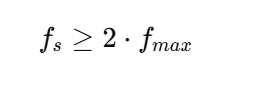
Where:
- (f_s) = sampling rate (samples per second)
- (f_{max}) = maximum frequency in the analog signal
Why it matters
- If you sample too slowly, higher frequencies in the signal will be misrepresented.
- This misrepresentation is called aliasing.
Example:
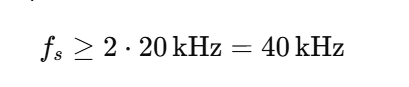
- Human hearing range: 20 Hz – 20 kHz
- That’s why CDs use 44.1 kHz.
- To capture all audible frequencies:
Aliasing Explained
If the sampling rate is below 2 *fmax
- High-frequency components “fold back” into lower frequencies
- The reconstructed audio sounds distorted
Visual: Imagine trying to sample a fast-moving wave slowly → it appears as a slower wave.
Embedded Systems Example
Suppose you have a microcontroller with a DAC:
- You want to play a sound with frequency content up to 8 kHz
- Minimum sample rate according to Shannon-Nyquist: (f_s \ge 16\text{kHz})
- Using 16 kHz will reconstruct the waveform correctly
- Using 10 kHz → aliasing will occur, audio will be distorted
Sound Digitization
Definition:
Sound digitization is the process of converting an analog sound wave (continuous) into a digital format (numbers) that a computer can store, process, or play back.
Step 1: Sampling the Sound
- The analog sound wave is measured at regular intervals.
- Each measurement is called a sample.
- Example:
- A sound is recorded at 44.1 kHz → 44,100 samples per second.
- Each sample captures the amplitude (height) of the wave at that instant.
Step 2: Quantization
- Each sample is rounded to the nearest value that can be represented digitally.
- This depends on bit depth.
- 16-bit → 65,536 possible levels
- 8-bit → 256 levels
- Effect: Higher bit depth → more precise representation of the wave.
Step 3: Storing as WAV
WAV (Waveform Audio File Format) is a digital audio file format used to store audio in uncompressed PCM (Pulse Code Modulation) format.
- Developed by Microsoft and IBM.
- Stores raw audio data plus some metadata (like sample rate, bit depth, and number of channels).
- Very common for high-quality audio in Windows and embedded projects.
- WAV file is a common container for PCM audio.
- Stores raw PCM data, along with metadata like:
- Sample rate (e.g., 44,100 Hz)
- Bit depth (e.g., 16-bit)
- Number of channels (mono/stereo)
Structure of a WAV file (simplified):
[Header]       → info about sample rate, bit depth, channels
[Data Chunk]   → sequence of PCM samples
Understanding WAV Files: Beginner’s Guide to Digital Audio
Digital audio has become an integral part of technology, from music streaming and video production to embedded systems and microcontroller projects. Among various audio formats, WAV (Waveform Audio File Format) stands out for its simplicity, high quality, and ease of use. This article explains WAV files in a beginner-friendly way, covering their structure, usage, and technical details.
What Is a WAV File?
A WAV file is a digital audio file format that stores sound in an uncompressed PCM (Pulse Code Modulation) format. Unlike compressed formats such as MP3 or AAC, WAV preserves every detail of the original audio. This makes it ideal for high-quality audio playback, recording, and professional applications.
WAV files can store:
- Mono or stereo audio
- Different bit depths (8-bit, 16-bit, 24-bit, 32-bit)
- Various sample rates (8 kHz, 44.1 kHz, 48 kHz, 96 kHz, etc.)
Structure of a WAV File
A WAV file has two main parts:
- Header – Contains metadata about the audio
- Data Chunk – Contains the actual audio samples
1. WAV Header
The header usually takes 44 bytes and helps software or embedded systems understand how to read the audio data. Key components include:
- RIFF Identifier (Bytes 0–3): Marks the file as a RIFF format file.
- File Size (Bytes 4–7): Total size of the file minus 8 bytes.
- WAVE Identifier (Bytes 8–11): Confirms the file is a WAV audio file.
- Format Chunk “fmt ” (Bytes 12–15): Starts the section describing the audio format.
Format Details in Header:
- Format Chunk Size (Bytes 16–19): Usually 16 for PCM audio.
- Audio Format (Bytes 20–21): 1 for PCM (uncompressed audio).
- Number of Channels (Bytes 22–23): 1 for mono, 2 for stereo.
- Sample Rate (Bytes 24–27): How many samples per second, e.g., 44,100 Hz.
- Byte Rate (Bytes 28–31): Number of bytes per second of audio.
- Block Align (Bytes 32–33): Size of a single sample frame in bytes.
- Bits Per Sample (Bytes 34–35): Audio precision (8-bit, 16-bit, etc.).
2. Data Chunk
After the header comes the data chunk, which stores raw PCM audio samples.
- Data Identifier (Bytes 36–39): Always labeled as “data”.
- Data Size (Bytes 40–43): Number of bytes of audio data.
- Audio Samples (Bytes 44+): The actual sound data, stored according to sample rate, bit depth, and channels.
In stereo audio, samples alternate between left and right channels:
Left1, Right1, Left2, Right2, ...Key WAV Features
- Uncompressed Audio: No loss in quality.
- High Compatibility: Supported on Windows, Linux, macOS, and embedded systems.
- Flexible Channels: Mono, stereo, or multiple channels for professional audio.
- Adjustable Sample Rate & Bit Depth: Allows balancing quality and memory usage.
WAV Files in Embedded Systems
WAV files are widely used in embedded projects because they are simple to process:
- Store PCM audio samples in memory (arrays).
- Send samples to a DAC at the correct sample rate.
- Play back sound through a speaker or audio output device.
Example in C for 16-bit stereo PCM data:
uint16_t audio_samples[] = {32768, 40000, 30000, 32768}; // interleaved left and right
- Send each sample frame to the DAC to reproduce the audio waveform.
Common Sample Rates for WAV
| Sample Rate | Typical Use |
|---|---|
| 8 kHz | Voice, telephony |
| 16 kHz | Wideband voice, low-quality audio |
| 44.1 kHz | Music, CD-quality audio |
| 48 kHz | Video, multimedia applications |
| 96 kHz | High-resolution audio, professional recording |
Example
Imagine a very short audio snippet:
- Mono audio, 8-bit, 4 samples per second (super simplified for example):
- Analog wave (simplified values):
0.1, 0.5, -0.3, 0.0 - Quantized to 8-bit integers (0–255):
128, 191, 87, 128 - Stored in WAV:
[128, 191, 87, 128] - When played back → approximates the original sound wave.
Key Points
- Sampling Rate: How often we take measurements → affects frequency accuracy
- Bit Depth: How precisely we store each measurement → affects volume/dynamics accuracy
- Channels: Mono/stereo → affects spatial perception
WAV is just a container for PCM audio. Other formats like MP3 or AAC compress PCM data.
Embedded Systems Perspective:
- On a microcontroller, you can store PCM samples in an array:
uint16_t audio_samples[] = {32768, 40000, 30000, 32768}; // 16-bit PCM
- Send them to a DAC at the correct sample rate to play the sound.
Common Audio Sample Rates and Their Uses
| Sample Rate | Frequency Captured | Use / Typical Application |
|---|---|---|
| 8 kHz | Up to 4 kHz | Telephony (phone calls), VoIP |
| 16 kHz | Up to 8 kHz | Wideband voice, some low-quality audio |
| 22.05 kHz | Up to 11 kHz | Low-quality music, older audio formats |
| 32 kHz | Up to 16 kHz | FM radio, some lower-quality recordings |
| 44.1 kHz | Up to 22 kHz | CD audio (standard for music), general-purpose audio |
| 48 kHz | Up to 24 kHz | Video production, DVDs, broadcast audio |
| 88.2 kHz | Up to 44.1 kHz | High-resolution audio, some studio recordings |
| 96 kHz | Up to 48 kHz | Professional audio, film production, high-quality recording |
| 192 kHz | Up to 96 kHz | Audiophile / ultra-high-resolution recordings |
Guidelines for Choosing Sample Rate
- Voice / telephony:
- Use 8 kHz or 16 kHz → only needs human speech range (~300–3400 Hz).
- Music / general audio:
- Use 44.1 kHz → covers full human hearing (~20 Hz – 20 kHz).
- Video / film:
- Use 48 kHz → industry standard for audio/video sync.
- High-quality / studio recording:
- Use 96 kHz or 192 kHz → captures more details for professional mixing/mastering.
Embedded Systems Perspective
- Microcontrollers with DACs often use 8 kHz–48 kHz.
- Higher sample rates → better quality, but more memory and higher CPU load.
- Example:
- Playing music on a small MCU → 44.1 kHz, 16-bit stereo PCM
- Voice alerts or notifications → 8 kHz, 8-bit mono PCM
Quick rule of thumb:
- 8–16 kHz: voice only
- 44.1 kHz: music / general audio
- 48 kHz: video / multimedia
- 96 kHz+: high-res studio recordings
Why we often use WAV files for testing audio instead of MP3, MP4, or other formats.
WAV Is Uncompressed (PCM)
- WAV stores audio in raw PCM format—the exact waveform is preserved.
- MP3, AAC, or MP4 are compressed formats (lossy or container formats), which remove some audio information to save space.
- For testing audio in embedded systems or audio applications, you want the original waveform without any distortion from compression.
Example: If you are testing a DAC or audio pipeline, WAV ensures the numbers you send to hardware match the original waveform perfectly.
Simple Structure
- WAV files have a simple, predictable header and straightforward data chunk.
- You can read the samples directly into memory and send them to a DAC.
- MP4 or MP3 files need decoding first (using codecs), which complicates testing.
In embedded systems, simplicity is key—WAV lets you focus on the hardware or playback pipeline without worrying about decoding software.
No Loss of Quality
- Compression can introduce artifacts (unwanted noise or distortion).
- Using WAV ensures that all audio details are preserved, which is crucial when testing:
- DAC linearity
- Speaker output quality
- Signal processing algorithms
Predictable Timing
- WAV files have a fixed sample rate and bit depth, so the timing of samples is predictable.
- MP3/MP4 often use variable bit rates, which can make playback timing less precise—not ideal for testing embedded audio systems.
Industry Standard for Testing
- Audio engineers and embedded developers almost always use WAV for test tones, audio calibration, and hardware verification.
- Common test signals include:
- Sine waves (to check frequency response)
- Square waves (for DAC linearity)
- White/pink noise (for speaker testing)
FAQs: What is Audio
1. What is audio?
Audio is the representation of sound, either as a physical wave in air or as a digital signal. It can be captured, processed, stored, and played back in devices like computers, smartphones, and embedded systems.
2. How is audio captured from a microphone?
A microphone converts sound waves into an analog electrical signal. This analog signal can then be converted into digital audio using an ADC (Analog-to-Digital Converter) and stored in formats like WAV or PCM.
3. What is PCM audio?
PCM (Pulse Code Modulation) is a method of converting analog sound into digital form by sampling the amplitude of the sound wave at regular intervals and storing it as numbers.
4. What is the difference between WAV and MP3?
WAV is an uncompressed audio format, preserving the original sound quality, making it ideal for testing and professional applications. MP3 is a compressed format that reduces file size but loses some audio details.
5. What is sample rate in audio?
Sample rate is the number of times per second the analog signal is measured during digitization. Common sample rates are 44.1 kHz (CD quality) and 48 kHz (video/audio production).
6. What is bit depth in audio?
Bit depth defines how accurately each audio sample is represented. Higher bit depth (like 16-bit or 24-bit) allows for greater dynamic range and more precise sound reproduction.
7. Why is WAV used for audio testing?
WAV files store raw PCM audio without compression, ensuring exact waveform reproduction. This makes them perfect for testing audio hardware or embedded systems, where accuracy is crucial.
8. Can all captured audio be saved as WAV?
Yes. Audio captured from a microphone or ADC can be saved as a WAV file by adding a header to the raw PCM data. Other formats like MP3 or AAC require compression and encoding.
9. What are the common audio channels?
Audio can have one channel (mono), two channels (stereo), or more for surround sound setups (5.1, 7.1). Channels determine how sound is distributed across speakers.
10. How is audio used in embedded systems?
Embedded systems use digital audio for alerts, notifications, music playback, and voice recognition. PCM data from WAV files is typically sent to a DAC to produce sound through speakers.
Recommended Resource: Expand Your ESP32 Knowledge
If you’re enjoying this project and want to explore more powerful sensor integrations, make sure to check out my detailed guide on using the ESP32 with the DS18B20 temperature sensor. It’s a beginner-friendly, real-world tutorial that shows how to measure temperature with high accuracy and integrate the data into IoT dashboards, automation systems, or cloud servers. You can read the full step-by-step guide here: ESP with DS18b20
This resource pairs perfectly with your ESP32 with RFID setup—together, you can build advanced smart home systems, environmental monitoring tools, or complete multi-sensor IoT projects.
Leave a Reply