
Tag: QNX Networking

  • Master QNX Boot Process Interview Question Explained (2026)

    Learn the complete QNX Boot Process: IPL, Startup Code, IFS, SLM & Boot Manager explained step-by-step for embedded system interviews.

    Understanding the QNX boot process is a must if you’re preparing for embedded or automotive interviews. In this video, we break down the complete QNX boot flow step by step from power-on to application launch in a way that’s easy to understand and practical for real interviews.

    You’ll learn how IPL, startup code, IFS, the Neutrino microkernel, SLM, and the Boot Manager work together during system boot. Each concept is explained with clear logic, real-world examples, and common interview questions that are frequently asked in companies working with QNX RTOS.

    This content is designed for beginners, experienced engineers, and senior embedded developers who want clarity instead of textbook definitions. If you’re targeting roles in automotive, IVI, ADAS, or real-time systems, this guide will help you answer confidently and explain concepts like a professional.

    Perfect for:

    • QNX RTOS interview preparation
    • Embedded software engineers
    • Automotive and safety-critical system roles

    Explain QNX booting process

    0️⃣ Power-On / Reset

    • CPU resets and starts execution from a fixed reset vector
    • Control goes to platform firmware
      • ROM code / SoC boot ROM
      • BIOS / UEFI (x86)
      • Trusted firmware (ARM)

    1️⃣ Firmware / Platform Initialization

    Responsibilities:

    • Basic silicon initialization
    • Select boot media (eMMC, SD, NOR, NAND, network)
    • Load the Initial Program Loader (IPL)

    Still not QNX OS yet.

    2️⃣ Initial Program Loader (IPL)

    First QNX-specific software

    Responsibilities:

    • Initialize minimum hardware:
      • DRAM controller
      • CPU caches
      • Basic clocking
    • Locate and load the QNX IFS (Image File System) into RAM
    • Transfer execution to the startup program inside the IFS

    IPL is board-specific and extremely small.

    3️⃣ Image File System (IFS)

    The IFS is a single binary image containing:

    • Startup program (startup-*)
    • procnto (kernel + process manager)
    • Boot scripts
    • Drivers & servers
    • Boot manager / SLM (if used)
    • Optional user applications

    IPL only loads the IFS; it does not start services.

    4️⃣ Startup Program (Critical Stage)

    Executed directly from the IFS

    Responsibilities:

    • Identify CPU and SoC
    • Initialize interrupt controller
    • Initialize timers
    • Configure caches
    • Initialize MMU
    • Discover RAM & reserved regions
    • Build the System Page (syspage)
    • Register kernel callouts
    • Prepare execution environment for the kernel

    The kernel cannot run without startup completing

    5️⃣ Transfer Control to procnto

    • Startup jumps to procnto entry point

    6️⃣ procnto (Kernel + Process Manager)

    procnto contains:

    • Neutrino microkernel
    • Process manager

    Kernel responsibilities:

    • Thread scheduling
    • Interrupt handling
    • Message passing (IPC)
    • Timers
    • Signals

    Process manager responsibilities:

    • Process creation (spawn, fork)
    • Memory management
    • POSIX services
    • File descriptor handling

    At this point, the OS is alive, but no drivers or filesystems exist yet.

    7️⃣ Boot Script Execution (Buildfile Script)

    • procnto executes the startup script embedded in the IFS
    • Script is defined in the IFS buildfile

    Script launches:

    • Device drivers (resource managers)
    • Filesystems
    • Networking stack
    • Logging services

    Example:

    devc-seromap
    io-blk.so
    devb-mmcsd
    mount -t qnx6 /dev/mmc0 /
    

    Script order defines system bring-up order.

    8️⃣ Boot Manager (Optional, Policy-Based)

    Runs as a user-space process

    Responsibilities:

    • Decide boot mode:
      • Normal
      • Recovery
      • Factory
      • OTA update
    • Read:
      • GPIO
      • NVRAM
      • Reset reason
    • Select:
      • Which script
      • Which partition
      • Which system profile

    Boot Manager does not boot the OS, it selects how the OS continues.

    9️⃣ SLM – System Launch Manager (Optional but Common)

    Runs after boot decision

    Responsibilities:

    • Launch services based on policy
    • Handle:
      • Dependencies
      • Ordering
      • Restart policies
      • Monitoring

    Example:

    • Start audio only after codec driver
    • Restart camera service on crash
    • Delay UI until graphics stack is ready

    Replaces traditional init systems.

    🔟 Filesystem Mounting

    • Root filesystem mounted
    • Persistent storage mounted
    • /proc, /dev, /etc become available

    1️⃣1️⃣ System Services Running

    Examples:

    • io-pkt (networking)
    • slog2info (logging)
    • devb-* (storage)
    • Audio, camera, display services

    All run in user space.

    1️⃣2️⃣ User Applications Start

    • System enters RUNNING state
    • Real-time applications start with:
      • Assigned priority
      • Scheduling policy
    • System is fully operational

    COMPLETE FLOW DIAGRAM

    Power On / Reset
          ↓
    Firmware / ROM / UEFI
          ↓
    Initial Program Loader (IPL)
          ↓
    Load IFS into RAM
          ↓
    Startup Program
          ↓
    procnto (Kernel + Process Manager)
          ↓
    Boot Script (IFS)
          ↓
    Boot Manager (optional)
          ↓
    SLM (optional)
          ↓
    Drivers / Services
          ↓
    Applications
    

    IPL (Initial Program Loader) is the first QNX-specific software component that runs after power-on/reset.
    Its primary role is to prepare minimal hardware and load the QNX OS image (IFS) into RAM.

    Simple Definition

    IPL is a small, board-specific program that runs after firmware, initializes minimal hardware, loads the QNX Image File System (IFS) into memory, and transfers control to the startup program.

    Where IPL Fits in the QNX Boot Sequence

    Power ON / Reset
       ↓
    Firmware / Boot ROM / UEFI
       ↓
    IPL   ← (first QNX component)
       ↓
    Startup program (inside IFS)
       ↓
    procnto (kernel + process manager)
    

    Key Responsibilities of IPL

    1️⃣ Minimal Hardware Initialization

    • Initialize DRAM / RAM controller
    • Set basic CPU clocks
    • Enable caches (if required)
    • Setup minimal UART for debug logs

    Only what’s needed to load the OS — nothing more.

    2️⃣ Locate Boot Media

    • Determines where the OS image is stored:
      • NOR / NAND Flash
      • eMMC / SD card
      • Network (TFTP)
      • SPI Flash

    3️⃣ Load the IFS (Image File System)

    • Copies the QNX IFS image from boot media into RAM
    • Verifies image integrity (optional checksum/signature)

    4️⃣ Transfer Control to Startup Program

    • Jumps to the startup program entry point
    • From this point, IPL is no longer involved

    What IPL Does NOT Do

    • Does not initialize MMU
    • Does not start the kernel
    • Does not start drivers or services
    • Does not run in user space

    Characteristics of IPL

    • Board-specific
    • Very small footprint
    • Runs in physical addressing mode
    • Written in C + assembly
    • Often stored in ROM or Flash

    IPL vs Startup Program (Very Common Interview Question)

    FeatureIPLStartup Program
    Runs first
    Hardware initMinimalExtensive
    Loads IFS
    Builds syspage
    Initializes MMU
    Starts kernel✅ (via procnto)

    One-Line Ultra-Short Answer

    IPL is a minimal bootloader in QNX that initializes basic hardware and loads the OS image (IFS) into RAM before handing control to the startup program.

    High-Level Difference (One-Line)

    IPL is a minimal, board-specific QNX loader whose only job is to load the IFS, while U-Boot is a full-featured, OS-agnostic bootloader that can load many operating systems and provide user interaction.

    Position in Boot Flow

    QNX with IPL

    ROM / Firmware
       ↓
    IPL
       ↓
    Startup program
       ↓
    procnto (kernel)
    

    QNX with U-Boot

    ROM / Firmware
       ↓
    U-Boot
       ↓
    Load IFS into RAM
       ↓
    Startup program
       ↓
    procnto (kernel)
    

    U-Boot can replace IPL, but the startup program is still mandatory in QNX.

    Core Purpose

    AspectIPLU-Boot
    Primary goalLoad QNX IFSGeneral-purpose bootloader
    OS specificYes (QNX)No (Linux, QNX, RTOS)
    Feature setMinimalVery rich
    User interactionNoneCLI, scripting
    Typical sizeVery small (KBs)Large (100s of KBs–MBs)

    Hardware Initialization

    AreaIPLU-Boot
    DDR initMinimalFull
    ClocksMinimalFull
    GPIONoYes
    NetworkingNoYes
    USBNoYes
    DisplayNoYes

    IPL initializes only what’s needed to load IFS.

    Storage & Boot Sources

    FeatureIPLU-Boot
    NOR/NANDYesYes
    eMMC/SDYesYes
    Network bootRareCommon
    Filesystem supportNoYes (FAT, EXT, etc.)

    OS Image Handling

    FeatureIPLU-Boot
    Loads IFSYesYes
    Loads Linux kernelNoYes
    Multiple imagesNoYes
    Image selectionFixedDynamic

    Security Features

    FeatureIPLU-Boot
    Secure bootLimitedStrong
    Image authenticationBasicAdvanced
    TPM supportNoYes

    Scripting & Debugging

    FeatureIPLU-Boot
    Command lineNoYes
    Boot scriptsNoYes
    Environment variablesNoYes
    Recovery shellNoYes

    Typical Use Cases

    IPL is used when:

    • You want fast, deterministic boot
    • System is fixed-function
    • Safety-critical systems (automotive)
    • Minimal attack surface

    U-Boot is used when:

    • Multiple OS support needed
    • Development & debugging required
    • OTA updates, recovery modes
    • Rich storage & network boot options

    Common Interview Trick Question

    Q: Can QNX boot without IPL?

    ✔️ Yes, if U-Boot loads the IFS directly
    No, QNX can’t boot without the startup program

    IPL vs U-Boot vs Startup

    ComponentRole
    IPLLoads IFS
    U-BootLoads IFS or kernel
    StartupPrepares system for kernel

    Startup is mandatory. IPL is optional if U-Boot is used.

    Real Automotive Example

    • Boot ROM → U-Boot
    • U-Boot verifies image & selects slot
    • U-Boot loads QNX IFS into RAM
    • Jumps to startup program
    • QNX kernel starts

    IFS (Image File System) is a single, self-contained binary image that contains everything QNX needs to boot and start running — including the kernel, startup code, drivers, and applications.

    Simple Definition

    IFS is a bootable, in-memory filesystem image that bundles the QNX kernel, startup program, system processes, drivers, scripts, and applications into one binary loaded by the bootloader.

    Where IFS Fits in the Boot Sequence

    IPL / U-Boot
       ↓
    Load IFS into RAM
       ↓
    Startup program
       ↓
    procnto (kernel)
       ↓
    Boot scripts & services
    

    What an IFS Contains

    Mandatory Components

    • Startup program (startup-*)
    • procnto
      • Neutrino microkernel
      • Process manager

    Optional Components

    • Boot scripts
    • Device drivers (resource managers)
    • Filesystem drivers
    • Networking stack
    • Boot Manager
    • SLM (System Launch Manager)
    • System services
    • User applications
    • Shared libraries

    Everything inside the IFS is available immediately at boot.

    Why QNX Uses IFS

    1️⃣ Single Binary = Fast & Reliable Boot

    • No dependency on external filesystems
    • Ideal for real-time & safety systems

    2️⃣ Read-Only & In-Memory

    • Stored in ROM/Flash
    • Loaded into RAM
    • Immutable at runtime → improves reliability

    3️⃣ Deterministic Startup

    • Exact execution order defined in buildfile
    • No surprises during boot

    How IFS is Created

    Tool Used

    • mkifs

    Input

    • Buildfile
      • Lists binaries
      • Defines scripts
      • Sets permissions & paths

    Output

    • Single IFS binary
      • Example: ifs-qnx.bin

    Simple Buildfile Example

    [virtual=armle]
    startup-qcom
    procnto
    script=/etc/system/boot {
        devc-seromap
        io-blk.so
    }
    

    Runtime Characteristics

    FeatureIFS
    LocationRAM
    Writable (read-only)
    SizeFixed at build time
    ExecutionDirect from memory
    Mount point/ (initial root)

    IFS vs Root Filesystem

    AspectIFSRoot FS
    PurposeBoot & early systemPersistent storage
    ModifiableNoYes
    Used at bootAlwaysOptional
    ReliabilityVery highDepends on storage

    After boot, QNX may switch root to a persistent filesystem.

    Common Interview Questions

    Q. Can QNX boot without IFS?

    No
    IFS is mandatory.

    Q. Can there be multiple IFS images?

    ✔️ Yes

    • Different boot modes
    • Recovery images
    • OTA A/B partitions

    Q. Is IFS the same as Linux initramfs?

    Conceptually similar, but:

    • IFS is more deterministic
    • Built specifically for QNX
    • Integrated tightly with the kernel startup

    One-Line Ultra-Short Answer

    IFS is a single, bootable in-memory filesystem image that contains the QNX startup program, kernel, drivers, scripts, and applications.

    Startup code in QNX is the very first software that runs after the boot loader (IPL) and before the QNX Neutrino microkernel starts.

    Its main job is to initialize the hardware, prepare memory, and load the QNX kernel and system processes into RAM.

    Why is Startup Code needed in QNX?

    When the system powers on:

    • Hardware is in an unknown state
    • RAM is not initialized
    • MMU, caches, clocks are not configured

    The startup code prepares the system so the QNX kernel can run safely and deterministically.

    Position in QNX Boot Flow (Interview Point)

    Power ON
       ↓
    ROM / Boot ROM
       ↓
    IPL (Initial Program Loader)
       ↓
    Startup Code   ← (This)
       ↓
    QNX Neutrino Microkernel (procnto)
       ↓
    System Services & Applications
    

    Key Responsibilities of QNX Startup Code

    1. Basic Hardware Initialization

    • Initialize CPU
    • Configure clocks and PLL
    • Enable RAM controllers
    • Set up UART (for early debug output)

    2. Memory Setup

    • Detect available RAM
    • Build the system memory map
    • Reserve memory for:
      • Kernel
      • System processes
      • Drivers

    3. MMU and Cache Setup

    • Initialize MMU
    • Set up page tables
    • Enable instruction and data caches

    (Important for performance and protection)

    4. Load the IFS (Image File System)

    • Locate the IFS image
    • Copy it into RAM
    • Validate the image

    IFS contains:

    • Neutrino kernel (procnto)
    • Process Manager
    • Shared libraries
    • Startup services

    5. Start the QNX Microkernel

    • Transfer control to:
    procnto
    
    • After this point, QNX kernel scheduling and message passing begin

    Is Startup Code Hardware Dependent?

    Yes

    • Startup code is board-specific
    • Written per SoC / CPU architecture
    • Different for:
      • ARM
      • x86
      • PowerPC

    Where is Startup Code Located?

    • Stored inside the IFS
    • Built using:
    startup-<boardname>
    

    Example:

    startup-am335x
    startup-imx8
    

    Difference Between IPL and Startup Code (Very Common Interview Question)

    IPLStartup Code
    Runs from ROM/FlashRuns from RAM
    Very minimalMore complex
    Loads startupLoads kernel + IFS
    Hardware-agnosticHardware-specific

    One-Line Interview Answer

    Startup code in QNX is a board-specific program that runs after the IPL to initialize hardware, configure memory and MMU, load the IFS, and finally start the QNX Neutrino microkernel.

    Real-World Example (Bonus)

    On an ARM board:

    • IPL sets up SDRAM
    • Startup code:
      • Configures MMU
      • Sets UART for logs
      • Loads procnto
      • Hands control to the kernel

    Where they sit in the QNX boot flow

    Power ON
      ↓
    Boot ROM
      ↓
    IPL (Initial Program Loader)
      ↓
    Startup Code
      ↓
    QNX Neutrino Microkernel (procnto)
      ↓
    SLM (System Launch Manager)
      ↓
    Boot Manager
      ↓
    System Services & Applications
    

    1️⃣ Startup Code (Before Kernel)

    What is Startup Code?

    Startup code is a board-specific program that runs after IPL and before the QNX kernel.

    Runs in:

    • No OS context
    • No scheduling, no IPC, no processes

    Main Responsibilities

    • Initialize CPU, clocks, PLL
    • Initialize RAM
    • Set up MMU and caches
    • Build system memory map
    • Load IFS into RAM
    • Start Neutrino microkernel (procnto)

    Key Interview Line

    Startup code prepares the hardware and memory so that the QNX kernel can safely start.

    2️⃣ SLM (System Launch Manager)

    What is SLM?

    SLM is the first user-space process launched by the QNX kernel.

    It is responsible for starting all core system services.

    Runs in:

    • User space
    • Fully scheduled by the kernel
    • Uses message passing

    What SLM Does

    • Reads system launch configuration
    • Starts:
      • Process Manager
      • Path Manager
      • Device drivers
      • Filesystems
      • Networking stack
    • Handles service dependencies
    • Ensures correct startup order

    Why SLM is important

    • Provides deterministic system bring-up
    • Allows controlled, restartable services

    Key Interview Line

    SLM is responsible for launching and supervising essential system services after the kernel starts.

    3️⃣ Boot Manager

    What is Boot Manager?

    Boot Manager is a user-space component that controls which system configuration or boot image to start.

    It is commonly used in automotive and safety-critical systems.

    Runs in:

    • User space
    • After SLM starts basic services

    What Boot Manager Does

    • Selects:
      • Normal boot
      • Recovery boot
      • OTA update boot
    • Validates images (CRC / signature)
    • Handles:
      • A/B partitions
      • Rollback on failure
    • Supports safe and secure boot flow

    Why Boot Manager is needed

    • Enables fail-safe boot
    • Supports software updates
    • Required for ASIL / functional safety systems

    Key Interview Line

    Boot Manager controls system boot modes and ensures safe startup, recovery, and update handling.

    Direct Comparison Table (Very Important)

    FeatureStartup CodeSLMBoot Manager
    Boot StageBefore kernelAfter kernelAfter SLM
    Runs InNo OSUser spaceUser space
    Hardware InitYesNoNo
    Kernel LaunchYesNoNo
    Service LaunchNoYesPartial
    Boot Mode SelectionNoNoYes
    Safety / OTANoNoYes
    Board SpecificYesMostly genericGeneric

    One-Line Differentiation

    • Startup code initializes hardware and starts the kernel
    • SLM launches and manages system services
    • Boot Manager decides how the system boots (normal, recovery, update)

    Common Interview Trap

    “Boot Manager starts the kernel”
    Wrong — kernel is already running before Boot Manager starts.

    Real Automotive Example

    • Startup initializes SoC and DDR
    • Kernel starts
    • SLM launches:
      • Audio
      • Camera
      • CAN
    • Boot Manager:
      • Verifies OTA image
      • Chooses A/B partition
      • Rolls back on failure

    5-Second Interview Answer

    In QNX, startup code initializes hardware and starts the kernel, SLM launches and supervises system services, and Boot Manager controls boot modes, recovery, and updates for safe system startup.

    io-pkt is the QNX networking stack process that provides TCP/IP networking services.

    Detailed Explanation

    • io-pkt is a user-space network protocol stack
    • It implements:
      • TCP
      • UDP
      • IP
      • ARP
      • ICMP
    • Uses QNX’s message-passing microkernel architecture
    • Hardware-independent networking core

    Key Responsibilities

    • Packet routing
    • Protocol handling
    • Socket API support
    • Interface with NIC drivers

    How hardware fits in

    • NIC drivers are shared libraries loaded by io-pkt
    • Example:
    io-pkt-v6-hc -d e1000
    

    Why QNX uses io-pkt (Interview Point)

    • Fault isolation (user space)
    • Restartable networking stack
    • Deterministic behavior

    Runs in:

    • User space

    devb-* is the QNX block device driver used for storage devices.

    Detailed Explanation

    • devb stands for device block
    • Provides block-level access to storage:
      • eMMC
      • SD card
      • USB storage
      • SATA
      • NVMe

    What devb-* Does

    • Manages:
      • Read/write blocks
      • Disk partitions
      • Media detection
    • Exposes devices like:
    /dev/hd0
    /dev/hd0t77
    

    Common devb-* Examples

    DriverDevice
    devb-sdmmcSD / eMMC
    devb-umassUSB mass storage
    devb-sataSATA disk
    devb-nvmeNVMe

    Used with File Systems

    • Works with:
      • fs-qnx6
      • fs-ext4
      • fs-fat

    Runs in:

    • User space

    devc-* is the QNX character device driver for serial communication interfaces.

    Detailed Explanation

    • devc stands for device character
    • Provides serial I/O support:
      • UART
      • RS-232
      • RS-485
    • Uses termios interface

    What devc-* Does

    • Handles:
      • Baud rate
      • Parity
      • Flow control
      • Interrupts
    • Creates devices like:
    /dev/ser1
    /dev/ttyS0
    

    Common devc-* Examples

    DriverInterface
    devc-ser8250Standard UART
    devc-mx1i.MX UART
    devc-omapTI OMAP UART

    Runs in:

    • User space

    Comparison Table

    Featureio-pktdevb-*devc-*
    TypeNetwork stackBlock driverCharacter driver
    Used ForTCP/IP networkingStorage devicesSerial communication
    Device TypeNetworkBlockCharacter
    Runs InUser spaceUser spaceUser space
    RestartableYesYesYes
    Hardware SpecificPartiallyYesYes

    One-Line Difference

    • io-pkt → networking stack
    • devb-* → storage devices
    • devc-* → serial communication

    Common Interview Trap

    ❌ “These drivers run in kernel space”
    Wrong — QNX runs drivers in user space for fault tolerance.

    Real Automotive Example

    • io-pkt → Ethernet / CAN-over-IP
    • devb-sdmmc → eMMC storage
    • devc-ser8250 → Debug UART

    5-Second Interview Answer (Perfect)

    In QNX, io-pkt provides networking services, devb-* handles block storage devices, and devc-* manages serial character devices, all running safely in user space

    A startup script in QNX is a shell script that runs after the QNX kernel boots to start system services, drivers, and applications in a defined order.

    Slightly Detailed

    • Executed in user space
    • Runs after procnto (microkernel) is up
    • Typically launched by SLM (System Launch Manager)
    • Used to:
      • Start drivers
      • Mount filesystems
      • Configure networking
      • Launch applications

    What Does a Startup Script Do?

    Common tasks include:

    • Start drivers:
    devc-ser8250 &
    io-pkt-v6-hc -d e1000 &
    devb-sdmmc &
    
    • Mount filesystems:
    mount -t qnx6 /dev/hd0t177 /data
    
    • Configure networking:
    ifconfig en0 192.168.1.10
    
    • Set environment variables
    • Start applications and services

    Where Are Startup Scripts Located?

    Interview Answer

    Startup scripts are stored inside the IFS (Image File System) and are executed during system boot.

    Common Locations

    LocationPurpose
    /etc/system/Primary system startup scripts
    /etc/system/enum/Hardware enumeration scripts
    /etc/rc.d/Optional rc-style scripts
    /proc/boot/Read-only IFS contents

    Most Important File (Very Common Question)

    /proc/boot/script

    • Main startup script
    • Executed automatically during boot
    • Lives inside the IFS
    • Read-only at runtime

    How Startup Scripts Are Executed (Boot Flow)

    Kernel (procnto)
       ↓
    SLM starts
       ↓
    SLM executes /proc/boot/script
       ↓
    Drivers and services start
    

    Why Startup Scripts Are Important?

    Interview Points

    • Control boot order
    • Enable deterministic startup
    • Allow easy system customization
    • No kernel recompilation required

    Startup Script vs Startup Code

    Startup CodeStartup Script
    Runs before kernelRuns after kernel
    Written in CWritten in shell
    Hardware initializationService & driver launch
    Board-specificMostly generic

    Real-World Example (Automotive)

    • Startup script:
      • Starts audio service
      • Launches camera driver
      • Brings up Ethernet
    • Allows OTA updates without touching kernel

    One-Line Interview Answer

    A startup script in QNX is a user-space shell script stored in the IFS that runs after the kernel boots to launch system services, drivers, and applications.

    Conclusion

    The QNX boot process may look complex at first, but once you understand the role of each stage, it becomes very logical and easy to explain in interviews. From IPL and startup code preparing the hardware, to the Neutrino microkernel taking control, and finally SLM and the Boot Manager launching and managing system services, every step is designed for determinism, safety, and reliability.

    Knowing how these components work together not only helps you answer interview questions with confidence but also gives you a real-world understanding of why QNX is widely used in automotive and safety-critical systems. If you can clearly explain the boot flow and the responsibility of each layer, you already stand out as a strong embedded engineer.

    Keep revising the flow, relate it to practical use cases, and you’ll be well prepared for any QNX or embedded systems interview.

    FAQ : QNX Boot Process

    1. What is the QNX boot process?

    The QNX boot process is the sequence of steps the system follows from power-on to running applications. It involves IPL, startup code, IFS, the Neutrino microkernel, SLM, and Boot Manager.

    2. What is IPL in QNX?

    IPL (Initial Program Loader) is the first code that runs after powering on the system. It initializes basic hardware and loads the startup code into RAM.

    3. What is startup code in QNX?

    Startup code is a board-specific program that runs after IPL. It sets up memory, MMU, caches, and loads the IFS, then starts the Neutrino microkernel.

    4. What is IFS (Image File System)?

    IFS contains the QNX kernel, drivers, libraries, and startup scripts. Startup code loads IFS into RAM so the system can run all services.

    5. What is SLM in QNX?

    SLM (System Launch Manager) is the first user-space process launched by the kernel. It starts drivers, system services, and applications, handling dependencies and startup order.

    6. What is Boot Manager in QNX?

    Boot Manager controls which boot mode or image the system uses. It ensures safe boot, recovery options, and OTA updates, especially in automotive or safety-critical systems.

    7. What is io-pkt in QNX?

    io-pkt is the networking stack process in QNX. It handles TCP/IP, UDP, ICMP, and communicates with NIC drivers to provide network functionality in user space.

    8. What are devb-* drivers in QNX?

    devb-* drivers are block device drivers for storage devices like SD cards, eMMC, USB drives, and SATA/NVMe disks. They provide read/write block-level access.

    9. What are devc-* drivers in QNX?

    devc-* drivers are character device drivers used for serial communication interfaces such as UART, RS-232, and RS-485.

    10. What is a startup script in QNX?

    A startup script is a user-space shell script executed after the kernel boots. It launches drivers, services, and applications, defining the system’s startup behavior.

    11. Where are startup scripts located in QNX?

    Startup scripts are stored in the IFS, usually under /etc/system/ or /proc/boot/script. They are executed automatically during system boot.

    12. What is the difference between startup code, SLM, and Boot Manager?

    ComponentRole
    Startup CodeHardware initialization and kernel launch
    SLMLaunches system services and drivers in user space
    Boot ManagerManages boot modes, safe boot, recovery, and updates

    In short, startup code starts the kernel, SLM starts services, and Boot Manager controls boot modes.
    Read More about Process : What is is Process
    Read More about System Call in Linux : What is System call
    Read More about IPC : What is IPC
  • Master QNX OS Interview Questions and Answer 2026

    QNX OS interview questions and answers for 2026, explained in simple language. Covers microkernel architecture, IPC, scheduling, resource managers, and real-time concepts for embedded and automotive engineers.

    This collection of QNX OS interview questions and answers is designed for engineers who want to truly understand QNX, not just memorize definitions. The questions are written in a practical way, similar to what is actually asked in real technical interviews, especially for automotive, embedded, and RTOS roles.

    The content starts from basic concepts, such as what QNX is, why it is called a microkernel OS, and how it differs from Linux. As the questions progress, they move into core internal topics like kernel space vs user space, message passing, processes and threads, scheduling, IPC, and resource managers. Advanced sections cover fault tolerance, adaptive partitioning, real-time behavior, priority scheduling, and system reliability, which are commonly discussed in senior-level interviews.

    Each answer is written in simple language, focusing on clarity and understanding, not textbook definitions. Wherever possible, explanations reflect real-world behavior, how QNX works internally, and how engineers actually use it in production systems like automotive ECUs, medical devices, and industrial controllers.

    This material is especially useful for:

    • Embedded Software Engineers
    • Automotive/QNX Developers
    • RTOS and System Programming Interviews
    • Engineers working with QNX Neutrino

    The goal is not to impress with complex wording, but to help you explain QNX confidently and naturally during interviews just like an experienced engineer would.

    QNX is a POSIX-compliant, microkernel-based real-time operating system used in embedded and safety-critical systems. It provides deterministic real-time performance, high reliability, and fault isolation, making it ideal for automotive, medical, industrial, and aerospace applications.

    Key Points to Mention in Interviews

    • RTOS (Real-Time OS) → Guarantees predictable response times
    • Microkernel architecture → Only essential services (scheduler, IPC, interrupts) run in kernel
    • Fault tolerant → A crashing driver doesn’t crash the whole system
    • POSIX compliant → Familiar Linux/UNIX APIs
    • High reliability & safety → Used in ADAS, infotainment, medical devices
    • Message-passing IPC → Core communication mechanism
    • Certified OS → ISO 26262, IEC 61508, etc.

    Where QNX is Used

    • Automotive (Infotainment, ADAS, Digital Cockpits)
    • Medical Devices
    • Industrial Automation
    • Aerospace & Defense
    • Robotics

    QNX is a real-time operating system (RTOS).

    Interview-Ready Answer

    QNX is a hard real-time operating system that provides deterministic and predictable response times, which makes it suitable for safety-critical embedded systems.

    Why QNX is Real-Time

    • Deterministic scheduling → Guaranteed response within deadlines
    • Microkernel architecture → Minimal kernel, faster interrupt handling
    • Priority-based preemptive scheduling
    • Message-passing IPC → Core real-time communication mechanism
    • Low interrupt latency & jitter

    Hard vs Soft Real-Time

    • QNX = Hard real-time OS
      Missing a deadline is considered a system failure (important for automotive, medical systems).

    Interview One-Liner (Strong)

    QNX is a POSIX-compliant, microkernel-based hard real-time operating system designed for deterministic and safety-critical applications.

    In QNX, a microkernel means that only the most essential operating system services run in the kernel, such as the scheduler, interrupt handling, and inter-process communication (IPC). All other services like device drivers, file systems, networking, and protocol stacks run as user-space processes.

    Key Points to Mention

    1. Minimal Kernel → Only critical functions run in kernel space.
    2. User-space Services → Most OS services run as separate processes, improving stability and fault isolation.
    3. Fault Isolation → If a driver or service crashes, it won’t crash the whole system.
    4. Message-Passing IPC → Kernel facilitates communication between processes efficiently.
    5. Real-Time Friendly → Microkernel keeps latency low, making it suitable for hard real-time applications.

    Example Explanation

    • Suppose the audio driver crashes in QNX → Only that driver stops; the OS and other applications continue running.
    • Contrast this with monolithic kernels (like Linux), where a driver crash can crash the whole system.

    One-Liner for Interviews

    QNX’s microkernel architecture runs only essential services in the kernel, while other services run in user space, providing fault tolerance and real-time performance.

    QNX is a microkernel-based real-time operating system designed for deterministic, safety-critical embedded systems, while Linux is a monolithic, general-purpose OS that is not inherently real-time (unless using PREEMPT_RT patches).

    Key Differences to Mention

    FeatureQNXLinux
    Kernel TypeMicrokernelMonolithic
    Real-Time SupportHard real-time (deterministic)General-purpose; soft real-time with PREEMPT_RT
    Fault IsolationHigh – services run in user space; crashes don’t crash OSLow – kernel modules can crash entire system
    Inter-Process Communication (IPC)Message-passing via microkernelShared memory, signals, pipes (less deterministic)
    Typical Use CaseAutomotive, medical, industrial, aerospaceDesktop, servers, embedded systems (non-critical)
    Memory FootprintSmall, lightweightLarger, heavier
    Boot TimeFast, optimized for embedded systemsSlower, general-purpose boot
    CertificationISO 26262, IEC 61508, DO-178Not generally certified for safety-critical applications

    Example for Interview

    • Automotive Infotainment: QNX → Digital dashboard (hard real-time, fault-tolerant).
    • Desktop Application: Linux → Ubuntu OS on a laptop.

    One-Liner for Interviews

    QNX is a real-time, microkernel OS optimized for safety-critical embedded systems, whereas Linux is a general-purpose monolithic OS with limited real-time support.

    QNX is widely used in embedded and safety-critical systems where reliability, fault tolerance, and real-time performance are essential.

    Key Areas / Industries

    1. Automotive
      • Infotainment systems (digital dashboards, touchscreens)
      • Advanced Driver Assistance Systems (ADAS)
      • Digital cockpits and instrument clusters
    2. Medical Devices
      • Life-support equipment, patient monitors
      • Imaging systems
    3. Industrial Automation
      • Robotics, PLCs, factory automation controllers
      • Process control systems
    4. Aerospace & Defense
      • Avionics and flight control systems
      • Mission-critical embedded electronics
    5. Telecommunications
      • Network switches, base stations
    6. IoT and Embedded Devices
      • Smart appliances, robotics, edge devices

    Example for Interview

    “For example, in automotive, QNX is used in digital dashboards where a crash in the media player or Bluetooth module won’t take down the whole system, thanks to its microkernel architecture.”

    One-Liner

    QNX is commonly used in automotive, medical, industrial, aerospace, and telecommunications systems where reliability and real-time performance are critical.

    QNX is a microkernel-based real-time operating system with features designed for embedded and safety-critical systems, providing high reliability, determinism, and fault tolerance.

    Key Features

    1. Microkernel Architecture
      • Only essential services run in the kernel (scheduler, IPC, interrupts)
      • Other services (drivers, file systems, networking) run in user space
      • Ensures fault isolation and system stability
    2. Real-Time Performance
      • Hard real-time deterministic scheduling
      • Low interrupt latency and predictable response times
      • Priority-based preemptive multitasking
    3. POSIX Compliance
      • Supports standard UNIX/Linux APIs
      • Eases application porting from other systems
    4. Inter-Process Communication (IPC)
      • Efficient message-passing mechanism
      • Supports synchronous and asynchronous communication between processes
    5. Fault Tolerance & High Reliability
      • Crashing of a driver or service does not crash the OS
      • Critical for safety-certified applications
    6. Scalability
      • Runs on small microcontrollers to complex multi-core systems
      • Suitable for both resource-constrained devices and high-end embedded platforms
    7. File System Support
      • Journaling and networked file systems for reliability
      • Can integrate custom embedded file systems
    8. Networking & Communication
      • Supports TCP/IP, CAN, USB, and other industrial protocols
      • Suitable for connected embedded systems
    9. Security & Safety Certification
      • ISO 26262 (Automotive), IEC 61508 (Industrial), DO-178B/C (Aerospace)
      • Enables use in safety-critical applications
    10. Modularity
      • Easy to add/remove components without affecting the kernel
      • Lightweight and customizable for specific embedded use cases

    Example for Interview

    “For instance, in an automotive digital dashboard, QNX ensures that even if the media or Bluetooth service crashes, the display of speed, fuel, and engine status continues to work reliably, thanks to its microkernel architecture and fault isolation.”

    One-Liner for Interviews

    QNX features a microkernel architecture, hard real-time performance, fault tolerance, POSIX compliance, scalable modular design, and is certified for safety-critical systems.

    POSIX compliance in QNX means that the operating system supports standard UNIX/Linux APIs and interfaces, allowing developers to write portable applications that can run on QNX with minimal changes.

    Key Points to Mention

    1. Standardized API
      • QNX provides POSIX-compliant system calls for file I/O, process management, threading, signals, and IPC.
      • Makes it familiar to developers coming from Linux or UNIX environments.
    2. Portability
      • Applications written using POSIX APIs can be easily ported between QNX and other POSIX-compliant systems.
    3. Real-Time Extensions
      • QNX extends POSIX with real-time features, such as real-time scheduling (SCHED_FIFO, SCHED_RR) and priority inheritance mutexes.
    4. Example APIs in QNX
      • File operations: open(), read(), write(), close()
      • Threads: pthread_create(), pthread_join()
      • IPC: mq_open(), mq_send(), mq_receive() (message queues)
    5. Why It Matters
      • Reduces development time and learning curve
      • Enables cross-platform development for embedded systems
      • Ensures consistency and standard compliance in embedded applications

    Example for Interview

    “If you have an application written for Linux using standard POSIX threads and message queues, you can port it to QNX almost directly because QNX supports the same POSIX APIs, while also providing real-time guarantees.”

    One-Liner for Interviews

    POSIX compliance in QNX ensures standard UNIX/Linux API support, enabling application portability and consistent development while adding real-time capabilities.

    QNX is a proprietary operating system developed by BlackBerry. It is not open source, and its source code is licensed under commercial terms.

    Key Points to Mention

    1. Proprietary License
      • QNX requires a commercial license for development and deployment.
      • Source code is not freely available to the public.
    2. Commercial Support
      • BlackBerry provides official support, updates, and safety certifications.
      • Essential for automotive, medical, and industrial applications.
    3. Contrast with Open Source OS
      • Linux, FreeRTOS → Open source, source code freely available.
      • QNX → Closed-source, with guaranteed reliability and certification.
    4. Why Proprietary Matters
      • Ensures controlled development, rigorous testing, and compliance with safety standards like ISO 26262 or IEC 61508.

    One-Liner for Interviews

    QNX is a proprietary, commercially licensed real-time operating system with source code controlled by BlackBerry.

    Neutrino is the microkernel-based real-time operating system (RTOS) at the core of QNX. It provides the fundamental services like scheduling, inter-process communication (IPC), and interrupt handling, enabling QNX to deliver deterministic, reliable, and fault-tolerant performance in embedded systems.

    Key Points to Mention

    1. Core of QNX
      • Neutrino is the actual OS kernel.
      • All QNX services (file system, networking, drivers) run on top of Neutrino.
    2. Microkernel Architecture
      • Only essential functions (scheduler, IPC, interrupt handling) are in the Neutrino kernel.
      • Other services run in user space → better fault isolation.
    3. Real-Time Capabilities
      • Supports hard real-time scheduling.
      • Ensures predictable response times for critical applications.
    4. POSIX Compliance
      • Neutrino implements POSIX APIs, allowing applications to be portable from UNIX/Linux.
    5. Fault-Tolerant
      • If a driver or service crashes, Neutrino keeps the system running.

    Example for Interview

    “In an automotive dashboard, Neutrino ensures that the speedometer and fuel gauge continue updating even if a non-critical service like media playback crashes, thanks to its microkernel design.”

    One-Liner for Interviews

    Neutrino is the microkernel RTOS at the heart of QNX, providing deterministic real-time performance, POSIX compliance, and fault tolerance for embedded systems.

    Deterministic behavior in an RTOS means that the system responds to events or interrupts within a guaranteed, predictable amount of time, regardless of system load. This is essential for real-time applications where timing is critical.

    Key Points to Mention

    1. Predictable Response
      • A deterministic RTOS ensures that tasks meet their deadlines consistently.
      • Example: If a sensor triggers an interrupt, the OS handles it within a fixed maximum latency.
    2. Critical for Real-Time Systems
      • Timing guarantees are required in automotive, medical, aerospace, and industrial systems.
      • Missing deadlines can lead to system failures or safety hazards.
    3. Determinism vs Speed
      • Determinism focuses on predictability, not just fast execution.
      • Even if execution is slightly slower, as long as timing is predictable, it’s considered deterministic.
    4. Example
      • In a car’s ABS system, the RTOS must read wheel speed sensors and control brakes within exact deadlines. QNX ensures this deterministic behavior.

    One-Liner for Interviews

    Deterministic behavior in an RTOS means predictable, guaranteed response times to events or interrupts, ensuring real-time deadlines are always met.

    The latest major version of QNX is QNX Software Development Platform (SDP) 8.0. It includes:

    • QNX OS 8.0 – The core microkernel-based real-time operating system.
    • QNX OS for Safety 8.0 – Safety-certified edition for critical systems (ISO 26262, IEC 61508).
    • QNX Hypervisor 8.0 – Embedded virtualization platform.
    • QNX Momentics IDE 8.0.x – Development environment supporting SDP 8.0.

    Key Points:

    • Designed for embedded and safety-critical systems.
    • Provides deterministic real-time performance.
    • Supports fault isolation and microkernel architecture.

    One-Liner for Interviews:

    “QNX SDP 8.0 is the latest version, with QNX OS 8.0 at its core, optimized for embedded and safety-critical applications.”

    QNX Architecture

    QNX Architecture Overview

    QNX is a microkernel-based real-time operating system (RTOS). Its architecture is designed for high reliability, modularity, and real-time performance.

    The main layers are:

    1. Microkernel

    • Core of QNX.
    • Very small and minimal: only contains the most essential OS functions.
    • Responsibilities:
      • Task scheduling (prioritized, real-time scheduling)
      • Interprocess communication (IPC)
      • Interrupt handling
      • Timers
      • Low-level memory management
    • All other OS services run as user-space processes, not inside the kernel.

    Key point: This design improves stability because a crash in a service doesn’t crash the entire system.

    2. Process Managers (User-space Services)

    These are system services that run outside the kernel, providing higher-level OS functionalities:

    ServiceFunction
    File SystemManages files, directories, and storage devices.
    Network StackHandles TCP/IP, UDP, and network protocols.
    Device DriversHardware control (keyboard, serial, audio, display) as user-space tasks.
    Resource ManagersUnified interface for devices & files, exposing them as files (/dev).
    Timers / ClocksUser-space timers and scheduling assistance.
    • These services communicate with each other and with the microkernel via IPC.
    • Because they are separate from the kernel, if one fails, the system can continue running.

    3. Application Layer

    • Your user applications run here.
    • They request services via standard APIs or POSIX calls, which get translated into IPC messages to the microkernel or system services.
    • Applications are fully isolated, which enhances reliability.

    4. Communication Model

    • QNX uses message-passing IPC instead of traditional system calls.
    • Every process can send and receive messages synchronously or asynchronously.
    • This ensures determinism, essential for real-time systems.

    5. Memory Architecture

    • Microkernel handles basic memory protection.
    • Applications and services are isolated in their own address space, preventing accidental overwrites.
    • Memory faults in one service usually do not affect the kernel or other services.

    6. Highlights of QNX Architecture

    • Modular & Scalable: Add/remove services without touching the kernel.
    • Fault-Tolerant: Crashes in user-space services don’t crash the kernel.
    • Deterministic: Real-time scheduling ensures predictable behavior.
    • POSIX-Compliant: Supports standard APIs for portability.

    Architecture Diagram (Text Representation)

    +----------------------------------+
    |         User Applications        |
    +----------------------------------+
    |        POSIX APIs / Libraries    |
    +----------------------------------+
    |       User-Space Services        |
    |  (File System, Network, Drivers)|
    +----------------------------------+
    |           Microkernel            |
    |  (Scheduler, IPC, Interrupts)   |
    +----------------------------------+
    |           Hardware Layer         |
    +----------------------------------+
    

    Interview-Friendly Answer:

    “QNX has a microkernel-based architecture, where the kernel is minimal and handles only essential functions like task scheduling, interprocess communication (IPC), interrupt handling, and memory management. All other services, such as file systems, network stacks, and device drivers, run as user-space processes, communicating with the kernel and each other via IPC. Applications run on top of these services using POSIX APIs. This modular design ensures high reliability, fault tolerance, and deterministic real-time performance, making QNX ideal for embedded and safety-critical systems.”

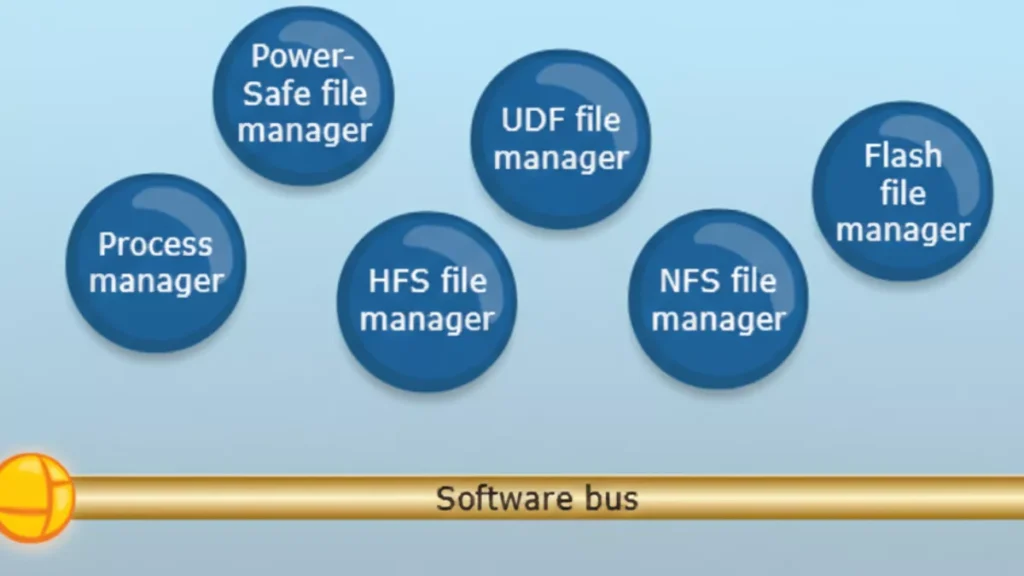
    Explanation of the Diagram

    1. Software Bus (Middle Layer)
      • Acts as a communication backbone for all user-space managers and applications.
      • All managers (file, network, GUI, character, etc.) and applications communicate with each other through this message-passing mechanism.
      • Essentially, this is how QNX implements microkernel principles: minimal kernel + IPC.
    1. Upper Layer: File and Process Managers
      These are system-level services running in user space:
      • Process Manager: Handles process creation, deletion, and scheduling requests.
      • File Managers: Manage different types of file systems:
        • Power-Safe file manager
        • UDF file manager
        • HFS file manager
        • NFS file manager
        • Flash file manager
      • These managers communicate via the software bus, instead of being inside the kernel.
    1. Lower Layer: Applications and Resource Managers
      • GUI Manager: Handles graphical interface.
      • Character Manager: Handles character devices (e.g., keyboard, serial port).
      • Network Manager: Handles network services.
      • Mqueue Manager: Manages message queues (IPC feature).
      • CIFS File Manager: For network file sharing (SMB/CIFS).
      • Applications: End-user or embedded applications running on top of these managers.

    Key Takeaways

    • This diagram shows QNX’s modular microkernel architecture in action:
      • Microkernel: Handles only essential kernel tasks (not shown explicitly in this diagram; it’s below the software bus, managing IPC, scheduling, and interrupts).
      • Software bus: Allows all user-space managers and applications to communicate.
      • Managers: Implement higher-level OS services in user space.
      • Applications: Sit at the top and use these services via message passing.
    • If one manager crashes, it doesn’t crash the kernel or other managers, highlighting QNX’s fault-tolerant design.

    Interview Tip:
    You can say:

    “This diagram shows QNX Neutrino’s user-space architecture. System managers like file managers, network manager, GUI manager, and process manager run as independent processes in user space. Applications communicate with these managers via the software bus, which implements the microkernel’s message-passing IPC. This design makes QNX highly modular, fault-tolerant, and suitable for real-time embedded systems.”

    QNX uses a microkernel architecture, meaning the operating system kernel is kept very small and only contains the most critical functions.
    All other OS services run as separate user-space processes, not inside the kernel.

    What Runs Inside the QNX Microkernel?

    The QNX Neutrino microkernel includes only four core responsibilities:

    1. Thread scheduling
      • Priority-based, fully preemptive
      • Ensures deterministic real-time behavior
    2. Inter-Process Communication (IPC)
      • Message passing (MsgSend, MsgReceive, MsgReply)
      • This is the heart of QNX
    3. Interrupt handling
      • Fast and predictable interrupt response
    4. Low-level thread and process management

    Nothing else runs in kernel space

    What Runs Outside the Kernel (User Space)?

    All higher-level OS services are implemented as user-space servers:

    • File systems (e.g., /fs-qnx6.so)
    • Device drivers (UART, I2C, SPI, Audio, Network)
    • Networking stack (TCP/IP)
    • Process manager (procnto)
    • Memory manager
    • Resource managers

    These components communicate using message passing.

    QNX Architecture Overview (Logical Flow)

    +-----------------------+
    |   Applications          |
    +-----------------------+
              |
              |  Message Passing (IPC)
              |
    +-----------------------+
    | OS Services / Servers |
    | (Drivers, FS, Net)         |
    +-----------------------+
              |
              | IPC
              |
    +-----------------------+
    |   Microkernel         |
    | (Scheduler, IPC, IRQ)|
    +-----------------------+
              |
    +-----------------------+
    |      Hardware         |
    +-----------------------+
    

    Message Passing – The Core Concept

    Unlike Linux (which uses system calls heavily), QNX uses:

    • Synchronous message passing
    • Client sends request → server processes → replies

    Example:

    • App wants to write to a UART
    • App sends message to UART driver
    • UART driver responds after operation
    • No shared memory required
    • Strong isolation
    • Predictable timing

    Why Microkernel? (Advantages)

    1. High Reliability

    • If a driver crashes, only that process restarts
    • Kernel remains unaffected

    2. Fault Tolerance

    • Ideal for safety-critical systems (ASIL-D)

    3. Deterministic Real-Time Behavior

    • Guaranteed response times
    • Used in automotive and medical systems

    4. Security

    • Smaller kernel → smaller attack surface

    QNX vs Linux (Interview Comparison)

    FeatureQNXLinux
    Kernel typeMicrokernelMonolithic
    DriversUser spaceKernel space
    IPCMessage passingSyscalls + shared memory
    Real-timeNativeNeeds RT patches
    Fault isolationStrongWeak
    Safety certificationYes (ASIL-D)Limited

    Real-World Example (Automotive)

    In a car infotainment system:

    • Audio driver crashes
    • Only audio service restarts
    • Navigation and UI keep running

    This is why QNX is used in automotive ECUs

    One-Line Interview Answer

    QNX uses a microkernel architecture where only scheduling, IPC, interrupts, and thread management run in the kernel, while all other services like drivers and file systems run in user space as separate processes, ensuring high reliability, fault isolation, and deterministic real-time behavior.

    In QNX (Neutrino), the kernel space contains only the most critical real-time components. Everything else runs in user space.

    The following run in kernel space:

    1. Thread Scheduling

    • Priority-based, fully preemptive scheduler
    • Ensures deterministic real-time behavior
    • Handles context switching

    2. Inter-Process Communication (IPC)

    • Core message passing mechanism
    • MsgSend(), MsgReceive(), MsgReply()
    • Fast, synchronous IPC

    IPC is the heart of QNX

    3. Interrupt Handling

    • Low-latency interrupt dispatching
    • Interrupt Service Routines (ISRs)
    • Interrupt events delivery to threads

    4. Low-Level Thread & Process Management

    • Thread creation and destruction
    • Basic process control
    • Kernel-level synchronization primitives

    What Does NOT Run in Kernel Space?

    These run in user space, not kernel space:

    • Device drivers (UART, I2C, SPI, Audio, Network)
    • File systems
    • Memory manager
    • Network stack (TCP/IP)
    • Process manager (procnto)
    • Resource managers

    One-Line Interview Answer

    In QNX, kernel space contains only the microkernel responsible for scheduling, message-passing IPC, interrupt handling, and low-level thread management; all other OS services and drivers run in user space.

    Memory Tip for Interviews

    Think S-I-I-T:

    • Scheduling
    • IPC
    • Interrupts
    • Threads

    In QNX Neutrino, almost everything except the microkernel runs in user space as separate processes (servers).

    Major Components Running in User Space

    1. Process Manager (procnto)

    • Handles:
      • Process creation (fork, spawn)
      • Signal delivery
      • POSIX compliance
    • Acts as the root server of the system

    2. Memory Manager

    • Virtual memory management
    • Address space creation
    • Memory protection
    • Page faults handling (with kernel support)

    3. Device Drivers

    • UART, I2C, SPI, CAN
    • Audio, Display, Camera
    • GPIO, ADC, PWM
    • Network drivers
    • Run as normal user processes
    • Can be restarted if they crash

    4. File Systems

    • QNX6 filesystem
    • Flash file systems
    • Network file systems
    • Mounted under /

    5. Network Stack

    • TCP/IP stack
    • Ethernet, Wi-Fi drivers
    • Socket services

    6. Resource Managers

    • Implement POSIX-style resources
    • Expose services as files (e.g. /dev/ser1)
    • Handle open/read/write/ioctl

    7. System Services & Daemons

    • Audio services
    • Power management
    • Clock services
    • Logging services

    8. User Applications

    • HMI / UI apps
    • Control logic
    • Diagnostic tools
    • Middleware

    QNX User Space Layout (Conceptual)

    +----------------------+
    |   User Applications  |
    +----------------------+
    | System Services      |
    | File Systems         |
    | Network Stack        |
    | Device Drivers       |
    | Resource Managers    |
    | procnto              |
    +----------------------+
            |
            | IPC (message passing)
            |
    +----------------------+
    |   Microkernel        |
    +----------------------+
    

    Why This Design Matters

    Fault Isolation

    • Driver crash ≠ system crash

    Easy Recovery

    • Restart a single service

    Safety Certification

    • Ideal for ASIL-D systems

    Secure Architecture

    • Minimal kernel attack surface

    One-Line Interview Answer

    In QNX, user space contains the process manager, memory manager, device drivers, file systems, network stack, resource managers, system services, and all applications—each running as separate processes that communicate via message passing.

    QNX uses message passing as its core communication mechanism to achieve deterministic real-time behavior, fault isolation, reliability, and scalability in a microkernel architecture.

    1. Fits the Microkernel Design

    QNX keeps the kernel very small.
    Since drivers, file systems, and services run in user space, they must communicate safely.

    Message passing replaces shared kernel data structures

    • No direct function calls across protection boundaries
    • Clean client–server model

    2. Deterministic Real-Time Behavior (Key Reason)

    Message passing in QNX is:

    • Synchronous
    • Priority-aware

    What this means:

    • Client blocks until server replies
    • Server temporarily inherits the client’s priority (priority inheritance)

    ✔ Prevents priority inversion
    ✔ Guarantees bounded latency
    ✔ Ideal for hard real-time systems

    3. Strong Fault Isolation & Reliability

    • Each driver/service runs as a separate process
    • If a driver crashes:
      • Kernel stays alive
      • Other services keep running
      • Only the failed service is restarted

    ➡ Message passing enforces strict process isolation

    4. Security by Design

    • No shared memory by default
    • No arbitrary kernel access
    • Services only expose controlled interfaces

    ➡ Smaller attack surface than monolithic kernels

    5. Unified Communication Model

    QNX uses one mechanism everywhere:

    OperationImplemented via
    File I/O (read/write)Messages
    Device accessMessages
    Network stackMessages
    Signals & eventsMessages

    ➡ Simpler OS design
    ➡ Easier to reason about timing

    6. Zero-Copy Efficiency

    Despite being message-based:

    • QNX supports zero-copy transfers
    • Uses shared memory only when explicitly needed

    ➡ High performance with real-time guarantees

    7. Easier Debugging & Maintenance

    • Services can be:
      • Stopped
      • Replaced
      • Restarted
    • No kernel rebuild required

    ➡ Faster development and safer updates

    Real Example (Automotive)

    • Audio application → sends message to audio driver
    • Audio driver crashes
    • Audio service restarts
    • Navigation & safety systems continue running

    System does not reboot

    One-Line Interview Answer

    QNX uses message passing to enable safe and deterministic communication between user-space services in its microkernel architecture, providing real-time predictability, fault isolation, priority inheritance, and high system reliability.

    Memory Trick for Interviews

    Think D-R-F-S-U:

    • Determinism
    • Reliability
    • Fault isolation
    • Security
    • Unified IPC

    Resource managers in QNX are user-space server processes that implement POSIX-style resources (files, devices, pseudo-devices) and expose them through the filesystem namespace using message passing.

    In simple words:

    A resource manager lets a user-space service behave like a file or device (e.g. /dev/ser1).

    Why Resource Managers Exist

    QNX follows the principle:

    “Everything is a file”

    Instead of placing drivers in kernel space (like Linux), QNX uses resource managers in user space to handle:

    • open()
    • read()
    • write()
    • ioctl()
    • close()

    All these calls are translated into messages.

    Where Do Resource Managers Run?

    • User space
    • As normal processes
    • Communicate with clients via QNX IPC (message passing)
    • Crash-safe
    • Restartable
    • Isolated

    Common Examples of Resource Managers

    ResourceExample
    Serial driver/dev/ser1
    GPIO/dev/gpioX
    Audio/dev/snd/*
    Custom device/dev/mydevice
    Pseudo file/proc, /dev/random

    How a Resource Manager Works (Flow)

    1. Application calls:fd = open("/dev/ser1", O_RDWR);
    2. Kernel converts this into a message
    3. Message is sent to the resource manager
    4. Resource manager processes the request
    5. Sends a reply back to the application

    Key Components of a Resource Manager

    1. Dispatch Layer

    • Receives messages
    • Routes them to appropriate handlers

    2. Connect Functions

    • Handle:
      • open()
      • close()

    3. I/O Functions

    • Handle:
      • read()
      • write()
      • ioctl()

    Types of Resource Managers

    Device Resource Managers

    • Hardware drivers (UART, I2C, CAN)

    Filesystem Resource Managers

    • QNX6, Flash FS

    Pseudo Resource Managers

    • Virtual or logical devices

    Benefits of Resource Managers

    Fault Isolation

    • Driver crash ≠ system crash

    POSIX Compliance

    • Standard file APIs

    Real-Time Friendly

    • Priority inheritance during IPC

    Easy Debugging

    • Run, stop, restart like any process

    QNX vs Linux (Quick Comparison)

    FeatureQNXLinux
    Driver locationUser spaceKernel space
    InterfaceFile-basedSyscalls
    Crash impactLocalOften system-wide
    IPCMessage passingFunction calls

    One-Line Interview Answer

    Resource managers in QNX are user-space processes that expose devices and services as POSIX-compliant files, handling open/read/write/ioctl requests via message passing, enabling fault isolation and real-time reliability.

    The microkernel’s role in QNX is to provide the core real-time foundation by handling thread scheduling, message-passing IPC, interrupt handling, and basic process/thread management, while all other OS services run in user space.

    QNX achieves fault tolerance by running drivers and OS services in user space, using message passing for isolation, and allowing failed components to be restarted without affecting the microkernel or the rest of the system.

    How QNX Achieves Fault Tolerance (Key Points)

    1. Microkernel Architecture
      • Kernel contains only scheduling, IPC, and interrupts
      • Minimal kernel → fewer failure points
    2. User-Space Drivers & Services
      • Device drivers, file systems, network stack run as separate processes
      • A crash affects only that component, not the whole OS
    3. Message Passing (Strong Isolation)
      • No shared kernel data by default
      • Faults are contained within a single process
    4. Service Restart & Recovery
      • Failed services/drivers can be restarted dynamically
      • System continues running
    5. Priority Inheritance in IPC
      • Prevents priority inversion during communication
      • Maintains real-time stability even under faults
    6. Health Monitoring (Optional)
      • Watchdogs and supervisors can detect failures and relaunch services

    Adaptive Partitioning in QNX is a CPU resource management mechanism that guarantees each group of threads a minimum percentage of CPU time, while dynamically redistributing unused CPU to other partitions.

    Key Points (Simple)

    • CPU time is divided into partitions
    • Each partition has a guaranteed minimum CPU budget
    • Unused CPU is adaptively shared with others
    • Ensures real-time tasks are never starved

    Why QNX Uses Adaptive Partitioning

    • Prevents CPU starvation
    • Improves system predictability
    • Supports mixed-criticality systems (safety + infotainment)

    Example

    PartitionCPU Guarantee
    Safety tasks40%
    Audio30%
    UI20%
    Background10%
    • If UI uses only 10%, the extra 10% is temporarily used by others
    • When UI needs CPU again, it gets its guaranteed share back

    Where It’s Used

    • Automotive ECUs
    • Medical devices
    • Industrial control systems

    One-Line Interview Answer

    Adaptive partitioning ensures guaranteed CPU bandwidth for critical tasks while efficiently sharing unused CPU among other processes.

    A thread in QNX is the smallest schedulable unit of execution that runs within a process and is scheduled by the microkernel based on priority.

    Key points:

    • Executes code
    • Has its own:
      • Program counter
      • Stack
      • Priority
    • Shares process resources (memory, file descriptors)
    • Scheduled directly by the QNX microkernel

    A process in QNX is a protected container that provides an address space and resources for one or more threads.

    Key points:

    • Owns:
      • Virtual address space
      • File descriptors
      • Signals
      • Permissions
    • Contains one or more threads
    • Provides isolation from other processes

    Relationship (Easy to Remember)

    • Process = container
    • Thread = worker
    Process
     ├── Thread 1 (main thread)
     ├── Thread 2
     └── Thread 3
    

    QNX-Specific Interview Highlight

    • Threads are the real-time scheduling entities, not processes
    • Priority, IPC, and interrupts are all thread-centric

    One-Line Comparison (Interview Gold)

    In QNX, a process provides isolation and resources, while threads are the actual execution units scheduled by the microkernel.

    Thread States in QNX

    In QNX Neutrino, a thread can exist in the following main states:

    1. READY

    • Thread is ready to run
    • Waiting for CPU
    • Placed in a priority-based ready queue

    2. RUNNING

    • Thread is currently executing on the CPU

    3. BLOCKED

    • Thread is waiting for an event or resource

    Common reasons:

    • Waiting for a message (MsgReceive)
    • Waiting for a reply (MsgSend)
    • Waiting for I/O
    • Waiting for a mutex or semaphore
    • Sleeping (nanosleep)

    4. STOPPED

    • Thread execution is suspended

    Causes:

    • Debugger attached
    • Job control signals (e.g. SIGSTOP)
    • Explicit suspension

    5. WAITING (ZOMBIE – process level)

    • Thread has exited
    • Waiting for parent process to collect status

    Note: Zombie is mainly a process concept, but threads can be in a terminated state internally.

    Simple State Diagram (Interview Friendly)

    READY → RUNNING → BLOCKED
      ↑        ↓         |
      └────────┴─────────┘
            STOPPED
    

    Important QNX Interview Points

    • Threads (not processes) are scheduled
    • Scheduling is priority-based and preemptive
    • IPC operations heavily influence BLOCKED states
    • Message passing directly affects thread transitions

    One-Line Interview Answer

    In QNX, threads transition between READY, RUNNING, BLOCKED, and STOPPED states, with scheduling handled at the thread level using priority-based preemption.

    Memory Trick

    Think R-R-B-S:

    • Ready
    • Running
    • Blocked
    • Stopped

    Thread Scheduling Algorithm in QNX

    QNX uses a priority-based, fully preemptive, deterministic thread scheduling algorithm, designed for hard real-time systems.

    Core Characteristics

    1. Priority-Based Scheduling

    • Each thread has a fixed priority
    • Priority range: 0 (lowest) to 255 (highest)
    • Highest-priority READY thread always runs

    2. Fully Preemptive

    • If a higher-priority thread becomes READY:
      • It immediately preempts the currently running thread
    • Ensures fast response for real-time tasks

    3. Round-Robin Within Same Priority

    • Threads with the same priority share CPU time
    • Each gets a time slice
    • Prevents starvation among equal-priority threads

    4. Thread-Centric Scheduling

    • QNX schedules threads, not processes
    • Each thread is an independent scheduling entity

    5. Deterministic Behavior

    • Scheduling decisions are predictable
    • No dynamic priority changes by default
    • Ideal for safety-critical systems

    Scheduling Flow (Simple)

    1. Scheduler checks READY queues (highest → lowest priority)
    2. Picks the highest-priority READY thread
    3. Thread runs until:
      • It blocks
      • Its time slice expires (same-priority case)
      • A higher-priority thread becomes READY

    Priority Inheritance (Very Important)

    • Used during message passing and mutex locking
    • If a high-priority thread is blocked by a lower-priority one:
      • Lower-priority thread temporarily inherits the higher priority
    • Prevents priority inversion

    Comparison with Linux (Interview Highlight)

    FeatureQNXLinux
    SchedulingFixed priorityCFS (dynamic)
    PreemptionAlwaysConfig-dependent
    DeterminismGuaranteedBest-effort
    Priority inheritanceBuilt-inPartial

    One-Line Interview Answer

    QNX uses a priority-based, fully preemptive scheduling algorithm where the highest-priority ready thread always runs, with round-robin scheduling among threads of equal priority and priority inheritance to prevent inversion.

    Conclusion

    QNX is not just another operating system—it is built for environments where reliability, predictability, and safety truly matter. Understanding QNX means understanding how real-time systems behave under pressure, how failures are isolated, and how software can continue running even when individual components crash.

    These interview questions and answers are meant to help you think like a QNX engineer, not just repeat definitions. By focusing on microkernel design, message passing, scheduling, fault tolerance, and system design choices, this content prepares you to explain why QNX works the way it does, not just what it is.

    If you can clearly explain these concepts in your own words during an interview, it shows strong fundamentals, real project exposure, and confidence in system-level thinking—qualities that interviewers look for in embedded and automotive roles.

    Master the concepts, relate them to real use cases, and you won’t just clear a QNX interview—you’ll stand out as someone who truly understands the system.

    FAQ : QNX OS Interview Questions

    1. What is QNX OS?

    QNX is a real-time operating system (RTOS) designed for systems that require high reliability, deterministic performance, and fault tolerance. It is widely used in automotive, medical, industrial, and safety-critical embedded systems.

    2. Why is QNX called a microkernel operating system?

    QNX uses a microkernel architecture, meaning only the most essential services (scheduling, IPC, interrupt handling) run in kernel space. All other services run in user space, improving system stability and fault isolation.

    3. How is QNX different from Linux?

    Linux uses a monolithic kernel, while QNX uses a microkernel. In QNX, drivers and services run in user space and can be restarted if they fail, whereas in Linux, a faulty driver can crash the entire system.

    4. What runs in kernel space in QNX?

    Only critical components run in kernel space:

    • Thread scheduling
    • Inter-process communication (IPC)
    • Interrupt handling
    • Low-level synchronization

    This keeps the kernel small and reliable.

    5. What runs in user space in QNX?

    Most system services run in user space, including:

    • Device drivers
    • File systems
    • Network stacks
    • Resource managers
    • System services

    This design improves fault tolerance.

    6. Why does QNX use message passing?

    QNX uses message passing for IPC to ensure:

    • Deterministic communication
    • Strong process isolation
    • Safer interaction between services
    • Easier debugging and recovery

    It is a core reason for QNX’s reliability.

    7. What is a resource manager in QNX?

    A resource manager is a user-space server that manages system resources like files, devices, or custom interfaces. Applications interact with resource managers using standard POSIX calls such as open(), read(), and write().

    8. What is the role of the microkernel in QNX?

    The microkernel acts as a traffic controller, handling communication, scheduling, and interrupts while letting user-space services do the rest. This separation makes the system robust and scalable.

    9. How does QNX achieve fault tolerance?

    QNX achieves fault tolerance through:

    • Process isolation
    • User-space drivers
    • Automatic service restart
    • Priority-based scheduling

    A failure in one component does not crash the entire system.

    10. What is adaptive partitioning in QNX?

    Adaptive partitioning ensures CPU time is reserved for critical processes. Even if one process misbehaves, real-time and safety-critical tasks continue to run without disruption.

    11. What is a process in QNX?

    A process is an independent program with its own memory space. It may contain one or more threads and communicates with other processes using message passing.

    12. What is a thread in QNX?

    A thread is the smallest unit of execution in QNX. Threads share the same address space within a process but are scheduled independently.

    13. What are the thread states in QNX?

    Common thread states include:

    • Running
    • Ready
    • Blocked (waiting for IPC or resources)
    • Stopped

    These states help manage real-time execution efficiently.

    14. What scheduling algorithm does QNX use?

    QNX uses priority-based preemptive scheduling. Higher-priority threads always run first, ensuring deterministic real-time behavior.

    Read More about Process : What is is Process
    Read More about System Call in Linux : What is System call
    Read More about IPC : What is IPC