Learn the Essentials of Linux Kernel Architecture with our comprehensive guide. Master core concepts, understand kernel components, and prepare for all Linux kernel interview questions. Perfect for beginners and professionals aiming to excel in Linux system programming.
If you have ever used Linux, whether on a server, embedded device, Android phone, or development board, you have already relied on the Linux kernel. It works quietly in the background, managing hardware, memory, processes, and communication between software and devices. Yet for many beginners, the kernel feels mysterious and complex.
This article breaks down the Essentials of Linux kernel architecture in a clear, human, and beginner-friendly way. Just real explanations that help you understand how the Linux kernel is designed, how its major components work together, and why this architecture has made Linux so powerful and popular.
By the end of this guide, you will have a solid mental model of how the Linux kernel works internally and why its architecture matters in real-world systems.
What Is the Linux Kernel?
At its core, the Linux kernel is the heart of the operating system. It sits between user applications and the hardware.
When you open a file, start a program, connect to the internet, or plug in a USB device, your application does not talk directly to the hardware. Instead, it makes a request to the kernel. The kernel decides what is allowed, manages resources, and communicates with the hardware safely.
In simple terms:
Applications ask for services
Kernel manages and controls everything
Hardware does the actual physical work
This layered design is the foundation of Linux kernel architecture.
Why Linux Kernel Architecture Matter
Understanding the Essentials of Linux kernel architecture is important for several reasons:
It helps you debug system-level problems
It improves performance tuning skills
It is essential for kernel development, device drivers, and embedded systems
It is a common interview topic for Linux and embedded roles
Linux is used everywhere because its kernel architecture is modular, efficient, and scalable. The same kernel design runs on tiny microcontrollers and massive cloud servers.
Monolithic Kernel Design in Linux
Linux uses a monolithic kernel architecture, but with a modern twist.
In a traditional monolithic kernel:
All core services run in kernel space
Memory management, process scheduling, file systems, and device drivers are part of the kernel
Linux follows this approach, but it also supports loadable kernel modules, which makes it flexible.
Why Linux Chose a Monolithic Kernel
A monolithic kernel offers:
Faster performance due to fewer context switches
Direct communication between kernel components
Lower overhead compared to microkernels
The downside is complexity, but Linux solves this with modular design.
Kernel Space vs User Space
One of the most important concepts in Linux kernel architecture is the separation between kernel space and user space.
User Space
User space is where applications run. Examples include:
Web browsers
Shells like bash
Media players
Your own C or Python programs
Applications in user space have limited privileges. They cannot directly access hardware or critical memory.
Kernel Space
Kernel space is where the Linux kernel runs. Code here has:
Full access to hardware
Control over memory and CPU
Responsibility for system stability
This separation improves security and stability. If an application crashes, it usually does not crash the whole system.
System Calls: The Bridge Between User and Kernel
Applications interact with the kernel using system calls.
A system call is a controlled entry point into the kernel. Common examples include:
open() for files
read() and write() for I/O
fork() and exec() for process creation
From a Linux kernel architecture point of view, system calls are critical because they define how user space safely requests kernel services.
Process Management in Linux Kernel
Process management is a core part of the Essentials of Linux kernel architecture.
What Is a Process?
A process is a running instance of a program. The kernel keeps track of each process using a structure called task_struct.
This structure stores:
Process ID (PID)
State (running, sleeping, stopped)
Priority
Memory information
Open files
Process Scheduling
The Linux kernel uses a scheduler to decide which process runs on the CPU.
Key features include:
Preemptive multitasking
Fair scheduling for interactive tasks
Support for real-time scheduling
The Completely Fair Scheduler (CFS) is commonly used and aims to give each process a fair share of CPU time.
Memory Management in Linux Kernel
Memory management is another essential building block of Linux kernel architecture.
Virtual Memory
Linux uses virtual memory to give each process the illusion that it has its own private memory.
Benefits include:
Process isolation
Efficient memory usage
Support for swapping
Paging and Address Translation
The kernel uses paging to map virtual addresses to physical memory. Hardware support from the MMU (Memory Management Unit) helps with fast translation.
Kernel Memory vs User Memory
The kernel carefully separates:
User process memory
Kernel memory
This prevents applications from corrupting kernel data.
File System Architecture
Linux treats almost everything as a file. This philosophy is deeply embedded in Linux kernel architecture.
Virtual File System (VFS)
The Virtual File System is an abstraction layer that allows Linux to support multiple file systems.
Examples include:
ext4
XFS
Btrfs
FAT
VFS provides a common interface so applications do not need to know which file system is in use.
Device Drivers and Hardware Interaction
Device drivers are the glue between hardware and the kernel.
In Linux kernel architecture:
Drivers run in kernel space
They expose standard interfaces to user space
They are often loadable as kernel modules
This modular approach allows:
Dynamic loading and unloading of drivers
Smaller kernel images
Easier development and debugging
Loadable Kernel Modules
One of the most powerful features in the Essentials of Linux kernel architecture is support for Loadable Kernel Modules (LKMs).
Modules allow you to:
Add functionality without rebooting
Develop drivers independently
Reduce kernel size
Common examples include:
USB drivers
Network drivers
File system modules
Interrupt Handling in Linux Kernel
Hardware devices need a way to notify the CPU. This is done using interrupts.
The Linux kernel:
Registers interrupt handlers
Responds quickly to hardware events
Uses deferred work mechanisms like softirqs and tasklets
Efficient interrupt handling is critical for performance and responsiveness.
Inter-Process Communication (IPC)
Processes often need to communicate. Linux kernel architecture supports multiple IPC mechanisms:
Pipes
Signals
Message queues
Shared memory
Sockets
Each method serves a different use case, from simple parent-child communication to high-performance data sharing.
Networking Stack in the Linux Kernel
The Linux kernel includes a full networking stack.
Key layers include:
Network device drivers
IP layer
Transport protocols like TCP and UDP
Socket interface for applications
This integrated design allows Linux to power everything from routers to cloud servers.
Security Model in Linux Kernel Architecture
Security is built into the kernel design.
Important elements include:
User and group permissions
Capability-based security
Mandatory Access Control frameworks like SELinux and AppArmor
The kernel enforces these rules consistently across the system.
Kernel Preemption and Real-Time Support
Linux supports different levels of kernel preemption.
This is especially important for:
Embedded systems
Audio processing
Automotive and industrial applications
Real-time patches further enhance deterministic behavior.
Boot Process and Kernel Initialization
Understanding kernel architecture also means understanding how Linux boots.
High-level steps include:
Bootloader loads the kernel
Kernel initializes hardware
Kernel mounts the root file system
First user process (init or systemd) starts
Each step relies on tightly coordinated kernel components.
Why Linux Kernel Architecture Scales So Well
One reason Linux dominates servers, cloud, and embedded systems is its scalable architecture.
It supports:
Multiple CPU architectures
SMP and NUMA systems
Tiny embedded boards and massive servers
This flexibility comes from clean internal abstractions and modular design.
Common Misconceptions About Linux Kernel Architecture
Let’s clear a few myths:
Linux is not a microkernel
Drivers do not always crash the system if written properly
Kernel development is hard but not impossible
With the right understanding, the kernel becomes approachable.
How Beginners Should Learn Linux Kernel Architecture
If you are new, focus on:
Understanding kernel vs user space
Learning system calls
Exploring process and memory management
Writing simple kernel modules
Reading code becomes much easier once the architecture makes sense.
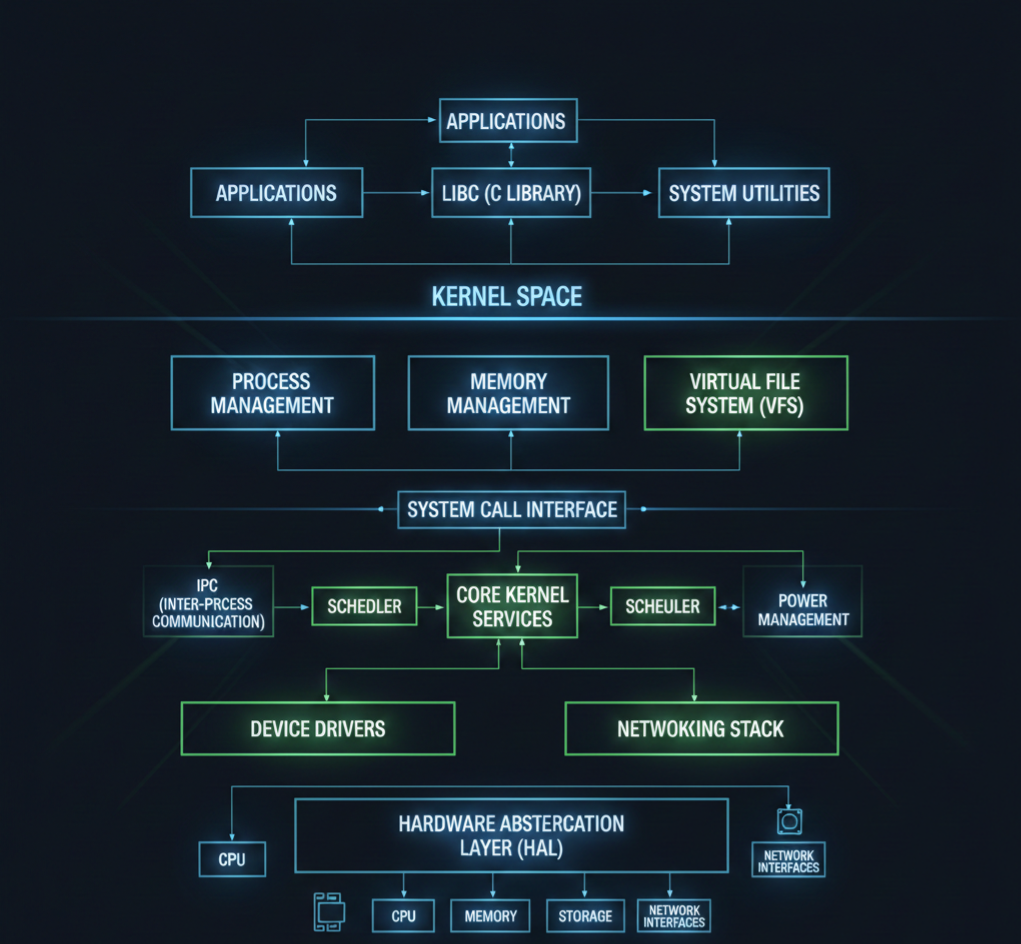
Linux Kernel Architecture Diagram
Think of Linux kernel architecture like a well-organized city. Applications live on the surface, hardware lives underground, and the kernel is the intelligent system running everything in between.
Let’s start with a simple logical diagram.
Linux Kernel Architecture Diagram (Conceptual View)
+--------------------------------------------------+
|                  User Space                      |
|                                                  |
|  Applications (Browser, Editor, Media Player)    |
|  Shell (bash, zsh)                               |
|  System Utilities                                |
|                                                  |
+--------------------|-----------------------------+
                     | System Calls
+--------------------v-----------------------------+
|                  Kernel Space                    |
|                                                  |
|  +--------------------------------------------+  |
|  |           System Call Interface             |  |
|  +--------------------------------------------+  |
|                                                  |
|  Process Management   Memory Management          |
|  (Scheduler, Tasks)   (Paging, Virtual Memory)   |
|                                                  |
|  File System (VFS)    Inter-Process Communication|
|  (ext4, XFS)         (Pipes, Signals, Sockets)  |
|                                                  |
|  Networking Stack     Device Drivers             |
|  (TCP/IP)             (USB, Audio, Display)     |
|                                                  |
|  Interrupt Handling   Power Management           |
|                                                  |
+--------------------|-----------------------------+
                     |
+--------------------v-----------------------------+
|                    Hardware                      |
|  CPU | RAM | Disk | Network | USB | Display     |
+--------------------------------------------------+
Now let’s break this down layer by layer.
1. User Space (Where Applications Live)
This is the top layer of the Linux kernel architecture.
What runs here?
Browsers
Media players
Text editors
Shells like bash
Your own C, C++, Python programs
Important point:
User space cannot directly access hardware. Everything must go through the kernel.
This separation keeps the system safe and stable. If an app crashes, the kernel stays alive.
2. System Call Interface (The Gateway)
The system call interface is the bridge between user space and kernel space.
When an application wants to:
Read a file
Allocate memory
Create a process
Send data over the network
It makes a system call.
Common system calls:
open()
read()
write()
fork()
exec()
Think of system calls as a formal request form that applications submit to the kernel.
3. Kernel Space (The Brain of the System)
This is where the real work happens. The kernel runs with full privileges and controls all system resources.
Let’s go component by component.
4. Process Management
Process management is a core pillar of Linux kernel architecture.
What it handles:
Creating processes
Killing processes
Scheduling CPU time
Context switching
The kernel uses internal structures to track each process and a scheduler to decide who runs and when.
This is why Linux can run hundreds of processes smoothly.
5. Memory Management
Memory management ensures every process gets memory safely and efficiently.
Key responsibilities:
Virtual memory
Paging
Memory protection
Kernel vs user memory separation
Each process thinks it owns all the memory, but the kernel quietly manages the illusion.
This design prevents one process from corrupting another.
6. File System Layer (VFS)
Linux supports many file systems, but applications don’t care which one you use.
That’s because of the Virtual File System (VFS).
What VFS does:
Provides a common interface for file operations
Allows ext4, XFS, FAT, and others to work together
Keeps applications portable
This is a classic example of smart kernel architecture design.
7. Device Drivers
Device drivers are how the kernel talks to hardware.
Examples:
Keyboard drivers
USB drivers
Audio drivers
Network card drivers
Drivers run in kernel space and expose standard interfaces to user space.
Linux supports loadable kernel modules, so drivers can be added or removed without rebooting.
8. Networking Stack
The Linux kernel includes a full networking implementation.
Includes:
Network device drivers
IP layer
TCP and UDP
Socket interface
This allows Linux to function as:
A desktop OS
A server OS
A router
A cloud platform
All using the same kernel architecture.
9. Inter-Process Communication (IPC)
Processes often need to talk to each other.
Linux kernel architecture supports multiple IPC mechanisms:
Pipes
Signals
Message queues
Shared memory
Sockets
Each one exists because different problems need different communication styles.
10. Interrupt Handling
Hardware devices need attention from the CPU.
They use interrupts to signal the kernel.
The kernel:
Handles interrupts quickly
Defers heavy work
Keeps the system responsive
Efficient interrupt handling is critical for performance.
11. Hardware Layer
This is the physical world:
CPU
RAM
Disk
Network card
Sensors
Displays
The kernel is the only layer allowed to touch hardware directly.
This design keeps hardware access controlled and secure.
How All Layers Work Together
Here’s a simple flow example:
You click “Save” in a text editor
The app makes a system call
The kernel checks permissions
VFS routes the request
File system writes data
Device driver talks to disk
Hardware stores the data
All of this happens in milliseconds.
Why This Architecture Is So Powerful
The Linux kernel architecture is:
Modular
Secure
High-performance
Scalable
That’s why the same kernel runs on:
Android phones
Embedded boards
Servers
Supercomputers
Linux Kernel Programming Interview Questions :
Basic Linux Kernel Programming Questions
What is the Linux kernel and its primary responsibilities?
What are the differences between user space and kernel space?
Explain the process context vs interrupt context in Linux kernel.
What are system calls? Give examples.
How does the Linux kernel manage memory?
What are kernel modules? How do you load and unload a module?
Explain the proc filesystem and its usage.
What are character devices and block devices?
What is a major number and a minor number in Linux device drivers?
What is init_module and cleanup_module in kernel modules?
Explain the difference between static and dynamic kernel modules.
What are kernel threads, and how do you create them?
What is spinlock, and how is it different from a mutex?
Explain preemption in Linux kernel.
What is a wait queue? How is it used in kernel programming?
Intermediate Linux Kernel Programming Questions
What is the difference between copy_to_user() and copy_from_user()?
Explain the kernel memory allocation methods (kmalloc, vmalloc, etc.).
What is a task_struct, and why is it important?
Explain the Linux process scheduling mechanism.
What is the difference between hardirq and softirq?
What are bottom halves, and what is their role?
Explain workqueues and tasklets.
What is interrupt handling in Linux kernel?
What is a device driver, and what are the types of device drivers?
How do you register a character device driver in Linux?
What is the difference between blocking and non-blocking I/O in kernel space?
Explain the Linux kernel logging mechanism (printk, KERN_INFO, etc.).
What is a module parameter, and how do you pass parameters to a kernel module?
What are kernel namespaces, and how are they used?
Explain Virtual File System (VFS) and its role.
How does the Linux kernel handle file operations?
Explain the kernel networking stack.
What is a kobject, and how does it relate to sysfs?
Explain reference counting in the Linux kernel.
How does dynamic kernel tracing work (ftrace, perf)?
What is a PCI device driver, and how do you write one?
How do you implement I2C or SPI device drivers in Linux?
Explain interrupt-driven vs polling mechanisms in kernel device drivers.
How do you implement DMA in Linux kernel drivers?
What is a kernel timer, and how do you implement it?
Explain Linux kernel modules dependencies and symbol exports.
How does user-space memory mapping (mmap) work in kernel drivers?
How do you debug kernel modules using kgdb or printk?
Explain the Linux kernel boot process.
How does the scheduler handle real-time processes?
What is NUMA, and how does the kernel handle memory in NUMA systems?
How do you handle deadlocks in the kernel?
Practical / Scenario-Based Questions
How would you modify an existing Linux kernel driver?
How do you implement read and write operations in a character driver?
How would you trace a kernel panic?
How do you profile a kernel module for performance?
How do you implement interrupt handling for a GPIO device?
How do you use procfs or sysfs to expose driver data to user space?
How do you implement ioctl commands for a custom device?
How would you handle concurrency in a multi-threaded kernel module?
How do you simulate and test a driver in QEMU before using real hardware?
How do you write a kernel module compatible with multiple kernel versions?
Expert / Advanced Scenario Questions
How would you implement zero-copy communication between kernel and user space?
How do you optimize memory usage in kernel modules?
How do you write a kernel driver for DMA buffer sharing between devices?
Explain how kernel hot-plugging works.
How do you handle interrupt storms in Linux?
How do you implement suspend/resume operations for a device driver?
How do you use kernel timers to schedule periodic tasks?
How do you implement custom kernel syscalls?
How do you handle kernel module security and permissions?
How do you debug race conditions in kernel driver code?
Final Thoughts
The Essentials of Linux kernel architecture are not about memorizing code or data structures. They are about understanding how Linux thinks, how it manages resources, and how its components work together as one system.
Once you grasp the architecture, Linux stops feeling like magic and starts feeling logical.
Whether you are preparing for interviews, working on embedded systems, or simply curious about how operating systems work, learning Linux kernel architecture is one of the best investments you can make in your technical journey.
FAQ : Linux Kernel Architecture
1. What is Linux Kernel Architecture? Linux Kernel Architecture is the internal structure of the Linux operating system. It manages hardware, processes, memory, and system calls, acting as a bridge between software and hardware.
2. Why is Linux Kernel important for developers? Understanding the Linux Kernel helps developers write efficient code, manage hardware resources, and develop device drivers or system-level applications.
3. What are the main components of the Linux Kernel? The Linux Kernel consists of process management, memory management, file system, device drivers, network stack, and system calls.
4. What is the difference between monolithic and microkernel in Linux? Linux uses a monolithic kernel, where all core services run in kernel space for performance. Microkernels run minimal services in kernel space and others in user space for modularity.
5. How does process management work in the Linux Kernel? The kernel handles process creation, scheduling, and termination. It uses scheduling algorithms to manage CPU time efficiently among processes.
6. What is a Linux Kernel module? A kernel module is a piece of code that can be loaded or unloaded into the kernel at runtime, like device drivers or system extensions.
7. How is memory managed in Linux Kernel? Linux uses virtual memory, paging, and caching to efficiently allocate memory for processes and the system while isolating processes from each other.
8. How can I prepare for Linux Kernel interview questions? Focus on kernel architecture, process and memory management, device drivers, file systems, and hands-on practice with kernel modules.
9. Can I modify the Linux Kernel safely? Yes, by using a separate test environment or virtual machine. Kernel modifications require caution and understanding of dependencies.
10. Where can I learn Linux Kernel Architecture from scratch? You can start with official Linux Kernel documentation, beginner-friendly tutorials, YouTube guides, and practical exercises like writing simple kernel modules.
Linux System Programming explained clearly for beginners, covering core concepts, real system behavior, and practical foundations to build strong low-level Linux skills.
Linux System Programming Part 1 is a beginner-friendly guide designed to help developers understand how software directly interacts with the Linux operating system. This part focuses on the core foundations of system programming, explaining essential concepts such as processes, system calls, file handling, memory layout, and user space vs kernel space in a simple and practical way.
If you are preparing for embedded systems roles, Linux interviews, or low-level programming jobs, this series will help you build strong fundamentals step by step. Real-world examples, clear explanations, and practical insights make complex topics easy to grasp, even for beginners.
By the end of Part 1, you will have a solid understanding of how Linux programs execute, how resources are managed, and how applications communicate with the kernel. This knowledge forms the base for advanced topics like device drivers, multithreading, and performance optimization covered in later parts.
Perfect for students, working professionals, and anyone serious about mastering Linux system programming.
What is GNU Compiler (GCC) ?
Q1: What is GCC and what are its main components? A1: GCC (GNU Compiler Collection) is a compiler system that supports multiple programming languages such as C, C++, and Fortran. Its main components include:
Preprocessor (cpp): Handles macros, header inclusion, and conditional compilation.
Compiler (cc1): Converts preprocessed source code into assembly code.
Assembler (as): Converts assembly code into machine code object files.
Linker (ld): Combines object files and libraries into a final executable.
Q2: What are the basic stages of compilation in GCC? A2: The stages are:
Preprocessing: Handles #include, #define, and conditional compilation.
Compilation: Converts preprocessed code into assembly code.
Assembly: Converts assembly into object code (.o files).
Linking: Combines object files and libraries into an executable binary.
Explain Compile & Build Process
Q3: What is the difference between compiling and building? A3:
Compiling: Transforming source code into object files (machine code) without producing a complete executable.
Building: The complete process including compilation, assembly, and linking to generate the final executable.
Q4: What are some common flags used in GCC to control compilation? A4:
-c: Compile only, do not link.
-o <file>: Specify output file name.
-Wall: Enable all warnings.
-g: Include debugging information.
-O / -O2 / -O3: Optimization levels.
What is Toolchain ?
Q5: What is a cross-compilation toolchain? A5: A cross-compilation toolchain allows compiling code on one platform (host) to run on a different platform (target). It typically includes:
Cross-compiler (e.g., arm-none-eabi-gcc)
Assembler
Linker
Libraries and headers for the target architecture.
Q6: What is the role of binutils in a toolchain? A6:binutils is a collection of binary tools like as (assembler), ld (linker), objdump, nm, and ar, which help in generating, inspecting, and managing object files and executables.
Explain Object File Analysis ?
Q7: How can you analyze an object file generated by GCC? A7: Object files (.o) can be analyzed using:
nm <file> → Lists symbols (functions and variables).
objdump -d <file> → Disassembles code into assembly.
readelf -h <file> → Shows ELF header information.
size <file> → Shows memory size used by code, data, and bss.
Q8: What is the difference between .text, .data, and .bss sections in an object file? A8:
.bss → Contains uninitialized global/static variables (zero-initialized at runtime).
What is Executable Images ?
Q9: What is an ELF executable? A9: ELF (Executable and Linkable Format) is a standard binary format used in Linux for executables, object files, and shared libraries. It contains sections for code, data, symbol tables, dynamic linking info, and headers.
Q10: How does the linker resolve symbols while creating an executable? A10: The linker combines object files and libraries, resolves undefined symbols by matching references with definitions, and adjusts addresses to produce a single executable. It also handles relocation and dynamic linking information if needed.
Q11: How can you check the dependencies of an executable in Linux? A11: Using ldd <executable> to list shared libraries required by the executable.
What is toolchain ?
A toolchain is essentially a set of programming tools used to develop software for a particular platform or processor. It’s called a “chain” because each tool in the chain passes its output to the next tool, ultimately producing a final executable program.
Key Points about a Toolchain:
Purpose: To take source code and turn it into a binary executable that can run on a target system.
Components of a Typical Toolchain: For C/C++ development (especially with GCC), a toolchain usually includes:
Compiler (e.g., gcc, g++) → Converts source code into assembly or object files.
Linker (ld) → Combines multiple object files and libraries into a single executable.
Libraries → Precompiled code you can use (like libc, math libraries).
Debugger (gdb) → Helps analyze and debug the program.
Other Utilities (binutils) → Tools like objdump, nm, readelf, ar for managing object files and binaries.
Cross-Compilation Toolchain: When the development machine (host) is different from the target machine, you need a cross-compiler toolchain. For example:
arm-none-eabi-gcc → Compiles code on x86 Linux for ARM microcontrollers.
Ensures the program runs correctly on the target platform.
Allows debugging, optimization, and analysis of code.
Supports embedded development where the target hardware is not the same as the host.
Example: On a Linux system, a simple toolchain flow for C could be:
gcc main.c -o main
Here, gcc acts as a compiler + linker, internally invoking the assembler and linker to generate the executable main.
Introduction to Libraries
What is a Library?
A library is a collection of precompiled code, functions, classes, or routines that you can use in your programs without rewriting them. Libraries help you reuse code, modularize applications, and reduce compilation time.
Example: printf() in C comes from the standard C library (libc).
Types of Libraries
Static Libraries (.a in Linux, .lib in Windows)
Code is copied into the executable at compile-time.
Advantages: Faster execution, no dependency at runtime.
Disadvantages: Larger executable, need to recompile to update.
Shared / Dynamic Libraries (.so in Linux, .dll in Windows)
Code is linked at runtime.
Advantages: Smaller executables, easy to update library without recompiling programs.
Disadvantages: Requires library to be present at runtime.
Creating Libraries
2.1 Creating a Static Library
Write your functions in a .c file. Example: mylib.c
Library provides fallback behavior if symbol is not defined.
Weak Symbols in Shared Libraries
Weak symbols are resolved at runtime
Strong symbols in application override shared library weak symbols
Example:
App strong foo → overrides libfoo.so weak foo
How to Check Weak vs Strong Symbols
nm libfoo.so
Output:
W foo     # Weak symbol
T bar     # Strong symbol (text)
One-Line Interview Answer
A strong symbol must have exactly one definition, while a weak symbol provides a default definition that can be overridden by a strong one during linking.
Common Pitfalls
Weak symbols hide missing implementations
Debugging override issues can be tricky
Overuse leads to unclear ownership
18. How to handle dependencies between shared libraries?
Use LD_LIBRARY_PATH, rpath, or system-wide paths
Example: -Wl,-rpath,/path/to/libs during compilation
Ensure dependent libraries are available at runtime
Shared libraries often depend on other shared libraries. These dependencies must be correctly resolved at build time and runtime.
We define dependencies in common.mk only if they are shared across multiple targets; target-specific libraries should be defined in their respective Makefiles.
19. How does the linker search for libraries?
Compile-time:-L/path
Runtime:
LD_LIBRARY_PATH
/etc/ld.so.conf + ldconfig
Default system paths like /lib, /usr/lib
20. How can static and shared libraries coexist in a project?
Use static libraries for critical code that must be embedded
Use shared libraries for common code that may be updated or reused across programs
Compile and link appropriately:
gcc main.c -L. -lmylib -static-libgcc -o main
What is Process Management?
Process Management is a fundamental function of an operating system (OS).
It is responsible for:
Creating, scheduling, and terminating processes
Managing process execution and resources
Ensuring efficient CPU utilization and system stability
Simply put, process management is how the OS keeps track of all running programs and decides who runs, when, and for how long.
Objectives of Process Management
Efficient CPU Utilization:
Maximize CPU usage by scheduling multiple processes efficiently.
Process Isolation and Protection:
Ensure processes don’t interfere with each other’s memory or resources.
Synchronization and Communication:
Manage inter-process communication (IPC) and prevent race conditions.
Deadlock Prevention:
Detect and handle situations where processes wait indefinitely for resources.
Resource Allocation:
Allocate CPU, memory, I/O devices fairly to all processes.
Components of Process Management
A. Process Creation
Processes can be created by:
User requests (running a program)
Parent process creating child (fork in Linux)
Example in Linux:
pid_t pid = fork();  // Creates a child process
if(pid == 0) {
    // Child process
} else {
    // Parent process
}
B. Process Termination
When a process finishes execution:
Releases memory, CPU, and other resources
Parent may collect exit status (using wait() in Linux)
Types of termination:
Normal termination: Process completes normally
Abnormal termination: Due to error or signal
C. Process Scheduling
Determines which process runs next on the CPU.
Two main types:
Long-term scheduling: Decides which job enters the ready queue.
Short-term scheduling: Decides which ready process gets CPU next.
Schedulers in Linux:
CFS (Completely Fair Scheduler) for normal tasks
RT (Real-Time) Scheduler for high-priority real-time tasks
D. Process States
New: Process created but not yet admitted to ready queue
Ready: Waiting to get CPU
Running: Currently executing
Waiting/Blocked: Waiting for I/O or event
Terminated: Finished execution
E. Process Control Block (PCB)
OS keeps a PCB for every process, containing:
Process ID (PID)
Process state
Program counter (PC)
CPU registers
Memory pointers
Open files
Scheduling info
PCB acts as a process identity card in the OS.
F. Inter-Process Communication (IPC)
Process management also ensures processes can communicate safely:
Shared memory
Message queues
Pipes
Signals
G. Context Switching
When CPU switches from one process to another:
Save current process’s context (registers, PC)
Load next process’s context
Overhead exists, but it allows multitasking
4. Importance in Linux
Linux is a multi-tasking, multi-user OS.
Process management ensures:
Fair CPU distribution
Isolation between user processes
Efficient handling of thousands of processes simultaneously
Summary Table
Feature
Description
Process Creation
Forking, exec, user requests
Process Termination
Normal/Abnormal, releasing resources
Scheduling
Long-term, short-term, CFS, RT
Process States
New, Ready, Running, Waiting, Terminated
PCB
Stores process info for OS
IPC
Communication between processes
Context Switching
Save/restore CPU state for multitasking
Introduction to Program Loading
Program loading is the process of taking a program from disk storage and making it ready to run in memory (RAM).
Active program; PID, stack, heap, data, text; process states
Process Address Space
Virtual memory: Text, Data, BSS, Heap, Stack; isolated per process
Kernel Process Descriptor
task_struct in Linux; holds all process info
Linux Process Scheduler
Decides CPU allocation; CFS (fair), RT (real-time), uses queues, priority
Introduction to Stack
Definition: A stack is a LIFO (Last In First Out) data structure used in memory to store temporary data such as function calls, local variables, and return addresses.
LIFO: Last item pushed is the first item popped.
Primary Use: Function calls, recursion, local variables, CPU context during interrupts, and expression evaluation.
Memory layout:
Stack usually grows downwards in most architectures (from high memory to low memory).
It is a part of process memory layout, along with code/text, heap, and data segments.
Interview Q:Why is stack used in function calls? Answer: Stack stores function parameters, return addresses, and local variables, allowing nested or recursive function calls to execute correctly.
How Stack Grows and Shrinks
Stack Growth:
Push operation: Adds data to the stack → stack grows downward (in most systems) toward lower memory addresses.
Pop operation: Removes data from the stack → stack shrinks upward toward higher memory addresses.
Example (x86 32-bit):
High Memory
|           |
|           |
|           |
|           |
|-----------| <- Stack starts here (top)
| Local var | <- Push
| Return Addr|
| Parameters|
Low Memory
Registers Involved:
ESP / RSP → Stack Pointer (points to the top of the stack)
EBP / RBP → Base Pointer (used to reference function frame)
Interview Q:Does stack grow upward or downward? Answer: Usually downward in most architectures like x86, but it depends on CPU architecture.
How Function Parameters Are Passed
Function parameters can be passed:
Via Stack (common in x86, C default calling conventions)
Push parameters right-to-left.Function reads them relative to the base pointer.
void foo(int a, int b);
foo(10, 20);
Stack layout before foo executes:
[b = 20]   <- top of stack
[a = 10]
[Return Address]
[Old EBP]
Via Registers (common in ARM, x64)
Parameters passed through registers (r0-r3 in ARM, RCX, RDX, R8, R9 in x64 Windows).
Interview Q:Why sometimes parameters are passed in registers instead of stack? Answer: Registers are faster than memory access, so small number of parameters are passed in registers for efficiency.
4. Stack Frame (Activation Record)
Definition: A stack frame is a block of memory created on the stack for a function call. It stores:
Function parameters
Local variables
Return address
Saved base pointer (old EBP / RBP)
Structure of a stack frame (x86):
Higher Memory
-----------------
Function Params  <- passed by caller
Return Address
Old Base Pointer <- EBP of previous function
Local Variables
-----------------
Lower Memory
sum() stack frame:
[Return Address to main]
[Old EBP of main]
[a = 10]
[b = 20]
[c = 30]
sum() executes → returns 30 → stack frame destroyed → back to main.
6. How Stack Is Managed by CPU
Stack Pointer (SP / ESP / RSP): Points to top of stack
Base Pointer (BP / EBP / RBP): Points to base of current stack frame
Push/Pop Instructions: Automatically update SP.
CALL Instruction: Pushes return address, jumps to function.
RET Instruction: Pops return address, resumes execution.
Interview Q:What registers are used in stack management? Answer: Stack Pointer (SP) for top of stack, Base Pointer (BP) to access local variables/parameters, Instruction Pointer (IP) for return addresses.
7. Common Interview Questions (with Answers)
Q1: Difference between stack and heap? A:
Feature
Stack
Heap
Allocation
Automatic
Manual (malloc/free)
Size
Limited
Larger
Access
Fast
Slower
Lifetime
Function lifetime
Until freed
Growth
Downward
Upward
Q2: What happens if stack overflows? A:Stack overflow occurs when recursion or deep function calls exceed stack memory → usually crashes program or triggers segmentation fault.
Q3: Can local variables be accessed after function returns? A: No, they exist only in the stack frame. After return, memory is reclaimed.
Q4: How recursion uses stack? A: Each recursive call creates a new stack frame storing its parameters and local variables. Base case stops recursion to avoid overflow.
Q5: What is difference between stack and static memory?
Stack: Dynamic, automatic, LIFO, local variables
Static: Fixed, global/static variables, exist throughout program lifetime
Q6: How is stack different from queue?
Stack: LIFO (last in, first out)
Queue: FIFO (first in, first out)
Q7: What are saved registers in stack frame?
Usually callee-saved registers (like EBX, ESI in x86) are saved to maintain state across function calls.
Application Programming Interfaces (API)
1. What is an API? (Definition)
API (Application Programming Interface) is a set of functions, rules, and protocols that allows one software component to communicate with another without knowing its internal implementation.
In simple words: API = Contract between software components
Example:
int open(const char *pathname, int flags);
You don’t know how open() works internally in the kernel — you just use it.
2. Why Do We Need an API? (Understanding the Need)
Problem without APIs
Applications would directly access hardware or kernel internals
Very unsafe
Hardware dependent
No portability
Difficult to maintain
APIs solve these problems
Problem
How API helps
Hardware complexity
Hides hardware details
Security
Prevents direct kernel access
Portability
Same API works across platforms
Maintainability
Internal changes don’t affect apps
Reusability
Same API used by multiple apps
Interview Line
APIs provide abstraction, safety, portability, and standardization for application development.
3. Types of APIs (Interview Important)
User-Space APIs
Used by applications in user mode
Examples:
POSIX APIs (printf(), malloc(), open())
C standard library (libc)
Qt, Android APIs
Kernel APIs (Internal)
Used inside the kernel, not by applications
Examples:
kmalloc()
schedule()
copy_to_user()
User applications cannot directly call kernel APIs
APIs may internally use system calls, but APIs are NOT system calls themselves.
5. What is a System Call? (Quick Recap)
A system call is a controlled entry point that allows a user-space program to request services from the kernel.
Examples:
read()
write()
fork()
exec()
System calls require mode switching.
6. User Mode vs Kernel Mode (Core OS Concept)
User Mode
Limited privileges
Cannot access hardware
Runs applications
Kernel Mode
Full privileges
Direct hardware access
Runs OS kernel & drivers
Feature
User Mode
Kernel Mode
Hardware access
❌
✅
Crash impact
Only app
Entire OS
Security
Safe
Critical
7. User Mode → Kernel Mode Transition (Step-by-Step)
How does it happen?
Application calls an API
API invokes a system call
CPU executes a software interrupt / syscall instruction
CPU switches to kernel mode
Kernel performs requested operation
Control returns to user mode
Architecture Example (x86)
Instruction: syscall / int 0x80
Interview Diagram (Explain verbally)
Application (User Mode)
        ↓
     API Call
        ↓
   System Call
        ↓
Kernel Mode Execution
        ↓
     Return Result
8. Why Applications Cannot Call System Calls Directly?
Reason
Explanation
Security
Prevent unauthorized access
Stability
Avoid OS crashes
Hardware protection
Prevent misuse
Standardization
APIs abstract OS differences
9. APIs and Application Portability (VERY IMPORTANT)
What is Portability?
Ability of software to run on multiple platforms with minimal changes
How APIs Enable Portability
Same API interface across OSes
Internals change, API stays same
Example:
printf("Hello");
Runs on:
Linux
QNX
Android
Embedded Linux
Because:
printf() API is standardized (POSIX / C standard)
Without APIs
Direct system calls
Hardware-specific code
Rewrite application for every OS
Interview Line
APIs act as a platform-independent layer, enabling application portability.
10. API Example in Embedded / QNX Context
Since you work on QNX & embedded systems, this is gold for interviews
Example:
read(fd, buffer, size);
Application doesn’t know:
Whether data comes from UART
SPI
Audio device
QNX kernel handles it via drivers
This allows same application to run on different SoCs.
11. Real-World Analogy (Interview Friendly)
API = Restaurant Menu
Menu = API
Kitchen = Kernel
Customer = Application
Customer doesn’t enter kitchen Customer orders via menu (API)
12. Common Interview Questions & Answers
Q1: Are APIs platform dependent?
APIs are platform-independent System calls are platform-dependent
Q2: Can API exist without system calls?
Yes (pure user-space APIs like math libraries)
Q3: Does every API call result in a system call?
No Example:
strlen()
Works entirely in user space
Q4: Why not expose system calls directly to applications?
Security risks
Portability issues
Kernel instability
Complete Interview Questions & Answers
What is an API?
Answer: An API (Application Programming Interface) is a set of predefined functions, rules, and protocols that allows an application to communicate with another software component or the operating system without knowing internal implementation details.
Why do we need APIs?
Answer: APIs are needed to:
Hide hardware and kernel complexity
Provide security and controlled access
Improve code reusability
Enable portability across platforms
Simplify application development
What problems would occur without APIs?
Answer: Without APIs:
Applications would directly access hardware
Security would be compromised
System crashes would increase
Code would be hardware-dependent
Applications would not be portable
What are the main advantages of APIs?
Answer:
Abstraction
Security
Portability
Maintainability
Scalability
Reusability
What are the different types of APIs?
Answer:
User-space APIs – Used by applications
Kernel APIs – Used internally by the OS kernel
Library APIs – Provided by libraries like libc, Qt
Web APIs – REST, HTTP APIs
What is a User-Space API?
Answer: User-space APIs are functions that run in user mode and are called directly by applications.
Examples: printf(), malloc(), open()
What is a Kernel API?
Answer: Kernel APIs are internal functions used inside the kernel to manage memory, processes, and hardware.
Example: kmalloc(), schedule()
Can user applications access kernel APIs directly?
Answer: No User applications cannot directly access kernel APIs due to security and stability reasons.
What is a System Call?
Answer: A system call is a mechanism that allows a user-space program to request services from the kernel by switching from user mode to kernel mode.
Examples of System Calls?
Answer:
read()
write()
fork()
exec()
exit()
API vs System Call
Feature
API
System Call
Level
High-level
Low-level
Mode
User mode
Kernel mode
Portability
High
Low
Hardware access
No
Yes
Safety
Safer
Risky
Are API and system call the same?
Answer: No APIs may internally use system calls, but APIs themselves are not system calls.
Does every API call invoke a system call?
Answer: No Example:
strlen()
This works completely in user space.
Why not allow applications to use system calls directly?
Answer:
Security risks
OS instability
No abstraction
Poor portability
What is User Mode?
Answer: User mode is a restricted CPU mode where applications run with limited privileges and no direct hardware access.
What is Kernel Mode?
Answer: Kernel mode is a privileged CPU mode where the OS has full control over hardware, memory, and processes.
Difference between User Mode and Kernel Mode?
Feature
User Mode
Kernel Mode
Privileges
Limited
Full
Hardware access
No
Yes
Crash impact
App only
Whole OS
Why do we need two modes?
Answer: To:
Protect the system
Prevent faulty applications from crashing the OS
Enforce security boundaries
How does user mode to kernel mode transition happen?
Answer (Step-by-step):
Application calls API
API triggers system call
CPU executes syscall instruction
CPU switches to kernel mode
Kernel performs operation
Control returns to user mode
Which CPU instruction is used for mode switching?
Answer:
syscall
sysenter
int 0x80 (older x86)
What is an API Wrapper?
Answer: An API wrapper is a library function that wraps a system call and provides a user-friendly interface.
Example:
printf() → write() → syscall
What is libc?
Answer: libc is the C standard library that provides APIs for:
File handling
Memory management
Process control
How does API improve portability?
Answer: APIs provide a standard interface, allowing the same application code to run on different platforms without modification.
Why are system calls not portable?
Answer: Because system calls are:
OS-specific
Architecture-dependent
Kernel-implementation dependent
What is POSIX API?
Answer: POSIX is a standardized API specification that ensures portability across UNIX-like operating systems.
Example of portability using APIs?
Answer:
read(fd, buf, size);
Works on:
Linux
QNX
Android
Embedded Linux
API vs Driver
Answer:
API → Application-facing interface
Driver → Hardware-facing interface
Can an API exist without kernel involvement?
Answer: Yes Example:
Math APIs
String APIs
What happens if an API fails?
Answer: API returns:
Error codes
NULL pointers
errno values
What is errno?
Answer: errno is a global variable set by APIs to indicate the cause of failure.
Role of APIs in Embedded Systems?
Answer:
Hardware abstraction
RTOS portability
Driver isolation
Faster development
API usage in QNX (Interview Bonus)
Answer: QNX uses POSIX-compliant APIs allowing applications to remain portable across different SoCs and BSPs.
What is the biggest benefit of APIs?
Answer: Abstraction + Portability
One-line API definition for interviews?
Answer:
An API is a standardized interface that allows applications to interact with the operating system safely and portably.
Virtual Address Space & Process Memory Management
1. Introduction to Virtual Address Space
Q1. What is a Virtual Address?
A virtual address is an address generated by a program during execution. It does not directly point to physical RAM.
Simplifies programming – same address layout for all processes
Q4. Difference between Virtual Address and Physical Address
Virtual Address
Physical Address
Used by program
Used by hardware
Process-specific
System-wide
Translated by MMU
Actual RAM location
Not directly accessible
Accessed by CPU
2. Managing Process Address Space
Q5. What is a Process Address Space?
It is the entire memory layout assigned to a process.
Typical layout (Linux):
High Address
-----------------
Stack
-----------------
Memory Mapped Region
-----------------
Heap
-----------------
BSS
-----------------
Data
-----------------
Text (Code)
-----------------
Low Address
Q6. Who manages the process address space?
Kernel manages it
Uses:
Page tables
MMU
Virtual memory subsystem
Each process has its own page table.
Q7. What is Page Table?
A page table maps:
Virtual Page Number → Physical Frame Number
Used by MMU during address translation.
Q8. What happens during context switch related to memory?
Kernel switches:
Page table base register
TLB entries may be flushed
New process sees its own virtual memory
3. Stack Allocations
Q9. What is Stack Memory?
Stack is a memory region used for:
Function calls
Local variables
Function parameters
Return addresses
Q10. How does Stack grow?
On most architectures (x86, ARM):
Grows downward (high → low address)
Q11. What is Stack Frame?
A stack frame is created for each function call and contains:
Function parameters
Local variables
Saved registers
Return address
Q12. Who allocates and deallocates stack memory?
Automatically managed
Allocated when function is called
Deallocated when function returns
Q13. Stack vs Heap (Interview Favorite)
Stack
Heap
Fast
Slower
Auto-managed
Programmer-managed
Limited size
Larger
Function scope
Global scope
Risk: Stack overflow
Risk: Memory leak
Q14. What is Stack Overflow?
Occurs when:
Deep recursion
Large local variables
Leads to segmentation fault.
4. Heap & Data Segment Management
Q15. What is Heap Memory?
Heap is used for:
Dynamic memory allocation at runtime
Allocated using:
malloc(), calloc(), realloc()
Q16. How does Heap grow?
Grows upward (low → high address)
Q17. What is Data Segment?
Stores global and static variables.
Q18. Types of Data Segment
Initialized Data Segment
int a = 10;
static int b = 5;
Uninitialized Data Segment (BSS)
int x;
static int y;
Q19. Why is BSS important?
Occupies no space in executable
Initialized to zero at runtime
Saves disk space
5. Memory Maps
Q20. What is a Memory Map?
A memory map shows how a process’s virtual address space is laid out.
External fragmentation – free memory split into small pieces
Q30. How does OS allocate heap memory internally?
Uses:
brk() / sbrk() → heap extension
mmap() → large allocations
7. Memory Locking
Q31. What is Memory Locking?
Prevents memory pages from being:
Swapped out to disk
Q32. Why is Memory Locking required?
Used in:
Real-time systems
Audio/video processing
Embedded & QNX/Linux RTOS
Ensures deterministic performance.
Q33. Functions used for Memory Locking
mlock()
munlock()
mlockall()
munlockall()
Q34. What does mlockall() do?
Locks:
All current and future memory pages of process
mlockall(MCL_CURRENT | MCL_FUTURE);
Q35. What happens if memory is not locked in RT systems?
Page faults
Unpredictable latency
Missed deadlines
Q36. Any limitations of Memory Locking?
Requires privileges
Limited by system settings
Excessive locking affects overall system
8. Interview Rapid-Fire Questions
Q37. Can two processes have same virtual address?
Yes But mapped to different physical memory
Q38. Who translates virtual to physical address?
MMU with page tables
Q39. What causes Segmentation Fault?
Invalid memory access
Stack overflow
Dereferencing NULL pointer
Q40. What is Copy-on-Write (CoW)?
Memory shared until modification
Used during fork()
Q41. Heap vs mmap allocation – when used?
Small allocations → Heap
Large allocations → mmap
9. One-Line Interview Summary
Virtual memory provides each process an isolated address space where stack, heap, data, and mapped regions are managed by the kernel using paging, ensuring security, efficiency, and deterministic behavior when required.
Conclusion
Linux System Programming builds a strong foundation for understanding how software truly works on a Linux system. By learning Linux System Programming, developers gain clarity on process behavior, memory usage, system calls, and kernel interaction, which are essential for writing efficient and reliable programs. These fundamentals not only improve coding confidence but also help in debugging real-world issues and performing better in technical interviews. Whether you are a beginner or an experienced developer, mastering Linux System Programming opens the door to advanced topics like embedded Linux, device drivers, and high-performance system software, making it a valuable skill for long-term career growth.
Frequently Asked Questions (FAQ) : Linux System Programming
1. What is Linux System Programming?
Linux System Programming involves writing programs that interact directly with the Linux operating system using system calls and low-level interfaces.
2. Why is Linux System Programming important?
Linux System Programming helps developers understand how applications communicate with the Linux kernel, improving performance, reliability, and debugging skills.
3. Who should learn Linux System Programming?
Linux System Programming is ideal for embedded engineers, Linux developers, backend programmers, and students preparing for system-level interviews.
4. What are the core topics in Linux System Programming?
Linux System Programming covers processes, system calls, file handling, memory management, signals, and user space vs kernel space concepts.
5. Is Linux System Programming beginner-friendly?
Linux System Programming can be learned by beginners with basic C knowledge when explained step by step with practical examples.
6. Which language is used for Linux System Programming?
Linux System Programming is primarily done using the C programming language because of its close interaction with the Linux kernel.
7. Is Linux System Programming required for embedded systems?
Yes, Linux System Programming is essential for embedded Linux development and understanding low-level system behavior.
8. How does Linux System Programming differ from application programming?
Linux System Programming focuses on low-level OS interaction, while application programming focuses on high-level user functionality.
9. Does Linux System Programming help in debugging?
Linux System Programming improves debugging skills by giving insight into process execution, memory usage, and system resources.
10. Can Linux System Programming improve career opportunities?
Yes, Linux System Programming skills are highly valued in embedded systems, Linux development, and system software roles.