
Tag: Linux Kernel Interview Questions

  • Master LDD Interview Questions (2026)

    LDD interview questions with clear answers for freshers and experienced engineers. Covers character drivers, platform drivers, device tree, and kernel basics.

    Preparing for a Linux Device Driver interview can feel overwhelming, especially when questions go deep into kernel internals, memory management, and hardware interaction. This curated collection of Linux Device Driver (LDD) Interview Questions is designed to help both freshers and experienced embedded/Linux engineers confidently crack technical interviews.

    In this guide, you’ll find real interview questions asked in Round 1 and Round 2, covering both theoretical concepts and practical kernel programming scenarios. The questions focus on character drivers, platform drivers, device tree, kernel modules, interrupt handling, memory mapping, synchronization, and system call flow, which are commonly discussed by interviewers in embedded and Linux kernel roles.

    Whether you’re targeting roles like Linux Device Driver Developer, Embedded Linux Engineer, Kernel Developer, or Automotive Software Engineer, these questions will strengthen your fundamentals and improve your problem-solving approach.

    This resource is especially useful if you are preparing for interviews at product-based companies, automotive firms, startups, or MNCs, where deep knowledge of Linux internals is expected. By practicing these LDD interview questions, you’ll gain clarity on how drivers interact with hardware, how the Linux kernel manages resources, and how to debug real-world driver issues.

    If you are serious about building a career in Embedded Systems and Linux Kernel Development, this Linux Device Driver interview question set is a must-read.

    1. Basics of Linux Device Drivers

    1. What is a device driver in Linux?
    2. Why are device drivers required?
    3. What are the main types of device drivers in Linux?
    4. What is the difference between a device driver and an application?
    5. What is a kernel module?
    6. What is the difference between built-in drivers and loadable kernel modules?
    7. How do you load and unload a kernel module?
    8. What are insmod, rmmod, modprobe, and lsmod?
    9. What is dmesg and why is it used?
    10. What is /proc and /sys filesystem?

    2. Device Driver Types

    1. What is a character device driver?
    2. What is a block device driver?
    3. What is a network device driver?
    4. Give examples of character and block devices.
    5. When should you use a character driver vs a platform driver?
    6. Can a platform driver be a character driver?

    3. Character Device Driver

    1. What is a major and minor number?
    2. How does the kernel identify a device file?
    3. What is register_chrdev()?
    4. What is alloc_chrdev_region()?
    5. What is struct file_operations?
    6. Explain open(), read(), write(), and release() in drivers.
    7. What is copy_to_user() and copy_from_user()?
    8. Why can’t we directly access user space memory from kernel space?
    9. What is udev?

    4. Platform Devices and Drivers

    1. What is a platform device?
    2. What is a platform driver?
    3. Why are platform drivers used?
    4. What is device tree?
    5. Why is device tree required?
    6. What is a compatible string?
    7. How does the kernel match a platform device with a platform driver?
    8. What is probe() and remove()?
    9. Where is hardware information stored in device tree?
    10. Is device tree mandatory for platform drivers?

    5. Kernel Space vs User Space

    1. What is kernel space?
    2. What is user space?
    3. Why is kernel space protected?
    4. Can kernel directly access user memory?
    5. What happens during a system call?

    6. Memory Management in Drivers

    1. What is kmalloc()?
    2. Difference between kmalloc() and vmalloc()?
    3. What is GFP_KERNEL?
    4. What is memory leak in kernel?
    5. How do you debug memory leaks in drivers?
    6. What is DMA?
    7. What is coherent vs non-coherent DMA?

    7. Interrupts

    1. What is an interrupt?
    2. What is ISR (Interrupt Service Routine)?
    3. What is top half and bottom half?
    4. What are softirqs?
    5. What are tasklets?
    6. What are workqueues?
    7. Why should ISR be short?
    8. How do you register an interrupt handler?

    8. Concurrency and Synchronization

    1. What is a race condition?
    2. What is a spinlock?
    3. Difference between mutex and spinlock?
    4. When do you use mutex vs spinlock?
    5. What is atomic operation?
    6. What is semaphore?
    7. What is deadlock?

    9. Device Driver Debugging

    1. How do you debug a kernel driver?
    2. What is printk()?
    3. What are printk log levels?
    4. What is ftrace?
    5. What is kgdb?
    6. How do you handle kernel panic?

    10. Device Tree (DTS)

    1. What is DTS and DTB?
    2. How is DTS compiled?
    3. What is a node and property?
    4. What is reg property?
    5. What is interrupts property?
    6. How do drivers read device tree data?
    7. What is of_match_table?

    11. Advanced Driver Concepts

    1. What is a bus in Linux?
    2. Difference between platform bus, I2C bus, SPI bus?
    3. What is a resource manager?
    4. What is power management in drivers?
    5. What is suspend and resume?
    6. What is runtime power management?
    7. What is hot-plugging?
    8. What is sysfs interface?
    9. How do you expose driver data to user space?

    12. Linux Driver Build & Deployment

    1. How do you write a Makefile for kernel modules?
    2. What is Kconfig?
    3. Difference between monolithic kernel and modular kernel?
    4. How do you cross-compile a driver?
    5. How do you insert a driver at boot time?
    6. What is initramfs?

    13. Interview Scenario-Based Questions

    1. How would you write a driver for an LED?
    2. How does the kernel know which hardware is connected?
    3. How would you handle multiple devices using one driver?
    4. What happens if probe fails?
    5. How do you ensure driver portability?
    6. How do you write a driver without device tree?
    7. How do you test a driver?
    8. What precautions are required while writing kernel code?
    9. What happens if a driver crashes?
    10. Why is kernel programming considered risky?

    Bonus: Common Follow-Up Questions

    • Explain driver flow from boot to device access
    • Explain system call flow for read()
    • Explain character driver vs platform driver with real example
    • Explain how user application communicates with driver

    Conclusion

    Linux Device Driver interview preparation is not just about answering questions, but about understanding how the Linux kernel interacts with hardware. By practicing these LDD interview questions, you build strong core concepts, improve your debugging skills, and gain the confidence needed to face real technical interviews. With consistent learning and hands-on practice, you can crack Linux Device Driver interviews and grow as a skilled Embedded or Kernel Developer.

    Frequently Asked Questions (FAQ) : Linux Device Driver Interview Questions

    1. What are Linux Device Driver interview questions?

    Linux Device Driver interview questions focus on how the Linux kernel communicates with hardware. These questions usually cover topics like character drivers, platform drivers, device trees, interrupts, memory management, system calls, and kernel modules. They test both conceptual understanding and practical coding skills.

    2. Are Linux Device Driver interview questions hard for beginners?

    They can feel challenging at first, but beginners can crack them by starting with basics such as driver types, kernel space vs user space, and file operations (open, read, write). With regular practice and hands-on driver development, these questions become much easier to understand.

    3. What topics are most important for LDD interviews?

    The most important topics include character drivers, platform drivers, device tree, kernel module lifecycle, interrupt handling, memory mapping (ioremap), synchronization mechanisms, and system call flow. Interviewers often expect strong fundamentals in these areas.

    4. What is the difference between Round 1 and Round 2 LDD interview questions?

    Round 1 usually focuses on basic concepts, theory, and simple code understanding. Round 2 is more in-depth and practical, covering real-world scenarios like driver debugging, hardware interaction, race conditions, and performance issues in the kernel.

    5. Do Linux Device Driver interviews require coding?

    Yes, most interviews include coding-related questions. You may be asked to write a simple character driver, explain kernel APIs, or debug a driver issue. Even if live coding is not required, you should clearly explain how you would implement a driver.

    6. Is device tree knowledge mandatory for Linux Device Driver interviews?

    Yes, device tree knowledge is very important, especially for embedded Linux roles. Interviewers often ask how the kernel identifies hardware, how drivers match with device tree nodes, and how platform drivers use device tree data.

    7. How can I prepare for Linux Device Driver interviews effectively?

    The best way to prepare is by combining theory with hands-on practice. Write small drivers, understand kernel logs using dmesg, explore /proc and /sys, and practice explaining concepts in simple terms. Revising common LDD interview questions regularly also helps a lot.

    8. Are these LDD interview questions useful for experienced engineers?

    Absolutely. Experienced engineers are often tested on deeper kernel internals, optimization, synchronization, and debugging. These Linux Device Driver interview questions help refresh fundamentals and prepare for advanced discussion rounds.

    9. Which job roles ask Linux Device Driver interview questions?

    Roles like Linux Device Driver Developer, Embedded Linux Engineer, Kernel Developer, BSP Engineer, and Automotive Software Engineer commonly ask LDD interview questions during technical interviews.

    10. Can learning LDD interview questions help in real projects?

    Yes. These questions are closely related to real-world driver development. Understanding them improves your ability to write stable drivers, debug kernel issues, and work efficiently with hardware in production systems.
    Read More : Char Driver Model in Linux

  • Master Time Measurement and Delays in Linux (2026)

    Time measurement and delays are the backbone of how Linux and embedded systems actually work. This guide explains time measurement in a simple, practical way, covering kernel ticks, jiffies, Linux timers, and delay APIs with real-world meaning.

    You will learn why systems need accurate time tracking, how delays are introduced without wasting CPU, and which delay methods are safe to use in user space and kernel space. Everything is explained in clear language, with examples that reflect real engineering work, not theory. Whether you are preparing for Linux kernel interviews or trying to write stable embedded code, this article helps you understand time and delays the way the operating system does.

    Introduction: Why Time Measurement & Delays Matter More Than You Think

    Time is invisible, but in computing systems, especially embedded and operating systems, time controls everything.

    When you blink an LED, schedule a process, debounce a button, send an audio frame, or wait for hardware to stabilize, you are dealing with time measurement & delays. If time handling is wrong, systems become unstable, slow, power-hungry, or simply broken.

    Most beginners treat delays as “just add sleep” and time as “just read a timer.” That works for demos, but real systems need precision, predictability, and efficiency .

    By the end, you will think about time the same way the kernel does.

    The Need for Time Measurement in Computing Systems

    Let’s start with the most basic question.

    Why do systems even need time measurement?

    Imagine a system with no sense of time:

    • Tasks would never expire
    • Schedulers could not decide who runs next
    • Network timeouts would never trigger
    • Animations, audio, and video would break

    This is why the need for time measurement exists at every level of software.

    Core reasons time measurement is required

    1. Task Scheduling

    Operating systems decide which task runs and for how long. Without time measurement, fair scheduling is impossible.

    2. Timeout Handling

    Waiting forever for hardware or network responses is dangerous. Time measurement allows safe timeouts.

    3. Performance Measurement

    You cannot optimize what you cannot measure. Execution time, latency, and response time all depend on accurate clocks.

    4. Synchronization

    Protocols, distributed systems, and real-time tasks rely on timestamps to stay in sync.

    5. Power Management

    Sleep states, wakeup timers, and low-power modes all rely on time measurement.

    In short, time measurement is not a feature. It is infrastructure.

    Understanding Time from a System’s Point of View

    Humans think in seconds and minutes. Computers don’t.

    A system sees time as:

    • Clock cycles
    • Timer interrupts
    • Counters
    • Ticks

    This abstraction is what allows software to reason about time.

    Hardware clocks vs software time

    Hardware clocks

    • CPU clock
    • System timer
    • RTC (Real Time Clock)

    These provide raw timing signals.

    Software time

    • Jiffies
    • Ticks
    • High resolution timers

    Software layers convert hardware signals into usable time units.

    This is where Time measurement & Delays becomes an OS responsibility.

    Kernel Tick: The Heartbeat of the Operating System

    One of the most important concepts in time measurement is the kernel tick.

    What is a kernel tick?

    A kernel tick is a periodic interrupt generated by a hardware timer. Every tick tells the kernel:
    “Another small unit of time has passed.”

    Think of it like a heartbeat.

    If the kernel tick is 1 ms, the kernel gets 1000 ticks per second.

    Why the kernel tick exists

    The kernel tick helps the OS:

    • Update system time
    • Preempt tasks
    • Handle timers
    • Trigger scheduling decisions

    Without the kernel tick, the OS would be blind to time progression.

    How Kernel Tick Works Internally

    Let’s simplify this.

    1. Hardware timer fires an interrupt
    2. CPU switches to kernel mode
    3. Timer interrupt handler runs
    4. Kernel updates internal time counters
    5. Scheduler may run
    6. CPU resumes execution

    This entire process happens thousands of times per second.

    That is why kernel tick handling must be fast.

    Kernel Tick Frequency and Its Impact

    Kernel tick frequency is often represented as HZ.

    Examples:

    • HZ = 100 → tick every 10 ms
    • HZ = 250 → tick every 4 ms
    • HZ = 1000 → tick every 1 ms

    Higher tick rate pros

    • Better timing precision
    • Smoother scheduling
    • More responsive systems

    Higher tick rate cons

    • More interrupts
    • Higher CPU overhead
    • Increased power consumption

    Choosing the right kernel tick rate is a balance, especially in embedded systems.

    Tickless Kernel: A Modern Improvement

    Older systems relied heavily on kernel ticks. Modern systems often use a tickless design.

    What does tickless mean?

    Instead of waking up at fixed intervals, the kernel sleeps until the next event.

    This reduces:

    • Unnecessary wakeups
    • Power usage
    • Interrupt overhead

    Tickless kernels still support Time measurement & Delays, but more efficiently.

    The Need for Delays in Real Systems

    Now let’s talk about delays.

    Why do we need delays at all?

    At first glance, delays seem wasteful. But the need for delays is very real.

    Common reasons include:

    • Hardware stabilization
    • Communication timing
    • User experience
    • Synchronization

    Let’s break this down.

    Hardware Stabilization Delays

    Hardware does not react instantly.

    Examples:

    • Sensors need warm-up time
    • PLLs need lock time
    • Displays need initialization delays

    Skipping these delays leads to undefined behavior.

    This is one of the most common beginner mistakes.

    Communication Timing Delays

    Protocols often require timing gaps.

    Examples:

    • SPI chip select timing
    • I2C setup and hold times
    • UART baud rate stabilization

    Here, delays are not optional. They are part of the protocol.

    User Experience Delays

    Sometimes delays are intentional.

    Examples:

    • Button debounce
    • UI animations
    • Status indication timing

    These delays make systems feel natural instead of jittery.

    Synchronization and Coordination

    In concurrent systems, delays help coordinate events.

    Examples:

    • Waiting for a resource
    • Polling with timeout
    • Retrying after failure

    This is where delay design becomes critical.

    Introducing Delays: The Right Way vs the Wrong Way

    Now comes the practical part.

    Introducing delays incorrectly

    The most common wrong approach is busy waiting.

    for (int i = 0; i < 1000000; i++);
    

    Problems:

    • CPU is wasted
    • Timing is unreliable
    • Power usage spikes

    Busy waits should be avoided unless absolutely necessary.

    Introducing Delays Using Sleep Mechanisms

    Operating systems provide sleep APIs for a reason.

    User space delays

    • sleep()
    • usleep()
    • nanosleep()

    These allow the CPU to do useful work elsewhere.

    Kernel space delays

    • msleep()
    • usleep_range()
    • schedule_timeout()

    These are safer and scheduler-friendly.

    This is the correct way of introducing delays in most cases.

    Delay Accuracy vs Delay Efficiency

    Not all delays are equal.

    Accurate delays

    • Needed for hardware timing
    • Short duration
    • Often implemented using timers

    Efficient delays

    • Needed for waiting
    • Longer duration
    • CPU should sleep

    Choosing the wrong type leads to bugs or inefficiency.

    Delays in Embedded Systems

    Embedded systems add another layer of complexity.

    Bare-metal delays

    • Timer based delays
    • Cycle counting
    • SysTick usage

    RTOS delays

    • vTaskDelay()
    • Tick based scheduling
    • Time slicing

    Here, Time measurement & Delays are tightly coupled with system design.

    Real Time Systems and Delay Guarantees

    In real-time systems, delays are not just delays. They are deadlines.

    Missing a delay window can cause:

    • Data corruption
    • Safety hazards
    • System failure

    That is why real-time kernels treat time as a first-class citizen.

    Measuring Time Accurately

    Delays are only as good as your time measurement.

    Common time sources

    • System clock
    • Monotonic clock
    • Hardware timers

    What to avoid

    • Wall clock for measuring durations
    • Unstable clocks
    • Low resolution timers

    Always use monotonic time for measuring elapsed durations.

    Time Drift and Its Effects

    Time is never perfect.

    Clocks drift due to:

    • Temperature
    • Voltage
    • Hardware quality

    Systems compensate using:

    • Clock synchronization
    • Periodic calibration
    • RTC correction

    Ignoring drift causes long-term issues.

    Common Mistakes Beginners Make

    Let’s call these out directly.

    1. Using busy loops for delays
    2. Assuming sleep is exact
    3. Ignoring scheduler behavior
    4. Mixing time units
    5. Using wall clock for performance measurement

    Fixing these improves system reliability instantly.

    Best Practices for Time Measurement & Delays

    Here are rules that actually work.

    • Measure time, don’t guess
    • Sleep whenever possible
    • Use kernel-provided timers
    • Keep delays minimal
    • Understand your scheduler
    • Test under load

    These apply across Linux, RTOS, and embedded platforms.

    Time Measurement & Delays in Linux Kernel Context

    In the Linux kernel:

    • Kernel tick drives scheduling
    • Timers manage delayed execution
    • High resolution timers improve accuracy

    Understanding these concepts helps you debug latency, audio glitches, and real-time issues.

    Linux Timer Internals, Delay APIs, and Interview Q&A

    Part 1: Linux Timer Internals Explained Like a Human

    Why Linux Needs Timers at All

    Linux is not sitting idle waiting for things to happen. It needs timers to:

    • Wake up sleeping processes
    • Enforce scheduling time slices
    • Handle timeouts
    • Measure time correctly

    This entire system is built around time measurement & delays.

    Core Building Blocks of Linux Timer Internals

    1. Hardware Timers (The Foundation)

    Linux does not create time from nothing. It relies on hardware timers such as:

    • Programmable Interval Timer
    • High Precision Event Timer (HPET)
    • ARM generic timer
    • TSC (Time Stamp Counter)

    These timers generate interrupts or counters that Linux uses to track time.

    2. Kernel Tick (Traditional Model)

    Earlier Linux kernels used a fixed periodic interrupt called the kernel tick.

    • Timer interrupt fires every X milliseconds
    • Kernel updates internal time
    • Scheduler decides task switching
    • Timers are checked

    This is where HZ comes into play.

    Example:

    HZ = 1000 → 1 tick every 1 ms
    

    3. Tickless Kernel (Modern Linux)

    Modern Linux uses a tickless kernel when possible.

    Instead of waking up every millisecond:

    • Kernel programs the timer for the next actual event
    • CPU sleeps longer
    • Power consumption drops

    Tickless kernel still supports accurate time measurement & delays, just smarter.

    4. Jiffies (Kernel’s Internal Time Unit)

    Jiffies is a global counter incremented every tick.

    • Type: unsigned long
    • Unit: ticks
    • Used heavily inside kernel

    Example:

    timeout = jiffies + msecs_to_jiffies(100);
    

    Jiffies is fast, not precise. That’s intentional.

    5. Timer Wheel (Efficient Timer Management)

    Linux manages timers using a timer wheel concept.

    Why?

    • Thousands of timers may exist
    • Checking all timers every tick is expensive

    Timer wheel groups timers by expiration time, making timer handling efficient.

    6. High Resolution Timers (hrtimers)

    For accurate timing (audio, real-time tasks), Linux uses high resolution timers.

    Features:

    • Nanosecond precision
    • Not limited by kernel tick
    • Uses hardware timer directly

    This is critical for modern multimedia and real-time systems.

    7. Softirqs and Timers

    Timer callbacks often run in softirq context.

    This means:

    • Cannot sleep
    • Must be fast
    • No blocking calls

    Many kernel bugs happen because developers forget this.

    Part 2: Linux Delay APIs Explained with Examples

    Why Linux Has So Many Delay APIs

    Because not all delays are the same.

    Some delays:

    • Must be accurate
    • Must not block CPU
    • Must allow scheduling
    • Must be safe in interrupt context

    One API cannot do everything.

    User Space Delay APIs

    1. sleep()

    sleep(2);
    
    • Sleeps for seconds
    • Low precision
    • Interrupted by signals

    Use for simple user programs only.

    2. usleep()

    usleep(500000);
    
    • Microsecond resolution
    • Still not precise
    • Deprecated in many cases

    Avoid for new code.

    3. nanosleep()

    struct timespec ts = {0, 1000000};
    nanosleep(&ts, NULL);
    
    • Nanosecond interface
    • Better control
    • Still scheduler dependent

    Best choice in user space.

    Kernel Space Delay APIs (Very Important for Interviews)

    1. mdelay()

    mdelay(10);
    
    • Busy wait
    • CPU is blocked
    • Accurate but inefficient

    Only use for very short hardware delays.

    2. udelay()

    udelay(50);
    
    • Microsecond busy wait
    • Very precise
    • Dangerous if used too long

    Interview rule:

    Never use udelay in large loops.

    3. msleep()

    msleep(100);
    
    • Task sleeps
    • CPU is free
    • Scheduler friendly

    Most commonly used delay in kernel code.

    4. msleep_interruptible()

    msleep_interruptible(100);
    
    • Sleep can be interrupted by signals
    • Used when responsiveness matters

    5. usleep_range()

    usleep_range(1000, 2000);
    
    • Best practice for short delays
    • Allows scheduler flexibility
    • Power efficient

    This is preferred over udelay in modern kernels.

    6. schedule_timeout()

    set_current_state(TASK_INTERRUPTIBLE);
    schedule_timeout(msecs_to_jiffies(100));
    
    • Low-level API
    • Full control
    • Used inside kernel subsystems

    Choosing the Right Delay API (Interview Gold)

    RequirementAPI
    Very short hardware delayudelay
    Short but flexible delayusleep_range
    Long delaymsleep
    Precise timinghrtimer
    User spacenanosleep

    Part 3: Linux Timer Interview Questions and Answers

    ROUND 1: Basic to Intermediate Questions

    Q1. Why does Linux need timers?

    Answer:
    Linux needs timers to track time, schedule processes, handle timeouts, manage delays, and support real-time behavior. Without timers, multitasking would not work.

    Q2. What is a kernel tick?

    Answer:
    A kernel tick is a periodic timer interrupt that tells the kernel that a small unit of time has passed. It is used for scheduling, time accounting, and timer management.

    Q3. What is HZ in Linux?

    Answer:
    HZ defines how many timer interrupts occur per second. For example, HZ = 1000 means one tick every millisecond.

    Q4. What are jiffies?

    Answer:
    Jiffies is a kernel variable that counts the number of ticks since system boot. It is used internally for timing calculations.

    Q5. Difference between busy wait and sleep?

    Answer:
    Busy wait wastes CPU cycles while sleep allows the scheduler to run other tasks. Busy wait is accurate but inefficient.

    Q6. Why is mdelay dangerous?

    Answer:
    Because it blocks the CPU and prevents other tasks from running, which can cause latency and power issues.

    Q7. What is tickless kernel?

    Answer:
    A tickless kernel avoids periodic timer interrupts when the system is idle and wakes up only when needed, improving power efficiency.

    ROUND 2: Advanced & Kernel-Level Questions

    Q1. Why does Linux prefer usleep_range over udelay?

    Answer:
    usleep_range allows the scheduler flexibility and reduces power usage, while udelay is a busy wait and blocks the CPU.

    Q2. Can you sleep in interrupt context?

    Answer:
    No. Sleeping in interrupt context is not allowed because interrupts must execute quickly and cannot block.

    Q3. What context do timer callbacks run in?

    Answer:
    Most timer callbacks run in softirq context, which means they cannot sleep and must be fast.

    Q4. How does Linux achieve high resolution timers?

    Answer:
    Linux uses hardware timers directly through hrtimers instead of relying on kernel ticks, allowing nanosecond precision.

    Q5. What happens if HZ is too high?

    Answer:
    Higher HZ increases timer interrupts, CPU overhead, and power consumption.

    Q6. Why should wall clock not be used for measuring execution time?

    Answer:
    Wall clock can change due to NTP or user adjustment. Monotonic clock always moves forward and is reliable.

    Q7. How does schedule_timeout work internally?

    Answer:
    It sets the task state and puts the process to sleep until the specified number of jiffies expires or a signal wakes it.

    Q8. When should hrtimers be used?

    Answer:
    When precise timing is required, such as audio playback, real-time scheduling, or hardware synchronization.

    Q9. What are common timer-related bugs?

    Answer:

    • Sleeping in atomic context
    • Using udelay for long delays
    • Timer callback doing heavy work
    • Incorrect time unit conversion

    Q10. How does time measurement affect audio or real-time systems?

    Answer:
    Incorrect timing causes jitter, buffer underruns, missed deadlines, and unstable system behavior.

    1. What is time measurement in Linux systems?

    Time measurement in Linux is the way the operating system tracks the passage of time to schedule tasks, manage delays, handle timeouts, and measure performance. It is done using hardware timers, kernel ticks, and software counters.

    2. Why is time measurement important in operating systems?

    Time measurement is important because without it the system cannot schedule processes, enforce timeouts, or coordinate hardware and software correctly. Almost every OS feature depends on accurate timing.

    3. What is a kernel tick in Linux?

    A kernel tick is a periodic timer interrupt that informs the Linux kernel that a fixed amount of time has passed. It helps the kernel update time, run the scheduler, and manage timers.

    4. What does HZ mean in the Linux kernel?

    HZ defines how many kernel ticks occur per second. For example, HZ = 1000 means the kernel receives one tick every millisecond, which improves timing accuracy but increases CPU overhead.

    5. What are jiffies and why are they used?

    Jiffies are a kernel variable that counts the number of ticks since system boot. They are fast and efficient, making them ideal for internal kernel time calculations.

    6. Why does Linux use a tickless kernel?

    Linux uses a tickless kernel to reduce unnecessary timer interrupts when the system is idle. This improves power efficiency and reduces CPU usage while still maintaining accurate time measurement.

    7. What is the need for delays in Linux and embedded systems?

    Delays are needed to allow hardware to stabilize, manage communication timing, debounce inputs, and synchronize tasks. Without proper delays, systems can behave unpredictably.

    8. What is the difference between busy wait and sleep delays?

    Busy wait delays keep the CPU active and waste processing power, while sleep delays allow the scheduler to run other tasks. Sleep-based delays are preferred in most cases.

    9. Which delay API should be used inside the Linux kernel?

    For short delays, usleep_range() is preferred. For longer delays, msleep() is commonly used. Busy wait functions like udelay() should only be used for very short hardware-specific delays.

    10. Can a kernel timer callback sleep?

    No, kernel timer callbacks usually run in softirq context, where sleeping is not allowed. Timer callbacks must execute quickly and avoid blocking operations.

    11. Why is monotonic time preferred over wall clock time?

    Monotonic time always moves forward and is not affected by system time changes. Wall clock time can change due to NTP or manual updates, making it unreliable for measuring durations.

    12. How do time measurement and delays affect system performance?

    Incorrect handling of time and delays can cause high CPU usage, poor responsiveness, audio glitches, missed deadlines, and increased power consumption. Proper time management leads to stable and efficient systems.

    Read More about Process : What is is Process

    Read More about System Call in Linux : What is System call

    Read More about IPC : What is IPC

  • How to Master Essentials of Linux Kernel Architecture : Complete Guide with All Interview Questions (2026)

    Learn the Essentials of Linux Kernel Architecture with our comprehensive guide. Master core concepts, understand kernel components, and prepare for all Linux kernel interview questions. Perfect for beginners and professionals aiming to excel in Linux system programming.

    If you have ever used Linux, whether on a server, embedded device, Android phone, or development board, you have already relied on the Linux kernel. It works quietly in the background, managing hardware, memory, processes, and communication between software and devices. Yet for many beginners, the kernel feels mysterious and complex.

    This article breaks down the Essentials of Linux kernel architecture in a clear, human, and beginner-friendly way. Just real explanations that help you understand how the Linux kernel is designed, how its major components work together, and why this architecture has made Linux so powerful and popular.

    By the end of this guide, you will have a solid mental model of how the Linux kernel works internally and why its architecture matters in real-world systems.

    What Is the Linux Kernel?

    At its core, the Linux kernel is the heart of the operating system. It sits between user applications and the hardware.

    When you open a file, start a program, connect to the internet, or plug in a USB device, your application does not talk directly to the hardware. Instead, it makes a request to the kernel. The kernel decides what is allowed, manages resources, and communicates with the hardware safely.

    In simple terms:

    • Applications ask for services
    • Kernel manages and controls everything
    • Hardware does the actual physical work

    This layered design is the foundation of Linux kernel architecture.

    Why Linux Kernel Architecture Matter

    Understanding the Essentials of Linux kernel architecture is important for several reasons:

    • It helps you debug system-level problems
    • It improves performance tuning skills
    • It is essential for kernel development, device drivers, and embedded systems
    • It is a common interview topic for Linux and embedded roles

    Linux is used everywhere because its kernel architecture is modular, efficient, and scalable. The same kernel design runs on tiny microcontrollers and massive cloud servers.

    Monolithic Kernel Design in Linux

    Linux uses a monolithic kernel architecture, but with a modern twist.

    In a traditional monolithic kernel:

    • All core services run in kernel space
    • Memory management, process scheduling, file systems, and device drivers are part of the kernel

    Linux follows this approach, but it also supports loadable kernel modules, which makes it flexible.

    Why Linux Chose a Monolithic Kernel

    A monolithic kernel offers:

    • Faster performance due to fewer context switches
    • Direct communication between kernel components
    • Lower overhead compared to microkernels

    The downside is complexity, but Linux solves this with modular design.

    Kernel Space vs User Space

    One of the most important concepts in Linux kernel architecture is the separation between kernel space and user space.

    User Space

    User space is where applications run. Examples include:

    • Web browsers
    • Shells like bash
    • Media players
    • Your own C or Python programs

    Applications in user space have limited privileges. They cannot directly access hardware or critical memory.

    Kernel Space

    Kernel space is where the Linux kernel runs. Code here has:

    • Full access to hardware
    • Control over memory and CPU
    • Responsibility for system stability

    This separation improves security and stability. If an application crashes, it usually does not crash the whole system.

    System Calls: The Bridge Between User and Kernel

    Applications interact with the kernel using system calls.

    A system call is a controlled entry point into the kernel. Common examples include:

    • open() for files
    • read() and write() for I/O
    • fork() and exec() for process creation

    From a Linux kernel architecture point of view, system calls are critical because they define how user space safely requests kernel services.

    Process Management in Linux Kernel

    Process management is a core part of the Essentials of Linux kernel architecture.

    What Is a Process?

    A process is a running instance of a program. The kernel keeps track of each process using a structure called task_struct.

    This structure stores:

    • Process ID (PID)
    • State (running, sleeping, stopped)
    • Priority
    • Memory information
    • Open files

    Process Scheduling

    The Linux kernel uses a scheduler to decide which process runs on the CPU.

    Key features include:

    • Preemptive multitasking
    • Fair scheduling for interactive tasks
    • Support for real-time scheduling

    The Completely Fair Scheduler (CFS) is commonly used and aims to give each process a fair share of CPU time.

    Memory Management in Linux Kernel

    Memory management is another essential building block of Linux kernel architecture.

    Virtual Memory

    Linux uses virtual memory to give each process the illusion that it has its own private memory.

    Benefits include:

    • Process isolation
    • Efficient memory usage
    • Support for swapping

    Paging and Address Translation

    The kernel uses paging to map virtual addresses to physical memory. Hardware support from the MMU (Memory Management Unit) helps with fast translation.

    Kernel Memory vs User Memory

    The kernel carefully separates:

    • User process memory
    • Kernel memory

    This prevents applications from corrupting kernel data.

    File System Architecture

    Linux treats almost everything as a file. This philosophy is deeply embedded in Linux kernel architecture.

    Virtual File System (VFS)

    The Virtual File System is an abstraction layer that allows Linux to support multiple file systems.

    Examples include:

    • ext4
    • XFS
    • Btrfs
    • FAT

    VFS provides a common interface so applications do not need to know which file system is in use.

    Device Drivers and Hardware Interaction

    Device drivers are the glue between hardware and the kernel.

    In Linux kernel architecture:

    • Drivers run in kernel space
    • They expose standard interfaces to user space
    • They are often loadable as kernel modules

    This modular approach allows:

    • Dynamic loading and unloading of drivers
    • Smaller kernel images
    • Easier development and debugging

    Loadable Kernel Modules

    One of the most powerful features in the Essentials of Linux kernel architecture is support for Loadable Kernel Modules (LKMs).

    Modules allow you to:

    • Add functionality without rebooting
    • Develop drivers independently
    • Reduce kernel size

    Common examples include:

    • USB drivers
    • Network drivers
    • File system modules

    Interrupt Handling in Linux Kernel

    Hardware devices need a way to notify the CPU. This is done using interrupts.

    The Linux kernel:

    • Registers interrupt handlers
    • Responds quickly to hardware events
    • Uses deferred work mechanisms like softirqs and tasklets

    Efficient interrupt handling is critical for performance and responsiveness.

    Inter-Process Communication (IPC)

    Processes often need to communicate. Linux kernel architecture supports multiple IPC mechanisms:

    • Pipes
    • Signals
    • Message queues
    • Shared memory
    • Sockets

    Each method serves a different use case, from simple parent-child communication to high-performance data sharing.

    Networking Stack in the Linux Kernel

    The Linux kernel includes a full networking stack.

    Key layers include:

    • Network device drivers
    • IP layer
    • Transport protocols like TCP and UDP
    • Socket interface for applications

    This integrated design allows Linux to power everything from routers to cloud servers.

    Security Model in Linux Kernel Architecture

    Security is built into the kernel design.

    Important elements include:

    • User and group permissions
    • Capability-based security
    • Mandatory Access Control frameworks like SELinux and AppArmor

    The kernel enforces these rules consistently across the system.

    Kernel Preemption and Real-Time Support

    Linux supports different levels of kernel preemption.

    This is especially important for:

    • Embedded systems
    • Audio processing
    • Automotive and industrial applications

    Real-time patches further enhance deterministic behavior.

    Boot Process and Kernel Initialization

    Understanding kernel architecture also means understanding how Linux boots.

    High-level steps include:

    1. Bootloader loads the kernel
    2. Kernel initializes hardware
    3. Kernel mounts the root file system
    4. First user process (init or systemd) starts

    Each step relies on tightly coordinated kernel components.

    Why Linux Kernel Architecture Scales So Well

    One reason Linux dominates servers, cloud, and embedded systems is its scalable architecture.

    It supports:

    • Multiple CPU architectures
    • SMP and NUMA systems
    • Tiny embedded boards and massive servers

    This flexibility comes from clean internal abstractions and modular design.

    Common Misconceptions About Linux Kernel Architecture

    Let’s clear a few myths:

    • Linux is not a microkernel
    • Drivers do not always crash the system if written properly
    • Kernel development is hard but not impossible

    With the right understanding, the kernel becomes approachable.

    How Beginners Should Learn Linux Kernel Architecture

    If you are new, focus on:

    • Understanding kernel vs user space
    • Learning system calls
    • Exploring process and memory management
    • Writing simple kernel modules

    Reading code becomes much easier once the architecture makes sense.

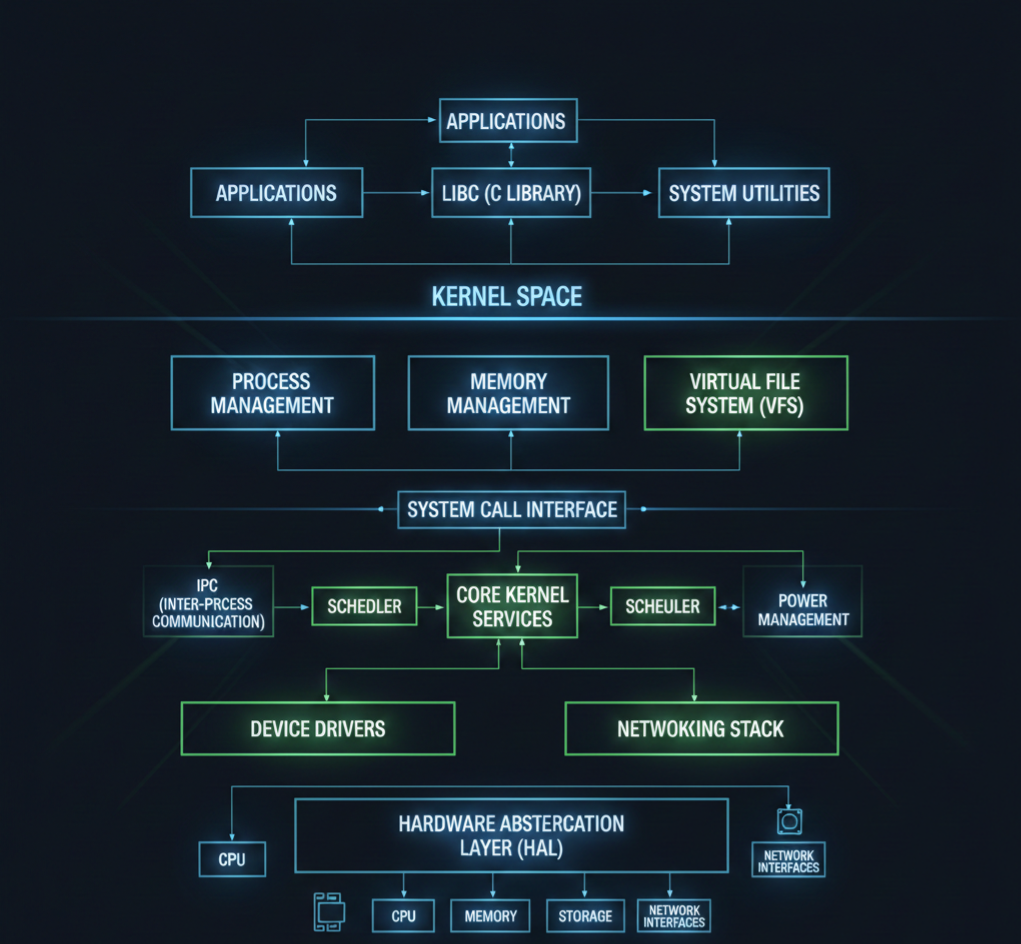
    Linux Kernel Architecture Diagram

    Think of Linux kernel architecture like a well-organized city. Applications live on the surface, hardware lives underground, and the kernel is the intelligent system running everything in between.

    Linux Kernel Architecture

    Let’s start with a simple logical diagram.

    Linux Kernel Architecture Diagram (Conceptual View)

    +--------------------------------------------------+
    |                  User Space                      |
    |                                                  |
    |  Applications (Browser, Editor, Media Player)    |
    |  Shell (bash, zsh)                               |
    |  System Utilities                                |
    |                                                  |
    +--------------------|-----------------------------+
                         | System Calls
    +--------------------v-----------------------------+
    |                  Kernel Space                    |
    |                                                  |
    |  +--------------------------------------------+  |
    |  |           System Call Interface             |  |
    |  +--------------------------------------------+  |
    |                                                  |
    |  Process Management   Memory Management          |
    |  (Scheduler, Tasks)   (Paging, Virtual Memory)   |
    |                                                  |
    |  File System (VFS)    Inter-Process Communication|
    |  (ext4, XFS)         (Pipes, Signals, Sockets)  |
    |                                                  |
    |  Networking Stack     Device Drivers             |
    |  (TCP/IP)             (USB, Audio, Display)     |
    |                                                  |
    |  Interrupt Handling   Power Management           |
    |                                                  |
    +--------------------|-----------------------------+
                         |
    +--------------------v-----------------------------+
    |                    Hardware                      |
    |  CPU | RAM | Disk | Network | USB | Display     |
    +--------------------------------------------------+
    

    Now let’s break this down layer by layer.

    1. User Space (Where Applications Live)

    This is the top layer of the Linux kernel architecture.

    What runs here?

    • Browsers
    • Media players
    • Text editors
    • Shells like bash
    • Your own C, C++, Python programs

    Important point:

    User space cannot directly access hardware.
    Everything must go through the kernel.

    This separation keeps the system safe and stable. If an app crashes, the kernel stays alive.

    2. System Call Interface (The Gateway)

    The system call interface is the bridge between user space and kernel space.

    When an application wants to:

    • Read a file
    • Allocate memory
    • Create a process
    • Send data over the network

    It makes a system call.

    Common system calls:

    • open()
    • read()
    • write()
    • fork()
    • exec()

    Think of system calls as a formal request form that applications submit to the kernel.

    3. Kernel Space (The Brain of the System)

    This is where the real work happens. The kernel runs with full privileges and controls all system resources.

    Let’s go component by component.

    4. Process Management

    Process management is a core pillar of Linux kernel architecture.

    What it handles:

    • Creating processes
    • Killing processes
    • Scheduling CPU time
    • Context switching

    The kernel uses internal structures to track each process and a scheduler to decide who runs and when.

    This is why Linux can run hundreds of processes smoothly.

    5. Memory Management

    Memory management ensures every process gets memory safely and efficiently.

    Key responsibilities:

    • Virtual memory
    • Paging
    • Memory protection
    • Kernel vs user memory separation

    Each process thinks it owns all the memory, but the kernel quietly manages the illusion.

    This design prevents one process from corrupting another.

    6. File System Layer (VFS)

    Linux supports many file systems, but applications don’t care which one you use.

    That’s because of the Virtual File System (VFS).

    What VFS does:

    • Provides a common interface for file operations
    • Allows ext4, XFS, FAT, and others to work together
    • Keeps applications portable

    This is a classic example of smart kernel architecture design.

    7. Device Drivers

    Device drivers are how the kernel talks to hardware.

    Examples:

    • Keyboard drivers
    • USB drivers
    • Audio drivers
    • Network card drivers

    Drivers run in kernel space and expose standard interfaces to user space.

    Linux supports loadable kernel modules, so drivers can be added or removed without rebooting.

    8. Networking Stack

    The Linux kernel includes a full networking implementation.

    Includes:

    • Network device drivers
    • IP layer
    • TCP and UDP
    • Socket interface

    This allows Linux to function as:

    • A desktop OS
    • A server OS
    • A router
    • A cloud platform

    All using the same kernel architecture.

    9. Inter-Process Communication (IPC)

    Processes often need to talk to each other.

    Linux kernel architecture supports multiple IPC mechanisms:

    • Pipes
    • Signals
    • Message queues
    • Shared memory
    • Sockets

    Each one exists because different problems need different communication styles.

    10. Interrupt Handling

    Hardware devices need attention from the CPU.

    They use interrupts to signal the kernel.

    The kernel:

    • Handles interrupts quickly
    • Defers heavy work
    • Keeps the system responsive

    Efficient interrupt handling is critical for performance.

    11. Hardware Layer

    This is the physical world:

    • CPU
    • RAM
    • Disk
    • Network card
    • Sensors
    • Displays

    The kernel is the only layer allowed to touch hardware directly.

    This design keeps hardware access controlled and secure.

    How All Layers Work Together

    Here’s a simple flow example:

    1. You click “Save” in a text editor
    2. The app makes a system call
    3. The kernel checks permissions
    4. VFS routes the request
    5. File system writes data
    6. Device driver talks to disk
    7. Hardware stores the data

    All of this happens in milliseconds.

    Why This Architecture Is So Powerful

    The Linux kernel architecture is:

    • Modular
    • Secure
    • High-performance
    • Scalable

    That’s why the same kernel runs on:

    • Android phones
    • Embedded boards
    • Servers
    • Supercomputers

    Basic Linux Kernel Programming Questions

    1. What is the Linux kernel and its primary responsibilities?
    2. What are the differences between user space and kernel space?
    3. Explain the process context vs interrupt context in Linux kernel.
    4. What are system calls? Give examples.
    5. How does the Linux kernel manage memory?
    6. What are kernel modules? How do you load and unload a module?
    7. Explain the proc filesystem and its usage.
    8. What are character devices and block devices?
    9. What is a major number and a minor number in Linux device drivers?
    10. What is init_module and cleanup_module in kernel modules?
    11. Explain the difference between static and dynamic kernel modules.
    12. What are kernel threads, and how do you create them?
    13. What is spinlock, and how is it different from a mutex?
    14. Explain preemption in Linux kernel.
    15. What is a wait queue? How is it used in kernel programming?

    Intermediate Linux Kernel Programming Questions

    1. What is the difference between copy_to_user() and copy_from_user()?
    2. Explain the kernel memory allocation methods (kmalloc, vmalloc, etc.).
    3. What is a task_struct, and why is it important?
    4. Explain the Linux process scheduling mechanism.
    5. What is the difference between hardirq and softirq?
    6. What are bottom halves, and what is their role?
    7. Explain workqueues and tasklets.
    8. What is interrupt handling in Linux kernel?
    9. What is a device driver, and what are the types of device drivers?
    10. How do you register a character device driver in Linux?
    11. What is the difference between blocking and non-blocking I/O in kernel space?
    12. Explain the Linux kernel logging mechanism (printk, KERN_INFO, etc.).
    13. What is a module parameter, and how do you pass parameters to a kernel module?
    14. What is kthread_stop, and how is it used?
    15. How do you handle race conditions in the kernel?

    Advanced Linux Kernel Programming Questions

    1. Explain Linux kernel memory management: page cache, slab allocator, buddy system.
    2. What are kernel namespaces, and how are they used?
    3. Explain Virtual File System (VFS) and its role.
    4. How does the Linux kernel handle file operations?
    5. Explain the kernel networking stack.
    6. What is a kobject, and how does it relate to sysfs?
    7. Explain reference counting in the Linux kernel.
    8. How does dynamic kernel tracing work (ftrace, perf)?
    9. What is a PCI device driver, and how do you write one?
    10. How do you implement I2C or SPI device drivers in Linux?
    11. Explain interrupt-driven vs polling mechanisms in kernel device drivers.
    12. How do you implement DMA in Linux kernel drivers?
    13. What is a kernel timer, and how do you implement it?
    14. Explain Linux kernel modules dependencies and symbol exports.
    15. How does user-space memory mapping (mmap) work in kernel drivers?
    16. How do you debug kernel modules using kgdb or printk?
    17. Explain the Linux kernel boot process.
    18. How does the scheduler handle real-time processes?
    19. What is NUMA, and how does the kernel handle memory in NUMA systems?
    20. How do you handle deadlocks in the kernel?

    Practical / Scenario-Based Questions

    1. How would you modify an existing Linux kernel driver?
    2. How do you implement read and write operations in a character driver?
    3. How would you trace a kernel panic?
    4. How do you profile a kernel module for performance?
    5. How do you implement interrupt handling for a GPIO device?
    6. How do you use procfs or sysfs to expose driver data to user space?
    7. How do you implement ioctl commands for a custom device?
    8. How would you handle concurrency in a multi-threaded kernel module?
    9. How do you simulate and test a driver in QEMU before using real hardware?
    10. How do you write a kernel module compatible with multiple kernel versions?

    Expert / Advanced Scenario Questions

    1. How would you implement zero-copy communication between kernel and user space?
    2. How do you optimize memory usage in kernel modules?
    3. How do you write a kernel driver for DMA buffer sharing between devices?
    4. Explain how kernel hot-plugging works.
    5. How do you handle interrupt storms in Linux?
    6. How do you implement suspend/resume operations for a device driver?
    7. How do you use kernel timers to schedule periodic tasks?
    8. How do you implement custom kernel syscalls?
    9. How do you handle kernel module security and permissions?
    10. How do you debug race conditions in kernel driver code?

    Final Thoughts

    The Essentials of Linux kernel architecture are not about memorizing code or data structures. They are about understanding how Linux thinks, how it manages resources, and how its components work together as one system.

    Once you grasp the architecture, Linux stops feeling like magic and starts feeling logical.

    Whether you are preparing for interviews, working on embedded systems, or simply curious about how operating systems work, learning Linux kernel architecture is one of the best investments you can make in your technical journey.

    FAQ : Linux Kernel Architecture

    1. What is Linux Kernel Architecture?
    Linux Kernel Architecture is the internal structure of the Linux operating system. It manages hardware, processes, memory, and system calls, acting as a bridge between software and hardware.

    2. Why is Linux Kernel important for developers?
    Understanding the Linux Kernel helps developers write efficient code, manage hardware resources, and develop device drivers or system-level applications.

    3. What are the main components of the Linux Kernel?
    The Linux Kernel consists of process management, memory management, file system, device drivers, network stack, and system calls.

    4. What is the difference between monolithic and microkernel in Linux?
    Linux uses a monolithic kernel, where all core services run in kernel space for performance. Microkernels run minimal services in kernel space and others in user space for modularity.

    5. How does process management work in the Linux Kernel?
    The kernel handles process creation, scheduling, and termination. It uses scheduling algorithms to manage CPU time efficiently among processes.

    6. What is a Linux Kernel module?
    A kernel module is a piece of code that can be loaded or unloaded into the kernel at runtime, like device drivers or system extensions.

    7. How is memory managed in Linux Kernel?
    Linux uses virtual memory, paging, and caching to efficiently allocate memory for processes and the system while isolating processes from each other.

    8. How can I prepare for Linux Kernel interview questions?
    Focus on kernel architecture, process and memory management, device drivers, file systems, and hands-on practice with kernel modules.

    9. Can I modify the Linux Kernel safely?
    Yes, by using a separate test environment or virtual machine. Kernel modifications require caution and understanding of dependencies.

    10. Where can I learn Linux Kernel Architecture from scratch?
    You can start with official Linux Kernel documentation, beginner-friendly tutorials, YouTube guides, and practical exercises like writing simple kernel modules.

    Read More about Process : What is is Process

    Read More about System Call in Linux : What is System call

    Read More about IPC : What is IPC