
QNX OS interview questions and answers for 2026, explained in simple language. Covers microkernel architecture, IPC, scheduling, resource managers, and real-time concepts for embedded and automotive engineers.
This collection of QNX OS interview questions and answers is designed for engineers who want to truly understand QNX, not just memorize definitions. The questions are written in a practical way, similar to what is actually asked in real technical interviews, especially for automotive, embedded, and RTOS roles.
The content starts from basic concepts, such as what QNX is, why it is called a microkernel OS, and how it differs from Linux. As the questions progress, they move into core internal topics like kernel space vs user space, message passing, processes and threads, scheduling, IPC, and resource managers. Advanced sections cover fault tolerance, adaptive partitioning, real-time behavior, priority scheduling, and system reliability, which are commonly discussed in senior-level interviews.
Each answer is written in simple language, focusing on clarity and understanding, not textbook definitions. Wherever possible, explanations reflect real-world behavior, how QNX works internally, and how engineers actually use it in production systems like automotive ECUs, medical devices, and industrial controllers.
This material is especially useful for:
- Embedded Software Engineers
- Automotive/QNX Developers
- RTOS and System Programming Interviews
- Engineers working with QNX Neutrino
The goal is not to impress with complex wording, but to help you explain QNX confidently and naturally during interviews just like an experienced engineer would.
1.What is QNX?
QNX is a POSIX-compliant, microkernel-based real-time operating system used in embedded and safety-critical systems. It provides deterministic real-time performance, high reliability, and fault isolation, making it ideal for automotive, medical, industrial, and aerospace applications.
Key Points to Mention in Interviews
- RTOS (Real-Time OS) → Guarantees predictable response times
- Microkernel architecture → Only essential services (scheduler, IPC, interrupts) run in kernel
- Fault tolerant → A crashing driver doesn’t crash the whole system
- POSIX compliant → Familiar Linux/UNIX APIs
- High reliability & safety → Used in ADAS, infotainment, medical devices
- Message-passing IPC → Core communication mechanism
- Certified OS → ISO 26262, IEC 61508, etc.
Where QNX is Used
- Automotive (Infotainment, ADAS, Digital Cockpits)
- Medical Devices
- Industrial Automation
- Aerospace & Defense
- Robotics
2. Is QNX a real-time operating system?
QNX is a real-time operating system (RTOS).
Interview-Ready Answer
QNX is a hard real-time operating system that provides deterministic and predictable response times, which makes it suitable for safety-critical embedded systems.
Why QNX is Real-Time
- Deterministic scheduling → Guaranteed response within deadlines
- Microkernel architecture → Minimal kernel, faster interrupt handling
- Priority-based preemptive scheduling
- Message-passing IPC → Core real-time communication mechanism
- Low interrupt latency & jitter
Hard vs Soft Real-Time
- QNX = Hard real-time OS
Missing a deadline is considered a system failure (important for automotive, medical systems).
Interview One-Liner (Strong)
QNX is a POSIX-compliant, microkernel-based hard real-time operating system designed for deterministic and safety-critical applications.
3.What does “microkernel” mean in QNX?
In QNX, a microkernel means that only the most essential operating system services run in the kernel, such as the scheduler, interrupt handling, and inter-process communication (IPC). All other services like device drivers, file systems, networking, and protocol stacks run as user-space processes.
Key Points to Mention
- Minimal Kernel → Only critical functions run in kernel space.
- User-space Services → Most OS services run as separate processes, improving stability and fault isolation.
- Fault Isolation → If a driver or service crashes, it won’t crash the whole system.
- Message-Passing IPC → Kernel facilitates communication between processes efficiently.
- Real-Time Friendly → Microkernel keeps latency low, making it suitable for hard real-time applications.
Example Explanation
- Suppose the audio driver crashes in QNX → Only that driver stops; the OS and other applications continue running.
- Contrast this with monolithic kernels (like Linux), where a driver crash can crash the whole system.
One-Liner for Interviews
QNX’s microkernel architecture runs only essential services in the kernel, while other services run in user space, providing fault tolerance and real-time performance.
4.How is QNX different from Linux?
QNX is a microkernel-based real-time operating system designed for deterministic, safety-critical embedded systems, while Linux is a monolithic, general-purpose OS that is not inherently real-time (unless using PREEMPT_RT patches).
Key Differences to Mention
| Feature | QNX | Linux |
|---|---|---|
| Kernel Type | Microkernel | Monolithic |
| Real-Time Support | Hard real-time (deterministic) | General-purpose; soft real-time with PREEMPT_RT |
| Fault Isolation | High – services run in user space; crashes don’t crash OS | Low – kernel modules can crash entire system |
| Inter-Process Communication (IPC) | Message-passing via microkernel | Shared memory, signals, pipes (less deterministic) |
| Typical Use Case | Automotive, medical, industrial, aerospace | Desktop, servers, embedded systems (non-critical) |
| Memory Footprint | Small, lightweight | Larger, heavier |
| Boot Time | Fast, optimized for embedded systems | Slower, general-purpose boot |
| Certification | ISO 26262, IEC 61508, DO-178 | Not generally certified for safety-critical applications |
Example for Interview
- Automotive Infotainment: QNX → Digital dashboard (hard real-time, fault-tolerant).
- Desktop Application: Linux → Ubuntu OS on a laptop.
One-Liner for Interviews
QNX is a real-time, microkernel OS optimized for safety-critical embedded systems, whereas Linux is a general-purpose monolithic OS with limited real-time support.
5.Where is QNX commonly used?
QNX is widely used in embedded and safety-critical systems where reliability, fault tolerance, and real-time performance are essential.
Key Areas / Industries
- Automotive
- Infotainment systems (digital dashboards, touchscreens)
- Advanced Driver Assistance Systems (ADAS)
- Digital cockpits and instrument clusters
- Medical Devices
- Life-support equipment, patient monitors
- Imaging systems
- Industrial Automation
- Robotics, PLCs, factory automation controllers
- Process control systems
- Aerospace & Defense
- Avionics and flight control systems
- Mission-critical embedded electronics
- Telecommunications
- Network switches, base stations
- IoT and Embedded Devices
- Smart appliances, robotics, edge devices
Example for Interview
“For example, in automotive, QNX is used in digital dashboards where a crash in the media player or Bluetooth module won’t take down the whole system, thanks to its microkernel architecture.”
One-Liner
QNX is commonly used in automotive, medical, industrial, aerospace, and telecommunications systems where reliability and real-time performance are critical.
6.What are the main features of QNX?
QNX is a microkernel-based real-time operating system with features designed for embedded and safety-critical systems, providing high reliability, determinism, and fault tolerance.
Key Features
- Microkernel Architecture
- Only essential services run in the kernel (scheduler, IPC, interrupts)
- Other services (drivers, file systems, networking) run in user space
- Ensures fault isolation and system stability
- Real-Time Performance
- Hard real-time deterministic scheduling
- Low interrupt latency and predictable response times
- Priority-based preemptive multitasking
- POSIX Compliance
- Supports standard UNIX/Linux APIs
- Eases application porting from other systems
- Inter-Process Communication (IPC)
- Efficient message-passing mechanism
- Supports synchronous and asynchronous communication between processes
- Fault Tolerance & High Reliability
- Crashing of a driver or service does not crash the OS
- Critical for safety-certified applications
- Scalability
- Runs on small microcontrollers to complex multi-core systems
- Suitable for both resource-constrained devices and high-end embedded platforms
- File System Support
- Journaling and networked file systems for reliability
- Can integrate custom embedded file systems
- Networking & Communication
- Supports TCP/IP, CAN, USB, and other industrial protocols
- Suitable for connected embedded systems
- Security & Safety Certification
- ISO 26262 (Automotive), IEC 61508 (Industrial), DO-178B/C (Aerospace)
- Enables use in safety-critical applications
- Modularity
- Easy to add/remove components without affecting the kernel
- Lightweight and customizable for specific embedded use cases
Example for Interview
“For instance, in an automotive digital dashboard, QNX ensures that even if the media or Bluetooth service crashes, the display of speed, fuel, and engine status continues to work reliably, thanks to its microkernel architecture and fault isolation.”
One-Liner for Interviews
QNX features a microkernel architecture, hard real-time performance, fault tolerance, POSIX compliance, scalable modular design, and is certified for safety-critical systems.
7.What does POSIX compliance mean in QNX?
POSIX compliance in QNX means that the operating system supports standard UNIX/Linux APIs and interfaces, allowing developers to write portable applications that can run on QNX with minimal changes.
Key Points to Mention
- Standardized API
- QNX provides POSIX-compliant system calls for file I/O, process management, threading, signals, and IPC.
- Makes it familiar to developers coming from Linux or UNIX environments.
- Portability
- Applications written using POSIX APIs can be easily ported between QNX and other POSIX-compliant systems.
- Real-Time Extensions
- QNX extends POSIX with real-time features, such as real-time scheduling (SCHED_FIFO, SCHED_RR) and priority inheritance mutexes.
- Example APIs in QNX
- File operations:
open(),read(),write(),close() - Threads:
pthread_create(),pthread_join() - IPC:
mq_open(),mq_send(),mq_receive()(message queues)
- File operations:
- Why It Matters
- Reduces development time and learning curve
- Enables cross-platform development for embedded systems
- Ensures consistency and standard compliance in embedded applications
Example for Interview
“If you have an application written for Linux using standard POSIX threads and message queues, you can port it to QNX almost directly because QNX supports the same POSIX APIs, while also providing real-time guarantees.”
One-Liner for Interviews
POSIX compliance in QNX ensures standard UNIX/Linux API support, enabling application portability and consistent development while adding real-time capabilities.
8.Is QNX open source or proprietary?
QNX is a proprietary operating system developed by BlackBerry. It is not open source, and its source code is licensed under commercial terms.
Key Points to Mention
- Proprietary License
- QNX requires a commercial license for development and deployment.
- Source code is not freely available to the public.
- Commercial Support
- BlackBerry provides official support, updates, and safety certifications.
- Essential for automotive, medical, and industrial applications.
- Contrast with Open Source OS
- Linux, FreeRTOS → Open source, source code freely available.
- QNX → Closed-source, with guaranteed reliability and certification.
- Why Proprietary Matters
- Ensures controlled development, rigorous testing, and compliance with safety standards like ISO 26262 or IEC 61508.
One-Liner for Interviews
QNX is a proprietary, commercially licensed real-time operating system with source code controlled by BlackBerry.
9.What is Neutrino in QNX?
Neutrino is the microkernel-based real-time operating system (RTOS) at the core of QNX. It provides the fundamental services like scheduling, inter-process communication (IPC), and interrupt handling, enabling QNX to deliver deterministic, reliable, and fault-tolerant performance in embedded systems.
Key Points to Mention
- Core of QNX
- Neutrino is the actual OS kernel.
- All QNX services (file system, networking, drivers) run on top of Neutrino.
- Microkernel Architecture
- Only essential functions (scheduler, IPC, interrupt handling) are in the Neutrino kernel.
- Other services run in user space → better fault isolation.
- Real-Time Capabilities
- Supports hard real-time scheduling.
- Ensures predictable response times for critical applications.
- POSIX Compliance
- Neutrino implements POSIX APIs, allowing applications to be portable from UNIX/Linux.
- Fault-Tolerant
- If a driver or service crashes, Neutrino keeps the system running.
Example for Interview
“In an automotive dashboard, Neutrino ensures that the speedometer and fuel gauge continue updating even if a non-critical service like media playback crashes, thanks to its microkernel design.”
One-Liner for Interviews
Neutrino is the microkernel RTOS at the heart of QNX, providing deterministic real-time performance, POSIX compliance, and fault tolerance for embedded systems.
10.What is deterministic behavior in RTOS?
Deterministic behavior in an RTOS means that the system responds to events or interrupts within a guaranteed, predictable amount of time, regardless of system load. This is essential for real-time applications where timing is critical.
Key Points to Mention
- Predictable Response
- A deterministic RTOS ensures that tasks meet their deadlines consistently.
- Example: If a sensor triggers an interrupt, the OS handles it within a fixed maximum latency.
- Critical for Real-Time Systems
- Timing guarantees are required in automotive, medical, aerospace, and industrial systems.
- Missing deadlines can lead to system failures or safety hazards.
- Determinism vs Speed
- Determinism focuses on predictability, not just fast execution.
- Even if execution is slightly slower, as long as timing is predictable, it’s considered deterministic.
- Example
- In a car’s ABS system, the RTOS must read wheel speed sensors and control brakes within exact deadlines. QNX ensures this deterministic behavior.
One-Liner for Interviews
Deterministic behavior in an RTOS means predictable, guaranteed response times to events or interrupts, ensuring real-time deadlines are always met.
11. What is the latest version of QNX?
The latest major version of QNX is QNX Software Development Platform (SDP) 8.0. It includes:
- QNX OS 8.0 – The core microkernel-based real-time operating system.
- QNX OS for Safety 8.0 – Safety-certified edition for critical systems (ISO 26262, IEC 61508).
- QNX Hypervisor 8.0 – Embedded virtualization platform.
- QNX Momentics IDE 8.0.x – Development environment supporting SDP 8.0.
Key Points:
- Designed for embedded and safety-critical systems.
- Provides deterministic real-time performance.
- Supports fault isolation and microkernel architecture.
One-Liner for Interviews:
“QNX SDP 8.0 is the latest version, with QNX OS 8.0 at its core, optimized for embedded and safety-critical applications.”
QNX Architecture
1.Explain QNX architecture
QNX Architecture Overview
QNX is a microkernel-based real-time operating system (RTOS). Its architecture is designed for high reliability, modularity, and real-time performance.
The main layers are:
1. Microkernel
- Core of QNX.
- Very small and minimal: only contains the most essential OS functions.
- Responsibilities:
- Task scheduling (prioritized, real-time scheduling)
- Interprocess communication (IPC)
- Interrupt handling
- Timers
- Low-level memory management
- All other OS services run as user-space processes, not inside the kernel.
Key point: This design improves stability because a crash in a service doesn’t crash the entire system.
2. Process Managers (User-space Services)
These are system services that run outside the kernel, providing higher-level OS functionalities:
| Service | Function |
|---|---|
| File System | Manages files, directories, and storage devices. |
| Network Stack | Handles TCP/IP, UDP, and network protocols. |
| Device Drivers | Hardware control (keyboard, serial, audio, display) as user-space tasks. |
| Resource Managers | Unified interface for devices & files, exposing them as files (/dev). |
| Timers / Clocks | User-space timers and scheduling assistance. |
- These services communicate with each other and with the microkernel via IPC.
- Because they are separate from the kernel, if one fails, the system can continue running.
3. Application Layer
- Your user applications run here.
- They request services via standard APIs or POSIX calls, which get translated into IPC messages to the microkernel or system services.
- Applications are fully isolated, which enhances reliability.
4. Communication Model
- QNX uses message-passing IPC instead of traditional system calls.
- Every process can send and receive messages synchronously or asynchronously.
- This ensures determinism, essential for real-time systems.
5. Memory Architecture
- Microkernel handles basic memory protection.
- Applications and services are isolated in their own address space, preventing accidental overwrites.
- Memory faults in one service usually do not affect the kernel or other services.
6. Highlights of QNX Architecture
- Modular & Scalable: Add/remove services without touching the kernel.
- Fault-Tolerant: Crashes in user-space services don’t crash the kernel.
- Deterministic: Real-time scheduling ensures predictable behavior.
- POSIX-Compliant: Supports standard APIs for portability.
Architecture Diagram (Text Representation)
+----------------------------------+
|         User Applications        |
+----------------------------------+
|        POSIX APIs / Libraries    |
+----------------------------------+
|       User-Space Services        |
|  (File System, Network, Drivers)|
+----------------------------------+
|           Microkernel            |
|  (Scheduler, IPC, Interrupts)   |
+----------------------------------+
|           Hardware Layer         |
+----------------------------------+
Interview-Friendly Answer:
“QNX has a microkernel-based architecture, where the kernel is minimal and handles only essential functions like task scheduling, interprocess communication (IPC), interrupt handling, and memory management. All other services, such as file systems, network stacks, and device drivers, run as user-space processes, communicating with the kernel and each other via IPC. Applications run on top of these services using POSIX APIs. This modular design ensures high reliability, fault tolerance, and deterministic real-time performance, making QNX ideal for embedded and safety-critical systems.”
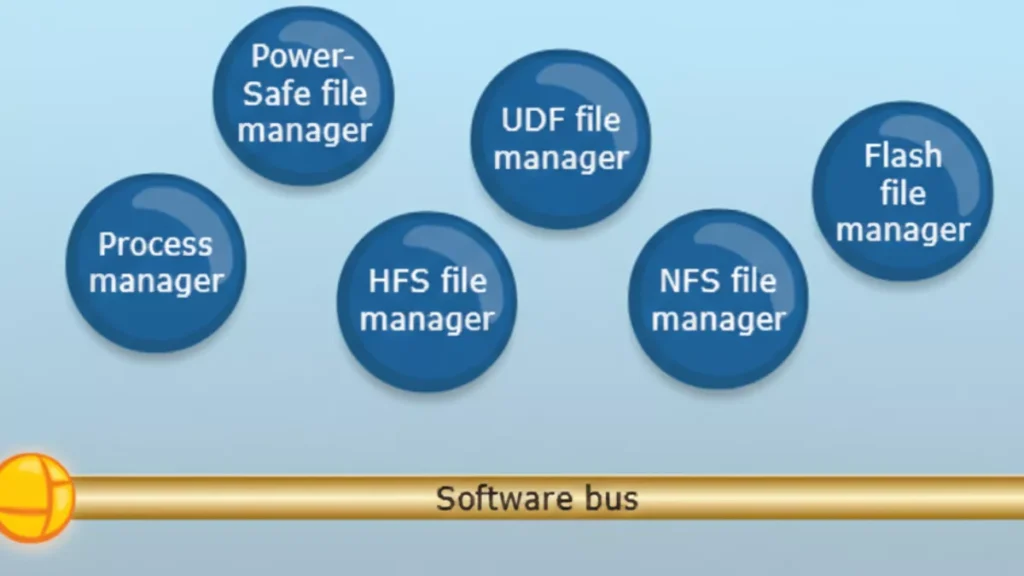
Explanation of the Diagram
- Software Bus (Middle Layer)
- Acts as a communication backbone for all user-space managers and applications.
- All managers (file, network, GUI, character, etc.) and applications communicate with each other through this message-passing mechanism.
- Essentially, this is how QNX implements microkernel principles: minimal kernel + IPC.
- Upper Layer: File and Process Managers
These are system-level services running in user space:- Process Manager: Handles process creation, deletion, and scheduling requests.
- File Managers: Manage different types of file systems:
- Power-Safe file manager
- UDF file manager
- HFS file manager
- NFS file manager
- Flash file manager
- These managers communicate via the software bus, instead of being inside the kernel.
- Lower Layer: Applications and Resource Managers
- GUI Manager: Handles graphical interface.
- Character Manager: Handles character devices (e.g., keyboard, serial port).
- Network Manager: Handles network services.
- Mqueue Manager: Manages message queues (IPC feature).
- CIFS File Manager: For network file sharing (SMB/CIFS).
- Applications: End-user or embedded applications running on top of these managers.
Key Takeaways
- This diagram shows QNX’s modular microkernel architecture in action:
- Microkernel: Handles only essential kernel tasks (not shown explicitly in this diagram; it’s below the software bus, managing IPC, scheduling, and interrupts).
- Software bus: Allows all user-space managers and applications to communicate.
- Managers: Implement higher-level OS services in user space.
- Applications: Sit at the top and use these services via message passing.
- If one manager crashes, it doesn’t crash the kernel or other managers, highlighting QNX’s fault-tolerant design.
Interview Tip:
You can say:
“This diagram shows QNX Neutrino’s user-space architecture. System managers like file managers, network manager, GUI manager, and process manager run as independent processes in user space. Applications communicate with these managers via the software bus, which implements the microkernel’s message-passing IPC. This design makes QNX highly modular, fault-tolerant, and suitable for real-time embedded systems.”
2.What is QNX Microkernel Architecture?
QNX uses a microkernel architecture, meaning the operating system kernel is kept very small and only contains the most critical functions.
All other OS services run as separate user-space processes, not inside the kernel.
What Runs Inside the QNX Microkernel?
The QNX Neutrino microkernel includes only four core responsibilities:
- Thread scheduling
- Priority-based, fully preemptive
- Ensures deterministic real-time behavior
- Inter-Process Communication (IPC)
- Message passing (
MsgSend,MsgReceive,MsgReply) - This is the heart of QNX
- Message passing (
- Interrupt handling
- Fast and predictable interrupt response
- Low-level thread and process management
Nothing else runs in kernel space
What Runs Outside the Kernel (User Space)?
All higher-level OS services are implemented as user-space servers:
- File systems (e.g.,
/fs-qnx6.so) - Device drivers (UART, I2C, SPI, Audio, Network)
- Networking stack (TCP/IP)
- Process manager (
procnto) - Memory manager
- Resource managers
These components communicate using message passing.
QNX Architecture Overview (Logical Flow)
+-----------------------+
|   Applications          |
+-----------------------+
          |
          |  Message Passing (IPC)
          |
+-----------------------+
| OS Services / Servers |
| (Drivers, FS, Net)         |
+-----------------------+
          |
          | IPC
          |
+-----------------------+
|   Microkernel         |
| (Scheduler, IPC, IRQ)|
+-----------------------+
          |
+-----------------------+
|      Hardware         |
+-----------------------+
Message Passing – The Core Concept
Unlike Linux (which uses system calls heavily), QNX uses:
- Synchronous message passing
- Client sends request → server processes → replies
Example:
- App wants to write to a UART
- App sends message to UART driver
- UART driver responds after operation
- No shared memory required
- Strong isolation
- Predictable timing
Why Microkernel? (Advantages)
1. High Reliability
- If a driver crashes, only that process restarts
- Kernel remains unaffected
2. Fault Tolerance
- Ideal for safety-critical systems (ASIL-D)
3. Deterministic Real-Time Behavior
- Guaranteed response times
- Used in automotive and medical systems
4. Security
- Smaller kernel → smaller attack surface
QNX vs Linux (Interview Comparison)
| Feature | QNX | Linux |
|---|---|---|
| Kernel type | Microkernel | Monolithic |
| Drivers | User space | Kernel space |
| IPC | Message passing | Syscalls + shared memory |
| Real-time | Native | Needs RT patches |
| Fault isolation | Strong | Weak |
| Safety certification | Yes (ASIL-D) | Limited |
Real-World Example (Automotive)
In a car infotainment system:
- Audio driver crashes
- Only audio service restarts
- Navigation and UI keep running
This is why QNX is used in automotive ECUs
One-Line Interview Answer
QNX uses a microkernel architecture where only scheduling, IPC, interrupts, and thread management run in the kernel, while all other services like drivers and file systems run in user space as separate processes, ensuring high reliability, fault isolation, and deterministic real-time behavior.
3.What Runs in Kernel Space in QNX?
In QNX (Neutrino), the kernel space contains only the most critical real-time components. Everything else runs in user space.
The following run in kernel space:
1. Thread Scheduling
- Priority-based, fully preemptive scheduler
- Ensures deterministic real-time behavior
- Handles context switching
2. Inter-Process Communication (IPC)
- Core message passing mechanism
MsgSend(),MsgReceive(),MsgReply()- Fast, synchronous IPC
IPC is the heart of QNX
3. Interrupt Handling
- Low-latency interrupt dispatching
- Interrupt Service Routines (ISRs)
- Interrupt events delivery to threads
4. Low-Level Thread & Process Management
- Thread creation and destruction
- Basic process control
- Kernel-level synchronization primitives
What Does NOT Run in Kernel Space?
These run in user space, not kernel space:
- Device drivers (UART, I2C, SPI, Audio, Network)
- File systems
- Memory manager
- Network stack (TCP/IP)
- Process manager (
procnto) - Resource managers
One-Line Interview Answer
In QNX, kernel space contains only the microkernel responsible for scheduling, message-passing IPC, interrupt handling, and low-level thread management; all other OS services and drivers run in user space.
Memory Tip for Interviews
Think S-I-I-T:
- Scheduling
- IPC
- Interrupts
- Threads
4.What Runs in User Space in QNX?
In QNX Neutrino, almost everything except the microkernel runs in user space as separate processes (servers).
Major Components Running in User Space
1. Process Manager (procnto)
- Handles:
- Process creation (
fork,spawn) - Signal delivery
- POSIX compliance
- Process creation (
- Acts as the root server of the system
2. Memory Manager
- Virtual memory management
- Address space creation
- Memory protection
- Page faults handling (with kernel support)
3. Device Drivers
- UART, I2C, SPI, CAN
- Audio, Display, Camera
- GPIO, ADC, PWM
- Network drivers
- Run as normal user processes
- Can be restarted if they crash
4. File Systems
- QNX6 filesystem
- Flash file systems
- Network file systems
- Mounted under
/
5. Network Stack
- TCP/IP stack
- Ethernet, Wi-Fi drivers
- Socket services
6. Resource Managers
- Implement POSIX-style resources
- Expose services as files (e.g.
/dev/ser1) - Handle
open/read/write/ioctl
7. System Services & Daemons
- Audio services
- Power management
- Clock services
- Logging services
8. User Applications
- HMI / UI apps
- Control logic
- Diagnostic tools
- Middleware
QNX User Space Layout (Conceptual)
+----------------------+
|   User Applications  |
+----------------------+
| System Services      |
| File Systems         |
| Network Stack        |
| Device Drivers       |
| Resource Managers    |
| procnto              |
+----------------------+
        |
        | IPC (message passing)
        |
+----------------------+
|   Microkernel        |
+----------------------+
Why This Design Matters
Fault Isolation
- Driver crash ≠ system crash
Easy Recovery
- Restart a single service
Safety Certification
- Ideal for ASIL-D systems
Secure Architecture
- Minimal kernel attack surface
One-Line Interview Answer
In QNX, user space contains the process manager, memory manager, device drivers, file systems, network stack, resource managers, system services, and all applications—each running as separate processes that communicate via message passing.
5.Why Does QNX Use Message Passing?
QNX uses message passing as its core communication mechanism to achieve deterministic real-time behavior, fault isolation, reliability, and scalability in a microkernel architecture.
1. Fits the Microkernel Design
QNX keeps the kernel very small.
Since drivers, file systems, and services run in user space, they must communicate safely.
➡ Message passing replaces shared kernel data structures
- No direct function calls across protection boundaries
- Clean client–server model
2. Deterministic Real-Time Behavior (Key Reason)
Message passing in QNX is:
- Synchronous
- Priority-aware
What this means:
- Client blocks until server replies
- Server temporarily inherits the client’s priority (priority inheritance)
✔ Prevents priority inversion
✔ Guarantees bounded latency
✔ Ideal for hard real-time systems
3. Strong Fault Isolation & Reliability
- Each driver/service runs as a separate process
- If a driver crashes:
- Kernel stays alive
- Other services keep running
- Only the failed service is restarted
➡ Message passing enforces strict process isolation
4. Security by Design
- No shared memory by default
- No arbitrary kernel access
- Services only expose controlled interfaces
➡ Smaller attack surface than monolithic kernels
5. Unified Communication Model
QNX uses one mechanism everywhere:
| Operation | Implemented via |
|---|---|
File I/O (read/write) | Messages |
| Device access | Messages |
| Network stack | Messages |
| Signals & events | Messages |
➡ Simpler OS design
➡ Easier to reason about timing
6. Zero-Copy Efficiency
Despite being message-based:
- QNX supports zero-copy transfers
- Uses shared memory only when explicitly needed
➡ High performance with real-time guarantees
7. Easier Debugging & Maintenance
- Services can be:
- Stopped
- Replaced
- Restarted
- No kernel rebuild required
➡ Faster development and safer updates
Real Example (Automotive)
- Audio application → sends message to audio driver
- Audio driver crashes
- Audio service restarts
- Navigation & safety systems continue running
➡ System does not reboot
One-Line Interview Answer
QNX uses message passing to enable safe and deterministic communication between user-space services in its microkernel architecture, providing real-time predictability, fault isolation, priority inheritance, and high system reliability.
Memory Trick for Interviews
Think D-R-F-S-U:
- Determinism
- Reliability
- Fault isolation
- Security
- Unified IPC
6.What Are Resource Managers in QNX?
Resource managers in QNX are user-space server processes that implement POSIX-style resources (files, devices, pseudo-devices) and expose them through the filesystem namespace using message passing.
In simple words:
A resource manager lets a user-space service behave like a file or device (e.g.
/dev/ser1).
Why Resource Managers Exist
QNX follows the principle:
“Everything is a file”
Instead of placing drivers in kernel space (like Linux), QNX uses resource managers in user space to handle:
open()read()write()ioctl()close()
All these calls are translated into messages.
Where Do Resource Managers Run?
- User space
- As normal processes
- Communicate with clients via QNX IPC (message passing)
- Crash-safe
- Restartable
- Isolated
Common Examples of Resource Managers
| Resource | Example |
|---|---|
| Serial driver | /dev/ser1 |
| GPIO | /dev/gpioX |
| Audio | /dev/snd/* |
| Custom device | /dev/mydevice |
| Pseudo file | /proc, /dev/random |
How a Resource Manager Works (Flow)
- Application calls:
fd = open("/dev/ser1", O_RDWR); - Kernel converts this into a message
- Message is sent to the resource manager
- Resource manager processes the request
- Sends a reply back to the application
Key Components of a Resource Manager
1. Dispatch Layer
- Receives messages
- Routes them to appropriate handlers
2. Connect Functions
- Handle:
open()close()
3. I/O Functions
- Handle:
read()write()ioctl()
Types of Resource Managers
Device Resource Managers
- Hardware drivers (UART, I2C, CAN)
Filesystem Resource Managers
- QNX6, Flash FS
Pseudo Resource Managers
- Virtual or logical devices
Benefits of Resource Managers
Fault Isolation
- Driver crash ≠ system crash
POSIX Compliance
- Standard file APIs
Real-Time Friendly
- Priority inheritance during IPC
Easy Debugging
- Run, stop, restart like any process
QNX vs Linux (Quick Comparison)
| Feature | QNX | Linux |
|---|---|---|
| Driver location | User space | Kernel space |
| Interface | File-based | Syscalls |
| Crash impact | Local | Often system-wide |
| IPC | Message passing | Function calls |
One-Line Interview Answer
Resource managers in QNX are user-space processes that expose devices and services as POSIX-compliant files, handling open/read/write/ioctl requests via message passing, enabling fault isolation and real-time reliability.
7.What is the role of the microkernel?
The microkernel’s role in QNX is to provide the core real-time foundation by handling thread scheduling, message-passing IPC, interrupt handling, and basic process/thread management, while all other OS services run in user space.
8.How does QNX achieve fault tolerance?
QNX achieves fault tolerance by running drivers and OS services in user space, using message passing for isolation, and allowing failed components to be restarted without affecting the microkernel or the rest of the system.
How QNX Achieves Fault Tolerance (Key Points)
- Microkernel Architecture
- Kernel contains only scheduling, IPC, and interrupts
- Minimal kernel → fewer failure points
- User-Space Drivers & Services
- Device drivers, file systems, network stack run as separate processes
- A crash affects only that component, not the whole OS
- Message Passing (Strong Isolation)
- No shared kernel data by default
- Faults are contained within a single process
- Service Restart & Recovery
- Failed services/drivers can be restarted dynamically
- System continues running
- Priority Inheritance in IPC
- Prevents priority inversion during communication
- Maintains real-time stability even under faults
- Health Monitoring (Optional)
- Watchdogs and supervisors can detect failures and relaunch services
9.What is adaptive partitioning?
Adaptive Partitioning in QNX is a CPU resource management mechanism that guarantees each group of threads a minimum percentage of CPU time, while dynamically redistributing unused CPU to other partitions.
Key Points (Simple)
- CPU time is divided into partitions
- Each partition has a guaranteed minimum CPU budget
- Unused CPU is adaptively shared with others
- Ensures real-time tasks are never starved
Why QNX Uses Adaptive Partitioning
- Prevents CPU starvation
- Improves system predictability
- Supports mixed-criticality systems (safety + infotainment)
Example
| Partition | CPU Guarantee |
|---|---|
| Safety tasks | 40% |
| Audio | 30% |
| UI | 20% |
| Background | 10% |
- If UI uses only 10%, the extra 10% is temporarily used by others
- When UI needs CPU again, it gets its guaranteed share back
Where It’s Used
- Automotive ECUs
- Medical devices
- Industrial control systems
One-Line Interview Answer
Adaptive partitioning ensures guaranteed CPU bandwidth for critical tasks while efficiently sharing unused CPU among other processes.
10.What is a Thread in QNX?
A thread in QNX is the smallest schedulable unit of execution that runs within a process and is scheduled by the microkernel based on priority.
Key points:
- Executes code
- Has its own:
- Program counter
- Stack
- Priority
- Shares process resources (memory, file descriptors)
- Scheduled directly by the QNX microkernel
11.What is a Process in QNX?
A process in QNX is a protected container that provides an address space and resources for one or more threads.
Key points:
- Owns:
- Virtual address space
- File descriptors
- Signals
- Permissions
- Contains one or more threads
- Provides isolation from other processes
Relationship (Easy to Remember)
- Process = container
- Thread = worker
Process
 ├── Thread 1 (main thread)
 ├── Thread 2
 └── Thread 3
QNX-Specific Interview Highlight
- Threads are the real-time scheduling entities, not processes
- Priority, IPC, and interrupts are all thread-centric
One-Line Comparison (Interview Gold)
In QNX, a process provides isolation and resources, while threads are the actual execution units scheduled by the microkernel.
Thread States in QNX
In QNX Neutrino, a thread can exist in the following main states:
1. READY
- Thread is ready to run
- Waiting for CPU
- Placed in a priority-based ready queue
2. RUNNING
- Thread is currently executing on the CPU
3. BLOCKED
- Thread is waiting for an event or resource
Common reasons:
- Waiting for a message (
MsgReceive) - Waiting for a reply (
MsgSend) - Waiting for I/O
- Waiting for a mutex or semaphore
- Sleeping (
nanosleep)
4. STOPPED
- Thread execution is suspended
Causes:
- Debugger attached
- Job control signals (e.g.
SIGSTOP) - Explicit suspension
5. WAITING (ZOMBIE – process level)
- Thread has exited
- Waiting for parent process to collect status
Note: Zombie is mainly a process concept, but threads can be in a terminated state internally.
Simple State Diagram (Interview Friendly)
READY → RUNNING → BLOCKED
  ↑        ↓         |
  └────────┴─────────┘
        STOPPED
Important QNX Interview Points
- Threads (not processes) are scheduled
- Scheduling is priority-based and preemptive
- IPC operations heavily influence BLOCKED states
- Message passing directly affects thread transitions
One-Line Interview Answer
In QNX, threads transition between READY, RUNNING, BLOCKED, and STOPPED states, with scheduling handled at the thread level using priority-based preemption.
Memory Trick
Think R-R-B-S:
- Ready
- Running
- Blocked
- Stopped
Thread Scheduling Algorithm in QNX
QNX uses a priority-based, fully preemptive, deterministic thread scheduling algorithm, designed for hard real-time systems.
Core Characteristics
1. Priority-Based Scheduling
- Each thread has a fixed priority
- Priority range: 0 (lowest) to 255 (highest)
- Highest-priority READY thread always runs
2. Fully Preemptive
- If a higher-priority thread becomes READY:
- It immediately preempts the currently running thread
- Ensures fast response for real-time tasks
3. Round-Robin Within Same Priority
- Threads with the same priority share CPU time
- Each gets a time slice
- Prevents starvation among equal-priority threads
4. Thread-Centric Scheduling
- QNX schedules threads, not processes
- Each thread is an independent scheduling entity
5. Deterministic Behavior
- Scheduling decisions are predictable
- No dynamic priority changes by default
- Ideal for safety-critical systems
Scheduling Flow (Simple)
- Scheduler checks READY queues (highest → lowest priority)
- Picks the highest-priority READY thread
- Thread runs until:
- It blocks
- Its time slice expires (same-priority case)
- A higher-priority thread becomes READY
Priority Inheritance (Very Important)
- Used during message passing and mutex locking
- If a high-priority thread is blocked by a lower-priority one:
- Lower-priority thread temporarily inherits the higher priority
- Prevents priority inversion
Comparison with Linux (Interview Highlight)
| Feature | QNX | Linux |
|---|---|---|
| Scheduling | Fixed priority | CFS (dynamic) |
| Preemption | Always | Config-dependent |
| Determinism | Guaranteed | Best-effort |
| Priority inheritance | Built-in | Partial |
One-Line Interview Answer
QNX uses a priority-based, fully preemptive scheduling algorithm where the highest-priority ready thread always runs, with round-robin scheduling among threads of equal priority and priority inheritance to prevent inversion.
Conclusion
QNX is not just another operating system—it is built for environments where reliability, predictability, and safety truly matter. Understanding QNX means understanding how real-time systems behave under pressure, how failures are isolated, and how software can continue running even when individual components crash.
These interview questions and answers are meant to help you think like a QNX engineer, not just repeat definitions. By focusing on microkernel design, message passing, scheduling, fault tolerance, and system design choices, this content prepares you to explain why QNX works the way it does, not just what it is.
If you can clearly explain these concepts in your own words during an interview, it shows strong fundamentals, real project exposure, and confidence in system-level thinking—qualities that interviewers look for in embedded and automotive roles.
Master the concepts, relate them to real use cases, and you won’t just clear a QNX interview—you’ll stand out as someone who truly understands the system.
FAQ : QNX OS Interview Questions
1. What is QNX OS?
QNX is a real-time operating system (RTOS) designed for systems that require high reliability, deterministic performance, and fault tolerance. It is widely used in automotive, medical, industrial, and safety-critical embedded systems.
2. Why is QNX called a microkernel operating system?
QNX uses a microkernel architecture, meaning only the most essential services (scheduling, IPC, interrupt handling) run in kernel space. All other services run in user space, improving system stability and fault isolation.
3. How is QNX different from Linux?
Linux uses a monolithic kernel, while QNX uses a microkernel. In QNX, drivers and services run in user space and can be restarted if they fail, whereas in Linux, a faulty driver can crash the entire system.
4. What runs in kernel space in QNX?
Only critical components run in kernel space:
- Thread scheduling
- Inter-process communication (IPC)
- Interrupt handling
- Low-level synchronization
This keeps the kernel small and reliable.
5. What runs in user space in QNX?
Most system services run in user space, including:
- Device drivers
- File systems
- Network stacks
- Resource managers
- System services
This design improves fault tolerance.
6. Why does QNX use message passing?
QNX uses message passing for IPC to ensure:
- Deterministic communication
- Strong process isolation
- Safer interaction between services
- Easier debugging and recovery
It is a core reason for QNX’s reliability.
7. What is a resource manager in QNX?
A resource manager is a user-space server that manages system resources like files, devices, or custom interfaces. Applications interact with resource managers using standard POSIX calls such as open(), read(), and write().
8. What is the role of the microkernel in QNX?
The microkernel acts as a traffic controller, handling communication, scheduling, and interrupts while letting user-space services do the rest. This separation makes the system robust and scalable.
9. How does QNX achieve fault tolerance?
QNX achieves fault tolerance through:
- Process isolation
- User-space drivers
- Automatic service restart
- Priority-based scheduling
A failure in one component does not crash the entire system.
10. What is adaptive partitioning in QNX?
Adaptive partitioning ensures CPU time is reserved for critical processes. Even if one process misbehaves, real-time and safety-critical tasks continue to run without disruption.
11. What is a process in QNX?
A process is an independent program with its own memory space. It may contain one or more threads and communicates with other processes using message passing.
12. What is a thread in QNX?
A thread is the smallest unit of execution in QNX. Threads share the same address space within a process but are scheduled independently.
13. What are the thread states in QNX?
Common thread states include:
- Running
- Ready
- Blocked (waiting for IPC or resources)
- Stopped
These states help manage real-time execution efficiently.
14. What scheduling algorithm does QNX use?
QNX uses priority-based preemptive scheduling. Higher-priority threads always run first, ensuring deterministic real-time behavior.