Tag: Arm cortex M4

  • Master Microcontroller Interview Questions (2026)

    Learn Master Microcontroller Interview Questions for microcontrollers and STM32F407VG with this complete guide. Explore embedded systems, IoT projects, programming, debugging, and hands-on applications. Perfect for beginners, students, and professionals looking to boost skills and career in embedded electronics.

    You’ll find questions on STM32, and other microcontrollers, including topics like GPIO, timers, interrupts, ADC/DAC, UART, SPI, I2C, PWM, and real-time applications.

    Whether you are aiming to strengthen your hardware knowledge, improve embedded C/C++ skills, or master practical debugging techniques, this comprehensive collection will help you crack interviews at top companies.

    This resource is perfect for those preparing for embedded systems roles, firmware development, IoT projects, and electronics-based careers. Boost your interview readiness, learn about peripheral programming, and understand the system-level design of microcontrollers with this all-in-one guide.

    Why Learning Microcontrollers is Important for Everyone

    In today’s world, technology is everywhere, from smartphones and smartwatches to home automation and industrial systems. At the heart of these devices are microcontrollers (MCUs), small but powerful computers that control hardware and make electronics “smart.” Learning about microcontrollers is not just for engineers it is becoming essential for students, hobbyists, tech enthusiasts, and professionals who want to stay ahead in a tech-driven world.

    Understanding the Basics of Smart Devices

    Microcontrollers like STM32F407VG, ESP32, or Arduino boards power everyday gadgets. By learning MCUs, users can understand how devices work, from blinking LEDs to controlling motors and reading sensors. This knowledge gives you the power to innovate, customize, and troubleshoot technology in your daily life.

    Empower Yourself with Hands-On Skills

    Learning microcontrollers teaches programming, electronics, and embedded systems. Users gain hands-on skills to build projects like IoT devices, robots, wearable electronics, and smart home systems. This is a fun and practical way to apply technology creatively and solve real-world problems.

    Boost Career Opportunities

    For students and professionals, microcontroller knowledge opens doors to embedded systems, IoT development, robotics, automation, and firmware engineering roles. Companies highly value individuals who can bridge software and hardware, making this knowledge a career booster.

    Improve Problem-Solving and Critical Thinking

    Working with microcontrollers encourages analytical thinking and problem-solving skills. Whether it’s debugging a circuit, optimizing code, or designing a complete system, learning MCUs sharpens your logical and technical abilities.

    Stay Future-Ready

    Technology is advancing rapidly, and embedded systems are becoming core to AI, IoT, and smart devices. Learning microcontrollers ensures users stay relevant and confident in a world where electronics are everywhere.

    Microcontroller Interview Questions

    1. Beginner Level (0–1 year experience)

    1. What is a microcontroller? How is it different from a microprocessor?
    2. Name some popular microcontrollers and their applications.
    3. Explain the architecture of 8051 / ARM Cortex-M / AVR / PIC microcontroller.
    4. What are GPIOs? How do you configure them?
    5. Explain the difference between Flash, RAM, and EEPROM.
    6. What is the function of timers and counters?
    7. Explain ADC and DAC in microcontrollers.
    8. What is PWM and where is it used?
    9. What is the difference between a microcontroller and an embedded system?
    10. What are interrupts? Give examples of hardware interrupts.
    11. How do you write a “Hello World” program for a microcontroller?
    12. How do you toggle an LED using GPIO in C?
    13. Explain the difference between polling and interrupts.
    14. Explain the role of startup code in microcontrollers.
    15. What is the difference between volatile and non-volatile variables in embedded C?

    2. Intermediate Level (1–3 years experience)

    1. Explain UART, SPI, I2C, and CAN protocols and their differences.
    2. How do you configure timers for delay generation?
    3. How do you generate PWM signals using timers?
    4. Explain watchdog timer and its use.
    5. How do you interface sensors (like DHT11, MQ135) with a microcontroller?
    6. How do you handle analog input using ADC?
    7. How do you reduce power consumption in microcontrollers?
    8. What are memory-mapped registers and how are they used?
    9. Explain bit-banding and its advantage in Cortex-M.
    10. How do you write an interrupt service routine (ISR)?
    11. What is the difference between RTOS tasks and bare-metal loops?
    12. How do you debounce a mechanical button in software?
    13. How do you implement circular buffers for UART communication?
    14. Explain the difference between deep sleep and sleep modes.
    15. How do you debug a “microcontroller not booting” issue?
    16. How do you check if GPIO pins are working correctly?
    17. How do you use serial debugging via UART?
    18. How do you use an oscilloscope or logic analyzer to debug communication protocols?

    3. Advanced Level (3+ years / Senior Engineers)

    1. Explain the memory hierarchy of ARM Cortex-M microcontrollers.
    2. How do NVIC and priority levels work in ARM Cortex-M?
    3. How do you handle nested interrupts efficiently?
    4. Explain DMA and how it can be used with ADC or UART.
    5. How do you implement low-latency real-time applications?
    6. How do you manage memory in resource-constrained microcontrollers?
    7. Explain the boot process of a microcontroller (from reset to main).
    8. How do you design interrupt-driven vs polling-driven systems?
    9. How do you implement CAN bus with error handling?
    10. How do you handle SPI/I2C bus contention or collision?
    11. How do you implement secure communication on microcontrollers (AES, SHA)?
    12. How do you implement firmware OTA (over-the-air) updates?

    4. Debugging & Troubleshooting Questions

    1. How do you debug a microcontroller that does not start after flashing firmware?
    2. How do you detect stack overflow in a microcontroller?
    3. How do you debug a misbehaving ISR or interrupt storm?
    4. How do you find memory leaks in an embedded C program?
    5. How do you debug peripheral drivers (I2C, SPI, UART)?
    6. How do you use a JTAG/SWD debugger to step through code?
    7. How do you analyze a system crash or hard fault on ARM Cortex-M?
    8. How do you identify why an ADC reading is noisy?
    9. How do you debug power consumption issues in a low-power design?
    10. How do you verify communication between microcontroller and sensor?
    11. How do you use breakpoints, watchpoints, and variable inspection to debug embedded applications?
    12. How do you use GDB or OpenOCD for microcontroller debugging?

    5. System Design / Real-Time Scenario Questions

    1. Design a low-power sensor node using a microcontroller. How would you implement sleep/wake cycles?
    2. How would you implement a UART-based protocol to handle multiple devices reliably?
    3. How do you prevent priority inversion in RTOS-based microcontroller applications?
    4. How would you design a robust firmware update mechanism with rollback in case of failure?
    5. How do you design a fault-tolerant system using watchdog timers and redundant sensors?
    6. How would you implement a PWM-based motor control with closed-loop feedback?
    7. How do you optimize memory usage for a microcontroller with <32KB RAM?
    8. How do you implement multitasking on a bare-metal microcontroller without an RTOS?

    STM32F407VG INTERVIEW QUESTIONS

    1. Beginner Level (0–1 year experience)

    1. What is STM32F407VG? Which family does it belong to?
    2. What is the CPU core used in STM32F407VG?
    3. What is the clock speed and Flash/RAM size of STM32F407VG?
    4. What are GPIOs and how many GPIO ports are there on STM32F407VG?
    5. Explain the memory map of STM32F407VG.
    6. What is the difference between Flash, SRAM, and EEPROM in STM32F407VG?
    7. What are the different power modes available in STM32F407VG?
    8. What is the purpose of the reset and clock control (RCC) in STM32F407VG?
    9. Explain what an NVIC is in STM32F407VG.
    10. What are timers in STM32F407VG and what are their types?
    11. What are interrupts and how are they handled in STM32F407VG?
    12. What is the function of SysTick timer?
    13. Explain ADC and DAC in STM32F407VG. How many channels are available?
    14. What is PWM and how can it be generated using STM32 timers?
    15. Explain USART/UART peripheral of STM32F407VG.
    16. What is the difference between UART, SPI, I2C, and CAN in STM32F407VG?
    17. What is DMA and why is it used?
    18. How many external interrupt lines are available?

    2. Intermediate Level (1–3 years experience)

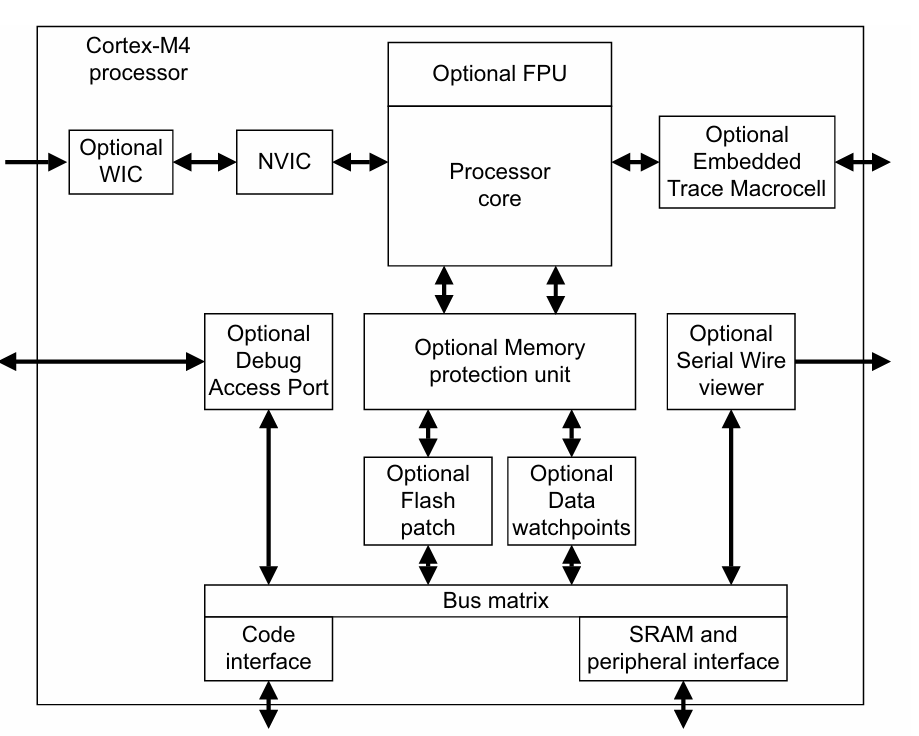
    1. Explain the ARM Cortex-M4 features used in STM32F407VG.
    2. What is the function of FPU (Floating Point Unit) in STM32F407VG?
    3. Explain the bus architecture (AHB, APB1, APB2) of STM32F407VG.
    4. How do you configure GPIO pins in STM32F407VG?
    5. How do you configure the system clock using PLL in STM32F407VG?
    6. Explain the concept of prescalers in timers and clocks.
    7. How do you configure and use an external interrupt (EXTI)?
    8. How do you implement debouncing for a push-button using STM32?
    9. How do you implement PWM for motor control using STM32F407VG timers?
    10. Explain the use of ADC with DMA for continuous data acquisition.
    11. How do you configure USART with interrupts for asynchronous communication?
    12. Explain I2C master/slave mode configuration.
    13. Explain SPI master/slave configuration and full-duplex communication.
    14. How do you implement CAN communication on STM32F407VG?
    15. How do you implement low-power sleep modes using PWR peripheral?
    16. How do you configure SysTick for RTOS tick generation?
    17. How do you use the watchdog timer (IWDG / WWDG) to prevent system hang?
    18. How do you use the RTC (Real-Time Clock) in STM32F407VG?
    19. How do you configure NVIC priority grouping and interrupts?
    20. How do you use STM32CubeMX to generate initialization code?

    3. Advanced Level (3+ years / Senior Engineers)

    1. Explain the startup sequence of STM32F407VG from reset to main().
    2. Explain the memory organization: Flash, SRAM1, SRAM2, CCM RAM.
    3. How do you implement nested interrupts efficiently?
    4. How do you implement DMA with peripherals (ADC, SPI, UART)?
    5. How do you implement double-buffered DMA for high-speed data acquisition?
    6. How do you handle critical sections in interrupt-based programming?
    7. How do you implement a real-time system using FreeRTOS on STM32F407VG?
    8. Explain the ARM Cortex-M4 vector table and exception handling.
    9. How do you debug a hard fault on STM32F407VG?
    10. How do you implement bootloader for STM32F407VG?
    11. How do you implement firmware OTA updates for STM32F407VG?
    12. How do you implement secure boot and Flash protection?
    13. How do you implement CRC or checksum for data integrity?
    14. How do you configure the PLL to achieve maximum system clock?
    15. How do you handle clock source failures (HSE/HSI) in STM32F407VG?
    16. How do you optimize power consumption for battery-operated STM32F407VG devices?
    17. How do you implement motor control using PWM and ADC feedback?
    18. How do you handle priority inversion in FreeRTOS tasks?
    19. How do you implement fault-tolerant CAN communication?

    4. Debugging & Troubleshooting Questions

    1. How do you debug a “microcontroller not booting” issue?
    2. How do you detect and debug stack overflow on STM32F407VG?
    3. How do you debug a hard fault using fault status registers (HFSR, CFSR, BFAR, MMAR)?
    4. How do you debug peripheral misbehavior (ADC, UART, SPI, I2C)?
    5. How do you check if GPIO is configured properly using LED test?
    6. How do you use JTAG/SWD debugging with STM32F407VG?
    7. How do you debug a misconfigured PLL or clock source?
    8. How do you debug power consumption issues in low-power modes?
    9. How do you use breakpoints, watchpoints, and variable inspection in embedded debugging?
    10. How do you use serial logging to debug STM32 applications?
    11. How do you debug DMA transfer failures or overrun conditions?
    12. How do you analyze and fix peripheral timing issues using oscilloscope or logic analyzer?

    5. System Design / Real-Time Scenario Questions

    1. Design a low-power IoT sensor node using STM32F407VG. How do you implement sleep/wake cycles?
    2. Design a UART/SPI/I2C communication protocol with error handling between multiple devices.
    3. How do you implement a robust motor control system using STM32F407VG with PWM feedback?
    4. How do you design a watchdog-based fault recovery system?
    5. How do you implement high-speed data acquisition with ADC + DMA + circular buffer?
    6. How do you implement FreeRTOS tasks and synchronization for a multi-peripheral system?
    7. How do you implement secure communication (AES encryption) between STM32F407VG devices?
    8. How do you implement bootloader + firmware upgrade with rollback mechanism?
    9. How do you implement motor control with PID using STM32F407VG?
    10. How do you optimize memory usage when SRAM is limited (<192KB)?
    11. How do you implement real-time CAN bus communication with error handling?

    Conclusion

    Learning microcontrollers empowers users to understand, create, and control technology in meaningful ways. Whether you are a student, hobbyist, or professional, mastering MCUs like STM32F407VG opens doors to hands-on projects, career opportunities, and problem-solving skills. In a world driven by smart devices and IoT, knowing how microcontrollers work ensures you stay innovative, future-ready, and confident in applying technology to real-world challenges.

    FAQ : Microcontrollers and STM32F407VG

    1. What is a microcontroller and why should I learn it?
    A microcontroller (MCU) is a small computer on a chip that controls electronic devices. Learning MCUs helps you understand, program, and create smart devices like IoT gadgets, robots, and automation systems.

    2. Why is STM32F407VG popular among engineers?
    STM32F407VG is part of the ARM Cortex-M4 series, known for its high performance, low power, and versatile peripherals. It’s widely used in embedded systems, robotics, and industrial applications.

    3. Do I need programming skills to work with microcontrollers?
    Yes! C/C++ programming is essential for microcontrollers. Some MCUs also support Python (MicroPython), but embedded C is the industry standard for STM32 and other professional projects.

    4. What projects can I build with STM32F407VG?
    You can build IoT devices, motor control systems, robotics projects, sensor monitoring systems, and smart home automation projects using STM32F407VG.

    5. Is learning microcontrollers useful for beginners?
    Absolutely! Microcontrollers teach programming, electronics, and problem-solving. Beginners can start with Arduino and gradually move to advanced MCUs like STM32.

    6. What is the difference between a microcontroller and a microprocessor?
    A microcontroller has built-in memory, peripherals, and I/O ports, while a microprocessor requires external components. MCUs are ideal for embedded applications, and microprocessors are used in computers.

    7. Can I use STM32F407VG for IoT projects?
    Yes, STM32F407VG supports UART, SPI, I2C, and Ethernet interfaces, making it perfect for IoT devices, sensor networks, and smart applications.

    8. How can learning microcontrollers boost my career?
    Knowledge of MCUs opens doors to embedded systems, IoT, robotics, firmware development, and automation jobs, making you highly employable in tech-driven industries.

    9. Do I need electronics knowledge to learn STM32?
    Basic electronics knowledge helps, like resistors, capacitors, and sensors, but STM32 tutorials often start with hands-on programming projects for beginners.

    10. Are debugging skills important for microcontrollers?
    Yes! Debugging using tools like GDB, STM32CubeIDE, and logic analyzers is critical to identify hardware/software issues and optimize your embedded applications.

    11. Can I learn STM32F407VG without Arduino?
    Yes. STM32F407VG can be programmed directly using STM32CubeIDE, HAL libraries, and bare-metal C, giving you full control of peripherals and advanced features.

    12. How long does it take to master microcontrollers?
    It depends on practice. Basic projects can be done in weeks, but mastering STM32F407VG, debugging, and advanced peripherals may take 3–6 months of consistent learning and practice.
    Read More : Microprocessor Interview Questions

    Read More : MCU Peripheral Interview Questions

  • Cortex M7: 12 Powerful Reasons Why This Microcontroller Is a Game-Changer

    Learn everything about Cortex M7 microcontrollers in this beginner-friendly, in-depth guide. Understand ARM Cortex-M series, differences between M3/M4/M7, architecture, applications, development boards, and more.

    If you are starting your embedded journey or preparing for technical exams or projects, you’ve probably heard a lot about Cortex M7, Cortex-M microcontrollers, ARM Cortex-M4, and other Cortex families. But understanding what makes each one unique can be confusing—especially if you’re a beginner.

    Don’t worry.

    This guide explains everything in simple, everyday language, while still being technically correct and packed with depth.

    Grab a cup of tea — this is the most detailed beginner-friendly guide you’ll find on Cortex M7 and the Cortex-M family.

    1. What Is Cortex M7?

    The Cortex M7 is one of ARM’s most powerful microcontroller cores in the ARM Cortex-M series. It is designed for applications that require high performance, real-time response, and efficient digital signal processing.

    In simple words:

    • Cortex M0 = Basic
    • Cortex M3 = Mid-level
    • Cortex M4 = DSP + performance
    • Cortex M7 = Supercharged version of Cortex-M4

    Cortex M7 is the “flagship” MCU core for performance in the Cortex M microcontrollers category.

    It powers applications such as:

    • High-end motor control
    • Industrial automation
    • Automotive sensor processing
    • Audio DSP
    • Robotics
    • Drone flight controllers
    • Wearable devices
    • IoT edge processing
    • Medical devices

    If you need speed, real-time behavior, and DSP power in a low-power microcontroller, Cortex M7 is the ideal choice.

    2. Why ARM Cortex-M Microcontrollers Are So Popular

    Before diving deeper into Cortex M7, it’s important to know why the ARM Cortex M microcontrollers family is the global industry standard.

    Reasons:

    Low power consumption

    Battery-powered and IoT devices rely heavily on Cortex cores.

    Simple and clean architecture

    Based on ARMv7-M and ARMv8-M architectures, optimized for MCUs.

    Strong ecosystem

    Huge support from STMicroelectronics, NXP, Microchip, TI, Espressif, and others.

    Affordable

    Boards like STM32, NXP LPC, and ATSAMD are extremely cheap and beginner friendly.

    Massive developer community

    Tutorials, tools, videos, GitHub projects — everything is available.

    Because of these advantages, terms like:

    • arm cortex m microcontrollers
    • cortex m microcontrollers
    • arm cortex microcontrollers

    are now common keywords in the embedded world.

    3. ARM Cortex-M Series Overview (Cortex-M Family)

    The ARM Cortex M series covers a wide range of microcontrollers for different performance needs.

    Here’s a super simple comparison:

    CorePerformanceUse Case
    Cortex M0 / M0+Very LowIoT basics, simple sensors
    Cortex M3MediumControl systems, appliances
    Cortex M4Medium + DSPAudio, motor control
    Cortex M7High + DSPAdvanced robotics, AI-lite
    Cortex M55Very High + MLEdge AI, neural processing
    Cortex M85HighestSecure & AI-ready MCU

    If someone searches for:

    • arm cortex m processors
    • cortex m processor
    • 32 bit arm cortex m

    they are basically looking for devices from this family.

    4. Cortex M3 – The Core That Brought Real-Time Power

    Although Cortex M7 is more advanced, the Cortex M3 core was the turning point for ARM microcontrollers. It introduced:

    • NVIC interrupt controller
    • Thumb-2 instruction set
    • Better performance per watt
    • Deterministic interrupt latency

    Cortex M3 has about 210–260 search volume globally, and is used in:

    • Automotive ECUs
    • Smart appliances
    • Industrial controllers
    • Medical pumps

    If you are working with STM32F103 (Blue Pill), you are using a Cortex M3.

    Keywords included:
    arm cortex m3, cortex m3, cortex m

    5. Cortex M4 – The DSP-Enabled Hero

    Before Cortex M7 existed, the Cortex M4 was the champion of performance.

    It added:

    DSP instructions

    Optional Floating Point Unit (FPU)

    Improved latency

    Better control performance

    Search variants include:

    • arm cortex m4
    • arm m4
    • cortex m 4
    • m4 cortex

    These keywords exist because many developers search using slightly different terms.

    Cortex M4 is ideal for:

    • Motor control
    • Digital filtering
    • Audio processing
    • Oscilloscopes
    • Smart appliances

    Popular MCUs:
    STM32F407, TM4C123, NXP Kinetis K64

    6. Cortex M7 – The Flagship Performance Core

    Now let’s return to the star of this article — Cortex M7.

    The Cortex M7 builds on the M4 and M3 cores but adds:

    1. Higher Clock Speeds

    Up to 600 MHz in some MCUs (like NXP i.MX RT series).

    2. Dual-Issue Pipeline

    Executes two instructions per cycle in some cases.

    3. Faster DSP

    Can perform:

    • FFT
    • IIR
    • FIR
    • Audio processing

    much faster than Cortex M4.

    4. Better Memory Architecture

    With separate I-cache and D-cache for performance.

    5. Real-Time Features

    Still keeps the deterministic behavior that MCUs need.

    6. Floating Point Unit (FPU)

    Supports both single and double-precision (optional).

    7. Ideal for High-End Industrial Applications

    Used in:

    • Audio systems
    • Motor control
    • Robotics
    • Automotive dashboards
    • Smart sensors
    • Drones
    • Industrial automation

    If you want to build something advanced — Cortex M7 is your go-to MCU.

    7. ARM Cortex-M Development Boards

    If you want to get hands-on experience, there are many arm cortex m development board options:

    Cortex M0 Boards

    • ATSAMD21
    • LPC800
    • STM32F0 series

    Cortex M3 Boards

    • STM32F103 Blue Pill
    • LPC1768
    • Arduino Due

    Cortex M4 Boards

    • STM32F407 Discovery
    • Teensy 3.2
    • TM4C123 Launchpad

    Cortex M7 Boards

    • Teensy 4.0 / 4.1
    • STM32H743 Nucleo board
    • NXP i.MX RT1050/1060 EVK

    Cortex M55 & M85 Boards

    Newer and more expensive but great for machine learning and AI on microcontrollers.

    People also search for:

    • arm cortex m board
    • cortex m mcu

    So including these helps SEO.

    8. Understanding Cortex M55 & Cortex M85 (Future of Cortex-M)

    Two important high-level Cortex cores exist:

    Cortex M55

    A next-generation core optimized for:

    • Machine learning
    • Neural processing
    • DSP
    • Voice detection
    • Low-power AI systems

    Many search for:
    cortex m55, cortex m 55

    It includes the Helium Vector Extensions for ML acceleration.

    Cortex M85

    Even more powerful than M55.
    Supports:

    • New security features (ARM TrustZone)
    • Advanced DSP
    • ML acceleration
    • High clock frequencies

    Search terms include:
    cortex m 85

    Cortex M85 aims to bridge the gap between MCUs and Cortex-A processors.

    9. Cortex M Processor Architecture

    While each core differs, the fundamental architecture of Cortex M processor family is similar.

    Here’s what all Cortex M cores include:

    Harvard Architecture

    Separate instruction and data buses
    → Faster execution, pipelining.

    Thumb-2 Instruction Set

    Compact 16-bit + 32-bit instructions
    → Better code density and performance.

    Nested Vectored Interrupt Controller (NVIC)

    Handles interrupts with:

    • Prioritization
    • Low latency
    • Deterministic timing

    Perfect for real-time systems.

    SysTick Timer

    Used for RTOS tick generation.

    Memory Protection Unit (MPU)

    Improves security and reliability.

    Floating Point Unit (Optional)

    Cortex M4, M7, M55, M85 support FPU.

    Low Power Modes

    Sleep, Deep Sleep, Standby
    → Essential for battery devices.

    10. Applications of Cortex M7 and Cortex-M Family

    If you’re wondering where these microcontrollers are used, think everywhere.

    Automotive

    • ECUs
    • Instrument clusters
    • Motor control
    • ADAS sensors

    Industrial

    • PLCs
    • Automation equipment
    • Motor drivers
    • Smart meters

    Consumer Electronics

    • Drones
    • Wearables
    • Smart home devices

    Audio & DSP

    • Audio mixers
    • Noise-cancellation systems

    Healthcare

    • Glucose monitors
    • Portable ECG
    • Ventilators

    IoT & Edge Computing

    • Gateways
    • Environmental sensors
    • Smart cameras

    Cortex M7 especially shines in:

    • Audio DSP
    • Robotics
    • AI-lite motor control
    • High-speed automation
    • Real-time dashboard graphics

    11. Programming the Cortex M Microcontrollers (Beginner Tips)

    If you want to start programming these MCUs, here is the easiest path:

    Step 1: Choose a board

    Start with STM32 or Teensy boards.

    Step 2: Install Tools

    • STM32CubeIDE
    • Keil uVision
    • IAR
    • PlatformIO
    • Arduino IDE (Teensy supports it)

    Step 3: Learn Basics

    • GPIO
    • Timers
    • UART
    • I2C
    • SPI
    • ADC
    • PWM

    Step 4: Learn RTOS

    FreeRTOS is the best for beginners.

    Step 5: Move to DSP

    Cortex M4 and M7 support CMSIS-DSP library.

    Step 6: Build a Project

    • Motor controller
    • Audio spectrum analyzer
    • Drone flight controller
    • IoT device

    12. Cortex M7 vs Cortex M4 vs Cortex M3 – Quick Comparison

    FeatureCortex M3Cortex M4Cortex M7
    DSP❌✔✔✔ (enhanced)
    FPU❌OptionalOptional/Double-precision
    Clock Speed~100 MHz~180 MHzUp to 600 MHz
    Cache❌❌✔ (I/D cache)
    Use CaseControl systemsAudio/MotorRobotics/AI/High-end systems

    Cortex M7 is usually found in systems where speed matters — especially robotics and signal processing.

    13. Cortex-M for Embedded Engineers (Career Perspective)

    If you’re learning embedded systems, mastering the Cortex M processors is one of the best investments you can make.

    Why?

    Used in 90% of embedded products

    Industry-standard for beginner to advanced roles

    Strong job demand

    Easy to get hardware

    Strong open-source support

    For freshers and experienced engineers alike, working on:

    • cortex m mcu
    • arm cortex m board
    • arm cortex m processors

    gives you strong credentials.

    14. Final Conclusion

    The Cortex M7 microcontroller represents the peak of performance in the ARM Cortex-M family. It offers a perfect blend of speed, DSP power, real-time performance, and low power consumption. Whether you’re building advanced industrial systems, audio DSP applications, UAVs, or IoT edge devices, the Cortex M7 is a reliable and powerful choice.

    Understanding the complete Cortex M series — from Cortex M0 to Cortex M85 — gives you the confidence to choose the right MCU for every project. By learning the architecture, programming techniques, and applications, you can become a highly skilled embedded engineer who can design real-world systems efficiently.

    If you’re starting today, Cortex M4 and Cortex M7 are the best cores to learn. They open endless opportunities in both industry and personal projects.

    FAQ Section

    1. What is Cortex M7 used for?

    Cortex M7 is used in high-performance embedded systems that require fast computation, real-time processing, and DSP features. Common applications include robotics, audio processing, drones, motor control, and industrial automation.

    2. Is Cortex M7 better than Cortex M4?

    Yes. Cortex M7 offers a faster clock speed, better pipeline, instruction cache, data cache, and stronger DSP performance compared to Cortex M4. It is ideal for advanced real-time applications.

    3. Does Cortex M7 support floating point?

    Yes. Cortex M7 supports both single-precision and double-precision FPU, depending on the implementation.

    4. Is Cortex M7 good for beginners?

    Beginners can use Cortex M7, but starting with Cortex M3 or M4 is easier. Once you understand basics like GPIO, timers, and UART, moving to M7 becomes straightforward.

    5. What clock speed does Cortex M7 run at?

    Depending on the manufacturer, Cortex M7 microcontrollers run anywhere between 200 MHz to 600 MHz.

    6. Which boards use Cortex M7?

    Popular Cortex M7 boards include:

    • STM32H743 Nucleo
    • Teensy 4.0 & 4.1
    • NXP i.MX RT1050 & RT1060
    • STM32H7 Discovery boards

    7. What programming languages can be used with Cortex M7?

    C and C++ are the most commonly used languages. Many developers use CMSIS libraries, HAL libraries, and FreeRTOS.

    8. What is the difference between ARM Cortex-M processors and Cortex-A processors?

    • Cortex-M = microcontrollers, real-time, low power
    • Cortex-A = application processors for Linux, Android, high-level OS

    9. Does Cortex M7 support DSP?

    Yes. Cortex M7 includes advanced DSP instructions that make it ideal for audio filters, FFT, and real-time signal processing.

    10. Does Cortex M7 support RTOS?

    Yes. It works with FreeRTOS, RTX, Zephyr, and many other RTOS frameworks.

    11. Is Cortex M7 good for machine learning?

    Yes, especially for lightweight ML models, audio classification, and gesture recognition. But Cortex M55 and M85 are more ML-optimized.

    12. What is the architecture of Cortex M7?

    It uses a 6-stage superscalar pipeline, separate I-cache/D-cache, Thumb-2 instruction set, NVIC for interrupts, and optional MPU/FPU.

    13. What is the power consumption of Cortex M7?

    Cortex M7 is optimized for performance per watt and consumes less power compared to Cortex-A processors, but more than Cortex M0/M3

    Helpful External Resources You Can Explore

  • Master ARM Cortex-M Exception Handling (2026)

    What is Exception Handling in ARM Cortex-M?

    ARM Cortex-M Exception Handling: In ARM Cortex-M, exceptions are interrupts and system events that cause the processor to temporarily stop the main program and execute a special function (handler) to deal with it.

    ✅ Cortex-M CPUs have a built-in Nested Vectored Interrupt Controller (NVIC) that supports exceptions, prioritization, nesting, and vector table.

    Types of Exceptions

    CategoryExamplesTriggered By
    System ExceptionsReset, NMI, HardFault, SysTick, PendSV, etc.System events or faults
    Fault ExceptionsMemManage, BusFault, UsageFaultErrors in code or hardware
    External Interrupts (IRQs)Timer, GPIO, UART, etc.Peripheral hardware requests

    What is an Exception?

    An exception is a special event that interrupts the normal program execution and transfers control to a special function called an exception handler.

    You can think of it like this:

    “Hey CPU, stop what you’re doing. Something important just happened. Handle it now!”

    Types of Exceptions in Cortex-M4

    The ARM Cortex-M4 processor has two main types of exceptions:

    TypeDescription
    Interrupts (IRQs)Triggered by external devices like timers, buttons, UART, etc.
    System ExceptionsTriggered internally by the processor (like faults, system calls, etc.)

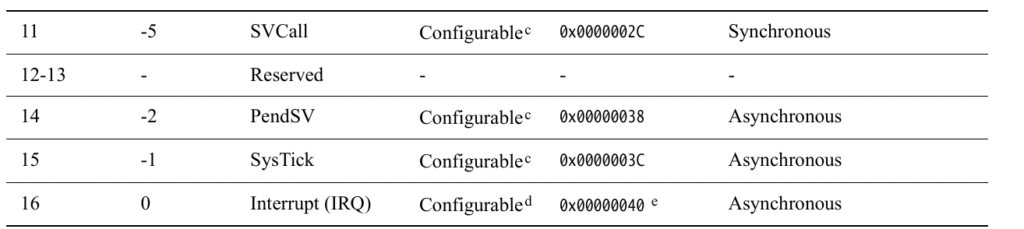
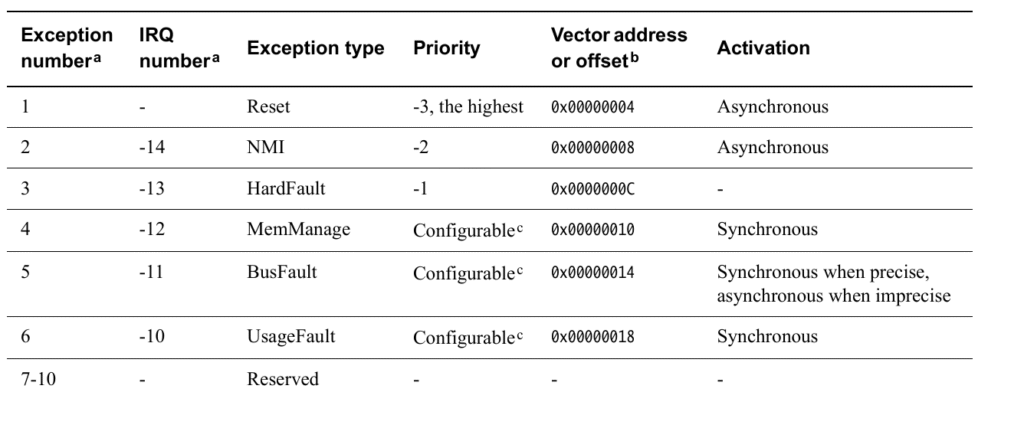
    List of System Exceptions (with vector numbers)

    Here are some common system exceptions:

    Exception NameVector NumberDescription
    Reset1Happens when the processor starts or is reset.
    NMI (Non-Maskable Interrupt)2A high-priority interrupt that cannot be disabled.
    HardFault3Happens when something goes seriously wrong (e.g., invalid memory access).
    MemManage Fault4Memory protection violation.
    BusFault5Bus error during instruction/data access.
    UsageFault6Illegal instructions (like divide by zero, etc).
    SVCall11Supervisor Call (used in RTOS or OS).
    PendSV14Used in context switching in RTOS.
    SysTick15Timer interrupt, often used for OS ticks.

    What Happens When an Exception Occurs?

    1. Processor saves context (automatically):
      • Saves registers: R0-R3, R12, LR, PC, xPSR onto the stack.
    2. Jumps to the exception handler:
      • The address is taken from the vector table.
    3. Executes handler function.
    4. Returns to where it was using BX LR or exception return sequence.

    Vector Table

    The vector table is a list of addresses stored at the beginning of memory (0x00000000). Each entry is a pointer to the handler for each exception.

    Example:

    void (* const vector_table[])() __attribute__((section(".isr_vector"))) = {
        (void*) 0x20002000,   // Initial Stack Pointer
        Reset_Handler,        // Reset
        NMI_Handler,          // NMI
        HardFault_Handler,    // HardFault
        ...
    };

    Common Fault Exceptions

    1. HardFault

    • Most serious.
    • Happens when no other fault handler catches the error.
    • Example: Dereferencing a NULL pointer.

    2. MemManage Fault

    • Related to memory protection (MPU).
    • Example: Accessing restricted memory.

    3. BusFault

    • Caused by bus errors during instruction fetch or data access.
    • Example: Accessing non-existent memory address.

    4. UsageFault

    • Caused by incorrect use of instructions.
    • Example: Division by zero, unaligned access.

    How to Write a Simple Exception Handler

    Example for HardFault:

    void HardFault_Handler(void) {
        while (1) {
            // Stay here forever - you can add logging or LED blink
        }
    }
    

    SysTick and PendSV (RTOS Related)

    • SysTick: Regular timer interrupt (e.g., every 1ms) used to keep track of time.
    • PendSV: Used for context switching in operating systems.

    These are critical for implementing real-time operating systems.

    Registers Involved

    • xPSR (Program Status Register): Gives status of current program state.
    • LR (Link Register): Helps in return from exception.
    • PC (Program Counter): Address of the instruction being executed.

    Debugging Tips

    • Check the value of the LR (Link Register) to know where the exception came from.
    • You can decode the value of LR to understand the exception return type (called EXC_RETURN).

    Exception Types in Cortex-M4 (Made Simple)

    1. Reset

    • What is it?
      It happens when you first turn on the microcontroller (power-up) or when it’s manually reset (like pressing a reset button).
    • What does it do?
      The processor starts from the beginning — it looks at a specific address (in the vector table) and starts running your main code.
    • Think of it like:
      Turning off and on your computer — it restarts from scratch.

    2. NMI (Non-Maskable Interrupt)

    • What is it?
      It’s a very important interrupt that cannot be ignored or turned off.
    • When does it happen?
      Triggered by special hardware problems or important peripherals.
    • Why is it special?
      • It can’t be blocked by other interrupts.
      • Only the Reset has a higher priority than NMI.
    • Think of it like:
      A fire alarm — it will ring no matter what else is going on.

    3. HardFault

    • What is it?
      A major error that happens when something really bad occurs — like accessing invalid memory or when another exception fails.
    • When does it happen?
      • Program tries to use a bad address.
      • An exception cannot be handled properly.
    • What makes it special?
      • Has very high priority (second only to Reset and NMI).
      • Can’t be ignored if it happens.
    • Think of it like:
      A system crash or blue screen. The processor doesn’t know what to do and enters a special error state.

    4. MemManage Fault

    • What is it?
      A memory access error — trying to read or write to protected or forbidden areas in memory.
    • Example:
      Trying to execute code in a non-executable area.
    • Think of it like:
      You tried opening a locked door. You’re not allowed in.

    5. BusFault

    • What is it?
      Happens when something goes wrong while moving data to or from memory (like over a bus).
    • Example:
      You try to read from a memory location that doesn’t respond or doesn’t exist.
    • Think of it like:
      A delivery truck goes to an address, but no one is there to accept the package.

    6. UsageFault

    • What is it?
      Happens when you use instructions incorrectly.
    • Examples:
      • Using an undefined instruction
      • Dividing by zero
      • Using misaligned memory access
    • Think of it like:
      Typing a wrong command in a computer program — something the processor doesn’t understand.

    7. SVCall (Supervisor Call)

    • What is it?
      It’s triggered by a special instruction in the program (called SVC).
    • Why is it used?
      To ask the operating system for help — like calling a system function or driver.
    • Think of it like:
      A customer service call — your code is asking the OS for assistance.

    8. PendSV (Pending Supervisor Call)

    • What is it?
      A special interrupt used for context switching in an operating system.
    • When is it used?
      When the OS wants to switch from one task to another.
    • Think of it like:
      Switching between open apps on your phone — only when the current one is done.

    9. SysTick

    • What is it?
      A system timer interrupt that goes off at regular time intervals (like every 1 millisecond).
    • Why is it useful?
      • Used by RTOS (real-time operating systems) to keep track of time.
      • Helps schedule tasks.
    • Think of it like:
      A ticking clock that reminds the CPU to check tasks.

    10. Interrupt (IRQ)

    • What is it?
      Regular interrupts triggered by external devices like:
      • Timers
      • Buttons
      • Sensors
    • Why are they important?
      Peripherals use IRQs to alert the processor when they need attention.
    • Think of it like:
      Your phone buzzing — something needs your attention.

    Summary Table

    Exception TypeSimple MeaningWho Triggers ItCan It Be Turned Off?
    ResetSystem restartPower or reset buttonNo
    NMIEmergency interruptHardwareNo
    HardFaultSerious errorProcessorNo
    MemManageBad memory accessProcessorYes
    BusFaultMemory bus errorProcessorYes
    UsageFaultWrong instructionProcessorYes
    SVCallSystem service requestSoftwareYes
    PendSVTask switch requestSoftware/OSYes
    SysTickTimer interruptTimerYes
    IRQNormal interruptPeripheralsYes

    Final Notes

    • Exceptions help the processor react to important or error conditions.
    • Some are triggered by hardware (like Reset, NMI), some by your own code (like SVCall).
    • Faults like HardFault, UsageFault help catch bugs and protect your system.

    What Are Exception States?

    When an exception (like an interrupt or a fault) occurs, the processor doesn’t just instantly handle it — instead, that exception goes through different states.

    Think of it like a queue at a doctor’s clinic:

    • You wait your turn (Pending)
    • You go inside to be treated (Active)
    • You’re done and leave (Inactive)
    • And sometimes, you’re inside while someone else knocks — that’s Active and Pending!

    The 4 States of an Exception

    1. Inactive

    • What it means:
      Nothing is happening — the exception is not triggered or being serviced.
    • Example:
      No interrupt from a button press or sensor — the CPU is doing regular work.

    2. Pending

    • What it means:
      The exception is waiting to be handled by the processor.
    • How it gets here:
      • A peripheral device (like a timer or sensor) sends an interrupt.
      • Software writes to a register to generate an interrupt.
    • Example:
      You press a button → that sends an interrupt → the exception becomes pending, waiting for the CPU to respond.

    3. Active

    • What it means:
      The CPU is currently handling the exception — it’s running the exception handler code.
    • Example:
      The CPU stops what it was doing and jumps to the interrupt handler for your button press.

    4. Active and Pending

    • What it means:
      The CPU is already handling this exception, and another one just came in from the same source — so now it’s both active and pending.
    • Important Note:
      • The CPU won’t handle the new request until the current one finishes.
      • This can happen if, for example, a timer interrupt happens again while the CPU is still handling the previous one.

    Key Notes (Simplified)

    🔁 Can one exception interrupt another?

    Yes! If a higher priority exception occurs while a lower priority one is being handled, it can interrupt it.
    Then both are in Active state, but the higher one is being serviced.

    Table Summary

    StateWhat it means
    InactiveNothing is happening. Not triggered or running.
    PendingWaiting in line. Triggered but not yet handled.
    ActiveCPU is handling it right now.
    Active & PendingCPU is still handling it, but another trigger from the same source just came.

    Real-World Analogy

    Imagine you’re a doctor (CPU) at a clinic:

    • Inactive: No patients in the waiting room.
    • Pending: A patient arrives and takes a seat in the waiting room.
    • Active: You’re currently treating a patient.
    • Active & Pending: While treating a patient, the same patient sends a new report (like a new symptom appears) — you’ll check that next.

    What is the System Control Block (SCB)?

    The System Control Block (SCB) is a special part of the ARM Cortex-M microcontroller that helps the system control and manage important operations, especially related to exceptions and faults (like errors or interrupts).

    Think of SCB as the “Control Room” of the system

    Just like a control room in a building handles alarms, system messages, and settings, the SCB handles things like:

    • Configuration settings
    • Control of system behavior
    • Reports on errors and exceptions

    What exactly does SCB do?

    1. Stores Information:
      • It contains information about how the system is set up.
      • For example, it knows what kind of CPU core you’re using and other system details.
    2. Controls Exceptions:
      • Exceptions are special events like:
        • An interrupt from a timer
        • A fault caused by invalid memory access
      • SCB helps control how the system responds to these events.
    3. Helps in Debugging:
      • It can report errors or faults that occur, which helps you debug your code.

    Where is it used?

    • It’s part of the core of ARM Cortex-M processors.
    • Used when handling:
      • Fault exceptions like hard faults or memory faults
      • System resets
      • Vector table settings (which tell the system what to do when something happens)

    Registers in SCB (just names for now):

    Here are some important registers inside the SCB (you don’t have to memorize them yet):

    • CPUID: Tells which processor you’re using
    • ICSR: Controls system exceptions
    • AIRCR: Lets you request a system reset
    • SCR: Controls system sleep modes
    • CCR: Enables/disables certain features like fault trapping
    • SHCSR: Shows which exceptions are enabled or active

    In Short:

    The SCB is a built-in control unit in ARM Cortex-M processors that manages exceptions, faults, and system control features like resets and sleep modes. It’s like the system’s supervisor.

    System Control Block (SCB) registers are part of the Cortex-M System Control Space, which provides system-level configuration and control features like interrupt priority, fault handling, system reset, and debug support.

    Here’s a breakdown of each column:

    Columns

    ColumnMeaning
    AddressThe memory-mapped address of the register in the SCB address space.
    NameName of the register.
    TypeRead/Write access: RW (Read/Write), RO (Read-Only), etc.
    Required PrivilegeOnly privileged code (like kernel or supervisor mode) can access it.
    Reset ValueThe value stored in the register after reset.
    DescriptionFunction of the register.

    Important Registers Explained

    RegisterAddressPurpose
    ACTLR0xE000E008Auxiliary Control Register – Enables/Disables implementation-specific features.
    CPUID0xE000ED00CPUID Base Register – Read-only; identifies the processor type and revision.
    ICSR0xE000ED04Interrupt Control and State Register – Controls pending interrupts and tracks the current interrupt number.
    VTOR0xE000ED08Vector Table Offset Register – Points to the interrupt vector table in memory.
    AIRCR0xE000ED0CApplication Interrupt and Reset Control Register – Software reset, endianness config, interrupt priority grouping.
    SCR0xE000ED10System Control Register – Configures deep sleep, sleep-on-exit, etc.
    CCR0xE000ED14Configuration and Control Register – Enables stack alignment, fault traps, etc.
    SHPRx0xE000ED18 to 0xE000ED20System Handler Priority Registers – Set priorities for system exceptions like SVCall, PendSV, SysTick.
    SHCSR0xE000ED24System Handler Control and State Register – Enables system exceptions and indicates their active/pending states.
    CFSR0xE000ED28Configurable Fault Status Register – Reports details of usage, bus, or memory faults.
    MMSR/BFSR/UFSR(parts of CFSR)Subfields of the CFSR to provide more specific fault information.
    HFSR0xE000ED2CHardFault Status Register – Indicates causes of HardFault exceptions.
    MMAR0xE000ED34MemManage Fault Address Register – Address that caused memory fault.
    BFAR0xE000ED38BusFault Address Register – Address that caused bus fault.
    AFSR0xE000ED3CAuxiliary Fault Status Register – Optional register for vendor-specific fault status.

    Key Concepts

    • Privileged Access: These registers can only be modified in privileged mode, ensuring the kernel has control over critical system behavior.
    • Reset Values: These default values indicate the state of the register after a system reset.
    • Exception Handling: Many of these registers are used for handling and prioritizing faults/exceptions.
    Enable PendSV and fault exceptions (Memory Management, BusFault, UsageFault) on an ARM Cortex-M processor, you’ll work with specific SCB system control registers. These are:

    1. Enabling PendSV Exception

    PendSV (Pendable Service Call) is enabled by default, but you may need to:

    • Set its priority to control preemption.
    • Pend it manually using ICSR.

    ✅ Set PendSV Priority (lowest)

    #define SCB_SHPR3    (*(volatile uint32_t *)0xE000ED20)
    #define PENDSV_PRIO_POS  16  // Bits 23:16 are for PendSV priority
    
    void enable_pendsv_lowest_priority(void) {
        // Set PendSV to lowest priority (0xFF)
        SCB_SHPR3 |= (0xFF << PENDSV_PRIO_POS);
    }
    

    ✅ Manually Pend the PendSV exception

    #define SCB_ICSR     (*(volatile uint32_t *)0xE000ED04)
    #define ICSR_PENDSVSET (1 << 28)
    
    void trigger_pendsv(void) {
        SCB_ICSR |= ICSR_PENDSVSET;  // Set bit 28 to pend PendSV
    }
    

    PendSV Handler Setup

    You must implement the handler function like this:

    void PendSV_Handler(void) {
        // Your context switch or deferred processing here
    }
    

    2. Enabling Fault Exceptions

    By default, fault handlers are disabled (except HardFault). You must enable:

    • Memory Management Fault
    • BusFault
    • UsageFault

    ✅ Use SCB_SHCSR to enable faults:

    #define SCB_SHCSR     (*(volatile uint32_t *)0xE000ED24)
    
    #define MEMFAULTENA   (1 << 16)
    #define BUSFAULTENA   (1 << 17)
    #define USGFAULTENA   (1 << 18)
    
    void enable_fault_exceptions(void) {
        SCB_SHCSR |= (MEMFAULTENA | BUSFAULTENA | USGFAULTENA);
    }
    

    Fault Handler Implementations

    You must implement handlers for these faults, or the system will go into HardFault if they occur:

    void MemManage_Handler(void) {
        // Handle memory fault
    }
    
    void BusFault_Handler(void) {
        // Handle bus fault
    }
    
    void UsageFault_Handler(void) {
        // Handle undefined instruction, divide by zero, etc.
    }
    

    Summary

    ExceptionEnable BitRegisterHandler
    PendSV(default enabled)SHPR3 (priority)PendSV_Handler()
    MemManageBit 16SHCSRMemManage_Handler()
    BusFaultBit 17SHCSRBusFault_Handler()
    UsageFaultBit 18SHCSRUsageFault_Handler()

    Manual triggering and handling of an interrupt (USART3) on an ARM Cortex-M processor, typically used in STM32 microcontrollers :

    /**
      ******************************************************************************
      * @file    main.c
      * @author  Nish
      * @version V1.0
      * @brief   Custom implementation: Triggering USART3 interrupt manually.
      ******************************************************************************
    */
    
    #if !defined(__SOFT_FP__) && defined(__ARM_FP)
      #warning "FPU is not initialized, but the project is compiling for an FPU. Please initialize the FPU before use."
    #endif
    
    #include <stdint.h>
    #include <stdio.h>
    
    #define USART3_IRQNO 39
    
    int main(void)
    {
    	// Step 1: Manually set the pending bit for USART3 interrupt in NVIC ISPR1
    	uint32_t *pISPR1 = (uint32_t*)0xE000E204;
    	*pISPR1 |= (1 << (USART3_IRQNO % 32));  // Force USART3 interrupt to pending state
    
    	// Step 2: Enable USART3 interrupt in NVIC ISER1
    	uint32_t *pISER1 = (uint32_t*)0xE000E104;
    	*pISER1 |= (1 << (USART3_IRQNO % 32));  // Allow USART3 interrupt to be serviced
    
    	// Infinite loop: Wait for interrupt to occur
    	for (;;);
    }
    
    // Custom ISR for USART3 interrupt
    void USART3_IRQHandler(void)
    {
    	printf("Inside custom USART3 ISR\n");
    }