Master ALSA Audio Interview Questions & Answers (SET-1) to crack embedded audio interviews with confidence. Learn key ALSA concepts, troubleshooting tips, and practical insights for embedded audio systems.
Are you preparing for an embedded audio or Linux audio interview? This article provides a comprehensive guide to ALSA (Advanced Linux Sound Architecture) Audio Interview Questions & Answers (SET-1). It is designed to help both freshers and experienced engineers understand key ALSA concepts, tackle common interview questions, and gain confidence in technical discussions.
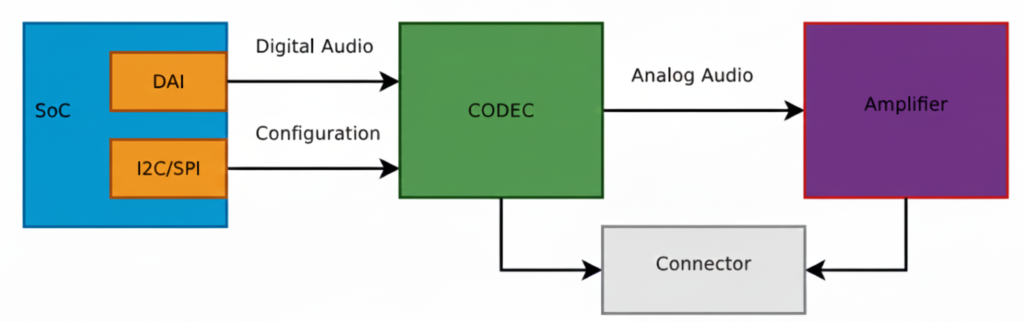
Inside, you will find clear explanations of ALSA architecture, PCM, mixer controls, sound cards, and multiple audio stream handling, along with practical examples that make these concepts easy to grasp. By studying this set, you can strengthen your embedded audio fundamentals, understand the flow from application to hardware, and learn how to answer questions effectively in real interviews.
This guide is especially useful for:
- Embedded software engineers
- Linux audio developers
- Engineers working on ALSA, PulseAudio, or device drivers
Mastering this SET-1 of ALSA interview questions will give you a solid foundation for advanced topics and help you crack embedded audio interviews with confidence.
1.Explain Linux audio stack end-to-end
Linux Audio Stack – End-to-End Explanation
Linux audio works in layers. Each layer has a clear responsibility.
Application
   ↓
User-space Audio Library / Server
   ↓
ALSA User Space
   ↓
ALSA Kernel (Sound Subsystem)
   ↓
SoC Audio Framework (ASoC)
   ↓
Audio Codec Driver
   ↓
I2S / TDM / PCM Bus
   ↓
DAC / ADC
   ↓
Speaker / Microphone
Application Layer (User Space)
What lives here?
- Media players (aplay, arecord)
- Music apps
- VoIP apps
- Your custom audio app
Examples:
aplay music.wav- Android Audio HAL
- PulseAudio client
- Your embedded test app using ALSA API
Role:
- Sends PCM samples
- Receives PCM samples
- Doesn’t care about hardware details
Audio Middleware / Sound Server (Optional)
Mostly used in desktop / Android, sometimes skipped in embedded systems.
Examples:
- PulseAudio
- PipeWire
- JACK
- Android AudioFlinger
Role:
- Mixing multiple apps
- Volume control
- Resampling
- Routing audio to different devices
Embedded systems often bypass this layer and talk directly to ALSA.
ALSA User-Space Library (libasound)
This is the heart of Linux audio
What it provides:
- Standard API to apps
- Device abstraction
- PCM configuration
Key ALSA APIs:
snd_pcm_open()
snd_pcm_hw_params()
snd_pcm_writei()
snd_pcm_readi()
PCM configuration:
- Sample rate (44.1kHz, 48kHz)
- Bit depth (16-bit, 24-bit)
- Channels (Mono / Stereo)
- Buffer size / period size
ALSA user space communicates with kernel via:
/dev/snd/pcmC0D0p
ALSA Kernel Subsystem
This is inside the Linux kernel.
Major components:
- PCM core
- Control core
- Mixer
- Timer
Responsibilities:
- Manage audio streams
- Handle buffers
- Expose devices via
/dev/snd/* - Interface with hardware drivers
Kernel ALSA does not know about apps
It only understands PCM streams and controls
2.What is ASoC (ALSA System-on-Chip Framework)
Most important for embedded Linux interviews
ASoC splits audio into 3 logical drivers:
Machine Driver
   ↕
CPU DAI Driver ↔ Codec DAI Driver
CPU DAI Driver
- Represents SoC audio interface
- I2S / TDM / PCM controller
Examples:
- McASP (TI)
- I2S (Qualcomm, NXP)
- SSP (Intel)
Handles:
- DMA
- Clocking
- Data format
Codec Driver
- External audio chip (e.g. PCM5122, WM8960)
- DAC / ADC
- Amplifier control
Handles:
- Volume
- Mute
- Bias
- Power management
Machine Driver (Glue Layer)
Most important driver
Defines:
- Which codec is connected to which CPU DAI
- Audio routing
- Clock setup
- Use cases
Example:
SND_SOC_DAILINK_DEFS(...)
Without machine driver → no sound
DAI Link & PCM Runtime
When app opens a PCM device:
- ALSA creates a PCM runtime
- Machine driver configures:
- Format
- Sample rate
- Clocks
- CPU DAI ↔ Codec DAI are linked
- DMA is started
Audio Bus (I2S / TDM / PCM)
Actual audio data flows here:
CPU → I2S → Codec → DAC → Speaker
- I2S: Left / Right audio
- TDM: Multi-channel audio
- PCM: Simple serial audio
DAC / ADC
DAC (Playback):
- Digital PCM → Analog signal
- Sent to speaker / headphone
ADC (Capture):
- Mic signal → Digital PCM
- Sent back to ALSA
Speaker / Microphone
Final physical world 🌍
Playback Flow (App → Speaker)
App
 → ALSA API
 → ALSA Kernel
 → ASoC
 → CPU DAI
 → I2S
 → Codec DAC
 → Amplifier
 → Speaker
Capture Flow (Mic → App)
Microphone
 → Codec ADC
 → I2S
 → CPU DAI
 → ALSA Kernel
 → ALSA API
 → App
Interview One-Line Summary
Linux audio stack converts application PCM data into electrical sound signals using ALSA and ASoC frameworks, where user space configures audio streams and kernel drivers manage hardware, clocks, DMA, and codecs.
Debugging Tools (Important)
aplay -l          # list playback devices
arecord -l        # list capture devices
amixer            # control mixer
alsamixer         # UI mixer
cat /proc/asound/cards
dmesg | grep asoc
3.Role of ALSA in Linux
Role of ALSA in Linux
ALSA (Advanced Linux Sound Architecture) is the core audio framework of Linux.
It is responsible for connecting user-space audio applications to audio hardware in a standardized, efficient, and hardware-independent way.
One-Line Definition (Interview)
ALSA provides kernel drivers and user-space APIs that allow Linux applications to play, record, and control audio hardware.
Where ALSA Sits in Linux Audio Stack
Application
   ↓
ALSA User Space (libasound)
   ↓
ALSA Kernel Subsystem
   ↓
ASoC Framework (Embedded)
   ↓
Audio Hardware (Codec, I2S, DMA)
ALSA is the bridge between software and sound hardware.
Core Roles of ALSA
Hardware Abstraction
ALSA hides hardware complexity from applications.
Apps don’t care:
- Which codec is used
- Which SoC
- How clocks or DMA work
Apps just say:
Play this PCM data at 48kHz, 16-bit, stereo
PCM Audio Data Handling
ALSA manages raw audio data (PCM).
Responsibilities:
- Buffer allocation
- Period handling
- Synchronization
- Underrun / overrun handling
Playback & Capture are both PCM streams.
User-Space API for Applications
ALSA exposes standard APIs via libasound.
Common APIs:
snd_pcm_open()
snd_pcm_hw_params()
snd_pcm_writei()
snd_pcm_readi()
Applications use these APIs to:
- Open audio devices
- Configure format
- Stream audio
Kernel Sound Subsystem
ALSA kernel side:
- Creates
/dev/snd/*devices - Manages audio streams
- Interfaces with hardware drivers
Examples:
/dev/snd/pcmC0D0p
/dev/snd/controlC0
Kernel ALSA ensures real-time audio performance.
Mixer & Control Management
ALSA manages:
- Volume
- Mute
- Input/output routing
- Power states
Tools:
amixer
alsamixer
Mixer controls are mapped to codec registers.
Support for Multiple Audio Devices
ALSA supports:
- Multiple sound cards
- Multiple playback & capture devices
- Multiple streams
Example:
aplay -l
arecord -l
Embedded Audio Support via ASoC
In embedded systems, ALSA works with ASoC framework.
ALSA + ASoC handles:
- SoC-specific audio
- Low power management
- External codecs
- I2S / TDM / PCM buses
ASoC is built on top of ALSA, not separate.
Integration with Sound Servers
ALSA acts as backend for:
- PulseAudio
- PipeWire
- JACK
- Android Audio HAL
Even if ALSA is hidden, it’s always working underneath.
What ALSA Does vs Does NOT Do
| ALSA Does | ALSA Does NOT |
|---|---|
| Manage PCM streams | UI sound effects |
| Handle hardware drivers | App mixing (mostly) |
| Provide audio APIs | Media decoding |
| Control volume/mute | Bluetooth stack |
| Real-time audio handling | Audio policy decisions |
Playback Flow (ALSA Role)
App
 → ALSA API
 → ALSA Kernel
 → ASoC
 → Codec
 → Speaker
Capture Flow (ALSA Role)
Microphone
 → Codec
 → ASoC
 → ALSA Kernel
 → ALSA API
 → App
4.Why ALSA is Critical in Embedded Systems
- No extra overhead
- Real-time capable
- Fine-grained control
- Power-efficient
- Works without GUI
That’s why QNX, Android, Automotive Linux rely heavily on ALSA-like architectures.
Common ALSA Debug Commands
aplay -l
arecord -l
amixer scontrols
cat /proc/asound/cards
dmesg | grep snd
Interview Closing Statement
ALSA is the foundation of Linux audio, providing standardized APIs, kernel drivers, and hardware abstraction to enable reliable, low-latency audio playback and capture across diverse hardware platforms.
5.ALSA vs ASoC
ALSA
- Generic Linux audio framework
- Provides:
- User-space API (
libasound) - Kernel sound core
- PCM, mixer, control, timer
- User-space API (
- Works well for PC-style audio cards
Problem:
ALSA alone is not optimized for embedded SoCs (power, routing, codecs).
ASoC (Built on ALSA)
- Embedded-focused extension of ALSA
- Designed for SoC + external codec systems
- Splits audio into:
- CPU DAI driver (I2S/TDM controller)
- Codec driver (DAC/ADC chip)
- Machine driver (board-specific glue)
ASoC handles:
- Power management
- Audio routing
- Clock control
- Low-power embedded use cases
One-liner (Interview)
ALSA is the core audio framework; ASoC is an embedded-optimized layer on top of ALSA for SoC-based audio systems.
6.ALSA PCM Internals
What is PCM?
PCM = raw digital audio samples (no compression).
Inside ALSA PCM:
- Each audio stream = PCM runtime
- Two types:
- Playback (
pcmC0D0p) - Capture (
pcmC0D0c)
- Playback (
PCM Runtime Contains:
- Sample rate
- Bit depth
- Channels
- Buffer & period sizes
- DMA configuration
- State machine
PCM States:
OPEN → SETUP → PREPARED → RUNNING → XRUN → STOPPED
ALSA PCM connects user buffer ↔ kernel buffer ↔ DMA ↔ hardware
ALSA Buffer & Period Concept
Buffer
- Large circular memory area
- Holds audio samples
- Size = latency
Period
- Smaller chunk inside buffer
- Unit of DMA transfer
- Triggers interrupt
|---- Buffer ----|
| P | P | P | P |
Example:
- Buffer = 4096 frames
- Period = 1024 frames
- Periods = 4
DMA interrupt every 1024 frames
Why It Matters:
| Parameter | Effect |
|---|---|
| Large buffer | High latency, safe |
| Small buffer | Low latency, XRUN risk |
| Small period | Faster response |
| Large period | Lower CPU load |
XRUN
- Playback: Buffer underrun (app too slow)
- Capture: Buffer overrun (app too slow)
Ultra-Short Interview Summary
- ALSA: Core Linux audio framework
- ASoC: Embedded extension for SoC + codec audio
- PCM: Raw audio stream abstraction
- Buffer: Total audio storage
- Period: DMA transfer unit
7.What is alsa-lib
alsa-lib (ALSA User-Space Library) is the standard user-space API of ALSA that applications use to access Linux audio devices.
Short & Interview-Ready
alsa-lib provides a hardware-independent API that lets applications configure, play, record, and control audio using ALSA.
What it does (in brief):
- Exposes APIs like:
snd_pcm_open()snd_pcm_hw_params()snd_pcm_writei()/snd_pcm_readi()
- Handles:
- PCM configuration (rate, format, channels)
- Buffer & period setup
- Mixer/control access
- Talks to the kernel via
/dev/snd/*
What it is NOT:
- Not a kernel driver
- Not an audio server or mixer for apps
One-line difference:
- ALSA (kernel): talks to hardware
- alsa-lib: lets applications talk to ALSA
Perfect for embedded Linux, low-latency audio, and direct hardware control.
Applications must include ALSA headers to use alsa-lib APIs.
Which header is required?
Most of the time, this one is enough:
#include <alsa/asoundlib.h>
This header internally includes:
- PCM APIs
- Mixer APIs
- Control APIs
- Error handling
Minimal Example
#include <alsa/asoundlib.h>

int main() {
    snd_pcm_t *handle;
    snd_pcm_open(&handle, "default",
                 SND_PCM_STREAM_PLAYBACK, 0);
    snd_pcm_close(handle);
    return 0;
}
Compile Command
gcc test.c -o test -lasound
-lasound links alsa-lib
When are other headers used?
Rarely, but possible:
#include <alsa/pcm.h>
#include <alsa/mixer.h>
#include <alsa/control.h>
Used only for very fine-grained control.
What if headers are missing?
Install dev package:
sudo apt install libasound2-dev
Final One-Liner
ALSA headers are mandatory because alsa-lib is a C library and its APIs are accessed via header files.
8.Difference between ALSA kernel and user space
ALSA Kernel (Kernel Space)
What it is
- Part of the Linux kernel
- Implements the actual sound drivers
Responsibilities
- Manage audio hardware
- Handle DMA transfers
- Control codecs, I2S/TDM, interrupts
- Expose devices via
/dev/snd/* - Provide real-time audio performance
Includes
- PCM core
- Control core
- Mixer core
- ASoC framework (embedded)
Examples
snd_soc_core
snd_pcm
codec drivers
machine drivers
Directly talks to hardware
ALSA User Space (alsa-lib)
What it is
- User-space C library (
libasound) - Used by applications
Responsibilities
- Provide standard audio APIs
- Configure PCM parameters
- Handle plugins (dmix, dsnoop)
- Communicate with kernel via syscalls
Examples
snd_pcm_open()
snd_pcm_writei()
snd_mixer_open()
Never touches hardware directly
Key Differences
| Aspect | ALSA Kernel | ALSA User Space |
|---|---|---|
| Runs in | Kernel space | User space |
| Purpose | Hardware control | Application API |
| Talks to hardware | Yes | No |
| Files | /dev/snd/* | libasound.so |
| Real-time critical | Yes | No |
| Crash impact | System crash | App crash |
Data Flow (Simple)
Application
 → alsa-lib (user space)
 → ALSA kernel
 → ASoC drivers
 → Audio hardware
One-Line Interview Answer
ALSA user space provides APIs for applications, while ALSA kernel space implements audio drivers and directly controls the hardware.
9.How alsa-lib Talks to the ALSA Kernel
alsa-lib communicates with the ALSA kernel through device files using system calls.
alsa-lib (user space)
   ↓
/dev/snd/*
   ↓
ALSA kernel
The two main mechanisms are:
- ioctl()
- mmap()
ioctl() – Control & Configuration Path
What is ioctl?
ioctl() = control command interface
Used to configure and control audio devices.
Used for:
- Opening PCM devices
- Setting hardware parameters
- Setting software parameters
- Starting / stopping streams
- Mixer & control operations
Examples:
snd_pcm_hw_params()
snd_pcm_sw_params()
snd_pcm_prepare()
snd_pcm_start()
Internally:
ioctl(fd, SNDRV_PCM_IOCTL_HW_PARAMS, ...)
No audio data flows via ioctl
Only commands and configuration
mmap() – Audio Data Path (Fast Path)
Why mmap?
- Avoid extra memory copies
- Low latency
- High performance
What happens?
- Kernel maps DMA buffer into user space
- App writes PCM samples directly into kernel buffer
User buffer
 ↕ (shared memory)
Kernel DMA buffer
Used in:
snd_pcm_mmap_begin()
snd_pcm_mmap_commit()
Zero-copy audio transfer
write()/read() – Simple Data Path (Slow Path)
Alternative to mmap():
snd_pcm_writei()
snd_pcm_readi()
Internally uses:
write(fd, buffer, size)
read(fd, buffer, size)
- Extra memory copy
- Higher latency
- Simpler
When Which Method Is Used?
| Method | Used For | Latency | CPU |
|---|---|---|---|
| ioctl | Control & setup | N/A | Low |
| mmap | Audio streaming | Very low | Very low |
| write/read | Audio streaming | Higher | Higher |
Professional embedded systems prefer mmap()
Complete Playback Flow (Internals)
App
 → snd_pcm_open()
    → open("/dev/snd/pcmC0D0p")
 → snd_pcm_hw_params()
    → ioctl()
 → snd_pcm_prepare()
    → ioctl()
 → snd_pcm_start()
    → ioctl()
 → snd_pcm_mmap_begin()
    → mmap()
 → write samples
 → DMA → Codec → Speaker
XRUN Handling
- Kernel tracks buffer pointers
- If app is late:
- Underrun (playback)
- Overrun (capture)
- Kernel notifies user space via:
ioctl- poll()/select()
Interview One-Liner
alsa-lib uses ioctl() for control and configuration, and mmap() or read/write system calls for PCM data transfer between user space and the ALSA kernel.
10.What is XRUN and Where Does It Occur?
What is XRUN?
XRUN means buffer overrun or underrun in ALSA audio streaming.
XRUN happens when the audio buffer is not filled or emptied in time.
Where Does XRUN Occur?
XRUN occurs in the ALSA kernel PCM buffer, between:
- User-space application
- Hardware (DMA + codec)
App ↔ ALSA PCM Buffer ↔ DMA ↔ Audio Hardware
                ↑
              XRUN here
Types of XRUN
Playback XRUN (Underrun)
- Buffer becomes empty
- Hardware has no data to play
Cause:
- App writes audio too slowly
Result:
- Click / pop / silence
Capture XRUN (Overrun)
- Buffer becomes full
- New audio data is lost
Cause:
- App reads audio too slowly
Result:
- Dropped samples
How ALSA Reports XRUN
- ALSA sets PCM state to:
SND_PCM_STATE_XRUN
- App sees error:
-32 (EPIPE)
How to Recover from XRUN
snd_pcm_prepare(pcm_handle);
Interview One-Liner
XRUN is a buffer overrun or underrun that occurs in the ALSA PCM buffer when the application and hardware are not synchronized in time.
Interview Bonus Tip
- Small buffers → low latency but more XRUN risk
- Large buffers → safe but high latency
11.What Problem Does PulseAudio Solve?
Short Interview Answer
PulseAudio solves the problem of managing multiple audio applications and audio devices simultaneously on Linux.
Detailed (Impressive) Answer
Before PulseAudio:
- ALSA allowed only one application to access a sound card at a time
- No easy per-application volume control
- Switching audio output (speaker → headphone → Bluetooth) was difficult
- No software mixing of multiple audio streams
PulseAudio fixes this by:
- Allowing multiple applications to play sound at the same time
- Providing software mixing
- Enabling per-application volume control
- Supporting dynamic device switching (plug headphones → audio moves automatically)
- Enabling network audio streaming
One-liner (Very Strong):
PulseAudio acts as a user-space sound server that sits on top of ALSA and manages audio streams intelligently.
ALSA vs PulseAudio
| Feature | ALSA | PulseAudio |
|---|---|---|
| Layer | Kernel + user space | User space |
| Direct hardware access | Yes | No (uses ALSA) |
| Multiple apps at once | Limited | Yes |
| Software mixing | No | Yes |
| Per-app volume | No | Yes |
| Hot-plug support | Basic | Excellent |
| Bluetooth / network audio | No | Yes |
| Target use | Low-level driver | Desktop audio |
Interview Explanation
- ALSA is responsible for talking to audio hardware
- PulseAudio is responsible for managing audio streams
Golden Line:
ALSA provides the hardware drivers, PulseAudio provides the user experience.
PulseAudio vs JACK
This question is commonly asked to check audio domain knowledge.
| Feature | PulseAudio | JACK |
|---|---|---|
| Purpose | General desktop audio | Professional audio |
| Latency | Medium | Ultra-low |
| Real-time audio | No | Yes |
| Audio quality | Good | Studio-grade |
| Multiple apps | Yes | Yes |
| Use cases | Browsers, media players | DAW, recording, live audio |
| Complexity | Easy | Complex |
| Default on Linux | Yes | No |
Simple Explanation
- PulseAudio = convenience + flexibility
- JACK = performance + precision
Interview One-Liner
PulseAudio is optimized for desktop usage, while JACK is optimized for real-time professional audio.
How They Work Together
Modern Linux audio stack:
Application
   ↓
PulseAudio / JACK
   ↓
ALSA
   ↓
Audio Hardware
JACK can bypass PulseAudio or integrate with it when needed.
Final Interview Summary
ALSA handles the hardware.
PulseAudio manages multiple applications and devices.
JACK is used when ultra-low latency and real-time audio are required.
12.Where Does PulseAudio Sit in the Linux Audio Stack?
One-Line Interview Answer
PulseAudio sits in user space, between applications and ALSA.
Detailed Explanation
PulseAudio is a user-space sound server.
It does not talk directly to hardware.
Instead, it:
- Receives audio streams from applications
- Mixes, processes, and routes them
- Sends final audio to ALSA, which talks to hardware
Audio Stack Position
Applications
  (Chrome, VLC, Media Player)
          ↓
     PulseAudio
  (mixing, routing, volume)
          ↓
        ALSA
  (kernel drivers, PCM)
          ↓
    Audio Hardware
  (Codec, DAC, Speaker)
Key Points Interviewers Expect
- PulseAudio runs in user space
- ALSA runs in kernel + user space
- PulseAudio uses ALSA as its backend
- PulseAudio cannot access hardware directly
Strong Line:
PulseAudio abstracts ALSA complexity and provides a rich audio experience to applications.
Common Trap Question
Q: Can applications talk directly to ALSA without PulseAudio?
Yes
- Embedded systems often skip PulseAudio
- Desktop Linux uses PulseAudio by default
Comparison Context
| Layer | Role |
|---|---|
| App | Generates audio |
| PulseAudio | Mixing, routing, policy |
| ALSA | Driver + PCM interface |
| Hardware | Actual sound |
Final Memory Hook
PulseAudio = user-space audio manager
ALSA = hardware interface
13.What is an Audio Source (ALSA context)
Simple Definition (Interview Answer)
An audio source is where audio data originates.
In ALSA
A source is anything that produces audio samples:
- Microphone
- Line-in
- FM tuner
- USB mic
- Bluetooth mic
- ADC output
ALSA Example
Mic → ADC → ALSA capture device (hw:0,0)
Here:
- Mic = Source
- ALSA capture PCM device = Interface to read data
Code Perspective
snd_pcm_open(&handle, "hw:0,0", SND_PCM_STREAM_CAPTURE, 0);
CAPTURE⇒ source side
One-Line Interview Punch
An audio source generates audio data and feeds it into the audio system.
14.What is an Audio Sink (ALSA context)
Simple Definition (Interview Answer)
An audio sink is where audio data is consumed or played.
In ALSA
A sink is anything that receives and plays audio samples:
- Speaker
- Headphones
- HDMI audio
- Bluetooth speaker
- DAC output
ALSA Example
ALSA playback device → DAC → Amplifier → Speaker
Here:
- Speaker = Sink
- ALSA playback PCM device = Interface to send data
Code Perspective
snd_pcm_open(&handle, "hw:0,0", SND_PCM_STREAM_PLAYBACK, 0);
PLAYBACK⇒ sink side
One-Line Interview Punch
An audio sink consumes audio data and converts it into sound.
15.What is a Sink-Input (Important Interview Trap)
This term is NOT native to pure ALSA
It comes from PulseAudio, but interviewers still expect you to understand it.
Meaning of Sink-Input
Correct Definition
A sink-input is a stream of audio data that is connected to a sink.
Think of it as:
“Who is sending audio to the sink?”
Example (Very Interview Friendly)
Music Player App → Sink-Input → Speaker (Sink)
- VLC playing a song = Sink-Input
- Speaker = Sink
- Multiple apps = multiple sink-inputs
Why Sink-Input Exists (Key Reason)
It allows:
- Per-app volume control
- Per-app mute
- Routing one app to one speaker and another app to HDMI
Example:
- YouTube → Speaker
- Zoom → Headphones
Each is a different sink-input.
Relation to ALSA
| Layer | Concept |
|---|---|
| Application | Audio stream |
| PulseAudio | Sink-Input |
| ALSA | PCM playback stream |
| Hardware | Speaker |
So:
Sink-Input = Logical audio stream mapped to an ALSA playback device
One-Line Interview Punch
A sink-input is an individual audio stream from an application that is routed to an audio sink.
Quick Comparison Table
| Term | Meaning | Example |
|---|---|---|
| Source | Produces audio | Mic |
| Sink | Consumes audio | Speaker |
| Sink-Input | Audio stream sent to sink | VLC → Speaker |
Interview Golden Answer
“In an audio system, a source generates audio data, a sink consumes audio data, and a sink-input represents an individual application’s audio stream routed to a sink. In Linux, ALSA handles the hardware level, while sink-inputs are managed by higher-level sound servers like PulseAudio.”
16.ALSA vs PulseAudio : Terminology Mapping
| Concept | ALSA Term | PulseAudio Term | Meaning (Simple Words) |
|---|---|---|---|
| Audio producer | Capture PCM | Source | Where audio comes from (Mic, Line-in) |
| Audio consumer | Playback PCM | Sink | Where audio goes (Speaker, Headphones) |
| Audio stream | PCM stream | Sink-Input / Source-Output | Per-application audio data flow |
| App playback stream | PCM playback handle | Sink-Input | Audio stream sent by an app to a sink |
| App capture stream | PCM capture handle | Source-Output | Audio stream recorded by an app |
| Audio mixing | dmix | Built-in software mixer | Mix multiple app streams |
| Volume control | Mixer controls | Per-app volume | Change volume at different levels |
| Hardware access | Direct | Indirect (via ALSA) | Who talks to hardware |
| Device naming | hw:0,0 / plughw | Sink name (alsa_output…) | Device identification |
| Routing control | Limited | Advanced routing | Move audio between devices |
| Latency control | Low (manual) | Higher (configurable) | Audio delay handling |
| User level | Kernel + user | User space daemon | Where it runs |
| Embedded usage | Primary | Optional | Typical embedded choice |
One-Line Mapping
| PulseAudio | ALSA Equivalent |
|---|---|
| Source | Capture PCM device |
| Sink | Playback PCM device |
| Sink-Input | PCM playback stream |
| Source-Output | PCM capture stream |
Real Audio Flow Example (Interview Gold)
Playback (Music App → Speaker)
App
 → PulseAudio Sink-Input
   → PulseAudio Sink
     → ALSA Playback PCM
       → DAC → Speaker
Capture (Mic → Recording App)
Mic
 → ADC
   → ALSA Capture PCM
     → PulseAudio Source
       → PulseAudio Source-Output
         → App
Interview Trap (Important)
ALSA does NOT have “sink” or “source” terminology
ALSA uses PLAYBACK and CAPTURE
Sink / Source belongs to PulseAudio
If you say this, interviewer knows you understand layers properly.
When to Use What
| Scenario | Use |
|---|---|
| Embedded / RTOS | ALSA only |
| Automotive | ALSA + custom audio service |
| Desktop Linux | ALSA + PulseAudio |
| Android | TinyALSA + Audio HAL |
Final Interview Summary Line
“ALSA handles low-level audio hardware using playback and capture PCM devices, while PulseAudio sits above ALSA and introduces higher-level concepts like sinks, sources, and per-application streams such as sink-inputs.”
17.How ALSA Mixes Multiple Audio Streams
Short Answer
ALSA itself does NOT mix multiple application streams in software.
Mixing is done either by hardware (sound card) or by a sound server (PulseAudio / PipeWire) on top of ALSA.
ALSA Audio Path (Base Understanding)
How ALSA Handles Multiple Streams
Application
   ↓
ALSA user-space library (libasound)
   ↓
ALSA kernel driver
   ↓
Sound Card (DAC)
Case 1: Pure ALSA (No Sound Server)
- ALSA opens the PCM device exclusively
- Only ONE application can play audio at a time
- Second app → “Device or resource busy”
Important Interview Line
“Raw ALSA does not provide software mixing by default.”
Case 2: ALSA dmix Plugin (Software Mixing)
ALSA provides a plugin called dmix.
What dmix does
- Mixes multiple PCM streams in software
- Sends one mixed stream to the hardware
App1 ─┐
      ├─> dmix ─> Hardware
App2 ─┘
Characteristics
| Feature | dmix |
|---|---|
| Mixing | Software |
| Latency | Higher |
| Per-app volume | No |
| Dynamic format | Limited |
| Used today | Rare |
Interview Tip
“dmix works, but modern systems prefer PulseAudio or PipeWire for better control.”
Real-World Mixing: PulseAudio on top of ALSA
Actual Production Stack
Applications
   ↓
PulseAudio
   ↓
ALSA
   ↓
Hardware
How Mixing Happens
- Each app sends audio to PulseAudio
- PulseAudio:
- Resamples if needed
- Applies per-app volume
- Mixes all streams
- Sends one stream to ALSA
Interview Line
“ALSA becomes a hardware abstraction layer; PulseAudio does the policy and mixing.”
18.How Per-Application Volume Works
Key Point
ALSA alone cannot do per-application volume.
ALSA Volume Control (Global Only)
ALSA controls:
- Master
- PCM
- Speaker
amixer set Master 50%
This affects ALL applications equally
PulseAudio Per-Application Volume (Real Answer)
PulseAudio assigns:
- One sink-input per application
- Each sink-input has its own software gain
App → Sink-Input → Sink → ALSA
Example
| Application | Volume |
|---|---|
| Chrome | 30% |
| VLC | 100% |
| System sounds | 60% |
This is done by digital scaling before mixing.
Interview Line
“Per-app volume is implemented in the sound server, not ALSA.”
Where Volume Is Applied
| Level | Who applies it |
|---|---|
| Per-App | PulseAudio |
| Master | ALSA mixer |
| Hardware | DAC amplifier |
19.What Happens If ALSA Crashes?
What “ALSA Crash” Really Means
ALSA has:
- Kernel drivers
- User-space library
If Kernel ALSA Driver Crashes (Rare but Serious)
- Audio hardware disappears
- All sound stops
- Apps get I/O errors
- Requires:
- Driver reload
- Reboot (worst case)
Interview Line
“A kernel-level ALSA crash impacts the entire audio subsystem.”
If ALSA User-Space Library Misbehaves
- Affected app crashes
- Other apps may still work
- Kernel driver remains fine
Effect on PulseAudio
PulseAudio → ALSA → Hardware
If ALSA fails:
- PulseAudio logs errors
- Sink becomes unavailable
- PulseAudio may:
- Suspend sink
- Retry device
- Recover automatically
Interview Line
“PulseAudio isolates application failures from hardware failures.”
Embedded / Automotive Scenario
In QNX / Embedded Linux:
- ALSA crash = Audio service restart
- Watchdog restarts audio daemon
- System continues running
Interview Power Line
“In embedded systems, ALSA is wrapped by a service to allow graceful recovery.”
One-Slide Interview Summary
Final Cheat Sheet
| Question | Answer |
|---|---|
| Does ALSA mix audio? | No (except dmix) |
| Who mixes streams? | PulseAudio / PipeWire |
| Per-app volume? | PulseAudio |
| ALSA crash effect? | Audio stops; system depends on layer |
| Why ALSA still needed? | Hardware access |
20.ALSA / Linux Audio – 10 Brutal Follow-Ups (With Killer Answers)
If ALSA doesn’t mix, how do multiple apps play sound on Linux?
Perfect Answer
“They don’t—unless a sound server is present. ALSA by itself allows only one PCM stream. Multiple applications work because PulseAudio or PipeWire mixes streams in software and sends a single stream to ALSA.”
What interviewer hears: Solid architecture understanding
What exactly is ALSA dmix and why isn’t it widely used today?
“
dmixis an ALSA software mixing plugin. It mixes PCM streams before sending them to hardware. It’s not widely used now because it lacks per-application volume control, has higher latency, and limited format flexibility compared to PulseAudio or PipeWire.”
Bonus Line
“Modern desktops prefer policy-based audio servers.”
Can ALSA do per-application volume control?
Wrong Answer
“Yes, using amixer.”
Perfect Answer
“No. ALSA mixer controls affect the entire hardware stream. Per-application volume is implemented in PulseAudio using individual sink-inputs, where digital gain is applied before mixing.”
Interviewer impressed instantly
What happens internally when you change volume for one app in PulseAudio?
Perfect Answer
“PulseAudio applies software gain to that application’s sink-input. The stream is scaled digitally, then mixed with other streams, and finally sent as a single PCM stream to ALSA.”
Key Word: sink-input
If PulseAudio crashes, does audio completely stop?
Perfect Answer
“Temporarily, yes. Applications lose their audio connection, but the system remains stable. PulseAudio usually auto-restarts and reopens the ALSA device. Hardware and kernel drivers are unaffected.”
Shows fault-tolerance understanding
What if ALSA kernel driver crashes—what breaks?
Perfect Answer
“That’s serious. The sound device disappears from the kernel. All audio services fail, PulseAudio logs I/O errors, and recovery may require reloading the driver or rebooting. It impacts the entire audio subsystem.”
Kernel vs user-space clarity
Why does ALSA still exist if PulseAudio does everything?
Perfect Answer
“PulseAudio is not a hardware driver. ALSA provides low-level hardware access, DMA handling, and codec drivers. PulseAudio depends on ALSA to actually talk to the sound card.”
Architecture awareness
Where exactly does PulseAudio sit in the Linux audio stack?
Perfect Answer
“PulseAudio sits between applications and ALSA. Applications talk to PulseAudio using a high-level API, and PulseAudio uses ALSA as a backend to access audio hardware.”
Clean stack explanation
In embedded or automotive Linux, do we still use PulseAudio?
Perfect Answer
“Often no. Embedded systems may use ALSA directly or a custom audio service for deterministic latency. PulseAudio is more common in desktop use cases where flexibility matters more than real-time behavior.”
Automotive-grade answer
How would you debug ‘no sound’ on a Linux system?
Perfect Answer (Stepwise)
- Check ALSA device:
aplay -l- Check mixer:
amixer- Test raw ALSA:
aplay test.wav- Check PulseAudio:
pactl list sinks- Restart service if needed
Practical engineer response
Ultra-Short Memory Hack
ALSA = hardware + driver
PulseAudio = mixing + policy
dmix = old software mixing
Per-app volume = PulseAudio
Kernel crash = system impact
User-space crash = recoverable
]
Conclusion
Mastering ALSA Audio concepts is crucial for anyone preparing for embedded Linux audio interviews. By understanding the ALSA architecture, PCM, mixer controls, sound cards, and handling of multiple audio streams, you can confidently answer the most commonly asked interview questions.
This SET-1 of ALSA Audio Interview Questions & Answers provides a strong foundation to crack embedded audio interviews, improve your technical knowledge, and excel in practical discussions. Regular practice of these questions will not only help you perform well in interviews but also strengthen your understanding of real-world Linux audio systems.
Stay tuned for SET-2, where we will cover advanced ALSA topics and tricky interview scenarios to further boost your confidence.
Frequently Asked Questions (FAQ) : ALSA Audio Interview Questions (SET-1)
1. What is ALSA in Linux?
Answer: ALSA (Advanced Linux Sound Architecture) is the default audio framework in Linux. It provides drivers, libraries, and APIs to manage audio hardware, handle PCM streams, and control mixers, enabling smooth audio playback and recording on Linux systems.
2. Why is ALSA important for embedded audio development?
Answer: ALSA is critical for embedded Linux audio systems because it handles direct communication with audio hardware, supports multiple audio streams, and forms the foundation for low-level audio management, making it a must-know for embedded audio interviews.
3. What are the main components of ALSA architecture?
Answer: ALSA architecture consists of:
- Application Layer: Programs that request audio playback/recording.
- PCM (Pulse Code Modulation): Digital audio representation.
- Mixer Controls: Volume, mute, and routing controls.
- Kernel Driver: Interfaces directly with hardware.
- Sound Hardware: Physical audio device (DAC/ADC).
4. How does ALSA handle multiple audio streams?
Answer: ALSA can manage multiple streams using software mixing (dmix plugin) or hardware mixing, allowing different applications to play audio simultaneously without conflicts.
5. What is PCM in ALSA?
Answer: PCM (Pulse Code Modulation) is the method ALSA uses to encode analog audio into digital form. It allows applications to send digital audio streams to hardware for playback or recording.
6. What is the difference between ALSA and PulseAudio?
Answer: ALSA is a low-level kernel driver responsible for interacting with hardware. PulseAudio is a user-space sound server built on top of ALSA to provide per-application volume control, network audio streaming, and advanced audio routing.
7. How do mixer controls work in ALSA?
Answer: Mixer controls allow users and applications to adjust volume, mute/unmute, and route audio signals. ALSA exposes these controls through APIs and command-line tools like amixer.
8. What happens if ALSA crashes?
Answer: If ALSA crashes, audio playback stops, but the system usually continues running. It can be restarted without rebooting, and applications should implement error handling to minimize disruption.
9. Can ALSA work without PulseAudio?
Answer: Yes. ALSA can function independently as a kernel-level audio interface, but PulseAudio adds user-friendly features like per-application volume and seamless mixing.
10. How can I prepare effectively for ALSA interview questions?
Answer: Focus on:
- Understanding ALSA architecture and audio data flow.
- Key concepts like PCM, mixer controls, sound cards, and multiple stream handling.
- Practicing real-world examples and scenarios to confidently answer technical questions in interviews.