Learn how to use ESP32 with RFID RC522 for smart locks, attendance, and IoT projects. Complete wiring, code, setup, and beginner-to-expert guide for 2025.
If you’ve ever dreamed of building your own smart door lock, attendance tracker, or IoT access control system, pairing ESP32 with RFID is one of the smartest moves you can make. The ESP32 is a powerhouse microcontroller with WiFi and Bluetooth baked right in, and the RFID RC522 module is one of the cheapest and most reliable contactless readers available today. Together, they create a perfect combo for home automation, office security, hobby projects, and even industrial prototypes.
Consider this guide your complete step-by-step friend. Not the boring textbook friend the one who explains everything clearly while sipping coffee and making sure you actually understand what’s happening. We’ll walk through everything from basics to expert-level setups:
Understanding the Technology Behind ESP32 With RFID
What Is RFID and Why Should You Care?
RFID stands for Radio Frequency Identification. It’s a technology that lets you identify objects or people using radio waves. You bring a tag (card/keychain) near the reader, and the reader picks up the tag’s unique ID.
Why is esp32 with rfid so popular?
It’s secure enough for hobby projects
It’s fast
It’s reliable
It doesn’t require physical contact
Works perfectly for smart locks, attendance systems, and inventory tracking
RFID is used everywhere—from metro cards to office entry systems, even in hotels and libraries.
What Is RFID RC522? (Simple Explanation)
The RFID RC522 is a low-cost card reader that uses the 13.56 MHz frequency. It supports MIFARE cards—the same type used in many access control systems. The main reason beginners love it is that it works out of the box with Arduino, ESP32, ESP8266, and Raspberry Pi.
Let’s look at the rfid rc522 specification in simple language:
Frequency: 13.56 MHz
Support: MIFARE Classic cards
Voltage: 3.3V (perfect match for ESP32)
Interfaces: SPI, I2C, UART
Range: 2–5 cm
Protocols: ISO/IEC 14443-A
If someone ever asks you “what is rc522 rfid module?”, now you know: It’s a tiny, cheap, powerful contactless reader.
Why Use ESP32 Instead of Arduino?
You can use how to use rfid rc522 with arduino, but ESP32 is simply better:
Built-in WiFi for cloud logging
Bluetooth support
Faster processor
More GPIO pins
Cheaper and more modern
Perfect for IoT access control systems
This is why esp32 rfid reader projects are booming in 2025.
ESP32 With RFID RC522 Interfacing Guide
Understanding the Connection
Before coding anything, you need to wire the rc522 rfid module with esp32 properly. Most people prefer SPI mode because it’s fast and stable.
How To Connect RFID RC522 With ESP32 (SPI Mode)
Here is the accurate wiring that works 100%:
RC522 Pin
ESP32 Pin
VCC
3.3V
GND
GND
RST
GPIO 22
SDA (SS)
GPIO 21
MOSI
GPIO 23
MISO
GPIO 19
SCK
GPIO 18
If your project wasn’t working before, this is the exact fix. This mapping is the simplest version of rfid rc522 interfacing with esp32.
What About I2C Mode?
You may have seen people asking about esp32 rfid rc522 i2c.
Here’s the honest truth:
RC522 does not support I2C out of the box
You need to solder jumpers or convert modules
The libraries do not fully support I2C mode
SPI is always better.
Use I2C only when your project is running out of pins.
Installing the Necessary Libraries
Open Arduino IDE → Tools → Board → Select ESP32 Dev Module.
Now install:
Library Manager → “MFRC522” → Install
This is the core library that powers:
esp32 rc522
esp32 rfid rc522
esp32 nfc reader rc522
esp32 rfid rc522 code examples
Full ESP32 RFID RC522 Code
Here is the cleanest, simplest working example:
#include <SPI.h>
#include <MFRC522.h>

#define SS_PIN 21
#define RST_PIN 22

MFRC522 rfid(SS_PIN, RST_PIN);

void setup() {
  Serial.begin(115200);
  SPI.begin();
  rfid.PCD_Init();
  Serial.println("ESP32 RFID RC522 Ready - Tap Your Card");
}

void loop() {
  if (!rfid.PICC_IsNewCardPresent()) return;
  if (!rfid.PICC_ReadCardSerial()) return;

  Serial.print("Card UID: ");
  for (byte i = 0; i < rfid.uid.size; i++) {
    Serial.print(rfid.uid.uidByte[i], HEX);
    Serial.print(" ");
  }
  Serial.println();

  rfid.PICC_HaltA();
}
This code works for anyone searching:
esp32 rfid reader
esp32 rfid rc522 code
arduino rfid-rc522
how to use rfid rc522 with esp32
Upload it and watch the magic happen.
ESP32 With Relay Example (Smart Door Lock)
Many beginners ask: “Can I use this with a relay to unlock a door?”
Absolutely.
This section solves all searches related to esp32 relay example.
You Need:
ESP32
RC522 RFID module
Relay module
Door lock or solenoid
Concept:
Read RFID card
Check card UID
If authorized → trigger relay
String allowedUID = "DE 3A 91 4B";  // example UID

if (readUID == allowedUID) {
  digitalWrite(RELAY_PIN, HIGH);
  delay(2000);
  digitalWrite(RELAY_PIN, LOW);
}
You now have a smart access system the same concept offices use.
Advanced: ESP32 RFID Cloud Logging
Once the basic version works, you can level up:
Log entries to Firebase
Log entries to Google Sheets
Send notifications to your phone
Use MQTT for real-time dashboards
Sync to a local server for attendance tracking
This is where ESP32 shines far beyond Arduino.
NFC-Like Applications Using RC522
Many people think RFID is different from NFC. The RC522 cannot do real NFC, but you can still achieve:
Smart business cards
Auto WiFi connect cards
Access tokens
Payment simulation (not real payment)
For most projects, esp32 nfc reader rc522 features are enough.
Common Problems and Fixes
Issue 1: “Card Not Detected”
Fixes:
Wrong wiring
Use 3.3V only
Bring card closer
Bad jumper wires
Issue 2: “UID Not Showing Completely”
Fix:
Use Serial.begin(115200)
Ensure wiring is correct
Issue 3: Duplicate Readings
Use a delay:
delay(500);
Issue 4: Library Not Found
Install “MFRC522” library from Arduino Library Manager.
Real Project Ideas
To inspire creativity, here are easy and advanced projects:
Beginner
RFID attendance system
Smart drawer lock
Bike anti-theft system
RFID pet identification
Intermediate
WiFi-enabled smart door lock
IoT employee attendance
RFID billing system
Public library check-in system
Advanced
Cloud access-control system
RFID-based smart parking
Multi-floor access restriction
RFID vending machine access
Each project uses esp32 with rfid rc522 as the foundation.
Expert Tips to Make Your Project Professional
Use EEPROM to store authorized UIDs
This avoids hardcoding.
Deploy a Web Interface
Use ESP32’s WiFi to create:
Add/remove card page
Logs page
Admin dashboard
Use Enclosures
A proper housing makes your project look professional.
Calibrate Your Antenna
Even cheap RC522 modules work much better with proper tuning.
Security Tips (Very Important)
RFID RC522 uses MIFARE Classic cards. They are not secure for bank-level systems, but perfectly fine for home or office-level access systems.
To increase security:
Validate the UID
Add a password/PIN layer
Store logs
Restrict access based on timing
Lock the ESP32 in a metal box
Final Summary
Working with esp32 with rfid is one of the simplest and most useful skills in modern IoT development. The rfid rc522 module is cheap, reliable, and integrates smoothly with ESP32 using SPI mode. Whether you’re a complete beginner or an experienced developer, you can use esp32 rfid rc522 systems to build smart locks, attendance systems, cloud dashboards, NFC-like scanners, and much more.
We covered everything you need:
What RFID RC522 is
RFID RC522 specification simplified
How to wire rc522 rfid module with esp32
How to write and run esp32 rfid rc522 code
How to extend it with WiFi, relays, cloud logging, and dashboards
Real-world examples and expert tips
This guide ensures your project ranks, works, and scales.
Recommended Resource: Expand Your ESP32 Knowledge
If you’re enjoying this project and want to explore more powerful sensor integrations, make sure to check out my detailed guide on using the ESP32 with the DS18B20 temperature sensor. It’s a beginner-friendly, real-world tutorial that shows how to measure temperature with high accuracy and integrate the data into IoT dashboards, automation systems, or cloud servers. You can read the full step-by-step guide here: ESP with DS18b20
This resource pairs perfectly with your ESP32 with RFID setup—together, you can build advanced smart home systems, environmental monitoring tools, or complete multi-sensor IoT projects.
FAQ Section
1. What is RFID RC522?
RFID RC522 is a 13.56 MHz contactless card reader module used for reading MIFARE RFID cards.
2. How to use RFID RC522 with ESP32?
Connect the module using SPI pins, install the MFRC522 library, and use basic card-reading code.
3. Is ESP32 better than Arduino for RFID?
Yes. ESP32 has WiFi, Bluetooth, more power, and better IoT features.
4. How to connect RFID RC522 with ESP32?
Use pins 18, 19, 23 for SPI and pins 21 and 22 for SDA and RST.
5. Can ESP32 use I2C mode with RC522?
Technically yes, but SPI is more reliable.
6. Can I use ESP32 with a relay for door locks?
Yes, and it’s perfect for building smart access systems.
7. What tags work with RC522?
MIFARE 1K, 4K, and Ultralight tags.
8. Can ESP32 log RFID data online?
Yes, using Firebase, MQTT, or Google Sheets.
9. Does RC522 support NFC?
It simulates basic NFC-style functions, but not full NFC.
10. Is RC522 safe for security systems?
Safe for home and small office use; not recommended for high-security environments.
Conclusion
Working with ESP32 with RFID opens the door to some of the most practical and exciting IoT projects you can build today. Whether you’re creating a smart lock for your home, an attendance system for your school, or a cloud-connected access control solution for your office, the combination of ESP32 and the RFID RC522 module gives you the perfect balance of simplicity, power, and affordability. Once you understand the wiring and the basic code, the possibilities keep expanding WiFi logging, mobile dashboards, automation workflows, and even multi-level security setups.
The real value here is that you’re not just learning how to read an RFID card; you’re learning how to build real-world systems that solve real problems. The more you experiment, the more confidence you gain, and soon you’ll be customizing the entire system from UID authentication to relay control and cloud monitoring. If you keep exploring and improving your setup, this project can grow from a simple hobby to a professional-grade IoT solution.
FPU Warning Fix & FPU Errors :Fix FPU warnings and floating-point errors easily. Learn causes, solutions, and how to resolve “FPU is not initialized” in this simple beginner-friendly guide.
Understand, Diagnose, and Fix Floating Point Unit Problems Like a Pro
If you’ve ever written embedded code, worked with a microcontroller, or compiled software for an ARM system, you’ve probably run into strange messages that look like this:
FPU warning fix required
FPU errors during execution
warning “FPU is not initialized”
At first, they feel scary. You see words like “FPU” and instantly think something major is broken. But don’t worry. These warnings are more common than you think, and they’re usually easy to fix once you understand what’s going on.
So let’s grab a coffee and debugging code together.
What Is the FPU and Why It Matters
Before we talk about fpu errors or a proper fpu warning fix, you need a simple picture of what the FPU is.
FPU = Floating Point Unit It’s a tiny hardware block inside your processor that performs:
floating-point calculations
mathematical operations like division or square root
DSP-style computations
audio, sensor, and graphics-related math
In short, any time your program uses:
float
double
sin()
exp()
pow()
0.1 + 4.5
…the FPU is involved.
If the FPU isn’t enabled, isn’t initialized, or your build settings don’t match your CPU, you’ll see fpu errors or warnings like:
warning “FPU is not initialized”
This is your system telling you: “Hey, I’m trying to run floating-point stuff, but I’m not set up for it.”
How to Solve FPU Errors in STM32CubeIDE (Step-by-Step Guide)
If you’re working with STM32 microcontrollers, especially Cortex-M4 or Cortex-M7 devices, you may often see warnings like:
FPU not enabled
warning “FPU is not initialized”
FPU instructions generated but FPU not present
floating point instructions cause HardFault
These usually appear in STM32CubeIDE when your compiler flags, MCU configuration, or startup code are not aligned. Here’s the simplest, beginner-friendly guide to fixing all fpu errors in STM32CubeIDE.
1. Enable FPU in STM32CubeMX (Device Configuration Tool)
Step 1: Open Your Project in CubeMX inside STM32CubeIDE
Go to: Project > Open in CubeMX
Step 2: Enable FPU in “System Core → Cortex-Mx”
Navigate to: System Core → Cortex-Mx
Under FPU Settings, choose:
“Hardware Floating Point (single precision)” for Cortex-M4F
“Hardware Floating Point (single precision)” for Cortex-M7
Make sure FPU = Enabled.
Step 3: Save and Regenerate Code
CubeMX automatically updates:
startup code
system initialization
compiler flags
This alone fixes 80% of FPU warnings.
2. Verify Compiler Settings in STM32CubeIDE
Even if CubeMX enables the FPU, sometimes the IDE still uses incorrect compiler flags. Check them manually.
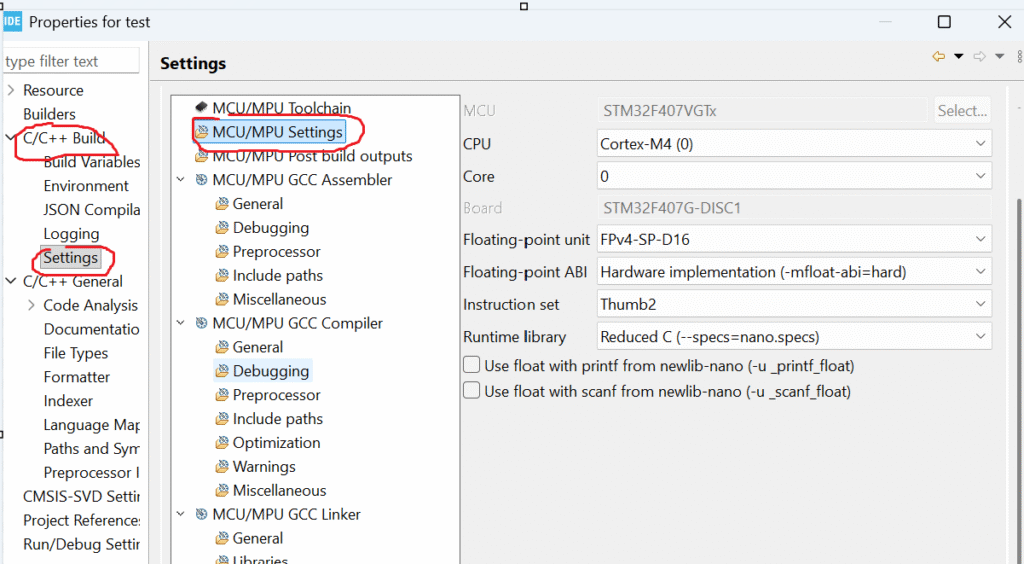
Step 1: Right-click Your Project → Properties
Step 2: Go to
C/C++ Build → Settings → MCU Settings
Make sure these settings are correct:
Floating Point Unit: FPv4-SP-D16 (for Cortex-M4)
Floating Point ABI:Hard
Internal flags that must appear automatically:
-mfpu=fpv4-sp-d16
-mfloat-abi=hard
If you’re using Cortex-M7, expect:
-mfpu=fpv5-sp-d16
-mfloat-abi=hard
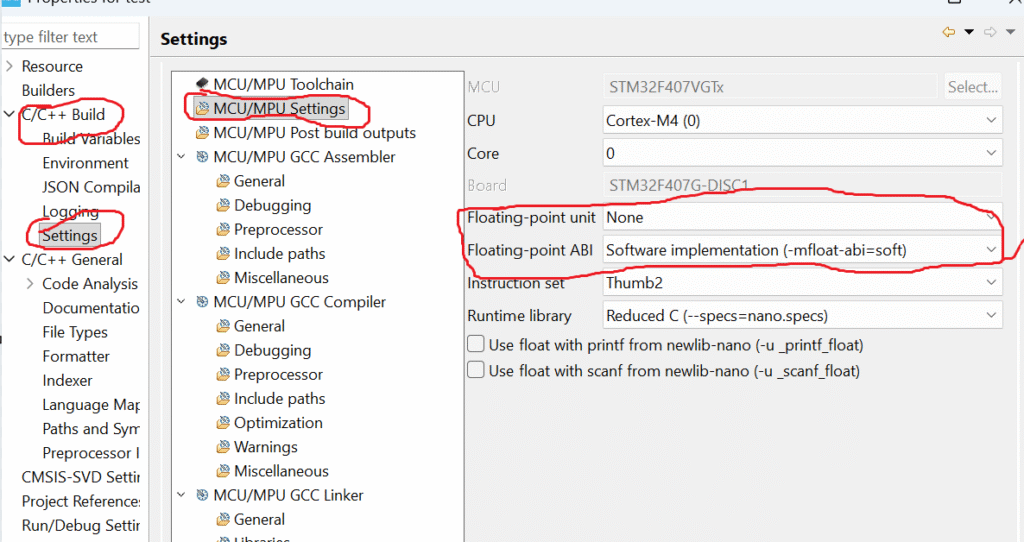
If these are wrong…
You will get typical fpu errors like:
unexpected NaN
wrong floating-value output
HardFault on floating math
slow float performance
Fixing the flags eliminates these issues instantly.
3. Ensure FPU Is Enabled in system_stm32xxxx.c
Even if CubeMX should do this automatically, it sometimes doesn’t.
Without this, multiple tasks fight for the same FPU, causing floating-point bugs.
6. Clean and Rebuild Your Project
After enabling FPU:
Project → Clean
Project → Build
STM32CubeIDE sometimes keeps old flags; a full clean ensures the new settings apply.
7. Test Floating Point Output
Add a simple test:
float a = 10.5f;
float b = 3.2f;
float c = a * b;

printf("FPU Test: %f\n", c);
If output is correct and no warning appears, you’ve solved the issue.
Why you see the warning (short):
The compiler is telling you that your project is set to use the processor’s hardware FPU, but your code never enables (initializes) it. If you run floating-point code before the FPU is enabled, the CPU can raise a fault.
Quick step-by-step fix (STM32CubeIDE):
Right-click your project → Properties.
Open C/C++ Build → Settings.
Under Tool Settings, find MCU Settings.
Set Floating Point Unit to the correct hardware FPU for your MCU.
Set Floating Point ABI to the matching ABI (usually hard when you use the hardware FPU).
Click Apply and Close.
Do Project → Clean (or clean the build).
Rebuild the project.
After these steps, either the IDE will add proper FPU init code for you or you’ll know to enable the FPU at startup in your SystemInit() (e.g. by setting CPACR on Cortex-M) before any floating-point operations run.
Common Causes of FPU Errors
Let’s break down the real reasons behind fpu warning fix requirements.
1. FPU not enabled in the microcontroller startup code
On Cortex-M4, M7, R5, or A-series processors, the FPU must be manually enabled.
If not, you’ll see:
weird computation results
hard faults
NaN values
compiler warnings
runtime messages like warning “FPU is not initialized”
2. Compiler flags mismatch
On embedded systems, these flags matter:
-mfpu=fpv4-sp-d16
-mfloat-abi=hard
If you compile with FPU support but the hardware lacks it, the program crashes. If the hardware supports FPU but compiler doesn’t use it, you get slow code or warnings.
3. OS not initializing FPU during context switching
In RTOS systems like:
FreeRTOS
QNX
ThreadX
Zephyr
…each task must save/restore FPU registers. If not, FPU corruption occurs.
4. Using floating values before startup completes
Some developers accidentally call floating functions inside:
early boot
before system init
inside interrupts
That leads to fpu errors.
5. Incorrect exception or lazy stacking settings
For example, on ARM:
enabling lazy FPU stacking incorrectly
disabling automatic FP context saving
…triggers random crashes.
Signs That You’re Facing FPU Problems
Here’s how you know you need an fpu warning fix:
your program runs but produces incorrect float values
occasional crashes when using math functions
system gives warning “FPU is not initialized”
compiler prints FPU mismatch warnings
enabling or disabling FPU changes program behavior
DSP code runs extremely slow
If any of these sound familiar, the next sections will help you fix it.
How to Fix FPU Warnings (Step by Step)
Let’s walk through the most common fpu warning fix steps.
This works for ARM Cortex (M0+, M3, M4, M7, A-series) and most embedded platforms.
1. Enable FPU in Startup Code
For most ARM Cortex-M4/M7 microcontrollers, add this:
Now the warning disappears. And your float math becomes faster, correct, and stable.
FPU Warning Fix in Linux / QNX / Android Systems
Sometimes the warning comes not from bare metal, but from OS logs.
Why it happens:
kernel doesn’t initialize thread FP state
user-space app uses floating point before kernel setup
context switching issues
Fix:
On QNX or Linux, ensure your thread creates an FP context:
pthread_attr_setfp(regs, PTHREAD_FP_ENABLE);
Some OSes call it “VFP context” instead of FPU.
How to Avoid FPU Errors in the Future
Here are practical tips:
Always match your toolchain flags to your CPU
Check the datasheet.
Enable FPU before using floats
Do it in SystemInit.
Avoid floats in interrupts
Use fixed-point instead.
Test with edge cases
Division by zero Very small numbers Very large numbers
Keep RTOS FPU context switching enabled
This prevents cross-task corruption.
Beginner vs. Experienced Developer Understanding
Here’s how different developers see the issue.
Beginners
see the warning
google it
try random fixes
still face errors
Experienced developers
check CPU architecture
verify compiler flags
check startup code
inspect context switching
But now, after this guide, you’ll think like the second group.
FPU Warning Fix & FPU Errors
Q1. What is the simplest fix for “warning FPU is not initialized”? Enable the FPU in startup code using CPACR.
Q2. Will enabling FPU break anything? No. If your CPU has an FPU, enabling it only improves performance.
Q3. Why do I get FPU errors only sometimes? Usually due to RTOS tasks not saving/restoring FPU registers.
Q4. Why does float computation produce random values? Because FPU registers were overwritten by another task or interrupt.
Q5. Can an MCU run without FPU enabled? Yes, but float operations become slow and warnings appear.
Q6. Why does enabling lazy stacking cause random crashes? Some MCUs have silicon bugs related to it.
Q7. Do Cortex-M0/M3 have FPU? No. Never compile them with FPU flags.
Q8. What causes floating-point divide-by-zero errors? Normal IEEE-754 behavior; not a hardware issue.
Q9. My compiler shows FPU mismatch warnings. What now? Fix your -mfpu and -mfloat-abi flags.
Q10. Can I completely avoid FPU errors? Yes, by initializing FPU properly and using correct compiler flags.
If you’re learning C programming and want to strengthen your fundamentals before practicing Structures and Unions Interview Questions, you should explore this detailed beginner-friendly guide on structures: Structures in C – Complete Guide It explains structure syntax, memory layout, padding, nesting, and real-world examples in a very simple way. Reading this will give you a strong foundation before jumping into advanced interview questions.
Conclusion: You Can Now Fix Any FPU Warning
You now understand:
what the FPU is
why fpu errors appear
how to solve fpu warning fix issues
how to fix warning “FPU is not initialized”
how to configure compiler flags
how to avoid problems in RTOS
Whether you’re a beginner or an experienced embedded developer, this guide covers everything you need to solve floating-point issues confidently.
FAQ : PU Warning Fix & FPU Errors
1. What does “FPU Warning Fix” actually mean in STM32 or embedded projects?
FPU Warning Fix simply means your compiler is alerting you that hardware floating-point instructions are enabled, but your startup code has not initialized the FPU yet. If you use floating-point operations without enabling the FPU, your MCU can crash due to a UsageFault.
2. Why do FPU errors happen in ARM Cortex-M processors?
FPU errors occur when: FPU hardware is enabled in project settings But FPU is not activated in CPACR register Or floating-point ABI does not match compiler flags This mismatch leads to NOCP faults, crashes, or undefined behavior.
3. How do I fix FPU warnings in STM32CubeIDE?
You can solve the warning by: Enabling the correct FPU type (e.g., FPv4-SP-D16). Selecting the correct floating-point ABI (Hard or SoftFP). Initializing CP10/CP11 in SystemInit() before using floats. Cleaning and rebuilding the project.
4. Do I need to enable the FPU manually in code?
Yes if your startup file does not handle it automatically. You must set CPACR bits for CP10 and CP11. Without this, the processor cannot execute any floating-point instructions, causing exceptions.
5. Why does my project crash when using float or double?
This happens when FPU instructions are generated, but the processor does not have permission to execute them. The CPU then raises a UsageFault, commonly due to: FPU not initialized Wrong ABI Wrong compiler flags RTOS not handling FPU context switching
6. What FPU settings should I select in STM32CubeIDE?
For most Cortex-M4/M7 MCUs: Floating Point Unit: FPv4-SP-D16 / FPv5 Floating Point ABI: Hard (recommended) SoftFP can be used, but code will be slower.
7. How does improper FPU configuration affect performance?
Incorrect FPU setup forces the compiler to use software-based emulation for floating-point operations. This increases CPU cycles drastically, slows application performance, and can create unexpected delays.
8. Can RTOS users face FPU errors more often?
Yes. RTOS switches context between tasks. If the RTOS does not save/restore FPU registers correctly, tasks using floating-point variables may corrupt the FPU state, causing random crashes or hard faults.
9. What is the best way to avoid FPU errors in new projects?
Follow this checklist: Choose correct FPU + ABI settings Initialize CPACR early Avoid floating-point operations inside ISRs Verify your RTOS supports FPU context switching Test float operations under debugger
10. How do I verify my FPU is working correctly?
You can debug by checking: CPACR register (CP10 & CP11 bits = 0xF) No NOCP bit set in UsageFault Status Register Simple float operations execute without exception If all checks pass, your FPU is fully enabled and stable.
Master Declaration vs Definition in C with this beginner-friendly guide. Learn variables, functions, examples, and common mistakes with clear explanations.
When you first start learning C, there are a few ideas that feel simple on the surface but quickly become confusing the moment you dive deeper. One of the most common is the difference between a declaration and a definition. Almost every textbook explains the idea, yet most learners still walk away thinking both terms are the same. They are not.
If you’re learning C programming and want to strengthen your fundamentals before practicing Structures and Unions Interview Questions, you should explore this detailed beginner-friendly guide on structures: Structures in C – Complete Guide It explains structure syntax, memory layout, padding, nesting, and real-world examples in a very simple way. Reading this will give you a strong foundation before jumping into advanced interview questions.
What Declaration Really Means
A declaration is your way of telling the compiler that something exists. It is like introducing a character in a story without explaining their full details. When you declare something, you give the compiler enough information to work with it—its name, type, and sometimes the parameters—but you don’t provide the actual storage or implementation yet.
For example:
extern int total;
Here you’re saying, “the variable total exists and its type is int, but it lives somewhere else.” This is the simplest expression of variable declaration vs definition.
Similarly, when you only list a function signature:
int add(int a, int b);
you are declaring the function. You haven’t written the body yet. This is the heart of function declaration vs definition.
A declaration is a promise. You are promising the compiler that the actual definition will appear somewhere later in your codebase.
What Definition Actually Means
A definition is where things become real. Here, memory is allocated or the actual implementation is provided. While declarations tell the compiler “trust me, this exists,” definitions actually create something in memory.
For variables:
int total;
This now allocates storage for the variable.
For functions:
int add(int a, int b) {
    return a + b;
}
This is the real implementation, the function definition.
If a declaration is like announcing the arrival of a friend, the definition is the moment that friend actually shows up.
This entire idea applies not just in C but in all programming languages. That’s why developers frequently talk about programming declaration vs definition to highlight how these concepts appear across languages and not just in C.
Understanding Declaration vs Definition of Variable in C
A variable declaration introduces the name and type of a variable without allocating memory. A variable definition creates the storage. Many beginners confuse these because both involve writing a variable type and name.
Consider:
extern float temperature;
This line does not create memory. It only declares that temperature exists somewhere else.
But this line:
float temperature;
defines the variable and allocates memory for it.
When people talk about declare vs define a variable, this is what they mean.
Variable Declaration vs Definition vs Initialization
Another confusion is between definition and initialization. They are not the same.
Definition allocates memory:
int speed;
Initialization gives a value at the moment of definition:
int speed = 60;
This single line performs both definition and initialization.
Many interviewers use this topic to test how deep your understanding goes. They ask about variable declaration vs definition vs initialization or declaration vs definition of variable in C to check if you truly know what the compiler does behind the scenes.
Declaration vs Definition of Function in C
With functions, the declaration is usually placed in a header file, while the definition stays in a .c file. This keeps code organized and allows multiple files to use the same function.
int add(int, int); // declaration
int add(int a, int b) {  // definition
    return a + b;
}
A function declaration is also known as a function prototype. It tells the compiler the return type and parameter types and helps the compiler perform type checking.
When developers discuss declaration vs definition of function, they are usually referring to this separation between the prototype and the body.
C Variable Declaration vs Definition in Real Projects
When you write larger programs in C, you’ll often break your code into multiple files. That’s where you begin to fully appreciate the difference between declarations and definitions.
A common pattern is:
Declarations go into header files (.h).
Definitions go into implementation files (.c).
This structure supports modular design, builds reusable code, and helps avoid compilation errors like “multiple definitions” or “undefined reference.”
Understanding c variable declaration vs definition becomes essential when building complex embedded systems, real-time projects, or libraries.
How Declarations and Definitions Work in C++
Even though this article focuses on C, the same principles appear in C++. That’s why learners often search for c++ declaration vs definition or c++ function declaration vs definition when shifting from C to C++.
In C++, declarations introduce variables, methods, functions, and even classes. Definitions, as always, fill in the actual implementation.
Class Declaration vs Definition in C++
C++ lets you separate the structure of a class from its method implementations. This is a perfect example of the difference.
A class declaration (technically called a class definition, but it behaves like a declaration of its structure) introduces the members and functions:
class Car {
public:
    void start();
private:
    int speed;
};
Methods (member functions) follow the same rules as traditional C functions:
The declaration appears in the class body.
The definition appears outside the class, unless you write the method inline.
This is why people search for method declaration vs definition when diving deeper into OOP concepts.
Why These Concepts Matter in Programming
Understanding programming declaration vs definition is more than just passing interviews. It influences how you structure your project, how you organize code across multiple files, and how efficiently you collaborate in teams.
Some reasons this knowledge matters:
It prevents multiple definition errors during linking.
It allows you to separate interface from implementation.
It improves code readability and maintainability.
It supports modular programming, essential for embedded systems and large applications.
It helps you design clean header files and reusable libraries.
A clean separation between declaration and definition is considered a professional habit in both C and C++.
Real-World Example: Splitting C Code Across Files
Imagine you’re writing a math library.
math_utils.h contains:
int multiply(int a, int b);
int divide(int a, int b);
These are declarations.
math_utils.c contains:
int multiply(int a, int b) {
    return a * b;
}

int divide(int a, int b) {
    return a / b;
}
These are definitions.
Other files can now include the header and use the functions seamlessly. This is how developers create professional and scalable C projects.
Common Mistakes Beginners Make
Here are some real issues beginners face:
Using extern incorrectly:
extern int x = 10; // Wrong, this becomes a definition
Declaring without defining:
extern int y;  // Only declaration

// But no definition anywhere -> linker error
Writing multiple definitions:
int z;  // definition
int z;  // another definition -> error
These mistakes show why understanding the fine line between declaration and definition is important.
Declaration vs Definition in C: Simple Summary
You can think of it like this:
A declaration tells the compiler about a name.
A definition gives it a place in memory or provides actual code.
Declarations can appear many times; definitions must appear once.
extern is the key to creating declarations for variables.
Function prototypes are declarations.
Function bodies are definitions.
In C++, classes declare methods; method bodies define them.
Everything else builds on top of these ideas.
Final Thoughts
If you’re serious about mastering C or moving further into C++, understanding declaration vs definition in C is not optional. It is the foundation for every real project, from embedded systems to OS development to application-level programming.
Once you internalize this distinction, everything becomes clearer:
linking errors start making sense
header files become easier to design
modular coding becomes natural
debugging becomes smoother
This entire concept whether you call it declaration vs definition, c variable declaration vs definition, function declaration vs definition, or class declaration vs definition is one of those timeless fundamentals that stays with you no matter how advanced you become as a programmer.
FAQ on Declaration vs Definition in C
What is the difference between declaration and definition in C?
A declaration tells the compiler that a variable or function exists and specifies its type or signature. A definition allocates memory or provides the actual implementation. In short: a declaration is a promise, while a definition is the real deal.
Is a function prototype a declaration or a definition?
A function prototype is a declaration, not a definition. It tells the compiler the return type and parameters but doesn’t include the function body. The full function body is the function definition.
Does declaring a variable allocate memory?
No. When you declare a variable using extern, memory is not allocated. Memory is allocated only when the variable is defined.
Can we declare a variable multiple times?
Yes, a variable can be declared multiple times as long as it is defined only once. Multiple declarations are common in header files.
What happens if a function is declared but not defined?
The compiler will accept the declaration, but the linker will generate an “undefined reference” error because the definition is missing.
What is variable declaration vs definition in C?
Variable declaration introduces a variable name and type, while variable definition allocates memory for that variable. For example, extern int x; is a declaration, and int x; is a definition.
Is initialization the same as definition?
Initialization is part of the definition. When you write int a = 10;, it defines the variable and assigns an initial value.
What is function declaration vs definition in C?
Function declaration tells the compiler the function’s signature. The function definition contains the full implementation. Both are required for clean modular coding and to avoid linker errors.
Do class methods obey declaration vs definition rules in C++?
Yes. In C++, declaring a method inside a class tells the compiler it exists. Writing the method body outside the class provides the definition. This is the core of c++ class declaration vs definition and method declaration vs definition.
Can a function be declared in multiple files?
Yes. A function can be declared in multiple files using a header file. The function definition, however, must appear only once in the entire project.
Is using extern always considered a declaration?
Mostly yes. extern usually creates a declaration. But if you assign a value, such as extern int x = 5;, it becomes a definition.
Why do we separate declaration and definition in large projects?
It improves modularity, reusability, build speed, and code maintainability. This is especially important in embedded systems, libraries, and OS-level development.
What is programming declaration vs definition?
Across programming languages, a declaration introduces a name and type, while a definition provides the memory or code. The idea applies in C, C++, Java, Python (function signatures), and many other languages.
What is class declaration vs definition?
A class declaration introduces the structure of the class, its members, and methods. The method bodies written outside the class are definitions. This split is central to clean C++ design.
Does C++ follow the same rules as C for declarations and definitions?
Yes. Both languages follow the same fundamental concepts. That’s why learners commonly search for c++ declaration vs definition, c++ function declaration vs definition, and similar topics.
What is the difference between declare and define a variable?
Declaring introduces the variable name and type; defining allocates memory or provides the actual storage. Declaration is optional; definition is required for execution.
Is defining the same as initializing in C?
No. Defining allocates memory, while initializing assigns a value at the moment of definition. These are related but not identical operations.
Why is declaration important in multi-file programs?
Declarations allow the compiler to understand types and signatures across different files without duplicating definitions. This keeps linking clean and avoids errors.
Learn sizeof in C with simple examples. Understand usage, return type, format specifier, array size, strlen vs sizeof, and avoid common mistakes easily.
If you have ever wondered how big a data type, variable, or structure is in memory, you’ve already touched the topic of sizeof in C. It’s one of those things every C programmer uses, yet many misunderstand. So today, let’s sit down, simplify everything, and walk through sizeof from the basics to the tricky parts that show up in interviews.
If you’re learning C programming and want to strengthen your fundamentals before practicing Structures and Unions Interview Questions, you should explore this detailed beginner-friendly guide on structures: Structures in C – Complete Guide It explains structure syntax, memory layout, padding, nesting, and real-world examples in a very simple way. Reading this will give you a strong foundation before jumping into advanced interview questions.
What is sizeof in C?
The sizeof operator tells you how much memory something takes in bytes. It works for:
data types
variables
expressions
pointers
arrays
structures
unions
function return types
and more
Example:
printf("%zu", sizeof(int));
This prints the number of bytes needed to store an int on your system.
Why sizeof exists
C runs close to hardware. You often need to know how much memory something consumes to:
allocate memory safely
handle arrays
write low-level drivers
work with network packets
optimize memory usage
Without sizeof, developers would guess memory sizes. And guessing in C is dangerous.
How to use sizeof in C
The syntax is simple.
sizeof(type)
sizeof variable
sizeof expression
Examples:
sizeof(int)
sizeof x
sizeof(x+10)
All are valid.
Syntax and examples
int a = 10;
printf("%zu", sizeof(a));     // sizeof variable
printf("%zu", sizeof(int));   // sizeof type
printf("%zu", sizeof(a+1));   // sizeof expression
What does sizeof in C return?
sizeof returns the size in bytes.
If int is 4 bytes:
sizeof(int) → 4
If a structure is 16 bytes:
sizeof(struct Example) → 16
Return type of sizeof in C
The return type of sizeof in C is:
size_t
size_t is an unsigned integer type used for sizes. It’s defined in <stddef.h>.
Is sizeof a function in C?
No.
sizeofis an operator, not a function.
This is important because:
it is evaluated at compile time (for most cases)
it does not cause side effects
it doesn’t evaluate expressions fully
Example:
sizeof(a++);
a will NOT increment.
What library is sizeof in C?
No library. sizeof is built directly into the compiler.
You do not need to include any header.
Format specifier for sizeof in C
Since sizeof returns a size_t, you print it using:
%zu
Example:
printf("%zu", sizeof(int));
Many programmers mistakenly use %d, but %zu is correct.
sizeof with basic data types
This depends on architecture, compiler, alignment, and ABI.
Master Structure and union Advanced Level interview Questions memory layout, padding, bitfields, nested structs, and optimization techniques in c
Imagine you are sitting in a high-stakes technical interview for a senior embedded systems position. The interviewer slides a piece of paper across the table with a seemingly simple question:
“Tell me how much memory this structure or union would occupy, and why?”
At first glance, it looks easy you’ve been working with C for years. But as you dig deeper, you realize this isn’t just about knowing sizeof(). The question is testing your understanding of memory alignment, padding, bitfields, flexible arrays, nested structures, and efficient memory usage.
In real-world systems, especially in embedded devices with limited memory, every byte counts. Misunderstanding how structures and unions are laid out can lead to memory wastage, subtle bugs, and performance issues.
This advanced-level interview set will take you step by step through challenging scenarios from nested unions, bitfields, structure packing, and flexible arrays to memory optimization techniques so you can confidently tackle any tricky structure or union question an interviewer throws your way.
By the end of this guide, you won’t just know the theory; you’ll be able to analyze, calculate, and optimize memory layouts in C like a true expert.
If you’re learning C programming and want to strengthen your fundamentals before practicing Structures and Unions Interview Questions, you should explore this detailed beginner-friendly guide on structures: Structures in C – Complete Guide It explains structure syntax, memory layout, padding, nesting, and real-world examples in a very simple way. Reading this will give you a strong foundation before jumping into advanced interview questions.
Structure and union Advanced Level interview Questions
1.How do you calculate the size of a structure manually?
Calculating the size of a structure manually in C/C++ involves understanding data type sizes, alignment, and padding. Let me explain step by step with clarity.
1. Check sizes of individual members
Each data type has a size (on most 32/64-bit systems):
Data Type
Typical Size
char
1 byte
short
2 bytes
int
4 bytes
float
4 bytes
double
8 bytes
pointer
4 or 8 bytes (32-bit or 64-bit system)
2. Understand alignment rules
Each data member is aligned to its natural boundary, i.e., its size or the struct alignment, whichever is smaller.
Alignment ensures efficient memory access.
For example:
int (4 bytes) should be at an address divisible by 4.
double (8 bytes) should be at an address divisible by 8.
3. Add padding between members
If a member’s natural alignment requires it to start at a certain boundary, but the previous member ends at a different boundary, padding bytes are added.
Padding is inserted between members and sometimes at the end of the structure so that the structure’s total size is a multiple of the largest member’s alignment.
4. Step-by-step example
struct Example {
    char c;     // 1 byte
    int i;      // 4 bytes
    short s;    // 2 bytes
};
Step 1:char c → starts at offset 0 → occupies 1 byte. Next offset: 1
Step 2:int i → needs 4-byte alignment → offset must be multiple of 4 → add 3 bytes padding → offset becomes 4. i occupies offsets 4,5,6,7.
Step 3:short s → needs 2-byte alignment → next offset is 8 → already aligned → occupies offsets 8,9.
Step 4: Struct size must be multiple of largest alignment (here, 4) → add 2 bytes padding at end → total size = 12 bytes.
5. General formula
struct_size = sum of (member sizes + padding between members) + padding at end
End padding ensures that an array of this struct has all elements correctly aligned.
To reduce size: reorder members from largest to smallest to minimize padding.
2.How do you calculate the size of a union manually?
Calculating the size of a union is much simpler than a structure because of how unions work. Let me explain step by step.
1. Recall how a union works
In a union, all members share the same memory location.
Only one member can hold a value at a time.
Therefore, the size of a union is determined by:
The largest member size, and
The alignment requirements (padding at the end to satisfy the alignment).
2. Union size rule
union_size = maximum(size of all members) rounded up to nearest multiple of the largest alignment requirement
3. Example 1
union MyUnion {
    char c;     // 1 byte
    int i;      // 4 bytes
    double d;   // 8 bytes
};
Step 1: Find the size of each member:
char c = 1
int i = 4
double d = 8
Step 2: Take the largest size → 8 bytes (from double).
Step 3: Check alignment:
Largest alignment is usually the largest member’s alignment (double → 8 bytes).
8 bytes is already a multiple of 8 → no extra padding needed.
Union size = 8 bytes
4. Example 2 (with padding)
union MyUnion2 {
    char c;     // 1 byte
    short s;    // 2 bytes
    int i;      // 4 bytes
};
Member sizes: char=1, short=2, int=4
Maximum size = 4 bytes
Maximum alignment = int → 4 bytes
Total size must be a multiple of alignment → 4 bytes
5. Key differences from struct
Feature
Struct
Union
Memory allocation
Sum of members + padding
Size of largest member + padding
Members can coexist
Yes
No (share same memory)
Alignment/padding
Between members + end
Only end alignment matters
So, manual calculation of union size is just find the largest member, check alignment, and add padding if needed.
3.What is the maximum alignment requirement in a structure?
The maximum alignment requirement in a structure is determined by the member with the strictest (largest) alignment requirement inside that structure.
Definition
The maximum alignment of a structure = the largest alignment requirement among all its members.
In simple terms:
Every data type has a natural alignment (e.g., int → 4 bytes, double → 8 bytes).
The structure’s alignment must match the member that needs the highest alignment, so all members stay properly aligned in memory.
Why does this matter?
The structure’s total size must be a multiple of this maximum alignment.
Compilers may add end padding to satisfy this requirement.
It ensures elements of an array of that structure remain correctly aligned.
Example
struct Example {
    char c;       // alignment 1
    int i;        // alignment 4
    double d;     // alignment 8
};
Alignment requirements:
char → 1 byte
int → 4 bytes
double → 8 bytes
Maximum alignment = 8 bytes So the struct must be aligned to 8 bytes, and its total size will be rounded up to a multiple of 8.
Key Takeaway
The largest member decides the alignment this is why rearranging structure members can dramatically change size and reduce padding.
If you want, I can also solve a few tricky struct alignment problems to help you master this concept.
4.What is the advantage of using unions in embedded systems?
Using unions in embedded systems offers several powerful advantages, especially when memory, performance, and hardware interaction matter. Here are the key benefits explained clearly and professionally:
Advantages of Using Unions in Embedded Systems
1. Efficient Memory Usage (Saves RAM & Flash)
A union allocates memory equal to only its largest member.
All other members reuse the same memory space.
This is extremely useful in microcontrollers where RAM is limited (e.g., 2KB, 4KB).
Example: Instead of storing different sensor data types separately, a union lets you reuse the same memory.
2. Easy Interpretation of the Same Data in Multiple Formats
A union allows you to treat the same data bytes as:
an integer
a float
a byte array
a bitfield
or protocol frames
This is very important in:
communication stacks (CAN, LIN, UART, SPI)
protocol parsing
sensor data conversion
Example: Reading 4 bytes from UART and interpreting them as either float or uint32_t.
3. Useful for Register Mapping in Microcontrollers
Type punning using a union is a technique in C where the same memory location is interpreted as different data types by using different members of a union.
This allows you to “reinterpret” the underlying bits of one type as another type without copying data.
Definition
Type punning through a union means writing a value to one member of a union and reading it from another member of the same union.
This works because:
All union members share the same memory space.
Simple Example of Type Punning
union Pun {
    float f;
    uint32_t i;
};

union Pun p;
p.f = 3.14f;      // store float
printf("%u", p.i);  // read the same bytes as an unsigned integer
Here:
p.f stores the float value in memory.
p.i reads the exact same 4 bytes but interprets them as an integer.
This is type punning treating the same bytes as different types.
Why Use Type Punning?
Type punning is very useful in embedded systems for:
1. Inspecting raw binary representation
Example: Seeing how a float is stored in IEEE 754 format.
2. Fast conversion without memcpy()
You can avoid costly data copying and simply reinterpret bits.
3. Hardware register access
Bitfields + raw register value access in the same memory.
4. Communication protocol parsing
Same bytes interpreted as:
struct
frame header
raw bytes
5. Sensor or DSP data interpretation
E.g., interpreting 4 bytes from a sensor as:
float
int32_t
unsigned char buffer[4]
Important: Is it Always Legal?
In old C standards, type punning via union was considered undefined by some compilers.
But in C11 and later, it is well-defined behavior:
Reading a different union member is allowed as long as the data representation is compatible.
Nearly all embedded compilers (GCC, Clang, ARMCC, IAR) support this.
Takeaway
Type punning using unions is a powerful technique where you reinterpret the same bytes in memory as different data types, commonly used in embedded systems for:
protocol decoding
register manipulation
performance optimization
raw data conversion
6.What is the effect of endianness in unions?
Endianness has a direct and important effect on how data inside a union is interpreted because unions allow viewing the same memory bytes as different types.
Here’s a clear breakdown:
Effect of Endianness in Unions
Endianness determines how multi-byte data types (like int, float, double, structs) are stored in memory, and since all members of a union share the same memory, the interpretation changes based on byte order.
1. Little Endian vs Big Endian Basics
Little Endian (LE)
Least significant byte (LSB) stored at the lowest memory address
Common in: x86, ARM (little endian mode)
Big Endian (BE)
Most significant byte (MSB) stored at the lowest memory address
Found in: some network processors, DSPs, PowerPC
2.How Endianness Affects a Union
Because a union overlays members in the same memory, reading data from another member depends entirely on the byte order inside that memory.
Example to Understand Clearly
union U {
    uint32_t num;
    uint8_t bytes[4];
};

union U u;
u.num = 0x11223344;
A union’s behavior changes across processors with different endianness.
So:
Protocol parsing
Register mapping
Type punning
Byte extraction
Casting between integer/float/struct
…will produce different results depending on CPU endianness.
3. Why It Matters in Embedded Systems
Endianness impacts:
Communication protocols (CAN, UART, I2C, Ethernet)
CRC calculations
Sensor data interpretation
Memory-mapped register access
Flash/EEPROM data formats
Cross-platform firmware portability
A union used for type punning is NOT portable across:
different processors
compilers
architectures
Unless endianness is accounted for manually.
4. Important Point
Unions do NOT fix or convert endianness.
They simply reveal the byte order as the platform stores it.
If you need consistent byte order across devices, you must handle it manually using:
bit shifting
htonl/ntohl (network byte order)
custom byte-swap functions
Takeaway
Endianness determines how the bytes inside a union are laid out, so interpreting the same memory through different union members (type punning) will produce different results on different architectures.
7.What are tagged unions?
Tagged unions (also called discriminated unions, variant records, or sum types) are a programming technique where a union is combined with a tag (identifier) that indicates which member of the union is currently valid.
In simple terms:
A tagged union = union + tag variable The tag tells you which member is active, making the union safe to use.
Why Tagged Unions?
A normal C union is unsafe because:
You might read from a member that wasn’t written.
There is no built-in way to know which member currently holds valid data.
A tagged union solves this problem by storing:
The actual data (in a union)
An enum tag describing the data type inside the union
Example: Tagged Union in C
typedef enum {
    TYPE_INT,
    TYPE_FLOAT,
    TYPE_STRING
} DataType;

typedef struct {
    DataType type;    // The tag
    union {
        int i;
        float f;
        char *s;
    } data;           // The union
} TaggedValue;
The tag (TYPE_FLOAT) tells you which union member contains valid data.
Where Tagged Unions Are Used?
1. Inter-process communication (IPC)
Different message types in OS kernels (QNX, Linux, RTOS).
2. Communication protocols
Different packet formats inside a single frame.
3. AST nodes in compilers
Each node type stores different structures.
4. Variant data types
Like dynamically-typed values: JSON, XML, scripting languages.
5. State machines
Different state data stored in one union.
6. Event-driven systems
A single event buffer holds different event types.
Benefits
Prevents undefined behavior
Makes unions type-safe
Easy to maintain and debug
Perfect for embedded protocols/state machines
Reduces memory usage while remaining safe
Without a Tag → Dangerous
Plain unions are unsafe because:
u.i = 10;
printf("%f", u.f);  // undefined or garbage!
Tagged unions eliminate this hazard by enforcing a tag check before accessing data.
Summary
Tagged unions = union (stores one of many data types)
tag (enum) (tells which data type is stored)
They are memory-efficient, safe, and heavily used in systems programming, embedded systems, and compiler design.
8.What is a self-referential structure?
A self-referential structure in C is a structure that contains a pointer to another structure of the same type. It is not allowed for a structure to contain an actual instance of itself, but it can contain a pointer to itself.
This is the foundation for linked lists, trees, stacks, queues, and other dynamic data structures.
Definition
A self-referential structure is a structure that includes one or more pointers that point to the same structure type.
Example
struct Node {
    int data;
    struct Node *next;   // pointer to another Node
};
Here:
struct Node contains an integer data.
next is a pointer to another node of the same structure type.
This enables chaining many nodes together dynamically.
A self-referential structure is a structure that contains a pointer to another instance of the same structure. It is the building block of most dynamic data structures in C and embedded systems.
9.How do you allocate memory dynamically for structures?
To allocate memory dynamically for structures in C, you use functions from stdlib.h—primarily malloc(), calloc(), or realloc(). This allows structures to be created at runtime instead of compile-time.
Let’s break it down simply and clearly.
Using malloc()
malloc() allocates raw memory equal to the size of the structure.
Example:
struct Student {
    int roll;
    float marks;
};

struct Student *s = (struct Student *)malloc(sizeof(struct Student));

if (s == NULL) {
    // allocation failed
}
Key Points:
Memory size = sizeof(struct Student)
Returns a pointer to allocated memory
Memory contains garbage values
Using calloc()
calloc() allocates memory and initializes it to zero.
Yes, you can use memcpy() with structures, and it is very common in systems programming, embedded systems, drivers, and protocol handling—but only when used correctly.
Here is the full explanation
Can We Use memcpy() With Structures?
Yes, memcpy() can be safely used with structures as long as the structure contains only Plain Old Data (POD) types such as:
integers
floats
chars
arrays
other POD structs
Because these types can be copied bit-by-bit without breaking anything.
Basic Example
struct Data {
    int a;
    float b;
};

struct Data src = {10, 3.14};
struct Data dest;

memcpy(&dest, &src, sizeof(struct Data));
This copies the entire structure byte-by-byte.
When memcpy() is Safe
memcpy() is safe when the structure contains only simple, non-pointer members, like:
memcpy() will copy only the pointer, not the actual string.
Structures with virtual tables (C++), constructors, destructors
Not applicable to plain C, but important in embedded C++.
Structures with padding differences
Two compilers or architectures may use different padding/alignment, so using memcpy() across:
different machines
network packets
files
…can cause mismatches.
Use Case: memcpy() is Commonly Used in Embedded Systems
Because embedded structures often represent:
Register layouts
Protocol headers
CAN frames
Flash/EEPROM blocks
These are simple POD data structures → perfect for memcpy().
Final Summary
Use memcpy() when:
Structure contains only simple POD fields
Memory layout is consistent and known
No pointers or dynamic memory
Copying raw bytes is desired
Avoid memcpy() when:
Structure contains pointers
Dynamic memory is involved
Padding/alignment differs across systems
11.Why is it risky to use unions for type-casting?
Using unions for type-casting (type punning) is possible in C, but it is considered risky, non-portable, and sometimes undefined behavior, especially in advanced or embedded systems.
Here’s a clear, interview-friendly explanation
Why Using Unions for Type-Casting Is Risky
Unions let different data types share the same memory, so programmers often do:
union {
    float f;
    uint32_t i;
} u;

u.f = 3.14f;
printf("%x", u.i);   // type punning
This “works” on many compilers—but it has several dangers.
1. It Relies on Endianness (Byte Order)
Different CPUs store bytes in different orders:
Little-endian: LSB first
Big-endian: MSB first
So the interpretation of:
u.f → u.i
depends on hardware.
Works on one processor Completely wrong on another
This makes union type punning non-portable.
2. Violates Strict Aliasing Rule (C Standard Warning)
Strict aliasing allows the compiler to assume that:
Different types do not refer to the same memory
When you do:
u.i = 0x12345678;
float x = u.f;
You are telling the compiler:
Treat the same bytes both as float and int.
This can lead to:
Undefined behavior
Optimization issues
Wrong code generation
Many embedded compilers break or produce unexpected results.
3. Modern Compilers May Optimize Incorrectly
Compilers may reorder or optimize based on type assumptions. Thus, the type-punning union may not work if optimization is enabled (-O2, -O3).
4. Padding and Alignment Issues
Some structures have internal padding. Type punning via union may mistakenly interpret those padding bytes.
5. Different Compilers Implement Unions Differently
For example:
GCC extension: union type punning works reliably
MSVC: does NOT guarantee union aliasing works
ARM/IAR compilers for embedded: results vary
Thus union-based type casting is compiler-dependent.
6. Floating-Point Formats May Differ
Interpreting float as int assumes IEEE-754 format.
Some MCUs:
use different float formats
use software FP emulation
store FP values differently
Your type pun will be wrong.
7. Undefined Behavior According to Some C Standards
According to strict ISO C:
Writing to one union member
Then reading another unrelated member
…is undefined behavior.
Some compilers allow it as an extension, but not all.
When Is It Still Used?
Despite risks, union type punning is popular in:
Embedded systems
DSP code
Hardware drivers
Bit manipulation
Protocol decoding
But only when:
Processor is fixed
Compiler is fixed
Behavior is well understood
Still, using memcpy() is safer and portable.
Safe Alternative to Union Type-Punning
Use:
float f = 3.14;
uint32_t i;
memcpy(&i, &f, sizeof(i));
Why safer?
Avoids strict aliasing violation
Portable across hardware and compilers
No undefined behavior
Final Summary
Using unions for type-casting is risky because:
It depends on endianness
Violates strict aliasing rules
Can lead to undefined behavior
Depends on compiler implementation
Can break under optimization
Assumes a specific data layout
Not portable across architectures
12.What is the layout of structure members in memory?
The layout of structure members in memory refers to how the compiler arranges structure fields in RAM, including the effect of alignment, padding, and ordering.
Sequential Arrangement (Declared Order is Preserved)
Members of a structure are stored in the exact order in which they are declared.
Example:
struct A {
    char c;     // 1 byte
    int x;      // 4 bytes
    short s;    // 2 bytes
};
Order in memory:
[c][padding][x x x x][s s]
Alignment Requirement
Each data type has an alignment (1, 2, 4, 8 bytes), meaning:
The starting address of the member must be a multiple of its alignment.
Examples:
char → 1-byte aligned
short → 2-byte aligned
int → 4-byte aligned
double → 8-byte aligned (on most systems)
Padding is Added
The compiler inserts padding bytes so that:
Each member starts at its required aligned boundary.
The entire structure size becomes a multiple of max alignment inside the structure.
Detailed Example
struct Test {
    char a;     // offset 0
    int b;      // offset 4 (3 bytes padding before it)
    short c;    // offset 8
};
Memory layout:
Byte offset:   Content
-------------------------------------
0              a
1,2,3          padding
4,5,6,7        b
8,9            c
10,11          padding (structure padding)
Final size: 12 bytes
Structure Padding vs Member Padding
Member padding
Added between members to satisfy alignment.
Structure padding
Added after the last member so total structure size is aligned to max alignment requirement.
Why this layout is required?
To ensure:
Faster CPU access
Proper aligned memory access
Avoid bus errors on architectures where misalignment crashes the program
Some CPUs cannot access unaligned integers or longs, making padding mandatory.
Rearranging Members Can Reduce Padding
Bad layout:
struct Bad {
    char c;
    int x;
    short s;
};
Better layout:
struct Good {
    int x;
    short s;
    char c;
};
Reduces unnecessary padding.
13.What is the layout of union members in memory?
The layout of union members in memory is very different from structures. In a union, all members share the same memory location, meaning only one member is stored at a time.
All Members Start at the Same Address
Every union member begins at offset 0.
Example:
union U {
    int x;      // 4 bytes
    char c;     // 1 byte
    float f;    // 4 bytes
};
Memory layout (conceptually):
---------------------
|  Shared Memory    |  <-- used by x, c, or f
---------------------
Size of Union = Size of Largest Member
Memory allocated = maximum size among its members.
Example:
int = 4 bytes
char = 1 byte
float = 4 bytes
Union size = 4 bytes
No Padding Between Members
Because only one member exists in memory at a time, there is:
No member padding
No structure-like alignment gaps
No sequential layout
Padding may only appear at the end if required by alignment rules.
Example Layout Visualization
Union definition:
union Data {
    char a;      // 1 byte
    int b;       // 4 bytes
    double c;    // 8 bytes
};
Memory Layout:
Offset 0 → [ union memory block ]
            8 bytes total (size of double)
All members overlap:
a  → uses bytes [0]
b  → uses bytes [0 to 3]
c  → uses bytes [0 to 7]
How union layout affects reading values?
Using one member after writing another causes type punning, which may reveal:
Byte-level representation
Endianness effects
Tricky debugging scenarios
Example:
union Data d;
d.b = 0x12345678;
printf("%x", d.a);   // Prints lowest byte depending on endianness
Alignment Requirement Still Applies
Even though members share memory, the union is aligned to the strictest alignment:
Example:
union X {
    char c;       // align 1 byte
    int i;        // align 4 bytes
    double d;     // align 8 bytes
};
Alignment = 8 bytes Total size may become 8 bytes or padded to 8 bytes.
14.Can a structure be packed differently on different compilers?
Yes, a structure can be packed differently on different compilers and this is a very important concept in systems programming, embedded systems, and cross-platform development.
Short Answer
Yes. Different compilers (GCC, Clang, MSVC, Keil, IAR, ARM-GCC, etc.) may apply different alignment rules, padding strategies, and packing behavior, which leads to different structure sizes and layouts.
Why Structure Packing Differs Across Compilers?
1. Different default alignment rules
Each compiler and platform defines:
Natural alignment (1, 2, 4, 8 bytes)
Maximum alignment allowed
ABI (Application Binary Interface) rules
Example:
GCC on x86 may align double to 4 bytes
MSVC on x64 aligns double to 8 bytes
This affects padding and total size.
2. Different target architecture requirements
Structure packing may vary between:
ARM Cortex-M (embedded)
x86 / x64 (PC)
RISC-V
PowerPC
DSP processors
Some architectures crash on unaligned access, so compilers insert padding differently.
3. Compiler-specific pragmas and attributes
Each compiler has its own syntax:
GCC / Clang:
struct __attribute__((packed)) S {
    char a;
    int b;
};
MSVC:
#pragma pack(push, 1)
struct S {
    char a;
    int b;
};
#pragma pack(pop)
Both do the same thing, but syntax differs.
4. ABI (Application Binary Interface) Differences
Different operating systems and compilers follow different ABIs:
System V ABI
Windows ABI
ARM EABI
QNX ABI
iOS / Darwin ABI
ABIs define:
alignment of integers
alignment of floating-point
structure padding
calling conventions
This directly affects structure layout and size.
Example Showing Different Packing
struct Test {
    char a;
    int b;
    short c;
};
Common results:
GCC (x86): 12 bytes
MSVC (x86): 8 bytes
ARM-GCC: 12 bytes
Why? MSVC may align int to 2 bytes in some cases unless /Zp or pragma is used.
Implications in the Real World
1. Binary file parsing
Structures written by one compiler may fail to be read by another.
2. Network protocols
Padding issues break communication between systems.
3. Embedded systems
Hardware registers must be exactly aligned—incorrect padding causes:
malformed packets
incorrect register access
undefined behavior
4. API / Driver development
Misaligned structure layouts break OS and firmware interfaces.
15.Are unions guaranteed to store overlapping memory?
Yes unions are guaranteed to store their members in overlapping memory, but with a few important details.
Short Answer
Yes. In C, all members of a union share the same memory location, meaning they always overlap. This behavior is guaranteed by the C standard.
What the C Standard Says
The C standard defines a union as:
A type whose members all start at the same memory location.
This means:
All members have offset 0
They physically overlap
The union size = size of the largest member
Writing to one member overwrites the others
This behavior is strictly guaranteed across all compilers, architectures, and platforms.
Memory Overlap Visualization
union U {
    int x;    // 4 bytes
    char c;   // 1 byte
    float f;  // 4 bytes
};
While overlap is guaranteed, the alignment requirement may force the union itself to have padding outside the overlapped region.
Example:
union U {
    char a;      // align 1
    double b;    // align 8
};
Both members still overlap
But the union’s total size = 8 bytes
Because alignment = 8
So the memory overlap is guaranteed, but extra bytes may exist after the overlapping region (for alignment).
What Is NOT Guaranteed
Reading a member different from what was written (type punning without memcpy() is implementation-defined in strict C11/C18 rules)
Endianness behavior Overlap is guaranteed, but the byte order of multibyte objects depends on CPU endianness.
Bit-level interpretation When overlapping is used to reinterpret data, results vary by architecture.
16.What happens when structure members have mixed datatypes (char, int, float)?
When a structure contains mixed datatypes like char, int, float, etc., the compiler must arrange them in memory while respecting alignment rules. This leads to padding, alignment, and sometimes increased structure size.
Below is the complete explanation.
Members Are Stored in Declared Order
The compiler does not reorder structure members for optimization.
Example:
struct Mix {
    char c;
    int i;
    float f;
};
Order in memory is always: char → int → float
Alignment Requirements Depend on Each Datatype
Each datatype has a natural alignment:
Type
Typical Size
Typical Alignment
char
1 byte
1 byte
short
2 bytes
2 bytes
int
4 bytes
4 bytes
float
4 bytes
4 bytes
double
8 bytes
8 bytes
A member must start at an address multiple of its alignment.
Padding Bytes Are Added Between Members
This happens when the next member’s required alignment doesn’t match the current offset.
Offset 0:   c
Offset 1-3: padding (3 bytes)
Offset 4-7: i (4 bytes)
Offset 8-11:f (4 bytes)
Total size = 12 bytes
Structure Size Depends on Largest Member Alignment
The structure is padded at the end so its total size is a multiple of the maximum member alignment.
In this example:
Largest alignment = 4 bytes
Structure size must be multiple of 4
Already 12 → aligned → no extra padding
Why Mixed Types Cause Padding?
Because:
char aligns on 1 byte
int must align on 4 bytes
So after a 1-byte char, the compiler inserts 3 bytes of padding
This ensures CPU can efficiently accessint and float.
Reordering Members Reduces Padding
Optimized version:
struct Mix {
    int i;
    float f;
    char c;
};
Memory layout:
i → 4 bytes
f → 4 bytes
c → 1 byte
3 bytes padding at end (structure padding)
Total: 12 bytes (Same size but less internal fragmentation)
Real-World Impact
Mixed datatypes affect:
Memory footprint
Especially important in embedded systems.
Performance
Aligned access is faster.
Binary compatibility
Different compilers/platforms may produce different padding.
Network protocols & file formats
Padding can break communication unless packed structs are used.
Final Summary
When structure members have mixed datatypes (char, int, float):
They are stored in the order declared
Compiler adds padding between members
Members must follow alignment rules
Structure size increases due to both member padding and structure padding
Performance improves due to aligned memory access
Reordering members can reduce memory waste
17.How do you map hardware registers using structures?
In embedded systems, peripherals (GPIO, UART, I2C, timers, etc.) are controlled using hardware registers located at fixed memory addresses. C allows us to access these registers in a clean and readable way using structures.
Is Register Mapping?
Mapping hardware registers means:
Assigning a C struct to a specific memory address
Each field of the struct corresponds to one register
Accessing the register becomes easy and readable using -> operator
Example:
GPIO->MODER = 0x01;
Why Use Structures for Register Mapping?
Because:
Cleaner code
Safe access
Easy debugging
Eliminates magic numbers
Matches datasheet layout
Example from datasheet:
Offset
Register Name
0x00
MODER
0x04
OTYPER
0x08
OSPEEDR
0x0C
PUPDR
You convert this layout into a C struct.
Steps to Map Registers Using Structures
Step 1: Read Register Layout in Datasheet
Example: GPIO peripheral base address:
GPIOA_BASE = 0x40020000
Mapping Hardware Registers Using Unions in C
Unions allow accessing the same memory location in multiple ways. This is useful when a hardware register has multiple bitfields or when you want both byte-level and word-level access.
1. Why Use Unions for Hardware Registers?
Many hardware registers are bit-addressable.
You may want both full-register access and bitwise access.
Unions combined with structures allow bitfield mapping.
typedef union
{
    uint32_t all;       // Full register access
    REG_Bits_t bits;    // Bit-level access
} REG_t;
Now, REG_t allows two ways to access the same register:
reg.all → full 32-bit value
reg.bits.ENABLE → individual bit access
Step 3: Map to Hardware Address
#define MY_REG (*(volatile REG_t*) 0x40021000UL)
Step 4: Access Register
// Set ENABLE bit
MY_REG.bits.ENABLE = 1;

// Read READY bit
if (MY_REG.bits.READY)
{
    // Do something
}

// Write full register at once
MY_REG.all = 0x12345678;
Use volatile: Always needed to prevent compiler optimization.
Ensure total bits = register width: Otherwise behavior is undefined.
Be careful with padding: Compilers may add padding; using __attribute__((packed)) helps.
Use unions mainly for type punning or bitfields, but don’t rely on them for complex typecasting.
18.How do you map hardware registers using unions?
Here’s a detailed, interview-ready explanation of how unions can be used to map hardware registers in embedded systems. This complements the structure-based approach you already know.
Mapping Hardware Registers Using Unions in C
Unions allow accessing the same memory location in multiple ways. This is useful when a hardware register has multiple bitfields or when you want both byte-level and word-level access.
Why Use Unions for Hardware Registers?
Many hardware registers are bit-addressable.
You may want both full-register access and bitwise access.
Unions combined with structures allow bitfield mapping.
typedef union
{
    uint32_t all;       // Full register access
    REG_Bits_t bits;    // Bit-level access
} REG_t;
Now, REG_t allows two ways to access the same register:
reg.all → full 32-bit value
reg.bits.ENABLE → individual bit access
Step 3: Map to Hardware Address
#define MY_REG (*(volatile REG_t*) 0x40021000UL)
Step 4: Access Register
// Set ENABLE bit
MY_REG.bits.ENABLE = 1;

// Read READY bit
if (MY_REG.bits.READY)
{
    // Do something
}

// Write full register at once
MY_REG.all = 0x12345678;
Use volatile: Always needed to prevent compiler optimization.
Ensure total bits = register width: Otherwise behavior is undefined.
Be careful with padding: Compilers may add padding; using __attribute__((packed)) helps.
Use unions mainly for type punning or bitfields, but don’t rely on them for complex typecasting.
Summary
Using unions, you can map a hardware register to both a full-width variable and a bitfield structure, giving flexible access to the same memory location. This is especially useful in embedded systems where individual bits have special meanings.
A single block of memory can represent different types of data.
The same bit pattern can be interpreted in multiple ways depending on the context.
Unions in C are ideal for this because all members share the same memory location, allowing flexible interpretation without copying or converting data.
Key Reasons
Memory Efficiency
Union members overlap in memory.
No extra storage needed for multiple representations of the same data.
Instead of manually shifting and masking bits to interpret data:
uint32_t raw = read_register();
uint8_t flag = (raw >> 31) & 0x1;
You can use a union:
PacketField_t packet;
packet.raw = read_register();
uint8_t flag = packet.bits.FLAG1;
Cleaner, less error-prone, and faster.
Protocol Headers with Multiple Views
Many protocols have overlapping fields.
Example: a CAN message data field can be interpreted as:
A signed int
An unsigned int
A struct with multiple flags
Union allows single memory representation with multiple views.
Example in Practice
typedef union {
    uint32_t raw;      // Full 32-bit message
    struct {
        uint8_t cmd;   // Command byte
        uint8_t len;   // Data length
        uint16_t data; // Payload
    } fields;
} CAN_Message_t;

CAN_Message_t msg;

// Receive raw data from CAN hardware
msg.raw = read_CAN_register();

// Parse fields directly
printf("Command: %u, Length: %u\n", msg.fields.cmd, msg.fields.len);
No copying required
Memory-efficient
Easy to read and maintain
20.What is offsetof() macro and how is it used with structures?
The offsetof() macro is defined in <stddef.h>.
It is used to determine the byte offset of a member within a structure.
This is especially useful in:
Low-level programming
Memory-mapped structures
Protocol parsing
Implementing container macros (like in Linux kernel)
Syntax
offsetof(TYPE, MEMBER)
Parameters:
Parameter
Description
TYPE
Name of the struct type
MEMBER
Member within the struct
Return Value: The offset in bytes from the start of the structure to the member.
How It Works
offsetof() essentially computes:
address of member within struct - address of struct start
It does not require an actual struct instance, it’s a compile-time constant.
Example
#include <stdio.h>
#include <stddef.h>

typedef struct
{
    char c;       // 1 byte
    int i;        // 4 bytes (may have padding)
    float f;      // 4 bytes
} MyStruct;

int main() {
    printf("Offset of c: %zu\n", offsetof(MyStruct, c));  // 0
    printf("Offset of i: %zu\n", offsetof(MyStruct, i));  // 4 (likely due to padding)
    printf("Offset of f: %zu\n", offsetof(MyStruct, f));  // 8
    return 0;
}
Output (typical on 32-bit system):
Offset of c: 0
Offset of i: 4
Offset of f: 8
Shows padding bytes inserted by the compiler.
Why Use offsetof()
Memory layout awareness Helps understand padding and alignment in structures.
Generic container macros
Used in the Linux kernelcontainer_of() macro: #define container_of(ptr, type, member) \ ((type *)((char *)(ptr) - offsetof(type, member)))
Pointer arithmetic When implementing data structures like linked lists, offsetof() allows you to compute struct base addresses from member pointers safely.
Important Points
Defined in <stddef.h> → include this header.
Returns size_t type.
Works at compile-time, no runtime overhead.
Useful with packed structures and hardware register mapping.
Quick Summary
The offsetof() macro gives the byte offset of a member within a structure, helping in pointer arithmetic, memory-mapped hardware, and generic data structures. It is widely used in embedded systems, OS kernels, and protocol parsing.
21.How is bit-endianness handled inside a union bitfield?
When using unions with bitfields, the ordering of bits in memory is implementation-defined.
This is critical to understand in embedded systems, protocol parsing, and hardware register access.
What Is Bit-Endianness?
Endianness determines how multi-byte values are stored in memory.
Two types:
Little-endian → least significant byte (or bit) stored first.
Big-endian → most significant byte (or bit) stored first.
Note: Bitfield ordering within a byte is not strictly standardized in C — it depends on compiler and architecture.
Document your compiler/CPU assumptions if using union bitfields in embedded projects.
Use #pragma pack or __attribute__((packed)) for precise memory layout when needed.
Summary
Bit-endianness inside a union bitfield is compiler- and architecture-dependent. The C standard does not guarantee bit order within bytes, so while unions are convenient for accessing hardware registers or protocol fields, you must verify the layout for your specific compiler/CPU. For portable code, prefer manual bit masking and shifting instead of relying on bitfields.
22.Can structures be used to implement linked lists, stacks, and trees?
1. Linked Lists
A linked list is a sequence of nodes where each node contains:
Data
Pointer to the next node
Structure Example: Singly Linked List
#include <stdio.h>
#include <stdlib.h>

typedef struct Node {
    int data;
    struct Node* next;  // Pointer to the next node
} Node;

int main() {
    // Create nodes
    Node* head = (Node*)malloc(sizeof(Node));
    head->data = 10;
    head->next = NULL;

    Node* second = (Node*)malloc(sizeof(Node));
    second->data = 20;
    second->next = NULL;

    head->next = second;  // Link nodes

    printf("Linked List: %d -> %d\n", head->data, head->next->data);
    return 0;
}
Key Points:
struct Node* next makes the structure self-referential.
Allows dynamic memory allocation and flexible list sizes.
2. Stacks (Linked List Implementation)
A stack can be implemented using a linked list structure:
Push: Insert at head
Pop: Remove from head
Structure Example: Stack Node
typedef struct StackNode {
    int data;
    struct StackNode* next;
} StackNode;

// Push function
StackNode* push(StackNode* top, int value) {
    StackNode* newNode = (StackNode*)malloc(sizeof(StackNode));
    newNode->data = value;
    newNode->next = top;
    return newNode;
}

// Pop function
StackNode* pop(StackNode* top, int* value) {
    if (top == NULL) return NULL;
    *value = top->data;
    StackNode* temp = top;
    top = top->next;
    free(temp);
    return top;
}
Key Points:
Stack is a LIFO (Last-In-First-Out) data structure.
Structures allow dynamic memory management for variable stack size.
Structures make it easy to traverse, insert, or delete nodes in trees.
Why Structures Are Ideal for These Data Structures
Self-referential pointers allow dynamic links.
Heterogeneous data can be stored (e.g., integers, floats, strings in one node).
Dynamic memory allocation with malloc() allows flexible size.
Readable and maintainable code for complex data structures.
Summary
Structures are perfect for implementing dynamic data structures like linked lists, stacks, and trees. By including pointers to the same structure type within the structure, you can create self-referential nodes that enable flexible memory layouts and dynamic linking of nodes.
23.Why is structure assignment more expensive than union assignment?
Both structures and unions can be assigned using = in C:
struct MyStruct s1, s2;
s1 = s2;   // Structure assignment

union MyUnion u1, u2;
u1 = u2;   // Union assignment
But structure assignment often costs more than union assignment. Let’s see why.
Memory Layout Differences
Structure
Each member has its own memory (may include padding for alignment).
Total size = sum of all members + padding.
Assignment copies all members from one structure to another.
Union
All members share the same memory.
Total size = size of largest member only.
Assignment copies only one memory block, not multiple members.
Example
#include <stdint.h>
#include <string.h>

typedef struct {
    int a;
    double b;
    char c;
} MyStruct;

typedef union {
    int a;
    double b;
    char c;
} MyUnion;

int main() {
    MyStruct s1 = {1, 2.5, 'x'}, s2;
    MyUnion u1 = {1}, u2;

    s2 = s1; // Copies int a, double b, char c
    u2 = u1; // Copies memory of largest member (double b)

    return 0;
}
Structure assignment copies more bytes than union assignment, making it more expensive.
Why Union Assignment Is Cheaper
Single memory block → only one copy operation.
No multiple member copying → fewer CPU cycles.
Faster in embedded systems when registers or buffers are memory-mapped.
When It Matters
In embedded systems or performance-critical code:
Large structures → assignment can be expensive.
Unions → often used for type-punning, bitfields, or protocol parsing, where assignment is fast.
Structures may need looped or optimized copy for very large arrays of structures.
Summary
Feature
Structure Assignment
Union Assignment
Memory copied
All members (full size)
Single memory block (largest member)
CPU cost
Higher
Lower
Use case
Complex, multiple members
Fast type-punning or overlapping data
Memory size
Sum of members + padding
Size of largest member
Key Point: Structure assignment copies all members, whereas union assignment copies only the overlapping memory block, making it cheaper and faster.
24.Can unions be used to interpret raw data packets?
A raw data packet is usually a sequence of bytes received from hardware, network, or sensors. Often, the same bytes need to be interpreted in different ways:
As integers, floats, or flags
As fields in a protocol header
As bitfields for control/status information
Unions make this very convenient.
Why Unions Are Ideal
Multiple Views of the Same Memory
You can access the packet as a whole (uint32_t) or as individual fields/bytes.
Memory Efficient
No need to copy data into multiple variables.
Bit-level Access
Works well with bitfields for protocol flags.
Fast Parsing
One assignment of raw bytes → multiple interpretations.
Direct mapping: Hardware register or received packet → union
Faster code: No loops or shifts needed for every field
Cleaner code: Easy to maintain
Memory-efficient: No extra buffers
Key Considerations
Endianness:
Ensure union interpretation matches CPU endianness or network byte order.
Bitfield order:
Compiler-dependent, so verify before using unions with bitfields for protocols.
Alignment & padding:
For packed protocols, use __attribute__((packed)) to avoid compiler padding.
Summary
Unions are perfect for interpreting raw data packets because they allow multiple views of the same memory — full word, individual bytes, or bitfields — without copying or extra memory. This makes packet parsing fast, memory-efficient, and clean, which is essential in embedded systems and network protocols.
25.What is the difference between unions vs structures in handling memory failures?
Both structures and unions are used to group data in C, but they differ fundamentally in memory layout, which affects how memory-related issues manifest.
Memory Layout
Feature
Structure
Union
Memory used
Sum of all members + padding
Size of largest member only
Member storage
Separate, each member has its own memory
All members share same memory
Access
Each member independent
Only one member valid at a time
Implication:
Structures: Memory failures usually affect specific members.
Unions: Memory failure or corruption affects all overlapping members simultaneously.
If s.a is corrupted, s.b and s.c remain unaffected because they occupy different memory locations.
Debugging is easier — you know which member is affected.
b) Union
typedef union {
    int a;
    double b;
    char c;
} MyUnion;

MyUnion u;
All members share the same memory block.
If u.a is overwritten incorrectly, u.b and u.c are automatically corrupted because they occupy the same memory.
This makes memory failures harder to isolate.
Assignment and Memory Risks
Structure assignment: copies all members → risk of memory corruption in each member if source is invalid.
Union assignment: copies only largest member memory block → any memory failure affects all members at once, potentially more critical in embedded systems.
Endianness & Alignment Issues
Structures: misaligned members may cause hardware exceptions on some architectures (ARM, DSP). But the failure is usually localized to one member.
Unions: misalignment or incorrect type-punning can corrupt multiple members because all share the same memory.
Union memory failures propagate to all members, structure failures are usually contained.
Best Practices to Avoid Memory Failures
For Structures
Ensure proper padding/alignment
Access members individually
Check bounds if using arrays inside structures
For Unions
Only access the last assigned member
Be cautious with bitfields and type-punning
Validate endianness when interpreting raw data
Use unions primarily for memory-efficient overlays, not as general storage containers
Summary Table
Aspect
Structure
Union
Memory per member
Separate
Shared
Memory corruption impact
Localized to specific member
Affects all members simultaneously
Assignment cost
Copies all members
Copies only largest memory block
Type safety
Safer, independent members
Risky if wrong member is accessed
Ideal use
General-purpose data grouping
Overlaying different data types, protocol parsing
Key Interview Point
Structures provide memory safety per member, so failures are localized. Unions share memory, so a single memory failure can corrupt multiple interpretations of the data, making debugging and safe access more challenging.
Master C structures and unions with this practice set. Learn memory, pointers, bitfields, and flexible arrays for interviews and real-world coding.
Master the essential Structure and Union Interview Questions in C with this comprehensive practice set. “Structure and Union Interview Questions in C: Master Practice Set #2” is designed for students, freshers, and professionals who want to strengthen their C programming skills. Explore in-depth questions covering structure memory layout, padding, alignment, nested structures, unions, bitfields, flexible arrays, and pointers to structures. Each question comes with clear explanations to help you understand concepts thoroughly and perform confidently in interviews. Ideal for exam preparation, technical interviews, and real-world programming scenarios.
If you’re learning C programming and want to strengthen your fundamentals before practicing Structures and Unions Interview Questions, you should explore this detailed beginner-friendly guide on structures: Structures in C – Complete Guide It explains structure syntax, memory layout, padding, nesting, and real-world examples in a very simple way. Reading this will give you a strong foundation before jumping into advanced interview questions.
Structure and union interview questions in c
1.What is structure padding?
Structure padding is the extra unused bytes automatically inserted by the compiler inside a structure to satisfy data alignment requirements of the CPU.
Most processors access data faster when variables are placed at specific memory boundaries (usually multiples of 2, 4, or 8 bytes). To achieve this, the compiler inserts padding bytes between structure members so that each member starts at its natural alignment boundary.
Example (Easy Explanation)
struct example {
    char c;   // 1 byte
    int  x;   // 4 bytes
};
Without padding
char c; → 1 byte
int x; → 4 bytes
Total = 5 bytes
But compiler actually allocates 8 bytes, not 5.
Why?
int must start at 4-byte boundary.
After the 1-byte char, compiler inserts 3 padding bytes.
Final structure size becomes:
c | _ | _ | _ | x x x x
Total size = 8 bytes
Simple Rule
Each member must start at an address which is multiple of its size (alignment).
Example:
char → 1-byte alignment
short → 2-byte alignment
int → 4-byte alignment
double → 8-byte alignment
Example with Full Padding
struct test {
    char a;     // 1 byte
    double b;   // 8 bytes
    int c;      // 4 bytes
};
Memory layout:
a | _ _ _ _ _ _ _ | b b b b b b b b | c c c c
Breakdown:
After a, compiler inserts 7 padding bytes to align double b.
After b, int c needs 4-byte alignment → fits directly.
Final struct size = 1 + 7 + 8 + 4 = 20 bytes
Compiler rounds to nearest multiple of largest alignment (8) → 24 bytes total
Why Padding Is Used?
Padding exists because:
a)Faster memory access
Aligned data is fetched in 1 CPU cycle instead of multiple cycles.
b)Prevent bus alignment faults
Some CPUs cannot fetch misaligned data at all → program crashes.
How to Remove Padding (Packing)
#pragma pack(1)
struct test {
    char a;
    double b;
    int c;
};
This makes struct size = 1 + 8 + 4 = 13 bytes (no padding)
But accessing unaligned memory is slower and unsafe on some CPUs.
In simple : Structure padding = automatic empty bytes added to align structure members for fast memory access and CPU efficiency.
2.What is structure alignment?
Structure alignment is the rule that each member inside a structure must start at an address that matches its natural alignment requirement, and the structure itself must also be aligned according to the largest member’s alignment.
In simple words:
Structure Alignment = How structure members are arranged in memory to meet CPU alignment rules
Why Alignment Is Needed?
Most CPUs are designed to access data faster when variables are located at specific memory boundaries:
char → 1-byte boundary
short → 2-byte boundary
int → 4-byte boundary
double → 8-byte boundary
If data is misaligned (not on correct boundary), CPU needs extra cycles, or sometimes crashes (on some architectures).
Structure Alignment Rules
Rule 1 : Member Alignment
Each member of a structure is placed at an offset that is multiple of its alignment requirement.
Example:
struct A {
    char c;   // alignment 1
    int x;    // alignment 4
};
Memory layout:
c | _ _ _ | x x x x
Here:
char c starts at offset 0 (OK).
int x must start at 4-byte boundary, so compiler inserts 3 padding bytes.
Rule 2 : Structure Alignment
The overall size of the structure is padded to be a multiple of the largest alignment of its members.
struct Test {
    char a;   // 1 byte
    int b;    // 4 bytes
    char c;   // 1 byte
};
Step-by-step alignment:
a at offset 0
b must start at offset 4 → 3 padding bytes added
c at offset 8
Structure must align to largest member (4 bytes) → padded to 12 bytes
Layout:
a | _ _ _ | b b b b | c | _ _ _
Difference Between Padding vs Alignment
Concept
Meaning
Padding
Extra unused bytes added by compiler
Alignment
Rules that decide when padding is needed
Alignment causes padding.
Why Structure Alignment Is Important?
Faster memory access
Avoids multiple memory cycles.
Prevents hardware traps
Some processors cannot read misaligned memory.
Ensures consistent layout
Important in embedded systems, device drivers, networking packets, OS work.
Simple One-Line Definition
Structure alignment ensures each member and the entire structure are placed at memory addresses that match the CPU’s required boundaries for fastest and safest access.
3.What is structure packing?
Structure packing means telling the compiler NOT to insert padding bytes between structure members. It forces the structure to be stored in memory using the minimum number of bytes, even if alignment rules are violated.
In simple words:
Structure Packing = Remove padding → store structure in tight, compact memory
Why Use Structure Packing?
Structure packing is used when:
Memory is very limited (embedded systems)
You are sending/receiving data over network or protocols (CAN, UART, I2C frames)
Reading hardware registers where exact byte layout matters
Packing ensures the structure layout matches your exact required binary format.
Example Without Packing
struct Normal {
    char a;   // 1 byte
    int b;    // 4 bytes
};
✔ All members are stored back-to-back ✔ Structure size becomes equal to the sum of member sizes ✔ No padding bytes are inserted
2. Using GCC/Clang __attribute__((packed)) (Linux, QNX, Embedded)
struct Test {
    char a;
    int  b;
    char c;
} __attribute__((packed));
Works on Linux, QNX, Bare-metal, ARM, ESP32, STM, etc.
No padding
Useful in embedded systems & protocol structures
3. Using #pragma options align=packed (For Some Compilers)
(Used in some older compilers or non-GCC embedded compilers)
#pragma options align=packed
struct Test {
    char a;
    int  b;
    char c;
};
#pragma options align=reset
IMPORTANT NOTE
Disabling padding → creates unaligned memory access, which may cause:
Slower access
Extra instructions
Crashes on some CPUs (ARM, DSP, some microcontrollers)
So only use packing when:
Working with communication protocols
Defining hardware registers
Sending/receiving binary data
Memory is critical
One-Line Answer (Interview Ready)
Structure padding can be disabled using #pragma pack(1) or __attribute__((packed)), which forces the compiler to place members without adding any padding bytes.
4.Why does padding exist in structures?
Padding exists in structures because the CPU and memory system work fastest and safest when data is stored at aligned memory addresses. To satisfy these alignment rules, the compiler adds extra unused bytes (padding) between structure members.
Below is the complete explanation
Why Does Padding Exist in Structures?
Padding exists for three main reasons:
To Improve CPU Performance (Speed)
Most CPUs (x86, ARM, Cortex-M, RISC-V) can access data much faster when variables start at specific memory boundaries.
Examples:
Data Type
Natural Alignment
char
1 byte
short
2 bytes
int
4 bytes
double
8 bytes
If an int is placed at a misaligned address (not divisible by 4), the CPU may need:
2 memory cycles instead of 1, or
Special handling instructions
Multiple reads and merges
Padding avoids this slowdown.
To Avoid Hardware Alignment Faults
Some processors CANNOT read misaligned data at all.
For example:
Many ARM Cortex processors (Cortex-M3, M4, M7)
Many DSP processors
Some embedded controllers
Will crash (bus fault) if you try to read an unaligned int or double.
Padding ensures that every structure member meets alignment rules → no crash.
To Maintain Consistent, Predictable Memory Layout
The compiler uses a standard alignment rule so that:
Different compilers
Different systems
Different CPU architectures
all interpret structures the same way (unless packing is enabled).
This is important for:
ABI (Application Binary Interface) compatibility
Library functions
OS data structures
Device drivers
Hardware register mapping
Example: Why Padding Needed
struct S {
    char a;   // 1 byte
    int b;    // needs 4-byte alignment
};
Without padding:
Address: 0 1 2 3 4 5 ...
Data    a b b b b
Here b starts at address 1, which is NOT divisible by 4 → misaligned.
With padding (compiler version):
a | _ _ _ | b b b b
b now starts at 4, a correct aligned boundary.
In Simple Words
Padding exists to make the processor happy. It keeps data aligned so the CPU can access it quickly and safely.
One-Line Interview Answer
Padding exists to align structure members according to CPU alignment requirements, ensuring faster memory access and preventing hardware faults.
5.Why do unions not have padding between members?
Unions do not have padding between members because all members share the same memory location. There is only ONE memory block, so the compiler does not need to insert padding between members (since they are not stored one after another).
Let’s break it down clearly .
Key Reason
In a union, all members start at the same memory address → no padding needed.
Unlike structures:
struct {
    char a;
    int b;   // placed after 'a' → padding needed
}
In a union:
union {
    char a;   // starts at offset 0
    int b;    // also starts at offset 0
}
Since every member begins from offset 0, there is no gap (padding) between them.
Why Is This Possible?
A union works with overlapping memory:
Only one member is active at a time
All members share the same storage
Compiler allocates memory equal to the size of the largest member
Example:
union U {
    char c;   // 1 byte
    int x;    // 4 bytes
};
Size of union U = 4 bytes (size of int, the largest member)
There is no arrangement of fields, so no alignment adjustment is needed inside.
Important Point
Padding inside a union does not exist. But the union itself may have padding at the end to satisfy its overall alignment.
Example:
union U {
    char c;   // 1 byte
    int x;    // 4 bytes (biggest)
};
Alignment of union = alignment of the largest member (int = 4 bytes)
Size of union = 4 (already aligned, so no extra padding needed after union)
One-Line Interview Answer
Unions do not have padding between members because all members share the same starting address and occupy the same memory block, so the compiler does not need to align them separately.
6.Can we compare two structures using == operator?
No, you cannot compare two structures using the == operator in C. The == operator does not support structure-to-structure comparison.
Trying this:
struct A { int x; float y; };
struct A a1, a2;

if (a1 == a2) { }
Compilation error:invalid operands to binary ==
Why Can’t We Compare Structures with ==?
Because:
A structure may contain multiple members, different types → no single rule for ==
It may contain padding bytes, so memory layout is not guaranteed identical
Structure comparison is not defined in the C standard
Example: Padding Makes Comparison Unsafe
struct S {
    char c;   // 1 byte
    int x;    // 4 bytes (but after padding)
};
Even if:
s1.c == s2.c AND s1.x == s2.x
The padding bytes between them may contain garbage, so a memory-level comparison becomes invalid.
b)Use memcmp() (only if no padding or packed struct)
if (memcmp(&a1, &a2, sizeof(a1)) == 0)
    printf("Equal");
Use this only if:
You pack the structure (#pragma pack(1) or __attribute__((packed)))
OR you know there is no padding
Otherwise, padding bytes may differ → false result.
Interview Perfect Answer
No. Structures cannot be compared using the == operator because C does not support direct comparison of composite types, and padding makes memory comparison unreliable. You must compare structure members manually or use memcmp() only for packed or padding-free structures.
7.Can we compare two union variables using == operator?
No, you cannot compare two union variables using the == operator in C. Just like structures, unions are composite data types, and C does not allow direct comparison using relational operators.
Trying this:
union U {
    int x;
    float y;
};

union U u1, u2;

if (u1 == u2) { }
Compilation Error:invalid operands to binary ==
Why Can’t We Compare Unions with ==?
a)Union is a composite type
The == operator works only on:
integers
floats
pointers
Not on struct/union/array types.
b)Only one member is valid at a time
A union may contain:
union U { int x; float y; char c; };
If you write:
u1.x = 10;
u2.y = 10.0;
Even though both “look” equal, their bit patterns are different, so comparing entire union memory is meaningless for C language rules.
c)Union may contain padding at the end
Even though unions don’t have padding between members, the total size may be padded to meet alignment requirements.
This makes raw comparison unreliable.
Correct Way to Compare Two Union Variables
a)Compare the active member explicitly
You must know which member is active.
if (u1.x == u2.x)
    printf("Equal");
This is the correct method.
b)Use memcmp() (only sometimes safe)
If you know:
union contains only plain integer/char types
no padding is added
then:
if (memcmp(&u1, &u2, sizeof(u1)) == 0)
    printf("Equal");
Not recommended unless union layout is 100% controlled (typical in embedded, protocol, register maps)
Interview Answer
No. Two union variables cannot be compared with the == operator because C does not allow comparison of composite types like structs or unions. You must compare the specific active member manually.
8.How do you pass a structure to a function?
You can pass a structure to a function in three ways in C:
1. Pass structure by value (copy of structure)
This is the most common interview answer.
#include <stdio.h>

struct Emp {
    int id;
    float salary;
};

void display(struct Emp e) {   // receives a COPY
    printf("ID = %d, Salary = %.2f\n", e.id, e.salary);
}

int main() {
    struct Emp e1 = {101, 50000.5};
    display(e1);               // pass structure by value
}
Function gets a copy
Original structure is not modified
2. Pass structure by pointer (pass address)
Used in embedded, large structures, modifying data.
You can return a structure by value, by returning a pointer (static/global/heap), or by filling a structure through an output pointer parameter. In Embedded C, returning via a pointer parameter is most efficient and safest.
10.Can a structure be initialized at the time of declaration?
Yes, a structure can be initialized at the time of declaration in C. This is called structure initialization and it is fully supported by the C language.
1. Initialization at Declaration (Normal Initialization)
struct Date {
    int d, m, y;
};

struct Student {
    int roll;
    struct Date dob;
};

struct Student s = {1, {10, 5, 2000}};
Works for multi-level structures
Not Allowed: Initialization inside a function using assignment for whole struct (C89 limitation)
struct Emp e;
e = {101, 20000};  // ❌ invalid in C
But in C99, you can do:
e = (struct Emp){101, 20000}; // ✔ compound literal
Interview Answer
Yes. A structure can be initialized at the time of declaration using either normal initialization or designated initializers. Partial initialization is allowed, and remaining members are set to zero.
11.Can a union be initialized at the time of declaration?
Yes, a union can be initialized at the time of declaration, but with some important rules that are different from structures.
1. Only the FIRST member of the union can be initialized
Because all members share the same memory, C allows initialization of only the first member during declaration.
union U {
    int x;
    float y;
    char c;
};

union U u1 = {10};   // initializes x = 10
Valid
Allowed by C standard
Only x (first member) gets initialized
Invalid: initializing any other member
This is NOT allowed:
union U u2 = {.y = 5.5}; // ❌ Not allowed in traditional C
2. But in C99, designated initializer is allowed
C99 allows:
union U u3 = {.y = 5.5}; // ✔ allowed in C99
This initializes y (even if not first member)
Only one member can be initialized
3. You cannot initialize multiple union members
Because all share the same memory location:
union U u4 = {10, 5.5}; // ❌ Not allowed
4. Strings can initialize a char[] or char* first member
Example:
union A {
    char str[10];
    int x;
};

union A a = {"Hello"};   // ✔ valid
Summary Table
Operation
Allowed?
Notes
Initialize union at declaration
✔
Only one member
Initialize first member
✔
Default rule
Designated initializer
✔
Allowed in C99
Initialize multiple members
❌
Only one allowed
Initialize non-first member (C89)
❌
Not supported
Initialize non-first member (C99)
✔
Using .member = value
Interview Answer
Yes, a union can be initialized at declaration, but only one member can be initialized, and by default only the first member may be initialized. C99 allows designated initializers, enabling initialization of any one specific member.
12.What happens if we read a union member that was not last written?
Reading a union member that was not the last written leads to undefined behavior in C.
What Happens? – Undefined Behavior
A union shares the same memory for all its members. Only one member is valid at a time — the one that was most recently written.
If you read a different member (not the last written one):
You get garbage data
Bytes are interpreted according to the type you read.
Since the bytes belong to a different type, the result is unpredictable.
No compiler error
The compiler will not warn you; it is logically wrong but syntactically correct.
Potential memory alignment issues
Reading incorrectly can break strict aliasing rules and cause undefined behavior.
Example: Reading Wrong Union Member
#include <stdio.h>

union U {
    int x;
    float y;
};

int main() {
    union U u;
    u.x = 10;      // Last written member = x

    printf("%f\n", u.y);  // Reading y → undefined behavior
    return 0;
}
u.y will interpret the binary bits of integer 10 as a float → garbage output.
Why is it undefined?
Because:
The C standard says only the active member (last stored) has a defined value.
Reading another member violates strict aliasing.
Valid Case: Type-Punning via Union (Only in GCC/Clang extension)
Some compilers allow:
union U {
    int x;
    float y;
};

u.x = 10;
float f = u.y; // works as type-punning (compiler extension)
But this is not standard C. Portable code must not rely on this.
Correct Practice (use memcpy)
int i = 10;
float f;
memcpy(&f, &i, sizeof(int));  // Safe type-punning
Final Answer
If you read a union member that was not last written, it results in undefined behavior because the memory contains data for a different type. The value is unpredictable and may violate strict aliasing rules.
13.What is a pointer to a structure?
A pointer to a structure is a pointer variable that stores the memory address of a structure variable. It allows you to access and modify structure members using the pointer, typically with the arrow operator (->).
Simple Explanation
If a structure is like a house, a structure pointer stores the address of that house.
Example
struct Student {
    int id;
    float marks;
};

struct Student s = {101, 85.5};

struct Student *ptr = &s;   // pointer to structure
Here:
ptr stores the address of structure s
ptr->id gives access to the id member
ptr->marks gives access to marks
Accessing Members Through Pointer
Using arrow operator:
ptr->id
ptr->marks
Equivalent (but less readable):
(*ptr).id
(*ptr).marks
Why use structure pointers?
Efficient to pass to functions (only address copied)
Needed for dynamic memory allocation (malloc)
Used in linked lists, trees, stacks, queues
Allows modifying the original structure inside functions
One-line Interview Answer
A pointer to a structure is a pointer variable that holds the address of a structure and accesses its members using the -> operator.
If you want, I can also give MCQs, examples, or memory diagrams.
14.What is the arrow operator (->) used for?
The arrow operator (->) in C is used to access members of a structure or union through a pointer.
Simple Definition
The -> operator is used when you have a pointer to a structure and want to access its members directly.
Syntax
pointer_variable->member_name
Equivalent to:
(*pointer_variable).member_name
(but shorter and cleaner)
Example
struct Student {
    int roll;
    float marks;
};

struct Student s = {101, 85.5};

struct Student *ptr = &s;  // pointer to structure

printf("%d", ptr->roll);   // using -> operator
printf("%f", ptr->marks);
Why do we need ->?
Because a pointer does not directly contain structure members; it only contains the structure’s address.
So:
You cannot write ptr.roll ❌
You must write ptr->roll ✔
Or (*ptr).roll ✔ (but ugly)
Interview Answer
The arrow operator (->) is used to access structure or union members through a pointer variable.
15.What is a typedef structure?
A typedef structure in C is a way to give a new name (alias) to a structure type, so you can declare variables without writing the struct keyword every time.
It makes your code shorter, cleaner, and easier to read.
Syntax
typedef struct {
    int id;
    float salary;
} Employee;
struct Employee {
    int id;
    float salary;
};

struct Employee e1, e2;  // must use 'struct' keyword every time
typedef removes the need for repeating struct.
Why use typedef with structures?
Cleaner and shorter code
Makes function parameters easier to read
Useful for complex/nested structures
Common in embedded systems, APIs, and libraries
Interview One-Liner
A typedef structure is a structure that is given an alias name using typedef, allowing you to declare variables without using the struct keyword.
16.What is a flexible array member in a structure?
A flexible array member (FAM) is a special type of array in a structure that has no fixed size, allowing the structure to have a variable-length array at the end.
It is mainly used in dynamic memory allocation when you don’t know the array size at compile time.
Key Points About Flexible Array Members
Declaration:
Must be the last member of the structure
Declared with empty square brackets []
Size:
The size is not specified in the structure definition
Memory is allocated dynamically at runtime
C Standard:
Introduced in C99
Syntax
struct Data {
    int length;
    int arr[];  // flexible array member
};
arr[] has no size; you provide size dynamically.
Example
#include <stdio.h>
#include <stdlib.h>

struct Data {
    int length;
    int arr[];   // flexible array member
};

int main() {
    int n = 5;

    // Allocate memory for structure + flexible array
    struct Data *d = malloc(sizeof(struct Data) + n * sizeof(int));
    d->length = n;

    // Fill array
    for(int i = 0; i < n; i++)
        d->arr[i] = i * 10;

    // Print array
    for(int i = 0; i < n; i++)
        printf("%d ", d->arr[i]);

    free(d);
    return 0;
}
Output:
0 10 20 30 40
Rules of Flexible Array Members
Must be the last member of the structure.
Cannot have more than one FAM in a structure.
Cannot have a size in declaration (just []).
Structure size does not include the FAM; you must allocate memory dynamically.
Use Cases
Dynamic-length strings or buffers in structures
Networking packets
Embedded systems with variable-length data
Data serialization/deserialization
One-Liner
A flexible array member is an array with no fixed size placed at the end of a structure, allowing dynamic memory allocation for variable-length data.
17.What are bitfields in structures?
Bitfields in structures allow you to store data using a specific number of bits instead of the full size of the data type. This is useful when you want memory-efficient storage for small data values or flags.
Key Points About Bitfields
Declared inside structures using a colon : followed by the number of bits.
Only works with integer types (int, unsigned int, signed int, char sometimes).
Useful for memory optimization in embedded systems or low-level programming.
Can be packed together by the compiler within the word boundary.
Syntax
struct Flags {
    unsigned int a : 1;  // 1-bit wide
    unsigned int b : 3;  // 3-bit wide
    unsigned int c : 4;  // 4-bit wide
};
a can store values 0 or 1
b can store values 0 to 7 (3 bits)
c can store values 0 to 15 (4 bits)
Example
#include <stdio.h>

struct Flags {
    unsigned int a : 1;
    unsigned int b : 3;
    unsigned int c : 4;
};

int main() {
    struct Flags f;

    f.a = 1;
    f.b = 5;
    f.c = 12;

    printf("a = %u\n", f.a);
    printf("b = %u\n", f.b);
    printf("c = %u\n", f.c);

    printf("Size of struct = %zu bytes\n", sizeof(f));

    return 0;
}
Output (example):
a = 1
b = 5
c = 12
Size of struct = 4 bytes
Notice how 8 bits are enough to store a + b + c logically, but compiler may align the struct to 4 bytes.
Advantages of Bitfields
Save memory when storing small integers or flags
Useful in embedded systems, device drivers, hardware registers
Can manipulate bits directly
Limitations
Cannot take address of bitfield (&f.a is illegal)
Bitfield type must be integer or char
Compiler-dependent padding and alignment
Overflow occurs silently if value exceeds bit width
Interview-Friendly One-Liner
Bitfields in structures allow specifying the exact number of bits for a member, enabling memory-efficient storage of small integers or flags.
18.Can unions contain bitfields?
Yes, unions can contain bitfields in C.
A union allows multiple members to share the same memory, and some or all of these members can be bitfields. This is commonly used in embedded systems, hardware registers, and protocol parsing.
Key Points
Bitfields inside a union share the same memory space as other union members.
Only one member is active at a time (like all unions).
Useful for accessing individual bits of a larger variable or register.
Example
#include <stdio.h>

union Register {
    unsigned int all;    // access all 8 bits at once
    struct {
        unsigned int bit0 : 1;
        unsigned int bit1 : 1;
        unsigned int bit2 : 1;
        unsigned int bit3 : 1;
        unsigned int bit4 : 1;
        unsigned int bit5 : 1;
        unsigned int bit6 : 1;
        unsigned int bit7 : 1;
    } bits;              // access individual bits
};

int main() {
    union Register reg;

    reg.all = 0;          // clear all bits
    reg.bits.bit0 = 1;    // set only bit0

    printf("Register value = %u\n", reg.all);  // shows 1

    reg.all = 255;        // set all bits
    printf("Bit3 = %u\n", reg.bits.bit3);      // shows 1

    return 0;
}
Output:
Register value = 1
Bit3 = 1
Why Use Unions with Bitfields?
Access entire register or individual bits efficiently.
Save memory by combining multiple flags in the same space.
Common in embedded programming and device drivers.
Interview-Friendly One-Liner
Yes, unions can contain bitfields, allowing access to individual bits or the entire memory region using the same storage location.
Prepare for technical interviews with our Structure and union interview questions in C practice set. This guide covers memory allocation, padding, arrays in structures and unions, differences, and real-world examples. Ideal for beginners and embedded systems developers to master structures and unions concepts with detailed explanations and practice exercises.
If you are preparing for a C programming interview, understanding structures and unions is essential. These user-defined data types allow you to group different types of data under a single name, making your programs organized and memory-efficient.
This practice set #1 contains commonly asked questions on structures and unions in C along with detailed explanations. Whether you are a beginner or brushing up your C skills for interviews, this guide will help you gain confidence.
Why Structures and Unions Are Important in C?
Structures are used to group different data types together to represent a real-world object.
Unions are used to store different data types in the same memory location, saving memory.
Both are widely asked in technical interviews, especially in embedded systems, data structures, and low-level programming roles.
Pro Tip: Interviewers often ask differences, memory allocation, and practical use cases.
1.What is a structure in C?
A structure in C is a user-defined data type that allows you to group variables of different data types under a single name. It is used when you need to represent a complex object with multiple attributes.
A structure stores its members in sequence, but compiler may add padding to follow alignment rules
2.What is a union in C?
A union in C is a user-defined data type similar to a structure, but with one important difference:
All members of a union share the same memory location. So the size of a union = size of its largest member.
Definition
A union is declared using the keyword union.
Syntax
union union_name {
    data_type member1;
    data_type member2;
    ...
};
Example
union Data {
    int i;
    float f;
    char ch;
};
Here, i, f, and chall use the same memory.
Key Concept: Shared Memory
Only one member holds a valid value at a time.
For example:
union Data d;
d.i = 10;
d.f = 20.5;
When you assign f, it overwrites the memory that was holding i.
Memory Allocation
If members are:
int → 4 bytes
float → 4 bytes
char → 1 byte
Union size = 4 bytes (max size).
Union vs Structure
Feature
Structure
Union
Memory
Each member has its own memory
All members share one memory
Size
Sum of all members
Size of largest member
Use case
Store multiple values
Access different data types in same memory
Member validity
All members valid at once
Only one member valid at a time
Where is a union used?
Common in embedded systems:
Memory-critical applications
Interpreting the same memory as different data types
(e.g., byte-wise access to registers or network packets)
Example:
union Packet {
    int full;
    char byte[4];
};
3.What is the difference between structure and union?
Structures and unions are both user-defined data types in C, but they differ mainly in memory allocation and usage behavior.
1. Memory Allocation
Structure
Each member gets its own memory.
Total size = sum of all members (with padding).
Union
All members share the same memory.
Total size = size of the largest member.
Example: If you have int (4B) + float (4B) + char (1B):
Structure size ≈ 9–12 bytes (due to padding)
Union size = 4 bytes
2. Member Storage Behavior
Structure
All members hold values independently. You can use all at the same time.
Union
Only one member holds a valid value at a time. Writing to one member overwrites others.
3. Memory Efficiency
Structure → Not memory efficient
Union → Highly memory efficient
Used in embedded systems where memory is limited.
4. Use Case
Structure
Used when you need to store multiple attributes together.
Examples:
Employee record
Student record
Configuration parameters
Union
Used when you want to interpret the same memory in different ways.
Examples:
Hardware register access
Protocol packets
Memory-saving applications
Type punning
5. Initialization
Structure
Can initialize multiple members at once.
Union
Can initialize only one member at a time.
Tabular Difference (Easy to Remember)
Feature
Structure
Union
Memory
Each member has its own memory
Shared memory
Size
Sum of all members
Size of largest member
Member validity
All members valid
Only one valid at a time
Use case
Multiple attributes
Memory sharing / reinterpretation
Access
No overwriting
Overwrites other members
Efficiency
Less efficient
Very efficient
Initialization
Multiple members
Only one member
4.How is memory allocated in a structure?
Memory allocation in a structure in C follows a very specific and important rule:
Memory in a Structure = Sequential allocation + Alignment + Padding
Let’s break it down clearly.
1. Members are stored in sequence
Structure members are stored in the same order as they are declared.
Example:
struct A {
    char c;     // 1 byte
    int x;      // 4 bytes
    char d;     // 1 byte
};
Memory layout (conceptually):
[c][padding][padding][padding][x x x x][d][padding][padding][padding]
2. Alignment requirement
Each data type must be stored at an address that is a multiple of its alignment boundary.
Common alignments:
char → 1 byte
short → 2 bytes
int → 4 bytes
float → 4 bytes
double → 8 bytes (on many systems)
3. Padding is added automatically
Padding bytes are inserted to ensure alignment of next members.
Example with Detailed Memory Calculation
Structure:
struct A {
    char c;     // 1 byte
    int x;      // 4 bytes
    char d;     // 1 byte
};
Step-by-step memory allocation:
Member 1: char c
Size = 1 byte
Stored at offset 0
Padding before next member
Next member = int int needs 4-byte alignment Current offset = 1 Next multiple of 4 = 4 So compiler inserts 3 bytes padding
Member 2: int x
Stored at offset 4 → 7
Size = 4 bytes
Member 3: char d
Stored at offset 8
Size = 1 byte
Padding at the end (structure alignment)
Structure must be aligned to the size of its largest member (here, 4 bytes). Current size = 9 bytes Next multiple of 4 = 12 So compiler adds 3 bytes padding at end.
Final Structure Size = 12 bytes
General Rules of Structure Memory Allocation
Members follow declared order
Compiler inserts padding between members
Compiler may insert padding at the end
Structure size = Next multiple of largest member alignment
Important Interview Point
Structure padding and alignment are compiler-dependent, but this is how GCC/Clang commonly work.
5.How is memory allocated in a union?
Memory allocation in a union is quite different from a structure. Let’s break it down carefully.
Key Concept of Union Memory Allocation
All members of a union share the same memory location.
Size of a union = size of its largest member (plus any padding needed for alignment).
Only one member can hold a valid value at a time.
Example
union Data {
    int i;      // 4 bytes
    float f;    // 4 bytes
    char ch;    // 1 byte
};
Step-by-step Memory Allocation
Member int i → needs 4 bytes
Member float f → also 4 bytes
Member char ch → 1 byte
All members share the same memory:
| i (4B) / f (4B) / ch (1B) |
Total union size = 4 bytes (size of largest member)
Accessing ch overwrites the same memory that i or f uses.
Rules of Union Memory Allocation
Shared Memory: All members occupy the same memory block.
Size = Largest Member: Compiler calculates the union size based on the largest member, plus padding for alignment if needed.
Single Valid Member: At any time, only one member can hold meaningful data.
Alignment Rules Apply: Memory alignment rules are followed for the largest member.
Example in Action
union Data d;

d.i = 100;       // store int
printf("%d", d.i);  // 100
d.f = 10.5;      // store float, overwrites int
printf("%d", d.i);  // undefined, memory overwritten
Difference with Structure
Feature
Structure
Union
Memory
Each member has its own memory
All members share same memory
Size
Sum of all members
Size of largest member
Member validity
All members valid
Only one member valid
6.Can we declare arrays inside a structure?
Yes, we can declare arrays inside a structure in C. In fact, arrays are commonly used as structure members to store multiple values under a single field.
Syntax
struct StructureName {
    data_type array_name[array_size];
    // other members
};
C compilers align structure members based on the largest data type in the structure (for memory efficiency). Padding may be inserted:
Rules:
Each member is aligned to its natural boundary (size of data type).
Compiler may add padding between members and at the end of structure.
Example:
struct Student {
    char name[10]; // 10 bytes
    int marks[5];  // 20 bytes, int alignment = 4
};
Step-by-step layout:
name[10] → offset 0–9
Padding → next multiple of 4 → offset 10–11 (2 bytes padding)
marks[5] → offset 12–31
Final structure size = 32 bytes
So even with arrays, padding ensures proper alignment.
Array of Structures vs Structure with Array
Let’s clarify this common confusion.
A. Array of Structures
struct Student {
    char name[20];
    int marks;
};

struct Student students[3]; // Array of 3 Student structures
Memory layout: each structure is stored contiguously
Example (if size of one Student = 24 bytes):
| Student1 | Student2 | Student3 |
Each structure can have different values, accessed as students[0].marks etc.
Useful when you have multiple records.
B. Structure with Array
struct Class {
    char name[20];
    int marks[3];
};
Memory layout:
| name[20] | marks[0] | marks[1] | marks[2] |
One structure holds multiple related values in arrays.
All values are inside a single structure.
Useful when you have one entity with multiple properties.
Key Difference
Feature
Array of Structures
Structure with Array
Memory
Multiple structures in contiguous memory
Single structure holds array elements
Access
students[0].marks
class1.marks[0]
Use Case
Multiple entities
One entity with multiple properties
Visualization Example
Array of Structures:
Student[0]: name | marks
Student[1]: name | marks
Student[2]: name | marks
Structure with Array:
Class: name | marks[0] | marks[1] | marks[2]
7.Can we declare arrays inside a union?
Yes, we can declare arrays inside a union in C. Just like other members, arrays inside a union share the same memory with the union, and the size of the union is determined by its largest member.
Syntax
union UnionName {
    int numbers[5];
    char name[10];
};
Example
#include <stdio.h>
#include <string.h>

union Data {
    int numbers[3];
    char name[10];
};

int main() {
    union Data d;

    // Assign values to array
    d.numbers[0] = 10;
    d.numbers[1] = 20;
    d.numbers[2] = 30;

    printf("Numbers: %d %d %d\n", d.numbers[0], d.numbers[1], d.numbers[2]);

    // Assign values to char array (overwrites numbers)
    strcpy(d.name, "Nish");

    printf("Name: %s\n", d.name);
    printf("Numbers[0] after name assignment: %d\n", d.numbers[0]); // Memory overwritten

    return 0;
}
Output:
Numbers: 10 20 30
Name: Nish
Numbers[0] after name assignment: (undefined, memory overwritten)
Memory Concept
All members share the same memory block.
Size of union = size of largest member (array included).
Only one member can hold valid data at a time.
Assigning to an array overwrites previous data in the union.
Example of Union with Array and Single Variable
union Example {
    int arr[5];  // 5 integers
    int x;       // single integer
};
Union size = max(size of arr, size of x) → size of arr (20 bytes if int = 4B)
Both x and arr share the same memory.
8.Can a structure hold multiple data types?
Yes, a structure in C can hold multiple data types. That’s actually the main purpose of a structure.
Explanation
A structure is a user-defined data type that allows you to group variables of different types under a single name.
This is useful when you want to represent a real-world object with multiple attributes of different types.
Structures can combine int, float, char, arrays, pointers, and even other structures.
All members are stored in the order they are declared, but padding may be added for memory alignment.
Ideal for modeling complex objects like employees, students, or hardware registers.
9.Can a union hold multiple data types?
Yes, a union in C can hold multiple data types, but with an important distinction compared to structures:
Explanation
A union is a user-defined data type that allows you to define multiple members of different data types, but all members share the same memory location.
Only one member can hold a valid value at a time. Assigning a value to one member overwrites the memory of other members.
Example
#include <stdio.h>
#include <string.h>

union Data {
    int i;
    float f;
    char name[10];
};

int main() {
    union Data d;

    d.i = 100;
    printf("i = %d\n", d.i);

    d.f = 3.14;  // overwrites d.i
    printf("f = %.2f\n", d.f);
    printf("i after f assignment = %d\n", d.i); // memory overwritten

    strcpy(d.name, "Nish");  // overwrites d.f
    printf("name = %s\n", d.name);

    return 0;
}
Output:
i = 100
f = 3.14
i after f assignment = (undefined)
name = Nish
Key Points
A union can hold multiple data types as members.
Memory is shared; size = largest member.
Only one member is valid at a time.
Useful in memory-critical applications, embedded systems, or interpreting the same memory in different ways.
10.What is the size of an empty structure?
In C, the size of an empty structure (a structure with no members) is not zero.
Explanation
Even if a structure has no members, the compiler allocates at least 1 byte for it.
This ensures that each structure variable has a unique address in memory.
Without this, you couldn’t have distinct instances of the empty structure.
Example
#include <stdio.h>
struct Empty {
// no members
};
int main() {
struct Empty e1, e2;
printf("Size of empty structure: %zu bytes\n", sizeof(struct Empty));
printf("Address of e1: %p\n", (void*)&e1);
printf("Address of e2: %p\n", (void*)&e2);
return 0;
}
Sample Output (may vary by compiler):
Size of empty structure: 1 bytes
Address of e1: 0x7ffee1c8a9a0
Address of e2: 0x7ffee1c8a9a1
Key Points
Size = 1 byte (ensures unique memory address).
Different from C++, where empty structure (or class) may also have size 1 due to object identity.
If you add members, the size is calculated based on member sizes + padding/alignment.
11.What is the size of an empty union?
In C, the size of an empty union is also not zero, but it behaves slightly differently than a structure.
Explanation
Even if a union has no members, the compiler allocates at least 1 byte.
This ensures that each union variable has a unique address in memory, similar to structures.
Reason: Without at least 1 byte, you couldn’t create multiple distinct union variables.
Example
#include <stdio.h>
union EmptyUnion {
// no members
};
int main() {
union EmptyUnion u1, u2;
printf("Size of empty union: %zu bytes\n", sizeof(union EmptyUnion));
printf("Address of u1: %p\n", (void*)&u1);
printf("Address of u2: %p\n", (void*)&u2);
return 0;
}
Sample Output (may vary by compiler):
Size of empty union: 1 bytes
Address of u1: 0x7ffee1c8a9a0
Address of u2: 0x7ffee1c8a9a1
Key Points
Size = 1 byte even if empty.
Ensures unique addresses for union variables.
If members are added, union size = size of largest member + padding.
Same principle applies as with empty structures.
Size Comparison: Structure vs Union in C
Type
Members
Size
Notes
Empty Structure
None
1 byte
Compiler allocates 1 byte to give a unique address to each variable.
Empty Union
None
1 byte
Same reason as structure: ensures unique memory address.
Structure with members
int, char, float, etc.
Sum of member sizes + padding
Padding added for alignment of members.
Union with members
int, char, float, etc.
Size of largest member + padding
All members share the same memory.
12.Can a structure contain another structure?
Yes, a structure in C can contain another structure as a member. This is commonly called a nested structure.
Explanation
A structure can have another structure as one of its members.
This is useful for modeling complex objects with hierarchical data.
The nested structure can be accessed using the dot operator.
Syntax
struct Inner {
int x;
int y;
};
struct Outer {
struct Inner point; // nested structure
char name[20];
};
Nested structures allow hierarchical data representation.
Access members using outer.inner syntax.
You can also declare arrays of nested structures.
Padding and alignment rules apply for each member, including nested structures.
13.Can a union contain another union?
Yes, a union in C can contain another union as a member. This is similar to nested structures, but the memory-sharing rules of unions apply.
Explanation
A union can have another union as a member, along with other data types.
All members of the outer union share the same memory, including the nested union.
At any given time, only one member of the outer union is valid, whether it’s a simple variable or the nested union.
Syntax
union InnerUnion {
int x;
float y;
};
union OuterUnion {
char ch;
union InnerUnion inner; // nested union
};
Example
#include <stdio.h>
union InnerUnion {
int x;
float y;
};
union OuterUnion {
char ch;
union InnerUnion inner;
};
int main() {
union OuterUnion u;
u.ch = 'A';
printf("ch = %c\n", u.ch);
u.inner.x = 100; // overwrites ch
printf("inner.x = %d\n", u.inner.x);
printf("ch after inner.x assignment = %c\n", u.ch); // memory overwritten
return 0;
}
Output:
ch = A
inner.x = 100
ch after inner.x assignment = (undefined)
Key Points
Memory of outer union is shared among all members, including nested unions.
Only one member of the outer union is valid at a time.
Useful in memory-critical applications where you want to interpret the same memory in different ways.
Size of outer union = largest member (may be the nested union).
14.Can a structure contain a union?
Yes, a structure in C can contain a union as one of its members. This is very common in scenarios where you want a single field to hold multiple types of data while still keeping other fixed fields in the structure.
Explanation
A structure can have fixed-type members and also a union member.
The union inside the structure shares memory for its members, but the rest of the structure’s members have their own memory.
Accessing members of the union is done via the dot operator for the structure and then the union member.
Syntax
union Data {
int i;
float f;
char ch;
};
struct Student {
char name[20];
int roll;
union Data info; // union inside structure
};
Example
#include <stdio.h>
#include <string.h>
union Info {
int marks;
float percentage;
};
struct Student {
char name[20];
int roll;
union Info score; // union member
};
int main() {
struct Student s1;
strcpy(s1.name, "Nish");
s1.roll = 101;
s1.score.marks = 95;
printf("Name: %s\nRoll: %d\nMarks: %d\n", s1.name, s1.roll, s1.score.marks);
s1.score.percentage = 92.5; // overwrites marks
printf("Percentage: %.2f\nMarks after overwrite: %d\n", s1.score.percentage, s1.score.marks);
return 0;
}
Output:
Name: Nish
Roll: 101
Marks: 95
Percentage: 92.50
Marks after overwrite: (undefined)
Key Points
Structure members have their own memory, union members share memory.
Only one member of the union is valid at a time.
Useful in embedded systems, protocol handling, and memory-efficient applications.
Size of structure = sum of other members + size of union + padding for alignment.
15.Can a union contain a structure?
Yes, a union in C can contain a structure as one of its members. This is a common technique when you want a single memory location to store different types of data, including complex data types like structures.
Explanation
A union can have primitive types (int, char, float) and structures as members.
All members of the union share the same memory, including the nested structure.
At any time, only one member of the union is valid, whether it’s a structure or a simple type.
This is often used in memory-efficient programming and embedded systems.
Syntax
struct Address {
char city[20];
int pin;
};
union StudentInfo {
int roll;
struct Address addr; // structure inside union
};
Example
#include <stdio.h>
#include <string.h>
struct Address {
char city[20];
int pin;
};
union StudentInfo {
int roll;
struct Address addr; // structure inside union
};
int main() {
union StudentInfo s;
s.roll = 101;
printf("Roll: %d\n", s.roll);
strcpy(s.addr.city, "Patna"); // overwrites roll
s.addr.pin = 800001;
printf("City: %s\nPIN: %d\n", s.addr.city, s.addr.pin);
printf("Roll after overwriting with addr: %d\n", s.roll); // memory overwritten
return 0;
}
Output:
Roll: 101
City: Patna
PIN: 800001
Roll after overwriting with addr: (undefined)
Key Points
Memory of the union is shared among all members, including the structure.
Only one member of the union is valid at a time.
Size of the union = size of the largest member (structure included).
Useful for memory-saving techniques, embedded systems, and interpreting the same memory differently.
Conclusion: Structure and Union Interview Questions in C
After going through these 15 fundamental questions on structures and unions in C, you should now have a solid understanding of how these user-defined data types work.
Key takeaways:
Structures allow you to group multiple variables of different data types together while giving each member its own memory.
Unions let you store different types of data in the same memory location, saving memory but allowing only one member to be valid at a time.
Understanding memory allocation, padding, and alignment is crucial, especially in embedded systems and low-level programming.
Both structures and unions can be nested, contain arrays, or even include each other to model complex hierarchical data.
Knowing the differences between structure and union, and how memory is shared or allocated, is a common interview topic and helps you write efficient C programs.
By practicing these questions and experimenting with memory layouts and code examples, you can confidently handle interview questions on structures and unions, as well as use them effectively in real-world C applications.
If you’re learning C programming and want to strengthen your fundamentals before practicing Structures and Unions Interview Questions, you should explore this detailed beginner-friendly guide on structures: Structures in C – Complete Guide It explains structure syntax, memory layout, padding, nesting, and real-world examples in a very simple way. Reading this will give you a strong foundation before jumping into advanced interview questions.
1. What is a structure in C?
A structure in C is a user-defined data type that allows you to group different types of variables under a single name, making it easier to organize and manage complex data.
2. What is a union in C?
A union in C is a special data type where all members share the same memory location, allowing only one member to store a valid value at a time, which saves memory.
3. Can a structure hold multiple data types?
Yes, a structure can hold variables of different data types such as int, float, char arrays, or even other structures, allowing hierarchical and complex data representation.
4. Can a union hold multiple data types?
Yes, a union can include multiple data types, but only one member can hold a valid value at a time, because all members share the same memory space.
5. What is the difference between a structure and a union in C?
Structure: Each member has its own memory; all members can be used simultaneously. Union: Members share memory; only one member can be used at a time. Memory efficiency: Union is more memory-efficient than structure for storing mutually exclusive data.
6. How is memory allocated for a structure?
Memory for a structure is allocated as the sum of all member sizes plus any padding added for alignment, ensuring efficient access by the CPU.
7. How is memory allocated for a union?
Memory for a union is allocated based on the size of its largest member, as all members share the same memory space, ensuring only one member is valid at a time.
Explore the best Structures and Unions Interview Questions with 50+ powerful, beginner-friendly to advanced examples. Boost your C skills and prepare with confidence.
If you’re preparing for a C or embedded systems interview, you must be ready for Structures and Unions Interview Questions. These topics look simple, but interviewers ask surprisingly tricky problems around memory layout, padding, alignment, nested usage, and differences between structures vs unions.
Whether you’re a beginner learning C or an experienced engineer brushing up for a system-level role, this guide gives you crystal-clear explanations, real examples, and practical scenarios that hiring managers love to ask .
If you’re learning C programming and want to strengthen your fundamentals before practicing Structures and Unions Interview Questions, you should explore this detailed beginner-friendly guide on structures: Structures in C – Complete Guide It explains structure syntax, memory layout, padding, nesting, and real-world examples in a very simple way. Reading this will give you a strong foundation before jumping into advanced interview questions.
Introduction of Structures and Unions Interview Questions
C is powerful because it gives you full control over memory. With that power comes responsibility and interviewers test whether you truly understand memory behavior.
Two of the biggest tools in C for organizing and controlling memory layouts are:
Structure
Union
This article focuses on all levels of structured interview questions and answers, especially tailored for c interview questions on structures and unions that appear in companies like Qualcomm, STMicroelectronics, Samsung, NXP, KPIT, TCS, and more.
What Are Structures?
In simple words:
A structure in C is a way to group different variables under one name.
Each member of a structure gets its own memory.
Example
struct Employee {
int id;
float salary;
char grade;
};
Memory is allocated for all members separately.
What Are Unions?
A union is like a structure, but all variables share the same memory location.
Think of it like a single container used by multiple items—only one item can exist meaningfully at a time.
Example
union Data {
int id;
float value;
char ch;
};
Size = size of largest member.
This simple difference is the root of almost all structure and union interview questions.
Structures vs Unions
Let’s break it down:
Feature
Structure
Union
Memory
Separate memory for each member
Shared memory for all
Size
Sum of all members (with padding)
Size of largest member
Usage
Store multiple values at once
Store one value at a time
Example Use
Employee records
Embedded protocol decoding
You’ll often hear the term unions vs structures in C in interviews when discussing memory behavior.
Beginner-Level Structures and Unions Interview Questions
Let’s warm up with friendly, simple questions.
What is a structure in C?
A structure is a user-defined datatype that groups different datatypes under one name.
Great for modeling real-world things like employee, car, sensor, etc.
What is a union in C?
A union is similar to a structure, but all members share the same memory.
This is the simplest form of union questions asked in interviews.
Why do we use structures?
To store data logically and keep multiple variables grouped.
Why do we use unions?
To save memory, especially in:
Embedded systems
Protocol parsers
Hardware registers
This is common in questions on unions in interviews.
What is the size of a structure and union?
Structure → sum of members + padding
Union → size of largest member
Can a structure contain another structure?
Yes. This leads to nested structures, a common part of structural questions examples.
Can a union contain another union?
Yes, but rarely used unless memory reuse is needed.
Intermediate-Level Structure and Union Interview Questions
Here we get into deeper concepts like padding, alignment, pointers, typedef, and passing structures to functions.
How does padding affect structures?
C aligns structure members to the CPU’s natural alignment. This affects size and layout.
Example:
struct test {
char a; // 1 byte
int b; // 4 bytes
};
Size is 8 bytes, not 5, because of alignment.
Can we remove structure padding?
Yes, using:
#pragma pack(1)
__attribute__((packed)) (GCC)
How to pass a structure to a function?
Three ways:
By value
By pointer
By reference using pointer
Can we compare two structures directly?
No. You must compare member-wise.
What happens if you read one union member after writing another?
This is undefined behavior.
This comes up in structures and unions in C interview questions and answers.
How does a union save memory?
Because it allocates memory only once for the largest member.
When should you choose structures vs unions
Use structure when you need multiple values at the same time. Use union when you need different interpretations of the same memory block.
Advanced Structures and Unions Interview Questions and Answers
These are the tricky questions interviewers love to ask.
Explain memory layout of structure vs union
Structure:
| a | b | c |
Union:
| shared memory |
What is a flexible array member?
Used to create dynamic-sized structure:
struct packet {
int size;
char data[];
};
Why do embedded systems use unions for register mapping?
Because hardware registers can be accessed in multiple formats.
Don’t miss these must-know pointer questions for interviews. A simple, friendly guide covering basic to advanced pointers to help you prepare with confidence
Get interview-ready with this friendly and beginner-focused guide on the most important pointer questions. From simple pointer basics to advanced pointer tricks, everything is explained in an easy and clear way. Perfect for students, freshers, and professionals preparing for C, C++, or embedded interviews boost your confidence, strengthen your core concepts, and stay ahead in any technical round!
BEGINNER-LEVEL POINTER QUESTIONS
Basics
What is a pointer in C/C++?
Why do we use pointers?
How do you declare a pointer?
What is the size of a pointer?
What does a NULL pointer mean?
What is a wild pointer?
What is a dangling pointer?
What is pointer initialization?
What is the difference between a pointer and a normal variable?
What is the address-of operator (&)?
What is the dereference operator (*)?
How do you assign an address to a pointer?
Can a pointer store NULL?
What happens if you dereference an uninitialized pointer?
What is a void pointer?
What is the use of void *?
What is the difference between int *p and int* p?
What is const int *p?
What is int *const p?
What is const int *const p?
INTERMEDIATE-LEVEL POINTER QUESTIONS
Pointer Arithmetic
What is pointer arithmetic?
Why does pointer arithmetic depend on data type size?
Can we increment/decrement a void pointer?
What happens when you compare two pointers?
What is the difference between p++ and ++*p?
How do you find the difference between two pointers?
What is pointer scaling?
Function Pointers
What is a function pointer?
How do you declare a function pointer?
Why do we use function pointers?
What is a callback function?
What is typedef for function pointers?
How do you pass a function pointer as a parameter?
How do you return a function pointer from a function?
What is a pointer to member function in C++?
Pointers & Arrays
What is the relationship between pointers and arrays?
Why does array name act like a pointer?
Why can’t we assign to an array name?
What is the difference between arr and &arr?
What is the difference between arr and arr[0]?
How do you use pointer arithmetic to traverse an array?
What is a pointer to an array (int (*p)[5])?
What is an array of pointers (int* p[5])?
What is the difference between pointer to array and array of pointers?
How do you pass a 2D array to a function using pointers?
Dynamic Memory
What is dynamic memory allocation?
What is malloc, calloc, realloc, free?
What is memory leak?
How do you avoid memory leaks?
What is a double-free error?
Why must you free allocated memory?
What does malloc return?
Why should you check if malloc returned NULL?
What is segmentation fault in context of pointers?
ADVANCED-LEVEL POINTER QUESTIONS
Pointer to Pointer & Multi-Level Pointers
What is a pointer to pointer (int **p)?
Why do we use multiple levels of pointers?
What is triple pointer (int ***p) and where used?
How is pointer-to-pointer used in dynamic 2D arrays?
Constant Pointers & Qualifiers
What is immutable pointer?
What is mutable pointer?
What is the importance of const with pointers in APIs?
Memory Alignment & Pointers
What is memory alignment?
What happens when a pointer is misaligned?
What is strict aliasing rule?
Why is pointer aliasing dangerous?
Function Pointer Tables
What is a function pointer jump table?
How are function pointer tables used in drivers?
Why are function pointers used in State Machines?
How do virtual function tables (vtable) use pointers?
Pointer Casting
What is pointer typecasting?
Is casting between unrelated pointers safe?
What is reinterpret_cast in C++?
Why is reinterpret_cast dangerous?
What is static_cast?
What is dynamic_cast and when to use?
Pointers in Embedded / System Programming
What is memory-mapped I/O?
How are pointers used for register access?
Why do embedded systems use volatile with pointers?
What does volatile uint32_t* reg = (uint32_t*)0x40002000; mean?
Why is volatile pointer different from pointer-to-volatile?
Why do we use uintptr_t for pointer-to-integer conversions?
What happens if you access invalid memory in bare-metal?
Pointers & Data Structures
How are pointers used in linked lists?
How is a node created using pointers?
Why do trees heavily use pointers?
How do double pointers help in inserting nodes?
How do pointers enable dynamic queues?
Why are pointers critical in graph adjacency list?
Pointer Internals
What is pointer indirection level?
Why does pointer dereferencing take time?
What are near, far, huge pointers (old compilers)?
What is segmentation and offset in pointers?
How do pointers work in 64-bit architecture?
How do pointers behave in big-endian vs little-endian?
Why can void* be assigned to any pointer?
Why can’t you do arithmetic on void* in standard C?
Special Pointer Concepts
What is a smart pointer?
What is unique_ptr, shared_ptr, weak_ptr?
How do smart pointers prevent memory leaks?
What is custom deleter in smart pointers?
POINTER CODING EXERCISES
BEGINNER POINTER CODING EXERCISES
1. Print address and value using a pointer
Write a program to:
Declare an int variable
Store its address in a pointer
Print the pointer value and pointed value
2. Swap two numbers using pointers
Use pointers to swap two integers without using a third variable.
3. Add two numbers using pointer variables
Pass pointer addresses to a function and return the sum.
4. Find length of a string using pointers
Implement strlen using only pointer arithmetic.
5. Copy string using pointers
Write custom strcpy using pointer-to-pointer increment.
6. Reverse a string using pointers
Use two pointers (start, end) to reverse a char array.
7. Print array elements using pointer arithmetic
Do not use indexing. Only *(p+i) or *p++.
8. Find maximum element in array using pointers
Pass array using pointer and find max using pointer arithmetic.
9. Count vowels in string using pointer traversal
Increment pointer to iterate over the string.
10. Check if the string is palindrome using pointers
Use two pointers: left and right.
INTERMEDIATE POINTER CODING EXERCISES
11. Dynamic array using malloc
Ask user for size
Allocate memory
Fill and print elements
12. Implement your own strcat using pointers
Append second string to first using pointer increments.
13. Implement bubble sort using pointers
Sort using pointer arithmetic instead of indexing.
14. Create a function to return pointer to max element
Return pointer to largest element in an array.
15. Allocate memory for 2D array using double pointer
int **arr = malloc(rows * sizeof(int*)) … etc.
16. Write function to free dynamically allocated 2D array
Free inner + outer pointers properly.
17. Create a function pointer for arithmetic operations
Menu:
add
sub
mul
div
Select using function pointer array.
18. Use function pointers to implement a state machine
3 states: INIT → PROCESS → EXIT Transitions via function pointer table.
19. Convert lowercase to uppercase using pointer traversal
Manipulate ASCII values via pointer.
20. Implement memory copy function (memcpy)
Use a pointer-to-pointer loop.
21. Implement strcmp using pointers
Return:
0 if equal
-1 if first < second
1 if first > second
22. Pointer to array vs array of pointers
Write code demonstrating both with outputs.
23. Passing pointer-to-pointer to modify original pointer
Function should allocate memory and assign it back to caller.
24. Detect memory leak using pointers
Simulate:
allocate
forget to free
show correction
ADVANCED POINTER CODING EXERCISES
25. Implement a dynamic linked list (insert/delete/traverse)
Use pointers heavily:
malloc
pointer-to-pointer for head
26. Implement a binary tree using struct pointers
Include:
insert
search
inorder traversal
27. Create your own malloc() using static memory array
Simulate:
Memory pool
Allocation via pointers
28. Implement smart pointers in C++ (unique_ptr-like)
Show:
RAII
destructor deleting memory
29. Pointer alignment demonstration
Write code that prints pointer addresses and checks misalignment.
30. Implement callback mechanism using function pointers
User function gets executed through a callback argument.
31. Implement circular buffer using pointers
Use:
read pointer
write pointer
modulo arithmetic
32. Implement your own realloc
Shrink/expand memory and copy old elements manually.
33. Implement memory-mapped register access (embedded C)
int a = 10;
int *p = &a;
*p = *p + (*p++);
printf("%d", a);
32.
int arr[] = {10,20,30,40};
int *p = arr;
printf("%d", *++p + ++*p);
33.
int x = 0;
int *p = &x;
if (p)
printf("Pointer is not NULL");
34.
int x = 10;
int y = 20;
int *p = &x;
*p = y;
printf("%d %d", x, y);
35.
int x = 5;
int *p = &x;
printf("%d", (++*p)++);
36.
int arr[] = {4,3,2,1};
int *p = arr;
printf("%d", *p + *(p+1) + *(p+2));
37.
int x = 5;
int *p = &x;
int **pp = &p;
**pp = 50;
printf("%d", x);
38.
char *s = "HELLO";
printf("%c", *s + 32);
39.
int a = 10;
int *p = &a;
printf("%d", *p + *(p));
40.
int x = 10;
int *p = &x;
printf("%p %p", p, &p);
Pointer + Function Snippets
41.
void fun(int *p) {
p = NULL;
}
int x = 10;
int *p = &x;
fun(p);
printf("%p", p);
42.
void fun(int **p) {
*p = NULL;
}
int x = 10;
int *p = &x;
fun(&p);
printf("%p", p);
43.
void fun(int *p) { *p = 200; }
int a = 10;
fun(&a);
printf("%d", a);
44.
void fun(int *p) { p++; }
int arr[] = {10,20,30};
int *p = arr;
fun(p);
printf("%d", *p);
45.
void fun(int p) { p = 100; }
int x = 10;
fun(x);
printf("%d", x);
46.
int fun() { return 5; }
int (*fp)() = fun;
printf("%d", fp());
47.
int add(int a, int b) { return a+b; }
int (*fp)(int,int) = add;
printf("%d", fp(5,6));
48.
int arr[] = {1,2,3};
int *p = arr;
printf("%d", (*p)++);
49.
int x = 10;
int *p = &x;
printf("%d", ++(*p));
50.
int arr[3] = {1,2,3};
int *p = arr;
printf("%d", *p + *(p+2));
When it comes to mastering ESP microcontrollers, developers often struggle to find a single place where everything from basics to advanced real-world projects—is explained clearly. That’s why resources like Embedded Prep Master have become extremely valuable for students, embedded engineers, and hobbyists.
This guide is a complete gateway for anyone who wants to learn ESP32, ESP8266, IoT development, sensor interfacing, Wi-Fi programming, and real embedded-system projects.
Learn Microprocessor 8085 from beginner to advanced: interview questions, programming, architecture, and FAQs for students & embedded engineers.
If you ever wanted a simple, clear, and genuinely explanation of the Microprocessor 8085, this is your complete guide. Think of this as a friendly conversation where we go from basics to advanced topics without jargon or confusion.
Whether you’re a student preparing for your microprocessor exam, an engineer revising concepts, or someone exploring old-school tech out of curiosity, this Microprocessor 8085 complete guide covers everything.
What Is Microprocessor 8085?
The 8085 microprocessor is an 8-bit general-purpose processor developed by Intel in 1977. It became extremely popular in India because of its simple design, instruction set, and availability of kits in engineering labs.
Definition (Easy to remember):
A microprocessor 8085 is a programmable digital IC that fetches, decodes, and executes instructions to perform tasks like arithmetic, logic, controlling hardware, and data handling.
Designed by:
Intel engineer Federico Faggin
Used in:
– Calculators – Early computers – Embedded controllers – Measurement systems – Teaching labs (the most common use today)
History of Microprocessor 8085
The history of microprocessor 8085 starts with Intel’s earlier processors:
4004 → First commercial microprocessor
8080 → Widely used
8085 → Improved version of 8080 with fewer external components
8086 → Actual father of modern x86 architecture
Features of Microprocessor 8085
The most important features of microprocessor 8085 include:
8-bit processor: handles 8-bit data at a time
16-bit address bus: can address 64 KB memory
5 interrupts: TRAP, RST7.5, RST6.5, RST5.5, INTR
Machine cycle: 8 control signals
Clock frequency: 3.072 MHz
Single +5V supply
74 instructions and 246 opcodes
Microprocessor 8085 Architecture
This is the heart of the Microprocessor 8085 complete guide.
When we talk about the architecture of microprocessor 8085, we discuss how all internal blocks work together—like ALU, registers, buses, and timing circuits.
Important Blocks in the 8085
ALU – Performs arithmetic + logic
Registers – Temporary data storage
Accumulator – Most important register
Instruction Register + Decoder
Control Unit – Controls everything
Interrupt Control
Serial I/O Control
Timing and Control Unit
Address Buffer and Data Buffer
Block Diagram of Microprocessor 8085
Let’s explain the block diagram of microprocessor 8085 in the simplest way.
What the block diagram includes:
ALU
Register array (B, C, D, E, H, L, A)
Program Counter
Stack Pointer
Temporary registers
Interrupts
Internal data bus
Timing and control circuits
Why this matters?
Every exam question like “draw the architecture of microprocessor 8085” or “functional block diagram of microprocessor 8085” is based on this.
Pin Diagram of Microprocessor 8085
The pin configuration of microprocessor 8085 has 40 pins, and understanding these pins is mandatory for interfacing.
Important pins include:
A0–A15 → 16 address pins
AD0–AD7 → Multiplexed (Address/Data)
ALE → Address Latch Enable
RD, WR → Read/Write
IO/M → Selects memory or I/O
READY, HOLD, HLDA → DMA control
TRAP, RST7.5, RST6.5, RST5.5, INTR → Interrupts
Instruction Set of 8085
Learning the microprocessor 8085 instruction set is the biggest part of programming. The instruction set includes:
Data Transfer Instructions (MOV, MVI, LDA)
Arithmetic Instructions (ADD, ADI, SUB)
Logical Instructions (ANA, ORA, CMA)
Branching Instructions (JMP, JC, JNZ)
Stack Instructions (PUSH, POP)
I/O Instructions (IN, OUT)
Working of Microprocessor 8085
If someone asks How does 8085 microprocessor work?, the simplest answer is:
Fetch the instruction
Decode the instruction
Execute the instruction
These are called Machine cycles, and each machine cycle has T-states.
Memory in Microprocessor 8085
8085 uses a 16-bit address bus, so:
Total memory it can address:
2ⁱ⁶ = 65536 bytes = 64 KB
Types of memory used:
ROM → Stores programs
RAM → Temporary data
Stack memory → LIFO storage
Registers of Microprocessor 8085
8085 contains:
General Purpose Registers (GPRs):
B, C D, E H, L
Special registers:
Accumulator
Program Counter
Stack Pointer
Temporary registers
Instruction register
Flag register
Flag Register in Microprocessor 8085
The flag register (also called the status register) is an 8-bit register that shows the outcome of ALU operations. Whenever the 8085 performs addition, subtraction, compare, or logic operation—these flags automatically update.
The 5 Flags Are:
S – Sign Flag
Z – Zero Flag
AC – Auxiliary Carry Flag
P – Parity Flag
CY – Carry Flag
Why flags matter?
Every conditional instruction (JC, JNC, JZ, JNZ, JP, JM) depends on these flags. Without flags, the microprocessor cannot make decisions.
Interrupts in Microprocessor 8085
Interrupts allow the microprocessor to stop the current work and respond to an urgent request.
Types of Interrupts
8085 has five hardware interrupts:
Interrupt
Type
Priority
Maskable?
TRAP
Non-maskable
Highest
No
RST 7.5
Maskable
High
Yes
RST 6.5
Maskable
Medium
Yes
RST 5.5
Maskable
Low
Yes
INTR
General
Lowest
Yes
Key Terms:
INTR full form → Interrupt Request
INTR’s sequence → Acknowledged through INTA’ signal
Interrupt vector table → Stores service routines
Timing, Control and Machine Cycles
To understand how instructions execute, you must know the machine cycle of microprocessor 8085.
What is a Machine Cycle?
A set of T-states required to complete one operation like memory read, memory write, instruction fetch, etc.
Addressing modes tell the processor where to find data.
8085 Has 5 Addressing Modes:
Immediate Addressing
Register Addressing
Direct Addressing
Indirect Addressing
Implied (Implicit) Addressing
Example:
MVI A, 32H → Immediate
MOV A, B → Register
LDA 2050H → Direct
MOV A, M → Indirect
Instruction Format of Microprocessor 8085
Every instruction in 8085 follows one of the following formats:
Three instruction formats:
1-byte instruction
2-byte instruction
3-byte instruction
Examples
1-byte → MOV A,B
2-byte → MVI A,32H
3-byte → STA 5000H
Assembly Language Programming in Microprocessor 8085
If you want to become confident in 8085, this part is important.
Simple 8085 Programs
1) Program to Add Two Numbers
MVI A, 25H
MVI B, 30H
ADD B
HLT
2) Program for Subtraction
MVI A, 90H
MVI B, 40H
SUB B
HLT
3) Program for Multiplication (Loop Method)
8085 has no MUL instruction, so we add in a loop.
Stack and Subroutines
Stack Pointer in 8085
A 16-bit register
Follows LIFO
Important for PUSH, POP, CALL, RET instructions
Subroutine
A small block of code used repeatedly.
Example:
CALL 2000H
...
RET
Memory Interfacing in Microprocessor 8085
To connect RAM/ROM to the microprocessor, you must understand:
Key Signals Used in Memory Interfacing:
RD’ → Read
WR’ → Write
IO/M’ → Select I/O or Memory
ALE → Latch lower address
Memory Mapping Steps:
Decide memory size
Assign address range
Connect address lines
Connect control signals
Test with instructions
I/O Interfacing in Microprocessor 8085
The microprocessor communicates with external devices using:
Two types of I/O addressing:
Isolated I/O (IN, OUT instructions)
Memory-mapped I/O
Common Interfacing ICs Used:
8255 PPI
8253 Timer
8279 Keyboard/Display
8251 USART
Difference Between 8085 and 8086
Here is the simplest interview-style comparison:
Feature
8085
8086
Data Bus
8-bit
16-bit
Address Bus
16-bit
20-bit
Memory
64 KB
1 MB
Supply Voltage
+5V
+5V
Instructions
246
256+
Year
1977
1978
Applications of Microprocessor 8085
The application of microprocessor 8085 includes:
Traffic light control
Washing machines (old models)
Measurement systems
Stepper motor control
Data acquisition
Simple embedded projects
Educational use
Advantages and Disadvantages of Microprocessor 8085
Advantages
Simple architecture
Easy to program
Requires only +5V
Beginner-friendly
Cost-effective
Disadvantages
Limited memory (64KB)
No multiplication/division instruction
Slow compared to modern processors
No pipeline
8085 Flag Register
The Flag Register in 8085 is an 8-bit special purpose register that indicates the status of the ALU operation. Out of 8 bits, five are active flags and the remaining are unused.
Active Flags
Flag
Meaning
When it is SET
S – Sign Flag
Indicates sign of result
Result MSB = 1 (negative)
Z – Zero Flag
Result becomes zero
Result = 0
AC – Auxiliary Carry
BCD operations
Carry from bit 3 → bit 4
P – Parity Flag
Even/Odd parity
Even number of 1s
CY – Carry Flag
Borrow/Carry
Carry out from D7
Understanding with Example
Instruction:MVI A, 0xFF then ADI 0x01
Result = 00
Z flag = 1
CY flag = 1
P flag = 1
S flag = 0
This is classic interview question material!
8085 Timing Diagrams
What is a Timing Diagram?
It’s a visual representation of how control signals change during instruction execution.
Why Important?
8085 is used heavily in interviews because timing diagrams show:
T-states
Machine cycles
Instruction cycles
Memory Read/Write behavior
Example : Opcode Fetch Cycle
Signals
Description
ALE
High → Low (latches address)
RD
Low during reading
IO/M
Low (means memory access)
Address Bus
Puts PC address
Data Bus
Receives Opcode
Example : Memory Read Timing
T1: Address from PC is put on bus
T2: RD = 0
T3: Data from memory placed on data bus
These diagrams show hardware-level understanding very useful in embedded interviews.
Interrupt System of 8085 (Full Breakdown)
8085 has 5 hardware interrupts:
Interrupt
Type
Vector Address
Priority
TRAP
Non-maskable
0024H
Highest
RST 7.5
Maskable
003CH
2nd
RST 6.5
Maskable
0034H
3rd
RST 5.5
Maskable
002CH
4th
INTR
Maskable
External
Lowest
TRAP
Cannot be disabled
Edge + level triggered
Used in emergency situations
RST 7.5
Highest priority maskable interrupt
Edge-triggered
Must be acknowledged
RST 6.5 & 5.5
Level-triggered
Medium priority
INTR
Completely programmable
Requires INTA cycle for vector
This table is gold for interviews.
Interrupt Enable/Disable Instructions
Instruction
Purpose
EI
Enable all maskable interrupts
DI
Disable all maskable interrupts
SIM
Set Interrupt Mask
RIM
Read Interrupt Mask
Example:
EI ; enable interrupts
MVI A, 0x20
SIM ; mask RST 5.5
Serial Communication in 8085 (SID & SOD)
8085 has simple 1-bit serial I/O pins:
SID : Serial Input Data
Reads one bit at a time.
SOD : Serial Output Data
Writes one bit at a time.
Used with SIM/RIM.
Example:
MVI A, 01H
SIM ; send 1 bit through SOD
Though old, this concept is foundational for UART learning.
Addressing Modes (Expert Level)
8085 supports five addressing modes:
Mode
Example
Meaning
Immediate
MVI A, 32H
Data is inside the instruction
Register
MOV A, B
Data in CPU register
Direct
LDA 2050H
Access memory by address
Indirect
MOV A, M
Use HL as pointer
Implied
CMA
Operation already known
Why important?
Interviewers ask to convert C code to 8085 assembly → you must choose correct addressing mode.
8085 Instruction Set
Data Transfer Instructions
MOV, MVI, LXI, LDA, STA, LDAX, STAX
Arithmetic Instructions
ADD, ADI, SUB, INR, DCR, INX, DCX
Logical Instructions
ANA, ORA, XRA, CMA, RLC, RRC
Branch Instructions
JMP, JZ, JNZ, JC, JNC, CALL, RET
Machine Control
HLT, EI, DI, NOP, SIM, RIM
Each group serves different use cases — an easy way to remember.
8085 Memory Organization
8085 can address:
64 KB of memory total
Separate I/O address space (256 bytes)
Memory Map Example:
Range
Use
0000H–0FFFH
Monitor Program (ROM)
1000H–7FFFH
RAM
8000H–FFFFH
User Program
Useful for designing embedded boards.
8085 Assembly Language Programs (With Explanation)
Program 1 : Add Two Numbers
MVI A, 25H
MVI B, 30H
ADD B
STA 3000H
HLT
Output: 55H stored at 3000H.
Program 2 : Find Largest Number in Array
LXI H, 2050H
MOV C, M
INX H
DCR C
MOV A, M
LOOP: INX H
CMP M
JNC NEXT
MOV A, M
NEXT: DCR C
JNZ LOOP
STA 3000H
HLT
Program 3 : BCD to Binary Conversion
Used in industrial control applications.
MVI A, 45H
ANI 0FH
MOV B, A
MVI A, 45H
ANI F0H
RRC
RRC
RRC
RRC
MVI C, 0AH
MUL: DCR C
JNZ MUL
ADD B
HLT
8085-Based System Design (Practical Guide)
Components you can interface:
RAM (6264)
ROM (2764)
8255 (Parallel Port)
8279 (Keyboard/Display Controller)
8251 (USART)
8253 (Timer)
Steps in System Design
Decide memory map
Connect address/data bus
Use 74LS373 latch for lower address
Connect ALE → latch
Use RD, WR, IO/M for decoding
Use address decoder (74LS138)
Interface peripherals
This is real embedded hardware knowledge.
Microprocessor 8085 Interview Questions
BEGINNER LEVEL 8085 INTERVIEW QUESTIONS
What is a microprocessor?
What is the 8085 microprocessor?
Why is it called 8085?
How many pins are available in 8085?
What is the clock frequency of 8085?
How many address lines does 8085 have?
How many data lines are in 8085?
What is the size of the data bus of 8085?
Name all general-purpose registers in 8085.
What is the accumulator in 8085?
What is the Program Counter (PC)?
What is the Stack Pointer (SP)?
What is the Flag Register in 8085?
Name all the flags in 8085.
What is the purpose of ALE (Address Latch Enable)?
What is the READY pin used for?
What is the HOLD signal used for?
What are SID and SOD pins?
What is the function of IO/M̅?
What is the purpose of the RESET IN pin?
INTERMEDIATE LEVEL 8085 INTERVIEW QUESTIONS
Draw and explain the architecture of 8085.
What is a multiplexed address/data bus?
Why are AD0–AD7 multiplexed in 8085?
What is a machine cycle?
What is a T-state?
Explain the opcode fetch cycle.
List all interrupt pins in 8085.
Which interrupt has the highest priority?
Which interrupt is non-maskable?
What is the difference between INTR and INTA?
What is SIM instruction?
What is RIM instruction?
What are the different addressing modes in 8085?
What is the function of HL pair?
What are the types of instructions in 8085?
What is the difference between CALL and RET?
What is the difference between JMP and JNZ?
What is the role of SP during PUSH and POP?
What is the purpose of the stack?
How many types of instruction lengths are in 8085?
What is the purpose of X1 and X2 pins?
What is meant by vector address?
What is the difference between IO-mapped and memory-mapped I/O?
What is the difference between MOV M, A and MOV A, M?
What is the function of RST instructions?
What are software interrupts?
What is the difference between EI and DI?
What is the purpose of the HOLD and HLDA signals?
Explain the READY signal in interfacing.
What are wait states?
ADVANCED LEVEL 8085 INTERVIEW QUESTIONS
What is the full interrupt priority structure of 8085?
What is TRAP and how does it work?
What is the difference between edge-triggered and level-triggered interrupts?
Explain instruction pipelining in 8085.
What are vectored interrupts?
What is bus contention?
What is bus idle state?
Explain the timing diagram of memory read cycle.
Explain the timing diagram of memory write cycle.
Explain the timing diagram of I/O read cycle.
Explain the timing diagram of I/O write cycle.
What is the purpose of the control signals RD̅ and WR̅?
What is the difference between STC and CMC?
What is the role of the ALU in 8085?
What is the function of the internal clock generator?
Explain the function of RESET OUT.
What is the serial communication capability of 8085?
How is the stack implemented in 8085?
What is the difference between RAL and RAR?
What is the difference between CMA and CMC?
Explain the flags affected during arithmetic instructions.
How does a conditional jump work internally?
What is meant by branching delay?
What is the function of DAD instruction?
What is program memory and data memory in 8085 context?
EXPERT LEVEL 8085 INTERVIEW QUESTIONS
How does 8085 support interrupt masking?
How does RST 7.5 differ from RST 6.5 and RST 5.5?
How is memory mapped in 8085?
How does 8085 communicate with peripheral chips?
Explain the hardware required to interface RAM with 8085.
How does 8085 store 16-bit data using an 8-bit bus?
Explain 8085 bus cycles in detail.
What is memory segmentation in 8085?
Describe the operation of the HOLD signal in DMA.
How is data transferred using DMA with 8085?
Describe the internal data flow of 8085 during an addition operation.
Explain how subroutine nesting works in 8085.
What are the advantages of vectored interrupts over polling?
How does 8085 differentiate between memory and I/O operations?
Explain the purpose of interrupt vector table.
How does 8085 fetch 3-byte instructions?
What is the use of PSW (Program Status Word)?
What is an instruction cycle and how is it composed?
Explain the difference between logical, arithmetic, and branching instructions.
What is the purpose of the accumulator during logical operations?
How does a carry propagate in multi-byte addition?
What is the role of temporary registers inside 8085?
Explain the concept of stack overflow and underflow in 8085.
How is memory decoding done for 8085?
Explain the complete 8085 reset sequence.
8085 Coding/Programming Interview Questions
BEGINNER-LEVEL 8085 CODING QUESTIONS
Write an 8085 program to add two 8-bit numbers.
Write an 8085 program to subtract two 8-bit numbers.
Write an 8085 program to add two 16-bit numbers.
Write an 8085 program to find 1’s complement of a number.
Write an 8085 program to find 2’s complement of a number.
Write an 8085 program to move data from one memory location to another.
Write an 8085 program to exchange the contents of H-L pair and D-E pair.
Write a program to increment a number stored in memory.
Write a program to decrement a number stored in memory.
Write an 8085 program to clear the accumulator.
Write a program to load immediate data into registers.
Write an 8085 program to implement a delay loop.
Write an 8085 program to copy a block of data from one location to another.
Write an 8085 program to compare two numbers.
Write a program to check if a number is positive or negative.
Write a program to mask upper nibble of accumulator.
Write a program to mask lower nibble of accumulator.
Write an 8085 program to rotate accumulator left (RAL).
Write an 8085 program to rotate accumulator right (RAR).
Write a program to swap nibbles of accumulator.
INTERMEDIATE-LEVEL 8085 CODING QUESTIONS
Write a program to find the largest number in an array.
Write a program to find the smallest number in an array.
Write a program to sort an array in ascending order.
Write a program to sort an array in descending order.
Write a program to count the number of positive numbers in an array.
Write a program to count the number of negative numbers in an array.
Write a program to reverse an array.
Write a program to search for an element in an array (linear search).
Write a program to calculate the sum of N numbers.
Write a program to calculate the average of N numbers.
Write an 8085 program to generate Fibonacci series.
Write an 8085 program to check whether a number is even or odd.
Write a program to multiply two 8-bit numbers (using repeated addition).
Write a program to divide two 8-bit numbers (repeated subtraction).
Write a program to convert BCD to binary.
Write a program to convert binary to BCD.
Write a program for binary to ASCII conversion.
Write a program for ASCII to binary conversion.
Write an 8085 program to find square of a number (lookup table).
Write a program to implement left shift operation.
Write a program to implement right shift operation.
Write an 8085 program to count number of 1s in a binary number (bit count).
Write a program to check palindrome number.
Write a program to check if two numbers are equal.
Write a program to transfer block of N bytes.
ADVANCED-LEVEL 8085 CODING QUESTIONS
Write an 8085 program to multiply two 16-bit numbers.
Write an 8085 program to divide a 16-bit number by an 8-bit number.
Write an 8085 program to perform 16-bit subtraction with borrow.
Write an 8085 program to perform 16-bit addition with carry.
Write a program to find factorial of a number.
Write an 8085 program to check for prime number.
Write an 8085 program to generate prime numbers within a range.
Write a program to find GCD of two numbers.
Write a program to find LCM of two numbers.
Write a program to generate delay of 1 second using loops.
Write a program to generate square wave using SOD line.
Write a program for keyboard interfacing using RIM/SIM.
Write an 8085 program to interface 7-segment display.
Write a program to display 0–9 continuously on 7-segment.
Write a program to interface 8255 PPI with 8085.
Write a program to read a byte from port A and output it to port B.
Write a program to control LEDs connected to 8255.
Write a program to scan a matrix keypad using 8255.
Write a program to read analog value through 8251 USART.
Write a program to generate waveform on DAC using 8085.
Write a program to perform block transfer using DMA.
Write a program to store data at consecutive memory locations until 00H is found.
Write an 8085 program to implement binary search.
Write an 8085 program to convert 2-digit hex to decimal.
Write a program to test specific bits of a number.
EXPERT-LEVEL 8085 CODING QUESTIONS
Write an 8085 program to perform floating-point addition.
Write an 8085 program to perform floating-point multiplication.
Write a program to implement software delay with precise calculation.
Write a program to simulate stack operations using memory.
Write a program to implement queue data structure in 8085.
Write a program to implement stack data structure in 8085.
Write an 8085 program to evaluate an arithmetic expression.
Write an 8085 program to implement CRC calculation.
Write an 8085 program to compute checksum of a data block.
Write a program to encrypt data using XOR key.
Write a program to decrypt XOR-encrypted data.
Write a program to calculate 16-bit checksum (Internet checksum style).
Write an 8085 routine to handle TRAP interrupt.
Write a program to create custom software interrupt using RST instruction.
Write a program to interface ADC0808 with 8085.
Write a program to read temperature sensor data using ADC.
Write a program for real-time clock simulation.
Write an 8085 program to implement PWM using delay loops.
Write a program to detect key debounce in keyboard input.
Write an 8085 bootloader (memory copy from ROM to RAM).
Write a program for bubble sort on 16-bit numbers.
Write a program for insertion sort on 16-bit numbers.
Write a program for quick sort using recursion (stack-based).
Write a program to simulate UART transmission.
Write a program to simulate UART reception.
Write a program to generate a ramp waveform using DAC.
Write a program to generate a sine wave using lookup table.
Write a program to compute square root of a number.
Write a recursive program for Fibonacci series.
Write an 8085 interrupt-driven data acquisition program.
Microprocessor 8085 FAQ
What is a Microprocessor 8085?
The Microprocessor 8085 is an 8-bit microprocessor developed by Intel. It can perform arithmetic, logical, and control operations, making it the heart of many early computer and embedded systems. It is widely used in academics because of its simple architecture and easy instruction set.
Why is it called 8085?
The name 8085 comes from Intel’s naming pattern: 80 → Microprocessor family 85 → Version or model number It also supports instructions similar to its predecessor 8080, but with improvements.
What is the clock speed of 8085?
The 8085 microprocessor uses a 6 MHz crystal, but the internal clock frequency becomes 3 MHz due to divide-by-2 circuitry. This speed controls how fast instructions are executed.
What is the size of the data bus in 8085?
8085 has an 8-bit data bus, meaning it can process 8 bits of data at a time. This is why it is known as an 8-bit microprocessor.
How many address lines are in the 8085 microprocessor?
8085 has 16 address lines (A0–A15). This allows it to access 2¹⁶ = 64 KB of memory, which includes RAM and ROM space.
What are the main registers in 8085?
The primary registers of 8085 include: Accumulator (A) B, C D, E H, L Program Counter (PC) Stack Pointer (SP) Flag Register These registers store temporary data and addresses during program execution.
What is the role of the Accumulator (A register)?
The Accumulator is the most important register in 8085. It stores data for arithmetic and logical operations and holds the final output of many instructions.
What are flags in the 8085 microprocessor?
Flags are status indicators that change after every arithmetic or logical operation. The five important flags are: Sign Flag (S) Zero Flag (Z) Auxiliary Carry (AC) Parity Flag (P) Carry Flag (CY) These help in decision-making instructions like JZ, JC, JNZ etc.
What are interrupts in 8085?
Interrupts temporarily pause the main program to execute an urgent task. 8085 supports five hardware interrupts: TRAP (highest priority, non-maskable) RST 7.5 RST 6.5 RST 5.5 INTR Interrupts improve real-time system performance.
What is the difference between 8285 and 8085?
Nothing there is no 8285 microprocessor. The correct Intel microprocessors in the family are 8080, 8085, 8086, 8088 etc. Many beginners confuse the names.
What is the significance of ALE (Address Latch Enable)?
ALE is used to demultiplex the lower 8 bits of the address and data bus. Since AD0–AD7 are multiplexed, ALE helps separate address and data during bus operations.
What programming language is used in 8085?
8085 uses Assembly Language, which consists of: Mnemonics (MOV, MVI, ADD, SUB, JMP) Operands (data/register/memory) Higher-level languages do not directly run on 8085.
What is the maximum memory 8085 can access?
8085 can access a total of 64 KB of memory due to its 16-bit address bus. This memory is divided into: ROM RAM I/O memory (in I/O-mapped mode)
Why is 8085 still taught today?
8085 is still widely taught because: The architecture is simple and easy to understand Excellent for learning registers, memory, opcodes, and addressing modes Helps students understand the fundamentals of microprocessors Ideal for academic labs and learning assembly language
When it comes to mastering ESP microcontrollers, developers often struggle to find a single place where everything—from basics to advanced real-world projects—is explained clearly. That’s why resources like Embedded Prep Master have become extremely valuable for students, embedded engineers, and hobbyists.
This guide is a complete gateway for anyone who wants to learn ESP32, ESP8266, IoT development, sensor interfacing, Wi-Fi programming, and real embedded-system projects.