


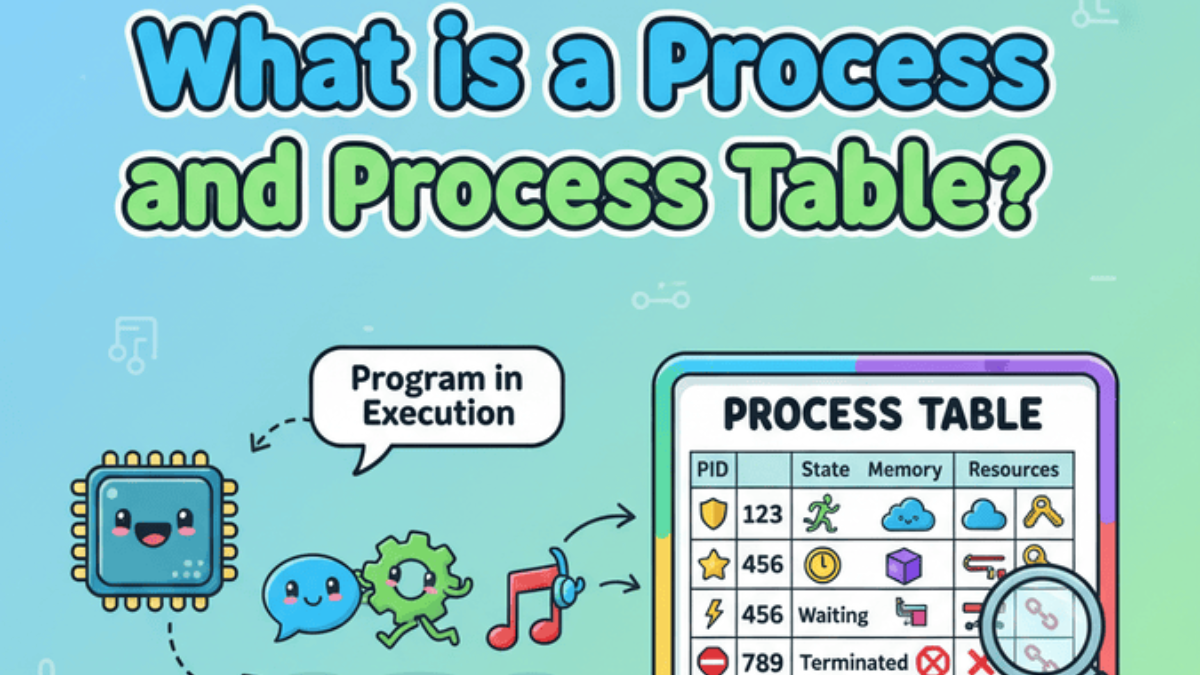
Learn What is a Process and Process Table are in operating systems. Understand how your OS manages tasks, memory, and multitasking in simple .
It was a cold winter Christmas night…..
The city lights shimmered through the fog as Rahul sat alone in his room, a cup of hot coffee steaming beside his laptop . Outside, snowflakes danced against the window, but Rahul’s focus was elsewhere — his computer screen. He was multitasking like crazy: downloading a movie, listening to music, chatting with friends, and compiling code all at once. Suddenly, everything froze for a second. The music paused. The cursor lagged.
“Uh oh… what just happened?” he muttered, staring at the screen.
Moments later, everything went back to normal — as if nothing had ever gone wrong. But Rahul’s curiosity was piqued.
“How did my computer manage to run all that together — and recover so fast?” he wondered.
And that’s when he stumbled upon two fascinating concepts that quietly power every computer in the world: processes and the process table.
That’s where processes and the process table come into the picture. Let’s understand both in the simplest way possible.
What is a Process and Process Table in Operating Systems?
What is a Process?
In simple terms, a process is a program that’s currently being executed by your computer’s CPU.
When you double-click an application — say, your browser or a text editor — your operating system loads it into memory and starts running it. That running instance becomes a process.
Think of it like this
A program is just a recipe stored in your system, while a process is the actual cooking happening in real time. You can even have multiple cooks (processes) preparing the same recipe (program) at once!
Example:
If you open three Chrome windows, you’re not running one Chrome program — you’re running three Chrome processes.
Each works independently, so if one crashes, the others continue running smoothly.
Key Features of a Process
Every process has some unique characteristics that help the operating system manage it properly:
- Process ID (PID): A unique number assigned to each process.
- Program Counter (PC): Keeps track of which instruction will execute next.
- Registers: Temporary CPU storage used while executing instructions.
- Memory Space: Each process gets its own memory area to prevent conflicts.
- State: Shows if the process is running, waiting, or finished.
What is a Process Table?
Now that you understand what a process is, let’s see how the operating system keeps track of them all.
The process table is like a master list that the OS maintains to store all information about running processes. Each entry in this table represents one active process.
Think of your teacher’s attendance register — every student (process) has a record with their roll number and current status (present/absent). Similarly, the OS keeps a record of all running processes in the process table.
What Does the Process Table Contain?
Each entry in the process table is known as a Process Control Block (PCB).
The PCB contains all the data the OS needs to manage the process effectively, including:
- Process ID
- Process State (Running, Waiting, Ready, etc.)
- Program Counter
- CPU Register Values
- Memory Management Info
- I/O Device Status
- Scheduling Information
Whenever the CPU switches from one process to another, it stores the current process’s information in its PCB and loads another process’s data — this is called a context switch.
Why is the Process Table Important?
The process table is crucial for smooth multitasking and resource management.
Without it, your operating system wouldn’t know:
- Which processes are running right now
- Which one to execute next
- How to resume a paused process correctly
It’s the core of process management, ensuring your system runs multiple programs efficiently without confusion.
Real-Life Example in Linux
If you’re using Linux, you can view process details using a simple command:
ps aux
This command lists all the running processes, their IDs, memory usage, and more — giving you a peek inside the process table itself.
check out this detailed guide on : Kernel Modules in Linux Operating System.
It’ll help you understand how modules interact with processes at the kernel level.
Final Thoughts of What is a Process and Process Table ?
To summarize:
- A process is a running instance of a program.
- The process table keeps track of all active processes and their details.
Together, they form the foundation of how an operating system handles multitasking.
So the next time you open multiple tabs, apps, or background services — remember, it’s all possible thanks to processes and the process table quietly managing everything behind the scenes.
Advantages, Disadvantages, and Applications of a Process and Process Table in Operating Systems
Advantages of a Process and Process Table
Understanding a process and process table in operating systems helps us see why they are essential for multitasking and system efficiency.
Here are the key advantages:
- Efficient Process Management
The process table stores details of all active processes, allowing the operating system to manage them efficiently.
Example: In Linux, commands likeps auxretrieve process details instantly from the process table. - Smooth Multitasking
With a process table, multiple processes can run simultaneously without interference.
Example: A desktop running a browser, video player, and antivirus program without slowing down. - Better Resource Allocation
The process table helps the OS allocate CPU, memory, and I/O resources effectively.
Example: In cloud servers, resource allocation to virtual machines is handled using process tables. - Quick Process Switching
The process table supports faster context switching between processes.
Example: Switching between apps on your smartphone happens seamlessly. - Improved System Stability
By maintaining proper process states, the process table helps prevent crashes and deadlocks.
Example: An autonomous vehicle system maintains stability even while processing sensor data and navigation simultaneously.
Disadvantages of a Process and Process Table
While the process table is critical, it has some limitations:
- Memory Overhead
Each process entry in the process table consumes memory, which can grow large with many processes.
Example: In high-performance servers running thousands of processes, process table size can affect performance. - Complexity
Maintaining and managing a process table increases operating system complexity.
Example: Designing a process table for a real-time operating system requires careful priority and state management. - Context Switching Overhead
Frequent process switching can cause performance overhead.
Example: In systems with high multitasking needs, context switching may reduce CPU efficiency. - Security Risks
If process table data is exposed, it can reveal sensitive information about processes.
Example: In shared environments like cloud computing, strict process table access control is necessary.
Applications of a Process and Process Table
The concept of a process and process table in operating systems is widely applied in various real-time and multitasking environments:
- Desktop Operating Systems
Enables smooth multitasking, such as running a browser, music player, and office software together.
Example: Windows, Linux, and macOS use process tables for process management. - Mobile Operating Systems
Allows multiple apps to run in the background while keeping the user experience smooth.
Example: Android and iOS rely heavily on process tables for multitasking. - Real-Time Systems
Ensures timely execution of tasks with minimal delay.
Example: In medical monitoring systems, the process table manages real-time data processing and alerts. - Cloud Computing
Allocates resources efficiently to virtual machines and containers.
Example: AWS and Google Cloud use process tables for process scheduling and resource distribution. - Embedded Systems
Supports multitasking in devices like smart appliances, automotive control systems, and robotics.
Example: Autonomous vehicles use process tables for managing sensor data, navigation, and safety control simultaneously.
C Code : Simulating a Process and Process Table in Operating Systems
#include <stdio.h>
#include <string.h>

#define MAX_PROCESSES 5

// Structure to simulate a Process Control Block (PCB)
struct Process {
    int pid;              // Process ID
    char name[20];        // Process Name
    char state[20];       // Process State
    int priority;         // Process Priority
};

// Simulated Process Table
struct Process processTable[MAX_PROCESSES];

// Function to display the process table
void displayProcessTable(int count) {
    printf("\n----- Process Table -----\n");
    printf("PID\tName\t\tState\t\tPriority\n");
    printf("--------------------------------------------\n");

    for (int i = 0; i < count; i++) {
        printf("%d\t%s\t\t%s\t\t%d\n",
               processTable[i].pid,
               processTable[i].name,
               processTable[i].state,
               processTable[i].priority);
    }
    printf("--------------------------------------------\n");
}

int main() {
    int processCount = 3;

    // Simulating some processes
    processTable[0].pid = 101;
    strcpy(processTable[0].name, "Chrome");
    strcpy(processTable[0].state, "Running");
    processTable[0].priority = 1;

    processTable[1].pid = 102;
    strcpy(processTable[1].name, "MusicPlayer");
    strcpy(processTable[1].state, "Waiting");
    processTable[1].priority = 2;

    processTable[2].pid = 103;
    strcpy(processTable[2].name, "CodeEditor");
    strcpy(processTable[2].state, "Ready");
    processTable[2].priority = 1;

    // Display process table
    displayProcessTable(processCount);

    return 0;
}
How This Code Explains the Concept
Output Example:
----- Process Table -----
PID     Name            State       Priority
--------------------------------------------
101     Chrome          Running     1
102     MusicPlayer     Waiting     2
103     CodeEditor      Ready       1
--------------------------------------------
The above C program demonstrates a simple simulation of a process and process table in operating systems.
Since the process table is a core part of the OS kernel, normal user programs cannot directly access it. So, this example is designed for learning purposes.
Key Points in the Code:
- Process Control Block (PCB) Simulation:
Each process is represented as a structure (struct Process) containing:- Process ID (PID)
- Process Name
- Process State (Running, Waiting, Ready)
- Process Priority
- Process Table:
The arrayprocessTable[MAX_PROCESSES]represents the process table in memory.
In a real OS, this process table is dynamically managed by the kernel and scheduler. - Displaying the Process Table:
The functiondisplayProcessTable()prints all process details in a table format.
This helps visualize how the operating system tracks active processes. - Example Process States:
"Running"— The process is currently executing."Waiting"— The process is waiting for resources or events."Ready"— The process is ready to execute when CPU time is available.
By studying this example, readers can better appreciate why the process table is vital for multitasking, context switching, and CPU scheduling in operating systems.
This code example clearly explains the concept of a process and process table in operating systems in a simple, beginner-friendly way. It makes the abstract idea of process management tangible and easy to understand.
Pro Tip for Readers:
If you want to explore real process tables in Linux, try the command:
ps auxThis shows all currently running processes along with their IDs, states, CPU usage, and memory usage — just like our simulated process table in this C example
How it Connected to Real-World
In a real OS, the process table is stored in kernel memory and managed by the dispatcher & scheduler.
This simulation helps beginners visualize how the OS keeps track of processes using the process table.
Top Interview Questions on What is a Process and Process Table in Operating Systems – What Interviewers Might Ask
1. Basic Understanding Questions
These questions test your foundational knowledge of a process and process table in operating systems.
- Can you explain in simple words what a process is and how it differs from a program?
- What is a process table in an operating system, and why is it important?
- What is a Process Control Block (PCB), and what details does it store?
- Can you describe the different states of a process and give real examples for each?
2. Practical and Scenario-Based Questions
Interviewers like to see how you connect theory to real-life situations.
- If you were designing a new operating system, how would you implement a process table?
- How does a process table help in multitasking? Can you give a real-time example?
- How does the operating system perform a context switch using the process table?
- In Linux, how would you check the process table? Can you name commands and explain their output?
3. Advanced and Analytical Questions
These questions test your deep understanding and problem-solving ability.
- What challenges might arise when maintaining a process table in a high-performance OS?
- How does the process table differ in a real-time operating system compared to a general-purpose OS?
- How can improper handling of the process table lead to security vulnerabilities?
- How would you optimize process table management for an embedded system?
4. Interviewer Trick Questions
These are designed to test your analytical thinking and depth of knowledge.
- Can a process exist without being listed in the process table? Why or why not?
- How does the process table interact with the scheduler and dispatcher in an OS?
- Is it possible for two processes to share the same process table entry? Explain with an example.
- How would you debug a corrupted process table in a live operating system?
5. Real-Time Example Questions
These test your ability to apply knowledge to real systems.
- Explain how a process table is used in Android OS multitasking.
- How does a process table help in cloud computing and virtualization?
- Can you explain a real-time scenario where the process table plays a critical role (for example, in autonomous vehicles or robotics)?
- How would a process table failure affect system performance and stability?
FAQ: What is a Process and Process Table ?
Q1. What is a process in an operating system?
A process in an operating system is an instance of a program that is currently being executed. When you open an application like a browser or text editor, the OS loads it into memory and runs it as a process. Think of a process as the active execution of a program.
Q2. What is a process table in an operating system?
The process table is a vital data structure maintained by the operating system to store information about all running processes. It tracks process IDs, states, memory usage, CPU registers, scheduling details, and more — ensuring efficient multitasking.
Q3. What information does a process table contain?
Each entry in the process table, called a Process Control Block (PCB), contains essential details such as:
- Process ID (PID)
- Process state (Running, Waiting, Ready, etc.)
- Program Counter (PC)
- CPU register values
- Memory management information
- I/O status information
- Scheduling information
Q4. How is a process different from a program?
A program is a static set of instructions stored on disk, while a process is the dynamic execution of those instructions in memory. A process is essentially the working state of a program.
Q5. Why is the process table important in operating systems?
The process table allows the operating system to track and manage multiple processes efficiently. It ensures smooth multitasking, proper resource allocation, and system stability by storing all necessary process-related information.
Q6. How can I view the process table in Linux?
In Linux, you can view active processes and their details using commands such as:
ps aux
top
htop
These commands display process IDs, CPU usage, memory usage, and other process details — giving you a live view of the process table.
Q7. What happens during a context switch?
A context switch occurs when the CPU changes from running one process to another. During this switch, the current process’s state is saved in its PCB, and the new process’s state is loaded, allowing multitasking to happen seamlessly.
Q8. Can multiple processes run the same program?
Yes! When you open multiple instances of the same program, each instance runs as a separate process with its own memory and PID. For example, opening several tabs in Chrome creates multiple Chrome processes.
Q9. What are the main states of a process?
A process can be in several states, including:
- New: Process is being created.
- Running: Process is executing instructions.
- Waiting: Process is waiting for resources or events.
- Ready: Process is ready to run when CPU is available.
- Terminated: Process has completed execution.
Q10. How does the process table improve multitasking?
The process table is essential for multitasking because it helps the operating system know exactly which processes are active, which are waiting, and which are ready to run. This allows the OS to switch tasks quickly and efficiently, keeping your computer running smoothly.


Mr. Raj Kumar is a highly experienced Technical Content Engineer with 7 years of dedicated expertise in the intricate field of embedded systems. At Embedded Prep, Raj is at the forefront of creating and curating high-quality technical content designed to educate and empower aspiring and seasoned professionals in the embedded domain.
Throughout his career, Raj has honed a unique skill set that bridges the gap between deep technical understanding and effective communication. His work encompasses a wide range of educational materials, including in-depth tutorials, practical guides, course modules, and insightful articles focused on embedded hardware and software solutions. He possesses a strong grasp of embedded architectures, microcontrollers, real-time operating systems (RTOS), firmware development, and various communication protocols relevant to the embedded industry.
Raj is adept at collaborating closely with subject matter experts, engineers, and instructional designers to ensure the accuracy, completeness, and pedagogical effectiveness of the content. His meticulous attention to detail and commitment to clarity are instrumental in transforming complex embedded concepts into easily digestible and engaging learning experiences. At Embedded Prep, he plays a crucial role in building a robust knowledge base that helps learners master the complexities of embedded technologies.












