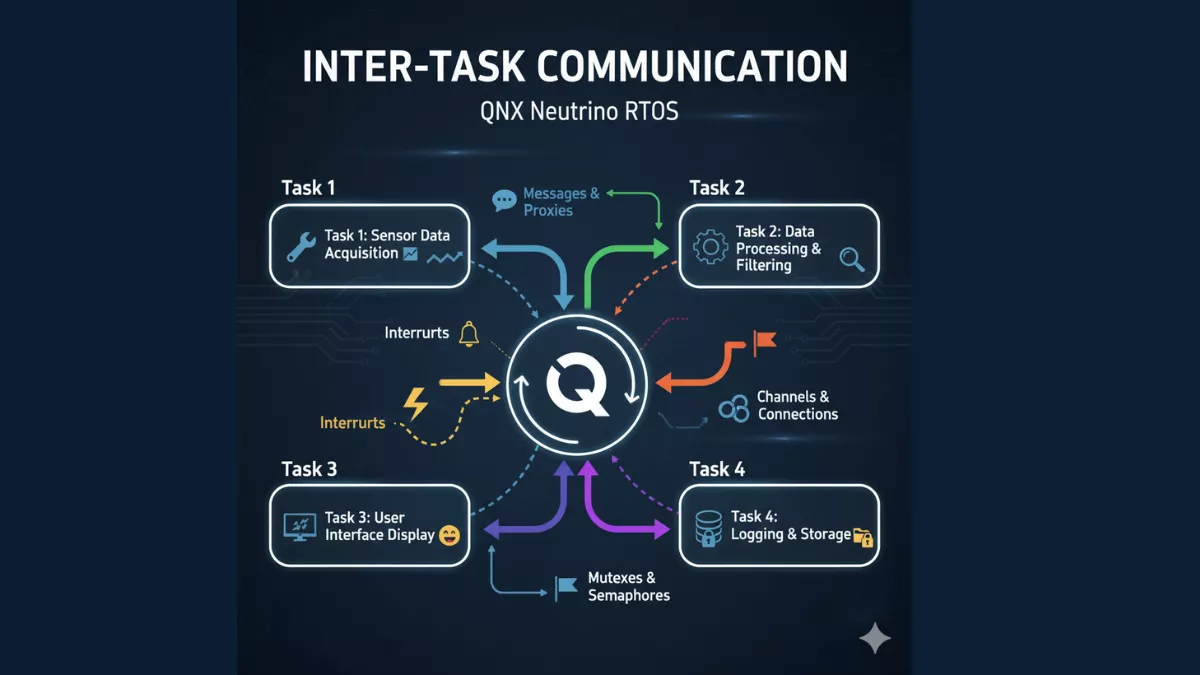
Learn about Inter-Task Communication in QNX RTOS, including message passing, synchronous and asynchronous communication, for real-time systems.
In the world of embedded systems, Inter-Task Communication in QNX RTOS plays a crucial role in ensuring tasks can share data, synchronize, and work seamlessly without conflicts. QNX, being a microkernel real-time operating system, provides robust mechanisms to implement inter-task communication efficiently, making it a preferred choice for safety-critical and high-performance applications.
What is Inter-Task Communication in QNX RTOS?
Inter-Task Communication in QNX RTOS refers to the methods and mechanisms through which different tasks (or threads) in a QNX-based system exchange information and coordinate their actions. Unlike traditional operating systems, QNX follows a microkernel design, which separates core kernel functions from user-space tasks. This separation enhances system reliability and ensures minimal interference among tasks.
Secondary Keywords: QNX messaging, task synchronization in QNX, real-time task communication
Why Inter-Task Communication is Important?
In embedded systems, tasks often need to:
- Share sensor data in real-time
- Synchronize control operations
- Prevent data corruption due to concurrent access
Without efficient Inter-Task Communication in QNX RTOS, tasks may experience race conditions, deadlocks, or inconsistent system behavior. QNX offers multiple mechanisms to handle these challenges gracefully.
Mechanisms for Inter-Task Communication in QNX RTOS
QNX provides several methods for Inter-Task Communication in QNX RTOS, including:
1. Message Passing
Message passing is the most widely used method for Inter-Task Communication in QNX RTOS. It allows tasks to send and receive messages, ensuring data integrity and synchronization. For a complete explanation of message passing and other IPC mechanisms in QNX, you can check out this comprehensive guide on IPC in QNX.
- Synchronous messaging: The sender waits until the receiver acknowledges the message.
- Asynchronous messaging: The sender continues execution without waiting for acknowledgment.
Message passing is lightweight and ideal for systems requiring precise timing, making it a preferred choice for real-time embedded applications.
2. Shared Memory
Shared memory allows multiple tasks to access the same memory region.
- Efficient for large data transfers
- Requires synchronization mechanisms like mutexes or semaphores to prevent data corruption
3. Signals
Signals are a lightweight method for notifying tasks about events.
- Ideal for interrupt-driven tasks
- Supports event-driven programming models
4. Semaphores and Mutexes
Semaphores and mutexes provide task synchronization, preventing multiple tasks from accessing shared resources simultaneously.
- Binary semaphores: Simple lock/unlock mechanism
- Counting semaphores: Manage access to limited resources
5. Pulses
Pulses are lightweight notifications used in QNX for communication with low overhead. They are faster than full message passing but less flexible for large data.
How to Implement Inter-Task Communication in QNX RTOS
To implement Inter-Task Communication in QNX RTOS, follow these steps:
- Identify Communication Needs: Determine which tasks need to exchange data.
- Select Communication Mechanism: Choose between message passing, shared memory, signals, or semaphores based on data size, speed, and synchronization requirements.
- Design Task Structure: Ensure tasks are modular and have clear responsibilities.
- Implement Synchronization: Use semaphores or mutexes if tasks share resources.
- Test for Reliability: Validate that the system handles concurrent access and edge cases without failure.
Example: Message Passing in QNX
#include <stdio.h>
#include <unistd.h>
#include <sys/neutrino.h>

int main() {
    int chid, rcvid;
    char msg[] = "Hello from Task A";

    chid = ChannelCreate(0);  // Create communication channel
    rcvid = MsgReceive(chid, msg, sizeof(msg), NULL); // Receive message

    printf("Message Received: %s\n", msg);
    MsgReply(rcvid, 0, "Acknowledged", 12); // Send reply
    return 0;
}
This simple example demonstrates the basic message passing mechanism in QNX, a core part of Inter-Task Communication in QNX RTOS.
Best Practices for Inter-Task Communication in QNX RTOS
- Minimize Blocking: Prefer asynchronous communication to reduce task waiting time.
- Use Appropriate Mechanisms: Avoid shared memory for small messages; use message passing instead.
- Prevent Deadlocks: Always acquire semaphores in a consistent order.
- Optimize for Performance: Pulses are suitable for high-frequency, low-data notifications.
Secondary Keywords: QNX RTOS tutorials, real-time OS communication, QNX IPC
Common Challenges
Even though Inter-Task Communication in QNX RTOS is efficient, developers face challenges like:
- Deadlocks due to improper semaphore usage
- Priority inversion in message passing
- Data inconsistency in shared memory
By understanding QNX’s robust IPC mechanisms, these challenges can be mitigated effectively.
Conclusion
Mastering Inter-Task Communication in QNX RTOS is essential for embedded developers building reliable, high-performance systems. From message passing to shared memory, QNX offers versatile tools to ensure tasks communicate safely and efficiently. Adhering to best practices and understanding system design considerations will enhance the stability and predictability of your real-time applications.
Secondary Keywords Recap: QNX messaging, task synchronization in QNX, real-time task communication, QNX IPC, real-time OS communication
FAQ: Inter-Task Communication in QNX RTOS
Q1: What is the most common method for Inter-Task Communication in QNX RTOS?
A1: Message passing is the most commonly used method due to its reliability and synchronization features.
Q2: Can shared memory be used safely in QNX RTOS?
A2: Yes, but synchronization tools like semaphores or mutexes are necessary to prevent data corruption.
Q3: What is the difference between signals and pulses in QNX?
A3: Signals are general event notifications, while pulses are lightweight, fast notifications used for minimal overhead communication.
Q4: How can deadlocks be avoided in Inter-Task Communication in QNX RTOS?
A4: Always acquire resources in a consistent order and use timeout mechanisms for semaphores.
Q5: Is Inter-Task Communication in QNX RTOS suitable for high-frequency data exchange?
A5: Yes, especially using message passing or pulses, which are optimized for low latency and real-time performance.


Mr. Raj Kumar is a highly experienced Technical Content Engineer with 7 years of dedicated expertise in the intricate field of embedded systems. At Embedded Prep, Raj is at the forefront of creating and curating high-quality technical content designed to educate and empower aspiring and seasoned professionals in the embedded domain.
Throughout his career, Raj has honed a unique skill set that bridges the gap between deep technical understanding and effective communication. His work encompasses a wide range of educational materials, including in-depth tutorials, practical guides, course modules, and insightful articles focused on embedded hardware and software solutions. He possesses a strong grasp of embedded architectures, microcontrollers, real-time operating systems (RTOS), firmware development, and various communication protocols relevant to the embedded industry.
Raj is adept at collaborating closely with subject matter experts, engineers, and instructional designers to ensure the accuracy, completeness, and pedagogical effectiveness of the content. His meticulous attention to detail and commitment to clarity are instrumental in transforming complex embedded concepts into easily digestible and engaging learning experiences. At Embedded Prep, he plays a crucial role in building a robust knowledge base that helps learners master the complexities of embedded technologies.