


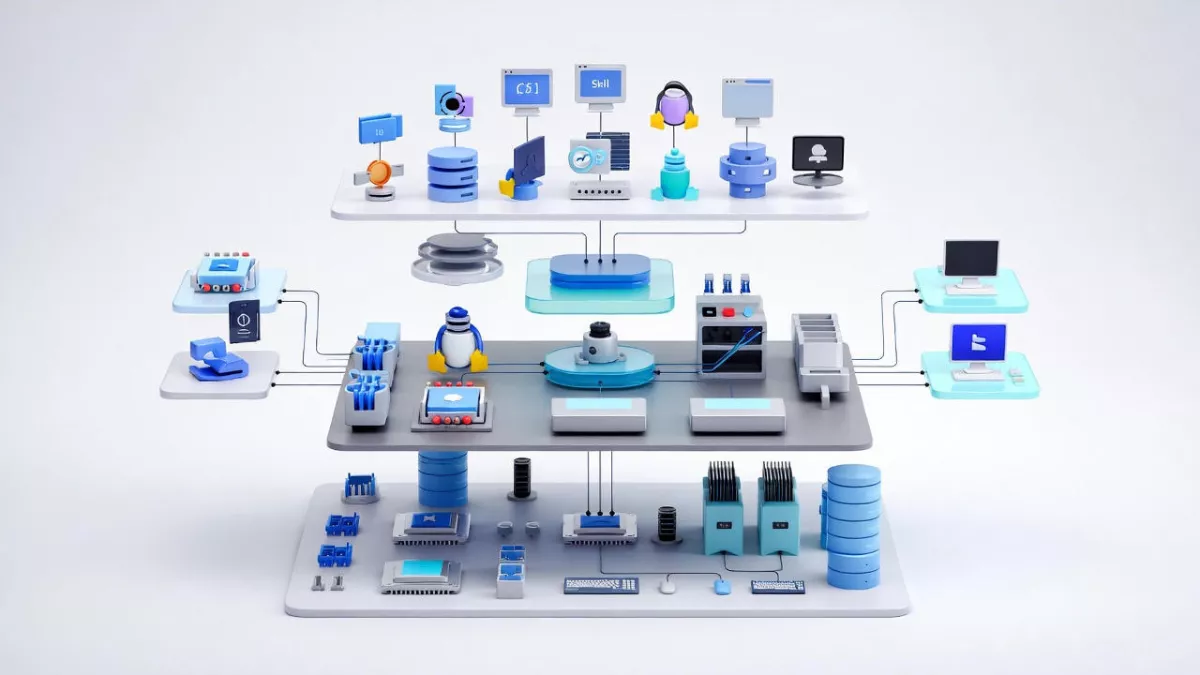
Learn the Essentials of Linux Kernel Architecture with our comprehensive guide. Master core concepts, understand kernel components, and prepare for all Linux kernel interview questions. Perfect for beginners and professionals aiming to excel in Linux system programming.
If you have ever used Linux, whether on a server, embedded device, Android phone, or development board, you have already relied on the Linux kernel. It works quietly in the background, managing hardware, memory, processes, and communication between software and devices. Yet for many beginners, the kernel feels mysterious and complex.
This article breaks down the Essentials of Linux kernel architecture in a clear, human, and beginner-friendly way. Just real explanations that help you understand how the Linux kernel is designed, how its major components work together, and why this architecture has made Linux so powerful and popular.
By the end of this guide, you will have a solid mental model of how the Linux kernel works internally and why its architecture matters in real-world systems.
What Is the Linux Kernel?
At its core, the Linux kernel is the heart of the operating system. It sits between user applications and the hardware.
When you open a file, start a program, connect to the internet, or plug in a USB device, your application does not talk directly to the hardware. Instead, it makes a request to the kernel. The kernel decides what is allowed, manages resources, and communicates with the hardware safely.
In simple terms:
- Applications ask for services
- Kernel manages and controls everything
- Hardware does the actual physical work
This layered design is the foundation of Linux kernel architecture.
Why Linux Kernel Architecture Matter
Understanding the Essentials of Linux kernel architecture is important for several reasons:
- It helps you debug system-level problems
- It improves performance tuning skills
- It is essential for kernel development, device drivers, and embedded systems
- It is a common interview topic for Linux and embedded roles
Linux is used everywhere because its kernel architecture is modular, efficient, and scalable. The same kernel design runs on tiny microcontrollers and massive cloud servers.
Monolithic Kernel Design in Linux
Linux uses a monolithic kernel architecture, but with a modern twist.
In a traditional monolithic kernel:
- All core services run in kernel space
- Memory management, process scheduling, file systems, and device drivers are part of the kernel
Linux follows this approach, but it also supports loadable kernel modules, which makes it flexible.
Why Linux Chose a Monolithic Kernel
A monolithic kernel offers:
- Faster performance due to fewer context switches
- Direct communication between kernel components
- Lower overhead compared to microkernels
The downside is complexity, but Linux solves this with modular design.
Kernel Space vs User Space
One of the most important concepts in Linux kernel architecture is the separation between kernel space and user space.
User Space
User space is where applications run. Examples include:
- Web browsers
- Shells like bash
- Media players
- Your own C or Python programs
Applications in user space have limited privileges. They cannot directly access hardware or critical memory.
Kernel Space
Kernel space is where the Linux kernel runs. Code here has:
- Full access to hardware
- Control over memory and CPU
- Responsibility for system stability
This separation improves security and stability. If an application crashes, it usually does not crash the whole system.
System Calls: The Bridge Between User and Kernel
Applications interact with the kernel using system calls.
A system call is a controlled entry point into the kernel. Common examples include:
open()for filesread()andwrite()for I/Ofork()andexec()for process creation
From a Linux kernel architecture point of view, system calls are critical because they define how user space safely requests kernel services.
Process Management in Linux Kernel
Process management is a core part of the Essentials of Linux kernel architecture.
What Is a Process?
A process is a running instance of a program. The kernel keeps track of each process using a structure called task_struct.
This structure stores:
- Process ID (PID)
- State (running, sleeping, stopped)
- Priority
- Memory information
- Open files
Process Scheduling
The Linux kernel uses a scheduler to decide which process runs on the CPU.
Key features include:
- Preemptive multitasking
- Fair scheduling for interactive tasks
- Support for real-time scheduling
The Completely Fair Scheduler (CFS) is commonly used and aims to give each process a fair share of CPU time.
Memory Management in Linux Kernel
Memory management is another essential building block of Linux kernel architecture.
Virtual Memory
Linux uses virtual memory to give each process the illusion that it has its own private memory.
Benefits include:
- Process isolation
- Efficient memory usage
- Support for swapping
Paging and Address Translation
The kernel uses paging to map virtual addresses to physical memory. Hardware support from the MMU (Memory Management Unit) helps with fast translation.
Kernel Memory vs User Memory
The kernel carefully separates:
- User process memory
- Kernel memory
This prevents applications from corrupting kernel data.
File System Architecture
Linux treats almost everything as a file. This philosophy is deeply embedded in Linux kernel architecture.
Virtual File System (VFS)
The Virtual File System is an abstraction layer that allows Linux to support multiple file systems.
Examples include:
- ext4
- XFS
- Btrfs
- FAT
VFS provides a common interface so applications do not need to know which file system is in use.
Device Drivers and Hardware Interaction
Device drivers are the glue between hardware and the kernel.
In Linux kernel architecture:
- Drivers run in kernel space
- They expose standard interfaces to user space
- They are often loadable as kernel modules
This modular approach allows:
- Dynamic loading and unloading of drivers
- Smaller kernel images
- Easier development and debugging
Loadable Kernel Modules
One of the most powerful features in the Essentials of Linux kernel architecture is support for Loadable Kernel Modules (LKMs).
Modules allow you to:
- Add functionality without rebooting
- Develop drivers independently
- Reduce kernel size
Common examples include:
- USB drivers
- Network drivers
- File system modules
Interrupt Handling in Linux Kernel
Hardware devices need a way to notify the CPU. This is done using interrupts.
The Linux kernel:
- Registers interrupt handlers
- Responds quickly to hardware events
- Uses deferred work mechanisms like softirqs and tasklets
Efficient interrupt handling is critical for performance and responsiveness.
Inter-Process Communication (IPC)
Processes often need to communicate. Linux kernel architecture supports multiple IPC mechanisms:
- Pipes
- Signals
- Message queues
- Shared memory
- Sockets
Each method serves a different use case, from simple parent-child communication to high-performance data sharing.
Networking Stack in the Linux Kernel
The Linux kernel includes a full networking stack.
Key layers include:
- Network device drivers
- IP layer
- Transport protocols like TCP and UDP
- Socket interface for applications
This integrated design allows Linux to power everything from routers to cloud servers.
Security Model in Linux Kernel Architecture
Security is built into the kernel design.
Important elements include:
- User and group permissions
- Capability-based security
- Mandatory Access Control frameworks like SELinux and AppArmor
The kernel enforces these rules consistently across the system.
Kernel Preemption and Real-Time Support
Linux supports different levels of kernel preemption.
This is especially important for:
- Embedded systems
- Audio processing
- Automotive and industrial applications
Real-time patches further enhance deterministic behavior.
Boot Process and Kernel Initialization
Understanding kernel architecture also means understanding how Linux boots.
High-level steps include:
- Bootloader loads the kernel
- Kernel initializes hardware
- Kernel mounts the root file system
- First user process (init or systemd) starts
Each step relies on tightly coordinated kernel components.
Why Linux Kernel Architecture Scales So Well
One reason Linux dominates servers, cloud, and embedded systems is its scalable architecture.
It supports:
- Multiple CPU architectures
- SMP and NUMA systems
- Tiny embedded boards and massive servers
This flexibility comes from clean internal abstractions and modular design.
Common Misconceptions About Linux Kernel Architecture
Let’s clear a few myths:
- Linux is not a microkernel
- Drivers do not always crash the system if written properly
- Kernel development is hard but not impossible
With the right understanding, the kernel becomes approachable.
How Beginners Should Learn Linux Kernel Architecture
If you are new, focus on:
- Understanding kernel vs user space
- Learning system calls
- Exploring process and memory management
- Writing simple kernel modules
Reading code becomes much easier once the architecture makes sense.
Linux Kernel Architecture Diagram
Think of Linux kernel architecture like a well-organized city. Applications live on the surface, hardware lives underground, and the kernel is the intelligent system running everything in between.

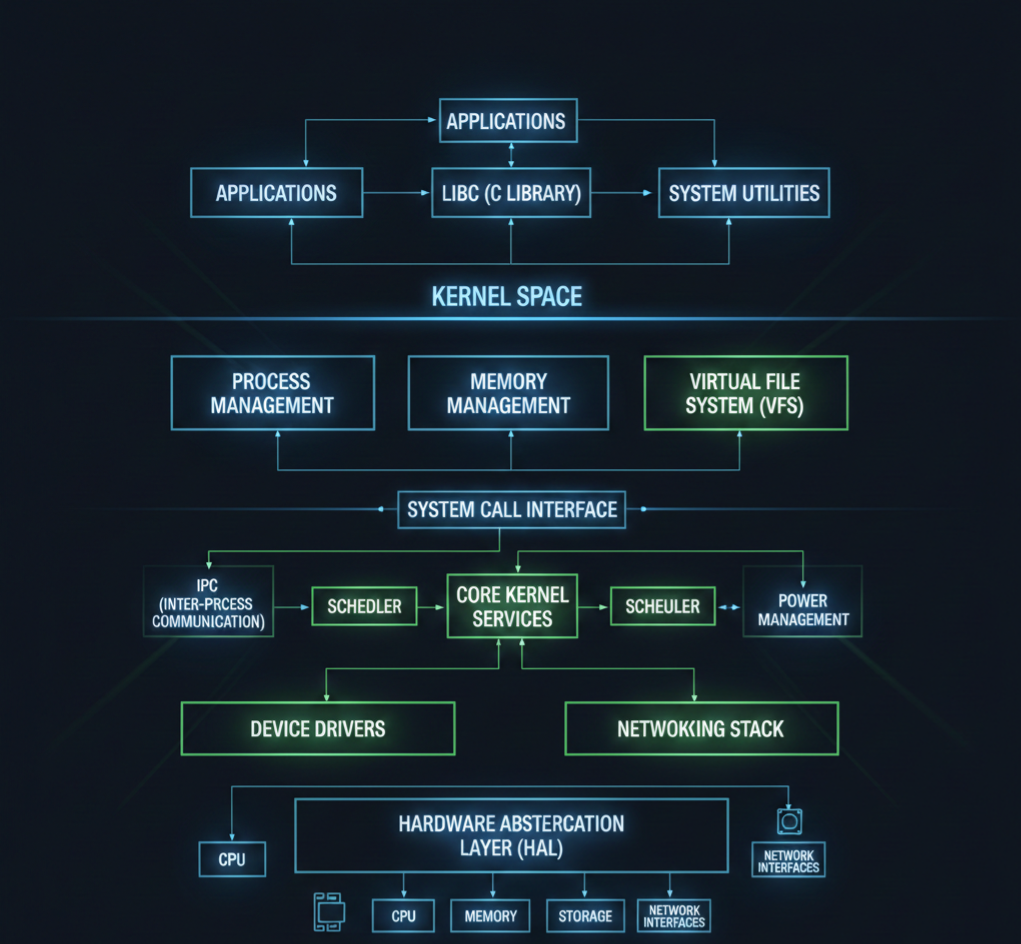
Let’s start with a simple logical diagram.
Linux Kernel Architecture Diagram (Conceptual View)
+--------------------------------------------------+
|                  User Space                      |
|                                                  |
|  Applications (Browser, Editor, Media Player)    |
|  Shell (bash, zsh)                               |
|  System Utilities                                |
|                                                  |
+--------------------|-----------------------------+
                     | System Calls
+--------------------v-----------------------------+
|                  Kernel Space                    |
|                                                  |
|  +--------------------------------------------+  |
|  |           System Call Interface             |  |
|  +--------------------------------------------+  |
|                                                  |
|  Process Management   Memory Management          |
|  (Scheduler, Tasks)   (Paging, Virtual Memory)   |
|                                                  |
|  File System (VFS)    Inter-Process Communication|
|  (ext4, XFS)         (Pipes, Signals, Sockets)  |
|                                                  |
|  Networking Stack     Device Drivers             |
|  (TCP/IP)             (USB, Audio, Display)     |
|                                                  |
|  Interrupt Handling   Power Management           |
|                                                  |
+--------------------|-----------------------------+
                     |
+--------------------v-----------------------------+
|                    Hardware                      |
|  CPU | RAM | Disk | Network | USB | Display     |
+--------------------------------------------------+
Now let’s break this down layer by layer.
1. User Space (Where Applications Live)
This is the top layer of the Linux kernel architecture.
What runs here?
- Browsers
- Media players
- Text editors
- Shells like bash
- Your own C, C++, Python programs
Important point:
User space cannot directly access hardware.
Everything must go through the kernel.
This separation keeps the system safe and stable. If an app crashes, the kernel stays alive.
2. System Call Interface (The Gateway)
The system call interface is the bridge between user space and kernel space.
When an application wants to:
- Read a file
- Allocate memory
- Create a process
- Send data over the network
It makes a system call.
Common system calls:
open()read()write()fork()exec()
Think of system calls as a formal request form that applications submit to the kernel.
3. Kernel Space (The Brain of the System)
This is where the real work happens. The kernel runs with full privileges and controls all system resources.
Let’s go component by component.
4. Process Management
Process management is a core pillar of Linux kernel architecture.
What it handles:
- Creating processes
- Killing processes
- Scheduling CPU time
- Context switching
The kernel uses internal structures to track each process and a scheduler to decide who runs and when.
This is why Linux can run hundreds of processes smoothly.
5. Memory Management
Memory management ensures every process gets memory safely and efficiently.
Key responsibilities:
- Virtual memory
- Paging
- Memory protection
- Kernel vs user memory separation
Each process thinks it owns all the memory, but the kernel quietly manages the illusion.
This design prevents one process from corrupting another.
6. File System Layer (VFS)
Linux supports many file systems, but applications don’t care which one you use.
That’s because of the Virtual File System (VFS).
What VFS does:
- Provides a common interface for file operations
- Allows ext4, XFS, FAT, and others to work together
- Keeps applications portable
This is a classic example of smart kernel architecture design.
7. Device Drivers
Device drivers are how the kernel talks to hardware.
Examples:
- Keyboard drivers
- USB drivers
- Audio drivers
- Network card drivers
Drivers run in kernel space and expose standard interfaces to user space.
Linux supports loadable kernel modules, so drivers can be added or removed without rebooting.
8. Networking Stack
The Linux kernel includes a full networking implementation.
Includes:
- Network device drivers
- IP layer
- TCP and UDP
- Socket interface
This allows Linux to function as:
- A desktop OS
- A server OS
- A router
- A cloud platform
All using the same kernel architecture.
9. Inter-Process Communication (IPC)
Processes often need to talk to each other.
Linux kernel architecture supports multiple IPC mechanisms:
- Pipes
- Signals
- Message queues
- Shared memory
- Sockets
Each one exists because different problems need different communication styles.
10. Interrupt Handling
Hardware devices need attention from the CPU.
They use interrupts to signal the kernel.
The kernel:
- Handles interrupts quickly
- Defers heavy work
- Keeps the system responsive
Efficient interrupt handling is critical for performance.
11. Hardware Layer
This is the physical world:
- CPU
- RAM
- Disk
- Network card
- Sensors
- Displays
The kernel is the only layer allowed to touch hardware directly.
This design keeps hardware access controlled and secure.
How All Layers Work Together
Here’s a simple flow example:
- You click “Save” in a text editor
- The app makes a system call
- The kernel checks permissions
- VFS routes the request
- File system writes data
- Device driver talks to disk
- Hardware stores the data
All of this happens in milliseconds.
Why This Architecture Is So Powerful
The Linux kernel architecture is:
- Modular
- Secure
- High-performance
- Scalable
That’s why the same kernel runs on:
- Android phones
- Embedded boards
- Servers
- Supercomputers
Linux Kernel Programming Interview Questions :
Basic Linux Kernel Programming Questions
- What is the Linux kernel and its primary responsibilities?
- What are the differences between user space and kernel space?
- Explain the process context vs interrupt context in Linux kernel.
- What are system calls? Give examples.
- How does the Linux kernel manage memory?
- What are kernel modules? How do you load and unload a module?
- Explain the proc filesystem and its usage.
- What are character devices and block devices?
- What is a major number and a minor number in Linux device drivers?
- What is init_module and cleanup_module in kernel modules?
- Explain the difference between static and dynamic kernel modules.
- What are kernel threads, and how do you create them?
- What is spinlock, and how is it different from a mutex?
- Explain preemption in Linux kernel.
- What is a wait queue? How is it used in kernel programming?
Intermediate Linux Kernel Programming Questions
- What is the difference between copy_to_user() and copy_from_user()?
- Explain the kernel memory allocation methods (kmalloc, vmalloc, etc.).
- What is a task_struct, and why is it important?
- Explain the Linux process scheduling mechanism.
- What is the difference between hardirq and softirq?
- What are bottom halves, and what is their role?
- Explain workqueues and tasklets.
- What is interrupt handling in Linux kernel?
- What is a device driver, and what are the types of device drivers?
- How do you register a character device driver in Linux?
- What is the difference between blocking and non-blocking I/O in kernel space?
- Explain the Linux kernel logging mechanism (printk, KERN_INFO, etc.).
- What is a module parameter, and how do you pass parameters to a kernel module?
- What is kthread_stop, and how is it used?
- How do you handle race conditions in the kernel?
Advanced Linux Kernel Programming Questions
- Explain Linux kernel memory management: page cache, slab allocator, buddy system.
- What are kernel namespaces, and how are they used?
- Explain Virtual File System (VFS) and its role.
- How does the Linux kernel handle file operations?
- Explain the kernel networking stack.
- What is a kobject, and how does it relate to sysfs?
- Explain reference counting in the Linux kernel.
- How does dynamic kernel tracing work (ftrace, perf)?
- What is a PCI device driver, and how do you write one?
- How do you implement I2C or SPI device drivers in Linux?
- Explain interrupt-driven vs polling mechanisms in kernel device drivers.
- How do you implement DMA in Linux kernel drivers?
- What is a kernel timer, and how do you implement it?
- Explain Linux kernel modules dependencies and symbol exports.
- How does user-space memory mapping (mmap) work in kernel drivers?
- How do you debug kernel modules using kgdb or printk?
- Explain the Linux kernel boot process.
- How does the scheduler handle real-time processes?
- What is NUMA, and how does the kernel handle memory in NUMA systems?
- How do you handle deadlocks in the kernel?
Practical / Scenario-Based Questions
- How would you modify an existing Linux kernel driver?
- How do you implement read and write operations in a character driver?
- How would you trace a kernel panic?
- How do you profile a kernel module for performance?
- How do you implement interrupt handling for a GPIO device?
- How do you use procfs or sysfs to expose driver data to user space?
- How do you implement ioctl commands for a custom device?
- How would you handle concurrency in a multi-threaded kernel module?
- How do you simulate and test a driver in QEMU before using real hardware?
- How do you write a kernel module compatible with multiple kernel versions?
Expert / Advanced Scenario Questions
- How would you implement zero-copy communication between kernel and user space?
- How do you optimize memory usage in kernel modules?
- How do you write a kernel driver for DMA buffer sharing between devices?
- Explain how kernel hot-plugging works.
- How do you handle interrupt storms in Linux?
- How do you implement suspend/resume operations for a device driver?
- How do you use kernel timers to schedule periodic tasks?
- How do you implement custom kernel syscalls?
- How do you handle kernel module security and permissions?
- How do you debug race conditions in kernel driver code?
Final Thoughts
The Essentials of Linux kernel architecture are not about memorizing code or data structures. They are about understanding how Linux thinks, how it manages resources, and how its components work together as one system.
Once you grasp the architecture, Linux stops feeling like magic and starts feeling logical.
Whether you are preparing for interviews, working on embedded systems, or simply curious about how operating systems work, learning Linux kernel architecture is one of the best investments you can make in your technical journey.
FAQ : Linux Kernel Architecture
1. What is Linux Kernel Architecture?
Linux Kernel Architecture is the internal structure of the Linux operating system. It manages hardware, processes, memory, and system calls, acting as a bridge between software and hardware.
2. Why is Linux Kernel important for developers?
Understanding the Linux Kernel helps developers write efficient code, manage hardware resources, and develop device drivers or system-level applications.
3. What are the main components of the Linux Kernel?
The Linux Kernel consists of process management, memory management, file system, device drivers, network stack, and system calls.
4. What is the difference between monolithic and microkernel in Linux?
Linux uses a monolithic kernel, where all core services run in kernel space for performance. Microkernels run minimal services in kernel space and others in user space for modularity.
5. How does process management work in the Linux Kernel?
The kernel handles process creation, scheduling, and termination. It uses scheduling algorithms to manage CPU time efficiently among processes.
6. What is a Linux Kernel module?
A kernel module is a piece of code that can be loaded or unloaded into the kernel at runtime, like device drivers or system extensions.
7. How is memory managed in Linux Kernel?
Linux uses virtual memory, paging, and caching to efficiently allocate memory for processes and the system while isolating processes from each other.
8. How can I prepare for Linux Kernel interview questions?
Focus on kernel architecture, process and memory management, device drivers, file systems, and hands-on practice with kernel modules.
9. Can I modify the Linux Kernel safely?
Yes, by using a separate test environment or virtual machine. Kernel modifications require caution and understanding of dependencies.
10. Where can I learn Linux Kernel Architecture from scratch?
You can start with official Linux Kernel documentation, beginner-friendly tutorials, YouTube guides, and practical exercises like writing simple kernel modules.
Read More about Process : What is is Process
Read More about System Call in Linux : What is System call
Read More about IPC : What is IPC


Mr. Raj Kumar is a highly experienced Technical Content Engineer with 7 years of dedicated expertise in the intricate field of embedded systems. At Embedded Prep, Raj is at the forefront of creating and curating high-quality technical content designed to educate and empower aspiring and seasoned professionals in the embedded domain.
Throughout his career, Raj has honed a unique skill set that bridges the gap between deep technical understanding and effective communication. His work encompasses a wide range of educational materials, including in-depth tutorials, practical guides, course modules, and insightful articles focused on embedded hardware and software solutions. He possesses a strong grasp of embedded architectures, microcontrollers, real-time operating systems (RTOS), firmware development, and various communication protocols relevant to the embedded industry.
Raj is adept at collaborating closely with subject matter experts, engineers, and instructional designers to ensure the accuracy, completeness, and pedagogical effectiveness of the content. His meticulous attention to detail and commitment to clarity are instrumental in transforming complex embedded concepts into easily digestible and engaging learning experiences. At Embedded Prep, he plays a crucial role in building a robust knowledge base that helps learners master the complexities of embedded technologies.












